城市交通流绿波协调模拟系统 (含python源代码)
·
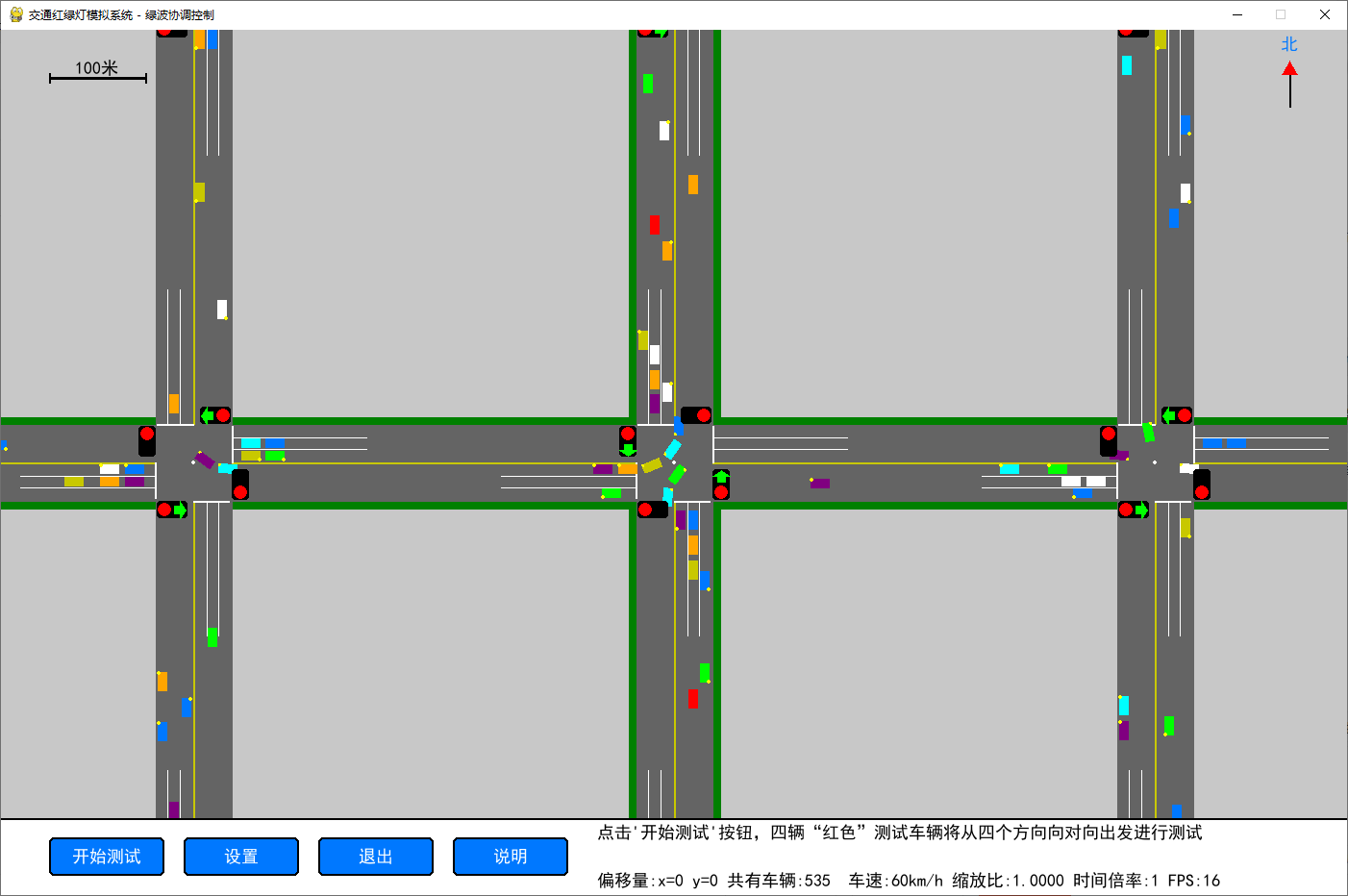
这是一个基于 Python + Pygame 开发的城市交通模拟工具,用于模拟城市网格路网的交通流行为,验证绿波协调红绿灯控制的通行效率,支持自定义路网配置、车辆行为模拟、通行效率测试等功能。提供完整的2000余行可运行的源代码。
环境要求
- 操作系统:Windows(推荐,支持剪贴板复制功能),Linux/macOS 可运行(复制功能不可用,其余功能正常)
- Python 版本:3.8 及以上
- 依赖库:
pygame>=2.0:图形渲染与交互pywin32>=300:Windows 剪贴板支持(仅 Windows 需要)
核心功能
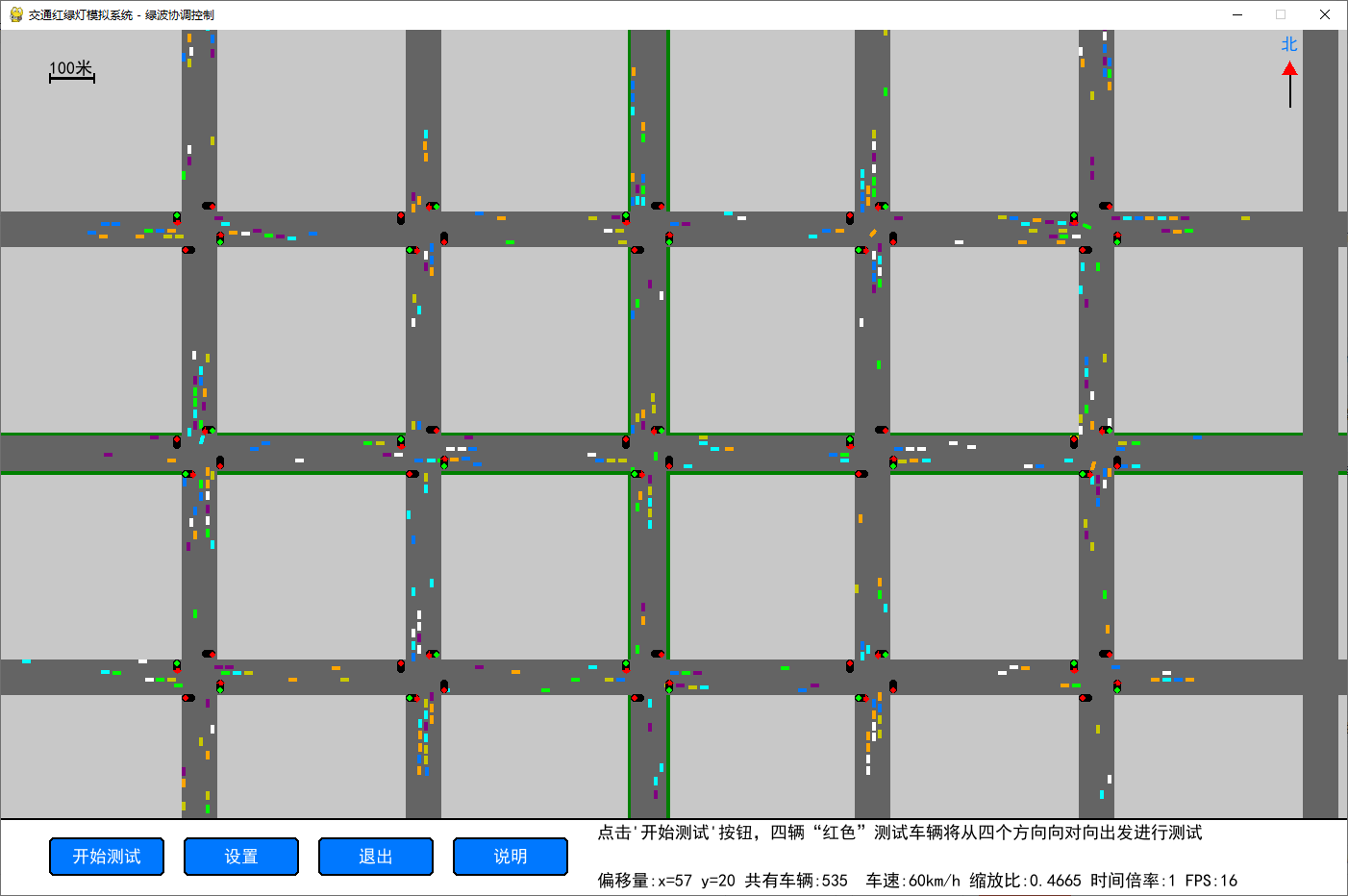
- ✅ 多路口网格路网:支持自定义行列数的城市路网,可配置路口间距、道路宽度
- ✅ 绿波协调红绿灯:根据中心点设置和偏移量,自动计算其它路口时间偏移,为了测试绿波协调,让车辆可以一路绿灯通过所有路口
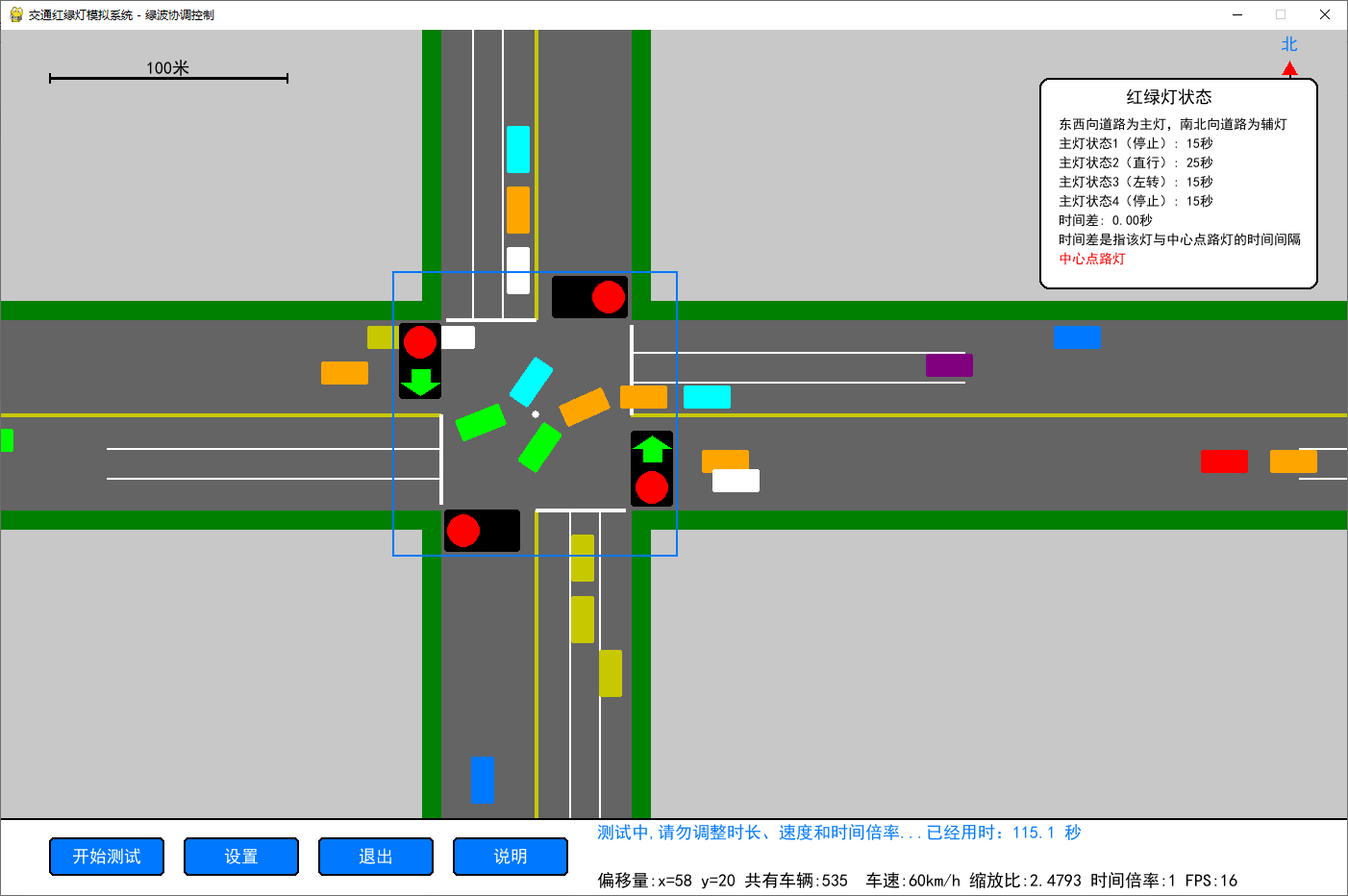
- ✅ 智能车辆行为:红绿灯自动交替直观显示,车辆依据红绿灯进行行驶、转弯、避让、停止等。车辆能根据下次转向提前进行车道切换、左右转弯时能打开转向灯,左转平滑转弯,模拟真实的城市驾驶行为
- ✅ 视角与时间控制:支持视角拖拽、缩放,支持 1-10 倍时间倍率,加速模拟过程
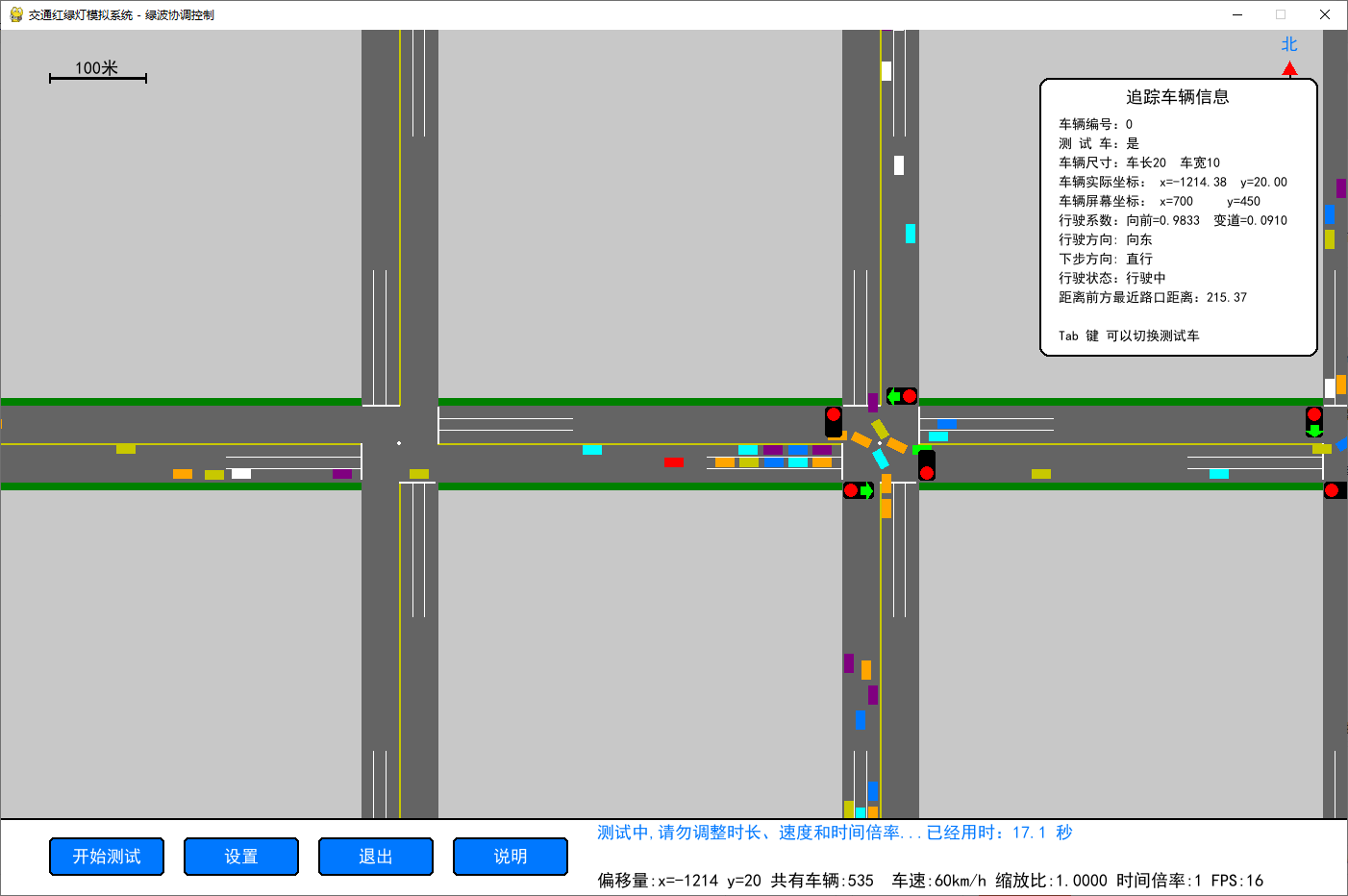
- ✅ 通行效率测试:内置测试车辆,自动统计通行时间、等待时间、停车次数,验证绿波效果
- ✅ 完整交互 UI:支持红绿灯调试、车辆追踪、报告生成及结果复制、设置面板、帮助界面
- ✅ 性能优化:基于空间哈希的碰撞检测,支持最高 2000 辆车的流畅模拟
快速开始
- 安装依赖:
程序需要以下库才能正常运行
import pygame
import sys,time
import win32clipboard
import random
from math import sin,cos,pi,degrees

from cProfile import Profile
from pstats import Stats- 下载代码,保存为
traffic_simulation.py - 运行程序:
运行
python traffic_simulation.py操作指南
鼠标操作
- 左键拖拽:移动视角,查看路网的不同区域
- 滚轮滚动:缩放视角,支持 0.25-4 倍缩放
- 右键点击车辆:选中并追踪该车辆,查看车辆的详细信息
- 点击红绿灯:选中并查看红绿灯的配置信息
快捷键
G:切换网格显示,用于查看碰撞检测的空间网格N:切换车辆编号显示,用于区分不同车辆Tab:在测试模式下,切换选中的测试车辆Ctrl+C:测试完成后,复制测试结果到剪贴板Esc:关闭测试结果面板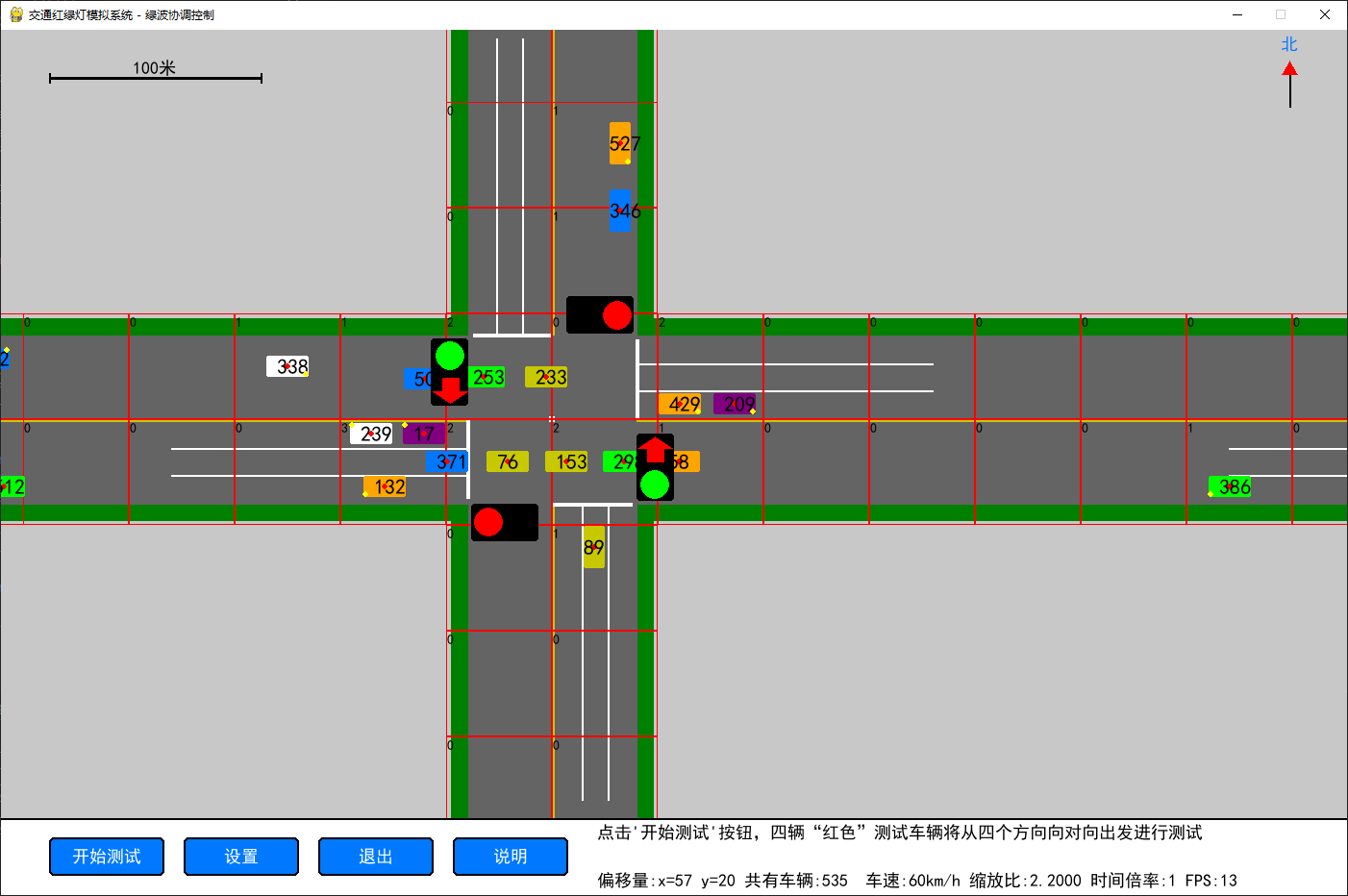
UI 按钮
开始测试:启动绿波通行测试,4 辆测试车会从四个方向出发,统计通行数据- 设置:打开设置面板,可调整红绿灯时间、车速、路网配置等参数
退出:退出程序帮助:打开帮助界面,查看详细的操作说明
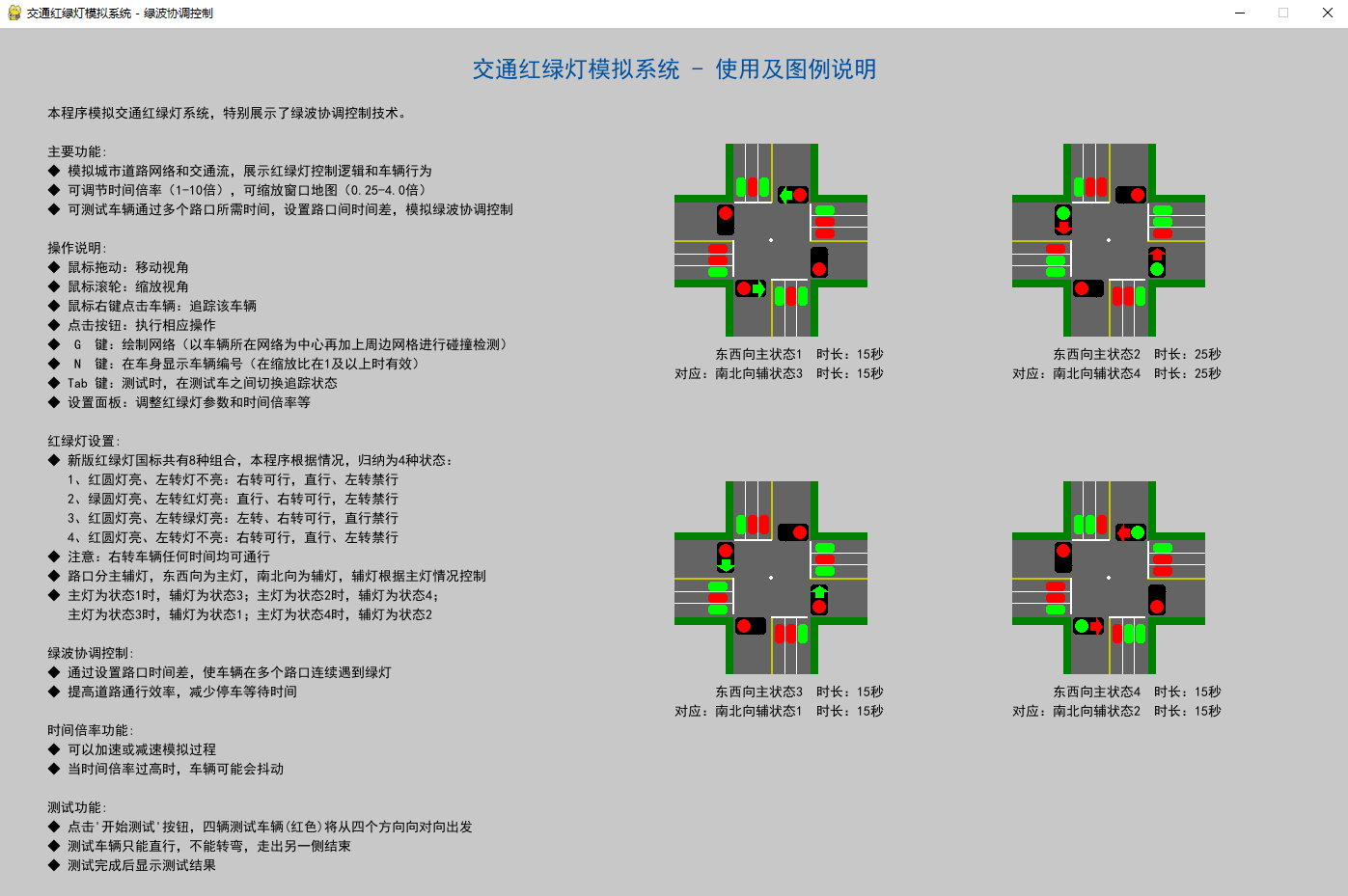
功能亮点
绿波协调验证
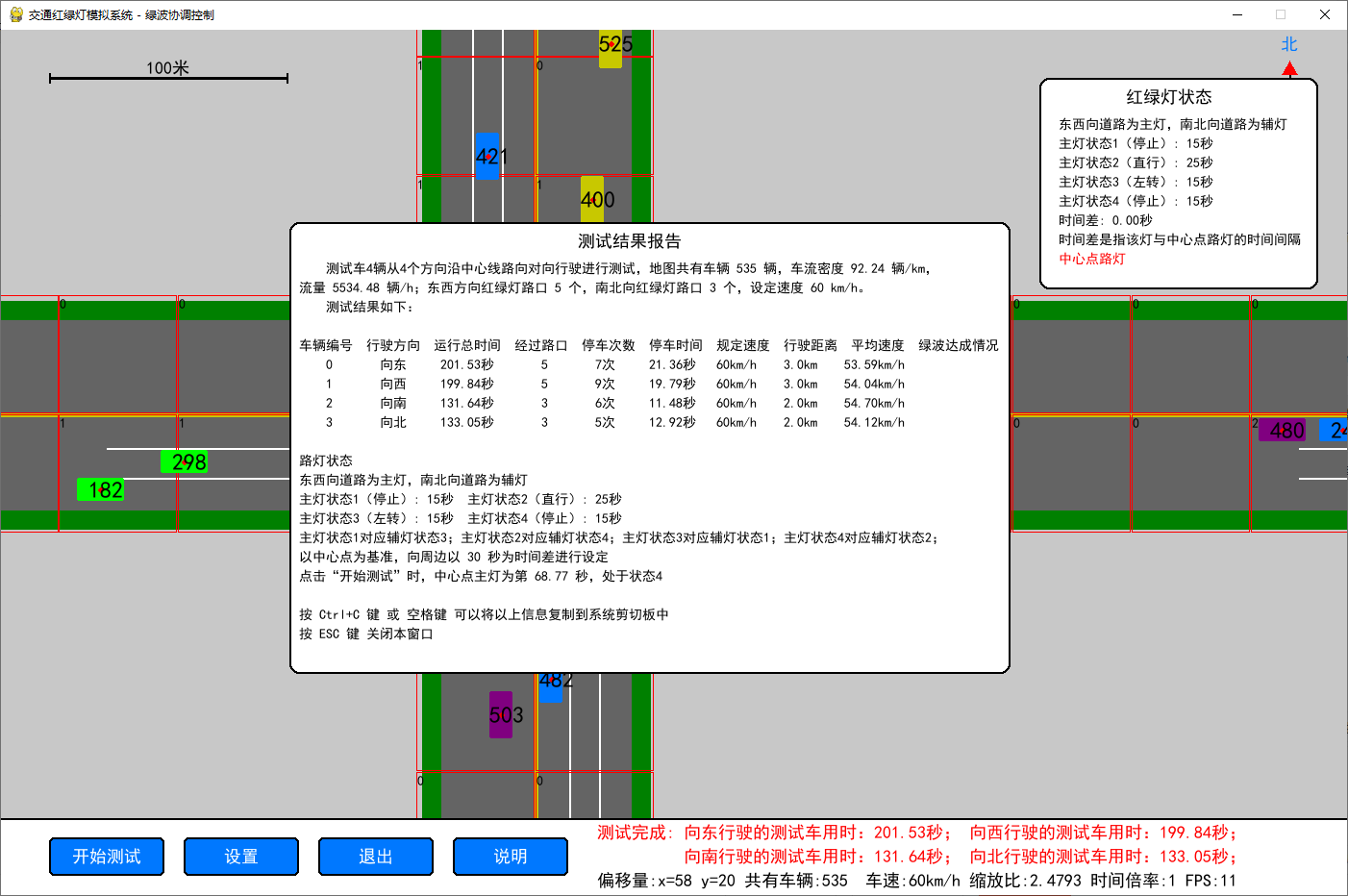
本程序的核心功能是验证绿波协调的效果,通过自动调整各个路口的红绿灯时间偏移,让车辆可以在不停车的情况下,一路绿灯通过所有路口,大幅提升通行效率。测试完成后会自动统计车辆的平均速度,标记出是否实现了绿波通行。
自定义配置
你可以在设置面板中,自定义路网的大小、路口间距、道路宽度、红绿灯的周期、车速、时间倍率等所有参数,调整后重启程序即可生效,支持不同场景的模拟。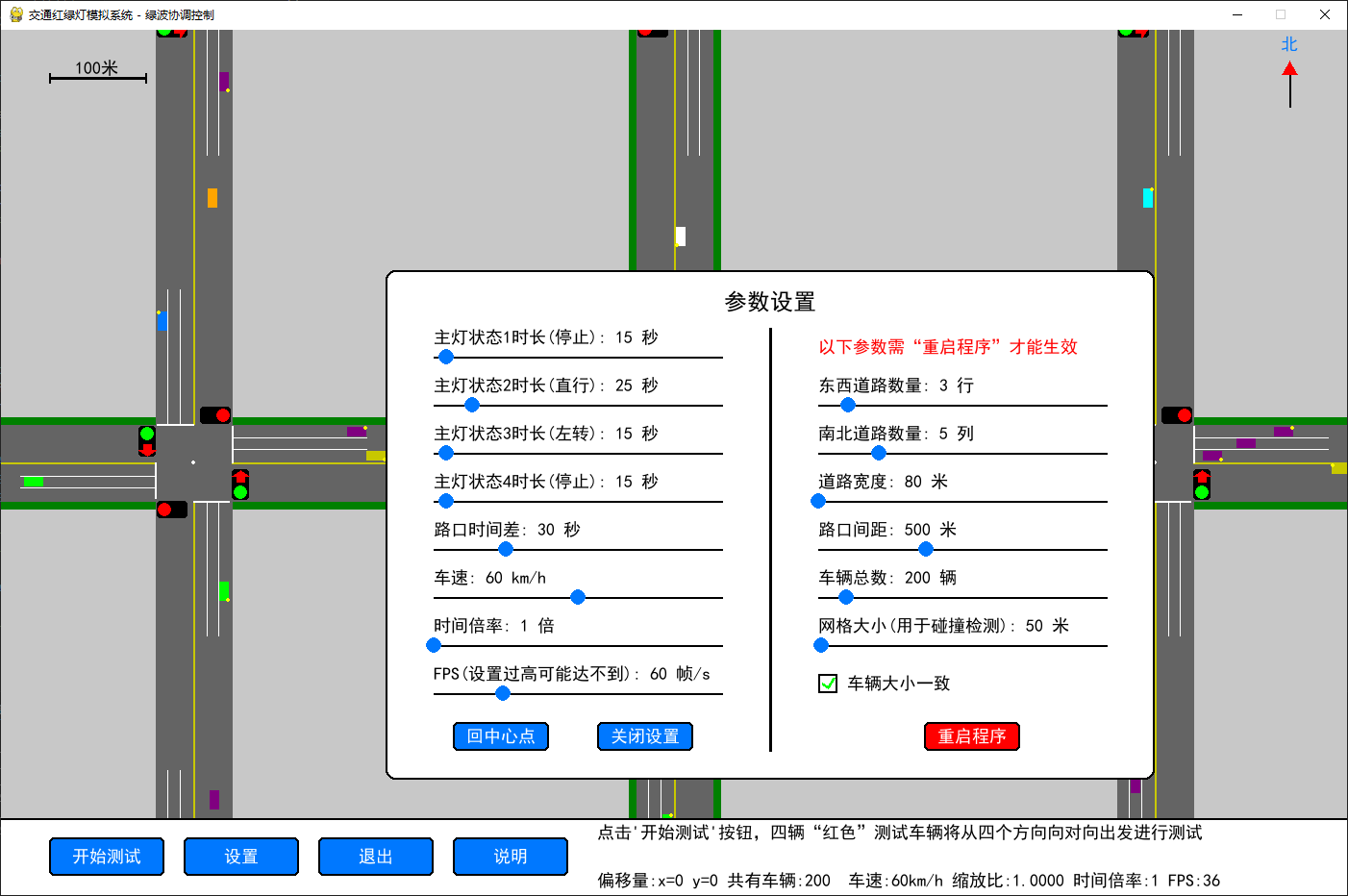
说明
- 剪贴板复制功能仅支持 Windows 系统,Linux/macOS 系统下该功能不可用,其余功能不受影响
- 修改路网、路口间距等参数后,需要点击重启程序才能生效
- 性能测试模式下,会输出详细的性能统计,用于优化程序性能
完整代码
# -*- coding: utf-8 -*-
# 版权声明:本代码为原创,遵循 CC 4.0 BY-SA 版权协议,转载请附上原文出处链接和本声明。链接:https://blog.csdn.net/weixin_69832035
# V1.0
import pygame
import sys,time
import win32clipboard
import random
from math import sin,cos,pi,degrees
from pygame.locals import *
# 注意:如果速度和时间倍率都很大,会导致“飞车”现象
performance_monitoring = False # 性能监测开关
if performance_monitoring:
# # 以下2个用于性能分析
from cProfile import Profile
from pstats import Stats
# 初始化pygame
pygame.init()
# 获取显示器信息
info = pygame.display.Info()
screen_width = info.current_w
screen_height = info.current_h
# 常量定义
MIN_SCALE, MAX_SCALE = 0.25, 4.0
SCREEN_WIDTH, SCREEN_HEIGHT = info.current_w, info.current_h - 70
SCREEN_WIDTH, SCREEN_HEIGHT = 1400,900 # 屏幕宽度不能小于1400,高度不能小于900
ROW = 3 # 行数,最小值1,东西向道路数量,建议是奇数
COL = 5 # 列数,最小值1,南北向道路数量,建议是奇数
ROAD_WIDTH = 80
INTERSECTION_DISTANCE = 500 # 路口间距500米
CARS_NUMS = 200 # 创建车辆的总数
GRID = 50 # 网格大小
FPS = 60
VEHICLE_SPEED_KMH = 60 # 车速60km/h
VEHICLE_SPEED_MS = VEHICLE_SPEED_KMH * 1000 / 3600 # 转换为米/秒
LIGHT_OFFSET = 30 # 路灯时间差初始值
scale = 1 # 缩放比例
time_scale = 1 # 时间倍率
min_x,max_x = 0 , 0 # 最左边与最右边有红绿灯交叉口的x坐标
min_y,max_y = 0 , 0 # 最上边与最下边有红绿灯交叉口的y坐标
draw_grid = False # 是否绘制网格
# 车道偏移量定义
LEFT_LANE_OFFSET = 10
STRAIGHT_LANE_OFFSET = 20
RIGHT_LANE_OFFSET = 30
# 颜色定义
BLACK = (0, 0, 0)
WHITE = (255, 255, 255)
GRAY = (100, 100, 100)
RED = (255, 0, 0)
GREEN = (0, 255, 0)
ORANGE = (255, 165, 0)
BLUE = (0, 120, 255)
CYAN = (0, 255, 255)
PURPLE = (128, 0, 128)
YELLOW = (200, 200, 0)
DARK_GREEN = (0, 128, 0)
LIGHT_YELLOW = (255, 255, 0)
LIGHT_GRAY = (200, 200, 200)
DARK_BLUE = (0, 80, 160)
# 创建窗口
screen = pygame.display.set_mode((SCREEN_WIDTH, SCREEN_HEIGHT))
pygame.display.set_caption("交通红绿灯模拟系统 - 绿波协调控制")
clock = pygame.time.Clock()
# 字体
font = pygame.font.SysFont('SimHei', 18)
small_font = pygame.font.SysFont('SimHei', 14)
title_font = pygame.font.SysFont('SimHei', 24)
arrow_font = pygame.font.SysFont('SimHei', int(10 * scale))
# 设置面板和说明面板可见性
settings_visible = False
settings_rect = pygame.Rect(SCREEN_WIDTH//2 - 300, SCREEN_HEIGHT//2 - 200, 800, 530)
selected = -1 # 追踪的车辆编号
testing = False # 是否正在测试
show_number = False # 是否在车辆上显示编号
uniform_size = True # 车辆大小是否统一
class TrafficLight: # 交通信号灯类
def __init__(self, x, y, direction, name,is_master=False):
self.x = x
self.y = y
self.direction = direction # 'horizontal' 或 'vertical'
self.name=name
self.is_master = is_master # 是否是主信号灯(控制协调)
# 初始状态:水平方向状态1,垂直方向状态2
self.state = "state1" if direction == "horizontal" else "state3"
self.timers = {
"state1": 15, # 红圆灯亮、左转灯不亮
"state2": 25, # 绿圆灯亮、左转红灯亮
"state3": 15, # 红圆灯亮、左转绿灯亮
"state4": 15 # 红圆灯亮、左转灯不亮
}
self.current_time = 0
self.offset = 0 # 启动时间偏移量,用于绿波协调
self.paired_light = None # 配对的红绿灯
self.selected = False # 是否被选中
self.adjusted_time = 0
def set_paired_light(self, paired_light):
"""设置配对的红绿灯"""
self.paired_light = paired_light
def update(self, dt, time_scale):
self.current_time += dt * time_scale
total_cycle = self.timers["state1"] + self.timers["state2"] + self.timers["state3"] + self.timers["state4"]
# 如果是主信号灯,控制配对信号灯的状态
if self.is_master:
self.adjusted_time = (self.current_time + self.offset) % total_cycle
if self.adjusted_time < self.timers["state1"]:
self.state = "state1"
if self.paired_light:
self.paired_light.state = "state3"
elif self.adjusted_time < self.timers["state1"] + self.timers["state2"]:
self.state = "state2"
if self.paired_light:
self.paired_light.state = "state4"
elif self.adjusted_time < self.timers["state1"] + self.timers["state2"] + self.timers["state3"]:
self.state = "state3"
if self.paired_light:
self.paired_light.state = "state1"
else:
self.state = "state4"
if self.paired_light:
self.paired_light.state = "state2"
def draw(self, surface, camera_x, camera_y, scale):
# 计算屏幕上的位置
screen_x = int((self.x - camera_x) * scale + SCREEN_WIDTH // 2)
screen_y = int((self.y - camera_y) * scale + SCREEN_HEIGHT // 2)
lights_rect = [(40,7,18,32),(-57,-38,18,32),(7,-58,32,18),(-38,40,32,18)] # 右下、左上、左下、右上
r = 7*scale
# 绘制选中框
if self.selected:
pygame.draw.rect(surface, BLUE,(screen_x - 60*scale, screen_y - 60*scale, 120*scale, 120*scale), 2)
if self.direction == "horizontal":
for i in lights_rect[:2]: # 绘制信号灯底座
rect = pygame.Rect(screen_x + i[0]*scale, screen_y + i[1]*scale, i[2]*scale, i[3]*scale)
pygame.draw.rect(surface, BLACK, rect, 0, 3)
# 根据状态绘制灯光
if self.state == "state1" or self.state == "state4": # 红圆灯亮、左转灯不亮
pygame.draw.circle(surface, RED, (screen_x + 49*scale, screen_y + 31*scale), r)
pygame.draw.circle(surface, RED, (screen_x - 48*scale, screen_y - 30*scale), r)
elif self.state == "state2": # 绿圆灯亮、左转红灯亮
# pygame.draw.circle(surface, GREEN, (screen_x + 27*scale, screen_y + 27*scale), r)
pygame.draw.circle(surface, GREEN, (screen_x + 49*scale, screen_y + 31*scale), r)
pygame.draw.circle(surface, GREEN, (screen_x - 48*scale, screen_y - 30*scale), r)
# 左侧红色向左箭头
draw_arrow(surface, RED, (screen_x + 49*scale, screen_y + 31*scale -14*scale), 'up', scale)
draw_arrow(surface, RED, (screen_x - 48*scale, screen_y - 30*scale +14*scale), 'down', scale)
elif self.state == "state3": # 红圆灯亮、左转绿灯亮
pygame.draw.circle(surface, RED, (screen_x + 49*scale, screen_y + 31*scale), r)
pygame.draw.circle(surface, RED, (screen_x - 48*scale, screen_y - 30*scale), r)
# 左侧绿色向上、下箭头
draw_arrow(surface, GREEN, (screen_x + 49*scale, screen_y + 31*scale -14*scale), 'up', scale)
draw_arrow(surface, GREEN, (screen_x - 48*scale, screen_y - 30*scale +14*scale), 'down', scale)
else: # vertical
for i in lights_rect[-2:]: # 绘制信号灯底座
rect = pygame.Rect(screen_x + i[0]*scale, screen_y + i[1]*scale, i[2]*scale, i[3]*scale)
pygame.draw.rect(surface, BLACK, rect, 0, 3)
# 根据状态绘制灯光
if self.state == "state1" or self.state == "state4": # 红圆灯亮、左转灯不亮
pygame.draw.circle(surface, RED, (screen_x + 31*scale, screen_y - 49*scale), r)
pygame.draw.circle(surface, RED, (screen_x - 30*scale, screen_y + 49*scale), r)
elif self.state == "state2": # 绿圆灯亮、左转红灯亮
pygame.draw.circle(surface, GREEN, (screen_x + 31*scale, screen_y - 49*scale), r)
pygame.draw.circle(surface, GREEN, (screen_x - 30*scale, screen_y + 49*scale), r)
# 绘制红向左、右箭头
draw_arrow(surface, RED, (screen_x + 17*scale, screen_y - 49*scale), 'left', scale)
draw_arrow(surface, RED, (screen_x - 17*scale, screen_y + 49*scale), 'right', scale)
elif self.state == "state3": # 红圆灯亮、左转绿灯亮
pygame.draw.circle(surface, RED, (screen_x + 31*scale, screen_y - 49*scale), r)
pygame.draw.circle(surface, RED, (screen_x - 30*scale, screen_y + 49*scale), r)
# 绿色向左右箭头
draw_arrow(surface, GREEN, (screen_x + 17*scale, screen_y - 49*scale), 'left', scale)
draw_arrow(surface, GREEN, (screen_x - 17*scale, screen_y + 49*scale), 'right', scale)
def is_clicked(self, pos, camera_x, camera_y, scale):
"""检查是否被点击"""
screen_x = int((self.x - camera_x) * scale + SCREEN_WIDTH // 2)
screen_y = int((self.y - camera_y) * scale + SCREEN_HEIGHT // 2)
rect = pygame.Rect(screen_x - 60*scale, screen_y - 60*scale, 120*scale, 120*scale)
return rect.collidepoint(pos)
def get_light_state_for_direction(self, vehicle_direction, turn_intention):
"""根据车辆方向和转向意图判断是否允许通行"""
# 右转任何时候都允许
if turn_intention == 'right':
return True
if self.direction == "horizontal":
# 水平信号灯控制东西方向
if vehicle_direction in ['left', 'right']:
if turn_intention == 'straight':
return self.state == "state2" # 直行只在状态2允许
elif turn_intention == 'left':
return self.state == "state3" # 左转只在状态3允许
else:
# 垂直信号灯控制南北方向
if vehicle_direction in ['up', 'down']:
if turn_intention == 'straight':
return self.state == "state2" # 直行只在状态2允许
elif turn_intention == 'left':
return self.state == "state3" # 左转只在状态3允许
return False
class draw_compass:
"""绘制指南针"""
def __init__(self):
# 指南针参数
self.compass_radius = 40
self.compass_center = (SCREEN_WIDTH - 60, 60) # 距离右上角50像素
# 绘制指向北方的箭头
arrow_height = self.compass_radius * 0.7
arrow_width = self.compass_radius * 0.4
# 箭头顶点
self.top_point = (self.compass_center[0], self.compass_center[1] - arrow_height)
# 箭头底部两点
self.left_point = (self.compass_center[0] - arrow_width/2, self.compass_center[1] - arrow_height/2)
self.right_point = (self.compass_center[0] + arrow_width/2, self.compass_center[1] - arrow_height/2)
def draw(self,screen):
# 绘制线
pygame.draw.line(screen, BLACK,
(self.compass_center[0], self.compass_center[1] - self.compass_radius//2),
(self.compass_center[0], self.compass_center[1] + self.compass_radius//2), 2)
# 绘制箭头三角形
pygame.draw.polygon(screen, RED, [self.top_point, self.left_point, self.right_point])
# 绘制北方向标记
north_text = font.render("北", True, BLUE)
screen.blit(north_text, (self.compass_center[0] - north_text.get_width()//2,
self.compass_center[1] - self.compass_radius - 15))
def is_in_intersection(vehicle_x, vehicle_y, intersections):
"""
判断车辆是否进入交叉口空间
参数:
vehicle_x: 车辆的x坐标
vehicle_y: 车辆的y坐标
intersections: 交叉口坐标列表
返回:
布尔值,True表示车辆在交叉口空间内,False表示不在
"""
half_width = ROAD_WIDTH / 2
for inter_x, inter_y in intersections:
# 检查车辆是否在当前交叉口的空间内
if (abs(vehicle_x - inter_x) < half_width and
abs(vehicle_y - inter_y) < half_width):
return True
return False
class Vehicle: # 车辆类
def __init__(self, x, y, direction, is_test_vehicle=False, vehicles=[]):
self.index = len(vehicles)
self.x = x
self.y = y
self.in_intersection = False
self.direction = direction
self.speed = VEHICLE_SPEED_MS
self.is_test_vehicle = is_test_vehicle
self.color = random.choice([WHITE,GREEN,BLUE,YELLOW,ORANGE,CYAN,PURPLE]) if not is_test_vehicle else RED
if uniform_size : # 车辆是否使用统一尺寸
self.init_height = 10
self.init_width = 20
else:
self.init_height = random.randint(8, 11)
self.init_width = int(random.uniform(1.2, 2.0) * self.init_height)
self.adjust_vehicle_orientation()
# 根据转向意图设置车道
self.turn_intention = 'straight' if is_test_vehicle else random.choice(['left', 'straight', 'right'])
# 设置车道偏移
self.lane_offset = self.get_lane_offset()
self.waiting_at_light = False
self.waiting_time = 0
self.停车次数 = 0
self.finished = False
self.start_time = pygame.time.get_ticks() / 1000.0
self.end_time = None
self.stop_line = ROAD_WIDTH/2
# 新增:平滑转弯相关属性
self.turning = False # 是否正在转弯
self.turn_start_pos = (0, 0) # 转弯起始位置
self.turn_end_pos = (0, 0) # 转弯结束位置
self.original_direction = direction # 保存原始方向
self.nearest_intersection = INTERSECTION_DISTANCE *10 #距离前方最近路口距离
self.min_ahead_distance=5 # 与前车最小距离
self.min_LR_distance=1 # 变道时与旁边车辆最小距离
self.move_dist = 0
self.变道系数 = 0
def adjust_vehicle_orientation(self) -> None:
# 调整车辆尺寸以适应新方向
if self.direction in ['left', 'right']:
self.width, self.height = self.init_width,self.init_height
else:
self.width, self.height = self.init_height,self.init_width
def get_lane_offset(self):
"""根据转向意图和行驶方向返回车道偏移量"""
# 车道偏移量定义
offset = [LEFT_LANE_OFFSET,STRAIGHT_LANE_OFFSET,RIGHT_LANE_OFFSET]
# 右转车道、直行车道、左转车道(从道路中心线向右计算)
if self.direction == 'right':
if self.turn_intention == 'left':
return offset[0] # 左转车道
elif self.turn_intention == 'straight':
return offset[1] # 直行车道
elif self.turn_intention == 'right':
return offset[2] # 右转车道
elif self.direction == 'left':
# 向左行驶时,车道方向相反
if self.turn_intention == 'left':
return -offset[0] # 左转车道(相对于行驶方向)
elif self.turn_intention == 'straight':
return -offset[1] # 直行车道
elif self.turn_intention == 'right':
return -offset[2] # 右转车道(相对于行驶方向)
elif self.direction == 'down':
if self.turn_intention == 'left':
return -offset[0] # 左转车道
elif self.turn_intention == 'straight':
return -offset[1] # 直行车道
elif self.turn_intention == 'right':
return -offset[2] # 右转车道
elif self.direction == 'up':
# 向上行驶时,车道方向相反
if self.turn_intention == 'left':
return offset[0] # 左转车道(相对于行驶方向)
elif self.turn_intention == 'straight':
return offset[1] # 直行车道
elif self.turn_intention == 'right':
return offset[2] # 右转车道(相对于行驶方向)
return offset[1]
def get_nearest_intersection(self, intersections):
"""获取到前方最近路口的距离"""
min_distance = INTERSECTION_DISTANCE * 10
for inter_x, inter_y in intersections:
if self.direction =='right':
distance = inter_x - self.x
elif self.direction =='left':
distance = self.x - inter_x
elif self.direction =='down':
distance = inter_y - self.y
else: # up
distance = self.y - inter_y
if 0 < distance < min_distance:
min_distance = distance
return min_distance
def update(self, dt, time_scale, traffic_lights, intersections, vehicles,vehicle_manager):
if self.finished:
return
# 记录测试车的停车时间
if testing and self.is_test_vehicle and self.waiting_at_light:
self.waiting_time += dt
# 计算移动距离,限制最大移动距离防止飞越
max_move_per_frame = 50
self.move_dist = min(self.speed * dt * time_scale, max_move_per_frame)
if self.turning: # 正在转弯
if self.old_turn_intention == 'left':
self.当前角度 += self.时针方向 * self.每帧移动角度 * time_scale
if self.当前角度 <= self.终止角度:
self.turning = False
self.adjust_vehicle_orientation()
if self.in_intersection:
self.x = self.圆心[0] +self.r*cos(self.当前角度)
self.y = self.圆心[1] +self.r*sin(self.当前角度)
self.turn_start_pos =(self.x,self.y)
return
# 检查前方和变道方向是否有车辆(防止追尾和碰撞)
if self.check_collision_ahead_optimized(self.move_dist, vehicle_manager): #check_collision_ahead_optimized(self, move_dist, vehicle_manager, min_distance=10)
if not self.waiting_at_light:
self.停车次数 += 1
self.waiting_at_light = True
self.move_dist = 0
self.变道系数 = 0
return
# #############################下面有这三行句子
# 检查到前方路口的距离,处理变道
self.nearest_intersection = self.get_nearest_intersection(intersections)
# 在路口前减速 TODO 保留,如果需要可以增加
# if nearest_intersection < 100:
# move_dist *= 0.7
# if nearest_intersection < 50:
# move_dist *= 0.5
x , y = self.x , self.y
self.变道系数 = 0 if self.move_dist < 0.0001 else (RIGHT_LANE_OFFSET-LEFT_LANE_OFFSET)/((INTERSECTION_DISTANCE - ROAD_WIDTH -15)/3*2/self.move_dist)
# print(变道系数,move_dist)
if self.变道系数 > 0 and ROAD_WIDTH/2+10 < self.nearest_intersection < INTERSECTION_DISTANCE - ROAD_WIDTH/2-5 :
# 设置车道偏移
self.lane_offset = self.get_lane_offset()
if self.direction in ['left' ,'right']:
# 找到最近的水平道路中心线 # 水平方向行驶的车辆,调整y坐标
nearest_road_y = min(horizontal_roads_y, key=lambda y: abs(self.y - y))
if self.y - (nearest_road_y + self.lane_offset) > 1:
y = self.y - self.变道系数
elif self.y - (nearest_road_y + self.lane_offset) < -1:
y = self.y + self.变道系数
else:
y = nearest_road_y + self.lane_offset
else: # up down
# 找到最近的纵向道路中心线 # 垂直方向行驶的车辆,调整x坐标
nearest_road_x = min(vertical_roads_x, key=lambda x: abs(self.x - x))
if self.x - (nearest_road_x + self.lane_offset) > 1:
x = self.x - self.变道系数
elif self.x - (nearest_road_x + self.lane_offset) < -1:
x = self.x + self.变道系数
else:
x = nearest_road_x + self.lane_offset
# 检查前方和变道方向是否有车辆(防止追尾和碰撞)
# if self.check_collision_ahead_optimized(self.move_dist, vehicle_manager): #check_collision_ahead_optimized(self, move_dist, vehicle_manager, min_distance=10)
# self.waiting_at_light = True
# self.move_dist = 0
# self.变道系数 = 0
# return
# else:
self.x , self.y = x , y
# 检查红绿灯
red_light_detected = False
for light in traffic_lights:
if ((self.direction in ['right', 'left'] and light.direction == "horizontal") or
(self.direction in ['up', 'down'] and light.direction == "vertical")):
if self.direction == 'right':
stop_line_x = light.x - self.stop_line
if (abs(self.y - light.y - self.lane_offset) < ROAD_WIDTH/6 and
stop_line_x - 10 < self.x + self.move_dist + self.width/2 < stop_line_x + 10):
if not light.get_light_state_for_direction(self.direction, self.turn_intention):
red_light_detected = True
if self.x + self.move_dist + self.width/2 > stop_line_x - 5:
self.x = stop_line_x - self.width/2 - 5
break
elif self.direction == 'left':
stop_line_x = light.x + self.stop_line
if (abs(self.y - light.y - self.lane_offset) < ROAD_WIDTH/6 and
stop_line_x - 10 < self.x - self.move_dist - self.width/2 < stop_line_x + 10):
if not light.get_light_state_for_direction(self.direction, self.turn_intention):
red_light_detected = True
if self.x - self.move_dist - self.width/2 < stop_line_x + 5:
self.x = stop_line_x + self.width/2 + 5
break
elif self.direction == 'down':
stop_line_y = light.y - self.stop_line
if (abs(self.x - light.x - self.lane_offset) < ROAD_WIDTH/6 and
stop_line_y - 10 < self.y + self.move_dist + self.height/2 < stop_line_y + 10):
if not light.get_light_state_for_direction(self.direction, self.turn_intention):
red_light_detected = True
if self.y + self.move_dist + self.height/2 > stop_line_y - 5:
self.y = stop_line_y - self.height/2 - 5
break
elif self.direction == 'up':
stop_line_y = light.y + self.stop_line
if (abs(self.x - light.x - self.lane_offset) < ROAD_WIDTH/6 and
stop_line_y - 10 < self.y - self.move_dist - self.height/2 < stop_line_y + 10):
if not light.get_light_state_for_direction(self.direction, self.turn_intention):
red_light_detected = True
if self.y - self.move_dist - self.height/2 < stop_line_y + 5:
self.y = stop_line_y + self.height/2 + 5
break
if red_light_detected:
if not self.waiting_at_light:
self.停车次数 += 1
self.waiting_at_light = True
self.move_dist = 0
self.变道系数 = 0
return
else:
self.waiting_at_light = False
# 根据方向移动车辆
if self.direction == 'right':
self.x += self.move_dist
elif self.direction == 'left':
self.x -= self.move_dist
elif self.direction == 'down':
self.y += self.move_dist
elif self.direction == 'up':
self.y -= self.move_dist
# 检查是否到达路口需要转向
in_intersection = is_in_intersection(self.x, self.y, intersections)
if not self.is_test_vehicle:
if in_intersection and not self.in_intersection:
self.in_intersection = True
self.make_turn()
else:
self.in_intersection = in_intersection
# 检查测试车辆是否完成行程
if self.is_test_vehicle:
if (self.direction =='right' and self.x > max_x+INTERSECTION_DISTANCE) or \
(self.direction == 'left' and self.x < min_x-INTERSECTION_DISTANCE) or \
(self.direction == 'down' and self.y > max_y+INTERSECTION_DISTANCE) or \
(self.direction == 'up' and self.y < min_y-INTERSECTION_DISTANCE):
self.finished = True
self.end_time = pygame.time.get_ticks() / 1000.0
def is_in_same_lane(self, other: 'Vehicle', lane_threshold: float = 8) -> bool:
"""检查两车是否在同一车道"""
if self.direction != other.direction:
return False
return (abs(self.y - other.y) < lane_threshold
if self.direction in ['right', 'left']
else abs(self.x - other.x) < lane_threshold)
def check_collision_ahead_optimized(self, move_dist, vehicle_manager):
"""使用空间分区的优化版本"""
"""检查移动后是否会与前车碰撞 - 优化版本"""
# 只检查附近的车辆,而不是所有车辆
nearby_vehicles = vehicle_manager.get_nearby_vehicles(self, radius=1)
# 使用之前的优化逻辑,但只遍历附近的车辆
if self.direction == 'right':
future_x = self.x + move_dist
future_front = future_x + self.width
for other in nearby_vehicles:
if other is self or other.finished:
continue
if other.direction != self.direction:
continue
if abs(self.y - other.y) >= 8:
continue
if other.x <= self.x:
continue
if future_front > other.x - self.min_ahead_distance:
return True
# if self.y != y and other.x < x < other.x+other.width and abs(y - other.y) < other.height + self.min_LR_distance: # 判断变道是否会碰撞其它车
# print('self.y , y , other.x , x , other.x,other.width , y, other.y, other.height , self.min_LR_distance')
# print(self.y , y , other.x , x , other.x,other.width , y, other.y, other.height , self.min_LR_distance)
# return True
elif self.direction == 'left':
future_x = self.x - move_dist
for other in nearby_vehicles:
if abs(self.y - other.y) >= 8:
continue
if other.direction != self.direction:
continue
if other.x >= self.x:
continue
if other is self or other.finished:
continue
if future_x < other.x + other.width + self.min_ahead_distance:
return True
elif self.direction == 'down':
future_y = self.y + move_dist
future_front = future_y + self.height
for other in nearby_vehicles:
if abs(self.x - other.x) >= 8:
continue
if other.direction != self.direction:
continue
if other.y <= self.y:
continue
if other is self or other.finished:
continue
if future_front > other.y - self.min_ahead_distance:
return True
elif self.direction == 'up':
future_y = self.y - move_dist
for other in nearby_vehicles:
if abs(self.x - other.x) >= 8:
continue
if other.direction != self.direction:
continue
if other.y >= self.y:
continue
if other is self or other.finished:
continue
if future_y < other.y + other.height + self.min_ahead_distance:
return True
return False
def make_turn(self):
self.old_direction = self.direction
self.old_turn_intention = self.turn_intention
# if self.old_turn_intention == 'straight' and not self.is_test_vehicle:
# self.turn_intention = random.choice(['left', 'straight', 'right'])
# return
# 根据转向意图改变方向
if self.turn_intention == 'left':
if self.direction == 'right':
self.direction = 'up'
elif self.direction == 'left':
self.direction = 'down'
elif self.direction == 'up':
self.direction = 'left'
elif self.direction == 'down':
self.direction = 'right'
elif self.turn_intention == 'right':
if self.direction == 'right':
self.direction = 'down'
elif self.direction == 'left':
self.direction = 'up'
elif self.direction == 'up':
self.direction = 'right'
elif self.direction == 'down':
self.direction = 'left'
# 直行不需要改变方向,只需要更新转向意图(仅限非测试车辆)
if not self.is_test_vehicle:
self.turn_intention = random.choice(['left', 'straight', 'right'])
newx,newy=self.x,self.y
# 找到最近的水平道路中心线 # 水平方向行驶的车辆,调整y坐标
nearest_road_y = min(horizontal_roads_y, key=lambda y: abs(self.y - y))
# 找到最近的纵向道路中心线 # 垂直方向行驶的车辆,调整x坐标
nearest_road_x = min(vertical_roads_x, key=lambda x: abs(self.x - x))
if self.old_turn_intention == 'right':
if self.direction == 'right':
newy = nearest_road_y + RIGHT_LANE_OFFSET
elif self.direction == 'left':
newy = nearest_road_y - RIGHT_LANE_OFFSET
elif self.direction == 'up':
newx = nearest_road_x + RIGHT_LANE_OFFSET
else: # down
newx = nearest_road_x - RIGHT_LANE_OFFSET
if self.old_turn_intention == 'straight' or self.old_turn_intention == 'right' : # 直行 和 右转 不用处理
self.x,self.y = newx,newy
else: # self.old_turn_intention == 'left'
self.turning = True # 是否正在左转弯
self.时针方向 = -1 # -1 表示逆时针
self.turn_start_center = (self.x , self.y)
if self.old_direction == 'down': #self.direction == 'right':
newx = nearest_road_x + ROAD_WIDTH//2
newy = nearest_road_y + LEFT_LANE_OFFSET
self.turn_end_center = (newx , newy )
self.当前角度 = -pi
self.终止角度 = -pi*3/2
self.圆心 = (self.turn_end_center[0],self.turn_start_center[1])
elif self.old_direction == 'up' : #self.direction == 'left':
newx = nearest_road_x - ROAD_WIDTH//2
newy = nearest_road_y - LEFT_LANE_OFFSET
self.turn_end_center = (newx , newy )
self.当前角度 = 0
self.终止角度 = -pi/2
self.圆心 = (self.turn_end_center[0],self.turn_start_center[1])
elif self.old_direction == 'right' : #self.direction == 'up':
newx = nearest_road_x + LEFT_LANE_OFFSET
newy = nearest_road_y - ROAD_WIDTH//2
self.turn_end_center = (newx , newy )
self.当前角度 = pi/2
self.终止角度 = 0
self.圆心 = (nearest_road_x-ROAD_WIDTH//2,newy)
elif self.old_direction == 'left' :# self.direction == 'down':
newx = nearest_road_x - LEFT_LANE_OFFSET
newy = nearest_road_y + ROAD_WIDTH//2
self.turn_end_center = (newx , newy )
self.当前角度 = pi*3/2
self.终止角度 = pi
self.圆心 = (nearest_road_x+ROAD_WIDTH//2,newy)
self.r = abs(self.turn_start_center[0] - self.turn_end_center[0]) # 半径
if self.r < 1:self.r = 1
nowfps = clock.get_fps()
nowfps = 1 if nowfps<=1 else nowfps
self.每帧移动角度 = VEHICLE_SPEED_MS/self.r/nowfps # 单位:弧度
self.turn_end_pos = (newx,newy) # 转弯结束位置
# 调整车辆尺寸以适应新方向
self.adjust_vehicle_orientation()
def draw_turn(self):
global scale
self.width, self.height = self.init_width,self.init_height
# 计算缩放后的尺寸
circle_radius = self.r * scale
rect_width = self.width * scale
rect_height = self.height * scale
self.圆心在屏幕上的位置 = (int((self.圆心[0] - camera_x) * scale + SCREEN_WIDTH // 2), int((self.圆心[1] - camera_y) * scale + SCREEN_HEIGHT // 2))
# 长方形中心坐标
rect_center_x = (self.圆心在屏幕上的位置[0]+ circle_radius * cos(self.当前角度))
rect_center_y = (self.圆心在屏幕上的位置[1]+ circle_radius * sin(self.当前角度))
# 创建车
rect_surface = pygame.Surface((rect_width, rect_height), pygame.SRCALPHA)
car_rect = pygame.Rect(0, 0, rect_width, rect_height)
pygame.draw.rect(rect_surface, self.color,car_rect ,0,int(scale))
light_pos = car_rect.bottomright
if int(time.time()*3) % 2 == 0:
pygame.draw.circle(rect_surface, LIGHT_YELLOW, (light_pos[0]-scale,light_pos[1]-scale), scale+1)
# 旋转车(使其长边与圆相切)
# 切线角度 = 法线角度 + 90度
rotation_angle = self.当前角度 + pi/2
rotated_rect = pygame.transform.rotate(rect_surface, -degrees(rotation_angle))
# 获取旋转后的矩形并绘制
rotated_rect_rect = rotated_rect.get_rect(center=(rect_center_x, rect_center_y))
# self.turn_start_center = (rotated_rect_rect.x,rotated_rect_rect.y)
screen.blit(rotated_rect, rotated_rect_rect)
# # 绘制圆
# pygame.draw.circle(screen, BLACK, self.圆心在屏幕上的位置, circle_radius, 2)
# # 绘制从圆心到长方形中心的线
# pygame.draw.line(screen, self.color, self.圆心在屏幕上的位置, (rect_center_x, rect_center_y), 1)
# pygame.draw.circle(screen, RED, (rect_center_x, rect_center_y), 2, 1)
return
def draw(self, surface, camera_x, camera_y, scale):
if self.finished:
return
# 出屏幕太多就从屏幕另一端回来
if not self.is_test_vehicle:
if self.x < min_x -INTERSECTION_DISTANCE * 2:
self.x = max_x +INTERSECTION_DISTANCE * 2 - 10
elif self.x > max_x +INTERSECTION_DISTANCE * 2:
self.x = min_x -INTERSECTION_DISTANCE * 2 + 10
elif self.y < min_y -INTERSECTION_DISTANCE * 2:
self.y = max_y +INTERSECTION_DISTANCE * 2 - 10
elif self.y > max_y +INTERSECTION_DISTANCE * 2:
self.y = min_y -INTERSECTION_DISTANCE * 2 + 10
if self.turning :#and not self.rect is None: # 正在转弯
self.draw_turn()
return
# 计算屏幕上的位置
screen_x = int((self.x - camera_x) * scale + SCREEN_WIDTH // 2)
screen_y = int((self.y - camera_y) * scale + SCREEN_HEIGHT // 2)
if screen_x < -20 or screen_x > SCREEN_WIDTH+20 or screen_y < -20 or screen_y > SCREEN_HEIGHT+20:
return
# 绘制车辆主体
car_rect = pygame.Rect(screen_x - self.width*scale/2, screen_y - self.height*scale/2,
self.width*scale, self.height*scale)
pygame.draw.rect(surface, self.color, car_rect, 0, int(scale))
if show_number and scale >= 1:
pygame.draw.circle(surface, RED, (screen_x,screen_y), scale+1)
text_surf = arrow_font.render(f'{self.index}', True, BLACK)
surface.blit(text_surf, (screen_x-(10*scale)/2, screen_y-(10*scale)/2))
# 绘制转向灯
if 40 < self.nearest_intersection < INTERSECTION_DISTANCE - 100 and self.turn_intention in ['left','right']:
if self.turn_intention == 'left':
if self.direction == 'left':
light_pos = car_rect.bottomright
light_pos = (light_pos[0]-scale,light_pos[1]-scale)
elif self.direction == 'right':
light_pos = car_rect.topleft
light_pos = (light_pos[0]+scale,light_pos[1]+scale)
elif self.direction == 'up':
light_pos = car_rect.bottomleft
light_pos = (light_pos[0]+scale,light_pos[1]-scale)
elif self.direction == 'down':
light_pos = car_rect.topright
light_pos = (light_pos[0]-scale,light_pos[1]+scale)
elif self.turn_intention == 'right':
if self.direction == 'left':
light_pos = car_rect.topright
light_pos = (light_pos[0]-scale,light_pos[1]+scale)
elif self.direction == 'right':
light_pos = car_rect.bottomleft
light_pos = (light_pos[0]+scale,light_pos[1]-scale)
elif self.direction == 'up':
light_pos = car_rect.bottomright
light_pos = (light_pos[0]-scale,light_pos[1]-scale)
elif self.direction == 'down':
light_pos = car_rect.topleft
light_pos = (light_pos[0]+scale,light_pos[1]+scale)
if int(time.time()*3) % 2 == 0:
pygame.draw.circle(surface, LIGHT_YELLOW, light_pos, scale+1)
class Slider:
def __init__(self, x, y, width, min_val, max_val, step, label, initial_val=None,单位='秒'):
self.x = x
self.y = y
self.width = width
self.min_val = min_val
self.max_val = max_val
self.step = step
self.label = label
self.handle_x = x
self.dragging = False
self.value = initial_val if initial_val else min_val
self.单位 =单位
self.update_handle_pos()
def update_handle_pos(self):
# 根据当前值更新滑块位置
fraction = (self.value - self.min_val) / (self.max_val - self.min_val)
self.handle_x = self.x + int(fraction * self.width)
def draw(self, surface):
# 绘制滑轨
pygame.draw.line(surface, BLACK, (self.x, self.y), (self.x + self.width, self.y), 2)
# 绘制滑块
pygame.draw.circle(surface, BLUE, (self.handle_x, self.y), 8)
# 绘制标签和值
label_text = f"{self.label}: {self.value} {self.单位}"
text_surf = font.render(label_text, True, BLACK)
surface.blit(text_surf, (self.x, self.y - 30))
def handle_event(self, event):
if event.type == MOUSEBUTTONDOWN and event.button == 1:
# 检查是否点击了滑块
if ((event.pos[0] - self.handle_x)**2 + (event.pos[1] - self.y)**2) <= 64:
self.dragging = True
elif event.type == MOUSEBUTTONUP and event.button == 1:
self.dragging = False
elif event.type == MOUSEMOTION and self.dragging:
# 更新滑块位置和值
new_x = max(self.x, min(self.x + self.width, event.pos[0]))
fraction = (new_x - self.x) / self.width
self.value = round(self.min_val + fraction * (self.max_val - self.min_val))
# 对齐到步长
self.value = self.min_val + round((self.value - self.min_val) / self.step) * self.step
self.handle_x = new_x
return True
return False
class Button:
def __init__(self, x, y, width, height, text, color=BLUE):
self.rect = pygame.Rect(x, y, width, height)
self.text = text
self.color = color
self.hover_color = (min(color[0] + 60, 255), min(color[1] + 60, 255), min(color[2] + 60, 255))
def draw(self, surface):
if not settings_visible and self.text in ['回中心点', '关闭设置','重启程序'] :
return
color = self.hover_color if self.rect.collidepoint(pygame.mouse.get_pos()) else self.color
pygame.draw.rect(surface, color, self.rect, 0, 5)
pygame.draw.rect(surface, BLACK, self.rect, 2, 5)
text_surf = font.render(self.text, True, WHITE)
text_rect = text_surf.get_rect(center=self.rect.center)
surface.blit(text_surf, text_rect)
def handle_event(self, event):
if event.type == MOUSEBUTTONDOWN and event.button == 1:
if self.rect.collidepoint(event.pos):
return True
return False
def draw_arrow(screen, color,xy, direction, scale):
# 定义箭头的基本尺寸(缩放前)
x,y=xy
shaft_length = 6 # 箭杆长度
head_length = 5 # 箭头长度
thickness = 8 # 箭头粗细
# 根据缩放比例调整尺寸
shaft_length = int(shaft_length * scale)+1
head_length = int(head_length * scale)+1
thickness = int(thickness * scale)+1
# 计算圆的半径(以箭头最大尺寸为准)
circle_radius = int(shaft_length//2)+1
# 根据方向计算箭头的起点和终点
if direction == "up":
start_pos = (x, y + shaft_length//2)
end_pos = (x, y - shaft_length//2)
head_points = [
(x, y - shaft_length//2 - head_length),
(x - thickness, y - shaft_length//2),
(x + thickness, y - shaft_length//2)
]
elif direction == "down":
start_pos = (x, y - shaft_length//2)
end_pos = (x, y + shaft_length//2)
head_points = [
(x, y + shaft_length//2 + head_length),
(x - thickness, y + shaft_length//2),
(x + thickness, y + shaft_length//2)
]
elif direction == "left":
start_pos = (x + shaft_length//2, y)
end_pos = (x - shaft_length//2, y)
head_points = [
(x - shaft_length//2 - head_length, y),
(x - shaft_length//2, y - thickness),
(x - shaft_length//2, y + thickness)
]
elif direction == "right":
start_pos = (x - shaft_length//2, y)
end_pos = (x + shaft_length//2, y)
head_points = [
(x + shaft_length//2 + head_length, y),
(x + shaft_length//2, y - thickness),
(x + shaft_length//2, y + thickness)
]
else:
return # 无效方向
# 绘制箭杆(使用抗锯齿线)
pygame.draw.line(screen, color, start_pos, end_pos, thickness)
# 绘制箭头
pygame.draw.polygon(screen, color, head_points)
def generate_sequence(n):
"""
根据输入的正整数n生成特定序列
参数:
n: 正整数
返回:
列表,包含n个整数,遵循特定规律
"""
if n < 1:
return []
# 计算序列的起始值
start = -(n // 2)
# 如果n是偶数,需要调整起始值
if n % 2 == 0:
start += 1
# 生成从start开始的连续n个整数
return list(range(start, start + n))
def Lane_Offse():
"""
车道偏移量定义
"""
global LEFT_LANE_OFFSET,STRAIGHT_LANE_OFFSET,RIGHT_LANE_OFFSET
quarter = (ROAD_WIDTH/2-30)/ 4
LEFT_LANE_OFFSET = int(5+quarter)
STRAIGHT_LANE_OFFSET = int(2 * quarter+15)
RIGHT_LANE_OFFSET = int(3 * quarter+25)
return LEFT_LANE_OFFSET,STRAIGHT_LANE_OFFSET,RIGHT_LANE_OFFSET
# 初始化道路和交通灯
def initialize_system():
global min_x,max_x,min_y,max_y,horizontal_roads_y,vertical_roads_x,horizontal_light,vertical_light
Lane_Offse()
# 创建交叉路口
intersections = []
for i in generate_sequence(COL):
for j in generate_sequence(ROW):
x,y=i * INTERSECTION_DISTANCE, j * INTERSECTION_DISTANCE
min_x,max_x = min(min_x,x) , max(max_x,x) # 最左边与最右边有红绿灯交叉口的x坐标
min_y,max_y = min(min_y,y) , max(max_y,y) # 最上边与最下边有红绿灯交叉口的y坐标
intersections.append((x,y))
# 提取水平道路的y值(所有水平道路的中心线y坐标)
horizontal_roads_y = sorted(set(y for x, y in intersections))
# 提取纵向道路的x值(所有纵向道路的中心线x坐标)
vertical_roads_x = sorted(set(x for x, y in intersections))
# 创建交通灯
traffic_lights = []
for x, y in intersections:
# 统一处理x轴和y轴的方向描述
x_direction = ""
if x != 0:
x_direction = "向西" if x < 0 else "向东"
x_distance = (-x if x < 0 else x) // INTERSECTION_DISTANCE
y_direction = ""
if y != 0:
y_direction = "向北" if y < 0 else "向南"
y_distance = (-y if y < 0 else y) // INTERSECTION_DISTANCE
# 根据x和y的值组合生成名称
if x == 0 and y == 0:
name = '中心点路灯'
elif x == 0: # 只在y轴上
name = f'中心点{y_direction}第{y_distance}路交叉口路灯'
elif y == 0: # 只在x轴上
name = f'中心点{x_direction}第{x_distance}路交叉口路灯'
else: # 既不在x轴也不在y轴上
name = f'中心点{y_direction}第{y_distance}路和{x_direction}第{x_distance}路交叉口路灯'
# 创建主信号灯(水平方向)
horizontal_light = TrafficLight(x, y, "horizontal", name,is_master=True)
# 创建从信号灯(垂直方向)
vertical_light = TrafficLight(x, y, "vertical", name,is_master=False)
# 设置配对关系
horizontal_light.set_paired_light(vertical_light)
vertical_light.set_paired_light(horizontal_light)
traffic_lights.append(horizontal_light)
traffic_lights.append(vertical_light)
# 设置垂直方向的初始状态与水平方向相反
vertical_light.state = "green_straight" if horizontal_light.state == "red" else "red"
# 设置绿波协调 - 以中心路口为基准,其他路口设置时间差
# base_cycle = traffic_lights[0].timers["state1"] + traffic_lights[0].timers["state2"] + traffic_lights[0].timers["state3"] + traffic_lights[0].timers["state4"]
for light in traffic_lights:
# 根据路口位置设置不同的偏移量,实现绿波协调
time_diff = (abs(light.x//INTERSECTION_DISTANCE)+abs(light.y//INTERSECTION_DISTANCE)) * LIGHT_OFFSET # 每路口相差LIGHT_OFFSET秒
light.offset = time_diff
# 创建车辆
vehicles = []
# 创建4个测试车辆(主干道端点),只能直行
test_vehicles = [
(min_x-INTERSECTION_DISTANCE, STRAIGHT_LANE_OFFSET,'right', True,vehicles),
(max_x+INTERSECTION_DISTANCE, -STRAIGHT_LANE_OFFSET, 'left', True,vehicles),
(-STRAIGHT_LANE_OFFSET, min_y-INTERSECTION_DISTANCE, 'down', True,vehicles),
(STRAIGHT_LANE_OFFSET, max_y+INTERSECTION_DISTANCE, 'up', True,vehicles)
]
for i in test_vehicles:
vehicles.append(Vehicle(i[0],i[1],i[2],i[3],i[4]))
times = init_time = 10 # 初始化最长时间 秒
# 创建一些随机车辆
offset = [LEFT_LANE_OFFSET , STRAIGHT_LANE_OFFSET , RIGHT_LANE_OFFSET]
oldtime=time.time()
while len(vehicles) < CARS_NUMS and times >0:
times = init_time - time.time()+oldtime
screen.fill(BLACK)
init_text = title_font.render(f"程序正在初始化:进度{len(vehicles)/CARS_NUMS*100:.1f}% 倒计时{times:.1f}秒", True, GREEN) # 黑色文本
text_rect = init_text.get_rect(center=(SCREEN_WIDTH//2, (SCREEN_HEIGHT-80)//2))
# 绘制初始化文本
screen.blit(init_text, text_rect)
pygame.display.flip()
direction = random.choice(['up', 'down', 'left', 'right'])
turn_intention = random.choice(['left', 'straight', 'right'])
# direction = 'down' # 测试后需要删除
# turn_intention = 'left' # 测试后需要删除
# 根据方向和转向意图设置车道偏移
lane_offset = offset[0] if turn_intention == 'left' else (offset[1] if turn_intention == 'straight' else offset[2])
if direction == 'right':
x = random.randint(min_x-INTERSECTION_DISTANCE*2, max_x+INTERSECTION_DISTANCE*2)
y = random.choice(horizontal_roads_y) + lane_offset
elif direction == 'left':
# 向左行驶时,车道方向相反
# lane_offset = ROAD_WIDTH/6 if turn_intention == 'left' else (0 if turn_intention == 'straight' else -ROAD_WIDTH/6)
x = random.randint(min_x-INTERSECTION_DISTANCE*2, max_x+INTERSECTION_DISTANCE*2)
y = random.choice(horizontal_roads_y) - lane_offset
elif direction == 'down':
x = random.choice(vertical_roads_x) - lane_offset
y = random.randint(min_y-INTERSECTION_DISTANCE*2, max_y+INTERSECTION_DISTANCE*2)
else: # up
# 向上行驶时,车道方向相反
x = random.choice(vertical_roads_x) + lane_offset
y = random.randint(min_y-INTERSECTION_DISTANCE*2, max_y+INTERSECTION_DISTANCE*2)
# 检查是否与其他车辆重叠 # 不在交叉口以内
if not is_overlapping(x, y, direction, vehicles) and not is_in_intersection(x, y, intersections):
vehicle = Vehicle(x, y, direction, False, vehicles)
vehicle.turn_intention = turn_intention
vehicle.lane_offset = lane_offset
vehicles.append(vehicle)
return traffic_lights, vehicles, intersections
def is_overlapping( x, y, direction, vehicles, min_gap=20):
"""检查新位置是否会与其他车辆重叠"""
for vehicle in vehicles:
if direction in ['right', 'left']:
# 检查水平方向重叠
if (abs(y - vehicle.y) < 10 and # 在同一车道
abs(x - vehicle.x) < min_gap):
return True
else:
# 检查垂直方向重叠
if (abs(x - vehicle.x) < 10 and # 在同一车道
abs(y - vehicle.y) < min_gap):
return True
return False
# 初始化UI元素
def initialize_ui():
# 创建按钮
buttons = {
"start": Button(50, SCREEN_HEIGHT - 60, 120, 40, "开始测试"),
"settings": Button(190, SCREEN_HEIGHT - 60, 120, 40, "设置"),
"exit": Button(330, SCREEN_HEIGHT - 60, 120, 40, "退出"),
"help": Button(470, SCREEN_HEIGHT - 60, 120, 40, "说明"),
"to_center": Button(settings_rect.x+70, settings_rect.y+470, 100, 30, "回中心点"),
"close_settings": Button(settings_rect.x+220, settings_rect.y+470, 100, 30, "关闭设置"),
"reboot": Button(settings_rect.x+70+490, settings_rect.y+470, 100, 30, "重启程序",color=RED)
}
# 创建滑块
x,y = settings_rect.x+50,settings_rect.y+90
width = 300
sliders = {
"state1_time": Slider(x, y, width, 10, 120, 5, "主灯状态1时长(停止)", 15),
"state2_time": Slider(x, y + 50, width, 10, 120, 5, "主灯状态2时长(直行)", 25),
"state3_time": Slider(x, y + 100, width, 10, 120, 5, "主灯状态3时长(左转)", 15),
"state4_time": Slider(x, y + 150, width, 10, 120, 5, "主灯状态4时长(停止)", 15),
"offset_time": Slider(x, y +200, width, 0, 120, 1, "路口时间差", 30),
"speed": Slider(x, y +250, width, 0, 120, 1, "车速", VEHICLE_SPEED_KMH,'km/h'),
"time_scale": Slider(x, y + 300, width, 1, 10, 1, "时间倍率", time_scale,'倍'),
"fps": Slider(x, y +350, width, 15, 200, 1, "FPS(设置过高可能达不到)", FPS,'帧/s'),
"row": Slider(x+400, y + 50, width, 1, 20, 1, "东西道路数量", ROW,'行'),
"col": Slider(x+400, y + 100, width, 1, 20, 1, "南北道路数量", COL,'列'),
"road_width": Slider(x+400, y + 150, width, 80, 120, 5, "道路宽度", ROAD_WIDTH,'米'),
"distance": Slider(x+400, y + 200, width, 200, 1000, 50, "路口间距", INTERSECTION_DISTANCE,'米'),
"cars_nums": Slider(x+400, y + 250, width, 5, 2000, 5, "车辆总数", CARS_NUMS,'辆'),
"grid": Slider(x+400, y + 300, width, 40, 1000, 10, "网格大小(用于碰撞检测)", GRID,'米'),
}
return buttons, sliders
# 显示说明界面
def show_help_screen(captured):
global screen
help_visible = True
scroll_offset = 0
max_scroll = 300
while help_visible:
for event in pygame.event.get():
if event.type == QUIT:
help_visible = False
elif event.type == KEYDOWN :
help_visible = False
elif event.type == MOUSEBUTTONDOWN:
if event.button == 4: # 滚轮上滚
scroll_offset = max(0, scroll_offset - 20)
elif event.button == 5: # 滚轮下滚
scroll_offset = min(max_scroll, scroll_offset + 20)
else:
help_visible = False
# 绘制说明界面
screen.fill(LIGHT_GRAY)
# 绘制标题
title = title_font.render("交通红绿灯模拟系统 - 使用及图例说明", True, DARK_BLUE)
screen.blit(title, (SCREEN_WIDTH//2 - title.get_width()//2, 30 - scroll_offset))
# 绘制说明内容
content = [
"本程序模拟交通红绿灯系统,特别展示了绿波协调控制技术。",
"",
"主要功能:",
"◆ 模拟城市道路网络和交通流,展示红绿灯控制逻辑和车辆行为",
f"◆ 可调节时间倍率(1-10倍),可缩放窗口地图({MIN_SCALE}-{MAX_SCALE}倍)",
"◆ 可测试车辆通过多个路口所需时间,设置路口间时间差,模拟绿波协调控制",
"",
"操作说明:",
"◆ 鼠标拖动:移动视角",
"◆ 鼠标滚轮:缩放视角",
"◆ 鼠标右键点击车辆:追踪该车辆",
"◆ 点击按钮:执行相应操作",
"◆ G 键:绘制网络(以车辆所在网络为中心再加上周边网格进行碰撞检测)",
"◆ N 键:在车身显示车辆编号(在缩放比在1及以上时有效)",
"◆ Tab 键:测试时,在测试车之间切换追踪状态",
"◆ 设置面板:调整红绿灯参数和时间倍率等",
"",
"红绿灯设置:",
"◆ 新版红绿灯国标共有8种组合,本程序根据情况,归纳为4种状态:",
" 1、红圆灯亮、左转灯不亮:右转可行,直行、左转禁行",
" 2、绿圆灯亮、左转红灯亮:直行、右转可行,左转禁行",
" 3、红圆灯亮、左转绿灯亮:左转、右转可行,直行禁行",
" 4、红圆灯亮、左转灯不亮:右转可行,直行、左转禁行",
"◆ 注意:右转车辆任何时间均可通行",
"◆ 路口分主辅灯,东西向为主灯,南北向为辅灯,辅灯根据主灯情况控制",
"◆ 主灯为状态1时,辅灯为状态3;主灯为状态2时,辅灯为状态4;",
" 主灯为状态3时,辅灯为状态1;主灯为状态4时,辅灯为状态2",
"",
"绿波协调控制:",
"◆ 通过设置路口时间差,使车辆在多个路口连续遇到绿灯",
"◆ 提高道路通行效率,减少停车等待时间",
"",
"时间倍率功能:",
"◆ 可以加速或减速模拟过程",
"◆ 当时间倍率过高时,车辆可能会抖动",
"",
"测试功能:",
"◆ 点击'开始测试'按钮,四辆测试车辆(红色)将从四个方向向对向出发",
"◆ 测试车辆只能直行,不能转弯,走出另一侧结束",
"◆ 测试完成后显示测试结果",
"",
"鼠标任意点击或按任意键返回主界面"
]
x_pos = SCREEN_WIDTH//2 - 650
y_pos = 80 - scroll_offset
for line in content:
text = small_font.render(line, True, BLACK)
screen.blit(text, (x_pos, y_pos))
y_pos += 20
xy=((SCREEN_WIDTH//2,120),(SCREEN_WIDTH//2+350,120),(SCREEN_WIDTH//2,470),(SCREEN_WIDTH//2+350,470))
r = 7
light_colors = ((RED,BLACK,RED,GREEN),(GREEN,RED,RED,BLACK),(RED,GREEN,RED,BLACK),(RED,BLACK,GREEN,RED))
for index,i in enumerate(xy):
captured.display(i[0],i[1])
text = small_font.render(f'东西向主状态{index+1} 时长:{horizontal_light.timers["state"+str(index+1)]}秒', True, BLACK)
screen.blit(text, (i[0]+42,i[1]+210))
text = small_font.render(f'对应:南北向辅状态{index+1+2 if index+1+2 <=4 else index+1+2-4 } 时长:{horizontal_light.timers["state"+str(index+1)]}秒', True, BLACK)
screen.blit(text, (i[0],i[1]+230))
# 四个路灯底座
rect1 = pygame.Rect(i[0]+44, i[1]+63, 18, 32)
pygame.draw.rect(screen, BLACK, rect1, 0, 3)
rect2 = pygame.Rect(i[0]+44+97, i[1]+63+44, 18, 32)
pygame.draw.rect(screen, BLACK, rect2, 0, 3)
rect3 = pygame.Rect(i[0]+107, i[1]+44, 32, 18)
pygame.draw.rect(screen, BLACK, rect3, 0, 3)
rect4 = pygame.Rect(i[0]+107-44, i[1]+44+97, 32, 18)
pygame.draw.rect(screen, BLACK, rect4, 0, 3)
# 左上灯,右下灯
pygame.draw.circle(screen, light_colors[index][0], (rect1.x+9, rect1.y+9), r)
pygame.draw.circle(screen, light_colors[index][0], (rect2.x+9, rect2.y+9+14), r)
draw_arrow(screen, light_colors[index][1], (rect1.x+9, rect1.y+9+12), 'down', 1)
draw_arrow(screen, light_colors[index][1], (rect2.x+9, rect2.y+9+1), 'up', 1)
#右上灯,左下灯
pygame.draw.circle(screen, light_colors[index][2], (rect3.x+9+14, rect3.y+9), r)
pygame.draw.circle(screen, light_colors[index][2], (rect4.x+9, rect4.y+9), r)
# 左侧红色向左箭头
draw_arrow(screen, light_colors[index][3], (rect3.x+9+2, rect3.y+9), 'left', 1)
draw_arrow(screen, light_colors[index][3], (rect4.x+9+12, rect4.y+9), 'right', 1)
# 绘制车辆
width,height=20,10
car_rect = pygame.Rect(i[0]+100 - 5 - width-ROAD_WIDTH/2,i[1]+100+ 20-4,width, height)
pygame.draw.rect(screen,GREEN if light_colors[index][0] is GREEN else RED, car_rect, 0, 3)
car_rect = pygame.Rect(i[0]+100 + 6 + ROAD_WIDTH/2,i[1]+100- 20-4,width, height)
pygame.draw.rect(screen,GREEN if light_colors[index][0] is GREEN else RED, car_rect, 0, 3)
car_rect = pygame.Rect(i[0]+100 - 5 - width-ROAD_WIDTH/2,i[1]+100+ 8-4,width, height)
pygame.draw.rect(screen, GREEN if light_colors[index][1] is GREEN else RED, car_rect, 0, 3)
car_rect = pygame.Rect(i[0]+100 + 6 + ROAD_WIDTH/2,i[1]+100- 8-4,width, height)
pygame.draw.rect(screen, GREEN if light_colors[index][1] is GREEN else RED, car_rect, 0, 3)
car_rect = pygame.Rect(i[0]+100 - 5 - width-ROAD_WIDTH/2,i[1]+100+ 32-4,width, height)
pygame.draw.rect(screen, GREEN, car_rect, 0, 3)
car_rect = pygame.Rect(i[0]+100 + 6 + ROAD_WIDTH/2,i[1]+100- 32-4,width, height)
pygame.draw.rect(screen, GREEN, car_rect, 0, 3)
width,height=10,20
car_rect = pygame.Rect(i[0]+100 -4-20,i[1]+100 -ROAD_WIDTH/2 -height-5,width, height)
pygame.draw.rect(screen, GREEN if light_colors[index][2] is GREEN else RED, car_rect, 0, 3)
car_rect = pygame.Rect(i[0]+100 -4+20,i[1]+100 +ROAD_WIDTH/2 +5+3,width, height)
pygame.draw.rect(screen, GREEN if light_colors[index][2] is GREEN else RED, car_rect, 0, 3)
car_rect = pygame.Rect(i[0]+100 -4-8,i[1]+100 -ROAD_WIDTH/2 -height-5,width, height)
pygame.draw.rect(screen, GREEN if light_colors[index][3] is GREEN else RED, car_rect, 0, 3)
car_rect = pygame.Rect(i[0]+100 -4+8,i[1]+100 +ROAD_WIDTH/2 +5+3,width, height)
pygame.draw.rect(screen, GREEN if light_colors[index][3] is GREEN else RED, car_rect, 0, 3)
car_rect = pygame.Rect(i[0]+100 -4-32,i[1]+100 -ROAD_WIDTH/2 -height-5,width, height)
pygame.draw.rect(screen, GREEN, car_rect, 0, 3)
car_rect = pygame.Rect(i[0]+100 -4+32,i[1]+100 +ROAD_WIDTH/2 +5+3,width, height)
pygame.draw.rect(screen, GREEN, car_rect, 0, 3)
pygame.display.flip()
clock.tick(FPS)
class captured_screen:
def __init__(self):
'''保存局部图形,用于在说明中显示'''
self.captured_surface = None
def capture(self):
if self.captured_surface is None:
# 定义要捕获的区域(矩形)
capture_area = pygame.Rect(SCREEN_WIDTH//2 - 100, SCREEN_HEIGHT//2 - 100, 200, 200)
# 捕获指定区域 - 使用.copy()创建独立副本
self.captured_surface = screen.subsurface(capture_area).copy()
def display(self,x,y):
# 在右侧显示捕获的图像
display_rect = pygame.Rect(x,y, 200, 200)
# 显示
screen.blit(self.captured_surface, display_rect)
class VehicleManager:
"""车辆管理器,使用空间分区优化碰撞检测"""
def __init__(self):
self.grid_size = GRID
self.grid = {} # 网格字典: (grid_x, grid_y) -> [vehicles]
def update_vehicle_grid(self, vehicle):
"""更新车辆在网格中的位置"""
# 从所有网格中移除车辆
for cell_vehicles in self.grid.values():
if vehicle in cell_vehicles:
cell_vehicles.remove(vehicle)
# 计算车辆所在的网格坐标
grid_x = int(vehicle.x // self.grid_size)
grid_y = int(vehicle.y // self.grid_size)
# 添加到新网格
key = (grid_x, grid_y)
if key not in self.grid:
self.grid[key] = []
self.grid[key].append(vehicle)
def get_nearby_vehicles(self, vehicle, radius=1):
"""获取车辆附近网格中的车辆"""
grid_x = int(vehicle.x // self.grid_size)
grid_y = int(vehicle.y // self.grid_size)
nearby = []
for dx in range(-radius, radius + 1):
for dy in range(-radius, radius + 1):
key = (grid_x + dx, grid_y + dy)
if key in self.grid:
nearby.extend(self.grid[key])
return nearby
def draw_grid(self):
'''绘制网格线'''
for key,value in self.grid.items():
# 计算屏幕上的位置
screen_x = (key[0]*self.grid_size - camera_x) * scale + SCREEN_WIDTH // 2
screen_y = (key[1]*self.grid_size - camera_y) * scale + SCREEN_HEIGHT // 2
pygame.draw.rect(screen, RED, (screen_x,screen_y,self.grid_size*scale,self.grid_size*scale), 1)
text_surf = small_font.render(f'{len(value)}', True, BLACK)
screen.blit(text_surf, (screen_x+1, screen_y+1))
class draw_test_info:
# 绘制测试结果
def __init__(self,traffic_lights):
self.x,self.y,self.w,self.h = SCREEN_WIDTH//2-400, SCREEN_HEIGHT//2-250, 750, 470
self.rect = pygame.Rect(self.x,self.y,self.w,self.h)
self.title_text = font.render("测试结果报告", True, BLACK)
self.方向 = {'right':'东','left':'西','down':'南','up':'北'}
self.clipboard = ''
self.traffic_lights = traffic_lights
for index,light in enumerate(traffic_lights):
if light.name == '中心点路灯' and light.is_master:
self.中心点路灯 = index
self.info_text = []
self.start_time = 0
def set_light(self):
# 记录点开始测试时,中心点路灯的状态
self.light_state = self.traffic_lights[self.中心点路灯].state.replace('state','')
self.light_adjusted_time = self.traffic_lights[self.中心点路灯].adjusted_time
def draw(self,vehicles,start_time):
if self.start_time != start_time:
self.start_time = start_time
车流密度 = len(vehicles)/((COL+3+ROW+3)*INTERSECTION_DISTANCE - (COL*ROW)*ROAD_WIDTH)*1000
流量 = 车流密度 * VEHICLE_SPEED_KMH
self.info_text = []
self.info_text.append(f' 测试车4辆从4个方向沿中心线路向对向行驶进行测试,地图共有车辆 {len(vehicles)} 辆,车流密度 {车流密度:.2f} 辆/km,')
self.info_text.append(f'流量 {流量:.2f} 辆/h;东西方向红绿灯路口 {COL} 个,南北向红绿灯路口 {ROW} 个,设定速度 {VEHICLE_SPEED_KMH} km/h。')
self.info_text.append(f' 测试结果如下:')
self.info_text.append('')
self.info_text.append('车辆编号 行驶方向 运行总时间 经过路口 停车次数 停车时间 规定速度 行驶距离 平均速度 绿波达成情况')
for vehicle in vehicles[:4]:
alltime=(vehicle.end_time - vehicle.start_time)*time_scale
行驶距离 = ((max_x - min_x) + INTERSECTION_DISTANCE*2 if vehicle.direction in ['left','right'] else (max_y - min_y) + INTERSECTION_DISTANCE*2)/1000
经过路口 = COL if vehicle.direction in ['left','right'] else ROW
平均速度 = 行驶距离 / alltime *3600
绿波达成情况 = '达成 ' if 平均速度 >= VEHICLE_SPEED_KMH*0.99 else ''
text = f' {vehicle.index} 向{self.方向[vehicle.direction]} {alltime:.2f}秒 {经过路口} {vehicle.停车次数}次 {vehicle.waiting_time*time_scale:.2f}秒 {VEHICLE_SPEED_KMH}km/h {行驶距离}km {平均速度:.2f}km/h {绿波达成情况}'
self.info_text.append(text)
self.info_text.extend([
f"",
f"路灯状态",
f"东西向道路为主灯,南北向道路为辅灯",
f"主灯状态1(停止): {self.traffic_lights[self.中心点路灯].timers['state1']}秒 主灯状态2(直行): {self.traffic_lights[self.中心点路灯].timers['state2']}秒",
f"主灯状态3(左转): {self.traffic_lights[self.中心点路灯].timers['state3']}秒 主灯状态4(停止): {self.traffic_lights[self.中心点路灯].timers['state4']}秒",
f"主灯状态1对应辅灯状态3;主灯状态2对应辅灯状态4;主灯状态3对应辅灯状态1;主灯状态4对应辅灯状态2;",
f"以中心点为基准,向周边以 {LIGHT_OFFSET} 秒为时间差进行设定",
f"点击“开始测试”时,中心点主灯为第 {self.light_adjusted_time:.2f} 秒,处于状态{self.light_state}"
])
self.info_text.append('')
self.info_text.append('按 Ctrl+C 键 或 空格键 可以将以上信息复制到系统剪切板中')
self.info_text.append('按 ESC 键 关闭本窗口')
self.clipboard = '测试结果报告\n\n'
pygame.draw.rect(screen, WHITE, self.rect, 0, 10)
pygame.draw.rect(screen, BLACK, self.rect, 2, 10)
screen.blit(self.title_text, (self.x+300, self.y+10))
for i, text in enumerate(self.info_text):
color = DARK_GREEN if '达成 ' in text else BLACK
text_surf = small_font.render(text, True, color)
screen.blit(text_surf, (self.x+10,self.y+40 + i * 20))
self.clipboard += '' if '键' in text else text+'\n'
def copy_clipboard(self):
copy_to_clipboard(self.clipboard)
def copy_to_clipboard(text):
# 打开剪切板
win32clipboard.OpenClipboard()
# 清空剪切板
win32clipboard.EmptyClipboard()
# 设置文本内容
win32clipboard.SetClipboardText(text)
# 关闭剪切板
win32clipboard.CloseClipboard()
def draw_vehicle_info(vehicle):
# 绘制追踪车辆信息
screen_x = int((vehicle.x - camera_x) * scale + SCREEN_WIDTH // 2)
screen_y = int((vehicle.y - camera_y) * scale + SCREEN_HEIGHT // 2)
pygame.draw.rect(screen,RED,(screen_x-vehicle.width*scale/2,screen_y-vehicle.height*scale/2,vehicle.width*scale,vehicle.height*scale),1)
panel_rect = pygame.Rect(SCREEN_WIDTH - 320, 50, 290, 290)
pygame.draw.rect(screen, WHITE, panel_rect, 0, 10)
pygame.draw.rect(screen, BLACK, panel_rect, 2, 10)
title_text = font.render("追踪车辆信息", True, BLACK)
screen.blit(title_text, (SCREEN_WIDTH - 230, 60))
方向 = {'right':'东','left':'西','down':'南','up':'北'}
下步方向 = {'right':'右转','left':'左转','straight':'直行'}
info_text = [
f"车辆编号:{vehicle.index}",
f"测 试 车:{'是' if vehicle.is_test_vehicle else '否'}",
f"车辆尺寸:车长{vehicle.init_width} 车宽{vehicle.init_height}",
f"车辆实际坐标: x={vehicle.x:.2f} y={vehicle.y:.2f}",
f"车辆屏幕坐标: x={screen_x} y={screen_y}",
f"行驶系数:向前={vehicle.move_dist:.4f} 变道={vehicle.变道系数:.4f}",
f"行驶方向: 向{方向[vehicle.direction]}",
f"下步方向: {下步方向[vehicle.turn_intention]}",
f"行驶状态:{'停止' if vehicle.waiting_at_light else '正在转弯' if vehicle.turning else '行驶中'}",
f"距离前方最近路口距离:{round(vehicle.nearest_intersection,2) if vehicle.nearest_intersection<5000 else '正在驶出屏幕...'}"
]
if testing:
info_text.append('')
info_text.append('Tab 键 可以切换测试车')
for i, text in enumerate(info_text):
text_surf = small_font.render(text, True, BLACK)
screen.blit(text_surf, (SCREEN_WIDTH - 300, 90 + i * 20))
# 主函数
def main():
global settings_visible, arrow_font,camera_x, camera_y,scale,time_scale,captured_surface,draw_grid,selected,testing,show_number,uniform_size
global VEHICLE_SPEED_KMH,VEHICLE_SPEED_MS,LIGHT_OFFSET,FPS
global ROW,COL,ROAD_WIDTH,INTERSECTION_DISTANCE,CARS_NUMS,GRID
# 初始化系统和UI
buttons, sliders = initialize_ui()
traffic_lights, vehicles, intersections = initialize_system()
# 相机位置和缩放
camera_x, camera_y = 0, 0
dragging = False
last_mouse_pos = (0, 0)
selected_light = None # 当前选中的红绿灯
captured = captured_screen()
vehicle_manager = VehicleManager()
# 测试状态
testing = False
test_OK = ''
test_OK2= ''
# 车辆大小一致 复选框参数
box_x, box_y = settings_rect.x+450, settings_rect.y+420
box_size = 20
# 车辆大小一致 复选框文字
text_uniform_size = font.render("车辆大小一致", True, BLACK)
text_rect = text_uniform_size.get_rect(topleft=(box_x + box_size + 10, box_y))
# 点击复选框矩形区域 或 文字区域
box_rect = pygame.Rect(box_x, box_y, box_size, box_size)
compass = draw_compass() # 指南针
test_info = draw_test_info(traffic_lights) # 测试结果
selected = -1
# 主循环
running = True
while running:
dt = clock.tick(FPS) / 1000.0 # Delta time in seconds
# 事件处理
for event in pygame.event.get():
if event.type == QUIT:
running = False
elif event.type == MOUSEBUTTONDOWN:
if event.button == 1: # 左键
selected = -1
# 检查是否点击了红绿灯
if not settings_visible and event.pos[1] < SCREEN_HEIGHT - 80:
for light in traffic_lights:
if light.is_clicked(event.pos, camera_x, camera_y, scale):
# 取消之前的选择
if selected_light:
selected_light.selected = False
# 选择新的红绿灯
light.selected = True
selected_light = light
break
else:
# 如果没有点击红绿灯,取消选择
if selected_light:
selected_light.selected = False
selected_light = None
# 检查按钮点击
for name, button in buttons.items():
if button.handle_event(event):
if name == "start":
testing = True
settings_visible = False
# test_start_time = pygame.time.get_ticks() / 1000.0
# 重置测试车辆
for vehicle in vehicles[:4]:
vehicle.finished = False
# 根据方向设置初始位置
if vehicle.direction == 'right':
vehicle.x = min_x-INTERSECTION_DISTANCE
vehicle.y = STRAIGHT_LANE_OFFSET
elif vehicle.direction == 'left':
vehicle.x = max_x+INTERSECTION_DISTANCE
vehicle.y = -STRAIGHT_LANE_OFFSET
elif vehicle.direction == 'down':
vehicle.x = -STRAIGHT_LANE_OFFSET
vehicle.y = min_y-INTERSECTION_DISTANCE
elif vehicle.direction == 'up':
vehicle.x = STRAIGHT_LANE_OFFSET
vehicle.y = max_y+INTERSECTION_DISTANCE
vehicle.start_time = pygame.time.get_ticks() / 1000.0
test_info.set_light()
vehicle.waiting_time = 0
vehicle.停车次数 = 0
vehicle.end_time = None
selected = 0 # 选中第一辆测试车进行跟踪
if selected_light:
selected_light.selected = False
selected_light = None
elif name == "exit":
running = False
elif name == "settings":
settings_visible = not settings_visible
elif name == "to_center" and settings_visible:
camera_x, camera_y = 0, 0
settings_visible = False
elif name == "help":
show_help_screen(captured)
elif name == "close_settings":
settings_visible = False
elif name == "reboot":
ROW = sliders["row"].value
COL = sliders["col"].value
ROAD_WIDTH = sliders["road_width"].value
INTERSECTION_DISTANCE = sliders["distance"].value
CARS_NUMS = sliders["cars_nums"].value
GRID = sliders["grid"].value
traffic_lights, vehicles, intersections = initialize_system()
# 相机位置和缩放
camera_x, camera_y = 0, 0
dragging = False
last_mouse_pos = (0, 0)
selected_light = None # 当前选中的红绿灯
# captured = captured_screen()
vehicle_manager = VehicleManager()
# 测试状态
testing = False
test_OK = ''
test_OK2= ''
settings_visible = False
test_info = draw_test_info(traffic_lights) # 测试结果
# 开始拖动地图
if event.pos[1] < SCREEN_HEIGHT - 80 and not selected_light: # 不在控制面板上
dragging = True
last_mouse_pos = event.pos
# 点击 车辆大小一致 复选框区域
if settings_visible and (box_rect.collidepoint(event.pos[0], event.pos[1]) or text_rect.collidepoint(event.pos[0], event.pos[1])):
uniform_size = not uniform_size # 切换状态
elif event.button == 3 and not settings_visible: # 右键
selected = -1
for vehicle in vehicles:
screen_x = int((vehicle.x - camera_x) * scale + SCREEN_WIDTH // 2)
screen_y = int((vehicle.y - camera_y) * scale + SCREEN_HEIGHT // 2)
if screen_x-vehicle.width*scale/2 <= event.pos[0] <= screen_x + vehicle.width*scale/2 and screen_y-vehicle.height*scale/2 <= event.pos[1] <= screen_y + vehicle.height*scale/2:
selected = vehicle.index
if selected_light:
selected_light.selected = False
selected_light = None
break
elif event.button == 4 and not settings_visible: # 滚轮上滚
scale = min(scale * 1.1, MAX_SCALE)
# 确保在接近整数值时取整
if abs(scale - 1) < 0.05:
scale = 1.0
elif abs(scale - 2) < 0.06:
scale = 2.0
elif abs(scale - 3) < 0.1:
scale = 3.0
arrow_font = pygame.font.SysFont('SimHei', int(10 * scale))
elif event.button == 5 and not settings_visible: # 滚轮下滚
scale = max(scale / 1.1, MIN_SCALE)
# 确保在接近整数值时取整
if abs(scale - 1) < 0.05:
scale = 1.0
elif abs(scale - 2) < 0.05:
scale = 2.0
elif abs(scale - 3) < 0.05:
scale = 3.0
arrow_font = pygame.font.SysFont('SimHei', int(10 * scale))
elif event.type == MOUSEBUTTONUP:
if event.button == 1: # 左键释放
dragging = False
elif event.type == MOUSEMOTION and not settings_visible:
if dragging:
# 移动地图
dx = (event.pos[0] - last_mouse_pos[0]) / scale
dy = (event.pos[1] - last_mouse_pos[1]) / scale
camera_x -= dx # 注意这里是负值,因为鼠标坐标系和屏幕坐标系相反
camera_y -= dy # 注意这里是负值,因为鼠标坐标系和屏幕坐标系相反
last_mouse_pos = event.pos
elif event.type == KEYDOWN:
# selected = -1
if event.key == K_g:
draw_grid = not draw_grid
elif event.key == K_SPACE:
test_info.copy_clipboard()
# 检查是否是 Ctrl+C
elif event.key == pygame.K_c and (pygame.key.get_mods() & pygame.KMOD_CTRL):
test_info.copy_clipboard()
elif event.key == pygame.K_ESCAPE:
test_OK = ''
test_OK2 = ''
elif event.key == pygame.K_n:
show_number = not show_number
elif event.key == pygame.K_TAB and testing:
# 查找下一个未完成的车辆
original_selected = selected
selected = (selected + 1) % 4
for _ in range(4): # 最多尝试4次
if not vehicles[selected].finished:
break
selected = (selected + 1) % 4
else:
# 如果所有车辆都已完成,保持原始选择或重置为0
selected = original_selected # 或者 selected = 0
# 处理滑块事件
if settings_visible:
for name, slider in sliders.items():
if slider.handle_event(event):
# 更新所有交通灯的设置
for light in traffic_lights:
light.timers["state1"] = sliders["state1_time"].value
light.timers["state2"] = sliders["state2_time"].value
light.timers["state3"] = sliders["state3_time"].value
light.timers["state4"] = sliders["state4_time"].value
if name == 'offset_time':
LIGHT_OFFSET = sliders["offset_time"].value
for light in traffic_lights:
# 根据路口位置设置不同的偏移量,实现绿波协调
time_diff = (abs(light.x//INTERSECTION_DISTANCE)+abs(light.y//INTERSECTION_DISTANCE)) * LIGHT_OFFSET # 每路口相差LIGHT_OFFSET秒
light.offset = time_diff
# 更新车速
if name == "speed":
VEHICLE_SPEED_KMH = sliders["speed"].value
VEHICLE_SPEED_MS = VEHICLE_SPEED_KMH * 1000 / 3600 # 转换为米/秒
for car in vehicles:
car.speed = VEHICLE_SPEED_MS
# 更新时间倍率
if name == "time_scale":
time_scale = sliders["time_scale"].value
# 更新FPS
if name == "fps":
FPS = sliders["fps"].value
# 更新交通灯
for light in traffic_lights:
light.update(dt, time_scale)
# 更新车辆
for vehicle in vehicles:
vehicle.update(dt, time_scale, traffic_lights, intersections,vehicles,vehicle_manager)
vehicle_manager.update_vehicle_grid(vehicle)
# 检查测试车是否完成测试
if testing:
all_finished = all(vehicle.finished for vehicle in vehicles[:4])
if all_finished:
testing = False
# total_time = sum(vehicle.end_time - vehicle.start_time for vehicle in test_vehicles if vehicle.end_time is not None)
test_OK = ''
test_OK2 = ''
方向 = ['东','西','南','北']
for index,vehicle in enumerate(vehicles[:4]):
if index in (0,1):
test_OK += f'向{方向[index]}行驶的测试车用时:{(vehicle.end_time - vehicle.start_time)*time_scale:.2f}秒; '
else:
test_OK2 += f'向{方向[index]}行驶的测试车用时:{(vehicle.end_time - vehicle.start_time)*time_scale:.2f}秒; '
# 绘制
screen.fill(LIGHT_GRAY)
if selected != -1:
# 移动地图,追踪车辆
camera_x = vehicles[selected].x
camera_y = vehicles[selected].y
# 绘制道路
#绘制主干道
i=0
pygame.draw.line(screen, DARK_GREEN,
((i * INTERSECTION_DISTANCE - camera_x) * scale + SCREEN_WIDTH // 2, 0),
((i * INTERSECTION_DISTANCE - camera_x) * scale + SCREEN_WIDTH // 2, SCREEN_HEIGHT - 80),
int((ROAD_WIDTH+16) * scale ))
pygame.draw.line(screen, DARK_GREEN,
(0, (i * INTERSECTION_DISTANCE - camera_y) * scale + SCREEN_HEIGHT // 2),
(SCREEN_WIDTH, (i * INTERSECTION_DISTANCE - camera_y) * scale + SCREEN_HEIGHT // 2),
int((ROAD_WIDTH+16) * scale ))
# 水平道路
for i in generate_sequence(COL+2):
pygame.draw.line(screen, GRAY,
((i * INTERSECTION_DISTANCE - camera_x) * scale + SCREEN_WIDTH // 2, 0),
((i * INTERSECTION_DISTANCE - camera_x) * scale + SCREEN_WIDTH // 2, SCREEN_HEIGHT - 80),
int(ROAD_WIDTH * scale))
# 路中间的行道线
pygame.draw.line(screen, YELLOW,
((i * INTERSECTION_DISTANCE - camera_x) * scale + SCREEN_WIDTH // 2 , 0),
((i * INTERSECTION_DISTANCE - camera_x) * scale + SCREEN_WIDTH // 2 , SCREEN_HEIGHT - 80),
int(2 * scale ))
# 垂直道路
for i in generate_sequence(ROW+2):
road_center_y = (i * INTERSECTION_DISTANCE - camera_y) * scale + SCREEN_HEIGHT // 2
pygame.draw.line(screen, GRAY,
(0, road_center_y),
(SCREEN_WIDTH, road_center_y),
int(ROAD_WIDTH * scale))
# 路中间的行道线
xy = generate_sequence(COL+2)
for j in xy:
# 计算道路中心线的x坐标
road_center_x = (j * INTERSECTION_DISTANCE - camera_x) * scale + SCREEN_WIDTH // 2
pygame.draw.circle(screen, WHITE, (road_center_x, road_center_y), int(2)*scale)
# 只在非交叉口位置绘制行道线
if j in xy:
# 绘制水平短线(行道线)
line_length = (INTERSECTION_DISTANCE - ROAD_WIDTH) * scale # 短线长度
if j == xy[0]: # 先绘制最左边的线
line_x_start = 0
line_x_end = road_center_x -(ROAD_WIDTH //2* scale )
pygame.draw.line(screen, YELLOW,
(line_x_start, road_center_y),
(line_x_end, road_center_y),
int(2 * scale))
line_x_start = (road_center_x +(ROAD_WIDTH //2* scale )) #if j!=xy[0] else 0
line_x_end = road_center_x +(ROAD_WIDTH //2* scale ) + line_length + (SCREEN_WIDTH*10 if j==xy[-1] else 0)
pygame.draw.line(screen, YELLOW,
(line_x_start, road_center_y),
(line_x_end, road_center_y),
int(2 * scale))
if scale >= 0.5:
# 绘制停车线,以每个交叉口为中心,向四侧扩展
line_length = (ROAD_WIDTH -5) / 2 * scale # 短线长度
half_road = ROAD_WIDTH / 2 * scale # 道路一半宽度
pygame.draw.line(screen, WHITE, (road_center_x-half_road,road_center_y),(road_center_x-half_road,road_center_y+line_length),int(2 * scale))
pygame.draw.line(screen, WHITE, (road_center_x+half_road,road_center_y-line_length),(road_center_x+half_road,road_center_y),int(2 * scale))
pygame.draw.line(screen, WHITE, (road_center_x-line_length,road_center_y-half_road),(road_center_x,road_center_y-half_road),int(2 * scale))
pygame.draw.line(screen, WHITE, (road_center_x,road_center_y+half_road),(road_center_x+line_length,road_center_y+half_road),int(2 * scale))
if scale >= 1:
# 绘制分道线
line_length = (INTERSECTION_DISTANCE - ROAD_WIDTH ) / 3 * scale # 分道线长度
位移1 = (LEFT_LANE_OFFSET + STRAIGHT_LANE_OFFSET) / 2 * scale
位移2 = (RIGHT_LANE_OFFSET + STRAIGHT_LANE_OFFSET) / 2 * scale
pygame.draw.line(screen, WHITE, (road_center_x+half_road,road_center_y-位移1),(road_center_x+half_road+line_length,road_center_y-位移1),int(scale))
pygame.draw.line(screen, WHITE, (road_center_x+half_road,road_center_y-位移2),(road_center_x+half_road+line_length,road_center_y-位移2),int(scale))
pygame.draw.line(screen, WHITE, (road_center_x-half_road,road_center_y+half_road-位移1),(road_center_x-half_road-line_length,road_center_y+half_road-位移1),int(scale))
pygame.draw.line(screen, WHITE, (road_center_x-half_road,road_center_y+half_road-位移2),(road_center_x-half_road-line_length,road_center_y+half_road-位移2),int(scale))
pygame.draw.line(screen, WHITE, (road_center_x-位移1+half_road,road_center_y+half_road),(road_center_x-位移1+half_road,road_center_y+half_road+line_length),int(scale))
pygame.draw.line(screen, WHITE, (road_center_x-位移2+half_road,road_center_y+half_road),(road_center_x-位移2+half_road,road_center_y+half_road+line_length),int(scale))
pygame.draw.line(screen, WHITE, (road_center_x-half_road+位移1,road_center_y-half_road),(road_center_x-half_road+位移1,road_center_y-half_road-line_length),int(scale))
pygame.draw.line(screen, WHITE, (road_center_x-half_road+位移2,road_center_y-half_road),(road_center_x-half_road+位移2,road_center_y-half_road-line_length),int(scale))
if captured.captured_surface is None:
captured.capture()
if draw_grid:
vehicle_manager.draw_grid()
# 绘制车辆
for vehicle in vehicles:
vehicle.draw(screen, camera_x, camera_y, scale)
# 绘制指南针
compass.draw(screen)
# 绘制交通灯
for light in traffic_lights:
light.draw(screen, camera_x, camera_y, scale)
# 绘制追踪车辆信息
if selected != -1:
draw_vehicle_info(vehicles[selected])
if vehicles[selected].finished:
selected = -1
# 绘制选中的红绿灯设置面板
if selected_light and not settings_visible:
# 绘制简化的设置面板
panel_rect = pygame.Rect(SCREEN_WIDTH - 320, 50, 290, 220)
pygame.draw.rect(screen, WHITE, panel_rect, 0, 10)
pygame.draw.rect(screen, BLACK, panel_rect, 2, 10)
title_text = font.render("红绿灯状态", True, BLACK)
screen.blit(title_text, (SCREEN_WIDTH - 230, 60))
info_text = [
f"东西向道路为主灯,南北向道路为辅灯",
f"主灯状态1(停止): {selected_light.timers['state1']}秒",
f"主灯状态2(直行): {selected_light.timers['state2']}秒",
f"主灯状态3(左转): {selected_light.timers['state3']}秒",
f"主灯状态4(停止): {selected_light.timers['state4']}秒",
f"时间差: {selected_light.offset:.2f}秒",
f"时间差是指该灯与中心点路灯的时间间隔"
]
for i, text in enumerate(info_text):
text_surf = small_font.render(text, True, BLACK)
screen.blit(text_surf, (SCREEN_WIDTH - 300, 90 + i * 20))
text_surf = small_font.render(selected_light.name, True, RED)
screen.blit(text_surf, (SCREEN_WIDTH - 300, 90 + (i+1) * 20))
# 绘制比例尺
scale_length = 100 # 100米
pixel_length = scale_length * scale
pygame.draw.line(screen, BLACK, (50, 50), (50 + pixel_length, 50), 3)
pygame.draw.line(screen, BLACK, (50, 45), (50, 55), 2)
pygame.draw.line(screen, BLACK, (50 + pixel_length, 45), (50 + pixel_length, 55), 2)
scale_text = font.render(f"{scale_length}米", True, BLACK)
screen.blit(scale_text, (50 + pixel_length/2 - scale_text.get_width()/2, 30))
# 绘制控制面板
panel_rect = pygame.Rect(0, SCREEN_HEIGHT - 80, SCREEN_WIDTH, 80)
pygame.draw.rect(screen, WHITE, panel_rect)
pygame.draw.line(screen, BLACK, (0, SCREEN_HEIGHT - 80), (SCREEN_WIDTH, SCREEN_HEIGHT - 80), 2)
# 绘制测试信息
if testing:
status_text = font.render(f"测试中,请勿调整时长、速度和时间倍率...已经用时:{(pygame.time.get_ticks() / 1000.0-vehicles[0].start_time)*time_scale:.1f} 秒", True, BLUE)
test_OK2 = ''
elif len(test_OK) > 0:
status_text = font.render(f"测试完成: {test_OK}",True, RED if len(test_OK) > 0 else BLACK)
test_info.draw(vehicles,vehicles[0].start_time)
else:
status_text = font.render("点击'开始测试'按钮,四辆“红色”测试车辆将从四个方向向对向出发进行测试", True, BLACK)
screen.blit(status_text, (620, SCREEN_HEIGHT - 75))
status_text = font.render(f" {test_OK2}",True, RED if len(test_OK) > 0 else BLACK)
screen.blit(status_text, (620, SCREEN_HEIGHT - 50))
status_text = font.render(f"偏移量:x={camera_x:.0f} y={camera_y:.0f} 共有车辆:{len(vehicles)} 车速:{VEHICLE_SPEED_KMH}km/h 缩放比:{scale:.4f} 时间倍率:{time_scale} FPS:{int(clock.get_fps())}", True, BLACK)
screen.blit(status_text, (620, SCREEN_HEIGHT - 25))
# 绘制设置面板
if settings_visible:
pygame.draw.rect(screen, WHITE, settings_rect, 0, 10)
pygame.draw.rect(screen, BLACK, settings_rect, 2, 10)
# 绘制标题
title_text = title_font.render("参数设置", True, BLACK)
screen.blit(title_text, (settings_rect.centerx - title_text.get_width()//2, settings_rect.y + 20))
text = font.render("以下参数需“重启程序”才能生效", True, RED)
screen.blit(text, (settings_rect.centerx +50, settings_rect.y + 70))
pygame.draw.line(screen, BLACK, (settings_rect.centerx, settings_rect.y + 60), (settings_rect.centerx, settings_rect.y + settings_rect.height-30 ), 3)
# 绘制滑块
for slider in sliders.values():
slider.draw(screen)
# 绘制复选框外框
pygame.draw.rect(screen, BLACK, (box_x, box_y, box_size, box_size), 2)
# 如果选中,内部绘制对勾(简单画两条线)
if uniform_size:
# 对勾的三个点:起点、拐点、终点
start = (box_x + 4, box_y + box_size // 2)
mid = (box_x + box_size // 2, box_y + box_size - 6)
end = (box_x + box_size - 4, box_y + 4)
pygame.draw.lines(screen, GREEN, False, [start, mid, end], 3)
# 绘制文本
screen.blit(text_uniform_size, text_rect)
# 绘制按钮
for button in buttons.values():
button.draw(screen)
# 更新显示
pygame.display.flip()
pygame.quit()
# sys.exit()
if __name__ == "__main__":
if performance_monitoring:
# 性能分析
profiler = Profile()
profiler.enable()
# 执行需要监控的函数
main()
if performance_monitoring:
profiler.disable()
stats = Stats(profiler)
stats.sort_stats('cumulative') # 按累计时间排序
print('''ncalls: 调用次数 | tottime: 在函数内部消耗的总时间(不包括子函数)| percall: tottime / ncalls
cumtime: 函数及其所有子函数消耗的累计时间 | percall: cumtime / 原始调用次数 | filename:lineno(function): 函数位置信息,行号,程序名称
''')
stats.print_stats(30) # 显示前n个最耗时的函数
sys.exit()
Agent 垂直技术社区,欢迎活跃、内容共建。
更多推荐


 8
8 0
0- 0


 已为社区贡献1条内容

所有评论(0)