Vscode插件Commands使用
·
我的需求是在本地mac编辑代码,然后便捷地同步到远端服务器的指定目录里,原因是公司的远端服务器有很多限制直接ssh上去不方便开发,本地又不方便直接配置编译环境。
研究的时候发现了一个叫Commands的插件,可以新增自定义命令,功能很灵活,下文是具体操作步骤。
1、创建task,命令就是执行本地一个脚本,里面是编辑好了的rsync命令
tasks.json
{
    // See https://go.microsoft.com/fwlink/?LinkId=733558
    // for the documentation about the tasks.json format
    "version": "2.0.0",
    "tasks": [
        {
            "label": "Run push_to_remote",
            "type": "shell",
            "command": "/Users/xxx/RemoteProject/push_to_remote.sh",
            "group": "build",
            "presentation": {
                "echo": true,
                "reveal": "always",
                "focus": false,
                "panel": "shared"
            },
            "problemMatcher": []
        }
    ]
}
push_to_remote.sh
REMOTE_USER="WHite"				# 远程服务器用户名
REMOTE_IP="1.1.1.1"				# 远程服务器IP
REMOTE_PORT="22"				# 远程服务器SSH端口
REMOTE_PATH="/home/white/workspace/"		# 远程项目根目录
LOCAL_PATH="$HOME/Desktop/workspace/"		# 本地同步目录

set -x
rsync -avz --delete --no-times --no-group --no-owner -e "ssh -p $REMOTE_PORT" $LOCAL_PATH $REMOTE_USER@$REMOTE_IP:$REMOTE_PATH --exclude='*.o' --exclude='*.d' --exclude='bin/'
2、点击Commands插件图标 -> 点击右上角设置图标


3、编辑settings.json
这里编辑的是全局settings.json
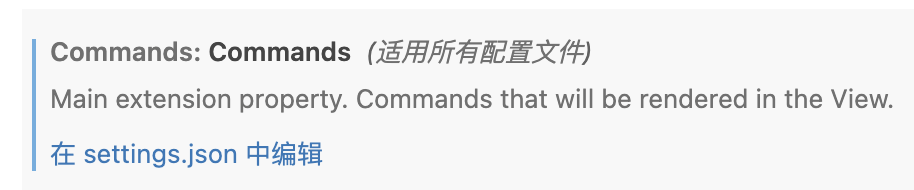
4、 新增命令,可以配置在statusBar中添加快捷按键
{
  "extensions.autoCheckUpdates": false,
  "extensions.autoUpdate": false,
  "remote.downloadExtensionsLocally": true,
  "workbench.colorTheme": "Visual Studio Light - C++",
  "cmake.showOptionsMovedNotification": false,
  "commands.commands": {

    "run push_to_remote": {.       // 这里是新增命令的名字
      "command": "workbench.action.tasks.runTask", // vscode中用于执行task的指令
      "args": "Run push_to_remote",  // 这里就是tasks.json里task的label
      "statusBar": {
        "text": "↗️push_to_remote"
      }
    }
  },
  "git.autoRepositoryDetection": "subFolders",
  "git.detectSubmodulesLimit": 100
}
保存后,底部status bar就会出现这个新按键。

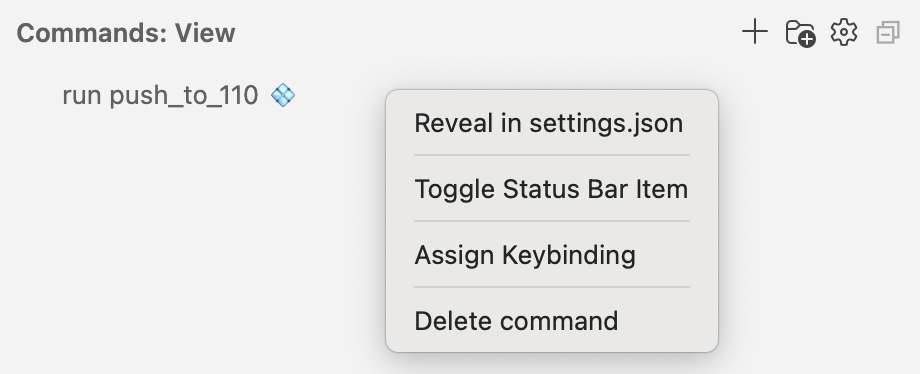
5、插件界面会出现新增的命令,右键可以给该task绑定快捷键
补充
如果不需要添加按键到底部status bar,只需要快捷键执行,就不用Commands插件了,按如下步骤即可:
1、打开命令面板(Ctrl+Shift+P / Cmd+Shift+P)
2、输入 “Preferences: Open Keyboard Shortcuts (JSON)” → 回车
3、在 keybindings.json 中添加如下配置:
{
    "key": "cmd+shift+1",            // 设定你想要的快捷键
    "command": "workbench.action.tasks.runTask", // vscode中用于执行task的指令
    "args": "Run push_to_110"        // 这里必须是 tasks.json 里 task 的 label
}

Agent 垂直技术社区,欢迎活跃、内容共建。
更多推荐


 2
2 0
0- 0


 已为社区贡献1条内容

所有评论(0)