Qwen3.5-122B-A10B 部署以及测试
资源开通:
GPU计算型 gn7e,ecs.gn7e-c16g1.32xlarge,128vCPU 1000GiB
8 * NVIDIA A100 80G
OS镜像选择(测试阶段免去组件预安装困扰):
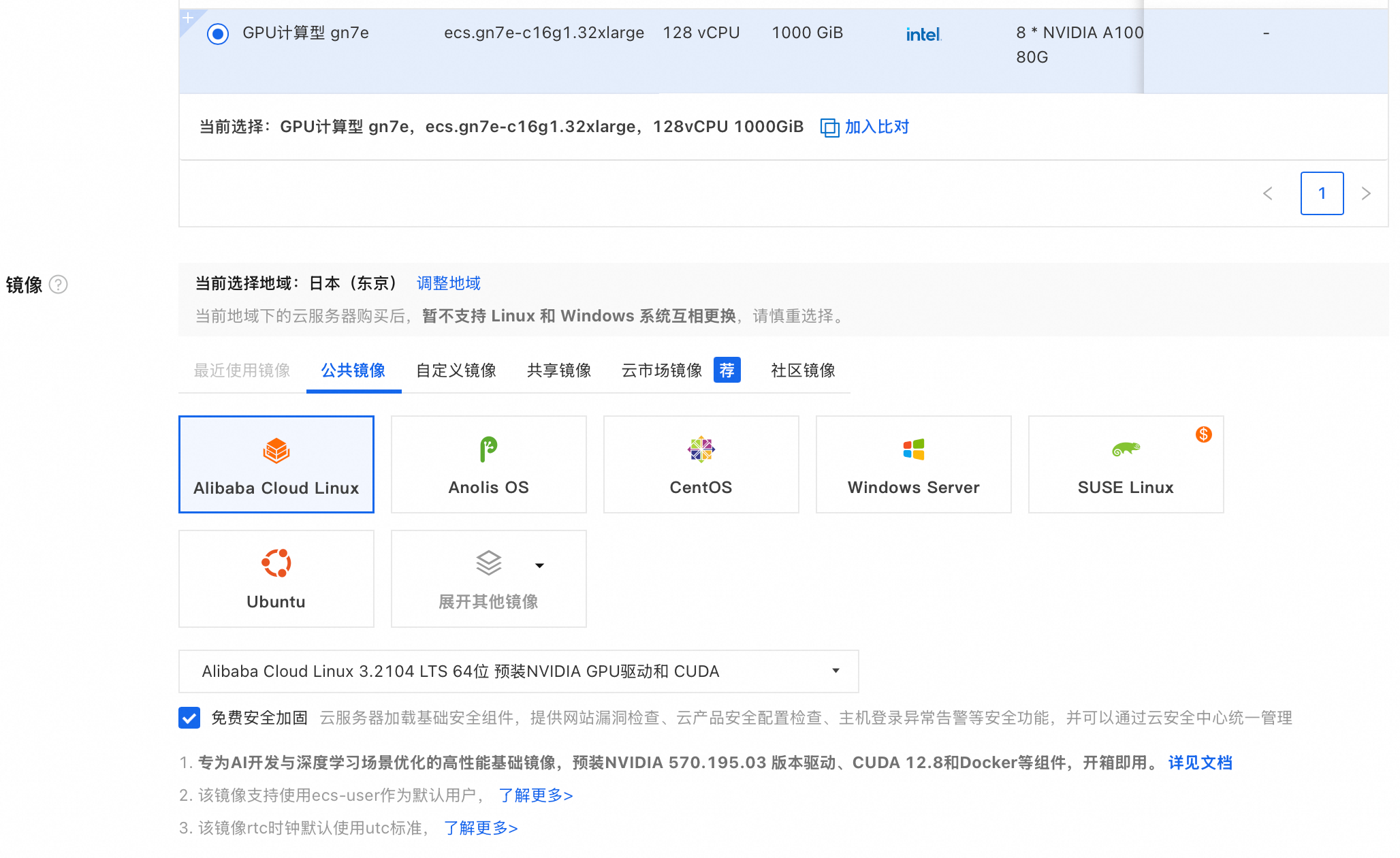
安装GPU驱动:
如果选用"安装 GPU 驱动"会基于如下脚本安装GPU驱动
“#!/bin/sh
#Please input version to install
DRIVER_VERSION=“570.195.03”
CUDA_VERSION=“12.8.1”
CUDNN_VERSION=“9.8.0.87”
IS_INSTALL_eRDMA=“FALSE”
IS_INSTALL_RDMA=“FALSE”
INSTALL_DIR=“/root/auto_install”
#using .run to install driver and cuda
auto_install_script=“auto_install_v4.0.sh”
script_download_url=(curlhttp://100.100.100.200/latest/meta−data/source−address∣head−1)"/opsx/ecs/linux/binary/script/(curl http://100.100.100.200/latest/meta-data/source-address | head -1)"/opsx/ecs/linux/binary/script/(curlhttp://100.100.100.200/latest/meta−data/source−address∣head−1)"/opsx/ecs/linux/binary/script/{auto_install_script}"
echo $script_download_url
rm -rf $INSTALL_DIR
mkdir -p $INSTALL_DIR
cd $INSTALL_DIR && wget -t 10 --timeout=10 $script_download_url && bash INSTALLDIR/{INSTALL_DIR}/INSTALLDIR/{auto_install_script} $DRIVER_VERSION $CUDA_VERSION $CUDNN_VERSION $IS_INSTALL_RDMA $IS_INSTALL_eRDMA ”
分配公网以及200M 带宽,加速镜像拉取。
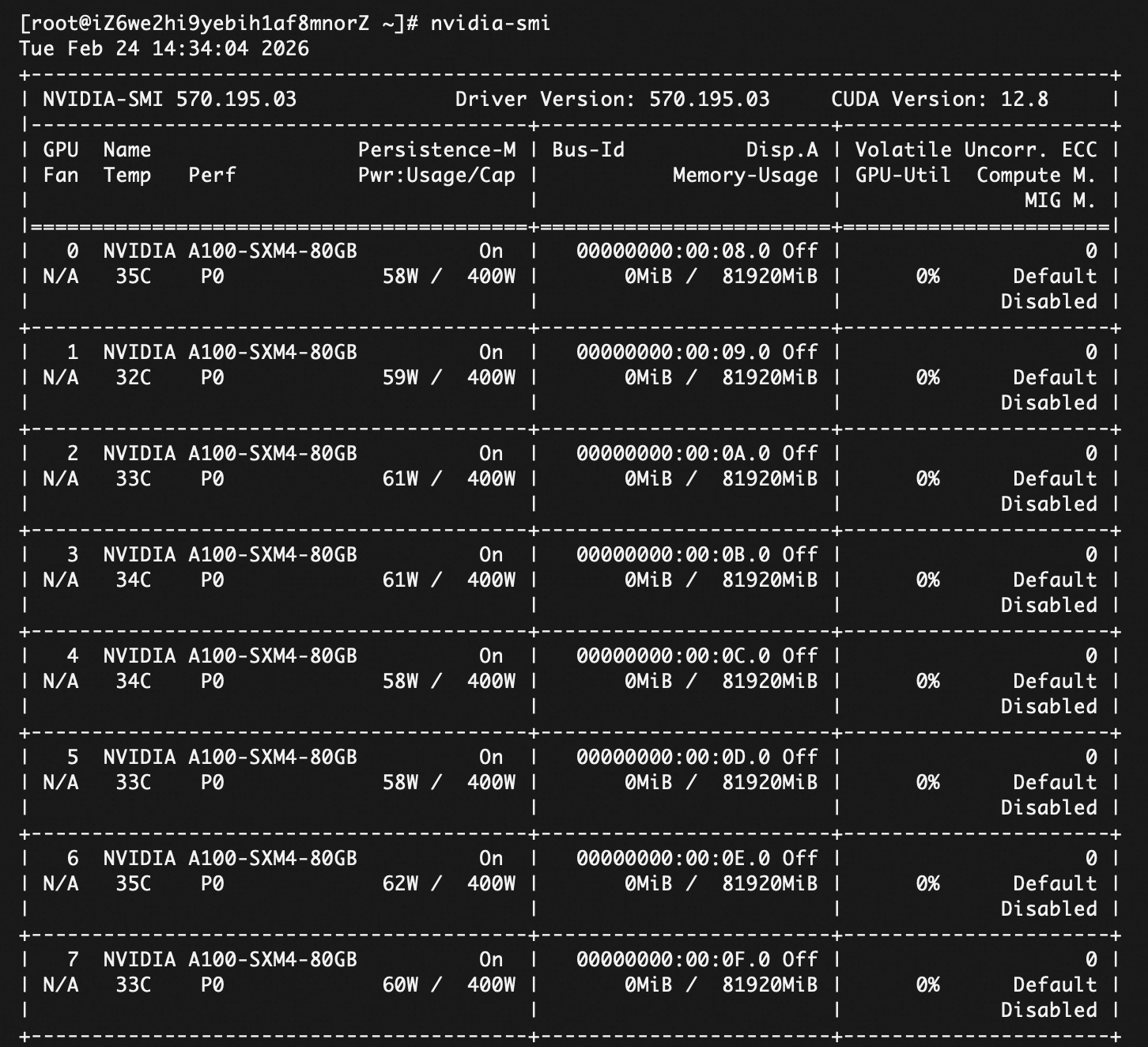
检查GPU服务器安装情况
执行: nvidia-smi
挂载云盘
1.直接格式化整块硬盘(制作文件系统)
lsblk
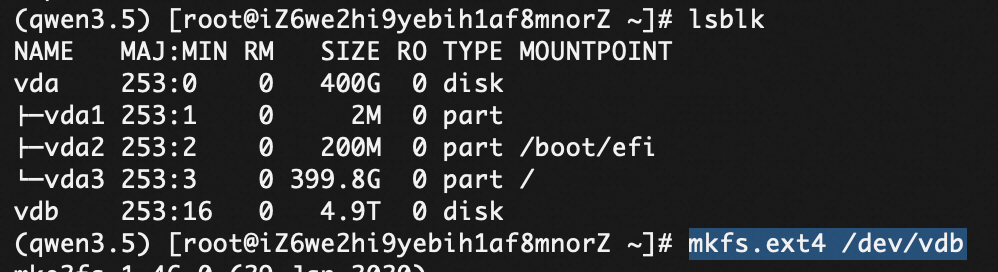 mkfs.ext4 /dev/vdb
2.挂载云盘
mkdir -p /data
mount /dev/vdb /data
开机自启动
df -h 看看挂载效果,然后:
echo ‘/dev/vdb /data ext4 defaults 0 0’ >> /etc/fstab
Miniconda安装
用miniconda做环境隔离,OS自带的python版本可能低一些,随意改动版本可能影响其他项目。
wget https://repo.anaconda.com/miniconda/Miniconda3-latest-Linux-x86_64.sh

bash Miniconda3-latest-Linux-x86_64.sh
// 一路输入 yes 或按回车,安装完后重启终端//
conda tos accept --override-channels --channel https://repo.anaconda.com/pkgs/main
conda tos accept --override-channels --channel https://repo.anaconda.com/pkgs/r
conda tos accept --override-channels --channel https://repo.anaconda.com/pkgs/r
conda init
source ~/.bashrc
成功后,你的命令行前缀应该会变成 (base)
创建Qwen3.5的conda部署环境:
conda create -n qwen3.5 python=3.10 -y
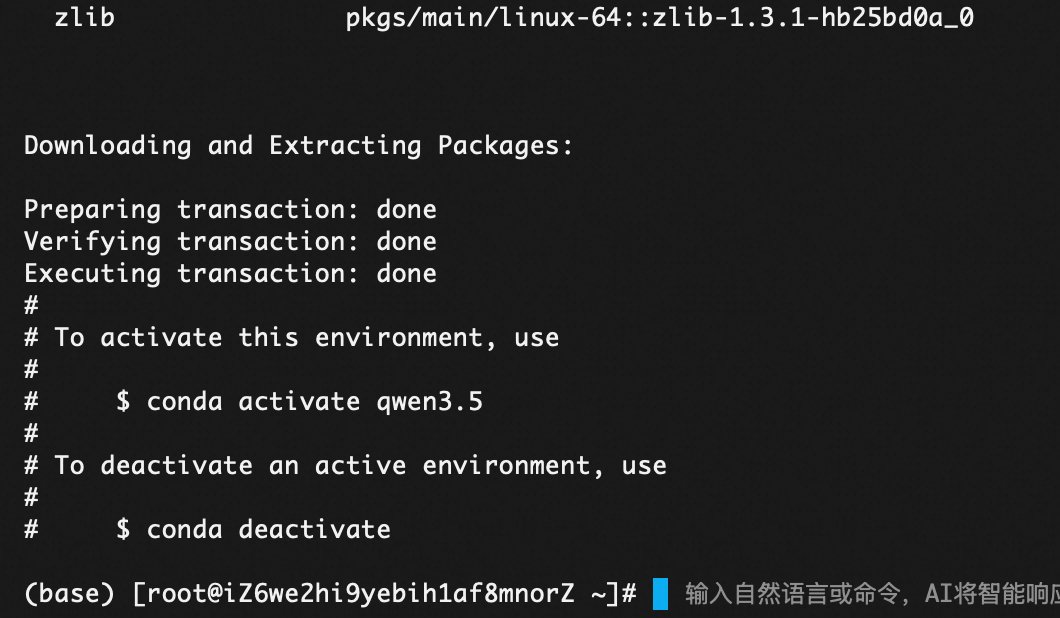
登陆qwen3.5环境
conda activate qwen3.5
pip install vllm
pip install uv
//用了 uv 加速安装
uv pip install vllm --torch-backend=auto --extra-index-url https://wheels.vllm.ai/nightly
//nightly版本是每日构建版本,如果运行遇到bug问题,可以随时退回到稳定版(uv pip install vllm)。
//pip install ‘vllm>=0.10.2’
点击 New token(或者用现有的),角色选 Read 即可,生成后复制那串长长的代码(比如 hf_xxxxxxx…)。
3. 安装工具
pip install -U “huggingface_hub[cli]”
/*python版本需要3.9+才行
wget https://www.python.org/ftp/python/3.9.0/Python-3.9.0.tgz && tar -xzf Python-3.9.0.tgz
cd Python-3.9.0 && ./configure --enable-optimizations */
下载模型
cd /data/models
nohup hf download Qwen/Qwen3.5-122B-A10B --local-dir Qwen3.5-122B-A10B > download.log 2>&1 &
挂在后台,防止网络断了影响下载。 痛点是下载很慢很慢,200M的情况下下载12小时
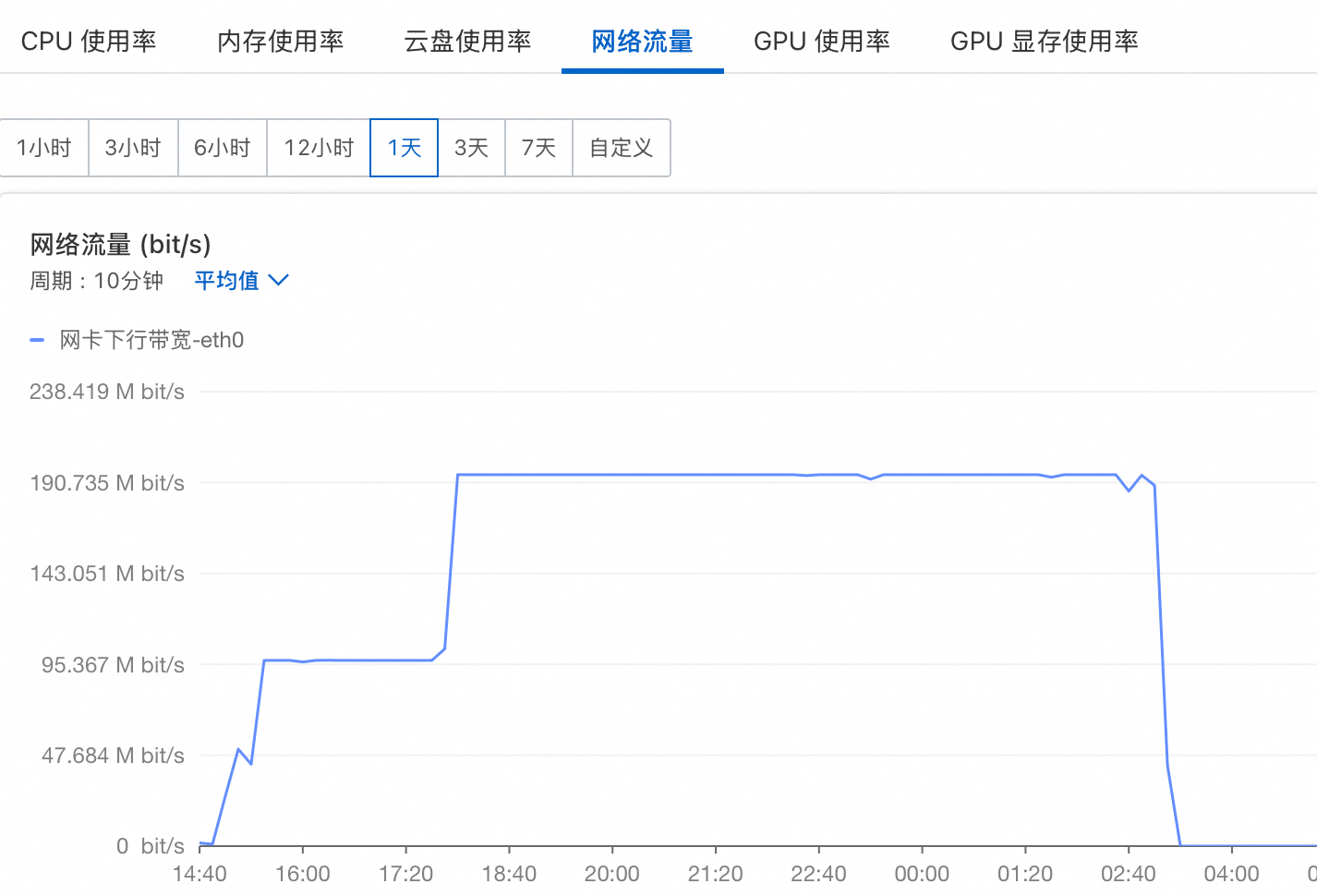
vllm 加载模型:
检查环境:
python -c “import torch; print(f’PyTorch Version: {torch.version}‘); print(f’CUDA Version: {torch.version.cuda}’)”
如果输出了 PyTorch 2.10.0 和 CUDA 12.9应该没问题,否则需要export LD_LIBRARY_PATH=“” 清空环境变量:
(qwen3.5) [root@iZ6we2hi9yebih1af8mnorZ models]# export LD_LIBRARY_PATH=“”
(qwen3.5) [root@iZ6we2hi9yebih1af8mnorZ models]# vllm serve /data/models/Qwen3.5-122B-A10B --port 8000 --tensor-parallel-size 8 --max-model-len 262144 --reasoning-parser qwen3
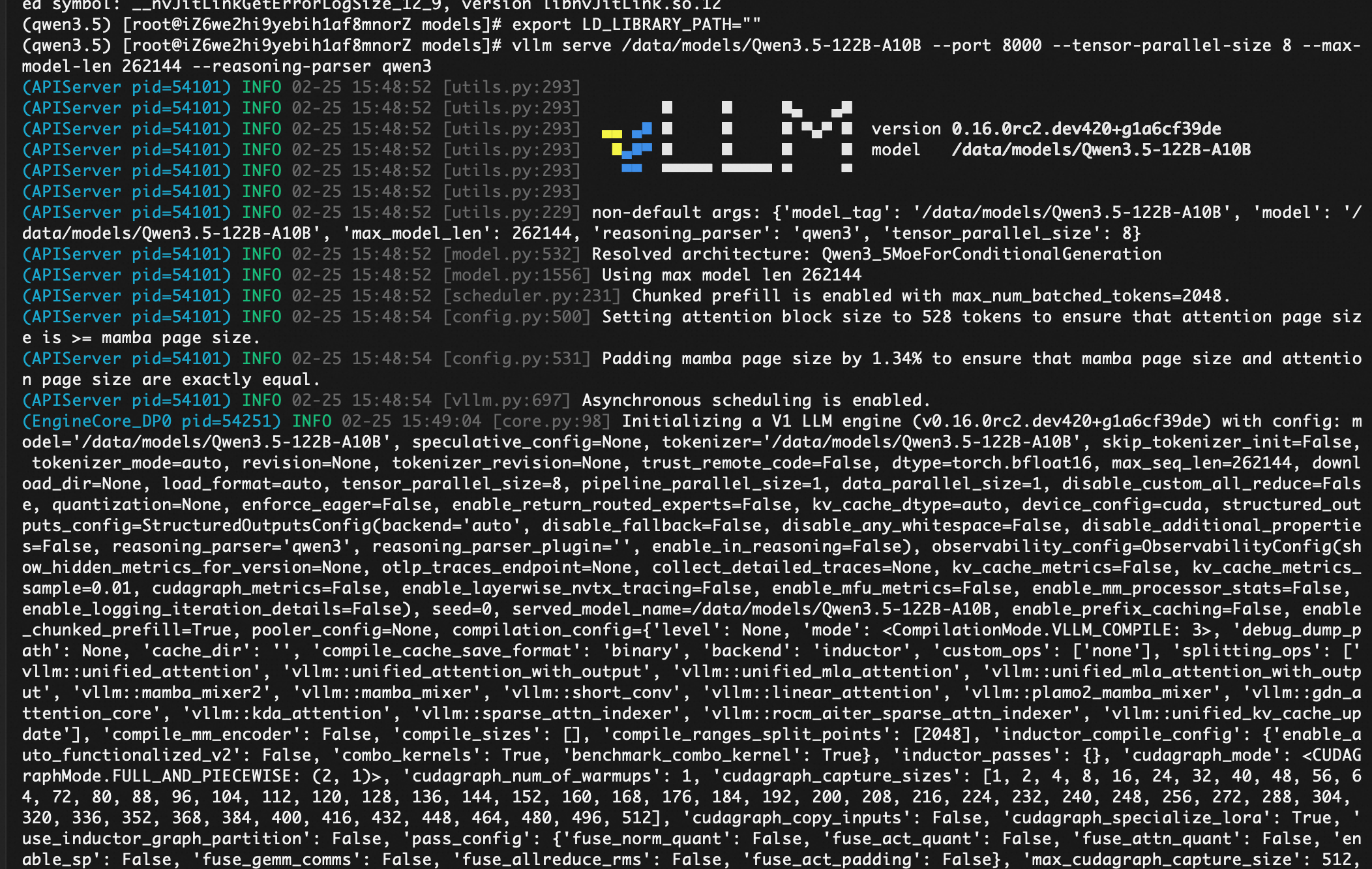
(qwen3.5) [root@iZ6we2hi9yebih1af8mnorZ models]# vllm serve /data/models/Qwen3.5-122B-A10B --port 8000 --tensor-parallel-size 8 --max-model-len 262144 --reasoning-parser qwen3
(APIServer pid=54101) INFO 02-25 15:48:52 [utils.py:293]
(APIServer pid=54101) INFO 02-25 15:48:52 [utils.py:293] █ █ █▄ ▄█
(APIServer pid=54101) INFO 02-25 15:48:52 [utils.py:293] ▄▄ ▄█ █ █ █ ▀▄▀ █ version 0.16.0rc2.dev420+g1a6cf39de
(APIServer pid=54101) INFO 02-25 15:48:52 [utils.py:293] █▄█▀ █ █ █ █ model /data/models/Qwen3.5-122B-A10B
(APIServer pid=54101) INFO 02-25 15:48:52 [utils.py:293] ▀▀ ▀▀▀▀▀ ▀▀▀▀▀ ▀ ▀
(APIServer pid=54101) INFO 02-25 15:48:52 [utils.py:293]
(APIServer pid=54101) INFO 02-25 15:48:52 [utils.py:229] non-default args: {‘model_tag’: ‘/data/models/Qwen3.5-122B-A10B’, ‘model’: ‘/data/models/Qwen3.5-122B-A10B’, ‘max_model_len’: 262144, ‘reasoning_parser’: ‘qwen3’, ‘tensor_parallel_size’: 8}
(APIServer pid=54101) INFO 02-25 15:48:52 [model.py:532] Resolved architecture: Qwen3_5MoeForConditionalGeneration
(APIServer pid=54101) INFO 02-25 15:48:52 [model.py:1556] Using max model len 262144
(APIServer pid=54101) INFO 02-25 15:48:52 [scheduler.py:231] Chunked prefill is enabled with max_num_batched_tokens=2048.
(APIServer pid=54101) INFO 02-25 15:48:54 [config.py:500] Setting attention block size to 528 tokens to ensure that attention page size is >= mamba page size.
(APIServer pid=54101) INFO 02-25 15:48:54 [config.py:531] Padding mamba page size by 1.34% to ensure that mamba page size and attention page size are exactly equal.
(APIServer pid=54101) INFO 02-25 15:48:54 [vllm.py:697] Asynchronous scheduling is enabled.
(EngineCore_DP0 pid=54251) INFO 02-25 15:49:04 [core.py:98] Initializing a V1 LLM engine (v0.16.0rc2.dev420+g1a6cf39de) with config: model=‘/data/models/Qwen3.5-122B-A10B’, speculative_config=None, tokenizer=‘/data/models/Qwen3.5-122B-A10B’, skip_tokenizer_init=False, tokenizer_mode=auto, revision=None, tokenizer_revision=None, trust_remote_code=False, dtype=torch.bfloat16, max_seq_len=262144, download_dir=None, load_format=auto, tensor_parallel_size=8, pipeline_parallel_size=1, data_parallel_size=1, disable_custom_all_reduce=False, quantization=None, enforce_eager=False, enable_return_routed_experts=False, kv_cache_dtype=auto, device_config=cuda, structured_outputs_config=StructuredOutputsConfig(backend=‘auto’, disable_fallback=False, disable_any_whitespace=False, disable_additional_properties=False, reasoning_parser=‘qwen3’, reasoning_parser_plugin=‘’, enable_in_reasoning=False), observability_config=ObservabilityConfig(show_hidden_metrics_for_version=None, otlp_traces_endpoint=None, collect_detailed_traces=None, kv_cache_metrics=False, kv_cache_metrics_sample=0.01, cudagraph_metrics=False, enable_layerwise_nvtx_tracing=False, enable_mfu_metrics=False, enable_mm_processor_stats=False, enable_logging_iteration_details=False), seed=0, served_model_name=/data/models/Qwen3.5-122B-A10B, enable_prefix_caching=False, enable_chunked_prefill=True, pooler_config=None, compilation_config={‘level’: None, ‘mode’: <CompilationMode.VLLM_COMPILE: 3>, ‘debug_dump_path’: None, ‘cache_dir’: ‘’, ‘compile_cache_save_format’: ‘binary’, ‘backend’: ‘inductor’, ‘custom_ops’: [‘none’], ‘splitting_ops’: [‘vllm::unified_attention’, ‘vllm::unified_attention_with_output’, ‘vllm::unified_mla_attention’, ‘vllm::unified_mla_attention_with_output’, ‘vllm::mamba_mixer2’, ‘vllm::mamba_mixer’, ‘vllm::short_conv’, ‘vllm::linear_attention’, ‘vllm::plamo2_mamba_mixer’, ‘vllm::gdn_attention_core’, ‘vllm::kda_attention’, ‘vllm::sparse_attn_indexer’, ‘vllm::rocm_aiter_sparse_attn_indexer’, ‘vllm::unified_kv_cache_update’], ‘compile_mm_encoder’: False, ‘compile_sizes’: [], ‘compile_ranges_split_points’: [2048], ‘inductor_compile_config’: {‘enable_auto_functionalized_v2’: False, ‘combo_kernels’: True, ‘benchmark_combo_kernel’: True}, ‘inductor_passes’: {}, ‘cudagraph_mode’: <CUDAGraphMode.FULL_AND_PIECEWISE: (2, 1)>, ‘cudagraph_num_of_warmups’: 1, ‘cudagraph_capture_sizes’: [1, 2, 4, 8, 16, 24, 32, 40, 48, 56, 64, 72, 80, 88, 96, 104, 112, 120, 128, 136, 144, 152, 160, 168, 176, 184, 192, 200, 208, 216, 224, 232, 240, 248, 256, 272, 288, 304, 320, 336, 352, 368, 384, 400, 416, 432, 448, 464, 480, 496, 512], ‘cudagraph_copy_inputs’: False, ‘cudagraph_specialize_lora’: True, ‘use_inductor_graph_partition’: False, ‘pass_config’: {‘fuse_norm_quant’: False, ‘fuse_act_quant’: False, ‘fuse_attn_quant’: False, ‘enable_sp’: False, ‘fuse_gemm_comms’: False, ‘fuse_allreduce_rms’: False, ‘fuse_act_padding’: False}, ‘max_cudagraph_capture_size’: 512, ‘dynamic_shapes_config’: {‘type’: <DynamicShapesType.BACKED: ‘backed’>, ‘evaluate_guards’: False, ‘assume_32_bit_indexing’: False}, ‘local_cache_dir’: None, ‘fast_moe_cold_start’: True, ‘static_all_moe_layers’: []}
(EngineCore_DP0 pid=54251) WARNING 02-25 15:49:04 [multiproc_executor.py:921] Reducing Torch parallelism from 64 threads to 1 to avoid unnecessary CPU contention. Set OMP_NUM_THREADS in the external environment to tune this value as needed.
INFO 02-25 15:49:11 [parallel_state.py:1307] world_size=8 rank=7 local_rank=7 distributed_init_method=tcp://127.0.0.1:36259 backend=nccl
INFO 02-25 15:49:11 [parallel_state.py:1307] world_size=8 rank=4 local_rank=4 distributed_init_method=tcp://127.0.0.1:36259 backend=nccl
INFO 02-25 15:49:12 [parallel_state.py:1307] world_size=8 rank=2 local_rank=2 distributed_init_method=tcp://127.0.0.1:36259 backend=nccl
INFO 02-25 15:49:12 [parallel_state.py:1307] world_size=8 rank=1 local_rank=1 distributed_init_method=tcp://127.0.0.1:36259 backend=nccl
INFO 02-25 15:49:12 [parallel_state.py:1307] world_size=8 rank=6 local_rank=6 distributed_init_method=tcp://127.0.0.1:36259 backend=nccl
INFO 02-25 15:49:12 [parallel_state.py:1307] world_size=8 rank=3 local_rank=3 distributed_init_method=tcp://127.0.0.1:36259 backend=nccl
INFO 02-25 15:49:12 [parallel_state.py:1307] world_size=8 rank=5 local_rank=5 distributed_init_method=tcp://127.0.0.1:36259 backend=nccl
INFO 02-25 15:49:12 [parallel_state.py:1307] world_size=8 rank=0 local_rank=0 distributed_init_method=tcp://127.0.0.1:36259 backend=nccl
INFO 02-25 15:49:13 [pynccl.py:111] vLLM is using nccl==2.27.5
WARNING 02-25 15:49:13 [symm_mem.py:67] SymmMemCommunicator: Device capability 8.0 not supported, communicator is not available.
WARNING 02-25 15:49:13 [symm_mem.py:67] SymmMemCommunicator: Device capability 8.0 not supported, communicator is not available.
WARNING 02-25 15:49:13 [symm_mem.py:67] SymmMemCommunicator: Device capability 8.0 not supported, communicator is not available.
WARNING 02-25 15:49:13 [symm_mem.py:67] SymmMemCommunicator: Device capability 8.0 not supported, communicator is not available.
WARNING 02-25 15:49:13 [symm_mem.py:67] SymmMemCommunicator: Device capability 8.0 not supported, communicator is not available.
WARNING 02-25 15:49:13 [symm_mem.py:67] SymmMemCommunicator: Device capability 8.0 not supported, communicator is not available.
WARNING 02-25 15:49:13 [symm_mem.py:67] SymmMemCommunicator: Device capability 8.0 not supported, communicator is not available.
WARNING 02-25 15:49:13 [symm_mem.py:67] SymmMemCommunicator: Device capability 8.0 not supported, communicator is not available.
INFO 02-25 15:49:14 [parallel_state.py:1535] rank 5 in world size 8 is assigned as DP rank 0, PP rank 0, PCP rank 0, TP rank 5, EP rank 5, EPLB rank N/A
INFO 02-25 15:49:14 [parallel_state.py:1535] rank 2 in world size 8 is assigned as DP rank 0, PP rank 0, PCP rank 0, TP rank 2, EP rank 2, EPLB rank N/A
INFO 02-25 15:49:14 [parallel_state.py:1535] rank 0 in world size 8 is assigned as DP rank 0, PP rank 0, PCP rank 0, TP rank 0, EP rank 0, EPLB rank N/A
INFO 02-25 15:49:14 [parallel_state.py:1535] rank 1 in world size 8 is assigned as DP rank 0, PP rank 0, PCP rank 0, TP rank 1, EP rank 1, EPLB rank N/A
INFO 02-25 15:49:14 [parallel_state.py:1535] rank 4 in world size 8 is assigned as DP rank 0, PP rank 0, PCP rank 0, TP rank 4, EP rank 4, EPLB rank N/A
INFO 02-25 15:49:14 [parallel_state.py:1535] rank 7 in world size 8 is assigned as DP rank 0, PP rank 0, PCP rank 0, TP rank 7, EP rank 7, EPLB rank N/A
INFO 02-25 15:49:14 [parallel_state.py:1535] rank 6 in world size 8 is assigned as DP rank 0, PP rank 0, PCP rank 0, TP rank 6, EP rank 6, EPLB rank N/A
INFO 02-25 15:49:14 [parallel_state.py:1535] rank 3 in world size 8 is assigned as DP rank 0, PP rank 0, PCP rank 0, TP rank 3, EP rank 3, EPLB rank N/A
(Worker_TP0 pid=54323) INFO 02-25 15:49:19 [gpu_model_runner.py:4139] Starting to load model /data/models/Qwen3.5-122B-A10B…
(Worker_TP2 pid=54325) INFO 02-25 15:49:20 [cuda.py:449] Using backend AttentionBackendEnum.FLASH_ATTN for vit attention
(Worker_TP2 pid=54325) INFO 02-25 15:49:20 [mm_encoder_attention.py:78] Using AttentionBackendEnum.FLASH_ATTN for MMEncoderAttention.
(Worker_TP4 pid=54327) INFO 02-25 15:49:20 [cuda.py:449] Using backend AttentionBackendEnum.FLASH_ATTN for vit attention
(Worker_TP4 pid=54327) INFO 02-25 15:49:20 [mm_encoder_attention.py:78] Using AttentionBackendEnum.FLASH_ATTN for MMEncoderAttention.
(Worker_TP0 pid=54323) INFO 02-25 15:49:20 [cuda.py:449] Using backend AttentionBackendEnum.FLASH_ATTN for vit attention
(Worker_TP0 pid=54323) INFO 02-25 15:49:20 [mm_encoder_attention.py:78] Using AttentionBackendEnum.FLASH_ATTN for MMEncoderAttention.
(Worker_TP5 pid=54328) INFO 02-25 15:49:20 [cuda.py:449] Using backend AttentionBackendEnum.FLASH_ATTN for vit attention
(Worker_TP5 pid=54328) INFO 02-25 15:49:20 [mm_encoder_attention.py:78] Using AttentionBackendEnum.FLASH_ATTN for MMEncoderAttention.
(Worker_TP3 pid=54326) INFO 02-25 15:49:20 [cuda.py:449] Using backend AttentionBackendEnum.FLASH_ATTN for vit attention
(Worker_TP3 pid=54326) INFO 02-25 15:49:20 [mm_encoder_attention.py:78] Using AttentionBackendEnum.FLASH_ATTN for MMEncoderAttention.
(Worker_TP7 pid=54330) INFO 02-25 15:49:20 [cuda.py:449] Using backend AttentionBackendEnum.FLASH_ATTN for vit attention
(Worker_TP7 pid=54330) INFO 02-25 15:49:20 [mm_encoder_attention.py:78] Using AttentionBackendEnum.FLASH_ATTN for MMEncoderAttention.
(Worker_TP6 pid=54329) INFO 02-25 15:49:20 [cuda.py:449] Using backend AttentionBackendEnum.FLASH_ATTN for vit attention
(Worker_TP6 pid=54329) INFO 02-25 15:49:20 [mm_encoder_attention.py:78] Using AttentionBackendEnum.FLASH_ATTN for MMEncoderAttention.
(Worker_TP0 pid=54323) INFO 02-25 15:49:20 [unquantized.py:142] Using TRITON backend for Unquantized MoE
(Worker_TP1 pid=54324) INFO 02-25 15:49:20 [cuda.py:449] Using backend AttentionBackendEnum.FLASH_ATTN for vit attention
(Worker_TP1 pid=54324) INFO 02-25 15:49:20 [mm_encoder_attention.py:78] Using AttentionBackendEnum.FLASH_ATTN for MMEncoderAttention.
(Worker_TP0 pid=54323) INFO 02-25 15:49:20 [cuda.py:402] Using FLASH_ATTN attention backend out of potential backends: [‘FLASH_ATTN’, ‘FLASHINFER’, ‘TRITON_ATTN’, ‘FLEX_ATTENTION’].
(Worker_TP2 pid=54325)
检查启动情况nvidia-smi
(qwen3.5) [root@iZ6we2hi9yebih1af8mnorZ ~]# nvidia-smi
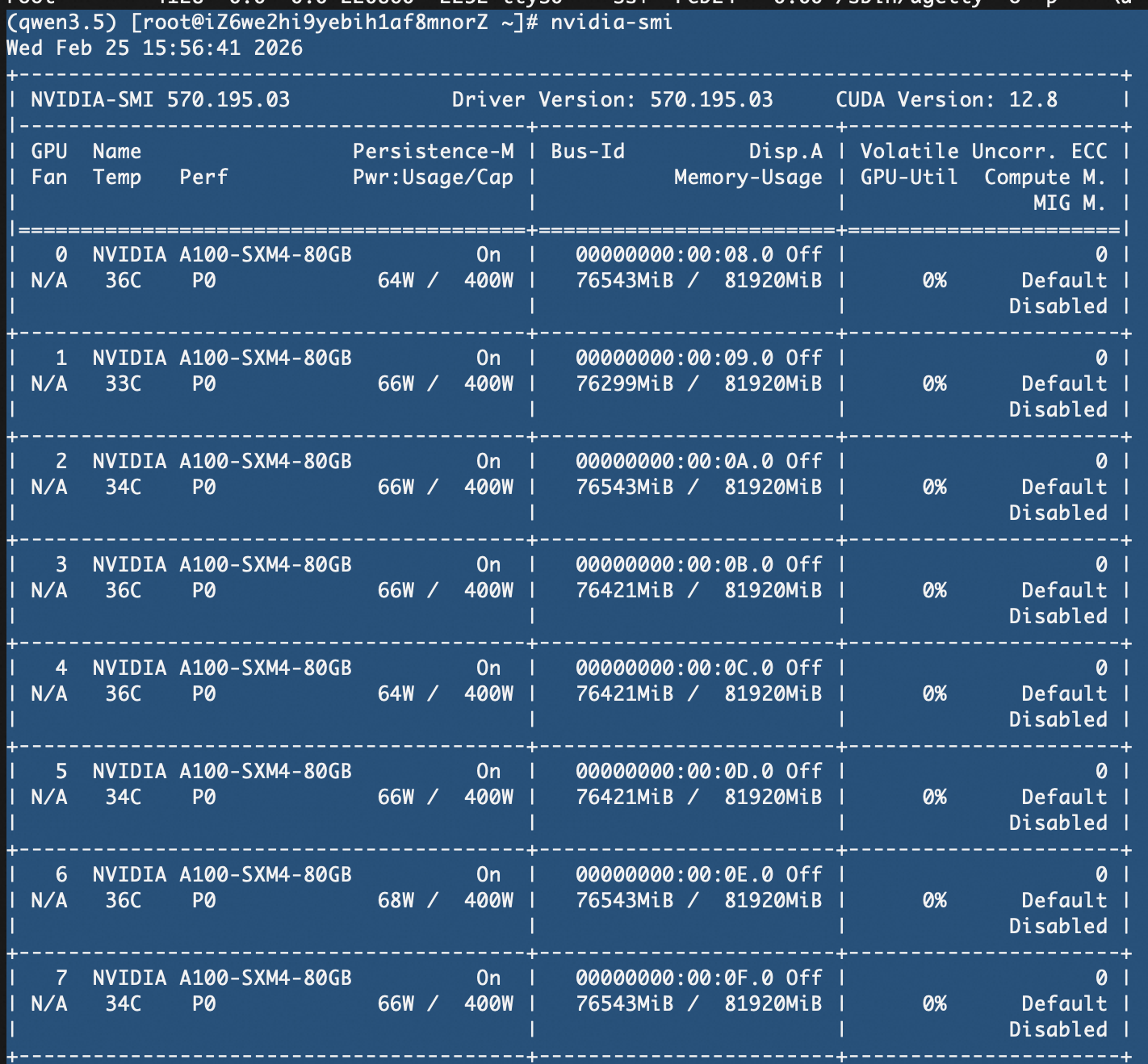
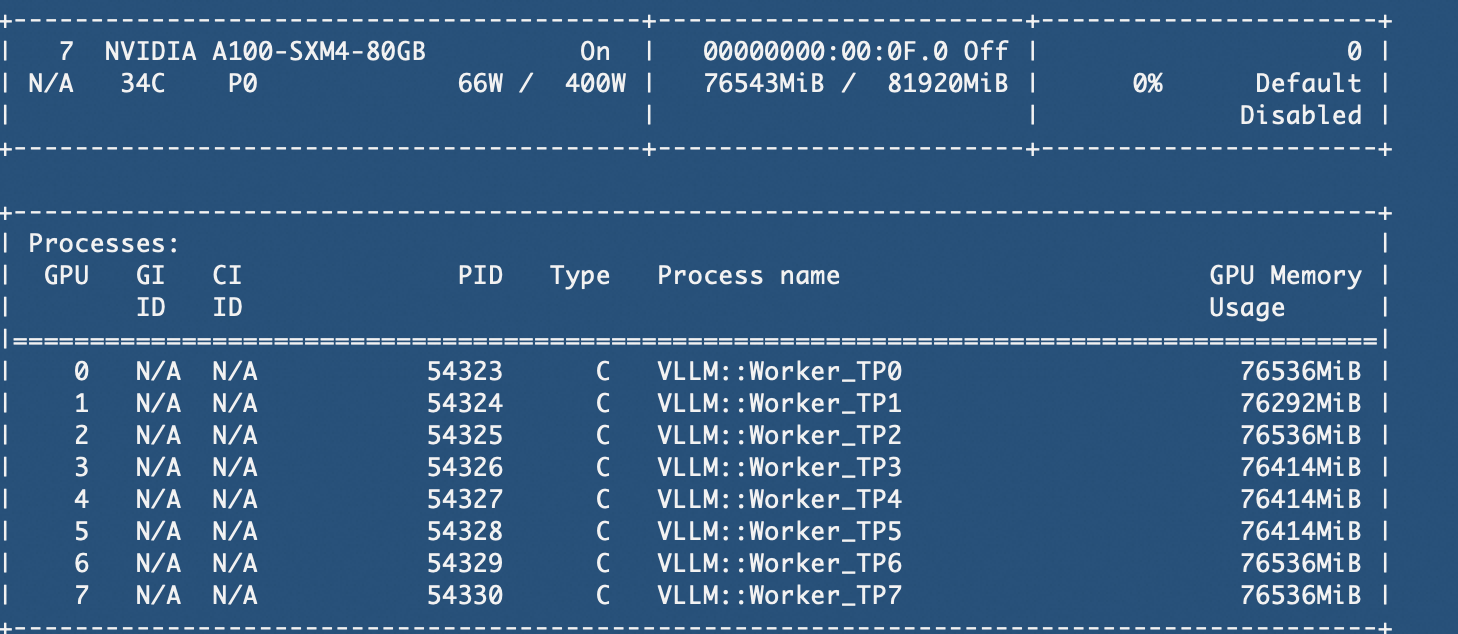
Wed Feb 25 15:56:41 2026
±----------------------------------------------------------------------------------------+
| NVIDIA-SMI 570.195.03 Driver Version: 570.195.03 CUDA Version: 12.8 |
|-----------------------------------------±-----------------------±---------------------+
| GPU Name Persistence-M | Bus-Id Disp.A | Volatile Uncorr. ECC |
| Fan Temp Perf Pwr:Usage/Cap | Memory-Usage | GPU-Util Compute M. |
| | | MIG M. |
|=++======|
| 0 NVIDIA A100-SXM4-80GB On | 00000000:00:08.0 Off | 0 |
| N/A 36C P0 64W / 400W | 76543MiB / 81920MiB | 0% Default |
| | | Disabled |
±----------------------------------------±-----------------------±---------------------+
| 1 NVIDIA A100-SXM4-80GB On | 00000000:00:09.0 Off | 0 |
| N/A 33C P0 66W / 400W | 76299MiB / 81920MiB | 0% Default |
| | | Disabled |
±----------------------------------------±-----------------------±---------------------+
| 2 NVIDIA A100-SXM4-80GB On | 00000000:00:0A.0 Off | 0 |
| N/A 34C P0 66W / 400W | 76543MiB / 81920MiB | 0% Default |
| | | Disabled |
±----------------------------------------±-----------------------±---------------------+
| 3 NVIDIA A100-SXM4-80GB On | 00000000:00:0B.0 Off | 0 |
| N/A 36C P0 66W / 400W | 76421MiB / 81920MiB | 0% Default |
| | | Disabled |
±----------------------------------------±-----------------------±---------------------+
| 4 NVIDIA A100-SXM4-80GB On | 00000000:00:0C.0 Off | 0 |
| N/A 36C P0 64W / 400W | 76421MiB / 81920MiB | 0% Default |
| | | Disabled |
±----------------------------------------±-----------------------±---------------------+
| 5 NVIDIA A100-SXM4-80GB On | 00000000:00:0D.0 Off | 0 |
| N/A 34C P0 66W / 400W | 76421MiB / 81920MiB | 0% Default |
| | | Disabled |
±----------------------------------------±-----------------------±---------------------+
| 6 NVIDIA A100-SXM4-80GB On | 00000000:00:0E.0 Off | 0 |
| N/A 36C P0 68W / 400W | 76543MiB / 81920MiB | 0% Default |
| | | Disabled |
±----------------------------------------±-----------------------±---------------------+
| 7 NVIDIA A100-SXM4-80GB On | 00000000:00:0F.0 Off | 0 |
| N/A 34C P0 66W / 400W | 76543MiB / 81920MiB | 0% Default |
| | | Disabled |
±----------------------------------------±-----------------------±---------------------+
±----------------------------------------------------------------------------------------+
| Processes: |
| GPU GI CI PID Type Process name GPU Memory |
| ID ID Usage |
|=========================================================================================|
| 0 N/A N/A 54323 C VLLM::Worker_TP0 76536MiB |
| 1 N/A N/A 54324 C VLLM::Worker_TP1 76292MiB |
| 2 N/A N/A 54325 C VLLM::Worker_TP2 76536MiB |
| 3 N/A N/A 54326 C VLLM::Worker_TP3 76414MiB |
| 4 N/A N/A 54327 C VLLM::Worker_TP4 76414MiB |
| 5 N/A N/A 54328 C VLLM::Worker_TP5 76414MiB |
| 6 N/A N/A 54329 C VLLM::Worker_TP6 76536MiB |
| 7 N/A N/A 54330 C VLLM::Worker_TP7 76536MiB |
±----------------------------------------------------------------------------------------+
(qwen3.5) [root@iZ6we2hi9yebih1af8mnorZ ~]#
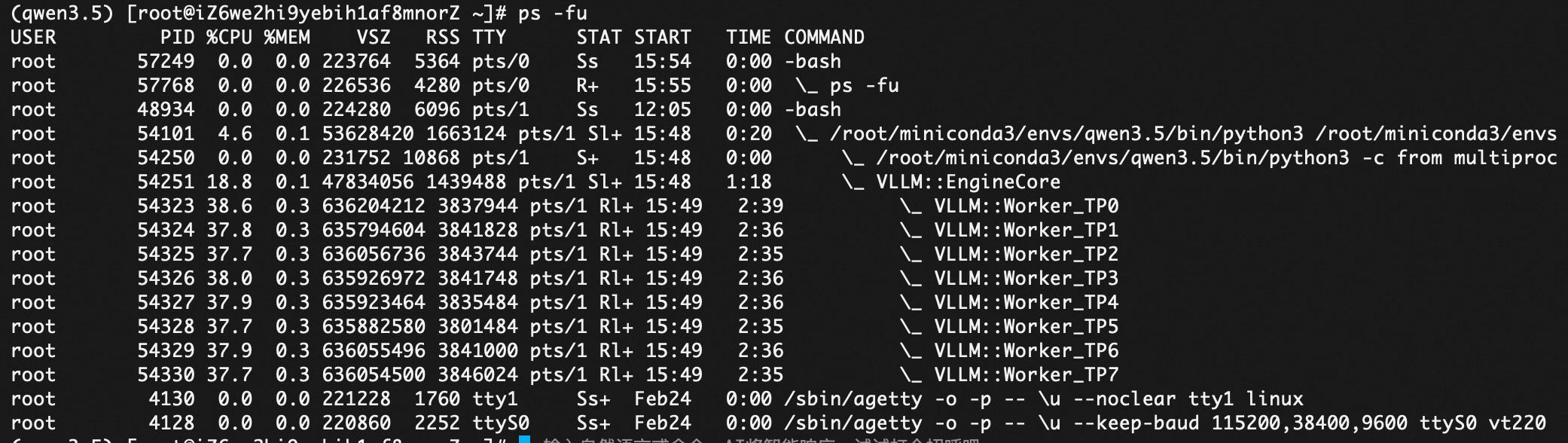
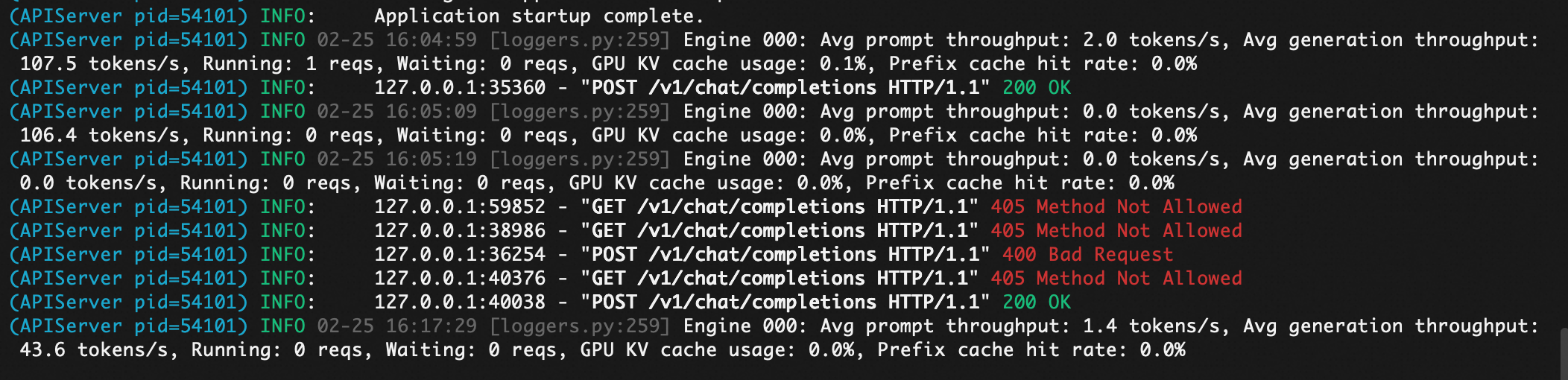
1. 文本场景测试
(qwen3.5) [root@iZ6we2hi9yebih1af8mnorZ ~]# curl http://localhost:8000/v1/chat/completions \
-H “Content-Type: application/json”
-d ‘{
“model”: “/data/models/Qwen3.5-122B-A10B”,
“messages”: [
{“role”: “user”, “content”: “为什么大模型TOKEN对于云计算企业这样重要。”}
]
}’
{“id”:“chatcmpl-8408164c5b0daadb”,“object”:“chat.completion”,“created”:1772006636,“model”:“/data/models/Qwen3.5-122B-A10B”,“choices”:[{“index”:0,“message”:{“role”:“assistant”,“content”:“\n\n对于云计算企业(如 AWS、Azure、阿里云、Google Cloud 等)而言,大模型 Token 的重要性已经超越了单纯的技术计量单位,它正在成为数字经济的新“货币”。\n\nToken 的重要性主要体现在以下五个核心维度:\n\n### 1. 新的核心营收引擎(从卖资源到卖智能)\n过去,云厂商的主要收入来源是基础设施服务(IaaS),如虚拟机、存储、带宽。这些业务竞争激烈,利润率相对透明且较低。\n* MaaS(Model as a Service)的货币化: 大模型时代,云厂商通过 API 提供模型服务。Token 是计费的直接单位(例如:每 1000 个输入 Token 收费 X 元)。\n* 高毛利业务: 相比于卖服务器,卖“智能推理能力”的边际成本随着模型优化和规模效应在降低,但定价权更高。Token 消耗量直接等同于云厂商的 AI 业务收入。\n* 持续性收入: 训练是一次性的,但推理(Inference)是持续发生的。只要用户在运行应用,Token 就在不断消耗,形成稳定的现金流。\n\n### 2. 基础设施调度的“指挥棒”\n云厂商拥有庞大的 GPU 集群,Token 的流量直接决定了硬件资源的调度策略。\n* 算力需求预测: Token 的吞吐量(Tokens Per Second, TPS)直接反映了 GPU 的负载。云厂商根据 Token 预测来采购 H100/B200 等高端芯片,避免资源闲置或短缺。\n* 成本控制: 云厂商的核心竞争力之一是“单位 Token 成本”。通过优化推理引擎、量化模型、混合精度计算,降低处理每个 Token 的电力和硬件成本,直接提升利润率。\n* 网络与存储优化: 长上下文(Long Context)模型需要处理海量 Token,这对云存储(向量数据库)和网络传输带宽提出了新要求,驱动云底层架构的升级。\n\n### 3. 生态锁定与开发者粘性\nToken 是连接开发者、应用和云平台的纽带。\n* API 依赖: 开发者一旦将应用逻辑绑定在特定云厂商的模型 API 上(即消耗其 Token),迁移成本极高(因为模型权重、Prompt 工程、上下文习惯都不同)。\n* 平台效应: 云厂商通过提供“模型 + 算力 + 数据 + 工具链”的一站式服务,让开发者在消耗 Token 的过程中,顺带使用了云厂商的数据库、安全服务和监控工具,形成生态闭环。\n* 应用商店模式: 类似于 App Store,云厂商希望成为 AI 应用的“操作系统”,Token 是应用运行的燃料。\n\n### 4. 市场竞争的“价格锚点”\n在 AI 大模型领域,Token 价格是市场博弈的最敏感指标。\n* 价格战武器: 近期(如 2024 年),国内云厂商(阿里、百度、字节等)纷纷大幅下调 Token 价格,甚至低于成本。这是为了抢占市场份额,培养用户习惯。谁的价格更低,谁就能吸引更多流量。\n* 性能对标: 除了价格,Token 的处理速度(延迟)和上下文窗口大小(能一次处理多少 Token)也是云厂商展示技术实力的关键参数。\n\n### 5. 数据飞轮与反馈闭环\nToken 不仅仅是计费单位,也是数据价值的体现。\n* 用户反馈: 用户生成的输入/输出 Token 包含了真实的业务场景数据。云厂商可以通过脱敏分析这些 Token 数据,了解市场趋势,甚至用于后续模型的微调(Fine-tuning),从而提供更好、更定制化的模型,进一步吸引用户消耗更多 Token。\n* RLHF(人类反馈强化学习): 用户的交互数据是优化模型对齐人类价值观的重要燃料。\n\n### 总结:Token 经济学的本质\n\n对于云计算企业,Token 标志着商业模式的代际跃迁:\n* 过去: 卖的是“铲子”(服务器、存储),用户挖到金子(数据/应用)是用户的事。\n* 现在: 卖的是“金子”(智能本身),Token 是开采金子的度量衡。\n\n一句话概括: Token 是云厂商在 AI 时代的核心计价单位,它连接了算力成本、模型能力与商业变现,决定了云厂商在未来智能基础设施市场中的地位和利润空间。谁能更高效、更低成本地处理和交付 Token,谁就是赢家。”,“refusal”:null,“annotations”:null,“audio”:null,“function_call”:null,“tool_calls”:[],“reasoning”:“Here’s a thinking process that leads to the explanation of why tokens are so important for cloud computing companies in the context of Large Language Models (LLMs):\n\n1. Deconstruct the Question:\n * Subject: Large Model Tokens (LLM Tokens).\n * Target: Cloud Computing Companies (Cloud Providers like AWS, Azure, Google Cloud, Alibaba Cloud, etc.).\n * Core Question: Why are they so important? (What is the strategic, economic, and technical significance?)\n\n2. Initial Brainstorming & Keyword Association:\n * Billing/Monetization: Tokens = Currency. Usage-based pricing.\n * Infrastructure: Compute (GPU), Memory, Network. Tokens drive resource consumption.\n * Ecosystem: API calls, developers, applications built on top.\n * Competition: Who has the best models? Who has the cheapest tokens?\n * Data: Tokens represent data processing.\n * Future: Agent economy, autonomous tasks.\n\n3. Structure the Answer:\n A good explanation should cover multiple dimensions: Economic, Technical/Infrastructure, Strategic/Ecosystem, and Future Trends.\n\n * Introduction: Define what a token is in this context (unit of billing and computation).\n * Point 1: Core Revenue Model (The “Oil” of the AI Era). Direct monetization.\n * Point 2: Resource Scheduling & Cost Control. GPU utilization, efficiency.\n * Point 3: Ecosystem Lock-in & Stickiness. Developers, APIs, platforms.\n * Point 4: Data & Feedback Loop. Training data, RLHF.\n * Point 5: Strategic Differentiation. Price wars, performance per token.\n * Conclusion: Summary of the shift from “Compute” to “Intelligence as a Service.”\n\n4. Drafting the Content (Iterative Refinement):\n\n * Revenue: Cloud providers used to sell VMs, Storage, Bandwidth. Now they sell “Intelligence.” Tokens are the meter for this. It’s a high-margin business compared to raw IaaS. Refinement: Mention MaaS (Model as a Service).\n * Infrastructure: Processing tokens requires GPUs. The volume of tokens determines how many GPUs are needed. It helps in capacity planning. Refinement: Mention inference vs. training costs.\n * Ecosystem: If I build my app on your API, I use your tokens. Switching costs are high. Refinement: Mention “Walled Garden” effect.\n * Pricing Strategy: Price per token is a key competitive metric. Lower price attracts more users. Refinement: Mention the “Price War” (e.g., DeepSeek, Alibaba recently).\n * Value Perception: Tokens aren’t just characters; they represent complexity. Refinement: Distinguish between input/output tokens.\n\n5. Polishing and Deepening (Adding Professional Context):\n * Analogy: Compare tokens to electricity (kWh) or gas (gallons).\n * Cloud Provider Perspective: They want to sell everything. LLMs are the new killer app for their infrastructure.\n * Current Market: Mention the shift from “Training” to “Inference.” Inference (consuming tokens) is the recurring revenue stream.\n * Technical Nuance: Tokenization affects latency and context window.\n\n6. Final Review against the Prompt:\n * Does this answer why it’s important for cloud companies specifically? Yes, focusing on revenue, infrastructure, and strategy.\n * Is the tone appropriate? Professional, analytical.\n\n7. Constructing the Output (similar to the provided good response):\n * Headline: Clear and direct.\n * Core Analogy: “Digital Oil” or “New Currency.”\n * Key Dimensions:\n 1. New Revenue Engine (MaaS): Shift from IaaS/PaaS to MaaS.\n 2. Infrastructure Utilization: GPU demand driver.\n 3. Ecosystem Stickiness: API integration.\n 4. Pricing & Competition: Metric for market share.\n 5. Data Value: Feedback loops.\n * Future Outlook: Agents, autonomous systems.\n\n8. Self-Correction/Edge Case Consideration:\n * Wait, is it just about billing? No, it’s also about technical metrics (throughput). Need to mention throughput (tokens per second).\n * Is it only for public cloud? Mostly, but private cloud/enterprise AI is also relevant.\n * Don’t forget the cost side: Cloud providers also need to minimize cost per token to stay profitable.\n\n9. Final Polish (incorporating into the final response structure):\n * Start with a strong summary.\n * Use bullet points for readability.\n * Add a concluding insight about the “Token Economy.”\n\n (Self-Correction during drafting): Make sure to distinguish between training tokens (one-time, huge cost) and inference tokens (recurring, revenue). Cloud providers care most about inference tokens for recurring revenue.\n\n10. Final Output Generation (Proceed to generate the Chinese response based on these thoughts).\n”},“logprobs”:null,“finish_reason”:“stop”,“stop_reason”:null,“token_ids”:null}],“service_tier”:null,“system_fingerprint”:null,“usage”:{“prompt_tokens”:20,“total_tokens”:2159,“completion_tokens”:2139,“prompt_tokens_details”:null},“prompt_logprobs”:null,“prompt_token_ids”:null,“kv_transfer_params”:null}(qwen3.5) [root@iZ6we2hi9yebih1af8mnorZ ~]#
2. 视频理解:
(qwen3.5) [root@iZ6we2hi9yebih1af8mnorZ models]# cat python_ethan.py
from openai import OpenAI

# 配置客户端连接到本地 vLLM 服务(根据您的启动命令,服务在 8000 端口)
client = OpenAI(
    base_url="http://localhost:8000/v1",
    api_key="dummy"  # vLLM 本地部署时 API key 可随意填写
)

messages = [
    {
        "role": "user",
        "content": [
            {
                "type": "video_url",
                "video_url": {
                    "url": "https://dashscope-463f.oss-accelerate.aliyuncs.com/1d/ec/20260225/e40eed08/20148289-Wlg3snnJ_d94cac079f2e.mp4?Expires=1772097932&OSSAccessKeyId=LTAI5t7xkDxYoFdeAc4nqUeU&Signature=HwQSfAgRDuCI7pqGiEnQjTXSwy0%3D"
                }
            },
            {
                "type": "text",
                "text": """角色设定:你是一位资深电影摄影指导兼 AI 视频生成专家。

任务目标:对提供的视频进行"逆向工程"分析。生成一段极度精准、细节丰富的文本描述,该描述将作为 Text-to-Video 模型的提示词,用于完美还原该视频。

分析维度(请严格按此结构输出):
主体与动作 (Subject & Action):精确描述主体的外貌、材质、服装细节。客观拆解其物理动作、连贯性及微表情。
场景与环境 (Setting & Environment):描述背景布局、地理位置、时间段、天气及氛围细节。
镜头语言 (Cinematography):明确景别(如特写、全景)、摄像机角度(如俯视、平视)、镜头运动(如推、拉、摇、移、手持跟拍)及景深。
光影与色彩 (Lighting & Color):说明光源类型(自然光/人造光)、光照方向、软硬程度(如柔光/强逆光),以及整体的色彩基调或电影级调色风格。
物理与动态 (Physics & Dynamics):描述画面中的物理特性(如风吹草动、流体动态、重力感)及视频播放速度(常规/慢动作/延时)。

最终输出:在完成上述拆解后,请将所有细节融合成一段 100-200字左右的连贯长文本提示词(Prompt),要求语言精炼、客观,去除非视觉的主观抒情词汇,直接可用于 AI 视频生成。"""
            }
        ]
    }
]

# 调用 vLLM 服务
# 注意:由于您使用了 --reasoning-parser qwen3,模型可能会输出思考过程
response = client.chat.completions.create(
    model="/data/models/Qwen3.5-122B-A10B",  # 与 vllm serve 的模型路径保持一致
    messages=messages,
    max_tokens=81920,  # 可根据需要调整,您的模型支持 262K 上下文
    temperature=1.0,
    top_p=0.95,
    presence_penalty=1.5,
    extra_body={
        "top_k": 20,
        #"mm_processor_kwargs": {"fps": 2, "do_sample_frames": True},
        “mm_processor_kwargs": { "do_sample_frames": False},
        #如果视频的fps不确定可以去掉FPS限制,不然分析的时候报mm_processor_kwargs
        },
    },
)

# 输出结果
print("Chat response:", response.choices[0].message.content)

# 如果需要提取推理过程(thinking content),vLLM 的 reasoning parser 会将其分离
# 可以通过以下方式查看是否有 reasoning 内容(取决于 vLLM 版本和解析器实现):
# if hasattr(response.choices[0].message, 'reasoning_content'):
#     print("Reasoning process:", response.choices[0].message.reasoning_content
(qwen3.5) [root@iZ6we2hi9yebih1af8mnorZ models]# python python_ethan2.py
Chat response:
Subject & Action: A young woman is depicted in a supine position, her head tilted back with eyes closed, suggesting relaxation. A thick, viscous white liquid, resembling cream or milk, streams continuously from above directly onto the center of her chest and collarbone area. The liquid spreads across the skin, dripping downwards along the curves of her body. Her hands are placed gently on either side of her torso, fingers spread slightly.
Setting & Environment: The scene takes place indoors, likely a bedroom or studio setting. The background features rich, dark red velvet curtains hanging vertically on the left, providing a textured backdrop. To the far right, a warm lamp is partially visible.
Cinematography: A tight close-up shot focusing primarily on the upper torso and neck. The camera remains relatively static with a very subtle handheld feel. The angle is low, looking slightly upward towards the subject’s face and the falling liquid. Shallow depth of field keeps the focus sharp on the liquid interaction while slightly blurring the background elements.
Lighting & Color: Warm, golden-hour style lighting illuminates the scene from the left side (window light) and possibly a soft fill from the front-right. This creates strong specular highlights on the wet skin and the flowing liquid, emphasizing a glossy, oily texture. The color palette is dominated by warm skin tones, creamy whites of the liquid, and the deep crimson of the curtains.
Physics & Dynamics: The video demonstrates realistic fluid simulation. The white liquid has high viscosity, flowing slowly and coating the surface it touches. Droplets splash slightly upon impact. The movement of the liquid follows gravity, cascading over the curves of the anatomy.
Final Prompt:
A cinematic close-up shot of a woman lying down with her head tilted back as thick white creamy liquid is poured steadily from above onto her chest. The viscous fluid flows over her skin, creating a glossy, wet texture with droplets cascading down her torso. Her hands rest gently by her sides. The background features deep red velvet curtains and soft window light entering from the left, casting warm highlights that accentuate the contours of her body and the fluid dynamics. Photorealistic, 8k resolution, high detail on water physics and skin texture.
报错:
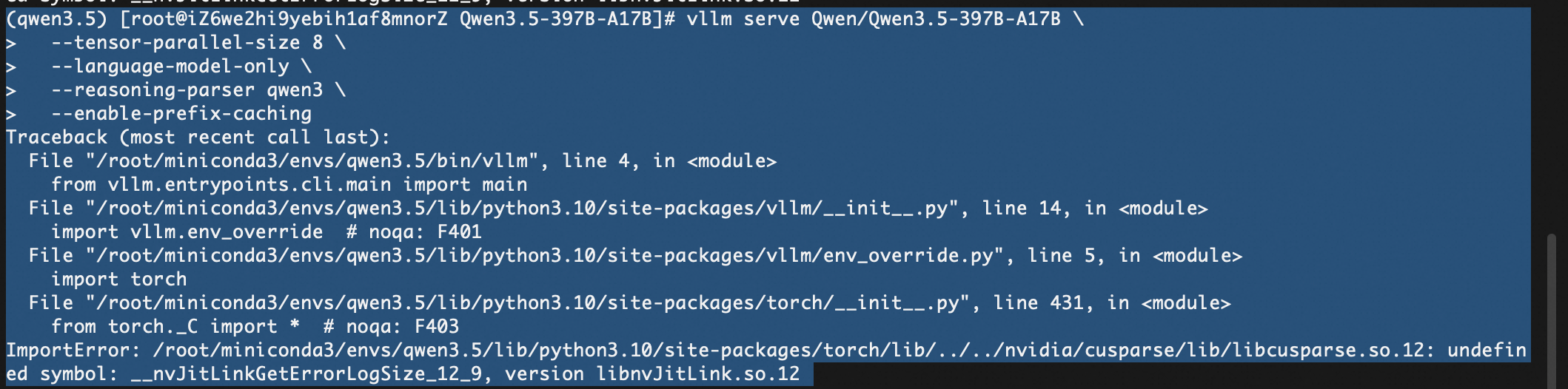
这个错误 ImportError: … undefined symbol: __nvJitLinkGetErrorLogSize_12_9, version libnvJitLink.so.12 通常是由于 PyTorch 捆绑的 NVIDIA CUDA 库版本冲突 或 缺失 导致的。具体来说,libcusparse 库试图调用 libnvJitLink 中的符号,但找不到或版本不匹配。
这在安装较新版本的 vllm 和 torch (特别是 CUDA 12.x 环境) 时比较常见。请尝试以下步骤来解决:
报错2 :
(qwen3.5) [root@iZ6we2hi9yebih1af8mnorZ Qwen3.5-397B-A17B]# vllm serve Qwen/Qwen3.5-397B-A17B --tensor-parallel-size 8 --language-model-only --reasoning-parser qwen3 --enable-prefix-caching
INFO 02-25 10:47:38 [parallel_state.py:1307] world_size=8 rank=4 local_rank=4 distributed_init_method=tcp://127.0.0.1:58137 backend=nccl
INFO 02-25 10:47:38 [parallel_state.py:1307] world_size=8 rank=0 local_rank=0 distributed_init_method=tcp://127.0.0.1:58137 backend=nccl
INFO 02-25 10:47:38 [parallel_state.py:1307] world_size=8 rank=2 local_rank=2 distributed_init_method=tcp://127.0.0.1:58137 backend=nccl
INFO 02-25 10:47:39 [pynccl.py:111] vLLM is using nccl==2.27.5
WARNING 02-25 10:47:40 [symm_mem.py:67] SymmMemCommunicator: Device capability 8.0 not supported, communicator is not available.
WARNING 02-25 10:47:40 [symm_mem.py:67] SymmMemCommunicator: Device capability 8.0 not supported, communicator is not available.
WARNING 02-25 10:47:40 [symm_mem.py:67] SymmMemCommunicator: Device capability 8.0 not supported, communicator is not available.
WARNING 02-25 10:47:40 [symm_mem.py:67] SymmMemCommunicator: Device capability 8.0 not supported, communicator is not available.
WARNING 02-25 10:47:40 [symm_mem.py:67] SymmMemCommunicator: Device capability 8.0 not supported, communicator is not available.
WARNING 02-25 10:47:40 [symm_mem.py:67] SymmMemCommunicator: Device capability 8.0 not supported, communicator is not available.
WARNING 02-25 10:47:40 [symm_mem.py:67] SymmMemCommunicator: Device capability 8.0 not supported, communicator is not available.
WARNING 02-25 10:47:40 [symm_mem.py:67] SymmMemCommunicator: Device capability 8.0 not supported, communicator is not available.
日志详细解析:
backend=nccl 和 vLLM is using nccl==2.27.5:说明 vLLM 成功检测到了你的 8 张显卡,并且初始化了标准的分布式通信后端(NCCL)。
Device capability 8.0:这说明系统检测到你使用的是 A100 显卡(NVIDIA A100 的算力架构代号就是 8.0)。
SymmMemCommunicator… not supported:这是由于你安装了 vLLM 的 nightly(开发抢先版)。 这个版本引入了一项名为“对称内存通信 (Symmetric Memory Communicator)”的极限加速黑科技。但是,这项黑科技在硬件上**强制要求 H100 显卡(算力 9.0)**才能运行。
可以忽略这信息。
报错3:
(Worker_TP3 pid=45631) ERROR 02-25 11:02:18 [gpu_model_runner.py:4234] Failed to load model - not enough GPU memory. Try lowering --gpu-memory-utilization to free memory for weights, increasing --tensor-parallel-size, or using --quantization. See https://docs.vllm.ai/en/latest/configuration/conserving_memory/ for more tips. (original error: CUDA out of memory. Tried to allocate 1024.00 MiB. GPU 3 has a total capacity of 79.25 GiB of which 556.94 MiB is free. Including non-PyTorch memory, this process has 78.70 GiB memory in use. Of the allocated memory 77.13 GiB is allocated by PyTorch, and 11.76 MiB is reserved by PyTorch but unallocated. If reserved but unallocated memory is large try setting PYTORCH_ALLOC_CONF=expandable_segments:True to avoid fragmentation. See documentation for Memory Management (https://pytorch.org/docs/stable/notes/cuda.html#environment-variables))
🚨 为什么会显存溢出?(残酷的数学题)
模型有多大?
Qwen3.5-397B 包含 3970 亿个参数。
需要多少显存?
默认情况下,模型是以 bfloat16(半精度,每个参数占 2 字节)加载的。
3970亿 × 2 字节 ≈ 794 GB 的纯权重体积。
你拥有多少显存?
根据报错 GPU 3 has a total capacity of 79.25 GiB,说明你是 8 张 80GB 的显卡(比如 A100/H100 80G)。
8 × 80 GB = 640 GB 的总显存。
结论:794 GB 的模型硬塞进 640 GB 的显卡里,连仅仅装下模型权重都不够,更别提推理时还需要预留 KV Cache 的显存了。
参考:
https://qwen.ai/blog?id=4074cca80393150c248e508aa62983f9cb7d27cd&from=research.latest-advancements-list
https://huggingface.co/Qwen/Qwen3.5-122B-A10B
https://modelscope.cn/models/Qwen/Qwen3.5-122B-A10B
https://docs.vllm.ai/projects/recipes/en/latest/Qwen/Qwen3.5.html#multimodal
https://docs.vllm.ai/en/latest/configuration/conserving_memory/
https://zhuanlan.zhihu.com/p/2006808243356333543

Agent 垂直技术社区,欢迎活跃、内容共建。
更多推荐

 18
18 0
0- 0


 已为社区贡献2条内容

所有评论(0)