Qwen3.5-397B-A17B部署
资源开通:
GPU计算型 gn7e,ecs.gn7e-c16g1.32xlarge,128vCPU 1000GiB
8 * NVIDIA A100 80G
OS镜像选择(测试阶段免去组件预安装困扰):
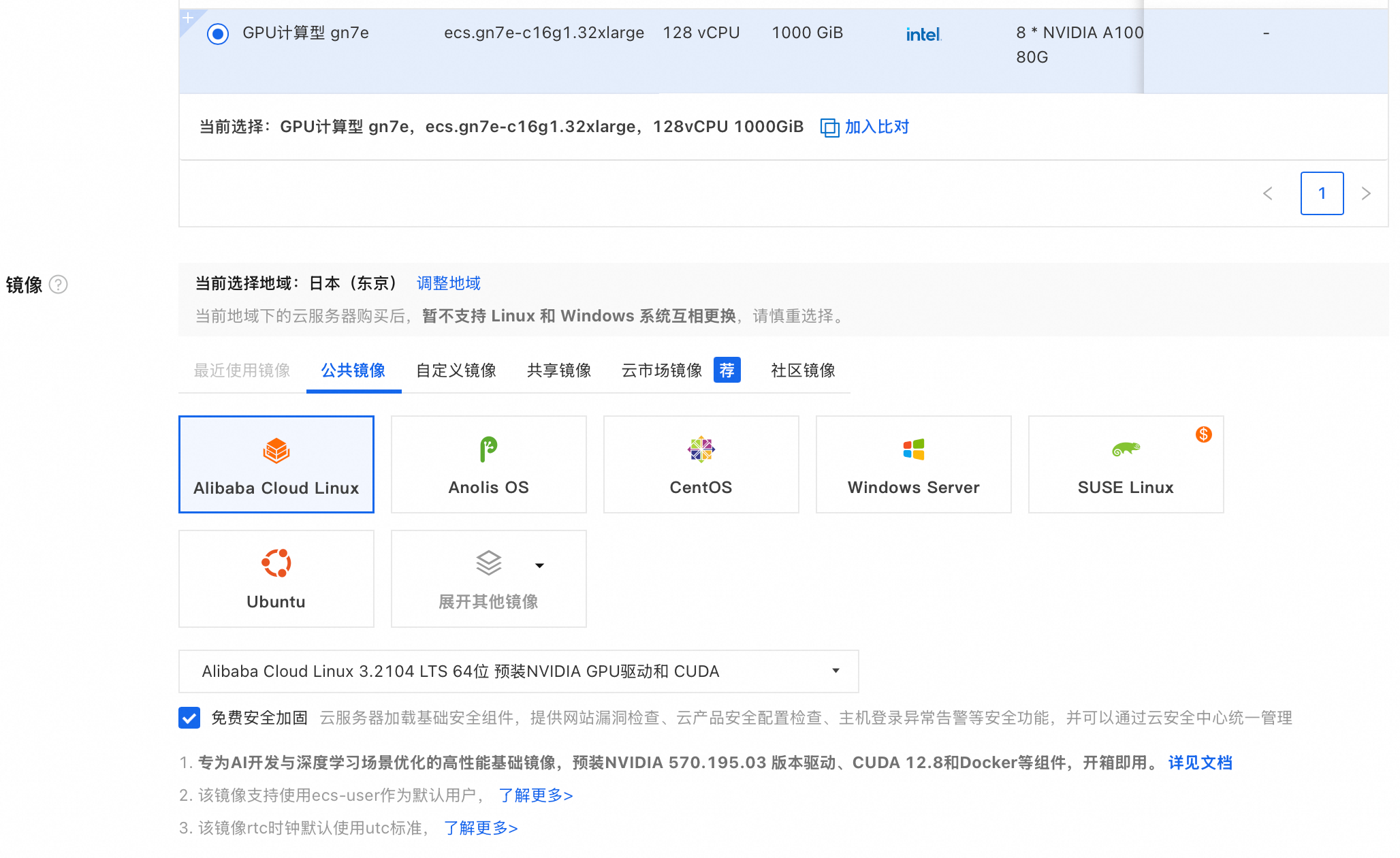
安装GPU驱动:
如果选用"安装 GPU 驱动"会基于如下脚本安装GPU驱动
“#!/bin/sh
#Please input version to install
DRIVER_VERSION=“570.195.03”
CUDA_VERSION=“12.8.1”
CUDNN_VERSION=“9.8.0.87”
IS_INSTALL_eRDMA=“FALSE”
IS_INSTALL_RDMA=“FALSE”
INSTALL_DIR=“/root/auto_install”
#using .run to install driver and cuda
auto_install_script=“auto_install_v4.0.sh”
script_download_url=(curlhttp://100.100.100.200/latest/meta−data/source−address∣head−1)"/opsx/ecs/linux/binary/script/(curl http://100.100.100.200/latest/meta-data/source-address | head -1)"/opsx/ecs/linux/binary/script/(curlhttp://100.100.100.200/latest/meta−data/source−address∣head−1)"/opsx/ecs/linux/binary/script/{auto_install_script}"
echo $script_download_url
rm -rf $INSTALL_DIR
mkdir -p $INSTALL_DIR
cd $INSTALL_DIR && wget -t 10 --timeout=10 $script_download_url && bash INSTALLDIR/{INSTALL_DIR}/INSTALLDIR/{auto_install_script} $DRIVER_VERSION $CUDA_VERSION $CUDNN_VERSION $IS_INSTALL_RDMA $IS_INSTALL_eRDMA ”
分配公网以及200M 带宽,加速镜像拉取。
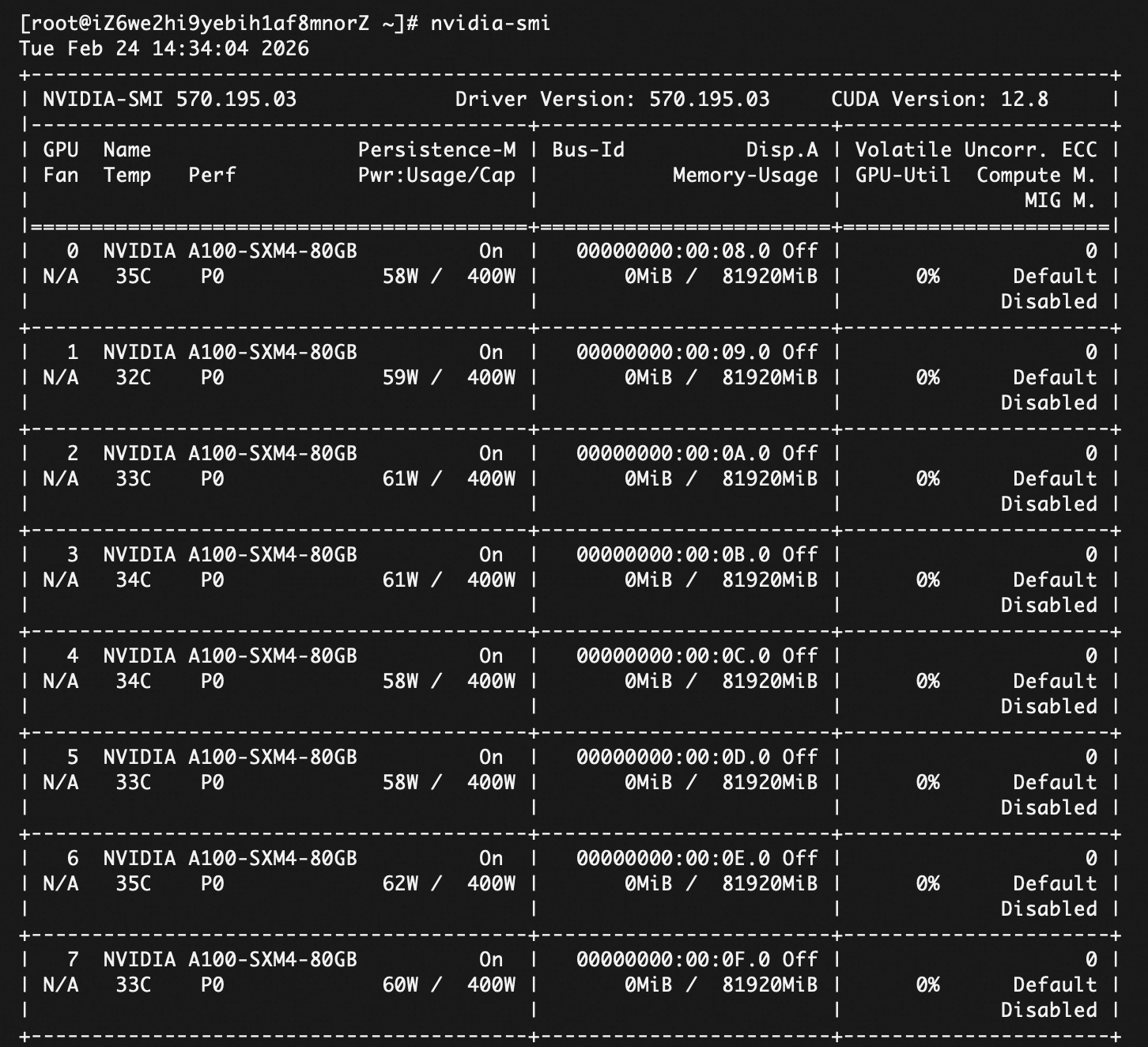
检查GPU服务器安装情况
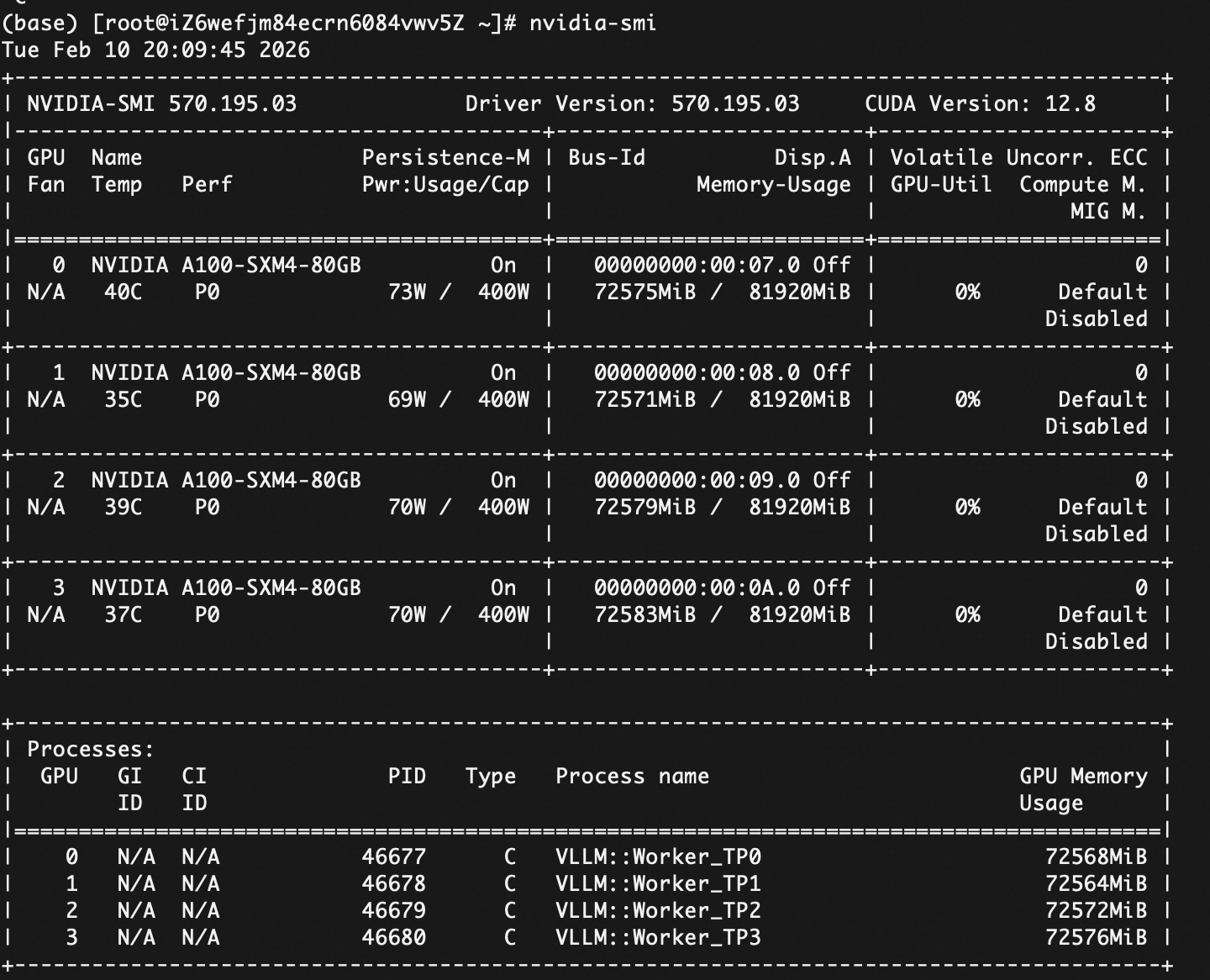
执行: nvidia-smi
挂载云盘
1.直接格式化整块硬盘(制作文件系统)
lsblk
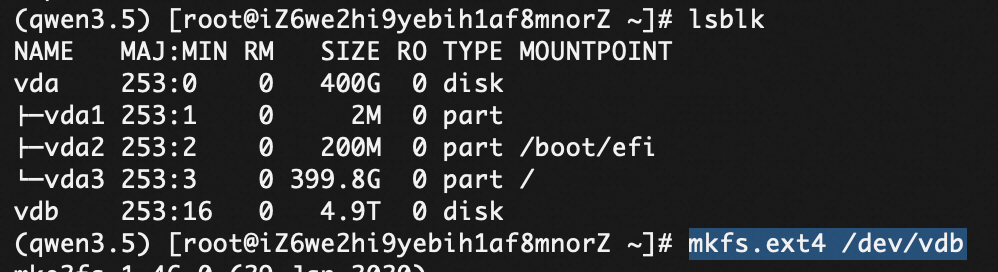 mkfs.ext4 /dev/vdb
2.挂载云盘
mkdir -p /data
mount /dev/vdb /data
开机自启动
df -h 看看挂载效果,然后:
echo ‘/dev/vdb /data ext4 defaults 0 0’ >> /etc/fstab
Miniconda安装
用miniconda做环境隔离,OS自带的python版本可能低一些,随意改动版本可能影响其他项目。
wget https://repo.anaconda.com/miniconda/Miniconda3-latest-Linux-x86_64.sh

bash Miniconda3-latest-Linux-x86_64.sh
// 一路输入 yes 或按回车,安装完后重启终端//
conda tos accept --override-channels --channel https://repo.anaconda.com/pkgs/main
conda tos accept --override-channels --channel https://repo.anaconda.com/pkgs/r
conda tos accept --override-channels --channel https://repo.anaconda.com/pkgs/r
conda init
source ~/.bashrc
成功后,你的命令行前缀应该会变成 (base)
创建Qwen3.5的conda部署环境:
conda create -n qwen3.5 python=3.10 -y
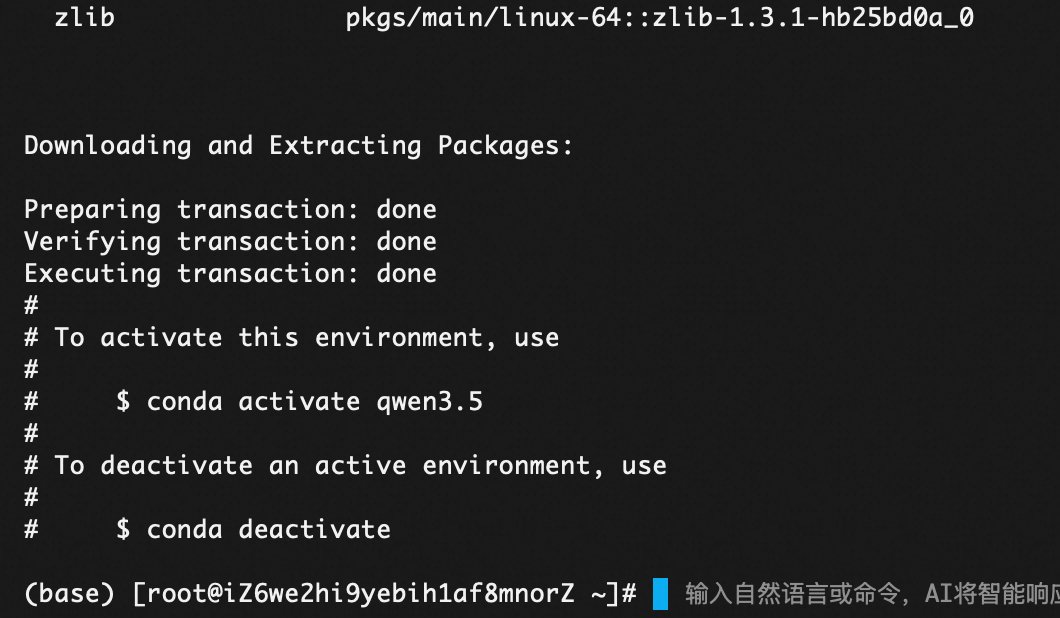
登陆qwen3.5环境
conda activate qwen3.5
pip install vllm
pip install uv
//用了 uv 加速安装
uv pip install vllm --torch-backend=auto --extra-index-url https://wheels.vllm.ai/nightly
//nightly版本是每日构建版本,如果运行遇到bug问题,可以随时退回到稳定版(uv pip install vllm)。
//pip install ‘vllm>=0.10.2’
点击 New token(或者用现有的),角色选 Read 即可,生成后复制那串长长的代码(比如 hf_xxxxxxx…)。
3. 安装工具
pip install -U “huggingface_hub[cli]”
/*python版本需要3.9+才行
wget https://www.python.org/ftp/python/3.9.0/Python-3.9.0.tgz && tar -xzf Python-3.9.0.tgz
cd Python-3.9.0 && ./configure --enable-optimizations */
下载模型
cd /data/models
nohup hf download Qwen/Qwen3.5-397B-A17B --local-dir Qwen3.5-397B-A17B > download.log 2>&1 &
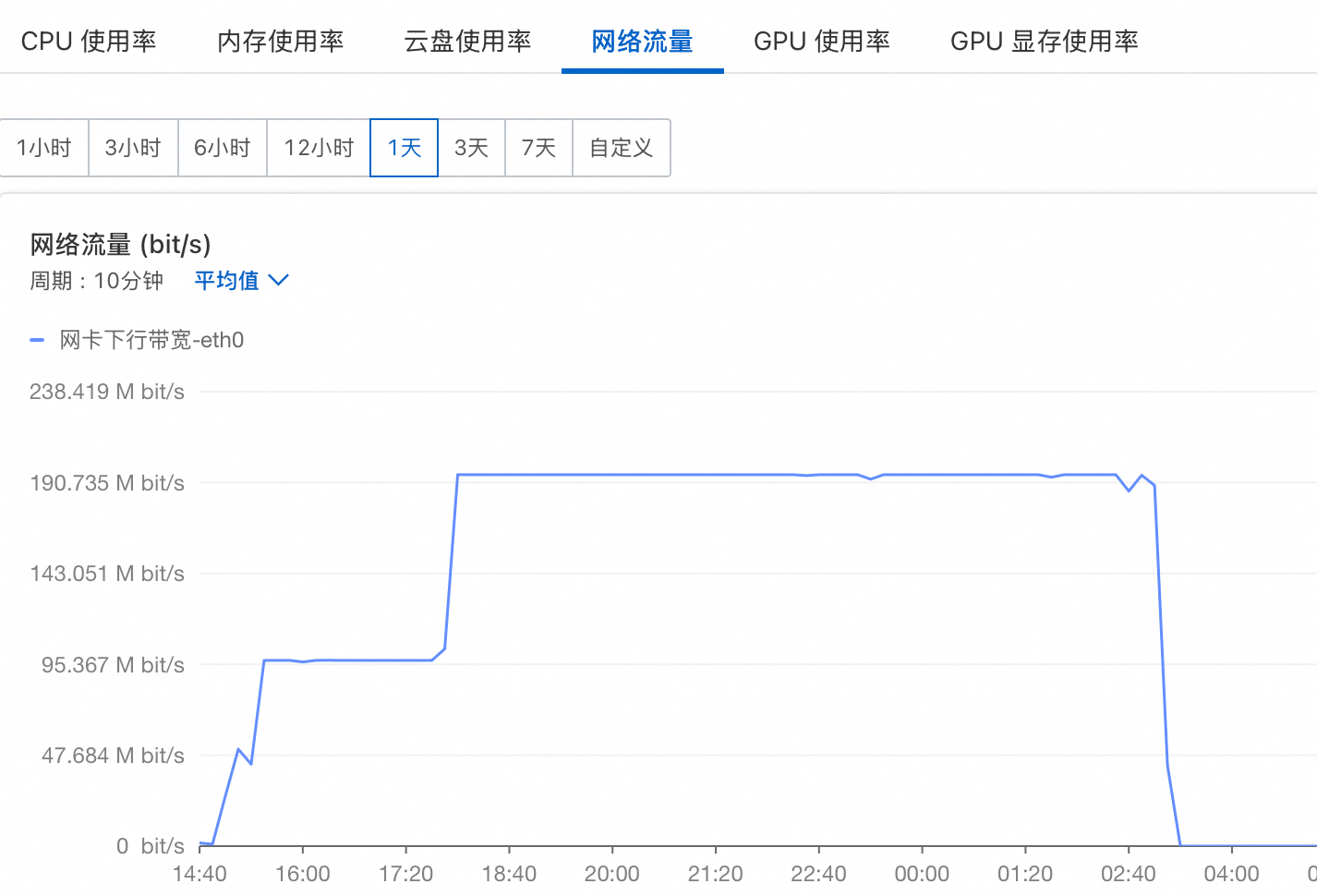
挂在后台,防止网络断了影响下载。 痛点是下载很慢很慢,200M的情况下下载12小时
vllm 加载模型:
(qwen3.5) [root@iZ6we2hi9yebih1af8mnorZ Qwen3.5-397B-A17B]# export LD_LIBRARY_PATH=“”
(qwen3.5) [root@iZ6we2hi9yebih1af8mnorZ Qwen3.5-397B-A17B]# vllm serve Qwen/Qwen3.5-397B-A17B --tensor-parallel-size 8 --language-model-only --reasoning-parser qwen3 --enable-prefix-caching
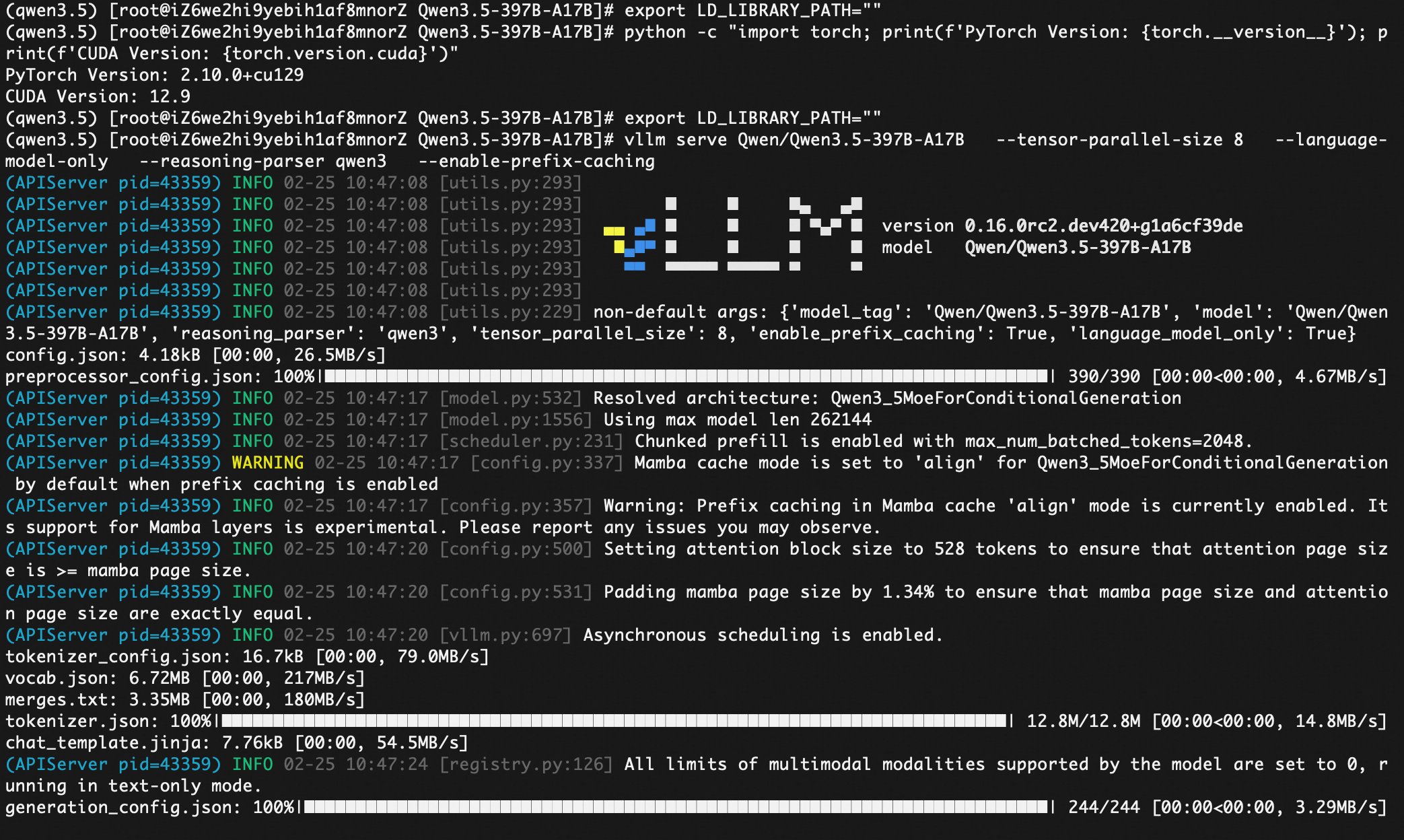
(qwen3.5) [root@iZ6we2hi9yebih1af8mnorZ Qwen3.5-397B-A17B]# vllm serve Qwen/Qwen3.5-397B-A17B \
–tensor-parallel-size 8
–language-model-only
–reasoning-parser qwen3
–enable-prefix-caching
–max-model-len 8192
–gpu-memory-utilization 0.90
–quantization fp8
(APIServer pid=46935) INFO 02-25 11:07:17 [utils.py:293]
(APIServer pid=46935) INFO 02-25 11:07:17 [utils.py:293] █ █ █▄ ▄█
(APIServer pid=46935) INFO 02-25 11:07:17 [utils.py:293] ▄▄ ▄█ █ █ █ ▀▄▀ █ version 0.16.0rc2.dev420+g1a6cf39de
(APIServer pid=46935) INFO 02-25 11:07:17 [utils.py:293] █▄█▀ █ █ █ █ model Qwen/Qwen3.5-397B-A17B
(APIServer pid=46935) INFO 02-25 11:07:17 [utils.py:293] ▀▀ ▀▀▀▀▀ ▀▀▀▀▀ ▀ ▀
(APIServer pid=46935) INFO 02-25 11:07:17 [utils.py:293]
(APIServer pid=46935) INFO 02-25 11:07:17 [utils.py:229] non-default args: {‘model_tag’: ‘Qwen/Qwen3.5-397B-A17B’, ‘model’: ‘Qwen/Qwen3.5-397B-A17B’, ‘max_model_len’: 8192, ‘quantization’: ‘fp8’, ‘reasoning_parser’: ‘qwen3’, ‘tensor_parallel_size’: 8, ‘enable_prefix_caching’: True, ‘language_model_only’: True}
(APIServer pid=46935) INFO 02-25 11:07:19 [model.py:532] Resolved architecture: Qwen3_5MoeForConditionalGeneration
(APIServer pid=46935) INFO 02-25 11:07:19 [model.py:1556] Using max model len 8192
(APIServer pid=46935) INFO 02-25 11:07:19 [scheduler.py:231] Chunked prefill is enabled with max_num_batched_tokens=2048.
(APIServer pid=46935) WARNING 02-25 11:07:19 [config.py:337] Mamba cache mode is set to ‘align’ for Qwen3_5MoeForConditionalGeneration by default when prefix caching is enabled
(APIServer pid=46935) INFO 02-25 11:07:19 [config.py:357] Warning: Prefix caching in Mamba cache ‘align’ mode is currently enabled. Its support for Mamba layers is experimental. Please report any issues you may observe.
(APIServer pid=46935) INFO 02-25 11:07:21 [config.py:500] Setting attention block size to 528 tokens to ensure that attention page size is >= mamba page size.
(APIServer pid=46935) INFO 02-25 11:07:21 [config.py:531] Padding mamba page size by 1.34% to ensure that mamba page size and attention page size are exactly equal.
video_preprocessor_config.json: 100%|████████████████████████████████████████████████████████████████| 385/385 [00:00<00:00, 4.04MB/s]
model.safetensors.index.json: 303kB [00:00, 354MB/s]
(APIServer pid=46935) INFO 02-25 11:07:22 [vllm.py:697] Asynchronous scheduling is enabled.
(APIServer pid=46935) INFO 02-25 11:07:24 [registry.py:126] All limits of multimodal modalities supported by the model are set to 0, running in text-only mode.
(EngineCore_DP0 pid=47088) INFO 02-25 11:07:29 [core.py:98] Initializing a V1 LLM engine (v0.16.0rc2.dev420+g1a6cf39de) with config: model=‘Qwen/Qwen3.5-397B-A17B’, speculative_config=None, tokenizer=‘Qwen/Qwen3.5-397B-A17B’, skip_tokenizer_init=False, tokenizer_mode=auto, revision=None, tokenizer_revision=None, trust_remote_code=False, dtype=torch.bfloat16, max_seq_len=8192, download_dir=None, load_format=auto, tensor_parallel_size=8, pipeline_parallel_size=1, data_parallel_size=1, disable_custom_all_reduce=False, quantization=fp8, enforce_eager=False, enable_return_routed_experts=False, kv_cache_dtype=auto, device_config=cuda, structured_outputs_config=StructuredOutputsConfig(backend=‘auto’, disable_fallback=False, disable_any_whitespace=False, disable_additional_properties=False, reasoning_parser=‘qwen3’, reasoning_parser_plugin=‘’, enable_in_reasoning=False), observability_config=ObservabilityConfig(show_hidden_metrics_for_version=None, otlp_traces_endpoint=None, collect_detailed_traces=None, kv_cache_metrics=False, kv_cache_metrics_sample=0.01, cudagraph_metrics=False, enable_layerwise_nvtx_tracing=False, enable_mfu_metrics=False, enable_mm_processor_stats=False, enable_logging_iteration_details=False), seed=0, served_model_name=Qwen/Qwen3.5-397B-A17B, enable_prefix_caching=True, enable_chunked_prefill=True, pooler_config=None, compilation_config={‘level’: None, ‘mode’: <CompilationMode.VLLM_COMPILE: 3>, ‘debug_dump_path’: None, ‘cache_dir’: ‘’, ‘compile_cache_save_format’: ‘binary’, ‘backend’: ‘inductor’, ‘custom_ops’: [‘none’], ‘splitting_ops’: [‘vllm::unified_attention’, ‘vllm::unified_attention_with_output’, ‘vllm::unified_mla_attention’, ‘vllm::unified_mla_attention_with_output’, ‘vllm::mamba_mixer2’, ‘vllm::mamba_mixer’, ‘vllm::short_conv’, ‘vllm::linear_attention’, ‘vllm::plamo2_mamba_mixer’, ‘vllm::gdn_attention_core’, ‘vllm::kda_attention’, ‘vllm::sparse_attn_indexer’, ‘vllm::rocm_aiter_sparse_attn_indexer’, ‘vllm::unified_kv_cache_update’], ‘compile_mm_encoder’: False, ‘compile_sizes’: [], ‘compile_ranges_split_points’: [2048], ‘inductor_compile_config’: {‘enable_auto_functionalized_v2’: False, ‘combo_kernels’: True, ‘benchmark_combo_kernel’: True}, ‘inductor_passes’: {}, ‘cudagraph_mode’: <CUDAGraphMode.FULL_AND_PIECEWISE: (2, 1)>, ‘cudagraph_num_of_warmups’: 1, ‘cudagraph_capture_sizes’: [1, 2, 4, 8, 16, 24, 32, 40, 48, 56, 64, 72, 80, 88, 96, 104, 112, 120, 128, 136, 144, 152, 160, 168, 176, 184, 192, 200, 208, 216, 224, 232, 240, 248, 256, 272, 288, 304, 320, 336, 352, 368, 384, 400, 416, 432, 448, 464, 480, 496, 512], ‘cudagraph_copy_inputs’: False, ‘cudagraph_specialize_lora’: True, ‘use_inductor_graph_partition’: False, ‘pass_config’: {‘fuse_norm_quant’: False, ‘fuse_act_quant’: False, ‘fuse_attn_quant’: False, ‘enable_sp’: False, ‘fuse_gemm_comms’: False, ‘fuse_allreduce_rms’: False, ‘fuse_act_padding’: False}, ‘max_cudagraph_capture_size’: 512, ‘dynamic_shapes_config’: {‘type’: <DynamicShapesType.BACKED: ‘backed’>, ‘evaluate_guards’: False, ‘assume_32_bit_indexing’: False}, ‘local_cache_dir’: None, ‘fast_moe_cold_start’: True, ‘static_all_moe_layers’: []}
(EngineCore_DP0 pid=47088) WARNING 02-25 11:07:29 [multiproc_executor.py:921] Reducing Torch parallelism from 64 threads to 1 to avoid unnecessary CPU contention. Set OMP_NUM_THREADS in the external environment to tune this value as needed.
INFO 02-25 11:07:37 [registry.py:126] All limits of multimodal modalities supported by the model are set to 0, running in text-only mode.
INFO 02-25 11:07:37 [parallel_state.py:1307] world_size=8 rank=7 local_rank=7 distributed_init_method=tcp://127.0.0.1:40139 backend=nccl
INFO 02-25 11:07:38 [registry.py:126] All limits of multimodal modalities supported by the model are set to 0, running in text-only mode.
INFO 02-25 11:07:38 [registry.py:126] All limits of multimodal modalities supported by the model are set to 0, running in text-only mode.
INFO 02-25 11:07:38 [registry.py:126] All limits of multimodal modalities supported by the model are set to 0, running in text-only mode.
INFO 02-25 11:07:38 [registry.py:126] All limits of multimodal modalities supported by the model are set to 0, running in text-only mode.
INFO 02-25 11:07:38 [registry.py:126] All limits of multimodal modalities supported by the model are set to 0, running in text-only mode.
INFO 02-25 11:07:38 [registry.py:126] All limits of multimodal modalities supported by the model are set to 0, running in text-only mode.
INFO 02-25 11:07:38 [registry.py:126] All limits of multimodal modalities supported by the model are set to 0, running in text-only mode.
INFO 02-25 11:07:38 [parallel_state.py:1307] world_size=8 rank=2 local_rank=2 distributed_init_method=tcp://127.0.0.1:40139 backend=nccl
INFO 02-25 11:07:38 [parallel_state.py:1307] world_size=8 rank=5 local_rank=5 distributed_init_method=tcp://127.0.0.1:40139 backend=nccl
INFO 02-25 11:07:38 [parallel_state.py:1307] world_size=8 rank=6 local_rank=6 distributed_init_method=tcp://127.0.0.1:40139 backend=nccl
INFO 02-25 11:07:38 [parallel_state.py:1307] world_size=8 rank=0 local_rank=0 distributed_init_method=tcp://127.0.0.1:40139 backend=nccl
INFO 02-25 11:07:38 [parallel_state.py:1307] world_size=8 rank=4 local_rank=4 distributed_init_method=tcp://127.0.0.1:40139 backend=nccl
INFO 02-25 11:07:38 [parallel_state.py:1307] world_size=8 rank=1 local_rank=1 distributed_init_method=tcp://127.0.0.1:40139 backend=nccl
INFO 02-25 11:07:38 [parallel_state.py:1307] world_size=8 rank=3 local_rank=3 distributed_init_method=tcp://127.0.0.1:40139 backend=nccl
INFO 02-25 11:07:39 [pynccl.py:111] vLLM is using nccl==2.27.5
WARNING 02-25 11:07:40 [symm_mem.py:67] SymmMemCommunicator: Device capability 8.0 not supported, communicator is not available.
WARNING 02-25 11:07:40 [symm_mem.py:67] SymmMemCommunicator: Device capability 8.0 not supported, communicator is not available.
WARNING 02-25 11:07:40 [symm_mem.py:67] SymmMemCommunicator: Device capability 8.0 not supported, communicator is not available.
WARNING 02-25 11:07:40 [symm_mem.py:67] SymmMemCommunicator: Device capability 8.0 not supported, communicator is not available.
WARNING 02-25 11:07:40 [symm_mem.py:67] SymmMemCommunicator: Device capability 8.0 not supported, communicator is not available.
WARNING 02-25 11:07:40 [symm_mem.py:67] SymmMemCommunicator: Device capability 8.0 not supported, communicator is not available.
WARNING 02-25 11:07:40 [symm_mem.py:67] SymmMemCommunicator: Device capability 8.0 not supported, communicator is not available.
WARNING 02-25 11:07:40 [symm_mem.py:67] SymmMemCommunicator: Device capability 8.0 not supported, communicator is not available.
INFO 02-25 11:07:41 [parallel_state.py:1535] rank 0 in world size 8 is assigned as DP rank 0, PP rank 0, PCP rank 0, TP rank 0, EP rank 0, EPLB rank N/A
INFO 02-25 11:07:41 [parallel_state.py:1535] rank 2 in world size 8 is assigned as DP rank 0, PP rank 0, PCP rank 0, TP rank 2, EP rank 2, EPLB rank N/A
INFO 02-25 11:07:41 [parallel_state.py:1535] rank 7 in world size 8 is assigned as DP rank 0, PP rank 0, PCP rank 0, TP rank 7, EP rank 7, EPLB rank N/A
INFO 02-25 11:07:41 [parallel_state.py:1535] rank 1 in world size 8 is assigned as DP rank 0, PP rank 0, PCP rank 0, TP rank 1, EP rank 1, EPLB rank N/A
INFO 02-25 11:07:41 [parallel_state.py:1535] rank 4 in world size 8 is assigned as DP rank 0, PP rank 0, PCP rank 0, TP rank 4, EP rank 4, EPLB rank N/A
INFO 02-25 11:07:41 [parallel_state.py:1535] rank 3 in world size 8 is assigned as DP rank 0, PP rank 0, PCP rank 0, TP rank 3, EP rank 3, EPLB rank N/A
INFO 02-25 11:07:41 [parallel_state.py:1535] rank 6 in world size 8 is assigned as DP rank 0, PP rank 0, PCP rank 0, TP rank 6, EP rank 6, EPLB rank N/A
INFO 02-25 11:07:41 [parallel_state.py:1535] rank 5 in world size 8 is assigned as DP rank 0, PP rank 0, PCP rank 0, TP rank 5, EP rank 5, EPLB rank N/A
(Worker_TP0 pid=47160) INFO 02-25 11:07:41 [gpu_model_runner.py:4139] Starting to load model Qwen/Qwen3.5-397B-A17B…
(Worker_TP7 pid=47167) INFO 02-25 11:07:41 [cuda.py:449] Using backend AttentionBackendEnum.FLASH_ATTN for vit attention
(Worker_TP7 pid=47167) INFO 02-25 11:07:41 [mm_encoder_attention.py:78] Using AttentionBackendEnum.FLASH_ATTN for MMEncoderAttention.
(Worker_TP2 pid=47162) INFO 02-25 11:07:41 [cuda.py:449] Using backend AttentionBackendEnum.FLASH_ATTN for vit attention
(Worker_TP2 pid=47162) INFO 02-25 11:07:41 [mm_encoder_attention.py:78] Using AttentionBackendEnum.FLASH_ATTN for MMEncoderAttention.
(Worker_TP1 pid=47161) INFO 02-25 11:07:41 [cuda.py:449] Using backend AttentionBackendEnum.FLASH_ATTN for vit attention
(Worker_TP1 pid=47161) INFO 02-25 11:07:41 [mm_encoder_attention.py:78] Using AttentionBackendEnum.FLASH_ATTN for MMEncoderAttention.
(Worker_TP0 pid=47160) INFO 02-25 11:07:41 [init.py:190] Selected CutlassFP8ScaledMMLinearKernel for Fp8OnlineLinearMethod
(Worker_TP3 pid=47163) INFO 02-25 11:07:41 [cuda.py:449] Using backend AttentionBackendEnum.FLASH_ATTN for vit attention
(Worker_TP0 pid=47160) INFO 02-25 11:07:41 [cuda.py:449] Using backend AttentionBackendEnum.FLASH_ATTN for vit attention
(Worker_TP3 pid=47163) INFO 02-25 11:07:41 [mm_encoder_attention.py:78] Using AttentionBackendEnum.FLASH_ATTN for MMEncoderAttention.
(Worker_TP0 pid=47160) INFO 02-25 11:07:41 [mm_encoder_attention.py:78] Using AttentionBackendEnum.FLASH_ATTN for MMEncoderAttention.
(Worker_TP4 pid=47164) INFO 02-25 11:07:41 [cuda.py:449] Using backend AttentionBackendEnum.FLASH_ATTN for vit attention
(Worker_TP5 pid=47165) INFO 02-25 11:07:41 [cuda.py:449] Using backend AttentionBackendEnum.FLASH_ATTN for vit attention
(Worker_TP4 pid=47164) INFO 02-25 11:07:41 [mm_encoder_attention.py:78] Using AttentionBackendEnum.FLASH_ATTN for MMEncoderAttention.
(Worker_TP6 pid=47166) INFO 02-25 11:07:41 [cuda.py:449] Using backend AttentionBackendEnum.FLASH_ATTN for vit attention
(Worker_TP5 pid=47165) INFO 02-25 11:07:42 [mm_encoder_attention.py:78] Using AttentionBackendEnum.FLASH_ATTN for MMEncoderAttention.
(Worker_TP6 pid=47166) INFO 02-25 11:07:42 [mm_encoder_attention.py:78] Using AttentionBackendEnum.FLASH_ATTN for MMEncoderAttention.
(Worker_TP0 pid=47160) INFO 02-25 11:07:42 [fp8.py:371] Using MARLIN Fp8 MoE backend out of potential backends: [‘AITER’, ‘FLASHINFER_TRTLLM’, ‘FLASHINFER_CUTLASS’, ‘DEEPGEMM’, ‘TRITON’, ‘MARLIN’, ‘BATCHED_DEEPGEMM’, ‘BATCHED_TRITON’, ‘XPU’].
/🔍 日志原理解析:
fp8.py 和 Fp8 MoE backend:
这证明 vLLM 正在以 8-bit(单字节) 的精度来加载这个 3970 亿参数的庞然大物。这意味着原本需要近 800GB 的显存,现在被硬生生压缩到了约 400GB 左右!你的 8x80G(共 640GB)显存现在完全可以装下它了。
同时,系统识别出 Qwen3.5-397B-A17B 是一个 MoE(混合专家) 架构的模型。
Using MARLIN…:
在众多计算后端(如 TRITON, DEEPGEMM 等)中,vLLM 自动为你挑选了 MARLIN。
Marlin 是目前开源界针对量化大模型推理最顶级的、性能最强悍的定制 CUDA 算子之一。 在 A100 显卡上,它能极大地加速 FP8 MoE 模型的矩阵乘法计算。这是一个非常完美的选择。/
(Worker_TP0 pid=47160) INFO 02-25 11:07:42 [cuda.py:402] Using FLASH_ATTN attention backend out of potential backends: [‘FLASH_ATTN’, ‘FLASHINFER’, ‘TRITON_ATTN’, ‘FLEX_ATTENTION’].
(Worker_TP7 pid=47167)
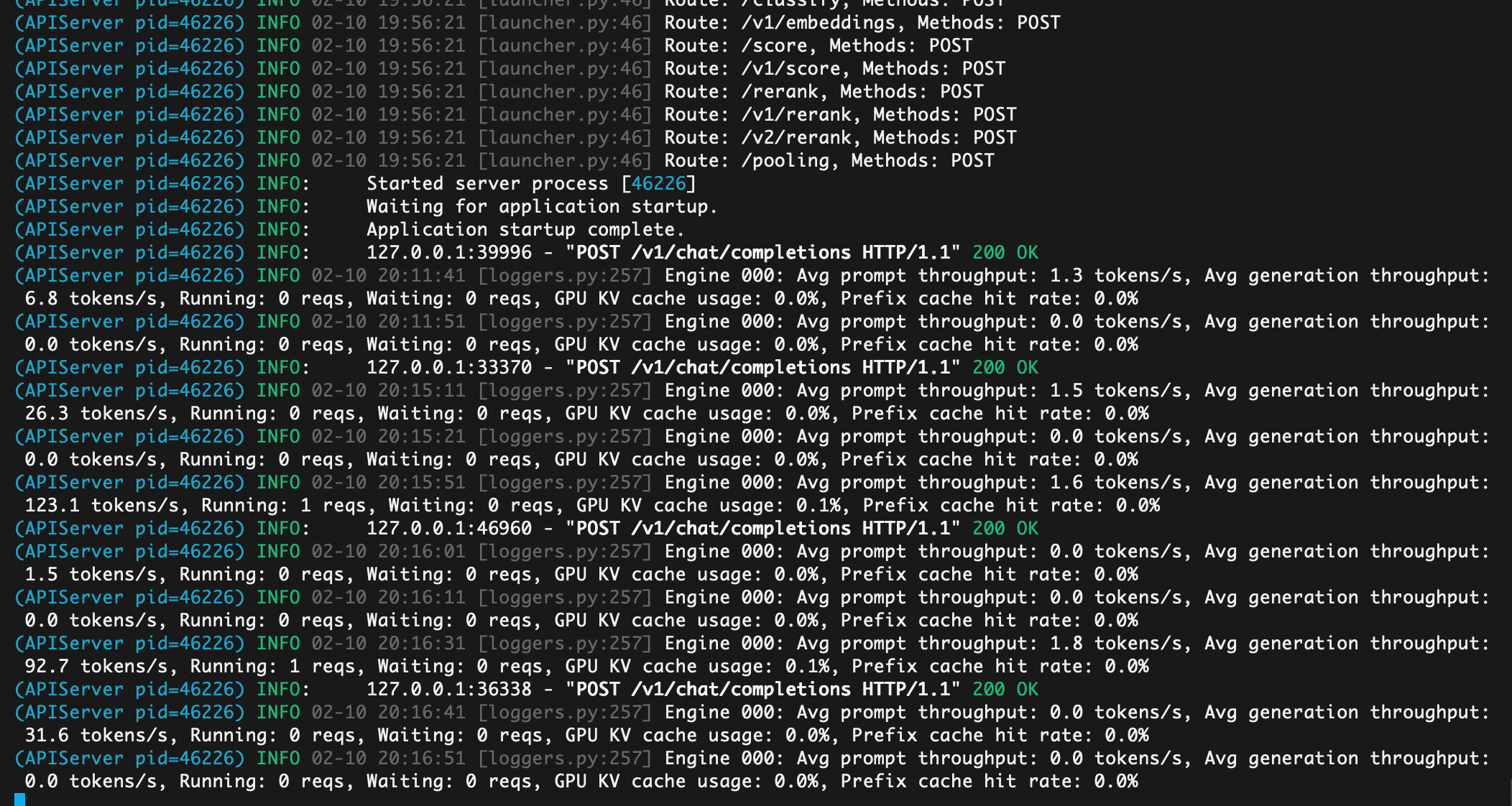
[root@iZ6wefjm84ecrn6084vwv5Z ~]# curl -X POST http://localhost:8000/v1/chat/completions ‘{“model”: “qwen3-next”,“messages”: [{“role”: “user”,“content”: “为什么大模型TOKEN对于云计算企业这样重要。”}]}’
{“id”:“chatcmpl-ae023d3165ec42f5”,“object”:“chat.completion”,“created”:1770725767,“model”:“qwen3-next”,“choices”:[{“index”:0,“message”:{“role”:“assistant”,“content”:“这是一个非常关键且前沿的问题。在大模型(Large Language Models, LLMs)时代,“Token”虽然只是一个技术术语(指文本被分词后的最小单位),但它对云计算企业的重要性远超其字面含义——它已成为算力经济、商业模式、竞争壁垒和收入引擎的核心计量单位。以下是详细解析:\n\n—\n\n### 一、Token 是大模型使用量的“基本计量单位”\n\n大模型的运行依赖于“输入 + 输出”的文本处理。无论是用户提问、生成文章、写代码,还是企业API调用,系统都必须将文本切分为Token进行处理。\n\n- 1个Token ≈ 0.75个英文单词 或 1~2个中文字符\n- 一次对话可能消耗几百到上万个Token\n- 一次API调用的计费 = 输入Token数 + 输出Token数\n\n👉 因此,Token = 用户使用量 = 云计算资源消耗量 = 企业收入来源\n\n—\n\n### 二、Token驱动云计算企业的商业模式变革\n\n#### 1. 从“卖服务器”到“卖Token”\n过去:AWS、阿里云卖的是EC2实例、存储、带宽。\n现在:OpenAI、Anthropic、百度文心、通义千问等通过API提供大模型服务,按Token收费。\n\n- OpenAI:$0.50 / 1M 输入Token,$1.50 / 1M 输出Token(GPT-4-turbo)\n- 阿里云通义千问:按Token计费,价格远低于OpenAI\n- 腾讯混元:按调用次数或Token阶梯计价\n\n云计算企业不再卖硬件,而是卖“智能计算服务”——而Token就是这个服务的“货币”。\n\n#### 2. Token成为定价与利润的核心\n- 模型推理成本 = Token数 × 每Token的算力开销(GPU时间、显存、能耗)\n- 云计算企业通过优化模型压缩、推理加速、批处理等技术,降低每Token成本,从而提升利润率\n- 高并发、高效率的云平台,能以更低的每Token成本提供服务,形成价格优势\n\n> 💡 举例:如果A公司每Token成本是$0.0000002,B公司是$0.0000005,那么A在同样收入下利润高出150%!\n\n—\n\n### 三、Token是云计算企业竞争的“新战场”\n\n| 竞争维度 | 传统云服务 | 大模型时代 |\n|----------|-------------|--------------|\n| 核心指标 | CPU利用率、网络延迟 | 每秒处理Token数(TPS)、每Token成本 |\n| 竞争焦点 | 价格、稳定性、地域覆盖 | 推理速度、Token性价比、长上下文支持 |\n| 技术壁垒 | 虚拟化、网络优化 | 模型并行、KV缓存优化、FlashAttention、量化压缩 |\n\n👉 谁能用更少的算力处理更多Token,谁就能赢得客户、抢占市场。\n\n—\n\n### 四、Token数据是云计算企业的“黄金资产”\n\n- 用户行为数据:通过Token分析,企业知道用户在问什么、用在什么场景(客服、写作、编程、医疗)\n- 模型迭代依据:高频Token组合 → 指导模型微调、数据增强、领域优化\n- 商业化拓展:识别高价值行业(如法律、金融)→ 推出垂直行业模型 + 高价套餐\n\n> 比如:阿里云发现“合同生成”类Token激增 → 推出“法务通义”专属模型 → 收费翻倍\n\n—\n\n### 五、Token推动云计算架构重构\n\n为了高效处理Token,云厂商必须:\n\n1. 部署专用AI芯片:如阿里含光800、华为昇腾、AWS Trainium/Inferentia\n2. 构建推理集群:优化KV Cache、PagedAttention、连续批处理(Continuous Batching)\n3. 边缘+云端协同:轻量模型在边缘处理短Token,重模型在云端处理长上下文\n4. 动态扩缩容:根据Token请求峰值自动调度GPU资源\n\n👉 这些技术投入,都是围绕“高效处理Token”展开的。\n\n—\n\n### 六、未来趋势:Token将成为“数字世界的石油”\n\n- Token经济:未来可能出现Token交易市场、Token期货、Token质押\n- 企业成本结构:SaaS公司成本中“LLM Token支出”将超过服务器、人力\n- 监管焦点:各国可能对Token能耗、碳足迹进行统计与征税\n\n—\n\n### ✅ 总结:为什么Token对云计算企业如此重要?\n\n| 维度 | 重要性 |\n|------|--------|\n| 收入来源 | Token是计费单位,直接决定营收 |\n| 成本控制 | 每Token成本决定利润率 |\n| 技术竞争 | 处理Token的效率 = 核心竞争力 |\n| 商业洞察 | Token数据 = 用户需求地图 |\n| 战略转型 | 从IaaS/PaaS向AI服务转型的核心载体 |\n| 生态构建 | 基于Token的API经济催生开发者生态 |\n\n> 🌟 一句话总结: \n> 在大模型时代,云计算企业不再卖“算力”,而是卖“智能文本处理能力”——而Token,就是这种能力的唯一通用货币。\n\n—\n\n如果你是云计算企业的决策者,你必须把“Token”当作核心KPI来管理——就像当年管理CPU利用率一样。谁掌握了Token的效率与规模,谁就掌握了AI时代的云市场。”,“refusal”:null,“annotations”:null,“audio”:null,“function_call”:null,“tool_calls”:[],“reasoning”:null,“reasoning_content”:null},“logprobs”:null,“finish_reason”:“stop”,“stop_reason”:null,“token_ids”:null}],“service_tier”:null,“system_fingerprint”:null,“usage”:{“prompt_tokens”:18,“total_tokens”:1261,“completion_tokens”:1243,“prompt_tokens_details”:null},“prompt_logprobs”:null,“prompt_token_ids”:null,“kv_transfer_params”:null}
报错:
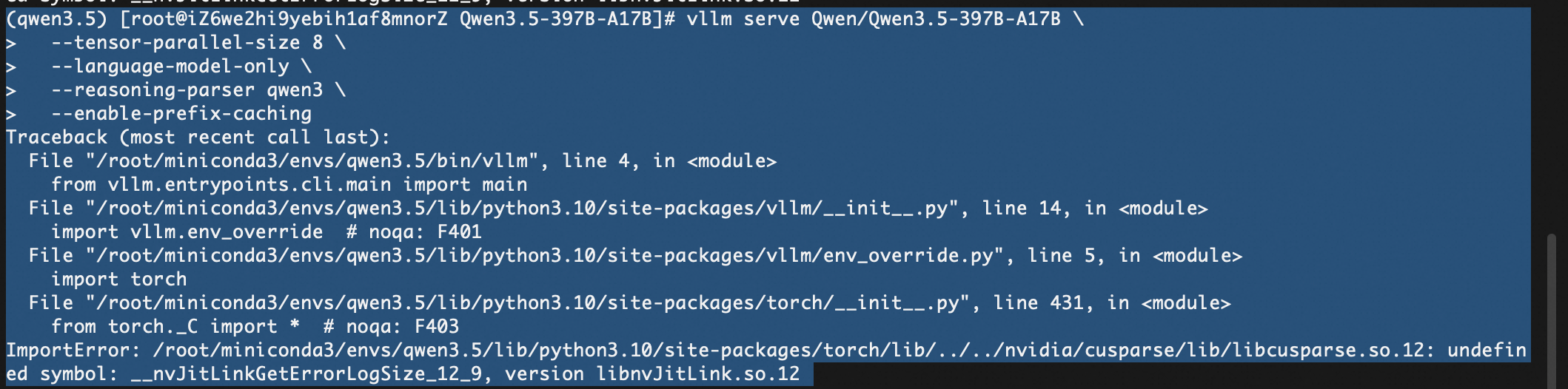
这个错误 ImportError: … undefined symbol: __nvJitLinkGetErrorLogSize_12_9, version libnvJitLink.so.12 通常是由于 PyTorch 捆绑的 NVIDIA CUDA 库版本冲突 或 缺失 导致的。具体来说,libcusparse 库试图调用 libnvJitLink 中的符号,但找不到或版本不匹配。
这在安装较新版本的 vllm 和 torch (特别是 CUDA 12.x 环境) 时比较常见。请尝试以下步骤来解决:
报错2 :
(qwen3.5) [root@iZ6we2hi9yebih1af8mnorZ Qwen3.5-397B-A17B]# vllm serve Qwen/Qwen3.5-397B-A17B --tensor-parallel-size 8 --language-model-only --reasoning-parser qwen3 --enable-prefix-caching
INFO 02-25 10:47:38 [parallel_state.py:1307] world_size=8 rank=4 local_rank=4 distributed_init_method=tcp://127.0.0.1:58137 backend=nccl
INFO 02-25 10:47:38 [parallel_state.py:1307] world_size=8 rank=0 local_rank=0 distributed_init_method=tcp://127.0.0.1:58137 backend=nccl
INFO 02-25 10:47:38 [parallel_state.py:1307] world_size=8 rank=2 local_rank=2 distributed_init_method=tcp://127.0.0.1:58137 backend=nccl
INFO 02-25 10:47:39 [pynccl.py:111] vLLM is using nccl==2.27.5
WARNING 02-25 10:47:40 [symm_mem.py:67] SymmMemCommunicator: Device capability 8.0 not supported, communicator is not available.
WARNING 02-25 10:47:40 [symm_mem.py:67] SymmMemCommunicator: Device capability 8.0 not supported, communicator is not available.
WARNING 02-25 10:47:40 [symm_mem.py:67] SymmMemCommunicator: Device capability 8.0 not supported, communicator is not available.
WARNING 02-25 10:47:40 [symm_mem.py:67] SymmMemCommunicator: Device capability 8.0 not supported, communicator is not available.
WARNING 02-25 10:47:40 [symm_mem.py:67] SymmMemCommunicator: Device capability 8.0 not supported, communicator is not available.
WARNING 02-25 10:47:40 [symm_mem.py:67] SymmMemCommunicator: Device capability 8.0 not supported, communicator is not available.
WARNING 02-25 10:47:40 [symm_mem.py:67] SymmMemCommunicator: Device capability 8.0 not supported, communicator is not available.
WARNING 02-25 10:47:40 [symm_mem.py:67] SymmMemCommunicator: Device capability 8.0 not supported, communicator is not available.
日志详细解析:
backend=nccl 和 vLLM is using nccl==2.27.5:说明 vLLM 成功检测到了你的 8 张显卡,并且初始化了标准的分布式通信后端(NCCL)。
Device capability 8.0:这说明系统检测到你使用的是 A100 显卡(NVIDIA A100 的算力架构代号就是 8.0)。
SymmMemCommunicator… not supported:这是由于你安装了 vLLM 的 nightly(开发抢先版)。 这个版本引入了一项名为“对称内存通信 (Symmetric Memory Communicator)”的极限加速黑科技。但是,这项黑科技在硬件上**强制要求 H100 显卡(算力 9.0)**才能运行。
可以忽略这信息。
报错3:
(Worker_TP3 pid=45631) ERROR 02-25 11:02:18 [gpu_model_runner.py:4234] Failed to load model - not enough GPU memory. Try lowering --gpu-memory-utilization to free memory for weights, increasing --tensor-parallel-size, or using --quantization. See https://docs.vllm.ai/en/latest/configuration/conserving_memory/ for more tips. (original error: CUDA out of memory. Tried to allocate 1024.00 MiB. GPU 3 has a total capacity of 79.25 GiB of which 556.94 MiB is free. Including non-PyTorch memory, this process has 78.70 GiB memory in use. Of the allocated memory 77.13 GiB is allocated by PyTorch, and 11.76 MiB is reserved by PyTorch but unallocated. If reserved but unallocated memory is large try setting PYTORCH_ALLOC_CONF=expandable_segments:True to avoid fragmentation. See documentation for Memory Management (https://pytorch.org/docs/stable/notes/cuda.html#environment-variables))
🚨 为什么会显存溢出?(残酷的数学题)
模型有多大?
Qwen3.5-397B 包含 3970 亿个参数。
需要多少显存?
默认情况下,模型是以 bfloat16(半精度,每个参数占 2 字节)加载的。
3970亿 × 2 字节 ≈ 794 GB 的纯权重体积。
你拥有多少显存?
根据报错 GPU 3 has a total capacity of 79.25 GiB,说明你是 8 张 80GB 的显卡(比如 A100/H100 80G)。
8 × 80 GB = 640 GB 的总显存。
结论:794 GB 的模型硬塞进 640 GB 的显卡里,连仅仅装下模型权重都不够,更别提推理时还需要预留 KV Cache 的显存了。
参考:
https://qwen.ai/blog?id=4074cca80393150c248e508aa62983f9cb7d27cd&from=research.latest-advancements-list
https://huggingface.co/Qwen/Qwen3-Next-80B-A3B-Instruct
https://modelscope.cn/models/Qwen/Qwen3.5-397B-A17B/summary
https://docs.vllm.ai/projects/recipes/en/latest/Qwen/Qwen3.5.html#multimodal
https://docs.vllm.ai/en/latest/configuration/conserving_memory/
https://zhuanlan.zhihu.com/p/2006808243356333543

Agent 垂直技术社区,欢迎活跃、内容共建。
更多推荐


 15
15 0
0- 0


 已为社区贡献2条内容

所有评论(0)