大模型驱动的交互动画叙事生成:从用户意图到动画脚本的自动编排
大模型驱动的交互动画叙事生成:从用户意图到动画脚本的自动编排
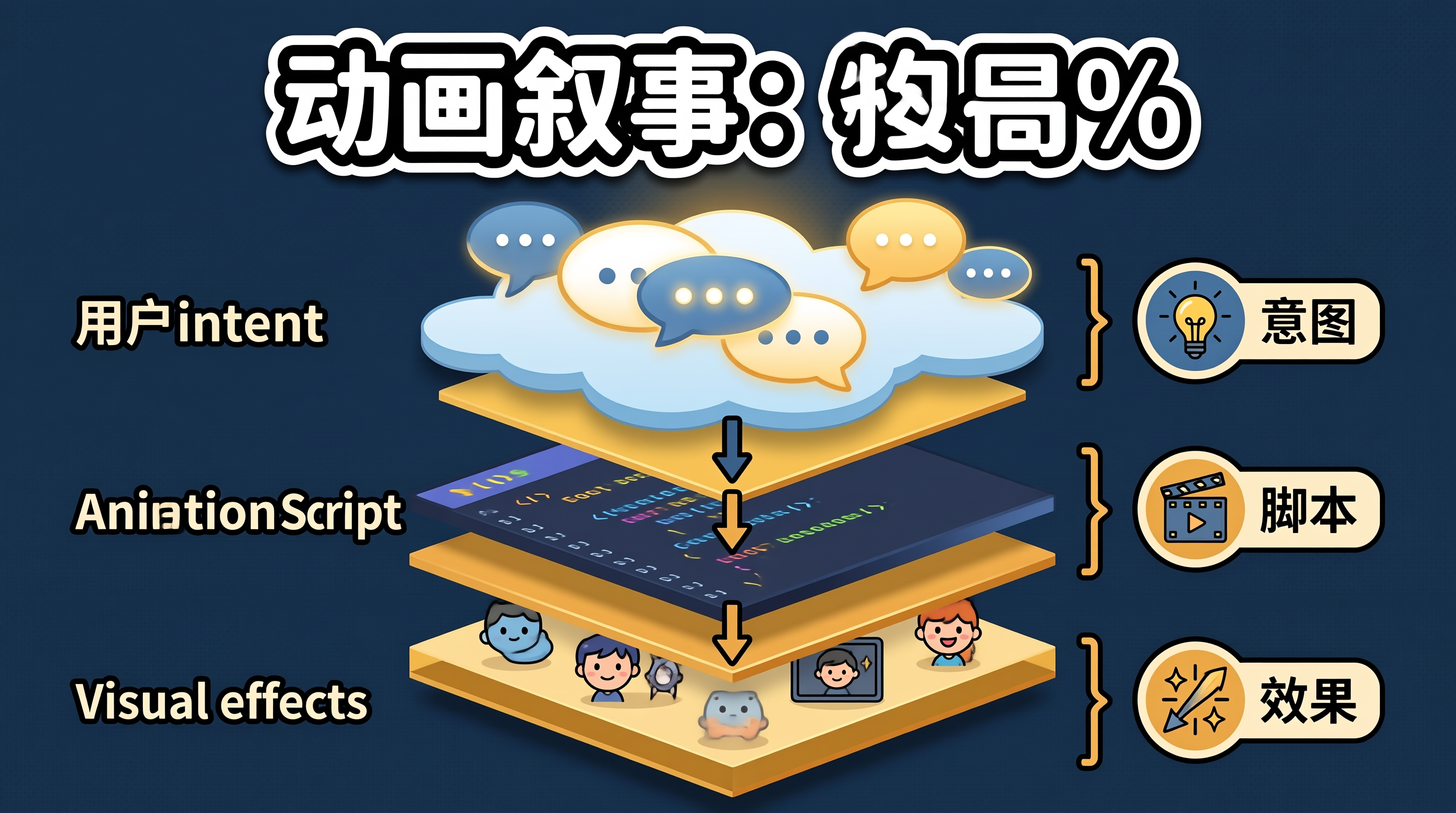
一、动画设计的"意图鸿沟":从需求描述到动效实现的工程困境
设计师描述动画时使用的是意图语言:"让这个卡片优雅地滑入"、"给按钮一个有弹性的点击反馈"、"页面切换要有故事感"。但 CSS 动画的实现语言是属性值:transform: translateY(20px), transition: 0.3s cubic-bezier(0.34, 1.56, 0.64, 1)。从意图到属性值的翻译,依赖设计师的动效经验和反复调试。
大模型驱动的动画叙事生成,核心思路是:将用户的自然语言意图描述翻译为结构化的动画脚本,再由脚本引擎渲染为 CSS/JS 动画。用户只需描述"想要什么感觉",AI 负责确定具体的属性值、时序和缓动曲线。
二、动画叙事生成的架构设计
flowchart TD
    A[用户意图描述] --> B[大模型解析: 意图→动画参数]
    B --> C[动画脚本: 结构化 JSON]
    C --> D{渲染引擎}
    D -->|Web| E[CSS Animation / WAAPI]
    D -->|Flutter| F[AnimationController]
    D -->|React Native| G[Animated API]
    C --> H[叙事编排: 多元素时序协调]
    H --> I[入场序列: 元素1→元素2→元素3]
    H --> J[交互反馈: 触发→响应→恢复]
    H --> K[退场序列: 反向播放]
三、动画叙事生成的代码实现
3.1 动画脚本结构定义
interface AnimationScript {
  id: string;
  name: string;
  description: string;
  sequences: AnimationSequence[];
}

interface AnimationSequence {
  trigger: 'mount' | 'hover' | 'click' | 'scroll' | 'custom';
  elements: ElementAnimation[];
}

interface ElementAnimation {
  selector: string;
  keyframes: Keyframe[];
  duration: number;    // ms
  easing: string;
  delay: number;       // ms
  fill: 'forwards' | 'backwards' | 'both' | 'none';
}

interface Keyframe {
  offset: number;      // 0-1
  properties: Record<string, string | number>;
}
3.2 AI 意图解析器
class AnimationIntentParser {
  private llmClient: LLMClient;

  /**
   * 将自然语言意图解析为结构化动画脚本
   * Prompt 包含动画知识库,确保生成的参数合理
   */
  async parseIntent(intent: string, context: ElementContext): Promise<AnimationScript> {
    const prompt = `
你是前端动画设计专家。请将用户的动画意图转换为结构化动画脚本。

## 用户意图
${intent}

## 目标元素上下文
- 元素类型: ${context.elementType}
- 当前样式: ${JSON.stringify(context.computedStyle)}
- 容器尺寸: ${context.containerWidth}x${context.containerHeight}

## 动画知识库
- 入场动画: 从不可见到可见,使用 decelerate 缓动
- 退场动画: 从可见到不可见,使用 accelerate 缓动
- 交互反馈: 短促有力,使用 spring/overshoot 缓动
- 叙事编排: 多元素按顺序入场,间隔 80-120ms

## 输出格式
返回 JSON 格式的 AnimationScript,包含 keyframes、duration、easing、delay。
`;

    const response = await this.llmClient.chat(prompt);
    return this.parseScript(response);
  }

  private parseScript(response: string): AnimationScript {
    const jsonMatch = response.match(/```json\n([\s\S]*?)```/);
    if (!jsonMatch) throw new Error('无法解析动画脚本');
    return JSON.parse(jsonMatch[1]);
  }
}
3.3 动画渲染引擎
class AnimationRenderer {
  /**
   * 将动画脚本渲染为 Web Animations API 调用
   * WAAPI 比 CSS Animation 更灵活:支持动态修改和精确控制
   */
  render(script: AnimationScript, rootElement: HTMLElement): Map<string, Animation> {
    const animations = new Map<string, Animation>();

    for (const sequence of script.sequences) {
      for (const elementAnim of sequence.elements) {
        const target = rootElement.querySelector(elementAnim.selector);
        if (!target) continue;

        const keyframes = elementAnim.keyframes.map(kf => ({
          ...kf.properties,
          offset: kf.offset,
        }));

        const animation = target.animate(keyframes, {
          duration: elementAnim.duration,
          easing: elementAnim.easing,
          delay: elementAnim.delay,
          fill: elementAnim.fill,
        });

        animations.set(elementAnim.selector, animation);
      }
    }

    return animations;
  }

  /**
   * 叙事编排:多元素按顺序入场
   * 每个元素延迟递增,形成"瀑布"效果
   */
  renderNarrativeSequence(
    elements: HTMLElement[],
    baseAnimation: Omit<ElementAnimation, 'selector' | 'delay'>,
    staggerDelay: number = 100
  ): Animation[] {
    return elements.map((el, index) => {
      const keyframes = baseAnimation.keyframes.map(kf => ({
        ...kf.properties,
        offset: kf.offset,
      }));

      return el.animate(keyframes, {
        duration: baseAnimation.duration,
        easing: baseAnimation.easing,
        delay: index * staggerDelay,
        fill: baseAnimation.fill,
      });
    });
  }
}
3.4 预设动画叙事模板
const NARRATIVE_TEMPLATES = {
  /**
   * "优雅入场"叙事:元素从下方滑入并淡入
   * 适合卡片列表、文章段落
   */
  elegantEntrance: (selector: string, index: number): ElementAnimation => ({
    selector,
    keyframes: [
      { offset: 0, properties: { opacity: 0, transform: 'translateY(24px)' } },
      { offset: 1, properties: { opacity: 1, transform: 'translateY(0)' } },
    ],
    duration: 500,
    easing: 'cubic-bezier(0, 0, 0.2, 1)',
    delay: index * 100,
    fill: 'both',
  }),

  /**
   * "弹性点击"叙事:按钮按下后弹性回弹
   * 适合交互反馈
   */
  springClick: (selector: string): ElementAnimation => ({
    selector,
    keyframes: [
      { offset: 0, properties: { transform: 'scale(1)' } },
      { offset: 0.3, properties: { transform: 'scale(0.92)' } },
      { offset: 0.7, properties: { transform: 'scale(1.04)' } },
      { offset: 1, properties: { transform: 'scale(1)' } },
    ],
    duration: 300,
    easing: 'cubic-bezier(0.34, 1.56, 0.64, 1)',
    delay: 0,
    fill: 'none',
  }),

  /**
   * "故事展开"叙事:中心元素先出现,周围元素依次展开
   * 适合仪表盘、信息图
   */
  storyReveal: (centerSelector: string, surroundingSelectors: string[]): AnimationScript => ({
    id: 'story-reveal',
    name: '故事展开',
    description: '中心元素先出现,周围元素依次展开',
    sequences: [{
      trigger: 'mount',
      elements: [
        {
          selector: centerSelector,
          keyframes: [
            { offset: 0, properties: { opacity: 0, transform: 'scale(0.8)' } },
            { offset: 1, properties: { opacity: 1, transform: 'scale(1)' } },
          ],
          duration: 400,
          easing: 'cubic-bezier(0, 0, 0.2, 1)',
          delay: 0,
          fill: 'both',
        },
        ...surroundingSelectors.map((sel, i) => ({
          selector: sel,
          keyframes: [
            { offset: 0, properties: { opacity: 0, transform: 'scale(0.9) translateY(12px)' } },
            { offset: 1, properties: { opacity: 1, transform: 'scale(1) translateY(0)' } },
          ],
          duration: 350,
          easing: 'cubic-bezier(0, 0, 0.2, 1)',
          delay: 300 + i * 80,
          fill: 'both',
        })),
      ],
    }],
  }),
};
四、动画叙事生成的边界分析与架构权衡
AI 生成参数的合理性。大模型可能生成不合理的动画参数,如 duration: 5000ms(太慢)或 translateY(500px)(位移过大)。需要在解析后添加参数校验,将异常值钳制到合理范围。
叙事编排的时序冲突。多元素动画的延迟和时长可能产生时序重叠或间隙。建议在渲染前做时序分析,检测是否有元素的入场动画在另一个元素的退场动画完成前就开始。
性能与复杂度的权衡。同时播放大量动画可能导致帧率下降。建议限制同时播放的动画数量(不超过 10 个),超出部分排队等待。
适用边界:动画叙事生成最适合营销页面、落地页等需要"讲故事"的场景。对于工具类产品(如编辑器、管理后台),简洁的过渡动画即可,无需复杂的叙事编排。
五、总结
大模型驱动的动画叙事生成将自然语言意图翻译为结构化动画脚本,通过 Web Animations API 渲染为实际动画。叙事编排模板提供了常见的多元素时序模式。落地时需关注 AI 生成参数的合理性校验、时序冲突检测、以及性能与复杂度的平衡。建议从预设模板开始,逐步引入 AI 自定义生成能力。

Agent 垂直技术社区,欢迎活跃、内容共建。
更多推荐

 1
1 0
0- 0


 已为社区贡献19条内容

所有评论(0)