【从0开发一个 Agent】第十四章:构建企业级用户系统与权限隔离
在前面的章节中,我们赋予了 AI Agent 强大的多模态处理、复杂任务规划和多智能体协作能力。然而,一个没有安全边界的强大系统,在企业环境中无异于“裸奔”。如果用户 A 上传的机密财报被用户 B 检索到,或者普通员工越权调用了管理员的数据库工具,整个系统将瞬间失去信任。
本章,我们将为 AI Agent 构建坚不可摧的“数字护城河”。这不仅仅是简单的登录注册,而是涵盖身份认证、RBAC 权限控制、多租户数据隔离、API Key 生命周期管理以及安全审计的完整企业级安全架构。
1. 为什么 AI Agent 需要企业级安全架构?
传统的 Web 应用安全模型在 AI Agent 场景下存在严重不足:
- 上下文污染与越权:AI Agent 的上下文窗口是动态的。如果权限校验仅在前端或 API 入口做,恶意用户可能通过 Prompt 注入或工具调用,让 Agent 在内部逻辑中越权访问其他租户的数据。
- API Key 滥用风险:Agent 频繁调用外部 API 和 MCP Server。如果 API Key 缺乏细粒度权限和自动轮换机制,一旦泄露,攻击者不仅能消耗额度,还能通过工具调用窃取核心数据。
- 审计盲区:传统日志只记录“谁访问了哪个接口”,但 AI Agent 的决策过程是黑盒。企业需要知道“谁在什么时间、基于什么上下文、调用了什么工具、访问了哪些数据”,以满足 GDPR 等合规要求。
- 多租户隔离失效:简单的
WHERE tenant_id = ?在复杂的多 Agent 协作和 RAG 检索中极易被绕过。需要数据库行级安全(RLS)和向量检索级别的强制隔离。
**设计哲学:**零信任(Zero Trust)。默认不信任任何请求,所有操作必须经过身份认证、权限校验和数据隔离三重验证。安全不是附加功能,而是 Agent 架构的基石。
2. 企业级安全架构设计
我们采用“身份-权限-数据-审计”四层防护体系,确保端到端的安全。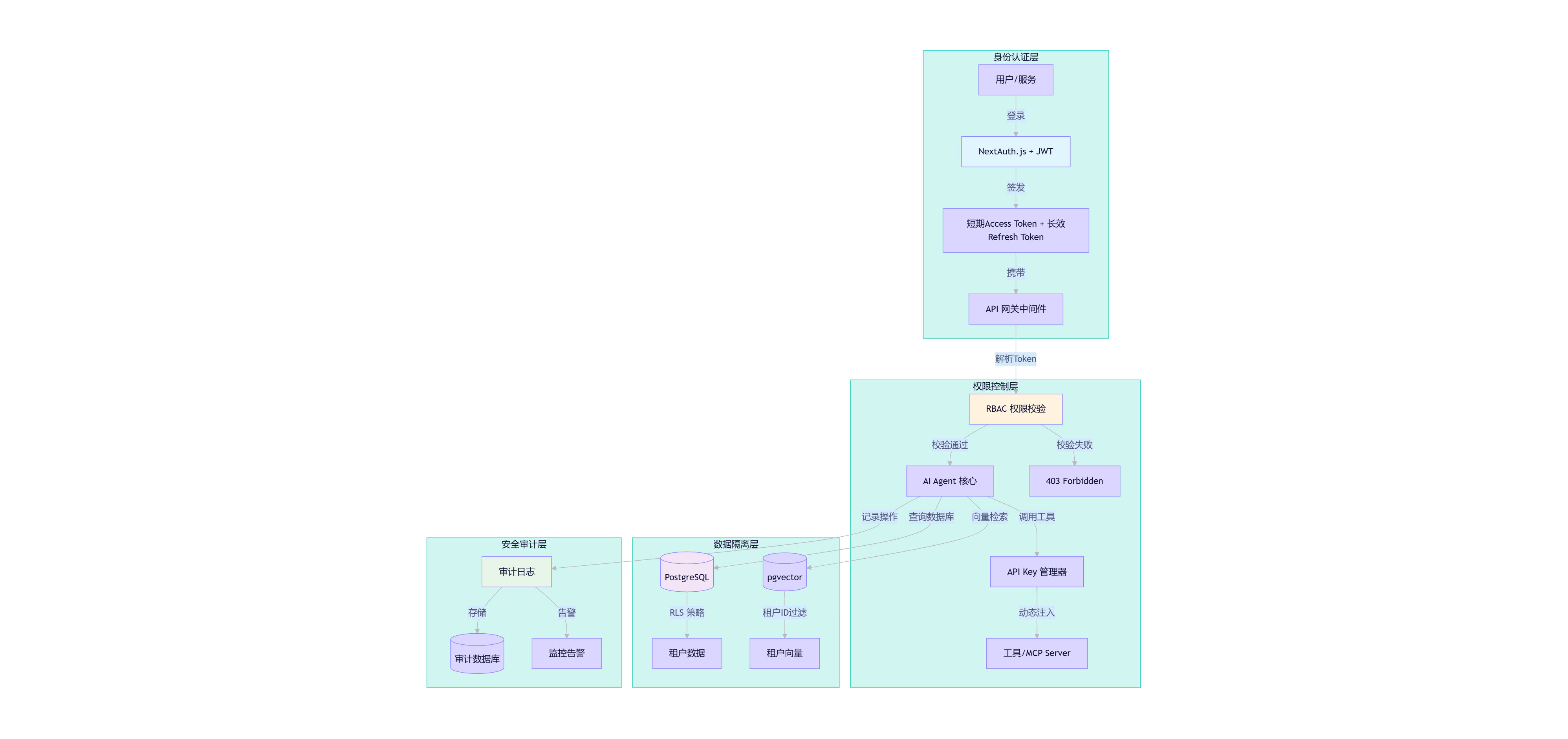
核心设计思想:
- 分层会话管理:区分前台用户、运营后台、API 服务三类会话,设置差异化有效期和设备绑定,避免“一刀切”带来的安全风险。
- RBAC + 数据权限双轨制:RBAC 控制“能做什么”,数据权限控制“能看什么”。通过数据库 RLS 和向量检索过滤,实现物理级隔离。
- API Key 动态注入:Agent 不持有明文 API Key。Key 管理器根据用户权限和工具需求,动态生成临时、限权、可审计的 Token。
- 全链路审计:记录身份、权限决策依据、设备指纹、操作详情,支持溯源追责和异常行为检测。
3. 核心代码实现
3.1 身份认证与分层会话管理
使用 NextAuth.js 作为身份认证框架,结合 Redis 实现分层会话管理。
// src/lib/auth.ts
import NextAuth from "next-auth";
import { PrismaAdapter } from "@auth/prisma-adapter";
import { prisma } from "@/lib/db";
import { Redis } from "ioredis";

const redis = new Redis(process.env.REDIS_URL!);

export const { handlers, auth, signIn, signOut } = NextAuth({
  adapter: PrismaAdapter(prisma),
  providers: [
    // 支持邮箱密码、OAuth2.0 等多种认证方式
    Credentials({
      credentials: { email: {}, password: {} },
      async authorize(credentials) {
        // 验证用户凭证
        const user = await prisma.user.findUnique({
          where: { email: credentials.email as string },
        });
        if (!user || !user.password) return null;
        // 验证密码...
        return user;
      },
    }),
  ],
  callbacks: {
    async jwt({ token, user }) {
      if (user) {
        token.userId = user.id;
        token.tenantId = user.tenantId;
        token.role = user.role;
        // 生成设备指纹
        token.deviceFingerprint = generateDeviceFingerprint();
      }
      return token;
    },
    async session({ session, token }) {
      session.user.id = token.userId as string;
      session.user.tenantId = token.tenantId as string;
      session.user.role = token.role as string;
      session.user.deviceFingerprint = token.deviceFingerprint as string;
      return session;
    },
  },
  // 分层会话有效期配置
  session: {
    strategy: "jwt",
    maxAge: 7 * 24 * 60 * 60, // 前台用户默认7天
  },
});

// 分层会话有效期管理(中间件)
export async function validateSession(req: NextRequest) {
  const session = await auth();
  if (!session) return null;

  const tokenKey = `session:${session.user.id}:${session.user.deviceFingerprint}`;
  const sessionData = await redis.get(tokenKey);

  if (!sessionData) {
    // 会话过期或无效
    return null;
  }

  // 检查会话类型和有效期
  const sessionInfo = JSON.parse(sessionData);
  const now = Date.now();

  if (sessionInfo.type === "admin" && now > sessionInfo.expiresAt) {
    // 后台会话过期,强制登出
    await redis.del(tokenKey);
    return null;
  }

  // 刷新会话有效期
  await redis.expire(tokenKey, sessionInfo.ttl);

  return session;
}
3.2 RBAC 权限与数据隔离
在 Prisma 中定义权限模型,并通过中间件和数据库 RLS 实现双重隔离。
// prisma/schema.prisma

model User {
  id        String   @id @default(uuid())
  email     String   @unique
  password  String
  tenantId  String
  role      String   // admin, editor, viewer
  roleRel   Role     @relation(fields: [role], references: [code])
  sessions  Session[]
  messages  Message[]
  documents Document[]
  apiKeys   ApiKey[]
}

model Role {
  code        String   @id
  name        String
  permissions Permission[]
}

model Permission {
  id       String   @id @default(uuid())
  name     String   // 如: "document:read", "tool:execute"
  roleCode String
  role     Role     @relation(fields: [roleCode], references: [code])
}

model Session {
  id                String   @id @default(uuid())
  userId            String
  user              User     @relation(fields: [userId], references: [id], onDelete: Cascade)
  deviceFingerprint String
  expiresAt         DateTime
  createdAt         DateTime @default(now())
}

model Document {
  id        String   @id @default(uuid())
  userId    String
  tenantId  String   // 租户隔离字段
  filename  String
  content   String   @db.Text
  chunks    Chunk[]
  createdAt DateTime @default(now())
}

model Chunk {
  id          String       @id @default(uuid())
  documentId  String
  content     String       @db.Text
  embedding   Float32Array @db.Vector(1536)
  metadata    Json?
  document    Document     @relation(fields: [documentId], references: [id], onDelete: Cascade)
}

model ApiKey {
  id          String   @id @default(uuid())
  userId      String
  user        User     @relation(fields: [userId], references: [id], onDelete: Cascade)
  key         String   @unique
  permissions String[] // 如: ["tool:weather", "rag:read"]
  expiresAt   DateTime?
  isActive    Boolean  @default(true)
  lastUsedAt  DateTime?
}
// src/lib/auth/rbac-middleware.ts
import { NextResponse } from "next/server";
import { auth } from "@/lib/auth";

export async function requirePermission(requiredPermission: string) {
  const session = await auth();
  if (!session) {
    return NextResponse.json({ error: "Unauthorized" }, { status: 401 });
  }

  // 检查用户角色是否拥有该权限
  const userRole = await prisma.role.findUnique({
    where: { code: session.user.role },
    include: { permissions: true },
  });

  if (!userRole?.permissions.some(p => p.name === requiredPermission)) {
    return NextResponse.json({ error: "Forbidden" }, { status: 403 });
  }

  return NextResponse.next();
}

// 数据库 RLS 策略(在 Prisma 客户端中自动注入)
// 所有查询自动添加 tenantId 过滤
const prismaWithRLS = prisma.$extends({
  query: {
    async $allOperations({ model, operation, args, query }) {
      const session = await auth();
      if (session && session.user.tenantId) {
        if (model === "Document" || model === "Chunk") {
          args.where = {
            ...args.where,
            tenantId: session.user.tenantId,
          };
        }
      }
      return query(args);
    },
  },
});
3.3 API Key 动态注入与管理
为 Agent 工具调用提供安全的 API Key 管理。
// src/lib/security/api-key-manager.ts
import { prisma } from "@/lib/db";
import { auth } from "@/lib/auth";
import crypto from "crypto";

export async function generateApiKey(permissions: string[], expiresAt?: Date) {
  const session = await auth();
  if (!session) throw new Error("Unauthorized");

  const key = `ak_${crypto.randomBytes(32).toString("hex")}`;
  const hashedKey = crypto.createHash("sha256").update(key).digest("hex");

  await prisma.apiKey.create({
    data: {
      userId: session.user.id,
      key: hashedKey,
      permissions,
      expiresAt,
    },
  });

  return key; // 仅返回一次明文
}

export async function validateApiKey(apiKey: string, requiredPermission: string) {
  const hashedKey = crypto.createHash("sha256").update(apiKey).digest("hex");
  const key = await prisma.apiKey.findUnique({
    where: { key: hashedKey },
    include: { user: true },
  });

  if (!key || !key.isActive || (key.expiresAt && key.expiresAt < new Date())) {
    throw new Error("Invalid or expired API key");
  }

  if (!key.permissions.includes(requiredPermission)) {
    throw new Error("Insufficient permissions");
  }

  // 更新最后使用时间
  await prisma.apiKey.update({
    where: { id: key.id },
    data: { lastUsedAt: new Date() },
  });

  return key;
}

// 在工具调用中动态注入 API Key
export async function getToolApiKey(toolName: string) {
  const session = await auth();
  if (!session) throw new Error("Unauthorized");

  // 根据工具名称和权限要求,动态生成或获取 API Key
  const key = await prisma.apiKey.findFirst({
    where: {
      userId: session.user.id,
      permissions: { has: `tool:${toolName}` },
      isActive: true,
    },
  });

  if (!key) {
    // 动态生成临时 Key
    return generateApiKey([`tool:${toolName}`], new Date(Date.now() + 5 * 60 * 1000));
  }

  return key.key;
}
3.4 安全审计日志
记录所有关键操作,支持溯源和异常检测。
// src/lib/security/audit-logger.ts
import { prisma } from "@/lib/db";
import { auth } from "@/lib/auth";

export interface AuditLog {
  userId: string;
  operationType: string;
  resourceType: string;
  resourceId?: string;
  operationDetail: string;
  clientIp: string;
  clientDevice: string;
  status: "success" | "failure";
}

export async function logAudit(data: AuditLog) {
  const session = await auth();
  if (!session) return;

  await prisma.auditLog.create({
    data: {
      userId: session.user.id,
      operationType: data.operationType,
      resourceType: data.resourceType,
      resourceId: data.resourceId,
      operationDetail: data.operationDetail,
      clientIp: data.clientIp,
      clientDevice: data.clientDevice,
      status: data.status,
    },
  });
}

// 审计中间件
export async function auditMiddleware(req: NextRequest, res: NextResponse) {
  const session = await auth();
  if (!session) return;

  const logData: AuditLog = {
    userId: session.user.id,
    operationType: req.method,
    resourceType: req.nextUrl.pathname,
    operationDetail: JSON.stringify({
      query: req.nextUrl.search,
      body: req.method === "POST" ? "..." : undefined,
    }),
    clientIp: req.headers.get("x-forwarded-for") || req.ip || "",
    clientDevice: req.headers.get("user-agent") || "",
    status: res.status < 400 ? "success" : "failure",
  };

  // 异步写入,不阻塞响应
  logAudit(logData).catch(console.error);
}
4. 测试验证
验证清单:
- 登录与会话:验证前台用户、后台管理员、API 服务三类会话的有效期和设备绑定是否正确。
- 权限校验:普通用户尝试访问管理员接口,应返回 403;拥有 tool:weather 权限的用户调用天气工具应成功,调用数据库工具应失败。
- 数据隔离:用户 A 上传文档后,用户 B 无法通过 RAG 检索到该文档;用户 A 的聊天记录对用户 B 不可见。
- API Key 管理:生成带权限的 API Key,验证过期、禁用、权限不足等场景是否正确拦截。
- 审计日志:执行关键操作后,验证审计日志是否完整记录用户、操作、资源、IP、设备等字段。
5. 常见问题与踩坑分析
问题1:向量检索中的租户隔离被绕过
原因:pgvector 的相似度搜索默认不携带租户过滤,恶意用户可能通过构造特殊查询,检索到其他租户的向量数据。
解决:
- 数据库层强制过滤:在 Prisma 扩展中,对所有向量检索查询自动注入
tenantId过滤条件。 - 向量元数据隔离:在向量表中增加
tenantId字段,并在相似度搜索时作为过滤条件:WHERE tenant_id = ? ORDER BY embedding <=> ? LIMIT 5。 - 定期审计:运行自动化测试,模拟跨租户检索,验证隔离策略是否生效。
问题2:API Key 泄露导致工具滥用
原因:API Key 长期有效、权限过宽、未绑定设备/IP,一旦泄露可被无限滥用。
解决:
- 最小权限原则:每个 API Key 仅授予完成特定任务所需的最小权限。
- 自动轮换:设置 API Key 自动过期时间(如 5 分钟),过期后自动失效。
- 动态注入:Agent 不持有明文 Key,每次工具调用时动态生成临时 Key。
- 异常检测:监控 API Key 的使用频率、IP 变化、权限范围,发现异常立即禁用并告警。
问题3:审计日志写入阻塞 API 响应
原因:审计日志同步写入数据库,在高并发场景下成为性能瓶颈。
解决:
- 异步写入:使用消息队列(如 Kafka、RabbitMQ)或异步任务将日志写入解耦。
- 批量写入:将多条日志合并为批量插入,减少数据库连接开销。
- 降级策略:当日志写入失败时,记录到本地文件,避免影响核心业务。
6. 本章总结
- 我们剖析了 AI Agent 在企业环境中的安全痛点,确立了零信任架构设计哲学。
- 实现了分层会话管理、RBAC 权限控制、数据库 RLS 和向量检索隔离,确保端到端的数据安全。
- 构建了 API Key 动态注入与生命周期管理机制,防止工具滥用。
- 实现了全链路审计日志,支持溯源追责和异常行为检测。
- 解决了向量检索隔离、API Key 泄露、审计性能等核心工程问题。
至此,我们的 AI Agent 已经具备了企业级安全与权限管理能力,能够安全地服务于多租户、多角色的复杂业务场景。但真正的生产环境,还需要可观测、可部署、可优化的工程实践。从下一章开始,我们将进入 生产环境部署 阶段,让 Agent 真正走向生产。

Agent 垂直技术社区,欢迎活跃、内容共建。
更多推荐
 5
5 0
0- 0


 已为社区贡献7条内容

所有评论(0)