传统Agent工具两大痛点!300行代码落地MCP跨语言工具,彻底解耦LLM与工具
😵做AI Agent时,我被内置工具坑到怀疑人生
写LangChain Agent原生工具一段时间,踩了两个无法解决的硬伤:
- 工具强绑定项目:工具代码和Agent耦合,换项目就要复制重构,无法复用
- 语言锁死:Node写的工具不能给Python/Rust Agent调用,跨语言互通完全无解
直到接触MCP(Model Context Protocol),才找到标准化解决方案:
把工具抽成独立MCP Server进程,通过统一协议通信,本地stdio、远程HTTP双模式,真正实现LLM与工具完全解耦。
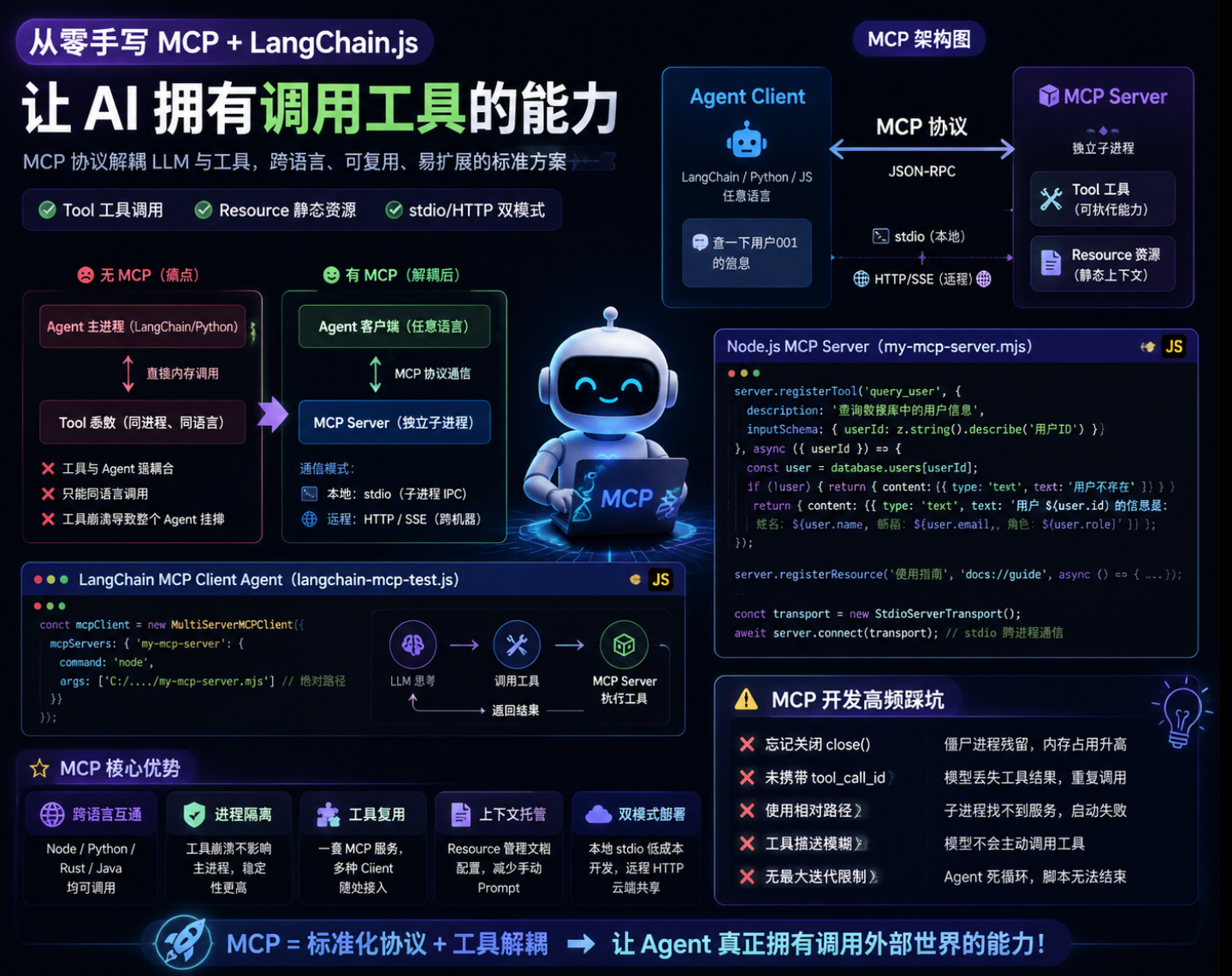
读完本文你能学到:
- MCP协议核心原理、stdio跨进程通信底层逻辑
- 完整可运行Node MCP Server(内置用户查询工具+静态资源)
- LangChain MultiServerMCPClient多服务Agent调用实战
- 开发过程中90%人都会踩的MCP坑与修复方案
- 一套可直接迁移到生产的Agent循环调用模板
一、先搞懂:MCP到底解决了什么问题
1. 无MCP的旧架构(痛点拉满)
Agent主进程(LangChain/Python)
    ↓ 直接内存调用
Tool函数(同进程、同语言)
缺陷:
- 工具与Agent代码强耦合,无法跨项目共享
- 只能同语言调用,Java/Python/JS工具无法互通
- 工具崩溃直接连带整个Agent进程挂掉
2. MCP标准化架构(解耦核心)
Agent客户端(任意语言) ←MCP协议→ MCP Server(独立子进程)
通信分两种模式:
1. 本地:stdio标准输入输出(子进程IPC通信,本次实战)
2. 远程:HTTP/SSE(公网部署,跨机器调用)
MCP两大核心能力:
- Tool工具:给LLM提供可执行能力(本文用户查询接口)
- Resource静态资源:给LLM注入上下文文档(使用指南)
二、实战第一步:手写MCP Server(Node完整代码)
新建my-mcp-server.mjs,完整可直接运行,内置用户查询工具+静态文档资源
import { McpServer } from '@modelcontextprotocol/sdk/server/mcp.js';
import { StdioServerTransport } from '@modelcontextprotocol/sdk/server/stdio.js';
import { z } from 'zod';

// 模拟数据库,生产可替换真实MySQL/Redis
const database = {
  users: {
    '001': { id: '001', name: '祖豪', email: 'zh@qq.com', role: 'admin' },
    '002': { id: '002', name: '光光', email: 'gg@qq.com', role: 'user' },
    '003': { id: '003', name: '小红', email: 'xh@qq.com', role: 'user' },
  }
}

// 初始化MCP服务实例
const server = new McpServer({
  name: 'my-mcp-server',
  version: '1.0.0'
});

// 注册工具:查询用户信息
server.registerTool('query_user', {
  description: `查询数据库中的用户信息。输入用户ID, 返回该用户的详细信息(姓名、邮箱、角色)`,
  inputSchema: {
    userId: z.string().describe('用户ID, 例如:001, 002, 003')
  }
}, async ({userId}) => {
  const user = database.users[userId];
  if (!user) {
    return {
      content: [
        { type: 'text', text: `用户 ID ${userId} 不存在。可用的ID: 001, 002, 003`}
      ]
    }
  }
  return {
    content: [
      {
        type: 'text',
        text: `用户 ${user.id} 的信息是:姓名: ${user.name}, 邮箱: ${user.email}, 角色: ${user.role}`
      }
    ]
  }
})

// 注册静态资源:MCP使用指南(自动注入Agent系统提示词)
server.registerResource(
  '使用指南',
  'docs://guide',
  {
    description: 'MCP Server 使用指南',
    mimeType: 'text/plain'
  },
  async () => {
    return {
      contents: [
        {
          uri: 'docs://guide',
          mimeType: 'text/plain',
          text: `
          MCP Server 使用指南
功能:提供用户查询等工具。
使用:在 Cursor 等 MCP Client / LangChain Agent 中通过自然语言对话,框架会自动调用相应工具。
          `
        }
      ]
    }
  }
)

// stdio跨进程通信通道,本地MCP核心
const transport = new StdioServerTransport();
await server.connect(transport);
关键代码说明
StdioServerTransport:本地进程间通信载体,Client启动子进程后通过标准输入输出传输JSON-RPC消息registerTool:对外暴露可被LLM调用的工具,zod做参数强校验registerResource:静态资源,Client可读取作为系统上下文,减少人工写Prompt
三、实战第二步:LangChain MCP Client Agent调用完整代码
新建langchain-mcp-test.js,基于DeepSeek大模型,自动拉起MCP子进程、循环工具调用
import 'dotenv/config';
import { MultiServerMCPClient } from '@langchain/mcp-adapters';
import { ChatOpenAI } from '@langchain/openai';
import chalk from 'chalk';
import { HumanMessage, SystemMessage, ToolMessage } from '@langchain/core/messages';

// 初始化大模型(兼容OpenAI格式API)
const model = new ChatOpenAI({
  modelName:'deepseek-v4-pro',
  apiKey: process.env.DEEPSEEK_API_KEY,
  temperature: 0,
  configuration: {
    baseURL: 'https://api.deepseek.com/v1',
  },
});

// 多MCP服务客户端配置,自动启动node子进程
const mcpClient = new MultiServerMCPClient({
  mcpServers: {
    'my-mcp-server': {
      command: 'node',
      args: ['C:/Users/26066/Desktop/workspace/hwq_ai/ai/agent_in_action/mcp-demo/src/my-mcp-server.mjs']
    }
  }
})

// 1. 拉取所有MCP服务暴露的工具
const tools = await mcpClient.getTools();
// 2. 读取所有静态资源,拼接为系统提示词
const resourceRes = await mcpClient.listResources();
let resourceContent = '';
for (const [serverName, resources] of Object.entries(resourceRes)) {
  for (const resource of resources) {
    const content = await mcpClient.readResource(serverName, resource.uri)
    resourceContent += content[0].text;
  }
}
console.log('加载系统上下文文档:', resourceContent, '---------------');

// 模型绑定MCP工具
const modelWithTools = model.bindTools(tools);

/**
 * Agent循环执行核心逻辑
 * @param {string} query 用户提问
 * @param {number} maxIterations 最大工具调用轮次,防止死循环
 */
async function runAgentWithTools(query,maxIterations=30){
  const messages =[
    new SystemMessage(resourceContent),
    new HumanMessage(query)
  ];
  for(let i=0;i<maxIterations;i++){
    console.log(chalk.bgGreen(`正在思考,第${i+1}轮`));
    const response = await modelWithTools.invoke(messages);
    messages.push(response);
    // 无工具调用,直接返回最终回答
    if (!response.tool_calls || response.tool_calls.length === 0) {
      console.log(`\n AI 最终回复: \n ${response.content}`);
      return response.content;
    }
    console.log(chalk.bgBlue(`检测到 ${response.tool_calls.length}个工具调用`));
    console.log(chalk.bgBlue(`工具调用: ${response.tool_calls.map(t => t.name).join(', ')}`))
    // 串行执行所有工具调用
    for(const toolCall of response.tool_calls){
      const foundTool=tools.find(t => t.name===toolCall.name);
      if(foundTool){
        const toolResult = await foundTool.invoke(toolCall.args);
        // 必须携带tool_call_id,否则模型无法匹配工具返回结果
        messages.push(new ToolMessage({
          content:toolResult,
          tool_call_id : toolCall.id
        }))
      } else {
        console.log(chalk.bgRed(`未找到工具: ${toolCall.name}`));
        messages.push(new ToolMessage({
          content: `未找到工具: ${toolCall.name}`,
          tool_call_id : toolCall.id
        }));
      }
    }
  }
  // 达到最大迭代次数,返回最后一轮输出
  return messages[messages.length-1].content;
}

// 执行测试查询
await runAgentWithTools('查一下用户001的信息')

// 关键:关闭MCP子进程,防止僵尸进程残留
await mcpClient.close();
运行流程拆解
MultiServerMCPClient根据配置自动执行node命令,拉起MCP Server子进程- Client通过stdio和子进程建立IPC通信,拉取工具列表+静态资源文档
- 资源文档自动注入SystemMessage,让模型知道工具使用规则
- Agent循环:模型思考→发起工具调用→Client转发给MCP Server→收集结果回传给模型
- 对话结束调用
mcpClient.close()销毁子进程,释放资源
四、开发必看:MCP高频踩坑清单
坑1:忘记调用close(),大量僵尸进程残留
现象:多次启动脚本后,任务管理器大量node进程占用内存,不会自动销毁
原因:MCP子进程生命周期依附主进程,异常退出时不会自动关闭
解决方案:无论正常/异常结束,都要执行await mcpClient.close();生产建议用try/finally包裹
try {
  await runAgentWithTools('查一下用户001的信息')
} finally {
  await mcpClient.close();
}
坑2:工具返回不携带tool_call_id,模型丢失上下文
现象:工具执行成功,但模型重复调用工具、无法读取返回结果
核心规则:ToolMessage必须传入对应tool_call.id,模型靠ID匹配工具请求与返回值
坑3:文件路径写相对路径,MCP子进程找不到服务
现象:启动报错 spawn node ENOENT,无法拉起MCP服务
解决:args中填写MCP Server绝对路径,避免工作目录不一致导致路径解析错误
坑4:工具描述模糊,模型不会主动调用工具
现象:提问需要查询用户,但模型直接回答不知道,不触发query_user
优化:完善description描述,明确工具适用场景;参数describe补充示例
坑5:循环无最大迭代次数,Agent死循环
现象:模型反复调用同一个工具,脚本无限运行
解决方案:设置maxIterations限制轮次(示例30轮),超过直接终止循环
五、MCP核心优势总结
- 跨语言互通:Node/Python/Rust/Java写的MCP Server,任意语言Agent均可调用
- 进程隔离:工具崩溃不会让主Agent进程挂掉,稳定性大幅提升
- 工具复用:一套MCP服务,Cursor、LangChain、Claude Desktop均可接入
- 上下文托管:Resource统一管理文档、配置,不用手动拼接Prompt
- 两种部署模式:本地stdio低成本开发,远程HTTP支持云端共享工具
对比传统内置工具,MCP彻底解决工具耦合、语言锁定两大核心痛点,是AI Agent工程化落地标准方案。

Agent 垂直技术社区,欢迎活跃、内容共建。
更多推荐


 1
1 0
0- 0


 已为社区贡献5条内容

所有评论(0)