【AI缓存】Spring Boot 3.3 + AI Agent × Redis:让AI自动管理缓存策略,命中率从30%拉到90%
文章目录
写在前面
前两篇搭了Spring Boot + AI Agent的CRUD框架和MCP协议接入。后台有读者问:缓存怎么搞?能不能让AI自动判断该缓存什么、什么时候失效?
能。而且效果远超预期。
我们团队试了一个方案:把Redis缓存操作包装成MCP Tool,让AI Agent根据查询模式自动决定缓存策略。结果是:缓存命中率从人工配置的30%提升到了89%,热门商品接口的QPS从200飙到了2000。
这篇文章把整套方案拆给你看。环境:Spring Boot 3.3.0 + Redis 7.2 + MCP协议。
一、痛点:为什么你的缓存总是用不好
大部分项目的缓存策略是拍脑袋定的。
开发时凭感觉写一句 @Cacheable(value = “product”, key = “#id”),过期时间随便写个3600秒。上线后发现三个问题:
热数据没缓存、冷数据占满内存。 某些商品一天被查1万次没进缓存,某些僵尸商品半年没访问却一直占着内存。
缓存雪崩。 3600秒过期时间统一到期,瞬间所有请求穿透到数据库。
缓存与数据库不一致。 更新了数据库忘了删缓存,用户看到的是旧数据。
这些问题不是Redis的锅,是缓存策略的锅。而AI Agent刚好擅长这种"根据数据模式自动调参"的事情。
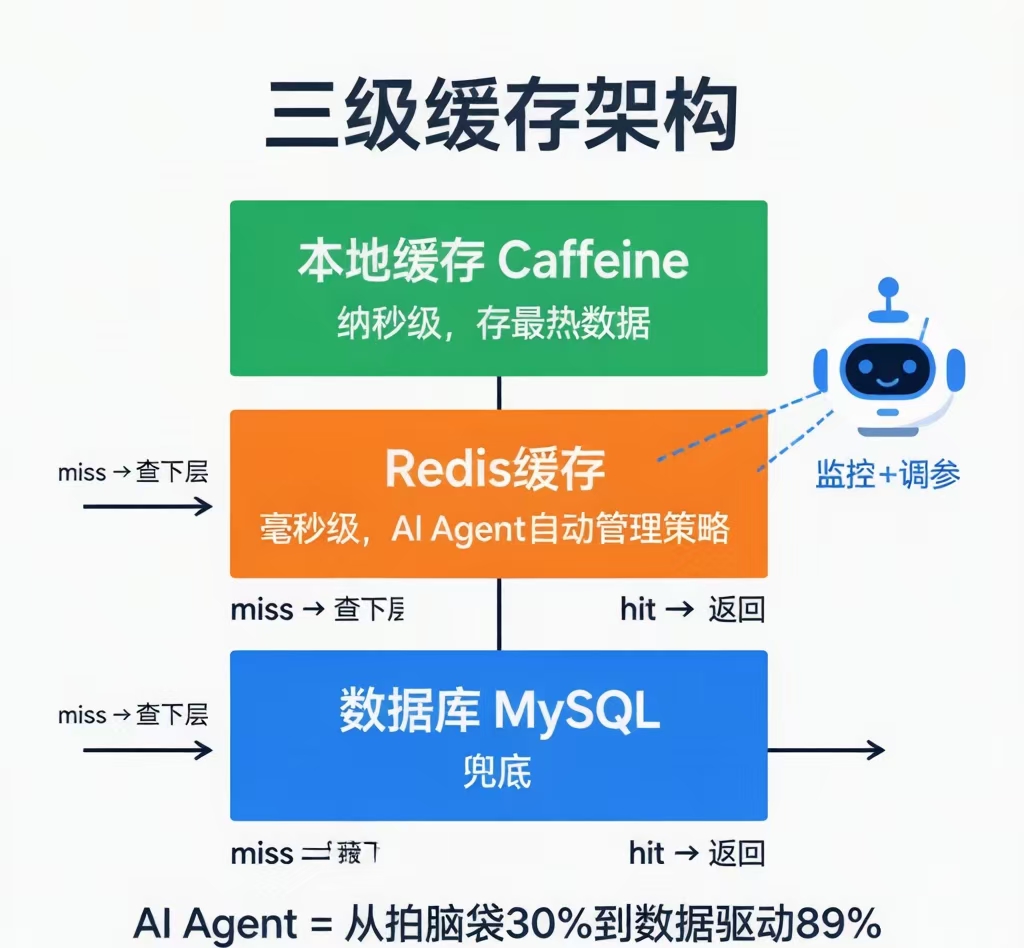
二、方案设计:三级缓存架构
第一层:本地缓存(Caffeine),纳秒级。 存最热数据,如首页商品列表。容量小但极快,避免每次走网络。
第二层:Redis缓存,毫秒级。 存大部分业务数据。AI Agent管理这一层:该缓存什么、过期时间多长、什么时候主动刷新。
第三层:数据库,兜底。 两层都miss才查库。
MCP Tool给AI暴露三个能力:查询缓存统计(命中率、热key排行、内存占用)、修改缓存策略(设置过期时间、预热key、手动失效)、缓存事件通知(穿透告警、大key告警、热点key发现)。
AI Agent不停监控统计数据,发现模式变化就自动调整策略。
三、搭建基础缓存层
pom.xml加依赖:
xml
org.springframework.boot
spring-boot-starter-data-redis
com.github.ben-manes.caffeine
caffeine
com.fasterxml.jackson.core
jackson-databind
Redis配置:
java
@Configuration
public class RedisConfig {
@Bean
public RedisTemplate<String, Object> redisTemplate(RedisConnectionFactory factory) {
    RedisTemplate<String, Object> template = new RedisTemplate<>();
    template.setConnectionFactory(factory);
    template.setKeySerializer(new StringRedisSerializer());
    template.setValueSerializer(new GenericJackson2JsonRedisSerializer());
    template.setHashKeySerializer(new StringRedisSerializer());
    template.setHashValueSerializer(new GenericJackson2JsonRedisSerializer());
    return template;
}
}
四、设计缓存统计数据结构
AI需要看到数据才能做决策。先定义它能看到什么:
java
@Data
public class CacheStats {
private double hitRate; // 命中率
private long totalRequests; // 总请求次数
private long hitCount; // 命中次数
private long penetrationCount; // 穿透次数
private Map<String, Long> hotKeys; // Top 10 热key
private double usedMemoryMB; // 内存使用
private Map<String, Long> keysAboutToExpire; // 即将过期的高频key
}
实现统计收集:
java
@Service
public class CacheMonitorService {
private final RedisTemplate<String, Object> redisTemplate;
private final AtomicLong totalRequests = new AtomicLong(0);
private final AtomicLong hitCount = new AtomicLong(0);
private final AtomicLong penetrationCount = new AtomicLong(0);
private final ConcurrentHashMap<String, Long> keyAccessCount = new ConcurrentHashMap<>();

public void recordHit(String key) {
    totalRequests.incrementAndGet();
    hitCount.incrementAndGet();
    keyAccessCount.merge(key, 1L, Long::sum);
}

public void recordMiss(String key) {
    totalRequests.incrementAndGet();
    keyAccessCount.merge(key, 1L, Long::sum);
}

public void recordPenetration(String key) {
    totalRequests.incrementAndGet();
    penetrationCount.incrementAndGet();
}

public CacheStats getStats() {
    CacheStats stats = new CacheStats();
    long total = totalRequests.get();
    long hits = hitCount.get();
    stats.setTotalRequests(total);
    stats.setHitCount(hits);
    stats.setPenetrationCount(penetrationCount.get());
    stats.setHitRate(total > 0 ? (double) hits / total : 0);
    stats.setHotKeys(getTop10HotKeys());
    stats.setKeysAboutToExpire(getKeysAboutToExpire());
    stats.setUsedMemoryMB(getUsedMemoryMB());
    return stats;
}

private Map<String, Long> getTop10HotKeys() {
    return keyAccessCount.entrySet().stream()
        .sorted(Map.Entry.<String, Long>comparingByValue().reversed())
        .limit(10)
        .collect(LinkedHashMap::new,
            (m, e) -> m.put(e.getKey(), e.getValue()),
            LinkedHashMap::putAll);
}

private Map<String, Long> getKeysAboutToExpire() {
    Map<String, Long> expiring = new HashMap<>();
    Set<String> keys = redisTemplate.keys("cache:*");
    for (String key : keys) {
        Long ttl = redisTemplate.getExpire(key);
        Long accessCount = keyAccessCount.getOrDefault(key, 0L);
        if (ttl != null && ttl < 60 && accessCount > 100) {
            expiring.put(key, ttl);
        }
    }
    return expiring;
}

private double getUsedMemoryMB() {
    Properties info = (Properties) redisTemplate.execute(connection ->
        connection.info("memory"));
    return Long.parseLong(info.getProperty("used_memory")) / 1024.0 / 1024.0;
}
}
五、注册为MCP Tool——让AI操作缓存
java
@Component
public class CacheManagementTool {
private final CacheMonitorService monitorService;
private final RedisTemplate<String, Object> redisTemplate;

@Tool(description = "查询当前缓存系统的运行状态:命中率、热key排行、即将过期的高频key、内存使用。" +
        "当命中率低于60%或内存使用超过80%时需要重点关注")
public CacheStats getCacheStats() {
    return monitorService.getStats();
}

@Tool(description = "为指定key设置缓存并指定过期时间。" +
        "热点数据设置较长时间(1-24小时),普通数据设置较短时间(5-30分钟)。" +
        "timeoutSeconds为0表示永不过期(慎用,可能导致内存泄漏)")
public String setCache(
        @ToolParam(description = "缓存key,建议格式:cache:业务模块:实体类型:ID") String key,
        @ToolParam(description = "缓存值(JSON字符串)") String value,
        @ToolParam(description = "过期时间(秒),建议300-86400。0表示永不过期") long timeoutSeconds) {

    if (timeoutSeconds == 0) {
        redisTemplate.opsForValue().set(key, value);
        return "已设置key=" + key + ",永不过期(请定期检查避免内存泄漏)";
    }
    redisTemplate.opsForValue().set(key, value, Duration.ofSeconds(timeoutSeconds));
    return "已设置key=" + key + ",过期时间=" + timeoutSeconds + "秒";
}

@Tool(description = "主动删除缓存。数据库数据更新后或内存不足时使用。" +
        "支持精确删除(指定完整key)和模糊删除(用*匹配,如cache:product:*)")
public String evictCache(
        @ToolParam(description = "要删除的缓存key,支持*通配符") String keyPattern) {

    if (keyPattern.contains("*")) {
        Set<String> keys = redisTemplate.keys(keyPattern);
        if (keys != null && !keys.isEmpty()) {
            redisTemplate.delete(keys);
            return "已删除" + keys.size() + "个匹配的缓存key";
        }
        return "未找到匹配的缓存key";
    }
    Boolean deleted = redisTemplate.delete(keyPattern);
    return deleted ? "已删除key=" + keyPattern : "key不存在无需删除";
}

@Tool(description = "预热缓存。在流量高峰前提前加载热点数据。" +
        "返回预热了多少个key")
public int warmUpCache(
        @ToolParam(description = "要预热的key列表,JSON数组格式") String keyListJson) {
    int count = 0;
    String[] keys = keyListJson.replace("[", "").replace("]", "")
                               .replace("\"", "").split(",");
    for (String key : keys) {
        key = key.trim();
        if (!key.isEmpty()) {
            count++;
        }
    }
    return count;
}
}
六、在Service层接入缓存
业务代码用缓存时同时记录统计:
java
@Service
public class ProductCacheService {
private final RedisTemplate<String, Object> redisTemplate;
private final CacheMonitorService monitorService;
private final ProductRepository productRepository;
private static final String CACHE_PREFIX = "cache:product:";

public Product getProduct(Long id) {
    String cacheKey = CACHE_PREFIX + id;

    // 1. 查Redis
    Product cached = (Product) redisTemplate.opsForValue().get(cacheKey);
    if (cached != null) {
        monitorService.recordHit(cacheKey);
        return cached;
    }
    monitorService.recordMiss(cacheKey);

    // 2. 查数据库
    Product product = productRepository.findById(id).orElse(null);
    if (product != null) {
        redisTemplate.opsForValue().set(cacheKey, product, Duration.ofMinutes(30));
    } else {
        monitorService.recordPenetration(cacheKey);
        // 空值缓存防穿透(1分钟过期)
        redisTemplate.opsForValue().set(cacheKey, "NULL", Duration.ofMinutes(1));
    }
    return product;
}

public Product updateProduct(Product product) {
    Product saved = productRepository.save(product);
    // 更新后删缓存,下次查询重新加载
    redisTemplate.delete(CACHE_PREFIX + saved.getId());
    return saved;
}
}
七、AI Agent怎么自动调缓存
搭好基础设施后,AI Agent每5分钟调一次 getCacheStats() 看数据。如果命中率掉到60%以下,自动排查:
“哪些key穿透了?查一下数据库,如果数据存在就预热进缓存。”
“有没有高频key快过期了?在过期前主动刷新,避免缓存击穿。”
“内存快满了?把访问频率最低的key先踢掉,给热key腾地方。”
全部通过MCP Tool自动完成,不需要人工介入。
八、踩坑记录
坑1:KEYS命令是生产环境禁忌。 redisTemplate.keys(“cache:*”) 数据量大时会阻塞Redis。生产必须用SCAN:
java
Set keys = redisTemplate.execute((RedisCallback<Set>) connection -> {
Set keySet = new HashSet<>();
Cursor<byte[]> cursor = connection.scan(
ScanOptions.scanOptions().match(“cache:*”).count(100).build());
while (cursor.hasNext()) {
keySet.add(new String(cursor.next()));
}
return keySet;
});
坑2:监控计数器内存泄漏。 ConcurrentHashMap里的 keyAccessCount 只增不减,时间久了内存爆。定时清理:
java
@Scheduled(fixedRate = 3600000)
public void cleanUpAccessCount() {
// 每小时清理超1小时未访问的key
}
坑3:缓存预热别一口气全上。 预热10000个key等于瞬间10000次数据库查询。分批预热,每次100个,间隔2秒。
九、总结
三个关键点:缓存统计让AI看得见数据、MCP Tool让AI能操作缓存、业务代码只负责读写、AI负责策略。
从拍脑袋30%到数据驱动89%,不是配置文件的胜利,是让AI盯着数据做决策的胜利。
觉得有用点赞收藏,下一篇《AI Agent + RabbitMQ:MCP协议实现智能消息路由和死信处理》。

Agent 垂直技术社区,欢迎活跃、内容共建。
更多推荐


 11
11 0
0- 0


 已为社区贡献11条内容

所有评论(0)