AtomCode 代码审查 Skill 开发:自动化 Code Review 工作流
文章目录

每日一句正能量
你以为的真理只是你的视角,你以为的不公只是你的执念。
我们常把自己的看法等同于事实。感到不公时,很可能是我们死死抓住某个角度不放。松开手,换一个位置看,世界会宽广很多。
一、引言:为什么需要自动化代码审查?
在软件工程实践中,代码审查(Code Review)是保障代码质量的关键防线。然而,传统的人工审查面临诸多挑战:审查者时间有限、标准不统一、容易遗漏安全问题、大型 PR 审查效率低下。据统计,人工审查平均只能发现 60% 的潜在缺陷,而安全漏洞的漏检率更是高达 85%。
AtomCode 作为 2026 年开源的终端 AI 编码智能体,其独特的 Skill 系统允许开发者定义可复用的 AI 能力模块。通过开发专门的代码审查 Skill,可以实现安全漏洞检测、代码风格检查、性能瓶颈识别、可维护性评估等自动化审查能力,将代码审查从"人工抽检"升级为"全量自动化 + 人工重点复核"的高效模式。
本文将手把手教你开发一套完整的代码审查 Skill,并集成到 Git 工作流中,打造自动化质量保障体系。
二、代码审查自动化工作流概览
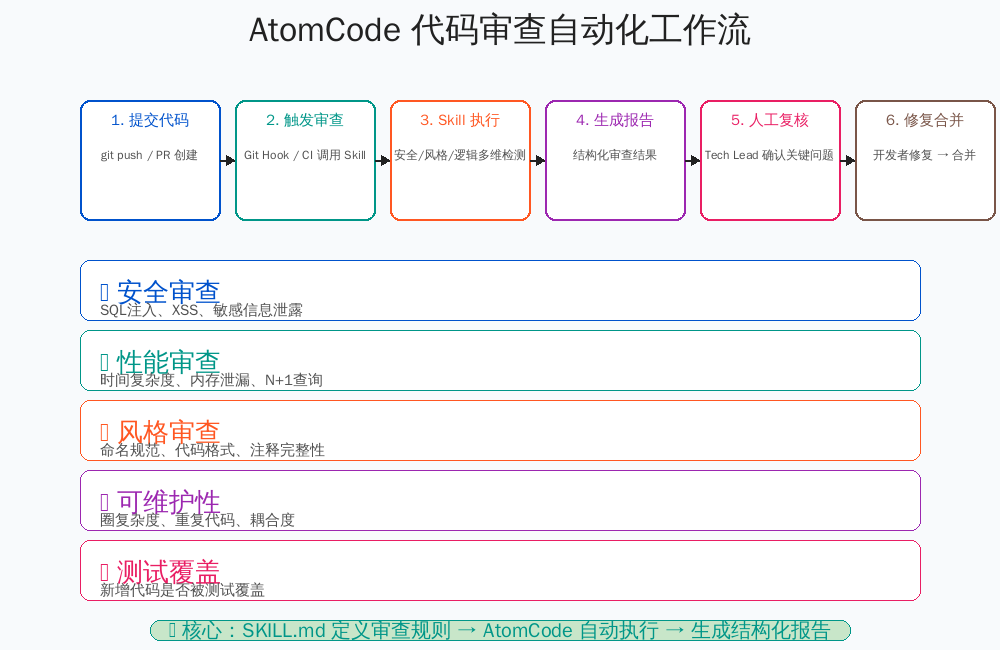
上图展示了 AtomCode 代码审查自动化的完整工作流:
- 提交代码:开发者执行
git push或创建 PR - 触发审查:Git Hook 或 CI 流水线调用审查 Skill
- Skill 执行:安全、风格、逻辑多维检测并行执行
- 生成报告:结构化审查结果,分级展示问题
- 人工复核:Tech Lead 确认关键问题,给出修复建议
- 修复合并:开发者修复问题后,代码合并到主干
审查维度:
- 🛡️ 安全审查:SQL 注入、XSS、敏感信息泄露
- ⚡ 性能审查:时间复杂度、内存泄漏、N+1 查询
- 📝 风格审查:命名规范、代码格式、注释完整性
- 🔧 可维护性:圈复杂度、重复代码、耦合度
- ✅ 测试覆盖:新增代码是否被测试覆盖
三、代码审查规范定义
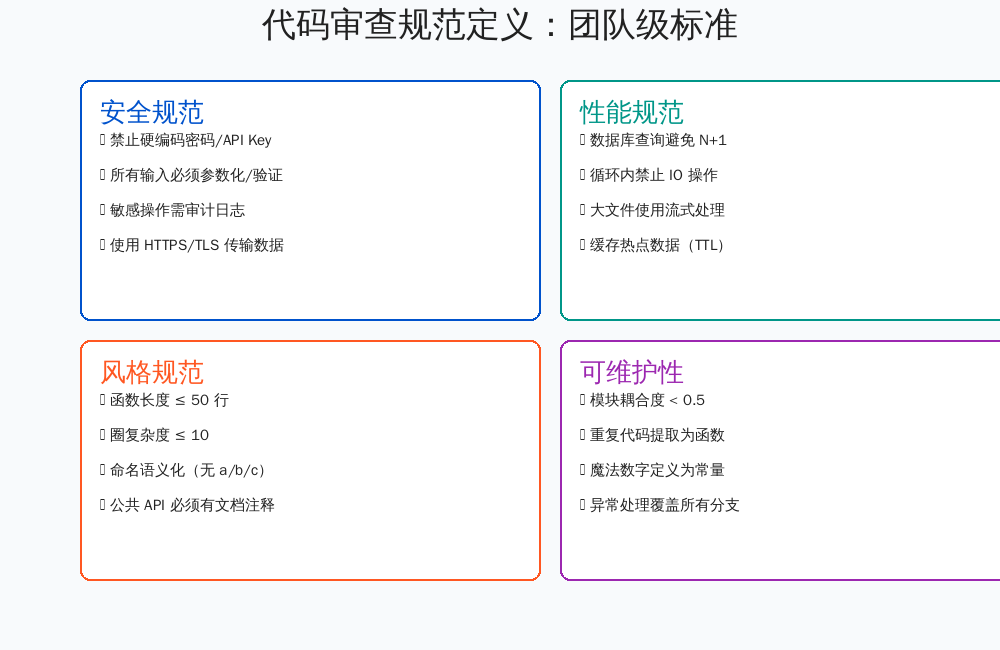
3.1 团队级审查标准
在开发审查 Skill 之前,首先需要定义团队的审查规范。规范应当具体、可量化、可自动化检测:
安全规范
- ✓ 禁止硬编码密码、API Key、Token
- ✓ 所有用户输入必须经过参数化或验证
- ✓ 敏感操作必须记录审计日志
- ✓ 数据传输必须使用 HTTPS/TLS
性能规范
- ✓ 数据库查询避免 N+1 问题
- ✓ 循环内禁止 IO 操作(数据库、文件、网络)
- ✓ 大文件处理必须使用流式读取
- ✓ 热点数据必须缓存(设置 TTL)
风格规范
- ✓ 函数长度不超过 50 行
- ✓ 圈复杂度不超过 10
- ✓ 命名语义化(禁止 a/b/c/x/y/z)
- ✓ 公共 API 必须有文档注释(含示例)
可维护性规范
- ✓ 模块耦合度低于 0.5
- ✓ 重复代码提取为公共函数
- ✓ 魔法数字定义为命名常量
- ✓ 异常处理覆盖所有分支
3.2 严重级别定义
| 级别 | 定义 | 示例 | 处理方式 |
|---|---|---|---|
| CRITICAL | 安全漏洞、数据丢失风险 | 硬编码密码、SQL 注入 | 必须修复,阻塞合并 |
| HIGH | 性能瓶颈、逻辑错误 | N+1 查询、死锁风险 | 必须修复,阻塞合并 |
| MEDIUM | 风格问题、可维护性 | 函数过长、命名不规范 | 建议修复,不阻塞 |
| LOW | 优化建议、文档补充 | 缺少注释、可简化逻辑 | 可选修复 |
四、审查 Skill 的 SKILL.md 编写
4.1 SKILL.md 结构
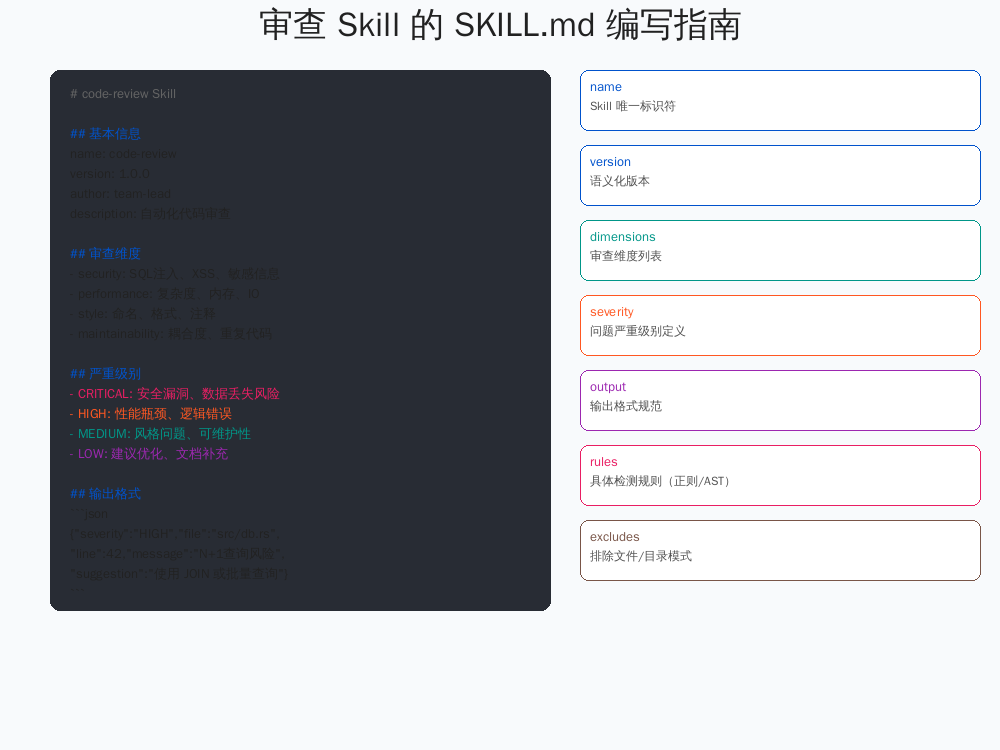
AtomCode 的 Skill 系统通过 SKILL.md 文件定义能力规范。代码审查 Skill 的编写需要遵循以下结构:
# code-review Skill

## 基本信息
name: code-review
version: 1.0.0
author: team-lead
description: 自动化代码审查,覆盖安全、性能、风格、可维护性
license: MIT

## 依赖
- tree-sitter-cli (>= 0.20)
- jq (>= 1.6)
- clippy (Rust 项目)

## 审查维度
dimensions:
  - security:
      weight: 0.35
      description: 安全漏洞检测
  - performance:
      weight: 0.25
      description: 性能瓶颈识别
  - style:
      weight: 0.20
      description: 代码风格检查
  - maintainability:
      weight: 0.20
      description: 可维护性评估

## 严重级别
severity:
  CRITICAL:
    score: 10
    block_merge: true
    notify: ["security@team.com", "tech-lead"]
  HIGH:
    score: 7
    block_merge: true
    notify: ["tech-lead"]
  MEDIUM:
    score: 4
    block_merge: false
  LOW:
    score: 1
    block_merge: false

## 输出格式
output_format: markdown
# 可选: json, sarif, junit

## 排除规则
excludes:
  - "tests/**"
  - "vendor/**"
  - "**/*.generated.rs"
  - "migrations/**"

## 语言特定配置
[languages.rust]
parser: tree-sitter-rust
tools:
  - clippy
  - rustfmt

[languages.javascript]
parser: tree-sitter-javascript
tools:
  - eslint
  - prettier

[languages.python]
parser: tree-sitter-python
tools:
  - pylint
  - black
4.2 核心字段说明
| 字段 | 说明 | 示例 |
|---|---|---|
name |
Skill 唯一标识符 | code-review |
version |
语义化版本 | 1.0.0 |
dimensions |
审查维度及权重 | security: 0.35 |
severity |
问题严重级别定义 | CRITICAL: {score: 10} |
excludes |
排除文件/目录模式 | tests/** |
output_format |
报告输出格式 | markdown / json / sarif |
languages |
语言特定工具配置 | rust: {parser: tree-sitter-rust} |
五、安全漏洞检测规则
5.1 规则库设计
安全审查是代码审查 Skill 的核心能力。以下是经过验证的检测规则库:
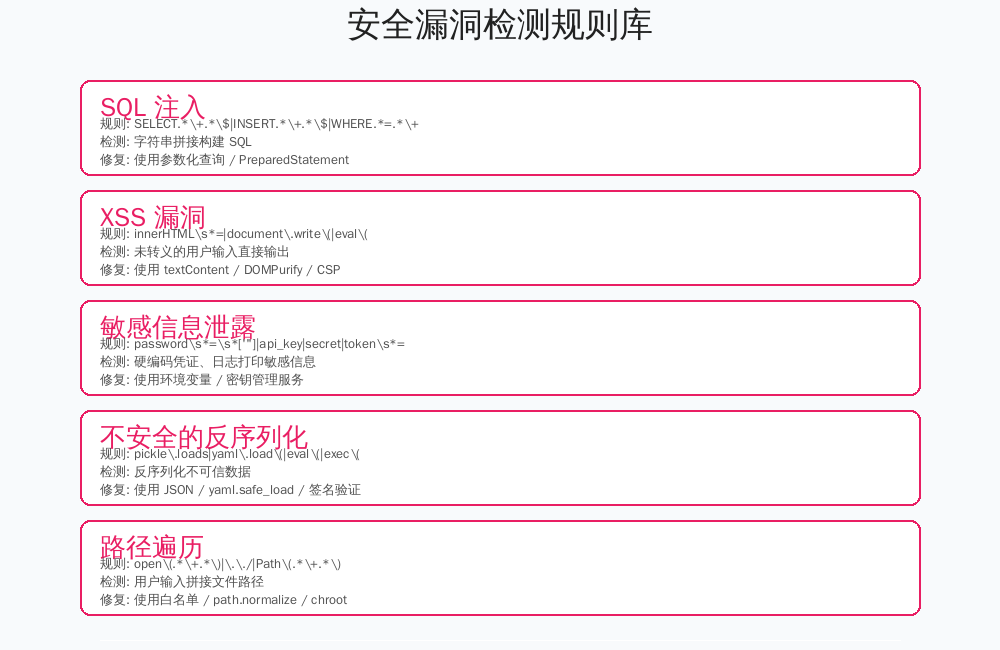
SQL 注入检测
# 规则定义
rules:
  - id: SQL-INJECTION-001
    name: SQL Injection via String Concatenation
    severity: CRITICAL
    pattern: |
      SELECT.*\+.*\$|INSERT.*\+.*\$|UPDATE.*\+.*\$|DELETE.*\+.*\$
    languages: [rust, javascript, python, java]
    message: "检测到 SQL 字符串拼接,存在注入风险"
    suggestion: "使用参数化查询(PreparedStatement)或 ORM"
    example_bad: |
      let query = "SELECT * FROM users WHERE id = " + user_id;
    example_good: |
      let query = "SELECT * FROM users WHERE id = ?";
      conn.execute(query, [user_id]);
XSS 漏洞检测
  - id: XSS-001
    name: XSS via Unsafe DOM Manipulation
    severity: CRITICAL
    pattern: |
      innerHTML\s*=|document\.write\(|eval\(|setTimeout\(".*\+
    languages: [javascript, typescript]
    message: "检测到不安全的 DOM 操作,存在 XSS 风险"
    suggestion: "使用 textContent 替代 innerHTML,或使用 DOMPurify 净化"
敏感信息泄露检测
  - id: SECRET-001
    name: Hardcoded Secret
    severity: CRITICAL
    pattern: |
      password\s*=\s*['"][^'"]+['"]|api_key\s*=\s*['"]|secret\s*=\s*['"]|token\s*=\s*['"]
    exclude_patterns:
      - "test"  # 测试文件允许硬编码
      - "example"
    message: "检测到硬编码的敏感信息"
    suggestion: "使用环境变量、密钥管理服务(Vault/AWS Secrets Manager)"
不安全的反序列化检测
  - id: DESER-001
    name: Unsafe Deserialization
    severity: HIGH
    pattern: |
      pickle\.loads|yaml\.load\(|eval\(|exec\(|marshal\.loads
    languages: [python, javascript]
    message: "检测到不安全的反序列化操作"
    suggestion: "使用 yaml.safe_load()、JSON.parse() 或签名验证"
路径遍历检测
  - id: PATH-001
    name: Path Traversal
    severity: HIGH
    pattern: |
      open\(.*\+.*\)|\.\./|Path\(.*\+.*\)|fs\.readFile\(.*\+
    message: "检测到用户输入拼接文件路径"
    suggestion: "使用路径白名单、path.normalize() 或 chroot 隔离"
5.2 规则执行引擎
// Skill 执行引擎伪代码(Rust)
fn execute_security_rules(files: &[PathBuf]) -> Vec<Issue> {
    let mut issues = Vec::new();

    for file in files {
        let content = fs::read_to_string(file)?;
        let lang = detect_language(file);

        for rule in &SECURITY_RULES {
            if !rule.languages.contains(&lang) {
                continue;
            }

            let regex = Regex::new(&rule.pattern)?;
            for mat in regex.find_iter(&content) {
                // 检查排除模式
                if rule.exclude_patterns.iter().any(|p| content.contains(p)) {
                    continue;
                }

                let line = content[..mat.start()].lines().count() + 1;
                issues.push(Issue {
                    rule_id: rule.id.clone(),
                    severity: rule.severity,
                    file: file.clone(),
                    line,
                    message: rule.message.clone(),
                    suggestion: rule.suggestion.clone(),
                    snippet: mat.as_str().to_string(),
                });
            }
        }
    }

    issues.sort_by(|a, b| b.severity.cmp(&a.severity));
    issues
}
六、代码风格检查集成
6.1 四种集成方法
AtomCode 的审查 Skill 支持多种风格检查集成方式,团队可根据技术栈选择:
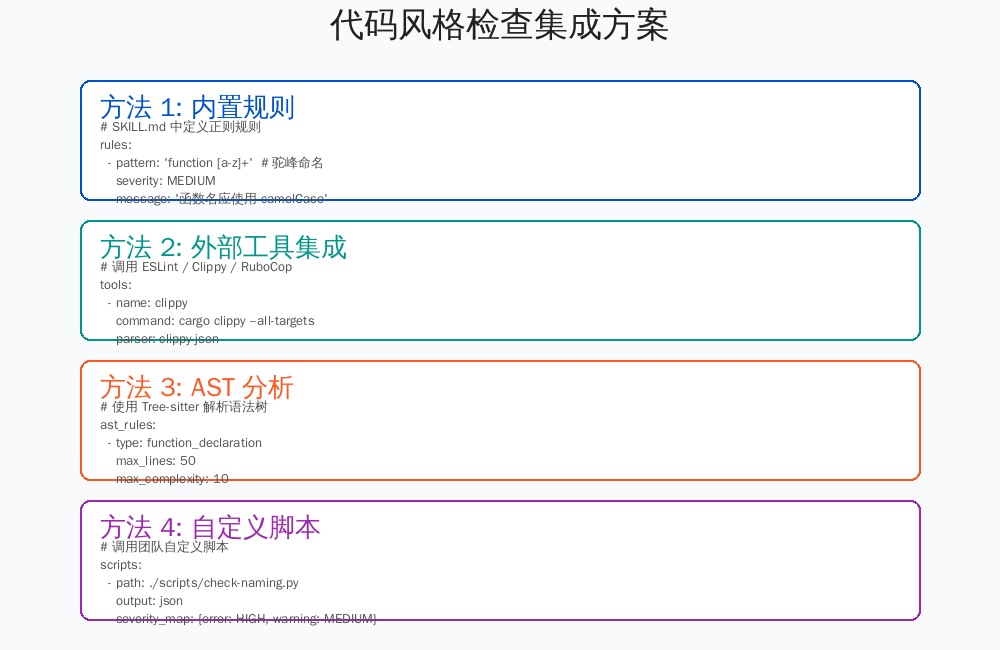
方法 1:内置正则规则
# SKILL.md 中直接定义正则规则
rules:
  - id: STYLE-001
    name: Function Naming Convention
    severity: MEDIUM
    pattern: "fn [A-Z]"  # Rust 函数名大写
    languages: [rust]
    message: "Rust 函数名应使用 snake_case"
    suggestion: "将函数名改为小写加下划线形式"

  - id: STYLE-002
    name: Line Length Limit
    severity: LOW
    pattern: "^.{101,}$"  # 超过 100 字符
    message: "行长度超过 100 字符"
    suggestion: "换行或提取变量"
方法 2:外部工具集成
# 调用现有 lint 工具
tools:
  - name: clippy
    command: "cargo clippy --all-targets --message-format=json"
    parser: clippy-json
    severity_map:
      error: HIGH
      warning: MEDIUM
      note: LOW

  - name: rustfmt
    command: "cargo fmt -- --check"
    parser: rustfmt-check
    severity: MEDIUM
    message: "代码格式不符合 rustfmt 规范"
方法 3:AST 分析
# 使用 Tree-sitter 解析语法树进行深度分析
ast_rules:
  - id: COMPLEXITY-001
    name: Cyclomatic Complexity
    type: function_declaration
    metric: cyclomatic_complexity
    threshold: 10
    severity: MEDIUM
    message: "函数圈复杂度过高: {value} (阈值: 10)"

  - id: SIZE-001
    name: Function Length
    type: function_declaration
    metric: line_count
    threshold: 50
    severity: MEDIUM
    message: "函数过长: {value} 行 (阈值: 50)"
方法 4:自定义脚本
# 调用团队自定义脚本
scripts:
  - path: ./scripts/check-naming-convention.py
    language: python
    output: json
    severity_map:
      error: HIGH
      warning: MEDIUM
    env:
      TEAM_PREFIX: "myapp"
6.2 多语言支持配置
# 支持多种编程语言的统一审查
languages:
  rust:
    parser: tree-sitter-rust
    file_extensions: [".rs"]
    tools: [clippy, rustfmt]
    rules: [rust-specific-rules]

  javascript:
    parser: tree-sitter-javascript
    file_extensions: [".js", ".jsx", ".ts", ".tsx"]
    tools: [eslint, prettier]
    rules: [js-specific-rules]

  python:
    parser: tree-sitter-python
    file_extensions: [".py"]
    tools: [pylint, black, mypy]
    rules: [python-specific-rules]

  go:
    parser: tree-sitter-go
    file_extensions: [".go"]
    tools: [golint, gofmt]
    rules: [go-specific-rules]
七、审查报告生成与输出
7.1 报告格式
AtomCode 的审查 Skill 支持多种输出格式,适应不同场景:
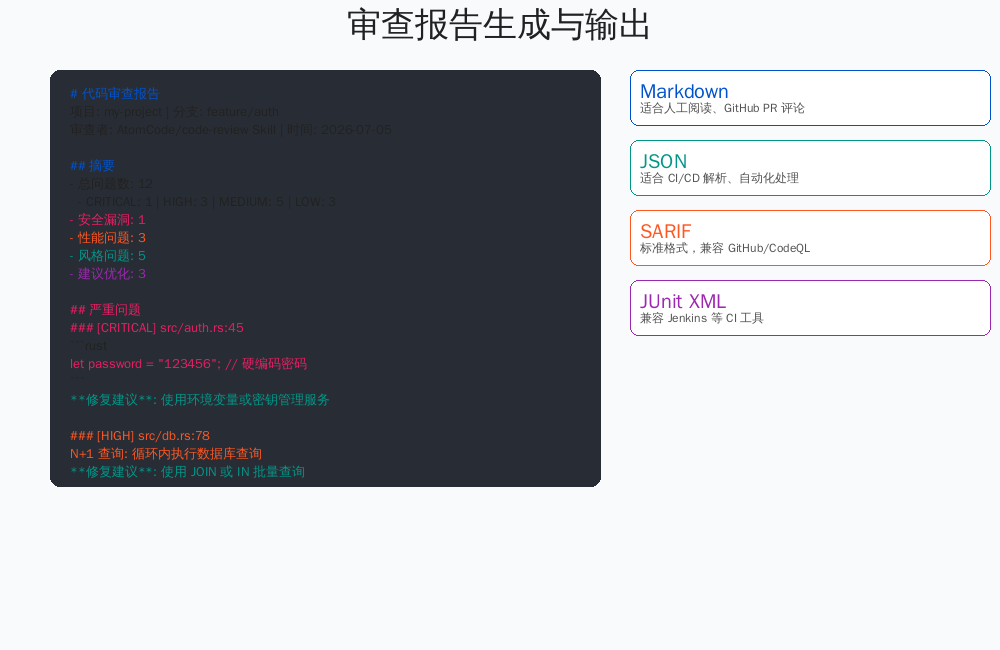
Markdown 格式(适合人工阅读)
# 代码审查报告

项目: my-project | 分支: feature/auth
审查者: AtomCode/code-review Skill | 时间: 2026-07-05 14:32
Skill 版本: 1.0.0

## 摘要
- 总问题数: 12
  - CRITICAL: 1 | HIGH: 3 | MEDIUM: 5 | LOW: 3
- 安全漏洞: 1
- 性能问题: 3
- 风格问题: 5
- 建议优化: 3

## 严重问题

### [CRITICAL] SQL-INJECTION-001 | src/auth.rs:45
```rust
let query = "SELECT * FROM users WHERE username = '" + username + "'";
问题: 检测到 SQL 字符串拼接,存在注入风险
修复建议: 使用参数化查询
let query = "SELECT * FROM users WHERE username = ?";
conn.execute(query, [username])?;
[HIGH] PERF-001 | src/db.rs:78
问题: N+1 查询:循环内执行数据库查询
for user in users {
    let orders = db.query("SELECT * FROM orders WHERE user_id = ?", user.id);
}
修复建议: 使用 JOIN 或 IN 批量查询
let user_ids: Vec<i64> = users.iter().map(|u| u.id).collect();
let orders = db.query("SELECT * FROM orders WHERE user_id = ANY(?)", user_ids);
[MEDIUM] STYLE-001 | src/main.rs:120
问题: 函数过长: 78 行 (阈值: 50)
修复建议: 提取为 3 个子函数
统计
| 维度 | 问题数 | 平均严重度 |
|---|---|---|
| 安全 | 1 | 10.0 |
| 性能 | 3 | 7.0 |
| 风格 | 5 | 4.0 |
| 可维护性 | 3 | 3.3 |
**JSON 格式(适合 CI/CD 解析)**

```json
{
  "summary": {
    "total_issues": 12,
    "critical": 1,
    "high": 3,
    "medium": 5,
    "low": 3
  },
  "issues": [
    {
      "rule_id": "SQL-INJECTION-001",
      "severity": "CRITICAL",
      "file": "src/auth.rs",
      "line": 45,
      "column": 12,
      "message": "检测到 SQL 字符串拼接",
      "suggestion": "使用参数化查询",
      "snippet": "let query = \"SELECT * FROM users WHERE username = '\" + username + \"'\"",
      "fix_diff": "--- a/src/auth.rs\n+++ b/src/auth.rs\n@@ -42,7 +42,7 @@\n-let query = \"SELECT * FROM users WHERE username = '\" + username + \"'\";\n+let query = \"SELECT * FROM users WHERE username = ?\";\n+conn.execute(query, [username])?;"
    }
  ],
  "metrics": {
    "security_score": 7.5,
    "performance_score": 6.0,
    "style_score": 8.2,
    "maintainability_score": 7.8
  }
}
SARIF 格式(标准安全审查格式)
{
  "$schema": "https://raw.githubusercontent.com/oasis-tcs/sarif-spec/master/Schemata/sarif-schema-2.1.0.json",
  "version": "2.1.0",
  "runs": [{
    "tool": {
      "driver": {
        "name": "AtomCode/code-review",
        "version": "1.0.0"
      }
    },
    "results": [{
      "ruleId": "SQL-INJECTION-001",
      "level": "error",
      "message": { "text": "检测到 SQL 字符串拼接" },
      "locations": [{
        "physicalLocation": {
          "artifactLocation": { "uri": "src/auth.rs" },
          "region": { "startLine": 45, "startColumn": 12 }
        }
      }]
    }]
  }]
}
7.2 输出格式配置
# SKILL.md
output:
  formats:
    - markdown:
        path: review-report.md
        template: default  # 使用内置模板
    - json:
        path: review-report.json
        pretty: true
    - sarif:
        path: review.sarif
        # SARIF 可上传到 GitHub Security tab

  # 条件输出
  conditional_output:
    - if: "critical_count > 0"
      format: markdown
      notify: ["security@team.com"]
    - if: "high_count > 5"
      format: json
      fail_ci: true
八、Git Hook 集成方案
8.1 三种 Hook 类型
将代码审查 Skill 集成到 Git Hook 中,可以在提交前、推送前自动执行审查,从源头拦截问题代码:
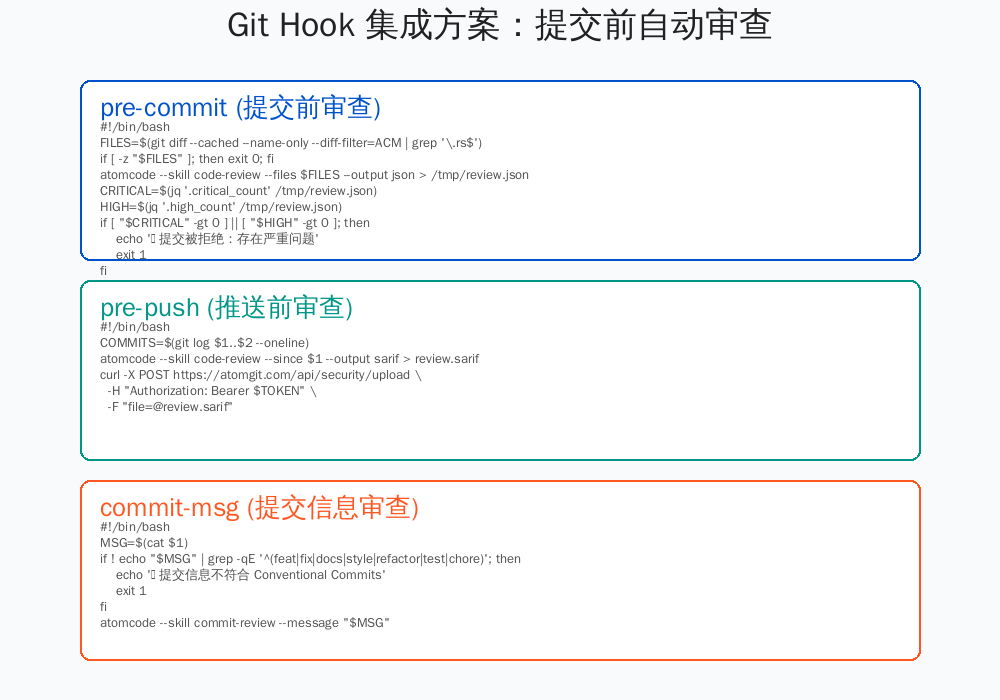
pre-commit:提交前审查
#!/bin/bash
# .git/hooks/pre-commit

# 获取暂存区变更的 Rust 文件
FILES=$(git diff --cached --name-only --diff-filter=ACM | grep '\.rs$')

if [ -z "$FILES" ]; then
    exit 0
fi

echo "🔍 正在执行代码审查..."

# 调用 AtomCode 审查 Skill
atomcode --skill code-review \
    --files $FILES \
    --output-format json \
    > /tmp/review.json

# 检查是否有 CRITICAL/HIGH 问题
CRITICAL=$(jq '.summary.critical' /tmp/review.json)
HIGH=$(jq '.summary.high' /tmp/review.json)

if [ "$CRITICAL" -gt 0 ] || [ "$HIGH" -gt 0 ]; then
    echo "❌ 提交被拒绝:存在严重问题"
    echo ""
    echo "CRITICAL: $CRITICAL | HIGH: $HIGH"
    echo ""
    jq -r '.issues[] | select(.severity == "CRITICAL" or .severity == "HIGH") | "[\(.severity)] \(.file):\(.line) - \(.message)"' /tmp/review.json
    echo ""
    echo "查看完整报告: atomcode --skill code-review --show-report /tmp/review.json"
    exit 1
fi

echo "✅ 审查通过 ($MEDIUM MEDIUM, $LOW LOW)"
exit 0
pre-push:推送前全量审查
#!/bin/bash
# .git/hooks/pre-push

LOCAL_REF=$1
LOCAL_SHA=$2
REMOTE_REF=$3
REMOTE_SHA=$4

echo "🔍 正在执行全量代码审查..."

# 获取本次推送的所有提交
COMMITS=$(git log $LOCAL_SHA..$REMOTE_SHA --oneline)

# 全量审查(包括历史提交引入的变更)
atomcode --skill code-review \
    --since $LOCAL_SHA \
    --output-format sarif \
    > review.sarif

# 上传到 AtomGit 安全中心
curl -X POST https://atomgit.com/api/security/upload \
    -H "Authorization: Bearer $ATOMGIT_TOKEN" \
    -F "file=@review.sarif" \
    -F "project=my-project" \
    -F "branch=$(git branch --show-current)"

# 检查是否通过
CRITICAL=$(jq '.runs[0].results | map(select(.level == "error")) | length' review.sarif)

if [ "$CRITICAL" -gt 0 ]; then
    echo "❌ 推送被拒绝:存在安全漏洞"
    exit 1
fi

echo "✅ 全量审查通过"
exit 0
commit-msg:提交信息审查
#!/bin/bash
# .git/hooks/commit-msg

MSG=$(cat $1)

# 检查是否符合 Conventional Commits
if ! echo "$MSG" | grep -qE '^(feat|fix|docs|style|refactor|test|chore)(\(.+\))?: .+'; then
    echo "❌ 提交信息不符合 Conventional Commits 规范"
    echo ""
    echo "格式: type(scope): description"
    echo ""
    echo "type 可选值:"
    echo "  feat: 新功能"
    echo "  fix: 修复"
    echo "  docs: 文档"
    echo "  style: 格式(不影响代码逻辑)"
    echo "  refactor: 重构"
    echo "  test: 测试"
    echo "  chore: 构建/工具"
    exit 1
fi

# 使用 AtomCode 检查提交信息语义
atomcode --skill commit-review --message "$MSG"

if [ $? -ne 0 ]; then
    echo "❌ 提交信息语义检查未通过"
    exit 1
fi

exit 0
8.2 统一安装脚本
#!/bin/bash
# install-hooks.sh - 团队统一安装 Git Hooks

HOOKS_DIR=".git/hooks"
SKILL_DIR=".atomcode/skills/code-review"

# 创建 Skill 目录
mkdir -p $SKILL_DIR

# 下载审查 Skill
curl -fsSL https://atomgit.com/team/code-review-skill/raw/main/SKILL.md \
    -o $SKILL_DIR/SKILL.md

# 安装 Git Hooks
cat > $HOOKS_DIR/pre-commit << 'HOOK'
#!/bin/bash
atomcode --skill code-review --files $(git diff --cached --name-only) --fail-on critical,high
HOOK
chmod +x $HOOKS_DIR/pre-commit

cat > $HOOKS_DIR/pre-push << 'HOOK'
#!/bin/bash
atomcode --skill code-review --since $1 --output sarif
HOOK
chmod +x $HOOKS_DIR/pre-push

echo "✅ Git Hooks 安装完成"
echo "审查 Skill 位置: $SKILL_DIR"
九、实战案例:完整审查 Skill 开发
9.1 项目结构
my-project/
├── .atomcode/
│   └── skills/
│       └── code-review/
│           ├── SKILL.md           # Skill 定义
│           ├── rules/
│           │   ├── security.yaml  # 安全规则
│           │   ├── performance.yaml # 性能规则
│           │   └── style.yaml     # 风格规则
│           ├── parsers/
│           │   ├── clippy.py      # Clippy 输出解析
│           │   └── eslint.py      # ESLint 输出解析
│           └── templates/
│               └── report.md      # 报告模板
├── .git/
│   └── hooks/
│       ├── pre-commit             # 提交前审查
│       └── pre-push               # 推送前审查
├── src/
└── atomcode.toml                  # 项目配置
9.2 完整 SKILL.md
# code-review Skill

## 基本信息
name: code-review
version: 1.2.0
author: my-team
description: 团队代码审查标准
min_atomcode_version: "2.0.0"

## 审查维度
dimensions:
  - security:
      weight: 0.35
      rules_file: rules/security.yaml
  - performance:
      weight: 0.25
      rules_file: rules/performance.yaml
  - style:
      weight: 0.20
      rules_file: rules/style.yaml
      tools: [clippy, rustfmt]
  - maintainability:
      weight: 0.20
      ast_metrics: [cyclomatic_complexity, cognitive_complexity]

## 严重级别
severity:
  CRITICAL: { score: 10, block_merge: true }
  HIGH: { score: 7, block_merge: true }
  MEDIUM: { score: 4, block_merge: false }
  LOW: { score: 1, block_merge: false }

## 输出
output:
  formats:
    - markdown:
        path: review-report.md
        template: templates/report.md
    - json:
        path: review-report.json
    - sarif:
        path: review.sarif

## 排除
excludes:
  - "tests/**"
  - "benches/**"
  - "target/**"
  - "**/*.generated.rs"

## 语言配置
[languages.rust]
file_extensions: [".rs"]
ast_parser: tree-sitter-rust
tools:
  - name: clippy
    command: "cargo clippy --all-targets --message-format=json"
    parser: parsers/clippy.py
  - name: rustfmt
    command: "cargo fmt -- --check"
    parser: parsers/rustfmt.py

## 自定义规则
[[rules]]
id: TEAM-001
name: "Team Naming Convention"
severity: MEDIUM
pattern: "fn [A-Z]"  # 团队规定函数名必须小写
message: "函数名必须使用 snake_case"
suggestion: "将函数名改为小写形式"
9.3 执行审查
# 手动执行审查
$ atomcode --skill code-review
🔍 正在执行代码审查...
[1/4] 安全审查... 发现 1 个问题
[2/4] 性能审查... 发现 3 个问题
[3/4] 风格审查... 发现 5 个问题
[4/4] 可维护性... 发现 3 个问题

审查完成:
  CRITICAL: 1 | HIGH: 3 | MEDIUM: 5 | LOW: 3
  综合评分: 7.2/10

查看报告: cat review-report.md

# 查看特定文件审查
$ atomcode --skill code-review --file src/auth.rs

# 查看特定维度
$ atomcode --skill code-review --dimension security

# 生成 SARIF 报告(上传到安全平台)
$ atomcode --skill code-review --output-format sarif
十、总结
AtomCode 的代码审查 Skill 系统为团队提供了一套完整的自动化质量保障方案。通过 SKILL.md 定义审查规范、规则库检测安全漏洞、多工具集成风格检查、Git Hook 实现提交拦截,开发者可以从源头保证代码质量。
关键要点:
- 规范先行:定义清晰、可量化的审查标准,是自动化审查的基础
- 分层检测:安全 > 性能 > 风格 > 可维护性,优先级递减
- 工具集成:善用现有 lint 工具,避免重复造轮子
- 流程嵌入:通过 Git Hook 将审查嵌入开发流程,而非事后检查
- 持续优化:基于审查数据反馈,持续优化规则和阈值
掌握 AtomCode 代码审查 Skill 开发,意味着团队可以从"人盯人"的审查模式升级为"AI 全量扫描 + 人工重点复核"的高效模式,在保障质量的同时释放开发者生产力。
转载自:https://blog.csdn.net/u014727709/article/details/162607788
欢迎 👍点赞✍评论⭐收藏,欢迎指正

Agent 垂直技术社区,欢迎活跃、内容共建。
更多推荐

 4
4 0
0- 0


 已为社区贡献35条内容

所有评论(0)