《聊天页-语音转文字》四、使用AudioCapturer开发音频录制功能指南
·
HarmonyOS 使用 AudioCapturer 开发音频录制功能(ArkTS)完整指南
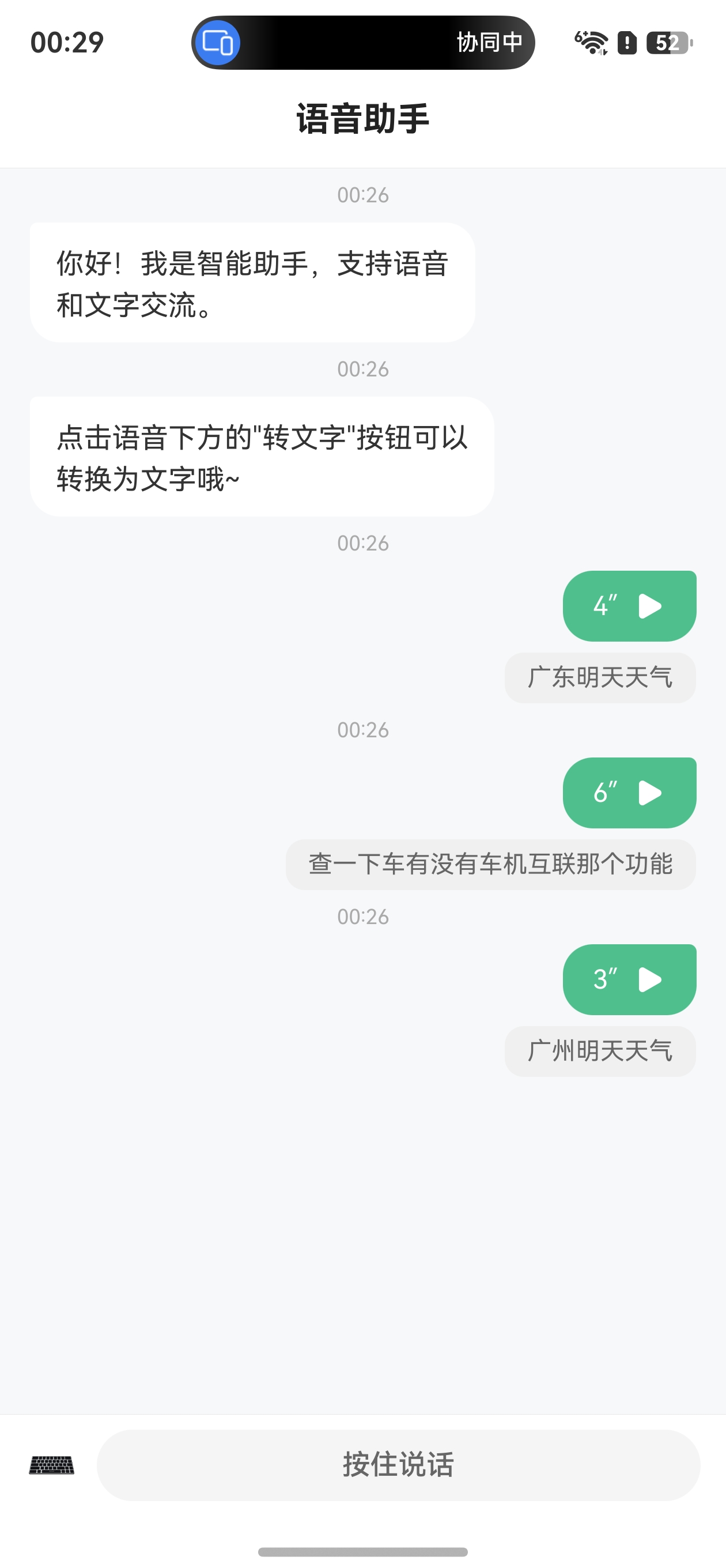
效果
一、概述
AudioCapturer 是 HarmonyOS 音频框架中的音频采集器,用于录制 PCM(Pulse Code Modulation)格式的音频数据。它适合有音频开发经验的开发者实现更灵活的录制功能,是语音识别、实时音频处理等场景的基础组件。
核心特点:
- 录制原始 PCM 音频数据
- 支持多种采样率、声道数、采样格式配置
- 支持麦克风、语音识别等多种音频源
- 提供状态机管理,可控的生命周期
- 通过回调方式实时获取音频数据
与 AudioRecorder 的区别:
| 对比项 | AudioCapturer | AudioRecorder |
|---|---|---|
| 输出格式 | PCM 原始数据 | M4A/AAC 等编码格式 |
| 灵活性 | 高,可自定义处理 | 低,系统自动处理 |
| 适用场景 | 语音识别、实时音频处理 | 普通录音、语音备忘录 |
| 开发难度 | 较高 | 较低 |
二、AudioCapturer 状态机
AudioCapturer 有明确的状态流转机制,理解状态变化对正确使用至关重要:
                createAudioCapturer
                      ↓
              ┌──────────────┐
              │   PREPARED   │  ← 初始创建状态
              └──────┬───────┘
                     │ start()
                     ↓
              ┌──────────────┐
              │   RUNNING    │  ← 正在录制
              └──────┬───────┘
                     │ stop()
                     ↓
              ┌──────────────┐
              │   STOPPED    │  ← 已停止
              └──────┬───────┘
                     │ start()   │ release()
                     ↓           ↓
              ┌──────────┐  ┌──────────┐
              │ RUNNING  │  │ RELEASED │
              └──────────┘  └──────────┘
AudioState 枚举值:
| 状态 | 值 | 说明 |
|---|---|---|
| STATE_PREPARED | 1 | 实例已创建,准备就绪 |
| STATE_RUNNING | 2 | 正在录制的运行状态 |
| STATE_STOPPED | 3 | 已停止录制 |
| STATE_RELEASED | 4 | 实例已释放 |
| STATE_PAUSED | 5 | 已暂停(仅AudioPlayer支持) |
三、开发环境准备
3.1 导入模块
import { audio } from '@kit.AudioKit';
import { fileIo as fs } from '@kit.CoreFileKit';
import { BusinessError } from '@kit.BasicServicesKit';
import { abilityAccessCtrl, common, Permissions } from '@kit.AbilityKit';
3.2 权限配置
当音频源为麦克风类型时(SOURCE_TYPE_MIC、SOURCE_TYPE_VOICE_RECOGNITION、SOURCE_TYPE_VOICE_COMMUNICATION 等),需要申请麦克风权限。
module.json5 配置:
{
  "module": {
    "requestPermissions": [
      {
        "name": "ohos.permission.MICROPHONE",
        "reason": "$string:mic_reason",
        "usedScene": {
          "abilities": ["EntryAbility"],
          "when": "always"
        }
      }
    ]
  }
}
运行时权限申请:
function requestPermission(context: common.UIAbilityContext): void {
  const atManager = abilityAccessCtrl.createAtManager();
  atManager.requestPermissionsFromUser(context, ['ohos.permission.MICROPHONE' as Permissions])
    .then(() => { console.info('麦克风权限获取成功'); })
    .catch((err: BusinessError) => {
      console.error(`权限申请失败: ${err.code} ${err.message}`);
    });
}
四、核心开发步骤
4.1 第一步:配置音频采集参数
// 音频流配置
const audioStreamInfo: audio.AudioStreamInfo = {
  samplingRate: audio.AudioSamplingRate.SAMPLE_RATE_16000,  // 采样率:16kHz
  channels: audio.AudioChannel.CHANNEL_1,                    // 单声道
  sampleFormat: audio.AudioSampleFormat.SAMPLE_FORMAT_S16LE, // 16位小端格式
  encodingType: audio.AudioEncodingType.ENCODING_TYPE_RAW    // 原始PCM编码
};

// 采集器配置
const audioCapturerInfo: audio.AudioCapturerInfo = {
  source: audio.SourceType.SOURCE_TYPE_MIC,  // 麦克风音频源
  capturerFlags: 0                            // 扩展标志位
};

// 组合配置
const audioCapturerOptions: audio.AudioCapturerOptions = {
  streamInfo: audioStreamInfo,
  capturerInfo: audioCapturerInfo
};
常用采样率:
| 采样率 | 枚举值 | 适用场景 |
|---|---|---|
| 8000 Hz | SAMPLE_RATE_8000 | 电话语音 |
| 16000 Hz | SAMPLE_RATE_16000 | 语音识别(推荐) |
| 22050 Hz | SAMPLE_RATE_22050 | 一般音频 |
| 44100 Hz | SAMPLE_RATE_44100 | CD音质音频 |
| 48000 Hz | SAMPLE_RATE_48000 | 高保真音频 |
常用音频源类型:
| 源类型 | 说明 |
|---|---|
| SOURCE_TYPE_MIC | 麦克风(通用录音) |
| SOURCE_TYPE_VOICE_RECOGNITION | 语音识别专用 |
| SOURCE_TYPE_VOICE_COMMUNICATION | VoIP通话 |
| SOURCE_TYPE_VOICE_MESSAGE | 语音消息 |
| SOURCE_TYPE_CAMCORDER | 摄像录制 |
4.2 第二步:创建 AudioCapturer 实例
let audioCapturer: audio.AudioCapturer | undefined = undefined;

audio.createAudioCapturer(audioCapturerOptions, (err: BusinessError, capturer: audio.AudioCapturer) => {
  if (err) {
    console.error(`创建失败: code=${err.code}, msg=${err.message}`);
    return;
  }
  audioCapturer = capturer;
  console.info('AudioCapturer 创建成功');
});
4.3 第三步:设置数据回调并录制到文件
// 创建 PCM 文件
const context = getContext(this) as common.UIAbilityContext;
const filePath = `${context.cacheDir}/recording.pcm`;
const file = fs.openSync(filePath, fs.OpenMode.READ_WRITE | fs.OpenMode.CREATE);
let bufferSize = 0;

// 注册数据回调 — 每当采集器获取到音频数据时触发
const readDataCallback = (buffer: ArrayBuffer): void => {
  const options = { offset: bufferSize, length: buffer.byteLength };
  fs.writeSync(file.fd, buffer, options);
  bufferSize += buffer.byteLength;
};

audioCapturer.on('readData', readDataCallback);
4.4 第四步:监听状态变化
audioCapturer.on('stateChange', (state: audio.AudioState) => {
  console.info(`状态变化: ${state}`);
  switch (state) {
    case audio.AudioState.STATE_PREPARED:
      console.info('准备就绪');
      break;
    case audio.AudioState.STATE_RUNNING:
      console.info('正在录制');
      break;
    case audio.AudioState.STATE_STOPPED:
      console.info('录制已停止');
      break;
    case audio.AudioState.STATE_RELEASED:
      console.info('资源已释放');
      fs.close(file); // 释放后关闭文件
      break;
  }
});
4.5 第五步:开始录制
audioCapturer.start((err: BusinessError) => {
  if (err) {
    console.error(`启动失败: ${err.code} ${err.message}`);
  } else {
    console.info('录制已开始');
  }
});
4.6 第六步:停止录制
audioCapturer.stop((err: BusinessError) => {
  if (err) {
    console.error(`停止失败: ${err.code} ${err.message}`);
  } else {
    console.info('录制已停止');
  }
});
4.7 第七步:释放资源
audioCapturer.release((err: BusinessError) => {
  if (err) {
    console.error(`释放失败: ${err.code} ${err.message}`);
  } else {
    console.info('资源已释放');
  }
});
audioCapturer = undefined;
五、完整示例:录音并保存为 PCM 文件
import { audio } from '@kit.AudioKit';
import { fileIo as fs } from '@kit.CoreFileKit';
import { abilityAccessCtrl, common, Permissions } from '@kit.AbilityKit';
import { BusinessError } from '@kit.BasicServicesKit';

@Entry
@Component
struct AudioRecorderDemo {
  @State isRecording: boolean = false;
  @State recordDuration: string = '0.0 秒';
  @State filePath: string = '';
  private capturer: audio.AudioCapturer | undefined = undefined;
  private timerId: number = -1;
  private startTime: number = 0;
  private fileSize: number = 0;

  aboutToAppear(): void {
    const ctx = getContext(this) as common.UIAbilityContext;
    abilityAccessCtrl.createAtManager()
      .requestPermissionsFromUser(ctx, ['ohos.permission.MICROPHONE' as Permissions]);
  }

  startRecording(): void {
    const streamInfo: audio.AudioStreamInfo = {
      samplingRate: audio.AudioSamplingRate.SAMPLE_RATE_16000,
      channels: audio.AudioChannel.CHANNEL_1,
      sampleFormat: audio.AudioSampleFormat.SAMPLE_FORMAT_S16LE,
      encodingType: audio.AudioEncodingType.ENCODING_TYPE_RAW
    };
    const capturerInfo: audio.AudioCapturerInfo = {
      source: audio.SourceType.SOURCE_TYPE_MIC,
      capturerFlags: 0
    };
    const options: audio.AudioCapturerOptions = {
      streamInfo: streamInfo,
      capturerInfo: capturerInfo
    };

    audio.createAudioCapturer(options, (err: BusinessError, capturer: audio.AudioCapturer) => {
      if (err) {
        console.error(`创建失败: ${err.code}`);
        return;
      }
      this.capturer = capturer;
      const ctx = getContext(this) as common.UIAbilityContext;
      this.filePath = `${ctx.cacheDir}/my_recording.pcm`;
      const file = fs.openSync(this.filePath, fs.OpenMode.READ_WRITE | fs.OpenMode.CREATE);
      let offset = 0;

      this.capturer.on('readData', (buffer: ArrayBuffer) => {
        fs.writeSync(file.fd, buffer, { offset: offset, length: buffer.byteLength });
        offset += buffer.byteLength;
        this.fileSize = offset;
      });

      this.capturer.on('stateChange', (state: audio.AudioState) => {
        if (state === audio.AudioState.STATE_RELEASED) {
          fs.close(file);
        }
      });

      this.startTime = Date.now();
      this.capturer.start();
      this.isRecording = true;

      // 更新录制时长显示
      this.timerId = setInterval(() => {
        const elapsed = (Date.now() - this.startTime) / 1000;
        this.recordDuration = `${elapsed.toFixed(1)} 秒`;
      }, 100);
    });
  }

  stopRecording(): void {
    clearInterval(this.timerId);
    if (this.capturer) {
      this.capturer.stop().then(() => {
        this.capturer?.release();
        this.capturer = undefined;
      });
    }
    this.isRecording = false;
    // 计算文件大小
    const sizeKB = (this.fileSize / 1024).toFixed(1);
    this.recordDuration += ` (${sizeKB} KB)`;
  }

  aboutToDisappear(): void {
    clearInterval(this.timerId);
    if (this.capturer) {
      this.capturer.stop();
      this.capturer.release();
    }
  }

  build() {
    Column({ space: 24 }) {
      Text('AudioCapturer 录音示例')
        .fontSize(22).fontWeight(FontWeight.Bold).margin({ top: 60 })

      Text(this.recordDuration)
        .fontSize(28).fontColor(this.isRecording ? '#FF6B6B' : '#333')

      Text(`文件路径: ${this.filePath}`)
        .fontSize(12).fontColor('#999').width('80%').textAlign(TextAlign.Center)

      Button(this.isRecording ? '停止录制' : '开始录制')
        .width(200).height(48)
        .backgroundColor(this.isRecording ? '#FF6B6B' : '#4FC08D')
        .onClick(() => {
          if (this.isRecording) {
            this.stopRecording();
          } else {
            this.startRecording();
          }
        })
    }
    .width('100%').height('100%')
    .justifyContent(FlexAlign.Center)
  }
}
六、PCM 数据量计算
PCM 文件大小的计算公式:
文件大小(字节)= 采样率 × 声道数 × 采样位深 / 8 × 录制时长(秒)
示例:16kHz、单声道、16位、录制10秒:
16000 × 1 × 16 / 8 × 10 = 320,000 字节 ≈ 312.5 KB
| 录制时长 | 采样率 | 声道 | 位深 | 文件大小 |
|---|---|---|---|---|
| 10秒 | 16kHz | 1 | 16 | ~312.5 KB |
| 60秒 | 16kHz | 1 | 16 | ~1.88 MB |
| 60秒 | 44.1kHz | 2 | 16 | ~10.5 MB |
| 300秒 | 16kHz | 1 | 16 | ~9.38 MB |
七、注意事项
- 权限先行:创建 AudioCapturer 前必须已获得麦克风权限,否则系统会抛出安全异常
- 状态检查:调用
start()前确认当前状态为PREPARED、PAUSED或STOPPED - 资源释放:录制结束后务必依次调用
stop()→release(),并在STATE_RELEASED回调中关闭文件 - 文件关闭时机:不要过早关闭文件句柄,应在
stateChange监听STATE_RELEASED(状态值为 4)后再关闭 - 采样率匹配:如果 PCM 数据后续用于语音识别,采样率必须为 16kHz,单声道,16位
- 缓冲区大小:
readData回调中的 buffer 大小由系统决定,通常为几百字节到几千字节 - 并发限制:同一时刻只能有一个录音线程在工作
- fs.writeSync offset 语义:HarmonyOS 的
fileIo.writeSync中offset参数表示文件写入位置(与 Node.js 的缓冲区偏移不同),即数据写入文件的起始位置 - ArkTS 对象字面量类型检查:ArkTS 要求对象字面量必须对应已声明的类或接口,不能直接使用未类型化的
{ offset: xxx, length: xxx },需声明WriteOptions类
八、PCM 文件播放验证
录制的 PCM 文件可以通过 AudioRenderer 播放验证:
import { audio } from '@kit.AudioKit';

function playPcm(filePath: string): void {
  const options: audio.AudioRendererOptions = {
    streamInfo: {
      samplingRate: audio.AudioSamplingRate.SAMPLE_RATE_16000,
      channels: audio.AudioChannel.CHANNEL_1,
      sampleFormat: audio.AudioSampleFormat.SAMPLE_FORMAT_S16LE,
      encodingType: audio.AudioEncodingType.ENCODING_TYPE_RAW
    },
    rendererInfo: {
      usage: audio.StreamUsage.STREAM_USAGE_MUSIC,
      rendererFlags: 0
    }
  };

  audio.createAudioRenderer(options, (err, renderer) => {
    if (err) return;
    const file = fs.openSync(filePath, fs.OpenMode.READ_ONLY);
    const fileSize = fs.statSync(filePath).size;
    let offset = 0;

    renderer.on('writeData', (buffer: ArrayBuffer) => {
      if (offset >= fileSize) return;
      const bytesRead = fs.readSync(file.fd, buffer, { offset: offset, length: buffer.byteLength });
      offset += bytesRead;
      if (offset >= fileSize) {
        fs.close(file);
        renderer.stop();
        renderer.release();
      }
    });
    renderer.start();
  });
}
九、总结
AudioCapturer 是 HarmonyOS 音频开发的基础组件,核心使用流程为:
配置参数 → 创建实例 → 注册 readData 回调 → start() 开始录制
    → [录制中...] → stop() 停止 → release() 释放资源
掌握 AudioCapturer 的使用,是实现语音识别、实时音频处理等高级功能的前提。结合 Core Speech Kit 的 speechRecognizer 模块,可以构建完整的语音转文字功能。

Agent 垂直技术社区,欢迎活跃、内容共建。
更多推荐


 14
14 0
0- 0



 已为社区贡献4条内容

所有评论(0)