C++学习笔记(五)——运算符重载
写在前面
写本系列的目的(自用)是回顾已经学过的知识、记录新学习的知识或是记录心得理解,方便自己以后快速复习,减少遗忘。以前三天打鱼两天晒网地学习C++,一直无法对C++熟练掌握,核心的面向对象编程并不熟悉,STL语法只会部分,因此也希望自己未来能做到熟悉甚至精通C++。
Part 2 面向对象编程
该部分主要通过b站黑马程序员的视频来进行学习,记录笔记。全部是概念性的东西并不能帮助理解知识,直接上代码并以注释的形式讲解会更易于理解。
二、类和对象
3、运算符重载
运算符重载概念:对已有的运算符重新进行定义,赋予其另一种功能,以适应不同的数据类型。
(1)加号运算符重载
运算符重载主要用在类中。计算机知道如何将两个整数或两个浮点数相加,但计算机不知道如何将两个类相加,这时候如果进行加号运算符重载,就可以实现类的相加。
先不考虑加号运算符,先看这个类
class Person
{
public:
    int m_A, m_B;
    Person() {  }

    Person(int a, int b)
    {
        m_A = a;
        m_B = b;
    }
};
如果我们要实现p3 = p1+p2,可以自己手动写一个成员函数或是全局函数。这里以成员函数为例
    Person PersonAdd(const Person& p)
    {
        Person temp;
        temp.m_A = this->m_A + p.m_A;
        temp.m_B = this->m_B + p.m_B;
        return temp;
    }
这个函数是每个人都可以写的,当然每个人写的函数名都会不同。但是如果我们将函数名改成operator+,这个函数就会变成重载函数,重载+运算符。原本调用这个函数的语法是:
p3 = p1.PersonAdd(p2);在进行重载后,就可以进行省略,写做:
p3 = p1 + p2;这就是加号运算符重载。放在整体代码里如下,代码还包括了全局函数重载加号运算符。
#include<iostream>
using namespace std;

class Person
{
public:
    int m_A, m_B;
    Person() {  }                             //默认构造函数

    Person(int a, int b)                      //有参构造函数
    {
        m_A = a;
        m_B = b;
    }

    Person operator+(const Person& p)         //成员函数重载+运算符
    {
        Person temp;
        temp.m_A = this->m_A + p.m_A;
        temp.m_B = this->m_B + p.m_B;
        return temp;
    }
};

/*
Person operater+(Person &p1, Person &p2)      //这里是全局函数重载+运算符
{
    Person temp;
    temp.m_A = p1.m_A + p2.m_A;
    temp.m_B = p1.m_B + p2.m_B;
    return temp;
}
*/

void test()
{
    Person p1(10, 20);
    Person p2(20, 40);

    Person p3 = p1 + p2;                      //这里就可以正常使用加号了

    cout << p3.m_A << " " << p3.m_B << endl;
}

int main()
{
    test();

    system("pause");
    return 0;
}
可能有人会担心,那+进行重载之后,原来的整数加整数之类的用法会受到影响吗?不会。这里还需要知道的一个知识是:运算符重载函数也是可以进行重载的,也就是我们还可以写这样一个函数,和以上代码放在一起:
Person operater+(Person &p1, int num)      //这里是全局函数重载+运算符
{
    Person temp;
    temp.m_A = p1.m_A + num;
    temp.m_B = p1.m_B + num;
    return temp;
}
这样,就可以同时实现这两个函数:
p3 = p2 + p1;
p4 = p3 + 10;
虽然我们不能重载原来整数加整数的加号,但从这个角度也能理解为什么原来的加号不受影响。
(2)左移运算符重载
接下来来看左移运算符。我们在输出时采用的是cout<<,为了能更方便地输出自定义的类,达到能直接使用cout<<p;的效果,我们需要对左移运算符进行重载。
左移运算符不能使用成员函数进行重载,只能使用全局函数进行重载。不能使用成员函数是因为我,我们知道,成员函数的调用语法是p.opreator(),cout只能放在括号内。这样简化出来的p一定在cout的左边,也就是会变为p << cout,这是很奇怪的,因此只能使用全局函数。
在说怎么写函数前,先要介绍一下cout,cout是有数据类型的,为ostream,输出流类型。因此我们需要在函数括号内分别传入cout和p,返回类型为cout,这样方便进行链式语法:cout<<p<<"Hello World"<<endl;,即每一次调用cout函数返回的都是cout本身,这样可以很方便地在后面直接使用<<,而不用重新写cout。
cout前需要加引用的原因是,cout只有一个,所以我们不能再创建一个新的cout,所以直接传入cout的别名就可以。p加引用的原因是节省内存,也可以不加。
ostream& operator<<(ostream &cout, Person &p)
{
    cout << "m_A = " << p.m_A << ",m_B =" << p.m_B;
    return cout;
}
这样,我们就写好了重载的全局函数,放到代码语境中如下所示:
此时要注意,m_A,m_B是私有变量,如果想让重载函数访问它们,就要涉及到友元。友元在上节有过介绍。
#include<iostream>
using namespace std;

class Person
{
    friend ostream& operator<<(ostream& cout, Person& p);       //友元
private:
    int m_A, m_B;

public:
    Person(int a, int b)
    {
        m_A = a;
        m_B = b;
    }
};

ostream& operator<<(ostream &cout, Person &p)        //重载函数
{
    cout << "m_A = " << p.m_A << ",m_B =" << p.m_B;
    return cout;
}

void test()
{
    Person p(10, 10);

    cout << p <<endl;
}

int main()
{
    test();

    system("pause");
    return 0;
}
(3)递增运算符重载
假如我们自己创建了一个整数类,想对它进行++运算,那么这时候就需要对递增运算符进行重载。并且,递增运算符分为前置递增和后置递增,因此我们需要分别对前置递增和后置递增进行书写。
我们先在成员函数中书写前置递增函数。创建一个整数类:
class MyInteger
{
public:
    MyInteger()
    {
        m_Num = 0;
    }

private:
    int m_Num;
};
假设我们创建的对象是Myinteger myint。
先不考虑返回值,我们知道函数名为operator++(),没有参数,因为是对自身进行++。前置++是先对m_Num进行+1,再进行其他操作,因此函数体只需要写m_Num++。在返回值后,我们当然希望此时的对象还是myint。就像原始的++函数一样:++(++a),可以进行链式相加,因此需要myint,所以返回值类型是MyInteger&。this是指向myint的指针,返回*this即是返回了myint。
    MyInteger& operator++()
    {
        m_Num++;
        return *this;
    }
现在写后置++函数,在c++中,区分前置和后置++需要用到占位参数,如下:
MyInteger operator++(int)
对于后置++而言,m_Num是先进行其他操作,再进行+1的,因此我们可以返回与myint相同的一个临时变量,来让临时变量去进行相关操作,在函数体内对myint的m_Num值进行++,这样我们就做到了让myint的原始值去操作的同时,又将myint的m_Num值进行了+1,如下:
    MyInteger operator++(int)
    {
        MyInteger temp = *this;
        m_Num++;
        return temp;
    }
结合上节左移运算符重载的知识,可以写出以下代码:
#include<iostream>
using namespace std;

class MyInteger
{
    friend ostream& operator<<(ostream& cout, MyInteger myInt);
public:
    MyInteger()
    {
        m_Num = 0;
    }
    //前置++
    MyInteger& operator++()
    {
        m_Num++;
        return *this;
    }
    //后置++
    MyInteger operator++(int)
    {
        MyInteger temp = *this;
        m_Num++;
        return temp;
    }

private:
    int m_Num;
};

ostream& operator<<(ostream& cout, MyInteger myInt)
{
    cout << myInt.m_Num;
    return cout;
}

void test1()
{
    MyInteger myInt;

    cout << ++myInt << endl;
    cout << myInt << endl;
}

void test2()
{
    MyInteger myInt;

    cout << myInt++ << endl;
    cout << myInt << endl;
}

int main()
{
    test1();
    test2();

    system("pause");
    return 0;
}
当然,除了++也可以写出--的代码,原理相同,这里直接放上代码
#include<iostream>
using namespace std;

class MyInteger
{
	friend ostream& operator<<(ostream& cout, MyInteger myint);
public:
	MyInteger()
	{
		m_Num = 0;
	}
    //前置--
	MyInteger& operator--()
	{
		m_Num--;
		return *this;
	}
	//后置--
	MyInteger operator--(int)
	{
		MyInteger temp = *this;
		m_Num--;
		return temp;
	}

private:
	int m_Num;
};

ostream& operator<<(ostream& cout, MyInteger myint)
{
	cout << myint.m_Num;
	return cout;
}

void test1()
{
	MyInteger myint;

	cout << --myint << endl;
	cout << myint << endl;
}

void test2()
{
	MyInteger myint;

	cout << myint-- << endl;
	cout << myint << endl;
}

int main()
{
	test1();
	test2();

	system("pause");
	return 0;
}
(4)赋值运算符重载
先来说为什么要进行赋值运算符重载。我们在前面已经学过深拷贝和浅拷贝,编译器在进行赋值拷贝时运用的是浅拷贝,在成员变量在堆区开辟空间时可能会出错。例如,以下这个类:
class Person
{
public:
	Person(int age)
	{
		m_Age = new int(age);
	}

	~Person()
	{
		if (m_Age != nullptr)
		{
			delete m_Age;
		}
	}

	int* m_Age;
};
在类的初始化时在堆区开辟了一块儿空间,并在结束时用析构函数释放这块空间。如图所示:
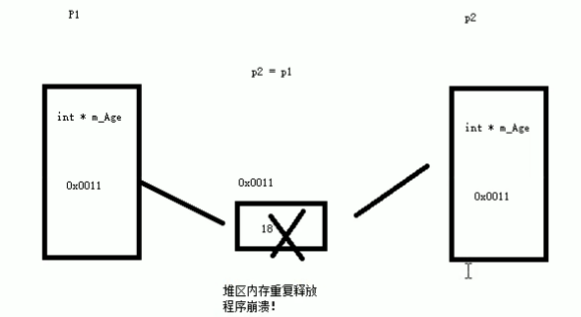
假如此时有两个变量p1,p2,m_Age里分别存储了p1、p2年龄的地址0x0011和0x0022。在进行赋值p2 = p1时,编译器进行的是浅拷贝,会直接将p1.m_Age赋值给p2.m_Age,导致这两个指针指向了同一块地址0x0011。最后析构函数会对这个地址释放两次,导致代码报错。
这和在深拷贝与浅拷贝中说的是同一个问题,因此就需要我们重载=运算符。依旧使用成员函数来重载等号运算符。我们知道等号运算符有连等操作p1=p2=p3,因此不难想到返回值应该是对象本身,return *this。在进行p2 = p1的操作时,需要先释放p1原本的指针(防止内存泄漏,后续会说明),然后生成新地址,值为p1.*m_Age,也就是如下代码:
	Person& operator=(Person& p)
	{
		if (m_Age != nullptr)
			delete m_Age;
		m_Age = new int(*p.m_Age);
		return *this;
	}
最后将代码放到整体:
#include<iostream>
using namespace std;

class Person
{
public:
	Person(int age)
	{
		m_Age = new int(age);
	}

	~Person()
	{
		if (m_Age != nullptr)
		{
			delete m_Age;
		}
	}

	Person& operator=(Person& p)
	{
		if (m_Age != nullptr)
			delete m_Age;
		m_Age = new int(*p.m_Age);
		return *this;
	}

	int* m_Age;
};

void test1()
{
	Person p1(18);

	Person p2(20);

	p2 = p1;

	cout << "p1的年龄为" << *p1.m_Age << endl;
	cout << "p2的年龄为" << *p2.m_Age << endl;
}

int main()
{
	test1();
	system("pause");
	return 0;
}
(5)关系运算符重载
重载关系运算符的原因也很简单,当我们自定义类后,编译器就不知道类的两个对象该如何比较了,因此需要重载关系运算符。以==和!=为例,很简单,可以直接看代码示例:
#include<iostream>
using namespace std;

class Person                      //这里创建了一个类,有姓名和年龄,并用有参构造函数初始化
{
public:
	Person(string name, int age)
	{
		m_Name = name;
		m_Age = age;
	}

	bool operator==(Person &p)   //这是重载的==运算符
	{
		if (this->m_Age == p.m_Age && this->m_Name == p.m_Name)
			return true;
		else return false;
	}

	bool operator!=(Person& p)   //这是重载的!=运算符
	{
		if (this->m_Age == p.m_Age && this->m_Name == p.m_Name)
			return false;
		else return true;
	}

	string m_Name;
	int m_Age;
};

void test1()
{
	Person p1("Tom", 18);

	Person p2("Tom", 19);

	if (p1 == p2)
		cout << "p1和p2是相等的" << endl;
	else cout << "p1和p2是不相等的" << endl;

	if (p1 != p2)
		cout << "p1和p2是不相等的" << endl;
	else cout << "p1和p2是相等的" << endl;
}

int main()
{
	test1();

	system("pause");
	return 0;
}
其实关系运算符都是你自己针对于自己的类来设定的新规则,每个人都有他不同的重载关系运算符。
(6)函数调用运算符重载
函数调用运算符是(),()也可以进行重载,又称为仿函数。
仿函数的使用非常灵活,尤其是在STL中,因此现在只是大概了解仿函数怎么书写,在STL的学习过程中会使用很多的仿函数。仿函数可以实现打印、输出、加...一系列功能,假设我们想实现一个打印的类:
class MyPrint
{
public:
	void operator()(string test)
	{
		cout << test << endl;
	}
};
这是一个简单的重载函数,重载(),所以是operator(),传入需要打印的值,然后把他们打印出来。这时候,该类创建的对象所带的()就能实现打印功能。如下:
MyPrint myPrint;
myPrint("Hello World!");
这很像函数调用,所以叫仿函数。同样的,如果要实现两数相加的重载函数:
class MyAdd
{
public:
	int operator()(int num1, int num2)
	{
		return num1 + num2;
	}
};
传入需要相加的两个值,然后把他们相加。这时候,该类创建的对象所带的()就能实现相加功能。如下:
MyAdd myadd;
int res = myadd(100, 100);
这里提一下匿名对象函数。这里,MyAdd()可以理解为隐式地创建了一个对象,假设为myadd,那这就回到了myadd(100,100),匿名对象在使用完后立马释放。
cout << MyAdd()(100, 100) << endl;整体的函数如下所示:
#include<iostream>
#include<string>
using namespace std;

class MyPrint
{
public:
	void operator()(string test)
	{
		cout << test << endl;
	}
};

class MyAdd
{
public:
	int operator()(int num1, int num2)
	{
		return num1 + num2;
	}
};

void myPrint2(string test)
{
	cout << test << endl;
}

void test1()
{
	MyPrint myPrint;
	myPrint("Hello World!");
	myPrint2("Hello World!");
}

void test2()
{
	MyAdd myadd;
	int res = myadd(100, 100);
	cout << res << endl;

	cout << MyAdd()(100, 100) << endl;
}

int main()
{
	test1();
	test2();

	system("pause");
	return 0;
}
Agent 垂直技术社区,欢迎活跃、内容共建。
更多推荐
 9
9 0
0- 0


 已为社区贡献8条内容

所有评论(0)