Vue3+element实现模拟ctrl+F功能高亮显示数据在表格中
·
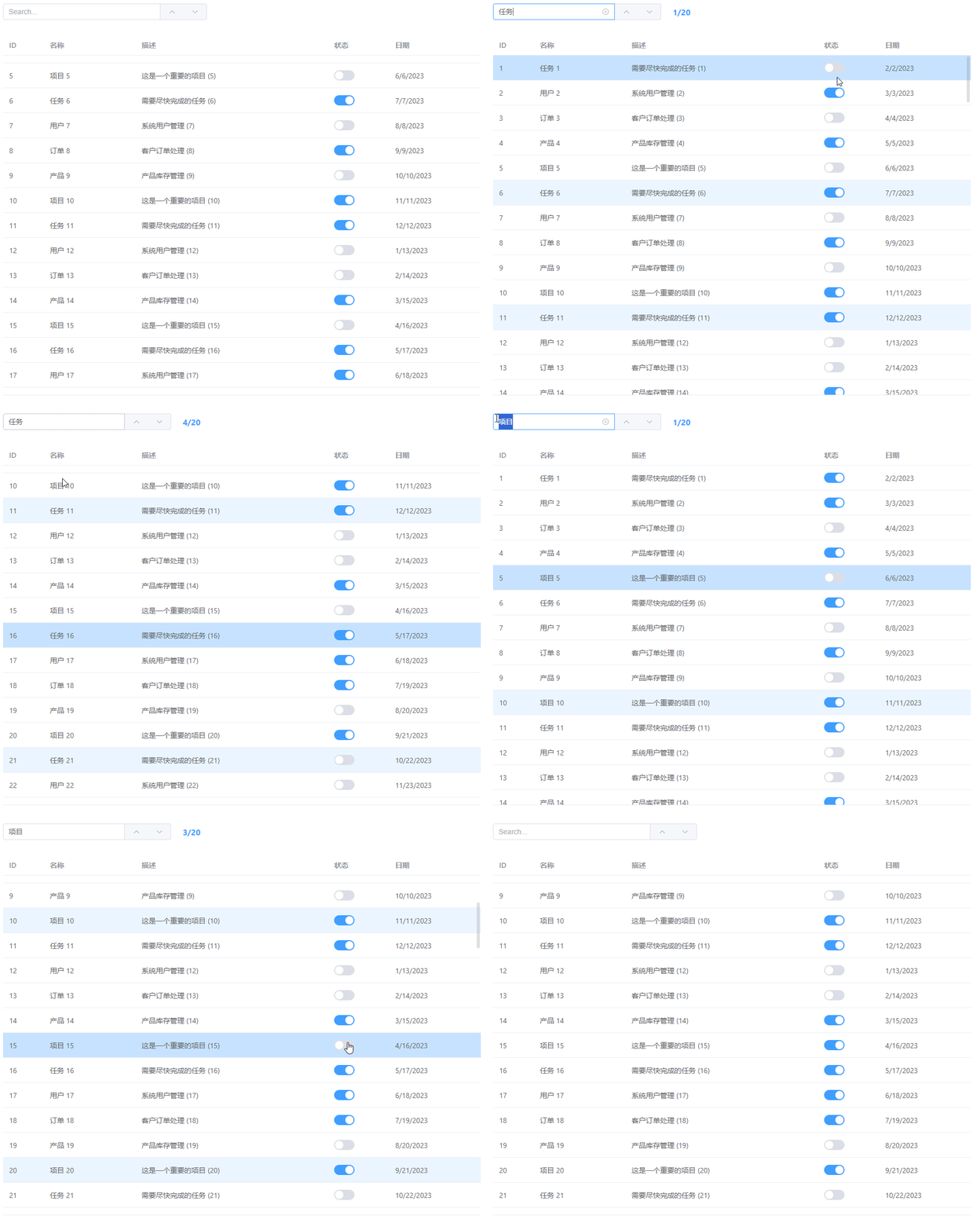
<template>
    <div style="background-color: white; overflow-x: auto;width: 100%;" >
        <!-- 搜索区域 -->
        <div class="search-controls">
          <el-input
              v-model="searchText"
              placeholder="Search..."
              class="search-input"
              @keyup.enter="handleSearch"
              clearable
              @clear="clearSearch"
              >
              <template #append>
                <el-button-group>
                <el-button @click="prevMatch" :disabled="!hasMatches" title="上一个匹配项">
                    <el-icon><ArrowUp /></el-icon>
                </el-button>
                <el-button @click="nextMatch" :disabled="!hasMatches" title="下一个匹配项">
                  <el-icon><ArrowDown /></el-icon>
                </el-button>
              </el-button-group>
          </template>
          </el-input>
            <div class="match-count" v-if="hasMatches">
                {{ currentMatchIndex + 1 }}/{{ matches.length }}
            </div>
          </div>


          <div style="padding:10px 10px 10px 0px ;display: flex; ">

            <el-table :data="tableData" ref="tableRef" style="width:100%;height: calc(100vh - 150px);"  highlight-current-row @current-change="handleCurrentChange" :row-class-name="tableRowClassName" row-key="id">
              <el-table-column prop="id" label="ID" width="80" />
              <el-table-column prop="name" label="名称" width="180" />
              <el-table-column prop="description" label="描述" />
              <el-table-column prop="status" label="状态" width="120">
                <template #default="{ row }">
                  <el-switch v-model="row.status"  />
                </template>
              </el-table-column>
              <el-table-column prop="date" label="日期" width="180" />
            </el-table>

          </div>

      </div>
    </template>

<script lang="ts" setup>

    import { ElInput, ElButton, ElTable, ElTableColumn } from 'element-plus';
    import { ArrowUp, ArrowDown } from '@element-plus/icons-vue'
    import { ref, computed, onMounted,onBeforeMount, getCurrentInstance } from 'vue'
    import { ElMessage, ElMessageBox} from 'element-plus'
    const activeName = ref()  //当前Tab选中的专案名,默认显示第一个专案

    const tableRef:any=ref()
    //------------------------------------- 模拟表格数据-----------------------
    const generateData = () => {
      const data = []
      const statuses = [true, false]
      const names = ['项目', '任务', '用户', '订单', '产品']
      const descriptions = [
        '这是一个重要的项目',
        '需要尽快完成的任务',
        '系统用户管理',
        '客户订单处理',
        '产品库存管理'
      ]

      for (let i = 1; i <= 100; i++) {
        data.push({
          id: i,
          name: `${names[i % names.length]} ${i}`,
          description: `${descriptions[i % descriptions.length]} (${i})`,
          status: statuses[i % statuses.length],
          date: new Date(2023, (i % 12), (i % 28) + 1).toLocaleDateString()
        })
      }
      return data
    }

    // 表格数据
    const tableData = ref(generateData())
    // 表格数据没带id可以自己手动添加id,用于数据定位以及row-key
    //tableData.value = tableData.value.map((item:any, index:any) => ({
    //  ...item,          // 保留原有属性
    //  id: index + 1,    // 添加 id(从 1 开始)
    //}));
//-------------------------------------------------------------

  // 为表格行添加类名,找到符合条件的行就给这行赋一个类名,通过css样式修改当前行的颜色
const tableRowClassName = ({ row }: { row: any }) => {
  return matchedRowIds.value.has(row.id) ? 'highlight-row' : '';
};


// 搜索相关状态
const searchText = ref('')  // 搜索框输入的值
const currentMatchIndex = ref(-1)  // 当前匹配到搜索结果的第几个值
const matches:any = ref([])
const matchedRowIds = ref(new Set()); // 存储所有匹配行的ID

// 计算属性
const hasMatches = computed(() => matches.value.length > 0)

// 搜索方法
const handleSearch = () => {
  if (!searchText.value.trim()) {
    clearSearch()
    return
  }

  const searchLower = searchText.value.toLowerCase()
  matches.value = tableData.value.map((row:any, index:any) => ({ row, index })).filter(( { row }: { row: any } ) =>
      Object.entries(row).some(([key, value]) => {
        if (key === 'id' || typeof value === 'object') return false
        return String(value).toLowerCase().includes(searchLower)
      })
    )


  // 更新匹配行的ID集合
  matchedRowIds.value = new Set(matches.value.map((m:any) => m.row.id));
  console.log('匹配行的ID集合', matchedRowIds.value)

  if (matches.value.length > 0) {
    currentMatchIndex.value = 0;
    scrollToMatch();
  } else {
    currentMatchIndex.value = -1;
  }
}

// 清除搜索
const clearSearch = () => {
  searchText.value = ''
  matches.value = []
  currentMatchIndex.value = -1
  matchedRowIds.value.clear();
  tableRef.value?.setCurrentRow()
}

// // 滚动到匹配项
const scrollToMatch = () => {
  if (!hasMatches.value || !tableRef.value) return;

  const match = matches.value[currentMatchIndex.value];

  const tableEl = tableRef.value.$el.querySelector('.el-table__body-wrapper');
  const rowEl = tableEl.querySelector(`.el-table__row:nth-child(${match.index + 1})`);

  if (rowEl) {
    // 优先使用 scrollIntoView(更精准)
    rowEl.scrollIntoView({ behavior: 'smooth', block: 'center' });
  } else {
    // 回退到 scrollTop(兼容方案)
    const rowHeight = tableEl.querySelector('.el-table__row')?.clientHeight || 40;
    tableEl.scrollTo({ top: match.index * rowHeight, behavior: 'smooth' });
  }

  tableRef.value.setCurrentRow(match.row);  // 将当前行执行选中操作,需要el-table带highlight-current-row才能实现
};

// 下一个匹配项
const nextMatch = () => {
  if (!hasMatches.value) return

  currentMatchIndex.value = (currentMatchIndex.value + 1) % matches.value.length
  scrollToMatch()
}

// 上一个匹配项
const prevMatch = () => {
  if (!hasMatches.value) return

  currentMatchIndex.value = (currentMatchIndex.value - 1 + matches.value.length) % matches.value.length
  scrollToMatch()
}

// 当前行变化处理
const handleCurrentChange = (currentRow:any) => {
  if (!currentRow || !hasMatches.value) return

  const matchIndex = matches.value.findIndex((m:any) => m.row.id === currentRow.id);
  if (matchIndex !== -1) {
    currentMatchIndex.value = matchIndex;
  }

}


</script>

<style>  //删除scope实现所有找到的行都高亮显示
  .table-search-container {
  padding: 20px;
  height: 100%;
    display: flex;
    flex-direction: column;
}

.search-controls {
    display: flex;
    align-items: center;
    margin-top: 10px;
    margin-bottom: 10px;
  gap: 10px;
  width:400px;
}

.search-input {
  flex: 1;
}

.match-count {
  min-width: 60px;
    text-align: center;
    color: var(--el-color-primary);
  font-weight: bold;
}

.el-table {
  flex: 1;
  margin-top: 10px;
  }


/* 实现所有找到的行都高亮显示,若不想直接删除scope可以在这三个格式前添加:deep() */
.highlight-row {
  background-color: var(--el-color-primary-light-9) !important;
}
.highlight-row:hover > td {
  background-color: var(--el-color-primary-light-8) !important;
}
.el-table .current-row.highlight-row > td {
  background-color: var(--el-color-primary-light-7) !important;
}


</style>

Agent 垂直技术社区,欢迎活跃、内容共建。
更多推荐
 7
7 0
0- 0


 已为社区贡献1条内容

所有评论(0)