Vue3 + Element Plus 实现带溢出提示的历史记录菜单
·
最终结果:
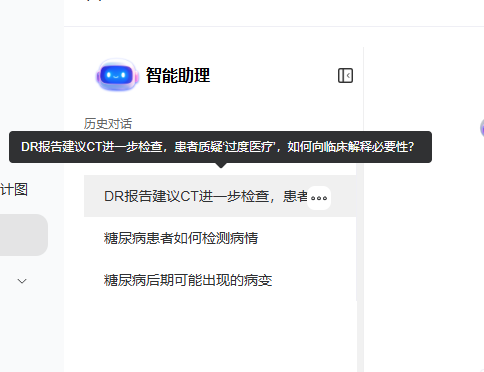
具体要求:
要实现一个带有文本溢出提示功能的左侧历史记录菜单,当文本过长时显示省略号并在悬停时显示完整内容,当文本长度正常时不显示提示,代码如下:
<el-menu
    class="history-menu"
    :default-active="activeIndex"
    @select="handleSelect"
  >
    <el-menu-item
      v-for="(item, index) in historyList"
      :key="index"
      :index="index.toString()"
    >
      <template #title>
        <div class="menu-item-content">
          <el-tooltip
            :disabled="!isTextOverflow($refs['historyItem_' + index]?.[0])"
            :content="item"
            placement="right"
          >
            <span
              class="history-text"
              :ref="'historyItem_' + index"
            >{{ item }}</span>
          </el-tooltip>
        </div>
      </template>
    </el-menu-item>
</el-menu>通过:disabled="!isTextOverflow(...)" 动态控制 Tooltip 的显示:
// 检查文本是否溢出
const isTextOverflow = (element: HTMLElement | undefined) => {
  if (!element) return false
  return element.scrollWidth > element.clientWidth
}
样式如下:
.history-menu {
  height: 100%;
  border-right: none;
}

.menu-item-content {
  width: 100%;
  display: flex;
  align-items: center;
}

.history-text {
  display: inline-block;
  max-width: 100%;
  white-space: nowrap;
  overflow: hidden;
  text-overflow: ellipsis;
}

/* 调整菜单项样式 */
.el-menu-item {
  padding: 0 16px;
  height: 40px;
  line-height: 40px;
}
Agent 垂直技术社区,欢迎活跃、内容共建。
更多推荐

 2
2 0
0- 0


 已为社区贡献1条内容

所有评论(0)