50天50个小项目 (Vue3 + Tailwindcss V4) ✨ | Pokedex(宝可梦图鉴)
📅 我们继续 50 个小项目挑战!—— Pokedex组件
仓库地址:https://github.com/SunACong/50-vue-projects
项目预览地址:https://50-vue-projects.vercel.app/
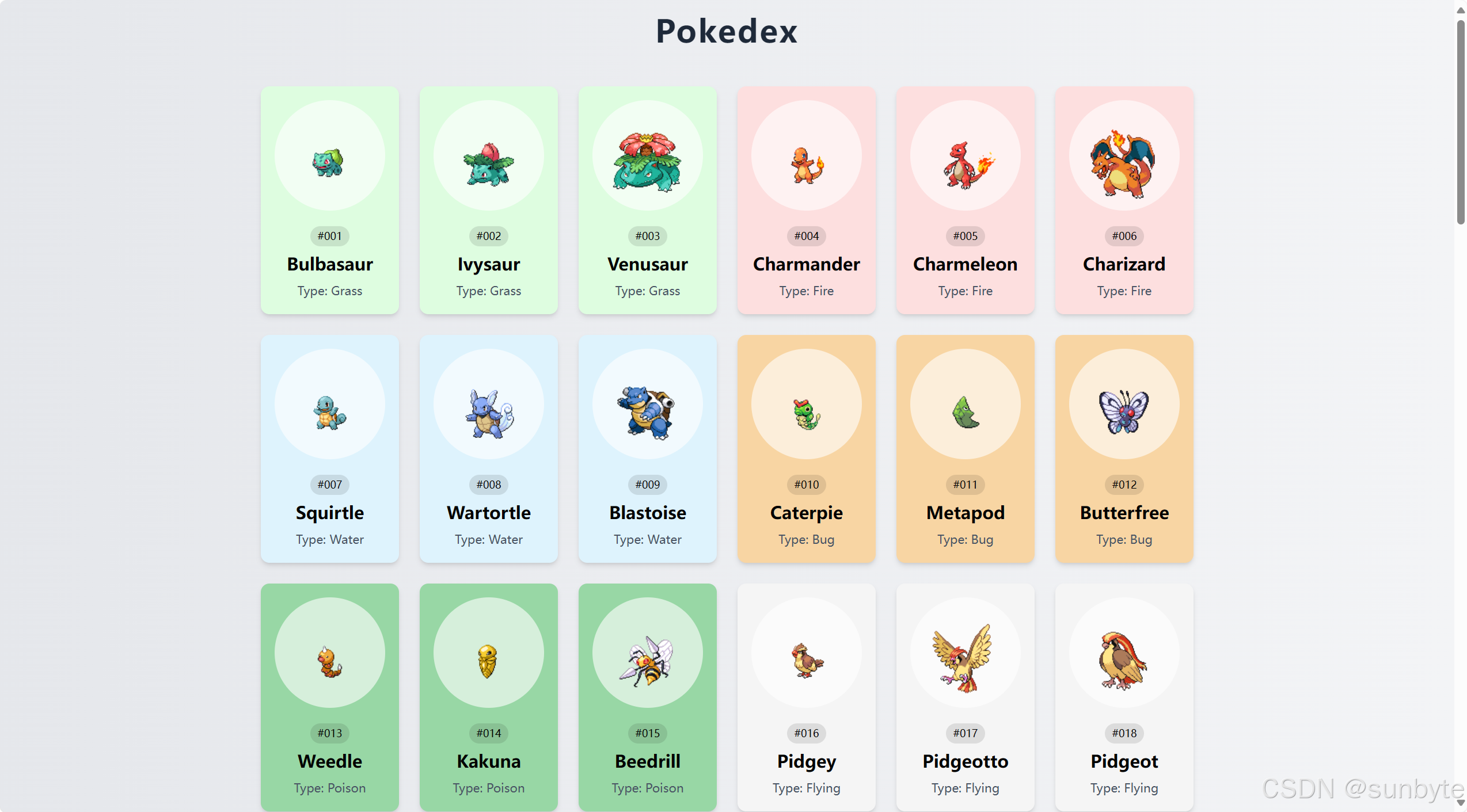
使用 Vue 3 结合 PokeAPI 来创建一个炫酷的宝可梦图鉴应用。通过这个项目,你将能够浏览前150只宝可梦的信息,包括它们的名字、类型、身高、体重以及能力等。而且,每只宝可梦都有其独特的颜色主题哦!让我们开始吧! 🚀
📝 应用目标
- 使用 Vue 3 的
<script setup>语法和 Composition API - 从 PokeAPI 获取并展示宝可梦数据
- 根据宝可梦类型动态设置卡片背景颜色
- 实现鼠标悬停显示更多详情的交互效果
- 采用 Tailwind CSS 快速构建美观的响应式布局
🔧 技术实现点
| 技术点 | 描述 |
|---|---|
Vue 3 <script setup> |
简洁地定义组件逻辑 |
异步函数 fetchPokemons & getPokemon |
从 PokeAPI 获取数据 |
| 动态背景颜色 | 根据宝可梦类型设置卡片背景色 |
| 鼠标事件绑定 | 显示/隐藏详细信息 |
| Tailwind CSS | 构建简洁美观的UI |
🖌️ 组件实现
🎨 模板结构 <template>
<template>
    <div
        class="flex min-h-screen flex-col items-center justify-center bg-gradient-to-r from-gray-200 to-gray-100 p-4 font-sans">
        <h1 class="mb-8 text-4xl font-bold tracking-wider text-gray-800">Pokedex</h1>
        <div class="mx-auto flex max-w-6xl flex-wrap justify-center" id="poke-container">
            <!-- Pokemon Card -->
            <div
                v-for="pokemon in pokemons"
                :key="pokemon.id"
                class="relative m-3 rounded-lg p-4 text-center shadow-md transition-transform hover:scale-105"
                :style="{ backgroundColor: pokemon.color }"
                @mouseenter="showDetails = pokemon.id"
                @mouseleave="showDetails = null">
                <!-- 卡片内容 -->
            </div>
        </div>
    </div>
</template>
我们的模板部分主要由一个渐变背景下的容器组成,其中包含了一个标题“Pokedex”和一个用于展示宝可梦卡片的区域。每个宝可梦卡片不仅展示了宝可梦的基本信息,还在鼠标悬停时显示更详细的资料。
💻 脚本逻辑 <script setup>
<script setup>
import { ref, onMounted } from 'vue'

const pokemons = ref([])
const pokemon_count = 150
const showDetails = ref(null)

// 宝可梦类型颜色映射
const colors = {
    fire: '#FDDFDF', grass: '#DEFDE0', electric: '#FCF7DE',
    water: '#DEF3FD', ground: '#f4e7da', rock: '#d5d5d4',
    fairy: '#fceaff', poison: '#98d7a5', bug: '#f8d5a3',
    dragon: '#97b3e6', psychic: '#eaeda1', flying: '#F5F5F5',
    fighting: '#E6E0D4', normal: '#F5F5F5',
}

const main_types = Object.keys(colors)

// 获取宝可梦数据
const fetchPokemons = async () => {
    for (let i = 1; i <= pokemon_count; i++) {
        await getPokemon(i)
    }
}

const getPokemon = async (id) => {
    try {
        const url = `https://pokeapi.co/api/v2/pokemon/${id}`
        const res = await fetch(url)
        const data = await res.json()
        createPokemonCard(data)
    } catch (error) {
        console.error('Error fetching Pokemon data:', error)
    }
}

// 处理宝可梦数据并添加到响应式数组
const createPokemonCard = (pokemon) => {
    const name = pokemon.name[0].toUpperCase() + pokemon.name.slice(1)
    const poke_types = pokemon.types.map((type) => type.type.name)
    const type = main_types.find((type) => poke_types.indexOf(type) > -1)
    const color = colors[type]

    pokemons.value.push({
        id: pokemon.id,
        name: name,
        type: type,
        color: color,
        height: pokemon.height,
        weight: pokemon.weight,
        abilities: pokemon.abilities,
    })
}

// 组件挂载时获取数据
onMounted(() => {
    fetchPokemons()
})
</script>
🎉 关键功能解析
✅ 动态背景颜色
通过定义 colors 对象,我们可以根据宝可梦的主要类型来设置卡片的背景颜色。这不仅增加了视觉吸引力,还帮助用户快速识别宝可梦的类型。
✅ 数据获取与处理
利用 fetchPokemons 和 getPokemon 函数,我们能够轻松地从 PokeAPI 获取数据,并将其转换成我们需要的格式。此外,我们还将数据添加到响应式数组中,以确保 UI 能够自动更新。
✅ 鼠标悬停效果
通过监听 @mouseenter 和 @mouseleave 事件,我们可以在鼠标悬停时显示宝可梦的详细信息,提供更加丰富的用户体验。
🎨 Tailwind CSS 样式重点
为了帮助你更好地理解如何使用 Tailwind CSS 来构建这个应用,下面是本文中使用的 Tailwind CSS 类及其作用的详细说明:
| 类名 | 作用 |
|---|---|
min-h-screen |
设置最小高度为视口高度 |
bg-gradient-to-r |
设置线性渐变背景,方向为从左到右 |
from-gray-200 |
渐变起始颜色 |
to-gray-100 |
渐变结束颜色 |
tracking-wider |
设置字母间距更宽 |
mx-auto |
自动设置左右外边距使元素水平居中 |
max-w-6xl |
设置最大宽度为 6xl (72rem) |
rounded-lg |
设置较大的圆角半径 |
shadow-md |
添加中等强度的阴影 |
transition-transform |
平滑过渡变换属性 |
hover:scale-105 |
在悬停时放大 5% |
overflow-y-auto |
当内容超出容器高度时启用垂直滚动条 |
bg-white/90 |
设置背景颜色为白色,并带有 90% 不透明度 |
📁 常量定义 + 组件路由
constants/index.js 添加组件预览常量:
{
        id: 37,
        title: 'Pokedex',
        image: 'https://50projects50days.com/img/projects-img/37-pokedex.png',
        link: 'Pokedex',
    },
router/index.js 中添加路由选项:
{
        path: '/Pokedex',
        name: 'Pokedex',
        component: () => import('@/projects/Pokedex.vue'),
    },
🏁 总结
在这篇教程中,我们学习了如何使用 Vue 3 和 PokeAPI 创建一个简单的宝可梦图鉴应用。我们探讨了如何获取和处理外部数据,以及如何基于这些数据动态地改变UI元素的样式。
想要让你的宝可梦图鉴更加完美?这里有几个扩展建议:
- ✅ 搜索功能:增加搜索栏,让用户可以快速找到特定的宝可梦。
- ✅ 收藏功能:允许用户收藏他们最喜欢的宝可梦。
- ✅ 动画效果:为宝可梦卡片添加更多的过渡动画,使界面更加生动。
- ✅ 多语言支持:支持多种语言,让更多人享受探索的乐趣!
👉 下一篇,我们将完成MobileTabNavigation组件,实现一个移动端的导航组件。🚀
感谢阅读,欢迎点赞、收藏和分享 😊

Agent 垂直技术社区,欢迎活跃、内容共建。
更多推荐


 30
30 0
0- 0


 已为社区贡献13条内容

所有评论(0)