vue 实现图片压缩和自定义水印功能
·
效果展示
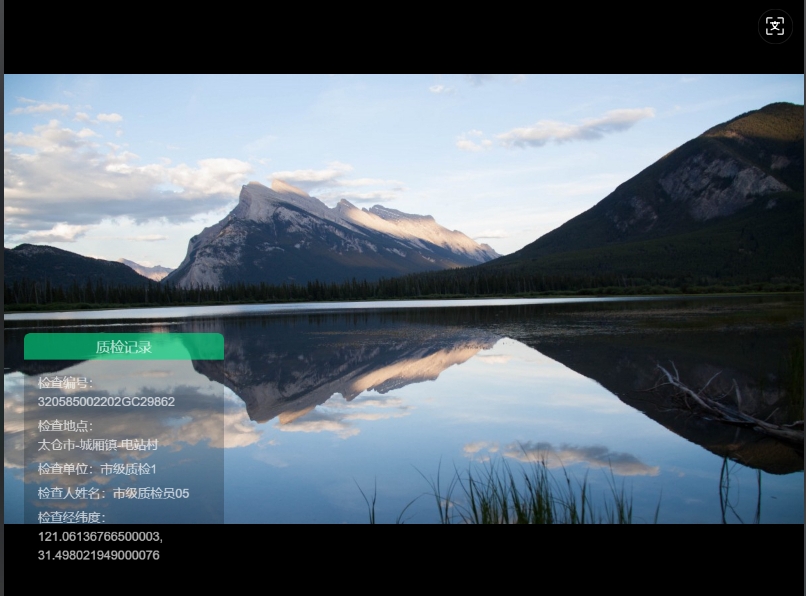
功能介绍
这是一个基于 Vant UI 的图片上传组件,支持图片压缩和自定义水印功能。组件会自动处理图片压缩并添加水印,适用于需要上传图片
并添加定制水印的场景。
功能特性
- 图片压缩 - 可配置尺寸和质量
- 自定义水印 - 动态内容水印模板
- 高度可配置 - 灵活设置水印内容和压缩参数
安装与使用
安装依赖
npm install html2canvas image-compressor vant
引入组件
在需要使用的页面中引入组件:
<template>
  <watermark-uploader
    v-model="fileList"
    :watermark-config="watermarkConfig"
    :compress-options="compressOptions"
  />
</template>

<script>
import WatermarkUploader from '@/components/WatermarkUploader.vue';

export default {
  components: { WatermarkUploader },
  data() {
    return {
      fileList: [],
      watermarkConfig: {
        title: '项目信息',
        items: [
          { label: '项目名称', value: '智慧园区系统' },
          { label: '上传人', value: '张三' }
        ]
      },
      compressOptions: {
        enabled: true,
        width: 800,
        height: 600,
        quality: 0.7
      }
    };
  }
};
</script>
Props 属性配置
| 属性名 | 类型 | 默认值 | 说明 |
|---|---|---|---|
| value | Array |
[] |
绑定值,文件列表 |
| maxCount | Number |
9 |
最大上传数量 |
| accept | String |
'image/*' |
接受的文件类型 |
| showUpload | Boolean |
true |
是否显示上传区域 |
| watermarkConfig | Object |
{ title: '项目信息', items: [{ label: '项目名称', value: '项目A' }] } |
水印配置对象 |
| compressOptions | Object |
{ enabled: true, width: 600, height: 800, quality: 0.8 } |
图片压缩配置 |
| uploadHandler | Function |
null |
自定义上传处理函数 |
组件内容
<template>
  <div class="watermark-uploader">
    <van-uploader
      v-model="fileList"
      :accept="accept"
      :max-count="maxCount"
      :show-upload="showUpload"
      :after-read="handleAfterRead"
    />

    <!-- 水印模板 -->
    <div id="canvasWrapper" class="watermark-template">
      <div class="watermark-content-box">
        <div class="watermark-title">{{ watermarkConfig.title }}</div>
        <div class="watermark-content">
          <div class="content-item" v-for="(item, index) in watermarkConfig.items" :key="index">
            <div class="content-item-title">{{ item.label }}:</div>
            <div class="content-item-value">{{ item.value }}</div>
          </div>
        </div>
      </div>
    </div>
  </div>
</template>

<script>
import html2canvas from 'html2canvas';
import { ImageCompressor } from 'image-compressor';
export default {
  name: 'WatermarkUploader',
  props: {
    // 基础配置
    value: { type: Array, default: () => [] },
    maxCount: { type: Number, default: 9 },
    accept: { type: String, default: 'image/*' },
    showUpload: { type: Boolean, default: true },

    // 水印配置
    watermarkConfig: {
      type: Object,
      default: () => ({
        title: '项目信息',
        items: [
          {
            label: '项目名称',
            value: '项目A',
          }
        ],
      }),
    },

    // 压缩配置
    compressOptions: {
      type: Object,
      default: () => ({
        enabled: true,
        width: 600,
        height: 800,
        quality: 0.8,
      }),
    },

    // 自定义上传方法
    uploadHandler: {
      type: Function,
      default: null,
    },
  },

  data() {
    return {
      fileList: [],
    };
  },

  watch: {
    value: {
      immediate: true,
      handler(val) {
        this.fileList = val;
      },
    },
  },

  methods: {
    // 文件读取后处理
    async handleAfterRead(file) {
      try {
        this.$toast.loading('处理中...');

        // 处理图片,压缩+水印
        let processedFile = await this.processImage(file);
        // console.log(processedFile);

        // 上传文件
        // let result = await this.uploadFile(processedFile);
      } catch (error) {
        // console.error('文件处理失败:', error);
        this.$toast('文件上传失败');
      } finally {
        this.$toast.clear();
      }
    },

    // 处理图片(压缩+水印)
    async processImage(file) {
      let imgBase64 = file.content;

      // 压缩图片
      if (this.compressOptions.enabled) {
        imgBase64 = await this.compressImage(imgBase64);
      }

      // 添加水印
      if (this.watermarkConfig.items.length > 0) {
        imgBase64 = await this.addWatermark(imgBase64);
      }
      file.content = imgBase64; // 更新文件内容为处理后的图片
      let blob = this.dataURLtoBlob(file.content);
      let processedFile = this.blobToFile(blob, file.file.name);

      return processedFile;
    },

    // 压缩图片
    compressImage(imageSrc) {
      return new Promise((resolve, reject) => {
        const img = new Image();
        img.src = imageSrc;
        img.onload = () => {
          let toWidth = this.compressOptions.width;
          let toHeight = this.compressOptions.height;
          let quality = this.compressOptions.quality;
          const imgWidth = img.width;
          const imgHeight = img.height;
          const rate = imgWidth / imgHeight;
          if (rate > 1) {
            toWidth = this.compressOptions.height;
            toHeight = this.compressOptions.width;
          }

          const imageCompressor = new ImageCompressor();
          const compressorSettings = {
            toWidth: toWidth,
            toHeight: toHeight,
            mimeType: 'image/png',
            mode: 'strict',
            quality: quality,
            grayScale: false,
            sepia: false,
            threshold: false,
            vReverse: false,
            hReverse: false,
            speed: 'low',
          };
          imageCompressor.run(imageSrc, compressorSettings, compressedSrc => {
            resolve(compressedSrc);
          });
        };
      });
    },

    // 添加水印
    async addWatermark(base64Img) {
      return new Promise((resolve, reject) => {
        let that = this;
        const canvas = document.createElement('canvas');
        const ctx = canvas.getContext('2d');
        const img = new Image();
        img.src = base64Img;
        let resultBase64 = null;
        img.onload = function () {
          let width = img.width;
          let height = img.height;
          canvas.width = width;
          canvas.height = height;
          ctx.drawImage(img, 0, 0, width, height);

          const canvasWrapper = document.getElementById('canvasWrapper');
          canvasWrapper.style.display = 'block';

          html2canvas(canvasWrapper, { useCORS: true, backgroundColor: 'rgba(0, 0, 0, 0)' }).then(canvas_ => {
            canvasWrapper.style.display = 'none';
            const canvasHeight = canvas_.height;
            const canvasWidth = canvas_.width;
            const ratio = canvasHeight / canvasWidth;
            ctx.drawImage(canvas_, 20, height - 200 * ratio - 20, 200, 200 * ratio);

            resultBase64 = canvas.toDataURL('image/png');
            if (!resultBase64) {
              reject();
            } else {
              resolve(resultBase64);
            }
          });
        };
      });
    },
    // 先将base64转换为blob
    dataURLtoBlob(dataurl) {
      var arr = dataurl.split(','),
        mime = arr[0].match(/:(.*?);/)[1],
        bstr = atob(arr[1]),
        n = bstr.length,
        u8arr = new Uint8Array(n);
      while (n--) {
        u8arr[n] = bstr.charCodeAt(n);
      }
      return new Blob([u8arr], { type: mime });
    },

    // 将blob转换为file
    blobToFile(theBlob, fileName) {
      theBlob.lastModifiedDate = new Date(); // 文件最后的修改日期
      theBlob.name = fileName; // 文件名
      return new File([theBlob], fileName, { type: theBlob.type, lastModified: Date.now() });
    },
  },
};
</script>

  <style lang="scss">
.watermark-uploader {
  .watermark-template {
    display: none;
    position: absolute;
    right: -1000px;
    opacity: 0.7;
    .watermark-content-box {
      border-radius: 8px;
      .watermark-title {
        width: 288px;
        height: 38px;
        background: rgba(1, 195, 118, 1);
        color: #fff;
        font-size: 20px;
        font-weight: 500;
        display: flex;
        align-items: center;
        justify-content: center;
        border-radius: 8px 8px 0 0;
      }
      .watermark-content {
        width: 288px;
        background: rgba(0, 0, 0, 0.3);
        font-size: 18px;
        padding: 12px 20px 20px;
        box-sizing: border-box;
        border-radius: 0 0 8px 8px;
        color: #fff;
        .content-item {
          margin-top: 8px;
          display: flex;
          align-items: center;
          flex-wrap: wrap;
          line-height: 1.5;
        }
      }
    }
  }
}
</style>
····

Agent 垂直技术社区,欢迎活跃、内容共建。
更多推荐


 11
11 0
0- 0


 已为社区贡献1条内容

所有评论(0)