打造炫酷音乐编辑器:Python+PyGame实战
# 音乐编辑器
大家好今天我来介绍我用`jieba`库生成的**音乐编辑器程序,这是我用VS Code写的第二篇博客**!
## 效果显示

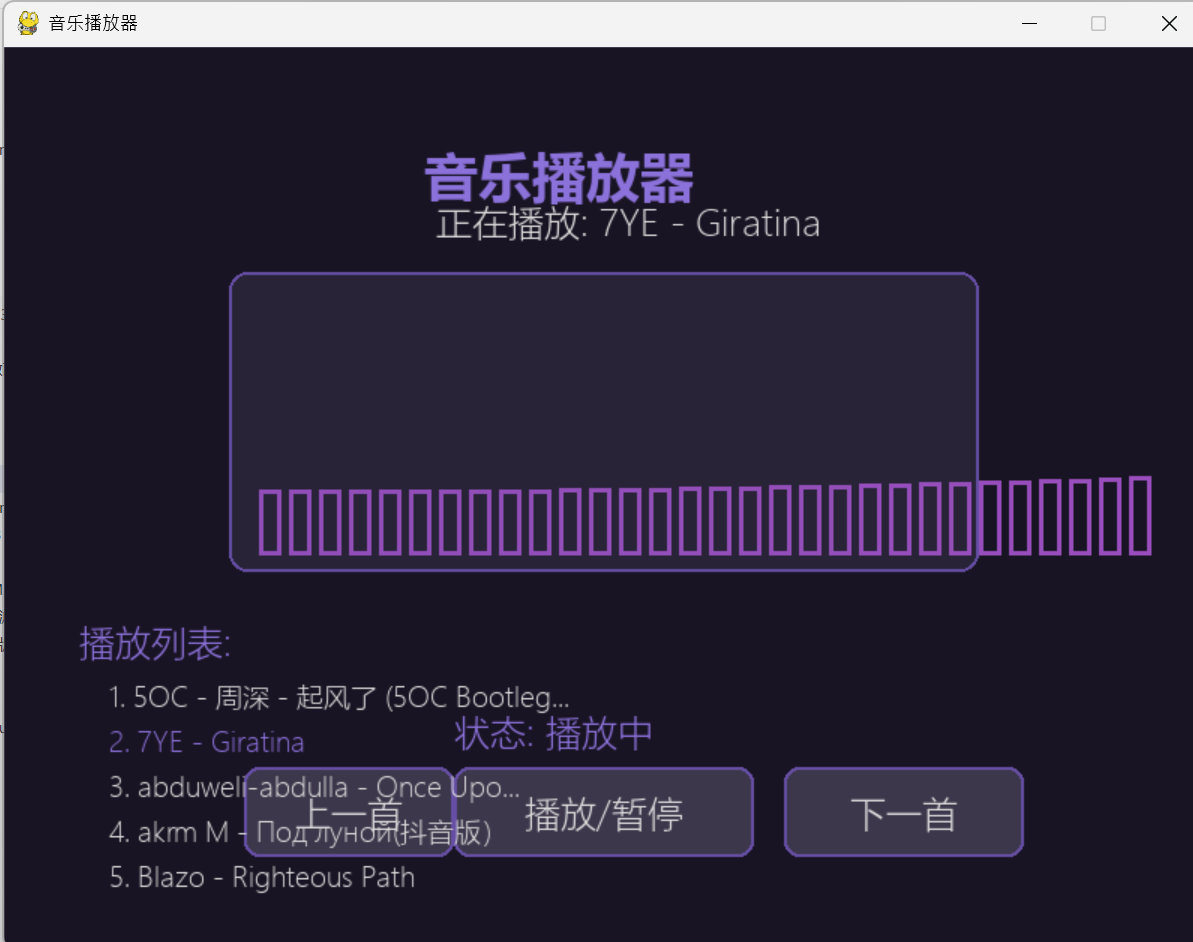
## 代码
代码分为五部分:
1.导入的库及初始化窗口
2.基础定义
3.创造按钮选项并创建
4.可视化效果
5.加入更新函数及界面绘制
### 第一部分
``` py
import pygame
import sys
import os
import time
from pygame import mixer
```
### 第二部分
``` py
pygame.init()
mixer.init()
# 屏幕设置
WIDTH, HEIGHT = 800, 600
screen = pygame.display.set_mode((WIDTH, HEIGHT))
pygame.display.set_caption("音乐播放器")
# 颜色定义
BG = (25, 20, 35)
ACCENT = (101, 78, 163)
LIGHT = (139, 113, 218)
TEXT = (220, 220, 220)
BTN_BG = (60, 55, 75)
BTN_HOVER = (80, 75, 95)
# 字体
title_font = pygame.font.SysFont("microsoftyaheiui", 36, bold=True)
font = pygame.font.SysFont("microsoftyaheiui", 24)
small_font = pygame.font.SysFont("microsoftyaheiui", 18)
# 音乐列表
music_files = [f for f in os.listdir(".") if f.endswith(('.mp3', '.wav', '.flac', '.ogg'))]
if not music_files:
music_files = ["陈奕迅 - 爱情转移", "周杰伦 - 青花瓷", "林俊杰 - 江南", "王菲 - 红豆", "邓紫棋 - 光年之外"]
# 播放状态
current = 0
playing = False
start_time = 0
paused_time = 0
# 加载初始歌曲
if music_files:
mixer.music.load(music_files[current])
```
### 第三部分
``` py
# 按钮类
class Button:
def __init__(self, x, y, w, h, text, action):
self.rect = pygame.Rect(x, y, w, h)
self.text = text
self.action = action
self.hover = False
def draw(self):
color = BTN_HOVER if self.hover else BTN_BG
pygame.draw.rect(screen, color, self.rect, border_radius=10)
pygame.draw.rect(screen, ACCENT, self.rect, 2, border_radius=10)
text_surf = font.render(self.text, True, TEXT)
screen.blit(text_surf, text_surf.get_rect(center=self.rect.center))
def update(self, pos):
self.hover = self.rect.collidepoint(pos)
def click(self):
if self.hover:
self.action()
# 播放控制
def play_pause():
global playing, start_time, paused_time
if not playing:
if paused_time:
mixer.music.unpause()
start_time = time.time() - (paused_time - start_time)
else:
mixer.music.play()
start_time = time.time()
playing = True
else:
mixer.music.pause()
paused_time = time.time()
playing = False
def change_song(direction):
global current, playing, start_time, paused_time
current = (current + direction) % len(music_files)
mixer.music.load(music_files[current])
mixer.music.play()
start_time, paused_time = time.time(), 0
playing = True
# 创建按钮
buttons = [
Button(WIDTH//2-240, HEIGHT-120, 120, 60, "上一首", lambda: change_song(-1)),
Button(WIDTH//2-100, HEIGHT-120, 200, 60, "播放/暂停", play_pause),
Button(WIDTH//2+120, HEIGHT-120, 160, 60, "下一首", lambda: change_song(1))
]
```
### 第四部分
``` py
class Visualizer:
def __init__(self):
self.bars = [0]*30
self.time = 0
def update(self):
self.time += 0.1
self.bars = [abs(pygame.math.Vector2(i*0.3, self.time).length()*15)%100+20 for i in range(30)]
def draw(self):
rect = pygame.Rect(WIDTH//2-250, 150, 500, 200)
pygame.draw.rect(screen, (40,35,55), rect, border_radius=12)
pygame.draw.rect(screen, ACCENT, rect, 2, border_radius=12)
bar_w, spacing = (rect.width-40)//30, 5
for i, h in enumerate(self.bars):
h = min(h, 180)
x = rect.x + 20 + i*(bar_w+spacing)
y = rect.y + rect.height - 10 - h
pygame.draw.rect(screen, (min(255,101+h),78,min(255,163+h//2)), (x,y,bar_w,h), 3)
visualizer = Visualizer()
```
### 第五部分
``` py
# 主循环
clock = pygame.time.Clock()
running = True
while running:
mouse = pygame.mouse.get_pos()
# 事件处理
for event in pygame.event.get():
if event.type == pygame.QUIT:
running = False
if event.type == pygame.MOUSEBUTTONDOWN and event.button == 1:
[btn.click() for btn in buttons]
# 更新状态
[btn.update(mouse) for btn in buttons]
visualizer.update()
# 绘制界面
screen.fill(BG)
# 标题和歌曲信息
screen.blit(title_font.render("音乐播放器", True, LIGHT), (WIDTH//2-120, 60))
if music_files:
song_name = music_files[current].rsplit(".",1)[0]
screen.blit(font.render(f"正在播放: {song_name}", True, TEXT), (WIDTH//2 - len(song_name)*8, 100))
# 可视化和控件
visualizer.draw()
[btn.draw() for btn in buttons]
screen.blit(font.render(f"状态: {'播放中' if playing else '已暂停'}", True, LIGHT), (WIDTH//2-100, HEIGHT-160))
# 播放列表
screen.blit(font.render("播放列表:", True, LIGHT), (50, 380))
for i, song in enumerate(music_files[:5]):
name = song.rsplit(".",1)[0][:27] + ("..." if len(song)>30 else "")
screen.blit(small_font.render(f"{i+1}. {name}", True, LIGHT if i==current else TEXT), (70, 420+i*30))
pygame.display.flip()
clock.tick(60)
pygame.quit()
sys.exit()
```

Agent 垂直技术社区,欢迎活跃、内容共建。
更多推荐
 7
7 0
0- 0


 已为社区贡献1条内容

所有评论(0)