Python Gradio 写的-文本情感分析小软件 (不用Html+css+js 可写出网页来)
·

1. 安装 Gradio
首先,需要安装 Gradio 库。打开命令行,执行以下命令:
pip install gradio注意:Gradio 需要 Python 3.10 或更高版本。推荐在虚拟环境中安装,避免依赖冲突。
2. 创建情感分析应用
创建一个 sentiment_analysis.py 文件,内容如下:
import gradio as gr
from textblob import TextBlob

def analyze_sentiment(text):
    """分析文本情感"""
    # 使用 TextBlob 进行情感分析
    blob = TextBlob(text)
    polarity = blob.sentiment.polarity

    # 判断情感倾向
    if polarity > 0:
        sentiment = "正面"
        confidence = polarity
    elif polarity < 0:
        sentiment = "负面"
        confidence = -polarity
    else:
        sentiment = "中性"
        confidence = 0

    return f"情感: {sentiment}, 置信度: {confidence:.2f}", polarity

# 创建 Gradio 界面
with gr.Blocks(title="文本情感分析工具") as demo:
    gr.Markdown("# 文本情感分析工具")
    gr.Markdown("输入一段文字,系统会分析其情感倾向。")

    with gr.Row():
        with gr.Column(scale=1):
            input_text = gr.Textbox(label="输入文本", placeholder="请在此输入要分析的文本...", lines=5)
            analyze_btn = gr.Button("分析情感")

        with gr.Column(scale=1):
            output_result = gr.Textbox(label="分析结果", lines=2)
            polarity_score = gr.Slider(label="情感极性 (-1 到 1)", minimum=-1, maximum=1, value=0, interactive=False)

    # 设置按钮点击事件
    analyze_btn.click(
        fn=analyze_sentiment,
        inputs=input_text,
        outputs=[output_result, polarity_score]
    )

# 启动应用
if __name__ == "__main__":
    demo.launch()
3. 安装额外依赖
我们的应用使用了 textblob 库进行情感分析,需要安装:
pip install textblob4. 运行应用
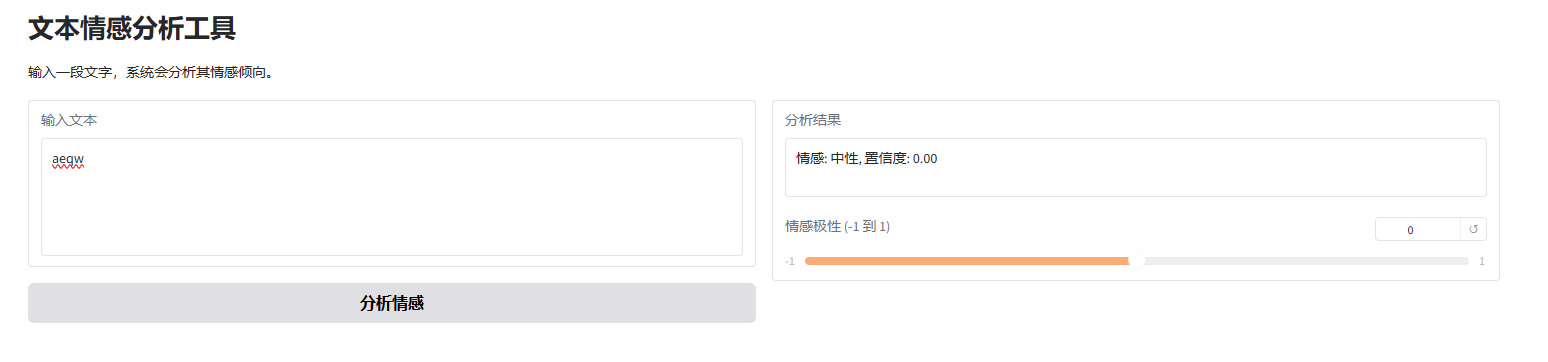
在命令行中执行:
python sentiment_analysis.py运行后,会自动打开浏览器,显示我们创建的情感分析工具界面。
5. 应用功能说明
- 在文本框中输入任意文字
- 点击"分析情感"按钮
- 系统会显示分析结果(正面/负面/中性)和置信度
- 滑块会直观显示情感极性(范围从-1到1)

Agent 垂直技术社区,欢迎活跃、内容共建。
更多推荐
 2
2 0
0- 0


 已为社区贡献1条内容

所有评论(0)