[ JDBC ] java 数据库连接
目录
2. JDBC API----供程序员调用的接口与类( java.sql 包中)
(3)Satement和PrepareStatement 安全性比较
1. 定义:
JDBC(Java DataBase Connectivity) java数据库连接: 是一种用于执行SQL语句的Java API,为多种关系型数据库提供了统一访问,由一组(Java语言编写的)类和接口组成,提供了增 删 改 查 等方法来更新数据库中数据
注意 : Java开发者只制定JDBC规范,不同数据库开发商对接口进行实现 , 程序员学习如何使用规范
2. JDBC API----供程序员调用的接口与类( java.sql 包中)
(1)DriverManager类作用:管理各种不同的jDBC驱动
(2)Connection 接口 与特定数据库的连接
(3)Statement 接口 执行sql
(4)PreparedStatement接口 执行sql
(5)ResultSet接口 接收查询结果
3. JDBC搭建
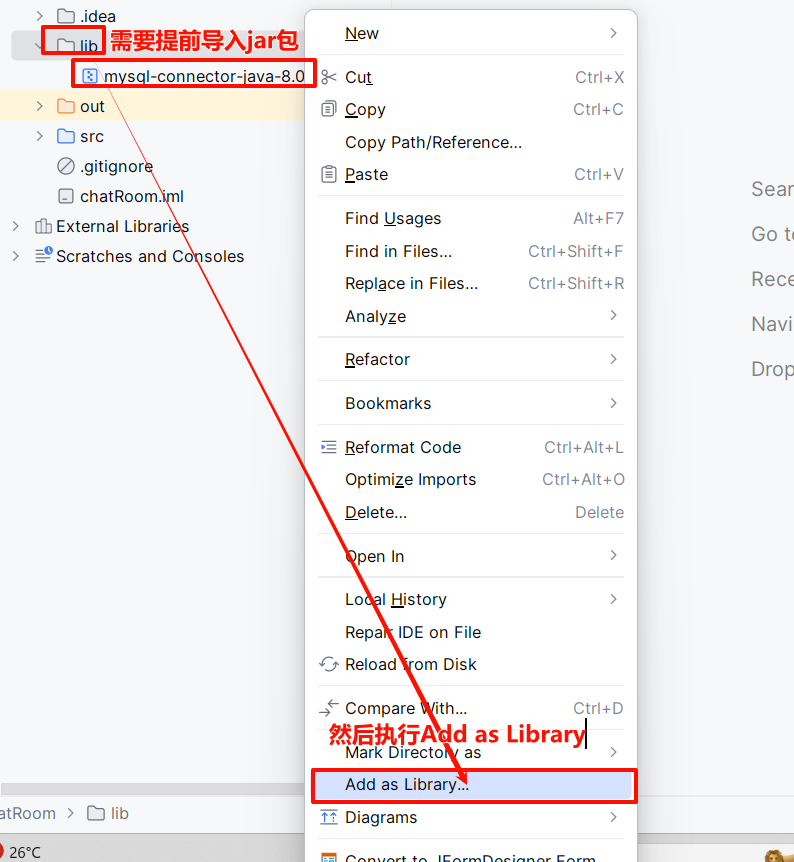
注意前提: 导入mysql的jar包
package ffyc.jdbc.demo;
import java.sql.Connection;
import java.sql.DriverManager;
import java.sql.SQLException;
import java.sql.Statement;

public class Demo1 {
    public static void main(String[] args) {
        String name = "C++";
        //1. 建立与数据库的链接
        String url = "jdbc:mysql://127.0.0.1:3306/schooldb?serverTimezone=Asia/Shanghai";//数据库地址
        String user = "root";//数据库用户名
        String dbpwd = "root";//数据库密码
        try {
            //建立与数据库的链接通道,返回一个链接对象  Connection对象表示一个与数据库的通道
            Connection connection = DriverManager.getConnection(url,user,dbpwd);
            // System.out.println(connection);com.mysql.cj.jdbc.ConnectionImpl@37574691

            //2.发送sql
            Statement statement = connection.createStatement();
            // System.out.println(statement);com.mysql.cj.jdbc.StatementImpl@71248c21
            int row =  statement.executeUpdate("insert into course(name)value('"+name+"')");//执行新增修改删除 发送sql到数据库
            System.out.println(row);

            //3.关闭与数据库的各种链接
            statement.close();
            connection.close();
        } catch (SQLException e) {
            System.out.println("数据库连接失败");
            e.printStackTrace();
        }

    }
}
1. 建立与数据库的链接
使用DriverManager.getConnection()方法创建Connection对象,表示一个物理连接的数据库
Connection conn = DriverManager.getConnection(url,user,pass);
url: jdbc:mysql://ip:端口(3306)/数据库名?serverTimezone=Asia/Shanghai (固定格式)
user: 用户名(root)
pass: 密码
注意: 可以创建一个JDBCUtil类 封装"与数据库连接"的代码,在使用时直接调用即可,减少代码冗余
package ffyc.jdbc.demo;

import java.sql.Connection;
import java.sql.DriverManager;
import java.sql.SQLException;
//将连接数据库的方法定义成一个类,使用的时候直接调用
public class JDBCUtil {
    //将数据库的地址 用户名 密码定义为 私有静态的 不需要被外界访问且只加载一次
    private static String url = "jdbc:mysql://127.0.0.1:3306/schooldb?serverTimezone=Asia/Shanghai";//数据库地址
    private static String user = "root";//数据库用户名
    private static String dbpwd = "root";//数据库密码
    public static Connection getConnection() throws SQLException {
        Connection connection = DriverManager.getConnection(url,user,dbpwd);
        return  connection;
    }
}
2. 执行SQL语句
(1)Satement执行sql语句
package ffyc.jdbc.demo;
import java.sql.Connection;
import java.sql.SQLException;
import java.sql.Statement;

public class Demo2 {
    public static void main(String[] args) {
        try {
            //Demo2.add(107,"赵六","男","161613");
            //Demo2.update(5,110,"赵四","女","151515");
            Demo2.delete(5);
        } catch (SQLException e) {
            e.printStackTrace();//打印异常信息
            System.out.println("数据库操作失败");
        }
    }
    //添加学生
    public static void add(int num,String name ,String gender ,String phone) throws SQLException {//增加
        Connection connection = JDBCUtil.getConnection();//获得数据库连接的对象 相当于建立connection通道
        Statement statement = connection.createStatement();//执行静态SQL语句 相当于将SQL封装在Statement里面,再借助通道connection通道,发送给数据库
        //执行(execute)数据: 数值类型双引双加  字符串类型先单引再双引双加
        statement.executeUpdate("insert into student(num,name,gender,phone,regtime)value("+num+",'"+name+"','"+gender+"','"+phone+"',now())");
        //关闭与数据库的连接
        statement.close();
        connection.close();
    }
    //修改学生
    public static void update(int id ,int num,String name,String gender,String phone) throws SQLException {
        Connection connection = JDBCUtil.getConnection();//通道
        Statement statement =connection.createStatement();//封装

        statement.executeUpdate("update student set num="+num+",name='"+name+"',gender='"+gender+"',phone='"+phone+"'where id ="+id);
        //关闭与数据库的连接
        statement.close();
        connection.close();
    }
    //删除学生
    public static void delete(int id) throws SQLException {
          Connection connection =  JDBCUtil.getConnection();//通道
          Statement statement = connection.createStatement();//封装

          statement.executeUpdate("delete from student where id ="+id);
          //关闭与数据库的连接
          statement.close();
          connection.close();
    }
}
ResultSet executeQuery(String sql); 用于执行查询语句,返回一个ResultSet 集合
(2)PrepareStatement执行sql语句
package ffyc.jdbc.demo;

import com.mysql.cj.x.protobuf.MysqlxPrepare;
import java.sql.Connection;
import java.sql.PreparedStatement;
import java.sql.SQLException;
import java.sql.Statement;

public class Demo3 {
    public static void main(String[] args) {
        try {
            //Demo3.add(107,"赵四","女","1212124");
            //Demo3.update(6,110,"赵六","女","161613");
            Demo3.delete(6);
        } catch (SQLException e) {
            e.printStackTrace();
        }
    }
    //添加学生
    public static void add(int num,String name ,String gender ,String phone) throws SQLException {//增加
        Connection connection = JDBCUtil.getConnection();//获得数据库连接对象 connection相当于建立通道
        PreparedStatement ps = connection.prepareStatement("insert into student (num,name,gender,phone,regtime)value(?,?,?,?,now())");//预编译的SQL语句
                          ps.setObject(1,num);////按顺序向SQL的占位符填充数据 1---第一个问号对应的数据                                                   //?是占位符,表示此处需要传递一个值
                          ps.setObject(2,name);
                          ps.setObject(3,gender);
                          ps.setObject(4,phone);//相当于组装数据,但是不执行
                          ps.executeUpdate();//执行SQL
        ps.close();//关闭与数据库的连接
        connection.close();
    }
    public static void update(int id ,int num,String name,String gender,String phone) throws SQLException {//修改
        Connection connection = JDBCUtil.getConnection();
        PreparedStatement ps =connection.prepareStatement("update student set num=?,name=?,gender=?,phone=? where id = ?");
                          ps.setObject(1,num);
                          ps.setObject(2,name);
                          ps.setObject(3,gender);
                          ps.setObject(4,phone);
                          ps.setObject(5,id);
                          ps.executeUpdate();//执行SQL
        ps.close();//关闭与数据库的连接
        connection.close();
    }
    public static void delete(int id) throws SQLException {
        Connection connection = JDBCUtil.getConnection();
        PreparedStatement ps =connection.prepareStatement("delete from student where id =?");
                          ps.setObject(1,id);
                          ps.executeUpdate();//执行SQL
        ps.close();//关闭与数据库的连接
        connection.close();
    }
}
ResultSet executeQuery(); 用于执行查询语句 返回一个ResultSet 集合
(3)Satement和PrepareStatement 安全性比较
使用预编译PrepareStatement语句.传入任何内容都不会和原语句(100 or 1=1)发生任何匹配的关系. 预编译模式中每个占位符处,只能插入一个值,而会过滤其他语句
package ffyc.jdbc.demo;
import java.sql.Connection;
import java.sql.SQLException;
import java.sql.Statement;

public class Demo4 {
    public static void main(String[] args) throws SQLException {
        Demo4.delete("100 or 1=1");
    }
    //安全性比较
    public static void delete(String id) throws SQLException {
        //Statement 安全性较低, 不能方式SQL注入
        Connection connection = JDBCUtil.getConnection();
        Statement statement = connection.createStatement();

        statement.executeUpdate("delete from student where id = "+id);
        statement.close();
        connection.close();

        /* PreparedStatement安全性较高 因为一个?只能占一个位 可以防止SQL注入,被恶意攻击
        Connection connection = JDBCUtil.getConnection();
        PreparedStatement ps = connection.prepareStatement("delete from student where id = ?");
                          ps.setObject(1, id);
                          ps.executeUpdate();
        ps.close();
        connection.close();*/
    }
}
3. 关闭与数据库的各种连接
4.结果集处理
PreparedStatement和Statement中的executeQuery()方法中会返回一个ResultSet对象,将查询结果封装在此对象中
(1)查询返回单个对象
package ffyc.jdbc.demo;
import java.sql.Connection;
import java.sql.PreparedStatement;
import java.sql.ResultSet;
import java.sql.SQLException;
//查询返回单个对象
public class Demo5 {
    public static void main(String[] args) throws SQLException {
     //通过学生的ID,查询唯一的一个学生的信息,返回一个学生对象
     Student student = Demo5.findStudentById(10);
        System.out.println(student);
        System.out.println(student);
    }
    public static Student findStudentById(int id) throws SQLException {
        Connection connection = JDBCUtil.getConnection();//获得连接对象
        PreparedStatement ps = connection.prepareStatement("select id,num,name,gender,birthday,phone,regtime from student where id = ?");//封装
                          ps.setObject(1,id);
        //executeQuery()查询执行后,将数据返回到一个ResultSet对象中
        ResultSet resultSet = ps.executeQuery();
        //由于resultSet中没有getid等方法直接使用,需要将ResultSet对象中的数据取出来,放到一个Student对象中,便于后续的使用
        Student student = new Student();
        while(resultSet.next()){//获得下一行数据,next()指向结果集中的数据
            student.setId(resultSet.getInt("id"));
            student.setNum(resultSet.getInt("num"));
            student.setName(resultSet.getString("name"));
            student.setGender(resultSet.getString("gender"));
            student.setPhone(resultSet.getString("phone"));
            student.setBirthday(resultSet.getDate("birthday"));//getDate() 获得年月日
            student.setRegTime(resultSet.getTimestamp("regtime"));//getTimestamp() 获得是年月日时分秒
        }
        resultSet.close();
        ps.close();
        connection.close();

        return student;
    }
}
(2)查询返回多个对象
package ffyc.jdbc.demo;
import java.sql.*;
import java.util.ArrayList;
//查询返回多个对象
public class Demo6 {
    public static void main(String[] args) throws SQLException {
        ArrayList<Student> students = Demo6.findStudentByGender("男");
        System.out.println(students);
    }
    public static ArrayList<Student> findStudentByGender(String gender) throws SQLException {
        ArrayList<Student> students =new ArrayList<>();//封装查询到的多个对象
        Connection connection = JDBCUtil.getConnection();
        PreparedStatement ps =connection.prepareStatement("select id,num,name,gender,birthday,phone,regtime from student where gender = ?");
                          ps.setObject(1,gender);

        ResultSet resultSet = ps.executeQuery();//包装
        while(resultSet.next()){
                Student student = new Student();//创建学生对象
                student.setId(resultSet.getInt("id"));
                student.setNum(resultSet.getInt("num"));
                student.setName(resultSet.getString("name"));
                student.setGender(resultSet.getString("gender"));
                student.setPhone(resultSet.getString("phone"));
                student.setBirthday(resultSet.getDate("birthday"));//getDate() 获得年月日
                student.setRegTime(resultSet.getTime("regtime"));//getTimestamp() 获得年月日时分秒
                students.add(student);//将所有学生对象都添加到集合里面
        }
        resultSet.close();
        ps.close();
        connection.close();

        return students;
    }
}

Agent 垂直技术社区,欢迎活跃、内容共建。
更多推荐
 25
25 0
0- 0


 已为社区贡献13条内容

所有评论(0)