vue+element实现下拉tree效果
·
前言:
vue+element实现下拉tree效果。
实现效果:
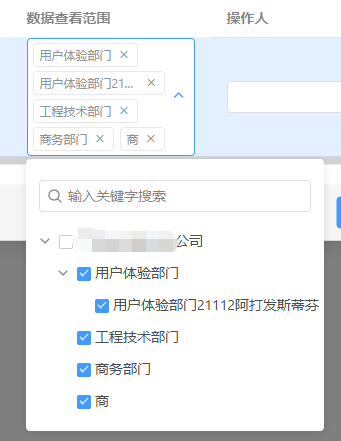
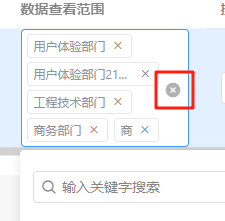
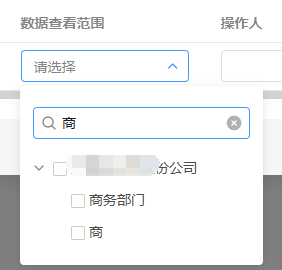
实现代码:
调用部分:
<nTreeSelect
    class="treeSel"
    v-model="scope.row.range"
    :filterable="true"
    :options="rangeOptions"
    :appendToBody="true"
/>

// 弹框就设置true,一级页面不用加


rangeOptions: [
        {
          label: '****股份公司',
          value: '1',
          children: [
            {
              label: '用户体验部门',
              value: '11',
              children: [
                {label: '用户体验部门21112阿打发斯蒂芬', value: '111'}
              ]
            }, {
              label: '工程技术部门',
              value: '12'
            }, {
              label: '商务部门',
              value: '13'
            }, {
              label: '商',
              value: '14'
            }
          ]
        }
      ]
封装好的nTreeSelect.vue
<template>
  <div>
    <el-select
        v-model="selectValue"
        multiple
        :placeholder="placeholder"
        :filterable="false"
        :filter-method="dataFilter"
        :popper-append-to-body="appendToBody"
        @remove-tag="removeTag"
        @clear="clearAll"
        :clearable="isCanDelete"
        :style="{ width: `${selectWidth}px` }"
        :disabled="disabledSelect"
        @visible-change="visibleChange"
        ref="treeSelect"
        class="auto-height-select"
    >
      <!-- 自定义标签展示 -->
      <template #prefix>
        <div class="custom-tags">
          <el-tag
              v-for="item in selectTree"
              :key="item[defaultProps.value]"
              size="small"
              closable
              @close="removeTag(item[defaultProps.label])"
          >
            {{ item[defaultProps.label] }}
          </el-tag>
        </div>
      </template>

      <el-option :value="selectTree" class="option-style" disabled>
        <div class="tree-select-container">
          <!-- 搜索框 -->
          <div class="tree-search" v-if="filterable">
            <el-input
                v-model="searchText"
                placeholder="输入关键字搜索"
                size="small"
                clearable
                @input="handleSearch"
            >
              <i slot="prefix" class="el-input__icon el-icon-search"></i>
            </el-input>
          </div>

          <!-- Tree组件 -->
          <el-scrollbar
              tag="div"
              wrap-class="el-select-dropdown__wrap"
              view-class="el-select-dropdown__list"
              ref="scrollbar"
          >
            <el-tree
                :data="options"
                :props="defaultProps"
                ref="treeNode"
                :show-checkbox="showCheckbox"
                :node-key="defaultProps.value"
                :filter-node-method="filterNode"
                :default-checked-keys="defaultValue"
                :check-strictly="true"
                @check="handleNodeCheck"
                :default-expand-all="defaultExpandAll"
                :lazy="lazy"
                :load="load"
                :highlight-current="true"
                :expand-on-click-node="false"
            >
              <span class="custom-tree-node" slot-scope="{ node, data }">
                <span>{{ node.label }}</span>
              </span>
            </el-tree>
          </el-scrollbar>
        </div>
      </el-option>
    </el-select>
  </div>
</template>

<script>
export default {
  name: 'nTreeSelect',
  props: {
    // 原有props保持不变
    defaultValue: {
      type: Array,
      default: () => ([])
    },
    options: {
      type: Array,
      default: () => ([])
    },
    defaultProps: {
      type: Object,
      default: () => ({
        children: 'children',
        label: 'label',
        value: 'value'
      })
    },
    appendToBody: {
      type: Boolean,
      default: false
    },
    filterable: {
      type: Boolean,
      default: true
    },
    disabledSelect: {
      type: Boolean,
      default: false
    },
    checkStrictly: {
      type: Boolean,
      default: true
    },
    isCanDelete: {
      type: Boolean,
      default: true
    },
    placeholder: {
      type: String,
      default: '请选择'
    },
    errMessage: {
      type: String,
      default: '该选项不可被删除'
    },
    selectWidth: {
      type: Number,
      default: 220
    },
    dropDownWidth: {
      type: Number,
      default: 220
    },
    defaultExpandAll: {
      type: Boolean,
      default: false
    },
    collapseTags: {
      type: Boolean,
      default: false
    },
    lazy: {
      type: Boolean,
      default: false
    },
    load: {
      type: Function,
      default: () => {}
    },
    visibleChange: {
      type: Function,
      default: () => {}
    },
    showCheckbox: {
      type: Boolean,
      default: true
    }
  },
  data() {
    return {
      selectTree: [],
      selectValue: [],
      VALUE_NAME: this.defaultProps.value,
      VALUE_TEXT: this.defaultProps.label,
      searchText: ''
    };
  },
  watch: {
    defaultValue: {
      immediate: true,
      deep: true,
      handler(val) {
        if (val && val.length) {
          this.$nextTick(() => {
            this.$refs.treeNode.setCheckedKeys(val);
            this.updateSelectedItems();
          });
        } else {
          this.selectTree = [];
          this.selectValue = [];
        }
      }
    }
  },
  methods: {
    // 更新选中项
    updateSelectedItems() {
      const checkedNodes = this.$refs.treeNode.getCheckedNodes();
      this.selectTree = checkedNodes;
      this.selectValue = checkedNodes.map(node => node[this.VALUE_TEXT]);
    },

    // 处理节点勾选
    handleNodeCheck(data, { checkedNodes }) {
      this.selectTree = checkedNodes;
      this.selectValue = checkedNodes.map(node => node[this.VALUE_TEXT]);
      this.$emit('changeSelectDataList', this.selectTree);
    },

    // 处理搜索
    handleSearch() {
      this.$refs.treeNode.filter(this.searchText);
    },

    // 过滤节点
    filterNode(value, data) {
      if (!value) return true;
      return data[this.defaultProps.label].toLowerCase().indexOf(value.toLowerCase()) !== -1;
    },

    // 移除标签
    removeTag(tag) {
      const item = this.selectTree.find(node => node[this.VALUE_TEXT] === tag);
      if (item) {
        this.$refs.treeNode.setChecked(item, false, true);
        this.updateSelectedItems();
        this.$emit('changeSelectDataList', this.selectTree);
      }
    },

    // 清空所有
    clearAll() {
      this.$refs.treeNode.setCheckedKeys([]);
      this.selectTree = [];
      this.selectValue = [];
      this.$emit('changeSelectDataList', this.selectTree);
    },

    // 原有方法保持
    dataFilter(val) {
      this.$refs.treeNode.filter(val);
    }
  }
};
</script>

<style lang="scss" scoped>
.auto-height-select {
  ::v-deep .el-select__tags {
    position: absolute;
    top: 50%;
    transform: translateY(-50%);
    left: 0;
    white-space: normal;
    width: 83%!important;
    max-width: 83%!important;
    height: auto;
    min-height: 32px;
    overflow-y: auto;
    display: flex;
    flex-wrap: wrap;
    align-items: center;
    line-height: normal;
  }

  ::v-deep .el-input__inner {
    height: auto;
    min-height: 32px;
    line-height: normal;
    padding-top: 0;
    padding-bottom: 0;
    overflow-y: auto;
  }

  ::v-deep .el-input__suffix {
    top: 50%;
    transform: translateY(-50%);
  }

  ::v-deep .el-input__prefix {
    display: none;
  }
}

.tree-select-container {
  display: flex;
  flex-direction: column;
  padding: 5px;
  min-height: 32px;
}

.tree-search {
  padding: 8px;
  margin-bottom: 5px;
  flex-shrink: 0;
}

.option-style {
  height: auto;
  overflow: hidden;
}

::v-deep .el-select-dropdown__wrap {
  max-height: 60vh;
  overflow-y: auto;
}

::v-deep .el-select-dropdown__list {
  padding: 0 !important;
}

.custom-tree-node {
  flex: 1;
  display: flex;
  align-items: center;
  justify-content: space-between;
  font-size: 14px;
  padding: 8px 8px 8px 0;
  min-height: 32px;
}

/* 滚动条优化 */
::v-deep .el-scrollbar {
  flex: 1;
  min-height: 100px;

  .el-scrollbar__wrap {
    overflow-x: hidden;
    max-height: none;
  }
}

/* 确保tree有足够空间 */
::v-deep .el-tree {
  min-height: 100px;
  padding-bottom: 10px;
  background: #fff!important;
  box-sizing: border-box;
}

::v-deep .el-select .el-tag {
  background: #fff!important;
  border-color: #e9e9eb!important;
  color: #909399;
  max-width:95%;
}

::v-deep .el-select .el-tag__close:hover {
  color: #fff;
  background: #909399;
}
::v-deep .el-select .el-select__tags-text {
  color: #909399;
}
::v-deep .el-select .el-input--prefix .el-input__inner{
  padding-left:12px;
}
</style>

Agent 垂直技术社区,欢迎活跃、内容共建。
更多推荐


 2
2 0
0- 0


 已为社区贡献8条内容

所有评论(0)