ClickHouse官网 Python UDF 官方示例报错解决方式
ClickHouse官网关于UDF的开发方式给出了很多的示例,但是其中Python版的UDF官方示例,根据步骤操作后最终执行异常。
本章内容将针对这个异常进行解决,使得Python版UDF正常运行。
根据官方示例,操作步骤如下
步骤一、使用 XML 配置创建 test_function。 文件 test_function.xml(/etc/clickhouse-server/test_function.xml,具有默认路径设置)。
<functions>
    <function>
        <type>executable</type>
        <name>test_function_python</name>
        <return_type>String</return_type>
        <argument>
            <type>UInt64</type>
            <name>value</name>
        </argument>
        <format>TabSeparated</format>
        <command>test_function.py</command>
    </function>
</functions>
步骤二、在用户脚本文件夹内的脚本文件 test_function.py(/var/lib/clickhouse/user_scripts/test_function.py,具有默认路径设置)。
#!/usr/bin/python3

import sys

if __name__ == '__main__':
    for line in sys.stdin:
        print("Value " + line, end='')
        sys.stdout.flush()
步骤三、上传python脚本到默认路径,然后登录给脚本添加执行权限
chmod +x test_function.py步骤四、ClickHouse客户端,reload 函数(如果配置文件中修改过默认端口9000,则需要指定修改后的端口 --port 指定端口)
/bin/clickhouse-client --user [你的用户名] --password [用户名密码] [--port 指定端口]重载函数使函数生效
SYSTEM RELOAD FUNCTIONS检查函数是否已加载 show functions like 'test%'

步骤五、校验函数是否可行
rabbitmq :) SELECT test_function_python(toUInt64(2));

SELECT test_function_python(toUInt64(2))

Query id: d15bf9d4-16e4-4ae0-adac-952161da8e0b


Elapsed: 0.111 sec.

Received exception from server (version 25.6.5):
Code: 75. DB::Exception: Received from localhost:9003. DB::Exception: Cannot write into pipe: , errno: 32, strerror: Broken pipe: While executing TabSeparatedRowOutputFormat: While executing ShellCommandSource: In scope SELECT test_function_python(toUInt64(2)). (CANNOT_
WRITE_TO_FILE_DESCRIPTOR)
官方示例执行后发现报错
Received exception from server (version 25.6.5):
Code: 75. DB::Exception: Received from localhost:9003. DB::Exception: Cannot write into pipe: , errno: 32, strerror: Broken pipe: While executing TabSeparatedRowOutputFormat: While executing ShellCommandSource: In scope SELECT test_function_python(toUInt64(2)). (CANNOT_
WRITE_TO_FILE_DESCRIPTOR)
解决方式:在配置文件中新增两行
<execute_direct>0</execute_direct>
<command>python3 /var/lib/clickhouse/user_scripts/test_function.py</command>
添加后示例如下
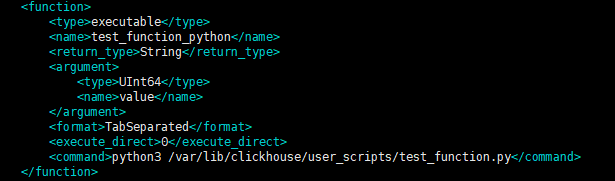
然后重新 reload 函数
SYSTEM RELOAD FUNCTIONS在执行查询查看结果
rabbitmq :) SELECT test_function_python(toUInt64(2));

SELECT test_function_python(toUInt64(2))

Query id: 7cea6ed4-4e33-4010-9135-02f69ba1520e

   ┌─test_functio⋯oUInt64(2))─┐
1. │ Value 2                  │
   └──────────────────────────┘

1 row in set. Elapsed: 0.127 sec.
运行成功,问题解决。

Agent 垂直技术社区,欢迎活跃、内容共建。
更多推荐
 4
4 0
0- 0


 已为社区贡献1条内容

所有评论(0)