echarts关系图(Vue3)节点背景图&连线设置
·
效果图:
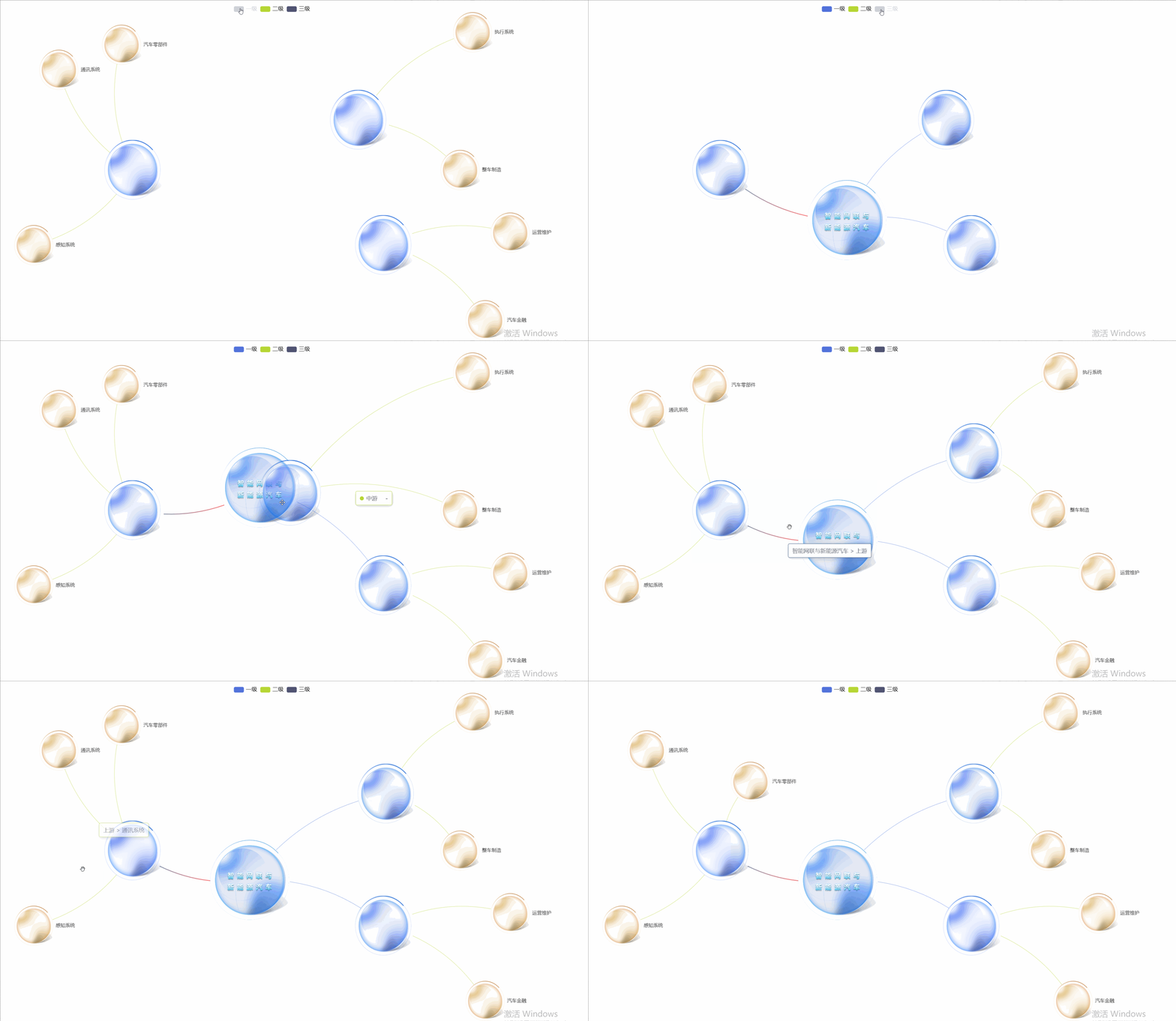
需求:节点添加背景图,连线不能从圆心连接,设置线的颜色(渐变/其他颜色),请求接口接进去即可用。
<template>
  <div>
    <v-chart
      ref="vChartRef"
      :option="option"
      style="width: 100%; height: 900px"
    ></v-chart>
  </div>
</template>

<script setup lang="ts">
import { ref, computed, nextTick } from "vue";
import VChart from "vue-echarts";
import { use } from "echarts/core";
import { CanvasRenderer } from "echarts/renderers";
import { RadarChart, GraphChart } from "echarts/charts";
import {
  DatasetComponent,
  GridComponent,
  TooltipComponent,
  LegendComponent,
} from "echarts/components";
import cloneDeep from "lodash/cloneDeep";

use([
  DatasetComponent,
  CanvasRenderer,
  RadarChart,
  GraphChart,
  GridComponent,
  TooltipComponent,
  LegendComponent,
]);

const seriesItem = ref({
  type: "graph", // 类型:关系图
  layout: "none", // none circular环形布局,force类型为力导图
  data: <any>[],
  links: <any>[],
  categories: <any>[],
  label: {
    // 标签
    show: 1,
    position: "right",
    formatter: "{b}",
  },
  labelLayout: {
    hideOverlap: true,
  },
  lineStyle: {
    color: "source", // 线条颜色
    curveness: 0.2, // 线条卷曲程度
  },
  roam: true, // 是否开启鼠标缩放和平移漫游。默认不开启。如果只想要开启缩放或者平移,可以设置成 'scale' 或者 'move'。设置成 true 为都开启
  edgeSymbolSize: [1, 1], //设置端点大小和线差不多
  edgeSymbol: ["circle", "circle"], // 边两端的标记大小,可以是一个数组分别指定两端,也可以是单个统一指定。(因节点背景是透明,不设置端点的时候是从节点中心开始连接,设置的时候是从边开始)
  // force: {
  //   //力引导图基本配置
  //   friction: 0.6,
  //   layoutAnimation: true,
  //   gravity: 0.05, //节点受到的向中心的引力因子。该值越大节点越往中心点靠拢。
  //   edgeLength: 360, //边的两个节点之间的距离
  //   repulsion: 4000, //节点之间的斥力因子。支持数组表达斥力范围,值越大斥力越大。
  // },
});

const getSeries = () => {
  let series: any = [];
  const values = dataJson.value;
  if (
    values.nodes === undefined ||
    values.links === undefined ||
    values.categories === undefined
  ) {
    return;
  }
  //渲染节点背景图
  const processedNodes = values.nodes.map((node: any) => {
    return {
      ...node,
      symbol: `image://${node.symbol}`,
    };
  });

  //系列模板
  let item: any = cloneDeep(seriesItem.value);
  item.data = processedNodes; // 使用处理后的节点数据
  item.links = values.links;
  item.categories = values.categories;
  series = item;
  return series;
};

const vChartRef = ref<typeof VChart>();

const option = ref({
  tooltip: {},
  legend: {
    show: true,
    top: 20,
    textStyle: {
      color: "#000",
      fontSize: 14,
    },
    data: dataJson.value.categories.map((a) => {
      return a.name;
    }),
  },
  series: getSeries(),
});
</script>
json数据
const dataJson = ref({
  nodes: [
    {
      draggable: true,
      symbolSize: [200, 200],
      symbol: require("@/assets/images/graph/1.png"),
      name: "智能网联与新能源汽车",
      x: 0,
      y: 10,
      fixed: true,
      label: {
        show: false,
      },
      category: "一级",
    },
    {
      draggable: true,
      symbolSize: [150, 150],
      symbol: require("@/assets/images/graph/2.png"),
      name: "上游",
      x: -50,
      y: -10,
      label: {
        show: false,
      },
      category: "二级",
    },
    {
      draggable: true,
      symbolSize: [150, 150],
      symbol: require("@/assets/images/graph/2.png"),
      name: "中游",
      x: 40,
      y: -30,
      label: {
        show: false,
      },
      category: "二级",
    },
    {
      draggable: true,
      symbolSize: [150, 150],
      symbol: require("@/assets/images/graph/2.png"),
      name: "下游",
      x: 50,
      y: 20,
      label: {
        show: false,
      },
      category: "二级",
    },
    {
      draggable: true,
      symbolSize: [100, 100],
      symbol: require("@/assets/images/graph/4.png"),
      name: "通讯系统",
      x: -80,
      y: -50,
      category: "三级",
    },
    {
      draggable: true,
      symbolSize: [100, 100],
      symbol: require("@/assets/images/graph/4.png"),
      name: "感知系统",
      x: -90,
      y: 20,
      category: "三级",
    },
    {
      draggable: true,
      symbolSize: [100, 100],
      symbol: require("@/assets/images/graph/4.png"),
      name: "汽车零部件",
      x: -55,
      y: -60,
      category: "三级",
    },
    {
      draggable: true,
      symbolSize: [100, 100],
      symbol: require("@/assets/images/graph/4.png"),
      name: "执行系统",
      x: 85,
      y: -65,
      category: "三级",
    },
    {
      draggable: true,
      symbolSize: [100, 100],
      symbol: require("@/assets/images/graph/4.png"),
      name: "整车制造",
      x: 80,
      y: -10,
      category: "三级",
    },
    {
      draggable: true,
      symbolSize: [100, 100],
      symbol: require("@/assets/images/graph/4.png"),
      name: "运营维护",
      x: 100,
      y: 15,
      category: "三级",
    },
    {
      draggable: true,
      symbolSize: [100, 100],
      symbol: require("@/assets/images/graph/4.png"),
      name: "汽车金融",
      x: 90,
      y: 50,
      category: "三级",
    },
  ],
  links: [
    {
      source: "智能网联与新能源汽车",
      target: "上游",
      lineStyle: {
        width: 2,
        color: {
          type: "linear",
          x: 0,
          y: 0,
          x2: 1,
          y2: 1,
          colorStops: [
            {
              //线渐变颜色
              offset: 0,
              color: "#0f3362", // 0% 处的颜色
            },
            {
              offset: 1,
              color: "red", // 100% 处的颜色
            },
          ],
          global: false, // 缺省为 false
        },
        curveness: 0.2, //折线曲度
      },
    },
    {
      source: "智能网联与新能源汽车",
      target: "中游",
    },
    {
      source: "智能网联与新能源汽车",
      target: "下游",
    },
    {
      source: "上游",
      target: "感知系统",
    },
    {
      source: "上游",
      target: "通讯系统",
    },
    {
      source: "上游",
      target: "汽车零部件",
    },
    {
      source: "中游",
      target: "执行系统",
    },
    {
      source: "中游",
      target: "整车制造",
    },
    {
      source: "下游",
      target: "运营维护",
    },
    {
      source: "下游",
      target: "汽车金融",
    },
  ],
  categories: [
    {
      name: "一级",
    },
    {
      name: "二级",
    },
    {
      name: "三级",
    },
  ],
});

Agent 垂直技术社区,欢迎活跃、内容共建。
更多推荐


 10
10 0
0- 0


 已为社区贡献12条内容

所有评论(0)