【文本数据获取】Python+Selenium3/4自定义检索词,从微博网页版检索,批量获取微博文本数据
·
本篇是基于此篇文章进行的改动和优化:https://zhuanlan.zhihu.com/p/364795318
首先请按照上篇文章第三部分的步骤,安装Python的Selenium库,并下载相关浏览器驱动。
1 准备工作
导入必要的selenium库,打开谷歌浏览器。
根据微博网页的特性,发现输入检索词后的网页就是在“https://s.weibo.com/weibo?q=”后加入检索词,如下图所示: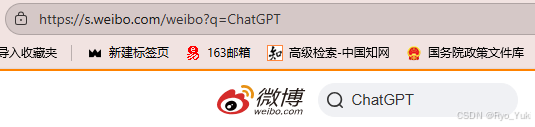
因此下方代码只需要将searchWord改为自己的检索词,就可以直接打开检索完成的页面。
需要注意,我设置了打开后有30秒钟的停止时间,在此期间务必完成扫码或输入账号密码登录操作,登陆完成后也可以在高级检索处根据自己的需求添加时间、微博类型等限制条件。
from selenium import webdriver
from selenium.webdriver.common.keys import Keys
import time
import pandas as pd
import requests

driver = webdriver.Chrome()
searchWord='在此输入自定义检索词'
driver.get('https://s.weibo.com/weibo?q='+searchWord)
#直接打开设置好关键词的网页,不需要在网页上额外操作
time.sleep(30)#在此30s时间段(可调整时间),用微博APP扫码登录,否则无法进行后边的步骤。如果需要设置时间,也要在此时间段运用高级搜索手动设置时间。
2 网页内容的获取与保存
等待半分钟结束,网页就会开始自动运行,展开全文,翻页,爬取内容,最后将结果导出为excel文件。
需要提到,由于微博官网自身限制,一次检索最多翻页50页,所以如果想要更多数据的话,就请在高级检索处通过设置时间,获取更多数据。
下方代码大多从文首网址中搬运而来,可以结合他的解释去看。
全部代码
selenium3版本
from selenium import webdriver
from selenium.webdriver.common.keys import Keys
import time
import pandas as pd
import requests

driver = webdriver.Chrome()
searchWord='在此输入自定义检索词'
driver.get('https://s.weibo.com/weibo?q='+searchWord)
#直接打开设置好关键词的网页,不需要在网页上额外操作
time.sleep(30)#在此30s时间段(可调整时间),用微博APP扫码登录,否则无法进行后边的步骤。如果需要设置时间,也要在此时间段运用高级搜索手动设置时间。

comment = []#储存内容
times = []#储存时间
username = []#储存用户名

#抓取节点:每个评论为一个节点(包括用户信息、评论、日期等信息),如果一页有20条评论,那么nodes的长度就为20
nodes = driver.find_elements_by_css_selector('div.card > div.card-feed > div.content')
#对每个节点进行循环操作
for i in range(0,len(nodes),1):
    #判断每个节点是否有“展开全文”的链接
    flag = False
    try:
        nodes[i].find_element_by_css_selector("p>a[action-type='fl_unfold']").is_displayed()
        flag = True
    except:
        flag = False
    #如果该节点具有“展开全文”的链接,且该链接中的文字是“展开全文c”,那么点击这个要素,并获取指定位置的文本;否则直接获取文本
    #(两个条件需要同时满足,因为该selector不仅标识了展开全文,还标识了其他元素,没有做到唯一定位)
    if(flag and nodes[i].find_element_by_css_selector("p>a[action-type='fl_unfold']").text.startswith('展开c')):
        nodes[i].find_element_by_css_selector("p>a[action-type='fl_unfold']").click()
        comment.append(nodes[i].find_element_by_css_selector('p[node-type="feed_list_content_full"]').text)
    else:
        comment.append(nodes[i].find_element_by_css_selector('p[node-type="feed_list_content"]').text)
    username.append(nodes[i].find_element_by_css_selector("div.info>div:nth-child(2)>a").text)
    try:
        times.append(nodes[i].find_element_by_css_selector("div.from>a:nth-child(1)").text)
    except:
        times.append(nodes[i].find_element_by_css_selector("div.from>a").text)


for page in range(49):
    print('第'+str(page+1)+'页结束')
    # 定位下一页按钮
    try:
        nextpage_button = driver.find_element_by_link_text('下一页')
    except:
        break

    #点击按键
    driver.execute_script("arguments[0].click();", nextpage_button)
    time.sleep(3)
    #与前面类似,抓取节点
    nodes1 = driver.find_elements_by_css_selector('div.card > div.card-feed > div.content')
    for i in range(0,len(nodes1),1):
        flag = False
        try:
            nodes1[i].find_element_by_css_selector("p>a[action-type='fl_unfold']").is_displayed()
            flag = True
        except:
            flag = False
        if (flag and nodes1[i].find_element_by_css_selector("p>a[action-type='fl_unfold']").text.startswith('展开c')):
            nodes1[i].find_element_by_css_selector("p>a[action-type='fl_unfold']").click()
            comment.append(nodes1[i].find_element_by_css_selector('p[node-type="feed_list_content_full"]').text)
        else:
            comment.append(nodes1[i].find_element_by_css_selector('p[node-type="feed_list_content"]').text)

        username.append(nodes1[i].find_element_by_css_selector("div.info>div:nth-child(2)>a").text)
        try:
            times.append(nodes1[i].find_element_by_css_selector("div.from>a:nth-child(1)").text)
        except:
            times.append(nodes1[i].find_element_by_css_selector("div.from>a").text)

data = pd.DataFrame({'username':username,'time':times,'comment':comment})
data.to_excel(searchWord+".xlsx")

driver.close()
selenium4版本
from selenium import webdriver
from selenium.webdriver.common.keys import Keys
from selenium.webdriver.common.by import By
import time
import pandas as pd
import requests
from selenium.webdriver.support.ui import WebDriverWait
from selenium.webdriver.support import expected_conditions as EC

#打开直接设置好关键词的
driver = webdriver.Chrome()
searchWord='请输入检索词'
driver.get('https://s.weibo.com/weibo?q='+searchWord)
time.sleep(30)#在此时间段,用微博APP扫码登录,否则无法进行后边的步骤。如果需要设置时间,也要在此时间段运用高级搜索手动设置时间。

comment = []
times = []
username = []

#抓取节点:每个评论为一个节点(包括用户信息、评论、日期等信息),如果一页有20条评论,那么nodes的长度就为20
nodes = driver.find_elements(By.CSS_SELECTOR, 'div.card > div.card-feed > div.content')
#对每个节点进行循环操作
for i in range(0,len(nodes),1):
    #判断每个节点是否有“展开全文”的链接
    flag = False
    try:
        nodes[i].find_element(By.CSS_SELECTOR, "p>a[action-type='fl_unfold']").is_displayed()
        flag = True
    except:
        flag = False
    #如果该节点具有“展开全文”的链接,且该链接中的文字是“展开全文c”,那么点击这个要素,并获取指定位置的文本;否则直接获取文本
    #(两个条件需要同时满足,因为该selector不仅标识了展开全文,还标识了其他元素,没有做到唯一定位)
    if(flag and nodes[i].find_element(By.CSS_SELECTOR, "p>a[action-type='fl_unfold']").text.startswith('展开c')):
        nodes[i].find_element(By.CSS_SELECTOR, "p>a[action-type='fl_unfold']").click()
        comment.append(nodes[i].find_element(By.CSS_SELECTOR, 'p[node-type="feed_list_content_full"]').text)
    else:
        comment.append(nodes[i].find_element(By.CSS_SELECTOR, 'p[node-type="feed_list_content"]').text)
    username.append(nodes[i].find_element(By.CSS_SELECTOR, "div.info>div:nth-child(2)>a").text)
    #pl_feedlist_index > div:nth-child(2) > div:nth-child(1) > div > div.card-feed > div.content > div.info > div:nth-child(2) > a
    try:
        times.append(nodes[i].find_element(By.CSS_SELECTOR, "div.from>a:nth-child(1)").text)
    except:
        times.append(nodes[i].find_element(By.CSS_SELECTOR, "div.from>a").text)


for page in range(49):
    print('第'+str(page+1)+'页结束')
    # 定位下一页按钮
    try:
        nextpage_button = driver.find_element(By.LINK_TEXT, '下一页')
    except:
        break

    #点击按键
    driver.execute_script("arguments[0].click();", nextpage_button)
    time.sleep(3)
    #与前面类似,抓取节点
    nodes1 = driver.find_elements(By.CSS_SELECTOR, 'div.card > div.card-feed > div.content')
    for i in range(0, len(nodes1), 1):
        flag = False
        try:
            nodes1[i].find_element(By.CSS_SELECTOR, "p>a[action-type='fl_unfold']").is_displayed()
            flag = True
        except:
            flag = False
        if (flag and nodes1[i].find_element(By.CSS_SELECTOR, "p>a[action-type='fl_unfold']").text.startswith('展开c')):
            nodes1[i].find_element(By.CSS_SELECTOR, "p>a[action-type='fl_unfold']").click()
            comment.append(nodes1[i].find_element(By.CSS_SELECTOR, 'p[node-type="feed_list_content_full"]').text)
        else:
            comment.append(nodes1[i].find_element(By.CSS_SELECTOR, 'p[node-type="feed_list_content"]').text)

        username.append(nodes1[i].find_element(By.CSS_SELECTOR, "div.info>div:nth-child(2)>a").text)
        try:
            times.append(nodes1[i].find_element(By.CSS_SELECTOR, "div.from>a:nth-child(1)").text)
        except:
            times.append(nodes1[i].find_element(By.CSS_SELECTOR, "div.from>a").text)


data = pd.DataFrame({'username':username,'time':times,'comment':comment})
data.to_excel(searchWord+".xlsx")

driver.close()

Agent 垂直技术社区,欢迎活跃、内容共建。
更多推荐

 5
5 0
0- 0


 已为社区贡献1条内容

所有评论(0)