Python 网络爬虫(系统版)
·
模仿者方式抓取系统接口数据
一、网络爬虫准备
1.需要通过检查模式获取登录与验证接口: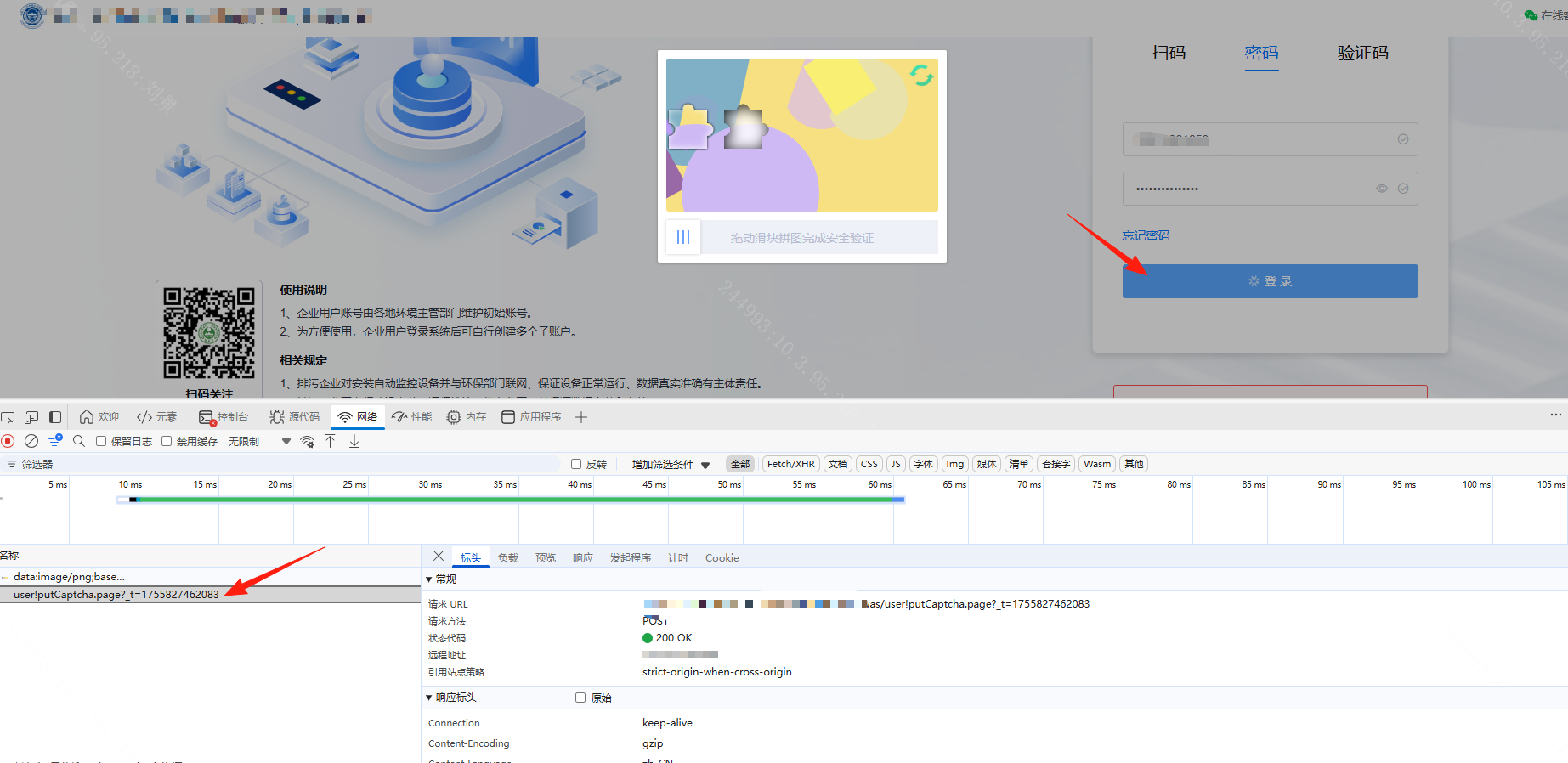
2.需要有账号密码来模拟登录获取动态cookie: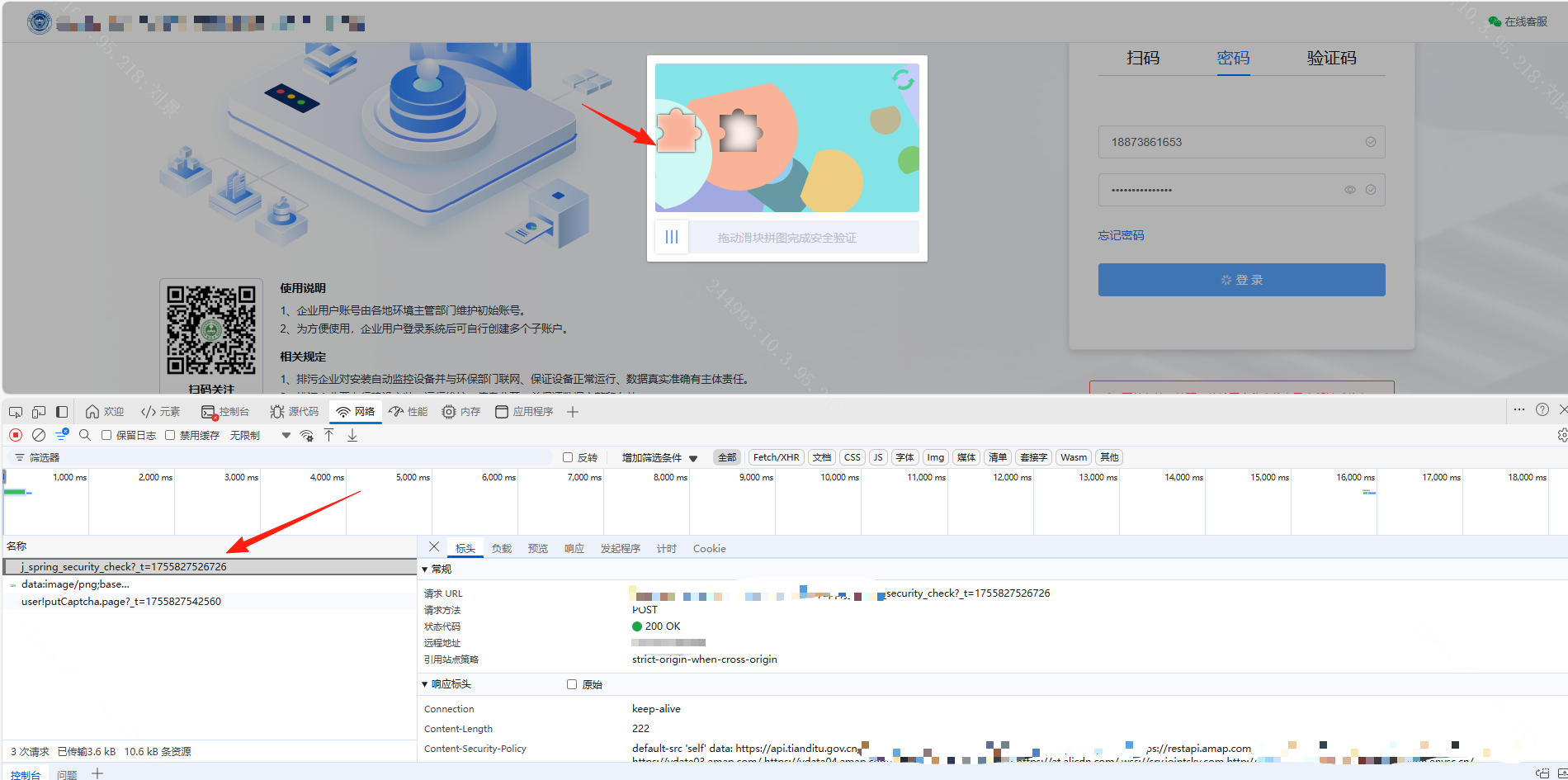
二、获取动态Cookie
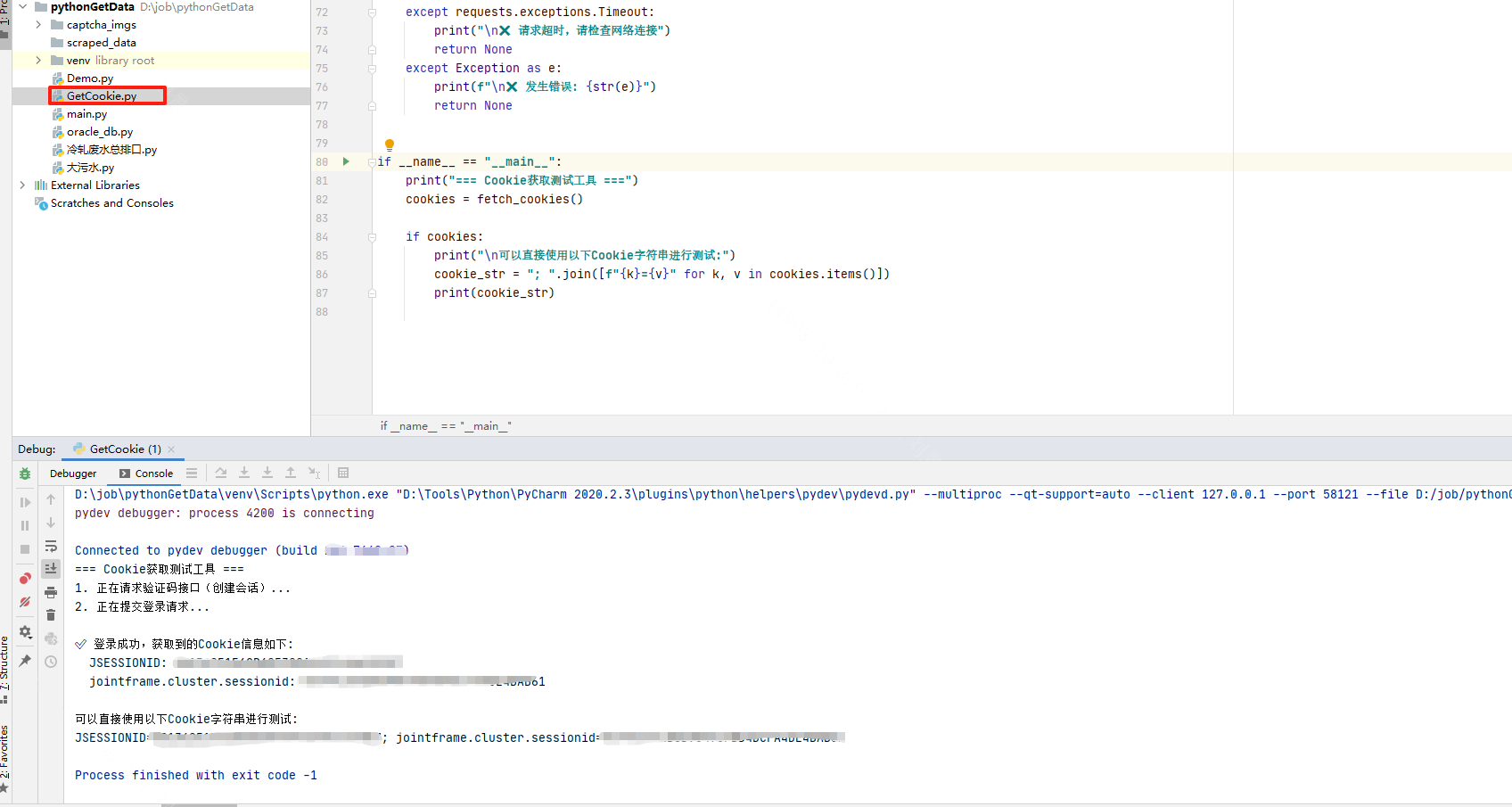
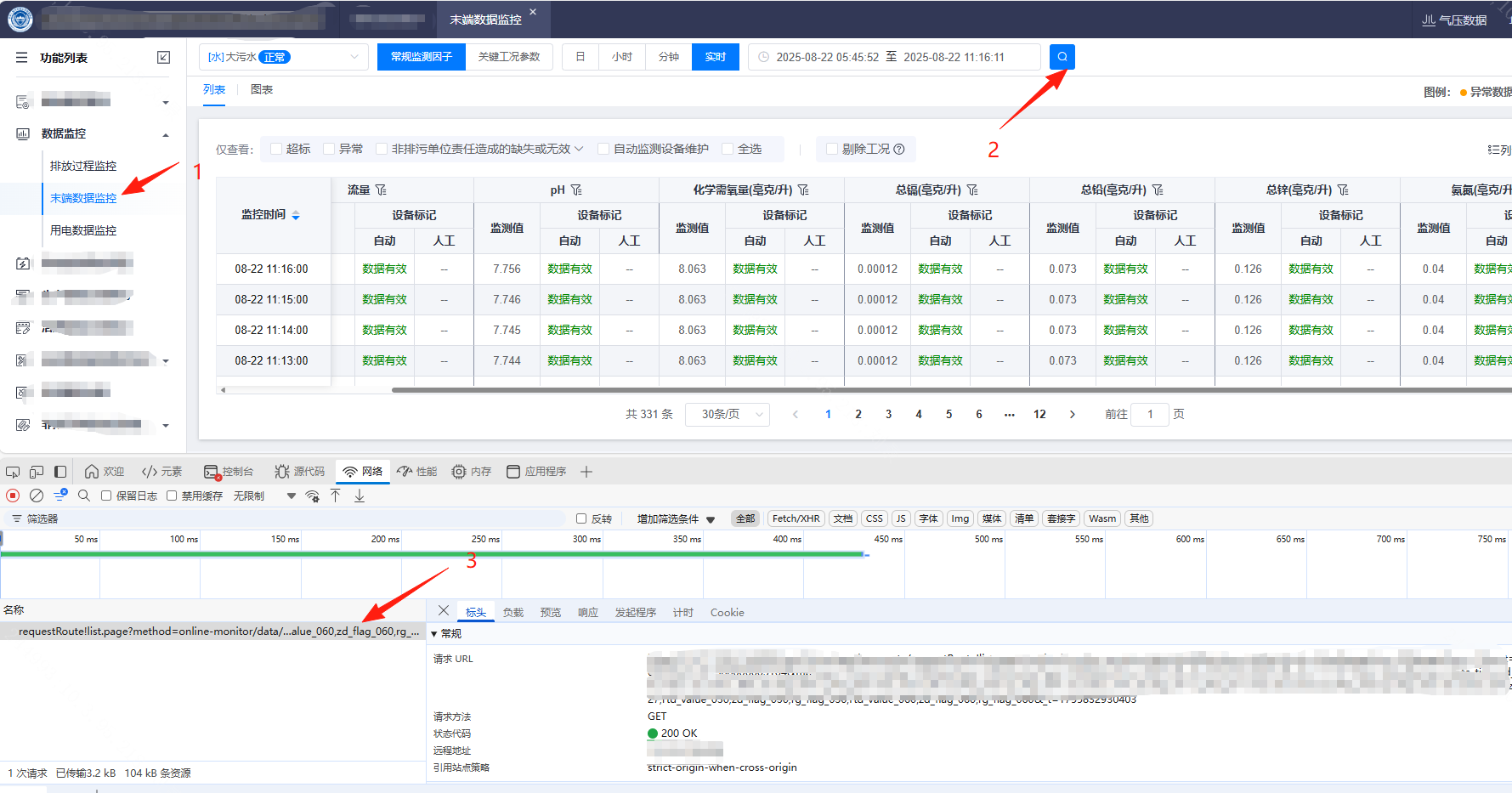
三、爬取指定目标(需要伪装成浏览器请求方式)
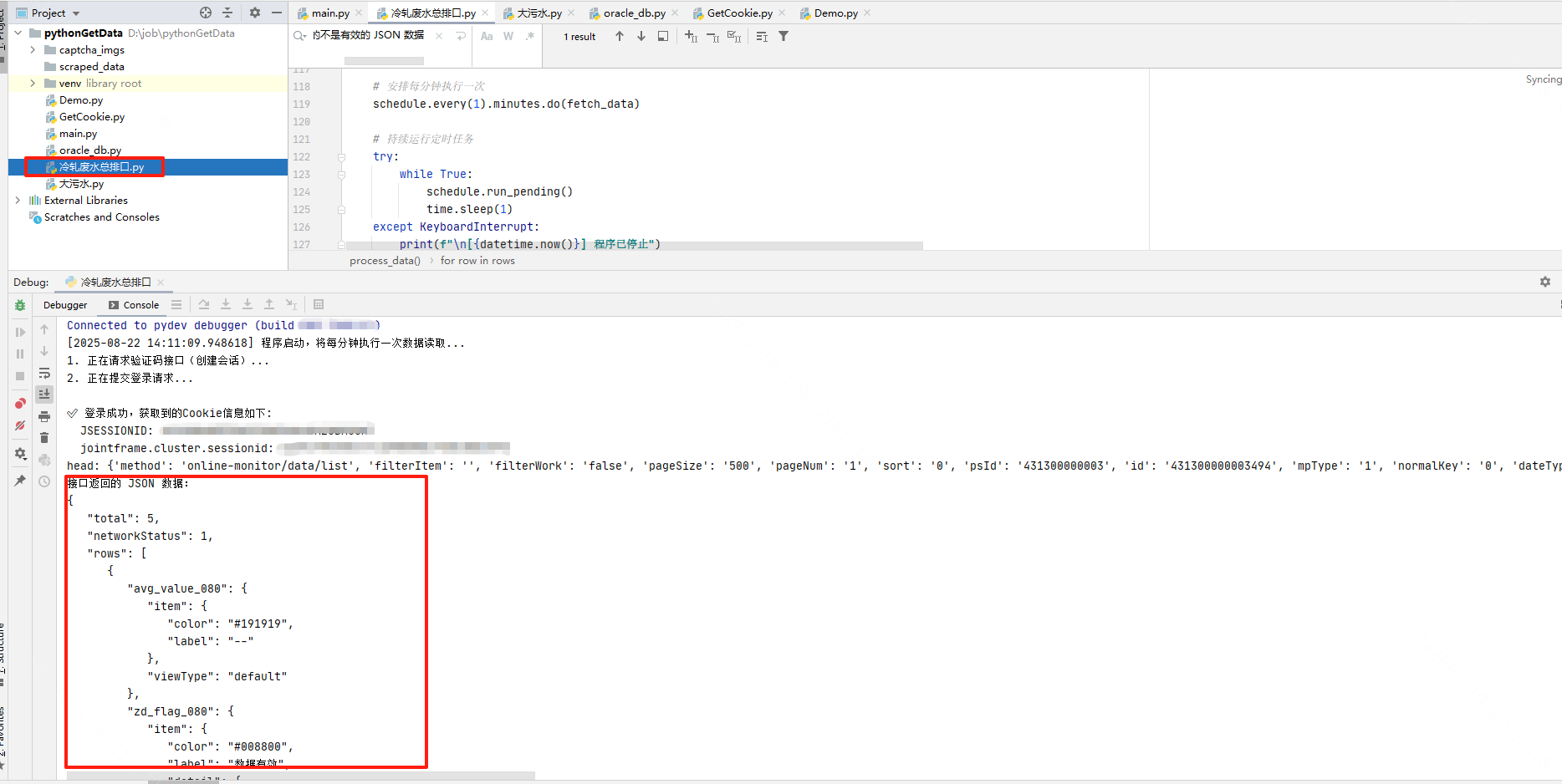
总结:
警告❌不要做违法违纪,不要恶意爬取数据👮。
下载依赖包
pip install 包名称 -i https://mirrors.aliyun.com/pypi/simple/
附上源代码
import requests
import json
import time
import GetCookie
import schedule
from datetime import datetime,timedelta


# 数据接口 URL
url = "http://xx.xx.xx/amOnline/app/baseroute/requestRoute!list.page"

# 获取当前时间戳
def get_timestamp():
    """生成毫秒级时间戳(动态参数)"""
    return int(time.time() * 1000)

#获取动态cookie
def get_cookie():
    cookies = GetCookie.fetch_cookies()
    if cookies:
        return "JSESSIONID=11025030; jointframe.cluster.sessionid=13D7C694; JSESSIONID=C133A6CD9CF"
    return cookies
# 数据方法
def fetch_data():
    headers={
        "Accept":"application/json, text/plain, */*",
        "User-Agent": "Mozilla/5.0 (Windows NT 10.0; Win64; x64) AppleWebKit/537.36",
        "Referer": "http://xx.xx.xx/amOnline/zdjk-company/?v__=123",
        "Content-Type": "application/x-www-form-urlencoded; charset=UTF-8",
        "Cookie":get_cookie()
    }
    # 准备数据接口参数(动态时间范围)
    start_time = datetime.now() - timedelta(minutes=5)
    start_time = start_time.strftime("%Y-%m-%d %H:%M:00")
    end_time = datetime.now().strftime("%Y-%m-%d %H:%M:00")
    #start_time = '2025-08-21 15:06:00'
    # 抓包得到的查询字符串参数
    params = {
        "method": "online-monitor/data/list",
        "industryType": "00",
        "dateTime": f"{start_time},{end_time}",
        "zs": "false",
        "props": "data_time,zd_workcordSc,r",
        "_t": get_timestamp()  # 动态时间戳
    }
    print("head:",params)
    # TODO 隐藏请求IP

    # 发送 GET 请求,携带查询参数
    response = requests.get(url, headers=headers,params=params)

    # 检查响应状态码,200 表示请求成功
    if response.status_code == 200:
        # 尝试将响应内容解析为 JSON
        try:
            data = response.json().get("data")
            if not data.get("rows"):
              Exception("接口返回的 rows 数据为NULL");
            # 提取核心数据行
            rows = data.get("rows")
            print("接口返回的 JSON 数据:")
            print(json.dumps(data, indent=3, ensure_ascii=False))
            # 这里可以根据实际需求对 data 进行进一步处理,比如提取特定字段等
        except Exception as e:
            print("接口返回的不是有效的 JSON 数据,原始响应内容:")
            print(e)
    else:
        print(f"请求失败,状态码:{response.status_code}")
        print(f"响应内容:{response.text}")

# 定时任务
def start_scheduler():
    """启动定时任务"""
    print(f"[{datetime.now()}] 程序启动,将每分钟执行一次数据读取...")

    # 首次运行先执行一次
    fetch_data()

    # 安排每分钟执行一次
    schedule.every(1).minutes.do(fetch_data)

    # 持续运行定时任务
    try:
        while True:
            schedule.run_pending()
            time.sleep(1)
    except KeyboardInterrupt:
        print(f"\n[{datetime.now()}] 程序已停止")

if __name__ == "__main__":
    start_scheduler()
import requests
import time

# 配置登录信息(请替换为实际账号密码)
USERNAME = "lisi"  # 你的登录账号
PASSWORD = "123456"  # 你的登录密码

# 登录相关接口URL
CAPTCHA_URL = "http://xxx.xx.xxx.xx/amOnline/app/was/user!putCaptcha.page"
LOGIN_URL = "http://xxx.xx.xxx.xx/amOnline/app/j_spring_security_check"


def get_timestamp():
    """生成毫秒级时间戳"""
    return int(time.time() * 1000)


def fetch_cookies():
    """模拟登录过程,获取并返回Cookie"""
    # 创建会话对象,自动处理Cookie
    session = requests.Session()

    # 设置请求头,模拟浏览器行为
    session.headers.update({
        "User-Agent": "Mozilla/5.0 (Windows NT 10.0; Win64; x64) AppleWebKit/537.36 (KHTML, like Gecko) Chrome/139.0.0.0 Safari/537.36 Edg/139.0.0.0",
        "Referer": "http:/xxx.xx.xxx.xx/amOnline/zdjk-company/?v__=1755757240122",
        "Accept": "text/html,application/xhtml+xml,application/xml;q=0.9,image/webp,*/*;q=0.8"
    })

    try:
        print("1. 正在请求验证码接口(创建会话)...")
        # 请求验证码接口,触发服务器创建会话
        captcha_params = {"_t": get_timestamp()}
        captcha_response = session.get(CAPTCHA_URL, params=captcha_params, timeout=10)

        if captcha_response.status_code != 200:
            print(f"验证码接口请求失败,状态码: {captcha_response.status_code}")
            print(f"响应内容: {captcha_response.text[:200]}")  # 只显示部分内容
            return None

        print("2. 正在提交登录请求...")
        # 准备登录参数
        login_params = {"_t": get_timestamp()}
        login_data = {
            "j_username": USERNAME,
            "j_password": PASSWORD
            # 如果有验证码,需要添加 captcha 参数,例如: "captcha": "1234"
        }

        # 发送登录请求
        login_response = session.post(
            LOGIN_URL,
            params=login_params,
            data=login_data,
            allow_redirects=True,
            timeout=10
        )

        # 检查登录是否成功(通过Cookie判断)
        cookies = session.cookies.get_dict()
        if "JSESSIONID" in cookies:
            print("\n✅ 登录成功,获取到的Cookie信息如下:")
            for key, value in cookies.items():
                print(f"  {key}: {value}")
            return cookies
        else:
            print("\n❌ 登录失败,未获取到有效Cookie")
            print(f"登录响应状态码: {login_response.status_code}")
            print(f"登录响应内容: {login_response.text[:500]}")  # 只显示部分内容
            return None

    except requests.exceptions.Timeout:
        print("\n❌ 请求超时,请检查网络连接")
        return None
    except Exception as e:
        print(f"\n❌ 发生错误: {str(e)}")
        return None


if __name__ == "__main__":
    print("=== Cookie获取测试工具 ===")
    cookies = fetch_cookies()

    if cookies:
        print("\n可以直接使用以下Cookie字符串进行测试:")
        cookie_str = "; ".join([f"{k}={v}" for k, v in cookies.items()])
        print(cookie_str)

Agent 垂直技术社区,欢迎活跃、内容共建。
更多推荐
 6
6 0
0- 0


 已为社区贡献1条内容

所有评论(0)