C++工程实战入门笔记1
·
项目名称命名:全部小写最好。因为windows环境下不区分大小写,但是linux中区分大小写,所以全小写,不会出麻烦。
C++从代码到程序过程
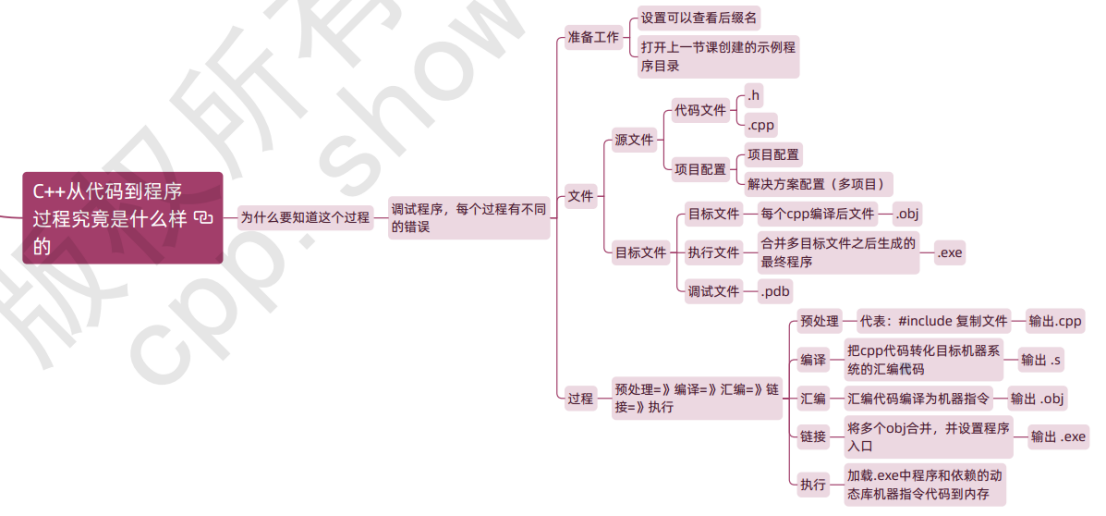
理解程序
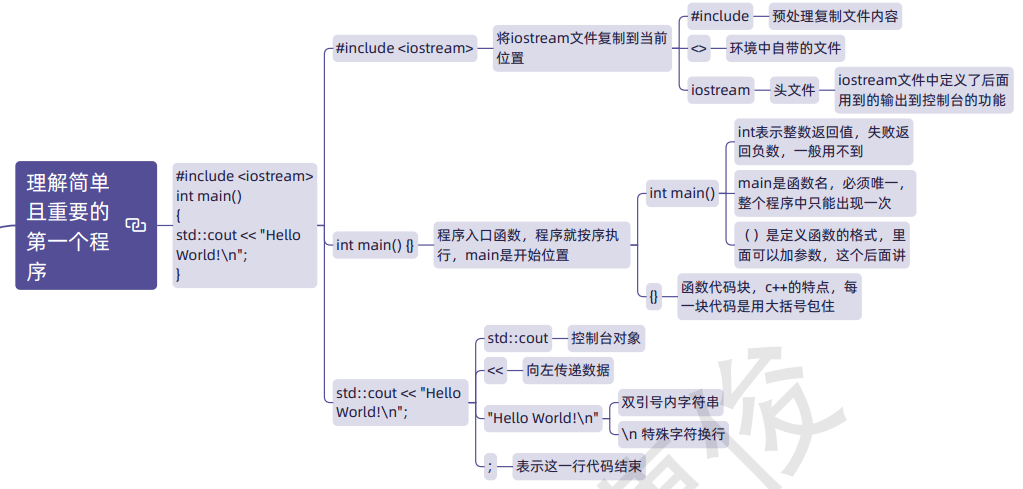
代码
// firstcpp.cpp : 定义控制台应用程序的入口点。
//

#include "stdafx.h"
#include<iostream>
using namespace std;
//全局变量
//作用域,在不做声明的情况下
//在本文都可访问
//生命周期 在进入main函数前申请空间
//main函数执行结束之后释放空间
int gx{ 0 };
int main()
{
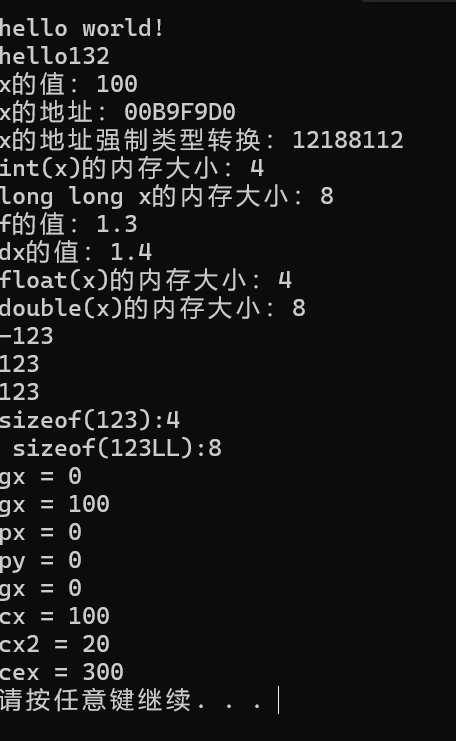
	cout << "hello world!\n" ;
	cout << "hello" << 132 << endl;

	int x{100};
	long long bigint{ 0 };
	float f1{1.3f};
	double d1{ 1.4 };
	cout << "x的值:" << x << endl;
	cout << "x的地址:" << &x << endl;
	cout << "x的地址强制类型转换:" << (long long)&x << endl;
	cout << "int(x)的内存大小:" << sizeof(x) << endl;
	cout << "long long x的内存大小:" << sizeof(bigint) << endl;
	cout << "f的值:" << f1 << endl;
	cout << "dx的值:" << d1 << endl;
	cout << "float(x)的内存大小:" << sizeof(f1) << endl;
	cout << "double(x)的内存大小:" << sizeof(d1) << endl;
	cout << -123 << endl;
	cout << 123 << endl;
	cout << 123LL << endl;
	cout << "sizeof(123):"<<sizeof(123) << endl;
	cout <<" sizeof(123LL):"<< sizeof(123LL) << endl;

	//访问全局变量
	cout << "gx = " << gx << endl;

	//局部变量
	//作用域 在变量定义所属的{}内部
	//从变量定义开始到}结束
	int px{ 0 };
	{
		//一段代码块,一个作用域
		//可以访问父作用域变量
		int py{ 0 };
		int gx{ 100 };//内部可以改全局变量值,但不影响外边的全局变量的值
		cout << "gx = " << gx << endl;
		cout << "px = " << px << endl;
		cout << "py = " << py << endl;
	}
	//出了代码块就不能再访问py
	cout << "gx = " << gx << endl;


	//运行时常量
	const int cx{ 100 };
	//cx = 10;//修改编译会报错
	cout << "cx = " << cx << endl;
	int t1 = 10;
	const int cx2{ t1 + 10 };
	cout << "cx2 = " << cx2 << endl;

	//编译时常量
	constexpr int cex{ 300 };
	cout << "cex = " << cex << endl;
	//constexpr int cex2{ t1*10 };//报错,无法用变量初始化的常量

	{
		auto a1 = 10;
		auto d1 = 9.;
		auto f1 = 8.f;
	}

	system("pause");
    //return 0;
}

Agent 垂直技术社区,欢迎活跃、内容共建。
更多推荐



 2
2 0
0- 0


 已为社区贡献6条内容

所有评论(0)