vue3+el-tooltip实现如果文字过多省略和鼠标移动上去展示全部并支持换行
·
vue3+el-tooltip实现如果文字过多省略和鼠标移动上去展示全部并支持换行
前端页面很多样式堆砌起来的。现在这个就是很简单的需求搞成通用的。
- 文字过多,如多于2行,就省略展示
- 更多的内容在鼠标移动上去后展示全部
- 并且展示的内容支持换行,而不是一行通栏
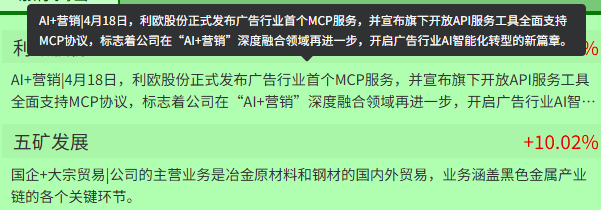
封装组件代码
<template>
  <el-tooltip
    v-if="showTooltip"
    :content="content"
    placement="top"
    :show-after="300"
    popper-class="self-selected-analysis-tooltip">
    <template #content>
      <div :style="{ width: `${tooltipWidth}rem` }">{{ content }}</div>
    </template>
    <div
      class="text-container"
      ref="textContainer"
      @mouseenter="checkOverflow"
    >{{ content }}</div>
  </el-tooltip>

  <div
    v-else
    class="text-container"
    ref="textContainer"
    @mouseenter="checkOverflow">{{ content }}</div>
</template>

<script setup>

// 接收父组件传入的文本内容
const props = defineProps({
  content: {
    type: String,
    required: true
  },
  // 可自定义显示的行数
  lineClamp: {
    type: Number,
    default: 2
  },
  //自定义宽度,默认30rem
  tooltipWidth: {
    type: Number,
    default: 30
  },
})

const textContainer = ref(null)
const showTooltip = ref(false)


// 组件挂载后检查一次
onMounted(() => {
  checkOverflow()
  // 监听窗口大小变化,重新检查
  window.addEventListener('resize', checkOverflow)
})

// 文本内容变化时重新检查
watch(() => props.content, () => {
  checkOverflow()
})

// 检查文本是否超出指定行数
const checkOverflow = () => {
  if (!textContainer.value) return

  const container = textContainer.value;
  const style = window.getComputedStyle(container)
  const lineHeight = parseFloat(style.lineHeight)
  const totalHeight = container.scrollHeight
  const expectedHeight = lineHeight * props.lineClamp

  // 当实际高度大于预期高度时,说明文本超出了指定行数
  showTooltip.value = totalHeight > expectedHeight
}
</script>

<style scoped lang="less">
.text-container {
  // 必须设置宽度,否则容器会被内容撑开
  width: 100%;
  // 多行文本截断样式
  display: -webkit-box;
  -webkit-box-orient: vertical;
  overflow: hidden;
  white-space: normal;
  word-break: break-all; // 处理长单词或URL
  line-height: 1.5; // 行高,影响整体高度计算
  -webkit-line-clamp: v-bind(lineClamp);
  overflow: hidden;
  text-overflow: ellipsis;

}
</style>
父组件使用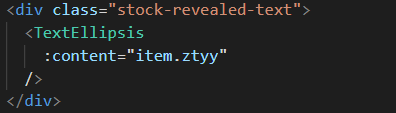

Agent 垂直技术社区,欢迎活跃、内容共建。
更多推荐
 1
1 0
0- 0


 已为社区贡献1条内容

所有评论(0)