uniapp 微信小程序实现省市区联动选择(文末附源码+地区数据)
·
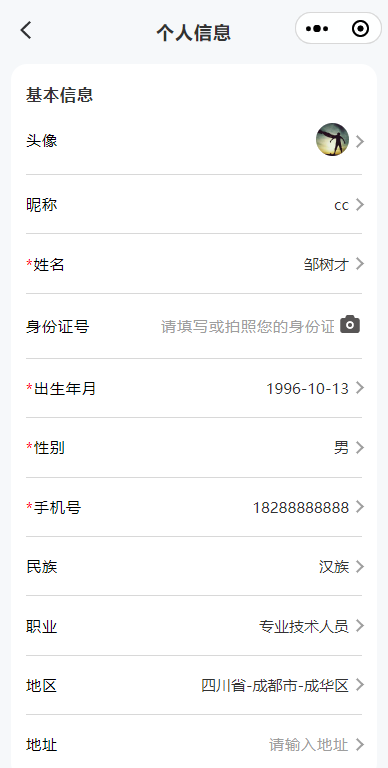
功能效果图:

页面效果图:
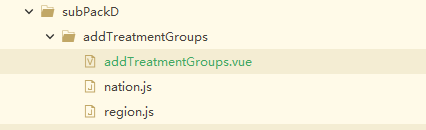
目录结构:
部分代码:
	<picker style="width: 100vw;" range-key="name" mode='multiSelector'
		@columnchange="pickerColumnChange" :value="addressIndex" :range="addressData"
		@change="bindPickerChange($event,index)" @click="initData">
		<view class="flex-align-center flex-justify-between">
			<view class="label required">地区</view>
			<view class="flex-align-center ">
				<input :style="{ color: isError ? '' : '#333333' }" cursor-spacing='20'
					v-model="userData.region" style="text-align: right;"
					placeholder-class="custom-placeholder" type="text" disabled
					placeholder="请选择地区" /><span class="jiantou"></span>
			</view>
		</view>
	</picker>
                province: '', //省的数据
				provinceCode: '', //省的code
				cityData: [], //市的数据
				districtData: [], //区的数据
				visible: true,
				addressData: [
					[],
					[],
					[]
				], // 三级数据源,分别对应省、市、区
				addressIndex: [0, 0, 0], // 当前选中的三级索引
				addressText: "" // 显示的选择结果文本
/**
			 * 初始化 省的数据
			 */
			initData() {
				let setA = this.regionData['86']
				this.province = []
				Object.entries(setA).find(([code, name]) => {
					this.province.push({
						code,
						name
					})
					this.addressData[0].push({
						code,
						name
					})
				});
				this.updateCityData(0)
				this.updateAreaData(0)
			},
			/**
			 * 地区选择的展示
			 * @param {Object} e
			 */
			bindPickerChange(e) {
				const indices = e.detail.value; // 最终确定时的索引数组
				const province = this.addressData[0][indices[0]];
				const city = this.addressData[1][indices[1]];
				const area = this.addressData[2][indices[2]];
				this.addressText = `${province}-${city}-${area}`;
				this.fromData.forEach(item => {
					if (item.title == '地区') {
						item.value = this.addressText
					}
				})
			},

			/**
			 * picker滚动数据改变时候触发
			 * @param {Object} e
			 */
			pickerColumnChange(e) {
				const {
					column, //0 省 1 市 2区县
					value //对应数据的下标
				} = e.detail; // 变化的列索引和该列新选中的值索引
				this.addressIndex[column] = value;
				// 根据变化的列索引,更新后续数据
				switch (column) {
					case 0: // 省份变化,更新市和区
						this.updateCityData(value); // 根据省份索引获取对应的市数据
						this.updateAreaData(0); // 用新的市数据索引(默认0)更新区数据
							this.$nextTick(() => {
								this.$set(this.addressIndex, 1, 0); // 重置区的选中索引
								this.$set(this.addressIndex, 2, 0); // 重置区的选中索引
							})

						break;
					case 1: // 市变化,更新区
						this.updateAreaData(value); // 根据市索引获取对应的区数据
						 this.$set(this.addressIndex, 2, 0); // 重置区的选中索引
						break;
				}
			},

			/**
			 * 更新 市 数据
			 * @param {Object} val
			 */
			updateCityData(val) {
				this.cityInit(this.province[val].code)
			},

			/**
			 * 更新 区县 数据
			 * @param {Object} val
			 */
			updateAreaData(val) {
				this.changeCity(this.cityData[val].code)
			},


			/**
			 * 获取市的数据
			 * @param {Object} city
			 */
			cityInit(city) {
				this.cityData = []
				let setSsj = []
				// 使用 Object.entries 将对象转为 [key, value] 数组
				Object.entries(this.regionData[city]).find(([code, name]) => {
					this.cityData.push({
						code,
						name
					})
					setSsj.push({
						code,
						name
					})
					// this.addressData[1].push(name)
				});
				this.$set(this.addressData, 1, []);
				this.$set(this.addressData, 1, setSsj);
				console.log(this.addressIndex, 'this.addressIndex')
			},

			/**
			 * 获取区县的数据
			 * @param {Object} val
			 */
			changeCity(val) {
				this.districtData = []
				let setQx = []
				// 使用 Object.entries 将对象转为 [key, value] 数组
				Object.entries(this.regionData[val]).find(([code, name]) => {
					this.districtData.push({
						code,
						name
					})
					setQx.push({
						code,
						name
					})
					this.$set(this.addressData, 2, []);
					this.$set(this.addressData, 2, setQx);
				});
			},
通过网盘分享的文件:uniapp小程序省市区选择
链接: https://pan.baidu.com/s/1MAbiZs7QcknrAu7gY3DovA 提取码: 1996

Agent 垂直技术社区,欢迎活跃、内容共建。
更多推荐


 1
1 0
0- 0


 已为社区贡献5条内容

所有评论(0)