vue3 使用日历组件 v-calendar
·
 https://vcalendar.io/calendar/api.html
npm install v-calendar@3 --save
npm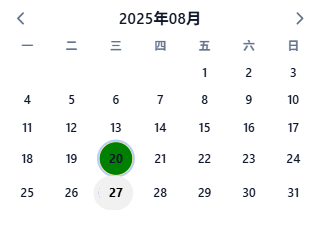
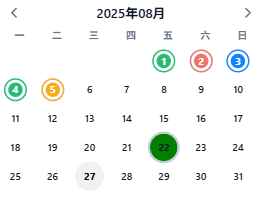
import { Calendar } from 'v-calendar';
  const dayStyleList = ref([
  { key: '1', dates: '2025-08-01',dayStatus:5 },
  { key: '2', dates: '2025-08-02', dayStatus:7 },
  { key: '3', dates: '2025-08-03', dayStatus:4 },
  { key: '4', dates: '2025-08-04', dayStatus:5},
  { key: '5', dates: '2025-08-05', dayStatus:8 },
]);
const getHighlightClass = (dayStatus: number) => {
  switch (dayStatus) {
    case 5:
      return 'normal'
    case 4:
      return 'off'
    case 7:
      return 'miss'
    default:
      return 'late'
  }
}
const getDayAttributes = () =>
  dayStyleList.value.map(v => ({
    key: v.dates,
    dates: v.dates,
    highlight: { color: getHighlightClass(v.dayStatus) },
  }))
// 定义属性,控制今天置灰,选中绿色
const calendarAttrs = ref([
  {
    key: 'choseDay',
    dates: choseDay,
    highlight: { backgroundColor: '#1890ff' , color: 'selectdata' },
  },
  {
    key: 'today',
    dates: today.value,
    highlight: { color: 'today' },

  },
])
const updateCalendarAttrs = () => {
  calendarAttrs.value = [
    {
      key: 'choseDay',
      dates: choseDay,
      highlight: { backgroundColor: '#1890ff', color: 'selectdata' }, // 选中绿色
    },
    {
      key: 'today',
      dates: today.value,
      highlight: { color: 'today' }, // 今天灰色
    },
    ...getDayAttributes(),
  ]
}
这里改变样式主要是attributes
      <Calendar
      class="calendar"
       v-model="choseDay"
        :show-adjacent-months="true"
        :columns="1"
        @dayclick="onConfirm"
        :attributes="calendarAttrs"
        :masks="{ title: 'YYYY年MM月', }"
        locale="zh-CN" />
完整版demo
<template>
  <div class="calendar-wrapper">
 <Calendar
      class="calendar"
       v-model="choseDay"
        :show-adjacent-months="true"
        :columns="1"
        @dayclick="onConfirm"
        @did-move="onMonthChange"
        :attributes="calendarAttrs"
        :masks="{ title: 'YYYY年MM月', }"
        locale="zh-CN" />
  </div>
</template>

<script setup lang="ts">
import { ref } from 'vue';
import { Calendar } from 'v-calendar';
import dayjs from "dayjs";
import 'v-calendar/style.css';


const choseDay = ref(dayjs().format('YYYY-MM-DD'));
const today = ref(new Date());


const dayStyleList = ref([
  { key: '1', dates: '2025-08-01', dayStatus: 5 },
  { key: '1', dates: '2025-08-02', dayStatus: 5 },
  { key: '1', dates: '2025-08-03', dayStatus: 4 },
  { key: '1', dates: '2025-08-04', dayStatus: 5 },
]);
const getHighlightClass = (dayStatus: number) => {
  switch (dayStatus) {
    case 5:
      return 'normal'
    case 4:
      return 'off'
    case 7:
      return 'miss'
    default:
      return 'late'
  }
}
const getDayAttributes = () =>
  dayStyleList.value.map(v => ({
    key: v.dates,
    dates: v.dates,
    highlight: { color: getHighlightClass(v.dayStatus) },
  }))
// 定义属性,控制今天置灰,选中绿色
const calendarAttrs = ref([
  {
    key: 'choseDay',
    dates: choseDay,
    highlight: { backgroundColor: '#1890ff', color: 'selectdata' },
  },
  {
    key: 'today',
    dates: today.value,
    highlight: { color: 'today' },

  },
  ...getDayAttributes(),
])
const updateCalendarAttrs = () => {
  calendarAttrs.value = [
    {
      key: 'choseDay',
      dates: choseDay,
      highlight: { backgroundColor: '#1890ff', color: 'selectdata' }, // 选中绿色
    },
    {
      key: 'today',
      dates: today.value,
      highlight: { color: 'today' }, // 今天灰色
    },
    ...getDayAttributes(),
  ]
}
const onMonthChange = (pages) => {
  const year = pages[0].year
  const month = pages[0].month
  getMonth(year, month)
}

const getDayRecord = (dayTime) => {
    recordList.value =  [
      { id: 1, accessTime: '2025-08-27 08:12:34', bodyTemperature: '36.5℃' },
    ];
}
const attendanceAwayList = (dayTime) => {
    awayList.value =[
      { id: 1, cardTime: '2025-08-27 09:15:22', temperature: '36.6', status: 4 }]
  }
// 发出选择日期事件
const onConfirm = (val: Date) => {

  choseDay.value = val.id;
  getDayRecord(val.id);
  attendanceAwayList(val.id);
};


const getMonth = (year, month) => {
  attendanceDetailMonth({ year, month }).then((res) => {
    if (res) {
      dayStyleList.value =
        res?.map((v) => {
          return {
            date: v.dayTime.replace("-", "/"),
            className:
              v.dayStatus === 5
                ? "normal"
                : v.dayStatus === 4
                  ? "off"
                  : v.dayStatus === 7
                    ? "miss"
                    : "late",
            ...v,
          };
        }) || [];
      // 有标记日期才调取
      updateCalendarAttrs();
    }
  })
}
</script>

<style scoped>
.calendar {
  max-width: 430px;
  width: 100%;
  height: 50vh;
  overflow: hidden;
  padding-bottom: 8px;
}

:deep(.vc-selectdata) {
  background-color: #008000;
  border-radius: 50%;
  border: 1px solid rgb(253, 226, 176);
  width: 40px;
  height: 40px;
  line-height: 40px;
}

:deep(.vc-today) {
  color: rgb(0, 0, 0) !important;
  background-color: rgb(241, 241, 241) !important;
  border-radius: 50%;
  border: none !important;
  width: 40px;
  height: 40px;
}

:deep(.vc-day) {
  width: 40px;
  height: 40px;
}

:deep(.vc-normal) {
  color: #fff;
  background-color: #26bd71;
  border: 4px solid #fff;
  border-radius: 100px;
}

:deep(.vc-off) {
  color: #fff;
  background-color: #1384ff;
  border: 4px solid #fff;
  border-radius: 100px;
}

:deep(.vc-late) {
  color: #fff;
  background-color: #faab1d;
  border: 4px solid #fff;
  border-radius: 100px;
}

:deep(.vc-miss) {
  color: #fff;
  background-color: #ed7466;
  border: 4px solid #fff;
  border-radius: 100px;
}
</style>

Agent 垂直技术社区,欢迎活跃、内容共建。
更多推荐



 9
9 0
0- 0


 已为社区贡献2条内容

所有评论(0)