C++工程实战入门笔记7-输入输出(一)
·
#include<iostream>
#include<string>
#include<sstream>
#include<fstream>
iostream - 输入输出流
提供标准输入输出功能,是 C++ 中最基础的 I/O 操作库。
包含的组件如下:
标准流对象
std::cin // 标准输入流(通常来自键盘)
std::cout // 标准输出流(通常到控制台)
std::cerr // 标准错误流(无缓冲)
std::clog // 标准日志流(有缓冲)
操作符
std::endl // 插入换行符并刷新缓冲区
std::flush // 刷新输出缓冲区
std::hex // 设置十六进制输出
std::dec // 设置十进制输出
std::oct // 设置八进制输出
代码块
int main()
{
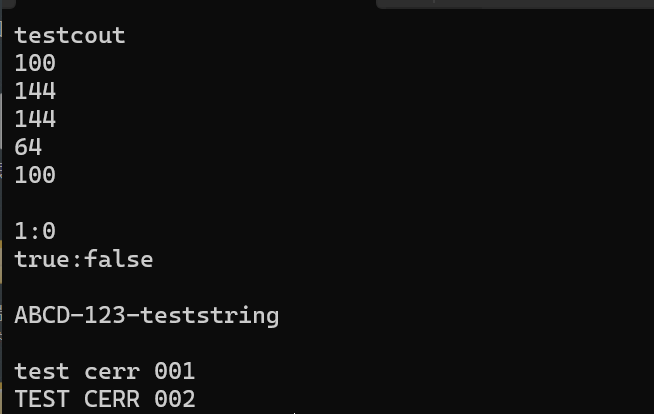
	//cout标准输出 ostream
	cout << "testcout" << endl;
	cout << 100 << endl;//默认10进制输出 >>100
	cout << oct << 100 << endl;//oct 8进制输出 >>144
	cout << 100 << endl;//后边就默认输出8进制了 >>144
	cout << hex << 100 << endl;//hex 16进制输出 >>64
	cout << dec << 100 << endl;//dec 10进制输出 >>100

	cout << endl;
	cout << true << ":" << false << endl;// <<1:0
	cout << boolalpha;
	cout << true << ":" << false << endl;// <<true:false
	cout << endl;

	//cout无格式输入
	cout.put('A').put('B');
	cout.put('C');
	cout.put(68); //D的asc码是68
	cout.write("-123", 4);
	string str = "-teststring";
	cout.write(str.c_str(), str.size());
	cout << endl;
	cout << flush;//刷新缓冲区
	cout << endl;

	//cerr
	cerr << "test cerr 001\n";
	cerr << "TEST CERR 002\n";


	system("pause");
}
单字符输入get、单行输入getline
```cpp
int main()
{
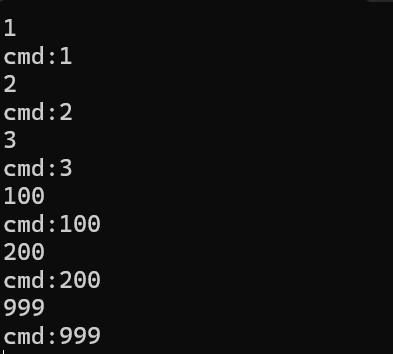
	//单个字符输入get
	string cmd;
	for (;;)
	{
		char c = cin.get();
		if (c == '\n')
		{
			cout << "cmd:" << cmd << endl;
		cmd = "";
		continue;
		}
	cmd += c;
	}
	system("pause");
}
int main()
{

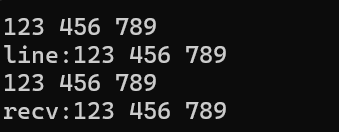
	//单行输入 getline
	//第一种
	string line;
	getline(cin, line);
	cout << "line:" << line << endl;
	//第二种
	for(;;)
	{
		char buf[1024]{ 0 };
		cin.getline(buf, sizeof(buf) - 1);
		cout <<"recv:"<< buf << endl;
		cout << endl;
		if (strstr(buf, "exit"))
		{
			break;
		}
	}

	system("pause");
}
cin.fail()
int main()
{
	for (;;)
	{
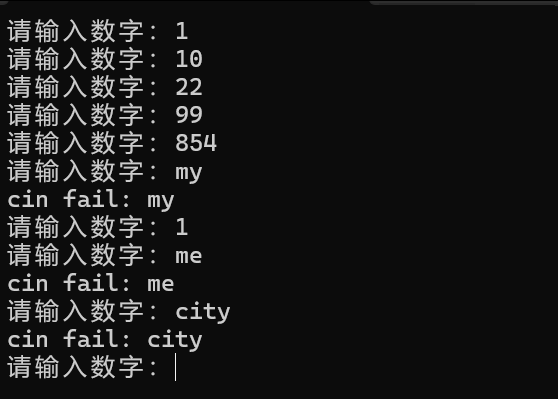
		cout << "请输入数字:" << flush;
		string line;
		int x{ 0 };
		cin >> x;
		if (cin.fail())
		{
			cin.clear();//恢复状态为正常
			getline(cin, line);
			cout << "cin fail: " <<line<< endl;

			continue;
		}
	}
}
sstream - 字符串流
提供字符串流类,用于在内存中格式化字符串,类似于对字符串进行输入输出操作。
包含的主要类
std::stringstream
std::istringstream
std::ostringstream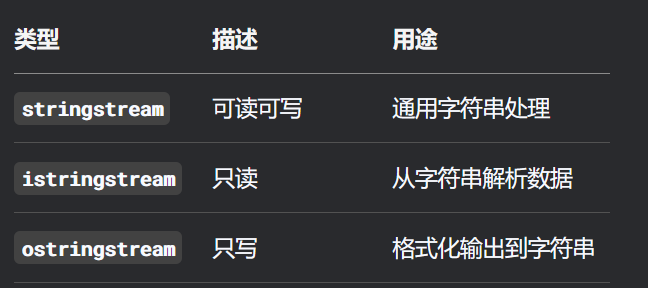
基本用法
“>>” :向流中插入数据
.str():获取字符串内容
#include <iostream>
#include <sstream>  // 必须包含这个头文件
#include <string>
using namespace std;

int main() {
    // 创建字符串流对象
    stringstream ss;

    // 向流中插入数据(像使用 cout 一样)
    ss << "Hello" << " " << "World" << " " << 2023;

    // 获取整个字符串内容
    string result = ss.str();
    cout << result << endl;  // 输出: Hello World 2023

    return 0;
}
数据类型转换
// 数字转字符串
int num = 42;
double pi = 3.14159;

stringstream ss;
ss << num << " " << pi;  // 自动转换为字符串
string str = ss.str();   // "42 3.14159"

// 字符串转数字
string input = "123 45.67";
stringstream ss2(input);
int intVal;
double doubleVal;

ss2 >> intVal >> doubleVal;  // 从字符串解析出数字
cout << intVal << ", " << doubleVal << endl;  // 输出: 123, 45.67
eof()
用于检测文件或输入流是否到达末尾的函数
int main()
{
	string data = "test1 test2 test3 \n test4 test5 test6";
	stringstream ss(data);
	string line;
	for(;;)
	{
	getline(ss, line);
	cout << "line:" << line << endl;
	if (ss.eof()) break;
	}
	system("pause");
}

fstream - 文件流
提供文件输入输出功能,用于读写文件。
包含的主要类
std::ifstream   // 输入文件流(读取文件)
std::ofstream   // 输出文件流(写入文件)
std::fstream    // 文件流(可读可写)
#include <iostream>
#include <fstream>
#include <string>

int main() {
    // 写入文件
    std::ofstream outfile("example.txt");
    if (outfile.is_open()) {
        outfile << "这是第一行" << std::endl;
        outfile << "这是第二行" << std::endl;
        outfile << "数字: " << 42 << std::endl;
        outfile.close();
        std::cout << "文件写入成功" << std::endl;
    } else {
        std::cerr << "无法打开文件进行写入" << std::endl;
    }

    // 读取文件
    std::ifstream infile("example.txt");
    if (infile.is_open()) {
        std::string line;
        std::cout << "文件内容:" << std::endl;
        while (std::getline(infile, line)) {
            std::cout << line << std::endl;
        }
        infile.close();
    } else {
        std::cerr << "无法打开文件进行读取" << std::endl;
    }

    // 追加到文件
    std::ofstream appfile("example.txt", std::ios::app);
    if (appfile.is_open()) {
        appfile << "这是追加的内容" << std::endl;
        appfile.close();
        std::cout << "内容追加成功" << std::endl;
    }

    return 0;
}
int main()
{
	string testfile = "testfile.txt";
	//out:写入文件;binary:二进制处理;\r \n不处理
	//输出默认清空文件原内容
	fstream wfs(testfile, ios::out | ios::binary);
	wfs << "123456789\n";
	wfs.close();
	ofstream ofs;//app追加写入
	ofs.open(testfile, ios::app | ios::binary);
	ofs << "ABDGUEJDKH\n" << flush;
	ofs.write("0000", 4);
	ofs.close();

	//读取文件
	fstream rfs(testfile, ios::in | ios::binary);
	if (!rfs.is_open())
	{
		cerr << "open file" << testfile << "failed!" << endl;
		return -1;
	}
	char buf[4090]{ 0 };
	rfs.read(buf, sizeof(buf) - 1);
	cout <<" rfs.gcount() = "<< rfs.gcount() << endl;
	cout << "-------------------\n";
	cout << buf << endl;
	cout << "-------------------\n";
	rfs.close();

	//获取文件大小
	ifstream ifs(testfile, ios::binary | ios::ate);
	cout << testfile << "的filesize = " << ifs.tellg() << endl;//tellg读取文件指针位置
	//读取文件更改后内容
	string line;
	for (;;)
	{
		getline(ifs, line);
		//cout << ifs.rdstate() << endl;
		if (!line.empty())
			cout << "line:" << line << endl;
		ifs.clear();
	}

	system("pause");
}

Agent 垂直技术社区,欢迎活跃、内容共建。
更多推荐



 4
4 0
0- 0


 已为社区贡献6条内容

所有评论(0)