C++工程实战入门笔记8-日志系统实现分析与优化
·
调试日志宏 LOGDEBUG(s)
简单使用
#include <iostream>
#define LOGDEBUG(s) std::cout << "DEBUG: " << s << std::endl

int main() {
    int x = 42;
    LOGDEBUG("程序启动");
    LOGDEBUG("x 的值为: " << x);
    return 0;
}
DEBUG: 程序启动
DEBUG: x 的值为: 42
简单的日志系统雏形
void LogWrite(string log)
{
    cout << log << endl;
}
#define LOGDEBUG(s) LogWrite(s)

int main()
{
    LOGDEBUG("test log 001");
    LOGDEBUG("test log 002");
    system("pause");
}
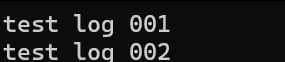
优化后
#include<iostream>
#include<string>
#include<sstream>
#include<fstream>
#include <iomanip>

using namespace std;

static std::string GetNow(
	const char* fmt = "%Y-%m-%d %H:%M:%S",
	int time_zone = 8)
{
	std::time_t unix_sec = std::time(nullptr);
	std::tm tm;
	static const int kHoursInDay = 24;
	static const int kMinutesInHour = 60;
	static const int kDaysFromUnixTime = 2472632;
	static const int kDaysFromYear = 153;
	static const int kMagicUnkonwnFirst = 146097;
	static const int kMagicUnkonwnSec = 1461;
	tm.tm_sec = unix_sec % kMinutesInHour;
	int i = (unix_sec / kMinutesInHour);
	tm.tm_min = i % kMinutesInHour; //nn
	i /= kMinutesInHour;
	tm.tm_hour = (i + time_zone) % kHoursInDay; // hh
	tm.tm_mday = (i + time_zone) / kHoursInDay;
	int a = tm.tm_mday + kDaysFromUnixTime;
	int b = (a * 4 + 3) / kMagicUnkonwnFirst;
	int c = (-b * kMagicUnkonwnFirst) / 4 + a;
	int d = ((c * 4 + 3) / kMagicUnkonwnSec);
	int e = -d * kMagicUnkonwnSec;
	e = e / 4 + c;
	int m = (5 * e + 2) / kDaysFromYear;
	tm.tm_mday = -(kDaysFromYear * m + 2) / 5 + e + 1;
	tm.tm_mon = (-m / 10) * 12 + m + 2;
	tm.tm_year = b * 100 + d - 6700 + (m / 10);
	stringstream ss;
	ss << std::put_time(&tm, fmt); //#include <iomanip>
	return ss.str();
}

//用户输入LOGEBUG("test log 001")
//生成一条日志:2024-7-30 18:29:30debug:test log 001 main.cpp:

void LogWrite(string level, string log,string file,int line)
{
	//拼日志
	cout << GetNow() <<" "<<level<<" "<<log<<" "<<file<<":"<<line << endl;
}
#define LOGDEBUG(s)LogWrite("debug",s,__FILE__,__LINE__)
int main()//生成一条日志
{
	LOGDEBUG("test log 001");
	LOGDEBUG("test log 002");
	system("pause");
}

设置日志输出为控制台、string和文件中
#include<iostream>
#include<string>
#include<sstream>
#include<fstream>
#include <iomanip>

using namespace std;

static std::string GetNow(
	const char* fmt = "%Y-%m-%d %H:%M:%S",
	int time_zone = 8)
{
	std::time_t unix_sec = std::time(nullptr);
	std::tm tm;
	static const int kHoursInDay = 24;
	static const int kMinutesInHour = 60;
	static const int kDaysFromUnixTime = 2472632;
	static const int kDaysFromYear = 153;
	static const int kMagicUnkonwnFirst = 146097;
	static const int kMagicUnkonwnSec = 1461;
	tm.tm_sec = unix_sec % kMinutesInHour;
	int i = (unix_sec / kMinutesInHour);
	tm.tm_min = i % kMinutesInHour; //nn
	i /= kMinutesInHour;
	tm.tm_hour = (i + time_zone) % kHoursInDay; // hh
	tm.tm_mday = (i + time_zone) / kHoursInDay;
	int a = tm.tm_mday + kDaysFromUnixTime;
	int b = (a * 4 + 3) / kMagicUnkonwnFirst;
	int c = (-b * kMagicUnkonwnFirst) / 4 + a;
	int d = ((c * 4 + 3) / kMagicUnkonwnSec);
	int e = -d * kMagicUnkonwnSec;
	e = e / 4 + c;
	int m = (5 * e + 2) / kDaysFromYear;
	tm.tm_mday = -(kDaysFromYear * m + 2) / 5 + e + 1;
	tm.tm_mon = (-m / 10) * 12 + m + 2;
	tm.tm_year = b * 100 + d - 6700 + (m / 10);
	stringstream ss;
	ss << std::put_time(&tm, fmt); //#include <iomanip>
	return ss.str();
}

//用户输入LOGEBUG("test log 001")
//生成一条日志:2024-7-30 18:29:30debug:test log 001 main.cpp:
//可以设置日志输出为控制台、string和文件中
static ostream logstr(cout.rdbuf());//需要设置buf
void SetLogBuf(streambuf* buf)
{
	logstr.set_rdbuf(buf);//可实现自行设置buf
}
void LogWrite(string level, string log,string file,int line)
{
	//拼日志
	logstr << GetNow() <<" "<<level<<" "<<log<<" "<<file<<":"<<line << endl;
}
#define LOGDEBUG(s)LogWrite("debug",s,__FILE__,__LINE__)
int main()//生成一条日志
{
	LOGDEBUG("test log 001");
	LOGDEBUG("test log 002");
	stringstream ss;
	SetLogBuf(ss.rdbuf());
	LOGDEBUG("test log 003 stringstream");
	cout << "ss.str():" << ss.str() << endl;

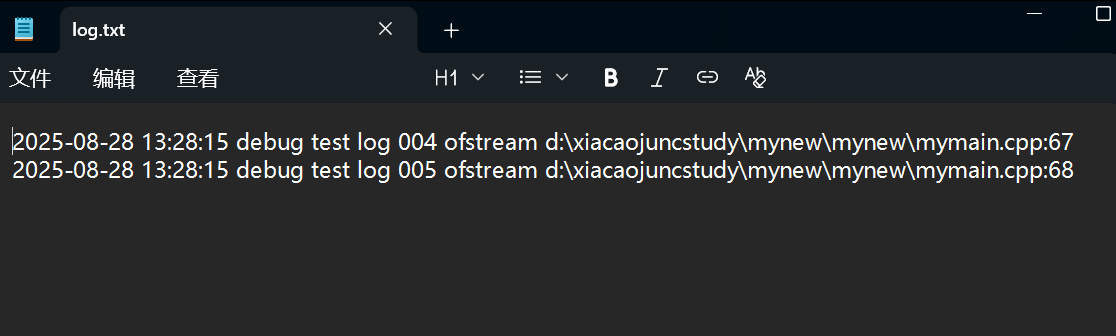
	ofstream ofs("log.txt",ios::app);//ios::app :追加写入
	SetLogBuf(ofs.rdbuf());
	LOGDEBUG("test log 004 ofstream");
	LOGDEBUG("test log 005 ofstream");
	system("pause");
}



Agent 垂直技术社区,欢迎活跃、内容共建。
更多推荐



 1
1 0
0- 0


 已为社区贡献6条内容

所有评论(0)