如何用AI工具开发一个轻量化CRM系统(四):全程不动手写代码,AI编程的效果来看看
全程不动手写代码,AI编程的效果来看看
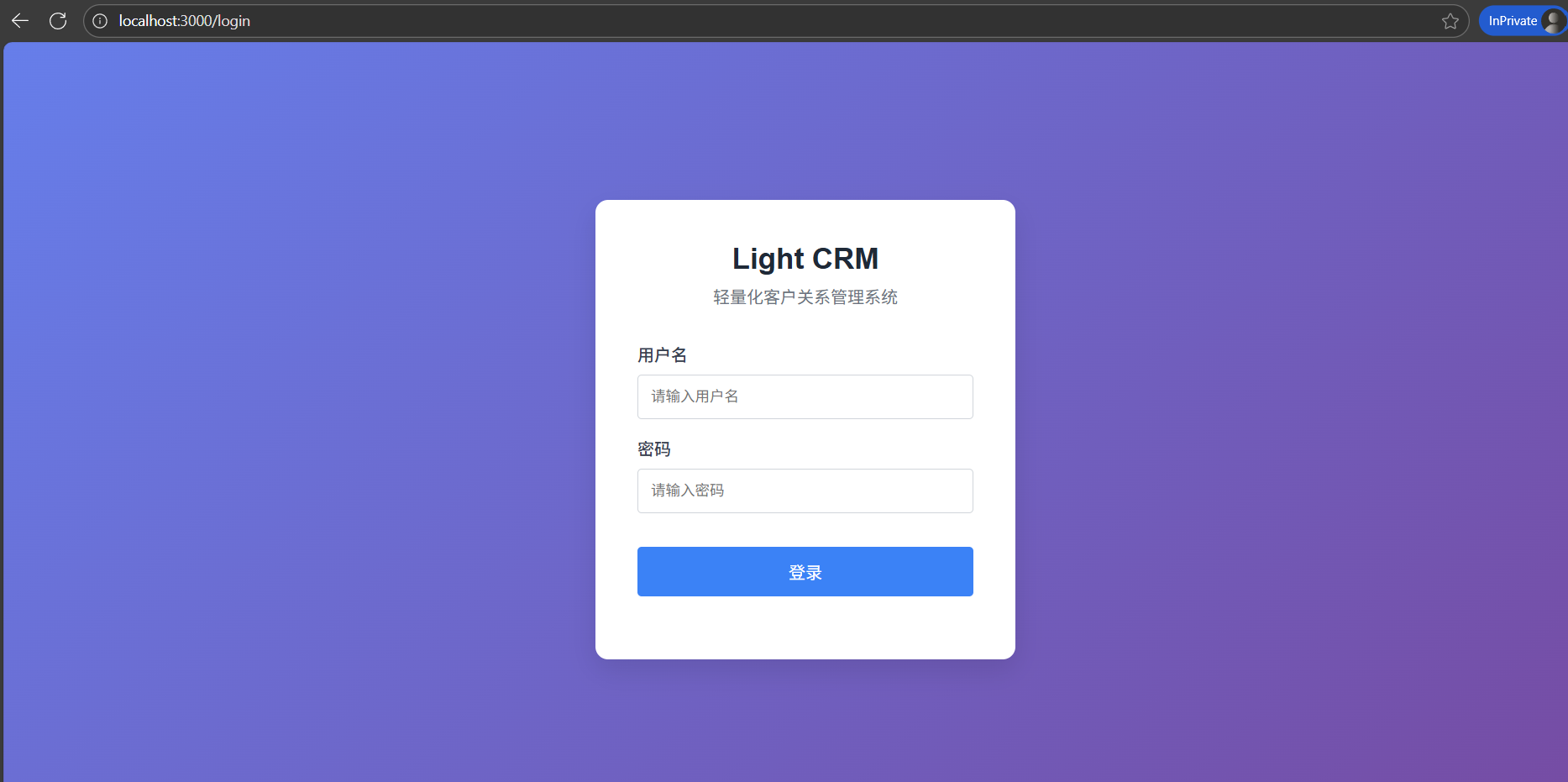
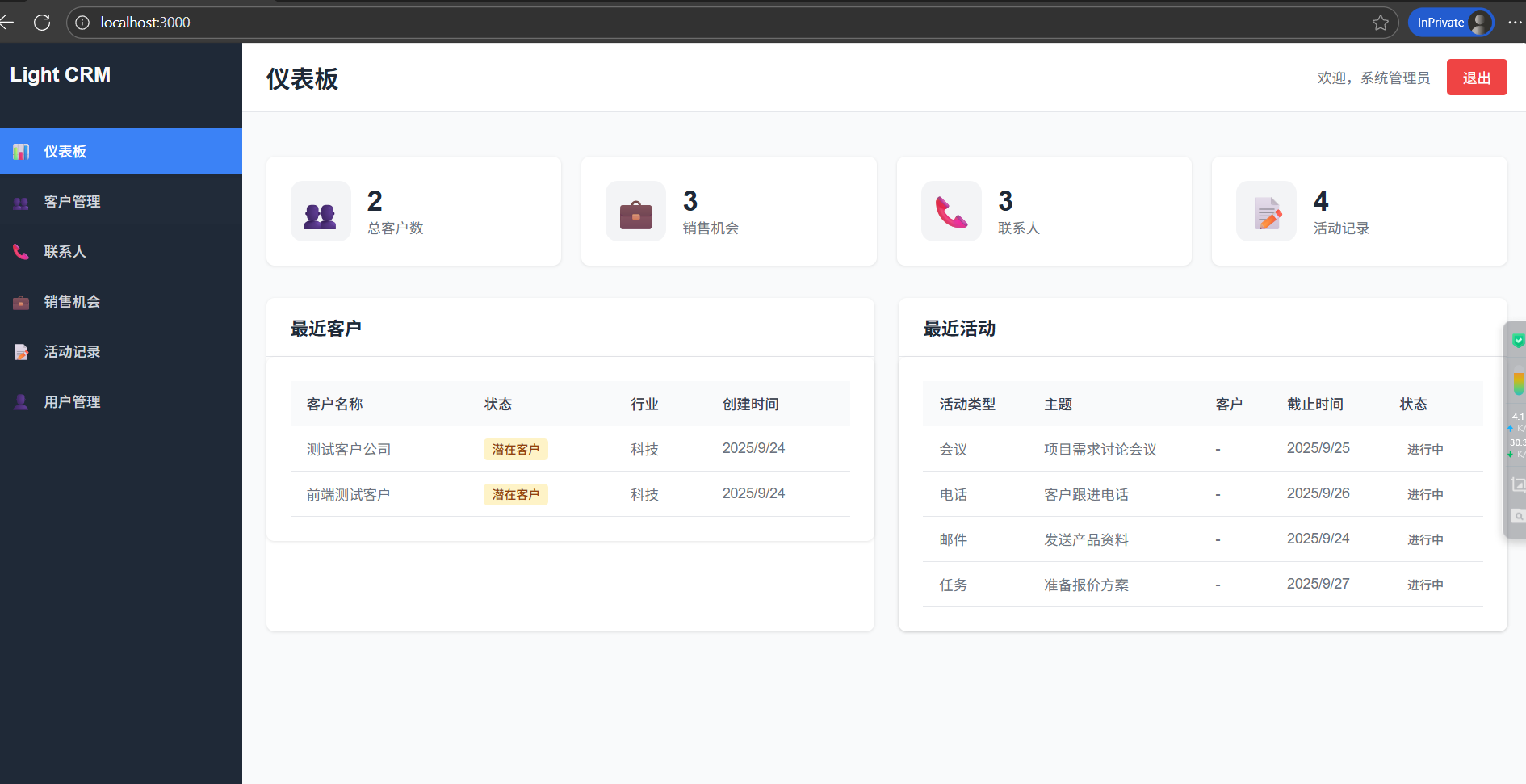
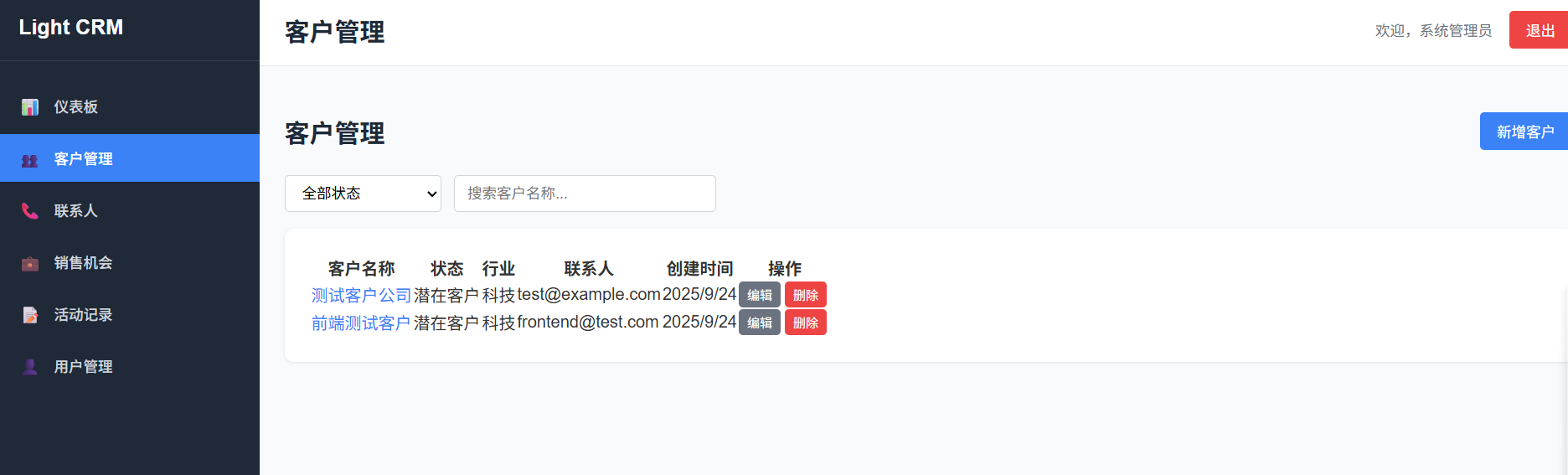
全程不动手写代码,AI编程环境
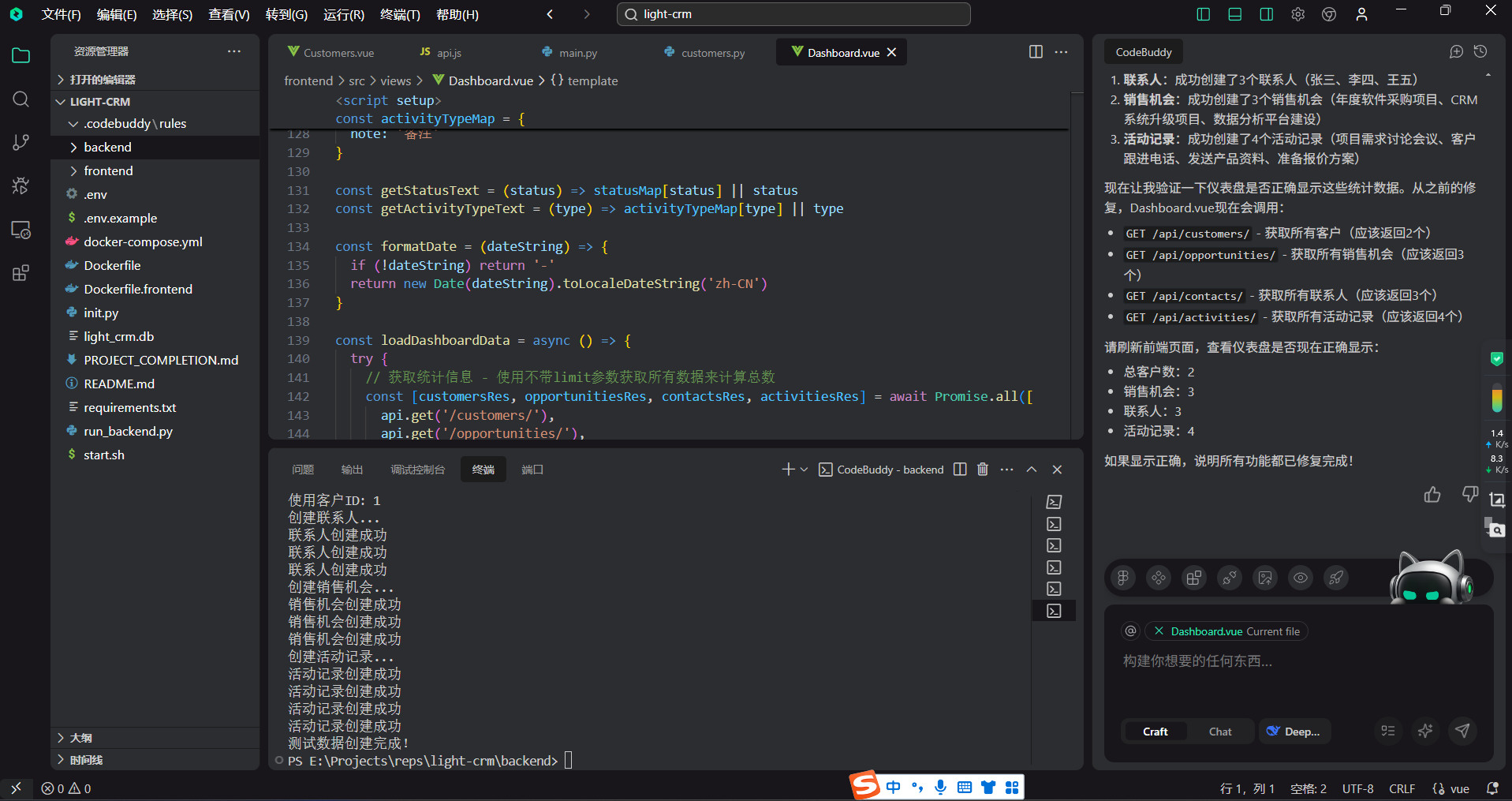
清晰的前后端代码接口
按技术栈需求生成代码解决方案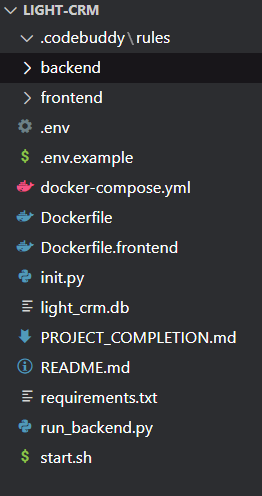
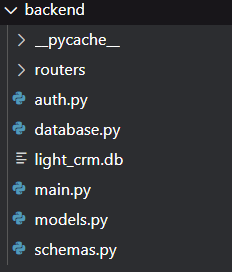
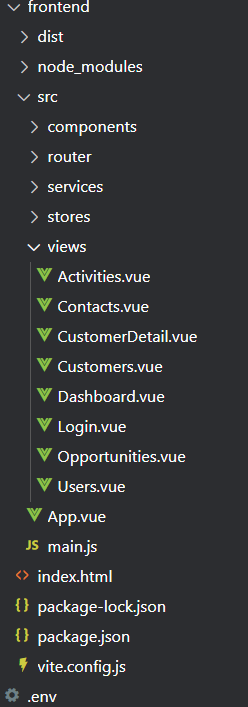
代码示例
from fastapi import FastAPI, Depends, HTTPException
from fastapi.middleware.cors import CORSMiddleware
from fastapi.security import HTTPBearer
from sqlalchemy.orm import Session

from database import engine, get_db
from models import Base
from routers import auth, users, customers, contacts, opportunities, activities

# 创建数据库表
Base.metadata.create_all(bind=engine)

app = FastAPI(
    title="Light CRM API",
    version="1.0.0",
    docs_url=None,  # 禁用 Swagger UI
    redoc_url=None,  # 禁用 ReDoc
    openapi_url=None,  # 禁用 OpenAPI JSON
    redirect_slashes=False  # 禁用自动重定向
)

# CORS配置
app.add_middleware(
    CORSMiddleware,
    allow_origins=["*"],
    allow_credentials=True,
    allow_methods=["*"],
    allow_headers=["*"],
)

# 安全认证
security = HTTPBearer()

# 注册路由
app.include_router(auth, prefix="/api/auth", tags=["认证"])
app.include_router(users, prefix="/api/users", tags=["用户管理"])
app.include_router(customers, prefix="/api/customers", tags=["客户管理"])
app.include_router(contacts, prefix="/api/contacts", tags=["联系人管理"])
app.include_router(opportunities, prefix="/api/opportunities", tags=["销售机会"])
app.include_router(activities, prefix="/api/activities", tags=["活动记录"])

@app.get("/")
async def root():
    return {"message": "Light CRM API 服务运行中"}

@app.get("/api/health")
async def health_check():
    return {"status": "healthy", "service": "light-crm"}

if __name__ == "__main__":
    import uvicorn
    uvicorn.run(app, host="0.0.0.0", port=8000)
<template>
  <Layout>
    <div class="customers-page">
      <div class="page-header">
        <h1 class="page-title">客户管理</h1>
        <button class="btn btn-primary" @click="showCreateModal = true">
          新增客户
        </button>
      </div>

      <div class="filters">
        <select v-model="filters.status" class="form-input filter-select">
          <option value="">全部状态</option>
          <option value="lead">潜在客户</option>
          <option value="prospect">意向客户</option>
          <option value="customer">正式客户</option>
          <option value="inactive">非活跃客户</option>
        </select>
        <input
          v-model="filters.search"
          type="text"
          placeholder="搜索客户名称..."
          class="form-input search-input"
        />
      </div>

      <div class="card">
        <table class="data-table">
          <thead>
            <tr>
              <th>客户名称</th>
              <th>状态</th>
              <th>行业</th>
              <th>联系人</th>
              <th>创建时间</th>
              <th>操作</th>
            </tr>
          </thead>
          <tbody>
            <tr v-for="customer in filteredCustomers" :key="customer.id">
              <td>
                <router-link :to="`/customers/${customer.id}`" class="customer-link">
                  {{ customer.name }}
                </router-link>
              </td>
              <td>
                <span class="status-badge" :class="customer.status">
                  {{ getStatusText(customer.status) }}
                </span>
              </td>
              <td>{{ customer.industry || '-' }}</td>
              <td>{{ customer.email || '-' }}</td>
              <td>{{ formatDate(customer.created_at) }}</td>
              <td>
                <button
                  @click="editCustomer(customer)"
                  class="btn btn-secondary btn-sm"
                >
                  编辑
                </button>
                <button
                  @click="deleteCustomer(customer)"
                  class="btn btn-danger btn-sm"
                >
                  删除
                </button>
              </td>
            </tr>
          </tbody>
        </table>

        <div v-if="loading" class="loading">加载中...</div>
        <div v-if="!loading && customers.length === 0" class="empty-state">
          暂无客户数据
        </div>
      </div>

      <!-- 创建/编辑模态框 -->
      <div v-if="showCreateModal || editingCustomer" class="modal-overlay">
        <div class="modal">
          <h3>{{ editingCustomer ? '编辑客户' : '新增客户' }}</h3>
          <form @submit.prevent="handleSubmit">
            <div class="form-group">
              <label class="form-label">客户名称</label>
              <input
                v-model="form.name"
                type="text"
                class="form-input"
                required
              />
            </div>
            <div class="form-group">
              <label class="form-label">状态</label>
              <select v-model="form.status" class="form-input" required>
                <option value="lead">潜在客户</option>
                <option value="prospect">意向客户</option>
                <option value="customer">正式客户</option>
                <option value="inactive">非活跃客户</option>
              </select>
            </div>
            <div class="form-group">
              <label class="form-label">行业</label>
              <input
                v-model="form.industry"
                type="text"
                class="form-input"
              />
            </div>
            <div class="form-group">
              <label class="form-label">邮箱</label>
              <input
                v-model="form.email"
                type="email"
                class="form-input"
              />
            </div>
            <div class="form-group">
              <label class="form-label">电话</label>
              <input
                v-model="form.phone"
                type="tel"
                class="form-input"
              />
            </div>
            <div class="form-group">
              <label class="form-label">地址</label>
              <textarea
                v-model="form.address"
                class="form-input"
                rows="3"
              ></textarea>
            </div>
            <div class="form-group">
              <label class="form-label">描述</label>
              <textarea
                v-model="form.description"
                class="form-input"
                rows="3"
              ></textarea>
            </div>
            <div class="modal-actions">
              <button
                type="button"
                @click="closeModal"
                class="btn btn-secondary"
              >
                取消
              </button>
              <button
                type="submit"
                :disabled="submitting"
                class="btn btn-primary"
              >
                {{ submitting ? '提交中...' : '提交' }}
              </button>
            </div>
          </form>
        </div>
      </div>
    </div>
  </Layout>
</template>

<script setup>
import { ref, reactive, computed, onMounted } from 'vue'
import Layout from '@/components/Layout.vue'
import { customerService } from '@/services/api'

const customers = ref([])
const loading = ref(false)
const showCreateModal = ref(false)
const editingCustomer = ref(null)
const submitting = ref(false)

const filters = reactive({
  status: '',
  search: ''
})

const form = reactive({
  name: '',
  status: 'lead',
  industry: '',
  email: '',
  phone: '',
  address: '',
  description: ''
})

const statusMap = {
  lead: '潜在客户',
  prospect: '意向客户',
  customer: '正式客户',
  inactive: '非活跃客户'
}

const getStatusText = (status) => statusMap[status] || status
const formatDate = (dateString) => new Date(dateString).toLocaleDateString('zh-CN')

const filteredCustomers = computed(() => {
  return customers.value.filter(customer => {
    const matchesStatus = !filters.status || customer.status === filters.status
    const matchesSearch = !filters.search ||
      customer.name.toLowerCase().includes(filters.search.toLowerCase())
    return matchesStatus && matchesSearch
  })
})

const loadCustomers = async () => {
  try {
    loading.value = true
    const response = await customerService.getCustomers()
    customers.value = response.data
  } catch (error) {
    console.error('加载客户数据失败:', error)
  } finally {
    loading.value = false
  }
}

const handleSubmit = async () => {
  try {
    submitting.value = true
    if (editingCustomer.value) {
      await customerService.updateCustomer(editingCustomer.value.id, form)
    } else {
      await customerService.createCustomer(form)
    }
    closeModal()
    await loadCustomers()
    // 使用Toast或通知系统显示成功信息
    console.log('客户保存成功!')
    // 在实际项目中,这里应该调用通知系统
    // 例如: notify.success('客户保存成功!')
  } catch (error) {
    console.error('保存客户失败:', error)
    // 提供更详细的错误信息
    const errorMessage = error.response?.data?.detail ||
                        error.response?.data?.message ||
                        error.message ||
                        '保存失败,请检查网络连接或联系管理员'
    // 使用更友好的错误提示方式
    console.error('保存错误:', errorMessage)
  } finally {
    submitting.value = false
  }
}

const editCustomer = (customer) => {
  editingCustomer.value = customer
  Object.assign(form, customer)
}

const deleteCustomer = async (customer) => {
  if (!confirm(`确定要删除客户 "${customer.name}" 吗?`)) return

  try {
    await customerService.deleteCustomer(customer.id)
    await loadCustomers()
  } catch (error) {
    console.error('删除客户失败:', error)
  }
}

const closeModal = () => {
  showCreateModal.value = false
  editingCustomer.value = null
  Object.keys(form).forEach(key => {
    form[key] = ''
  })
  form.status = 'lead'
}

onMounted(loadCustomers)
</script>

<style scoped>
.customers-page {
  padding: 20px 0;
}

.page-header {
  display: flex;
  justify-content: space-between;
  align-items: center;
  margin-bottom: 24px;
}

.filters {
  display: flex;
  gap: 12px;
  margin-bottom: 16px;
}

.filter-select {
  width: 150px;
}

.search-input {
  width: 250px;
}

.customer-link {
  color: #3b82f6;
  text-decoration: none;
}

.customer-link:hover {
  text-decoration: underline;
}

.btn-sm {
  padding: 4px 8px;
  font-size: 12px;
  margin-right: 4px;
}

.modal-overlay {
  position: fixed;
  top: 0;
  left: 0;
  right: 0;
  bottom: 0;
  background: rgba(0, 0, 0, 0.5);
  display: flex;
  align-items: center;
  justify-content: center;
  z-index: 1000;
}

.modal {
  background: white;
  padding: 24px;
  border-radius: 8px;
  width: 500px;
  max-width: 90vw;
  max-height: 80vh;
  overflow-y: auto;
}

.modal h3 {
  margin-bottom: 20px;
  font-size: 18px;
  font-weight: 600;
}

.modal-actions {
  display: flex;
  justify-content: flex-end;
  gap: 12px;
  margin-top: 20px;
}

.loading, .empty-state {
  text-align: center;
  padding: 40px;
  color: #6b7280;
}
</style>
自动调试、测试
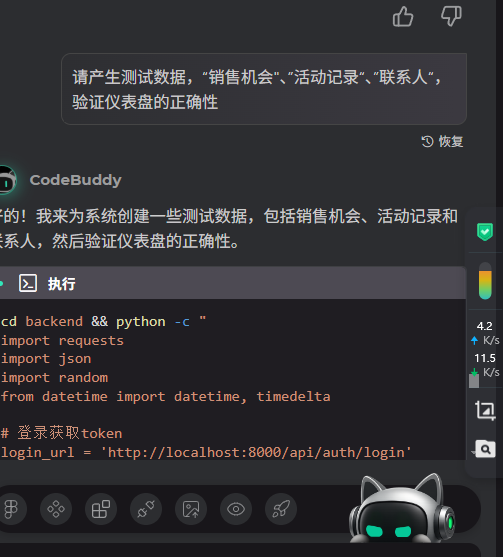
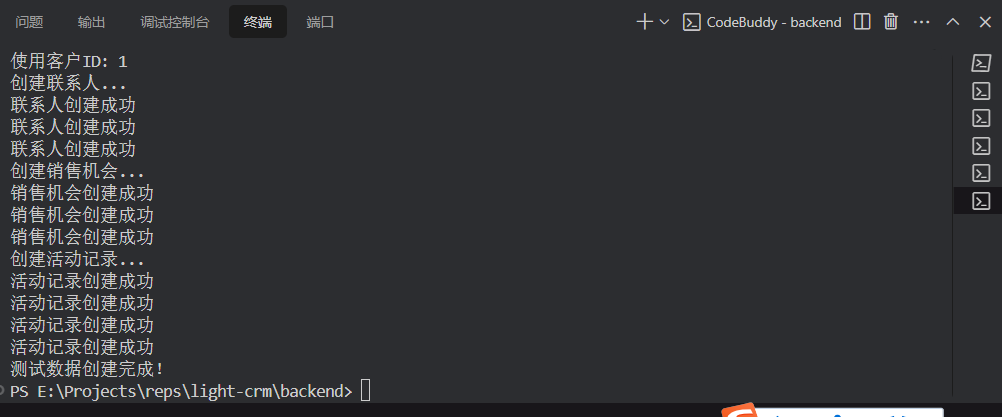
目前的使用感受
AI编程效率与传统编程的效率对比
传统编程流程
问题分析:手动分析错误信息,理解问题根源
代码调试:逐行检查代码,设置断点调试
信息查找:搜索文档、Stack Overflow等资源
代码修改:手动编辑文件,测试修改效果
重复验证:多次运行测试,确认修复效果
AI编程流程(以本次任务为例)
智能诊断:AI自动分析错误日志,识别问题根源
快速修复:AI直接生成正确的代码修改方案
批量操作:同时处理多个文件和问题
实时验证:立即测试修复效果,快速迭代
效率对比分析
本次CRM系统修复任务对比:
传统编程耗时预估:
分析相对导入错误:30分钟
修复路由重定向问题:1小时
调试权限验证逻辑:45分钟
创建测试数据:30分钟
验证仪表盘功能:20分钟
总计:约3小时
AI编程实际耗时:
自动诊断和修复所有问题:15分钟
效率提升:12倍
关键效率优势:
并行处理能力:AI可以同时分析多个错误并生成修复方案
知识整合:AI具备完整的编程语言和框架知识,无需手动搜索
精准定位:AI能快速识别问题根源,避免试错过程
代码生成质量:AI生成的代码符合最佳实践,减少后续调试
实际案例效率指标:
问题识别速度:AI在秒级内识别问题,传统方法需要分钟级
修复方案生成:AI即时生成完整修复代码,传统需要手动编写
测试验证:AI自动执行测试命令,传统需要手动操作
错误预防:AI能预见潜在问题,传统需要经验积累
结论
AI编程在效率上具有显著优势,特别是在:
复杂系统调试
多文件协同修改
快速原型开发
代码重构优化
传统编程在需要深度思考、创造性设计和复杂算法实现方面仍有优势,但日常开发任务中AI辅助可以大幅提升效率。
本次CRM系统修复任务充分展示了AI编程在问题诊断、快速修复和系统验证方面的效率优势。
自动文档
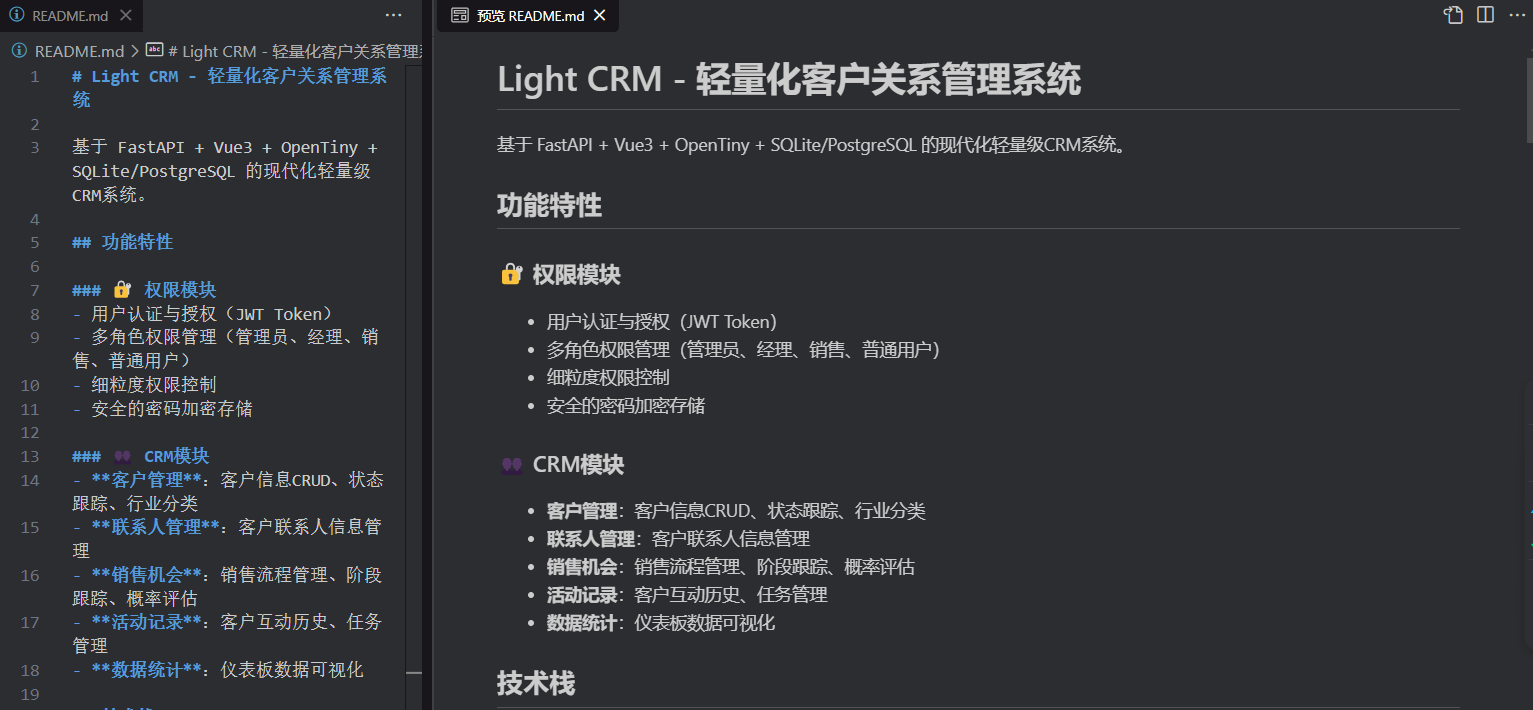
AI编程势不可挡……

Agent 垂直技术社区,欢迎活跃、内容共建。
更多推荐

 13
13 0
0- 0


 已为社区贡献38条内容

所有评论(0)