(vue)前端下载本地excel文件
·
(vue)前端下载本地excel文件
- 已实现
先将文件放入public文件夹下的excel文件夹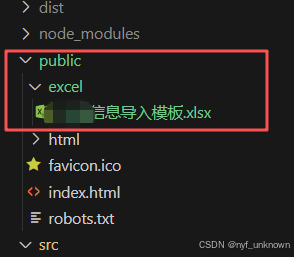
html
div class="download-btn">
    <el-button
        type="primary"
        icon="el-icon-download"
        @click="downloadFile"
        :loading="downloading">
        {{ downloading ? '下载中...' : '下载模板' }}
    </el-button>
    <div class="progress-bar" :style="{width: progress + '%'}"></div>
</div>

<div class="download-complete" :style="{display: downloadComplete ? 'block' : 'none'}">
    <i class="el-icon-success"></i> 下载完成!
</div>
js
data: {
    downloading: false,
    progress: 0,
    downloadComplete: false
},
methods: {
    downloadFile() {
        this.downloading = true;
        this.progress = 0;
        this.downloadComplete = false;

        // 模拟下载进度
        const interval = setInterval(() => {
            this.progress += 10;
            if (this.progress >= 100) {
                clearInterval(interval);
                this.downloading = false;
                this.downloadComplete = true;

                // 实际下载文件
                const link = document.createElement('a');
                link.href = '/excel/信息导入模板.xlsx';
                link.download = '信息导入模板.xlsx';
                link.click();

                // 3秒后隐藏完成提示
                setTimeout(() => {
                    this.downloadComplete = false;
                }, 3000);
            }
        }, 200);
    }
}

Agent 垂直技术社区,欢迎活跃、内容共建。
更多推荐
 3
3 0
0- 0


 已为社区贡献2条内容

所有评论(0)