Vue 3 中 routes 与 route 的详解
·
1. 核心区别
| 特性 | routes |
route |
|---|---|---|
| 类型 | 数组 (Array) |
对象 (Object) |
| 作用 | 定义路由规则 (路由表) | 访问当前激活的路由信息 |
| 使用场景 | 路由配置 (router/index.js) |
组件内部访问当前路由 |
| 响应式 | 否 (静态配置) | 是 (可监听变化) |
| 数据内容 | 路径、组件、子路由等配置信息 | 路径、参数、查询字符串等运行时信息 |
2. API 详解
routes (路由配置)
// router/index.js
import { createRouter, createWebHistory } from 'vue-router'

const routes = [  //  👈 定义路由表数组
  {
    path: '/user/:id',
    name: 'user-profile',
    component: () => import('./views/User.vue'),
    props: true, // 将 params 转为 props
    children: [   // 嵌套路由
      { path: 'posts', component: () => import('./components/Posts.vue') }
    ]
  },
  {
    path: '/about',
    redirect: { name: 'home' } // 重定向
  }
]

const router = createRouter({
  history: createWebHistory(),
  routes //  👈 传入路由配置
})
route (当前路由对象)
<!-- 组件内使用 -->
<script setup>
import { useRoute } from 'vue-router'

const route = useRoute() //  👈 获取当前路由对象

// 监听路由变化
watch(
  () => route.params.id,
  (newId) => {
    console.log('ID changed to:', newId)
  }
)
</script>

<template>
  <div>
    <!-- 访问路由属性 -->
    <p>当前路径: {{ route.path }}</p>
    <p>用户ID: {{ route.params.id }}</p>
    <p>查询参数: {{ route.query.page }}</p>
  </div>
</template>
route 关键属性:
| 属性 | 说明 | 示例 |
|---|---|---|
path |
当前路径 (不含查询参数) | /user/123 |
fullPath |
完整路径 (含查询参数和 hash) | /user/123?page=2#section |
params |
动态路径参数对象 | { id: '123' } |
query |
URL 查询参数对象 | { page: '2' } |
hash |
URL 的 hash 部分 | #section |
name |
路由名称 (如有定义) | 'user-profile' |
matched |
匹配的路由记录数组 | 嵌套路由层级信息 |
meta |
路由元信息 | { requiresAuth: true } |
3. 使用场景对比
| 操作 | routes 的用法 |
route 的用法 |
|---|---|---|
| 获取路由参数 | ❌ 无法直接获取 | ✅ route.params.id |
| 定义新路由 | ✅ router.addRoute({ path: ... }) |
❌ 只读属性 |
| 访问查询字符串 | ❌ 配置阶段无此信息 | ✅ route.query.page |
| 路由重定向 | ✅ { path: '/old', redirect: '/' } |
❌ 只读 |
| 监听路由变化 | ❌ 静态配置 | ✅ watch(() => route.path, ...) |
4. 总结图表
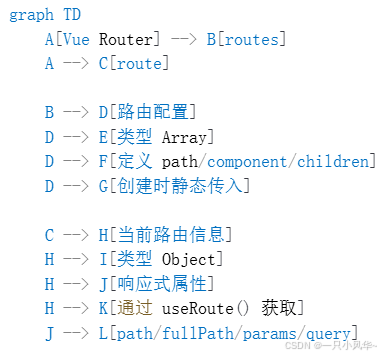
关键结论
-
routes是路由配置表,在创建路由实例时定义,描述所有可能的路径与组件的映射关系。 -
route是当前路由状态对象,在组件内通过useRoute()获取,包含 URL 解析后的实时信息。 -
动态路由参数(如
:id)通过route.params访问,查询参数通过route.query访问。 -
使用
watch监听route对象属性可实现基于路由的逻辑响应。

Agent 垂直技术社区,欢迎活跃、内容共建。
更多推荐
 7
7 0
0- 0


 已为社区贡献19条内容

所有评论(0)