vue3+js 标签云
·
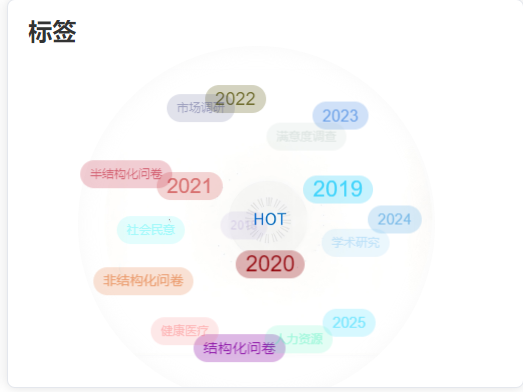
这是效果图 动态的旋转展示这些标签,下面是代码
<template>
  <div class="tag-wall">
    <div class="tag-cloud" ref="wrapper">
      <p
        v-for="(item, index) in data"
        :key="item.id"
        ref="tagElements"
        @click="() => clickTag(item)"
        @dblclick="dbclickTag"
      >
        {{ item }}
      </p>
    </div>
  </div>
</template>

<script setup>
import { ref, watch, onMounted, onBeforeUnmount, nextTick } from "vue";

const props = defineProps({
  data: {
    type: Array,
    default: () => [],
  },
  config: {
    type: Object,
    default: () => ({}),
  },
});

const emit = defineEmits(["clickTag"]);

// Refs
const wrapper = ref(null);
const tagElements = ref([]);
const timer = ref(null);

// Data
const tagList = ref([]);
const option = ref({
  radius: 140,
  maxFont: 24,
  color: null,
  rotateAngleXbase: 600,
  rotateAngleYbase: 600,
  ...props.config,
});

// Methods
const initTags = async () => {
  await nextTick(); // 确保DOM更新完成

  // 清除现有标签
  tagList.value = [];

  // 计算旋转角度
  const rotateAngleX = Math.PI / option.value.rotateAngleXbase;
  const rotateAngleY = Math.PI / option.value.rotateAngleYbase;

  // 初始化标签位置
  props.data.forEach((_, index) => {
    const length = props.data.length;
    const angleX = Math.acos((2 * (index + 1) - 1) / length - 1);
    const angleY = angleX * Math.sqrt(length * Math.PI);

    const x = option.value.radius * Math.sin(angleX) * Math.cos(angleY);
    const y = option.value.radius * Math.sin(angleX) * Math.sin(angleY);
    const z = option.value.radius * Math.cos(angleX);

    const ele = tagElements.value[index];
    if (ele) {
      // 设置随机颜色(如果未指定颜色)
      if (!option.value.color) {
        const first = Math.round(255 * Math.random());
        const second = Math.round(255 * Math.random());
        const three = Math.round(255 * Math.random());
        ele.style.color = `rgba(${first}, ${second}, ${three},1)`;
        ele.style.background = `rgba(${first}, ${second}, ${three},0.3)`;
        ele.style.padding = "5px 10px";
        ele.style.borderRadius = "25px";
      } else {
        ele.style.color = option.value.color;
      }

      tagList.value.push({ x, y, z, ele });
    }
  });

  // 启动动画
  if (timer.value) clearInterval(timer.value);
  timer.value = setInterval(() => {
    tagList.value.forEach((tag) => {
      rotateX(tag, rotateAngleX);
      rotateY(tag, rotateAngleY);
      setPosition(tag);
    });
  }, 20);
};

const setPosition = (tag) => {
  if (!wrapper.value) return;

  const r = option.value.radius;
  const maxFont = option.value.maxFont;
  const wrapperWidth = wrapper.value.offsetWidth;
  const wrapperHeight = wrapper.value.offsetHeight;

  tag.ele.style.transform = `translate(${
    tag.x + wrapperWidth / 2 - tag.ele.offsetWidth / 2
  }px, ${tag.y + wrapperHeight / 2 - tag.ele.offsetHeight / 2}px)`;

  tag.ele.style.opacity = tag.z / r / 2 + 0.7;
  tag.ele.style.fontSize = `${(tag.z / r / 2 + 0.5) * maxFont}px`;
};

const rotateX = (tag, angle) => {
  const { y, z } = tag;
  tag.y = y * Math.cos(angle) - z * Math.sin(angle);
  tag.z = y * Math.sin(angle) + z * Math.cos(angle);
};

const rotateY = (tag, angle) => {
  const { x, z } = tag;
  tag.x = z * Math.sin(angle) + x * Math.cos(angle);
  tag.z = z * Math.cos(angle) - x * Math.sin(angle);
};

const dbclickTag = () => {
  if (timer.value) {
    clearInterval(timer.value);
    timer.value = null;
  } else {
    const rotateAngleX = Math.PI / option.value.rotateAngleXbase;
    const rotateAngleY = Math.PI / option.value.rotateAngleYbase;

    timer.value = setInterval(() => {
      tagList.value.forEach((tag) => {
        rotateX(tag, rotateAngleX);
        rotateY(tag, rotateAngleY);
        setPosition(tag);
      });
    }, 20);
  }
};

const clickTag = (item) => {
  emit("clickTag", item);
};

// Lifecycle
onMounted(() => {
  initTags();
});

onBeforeUnmount(() => {
  if (timer.value) {
    clearInterval(timer.value);
    timer.value = null;
  }
});

// Watch
watch(
  () => props.data,
  () => {
    initTags();
  },
  { deep: true }
);
</script>

<style scoped>
.tag-wall {
  perspective: 1000px;
}

.tag-cloud {
  width: 40vh;
  height: 40vh;
  position: relative;
  margin: 0 auto;
  transform-style: preserve-3d;
}

.tag-cloud p {
  position: absolute;
  top: 0;
  left: 0;
  color: #333;
  font-family: Arial;
  text-decoration: none;
  margin: 0 10px 15px 0;
  line-height: 18px;
  text-align: center;
  font-size: 16px;
  padding: 4px 9px;
  display: inline-block;
  border-radius: 3px;
  transition: all 0.3s ease;
  will-change: transform, opacity, font-size;
}

.tag-cloud p:hover {
  cursor: pointer;
  text-decoration: underline;
}
</style>
这是原文章
 https://blog.csdn.net/qq_40942490/article/details/110328909?ops_request_misc=&request_id=&biz_id=102&utm_term=vue-tag-cloud%E6%94%AF%E6%8C%81vue3%E5%90%97&utm_medium=distribute.pc_search_result.none-task-blog-2~all~sobaiduweb~default-6-110328909.142^v102^pc_search_result_base6&spm=1018.2226.3001.4187
Agent 垂直技术社区,欢迎活跃、内容共建。
更多推荐

 18
18 0
0- 0


 已为社区贡献2条内容

所有评论(0)