vue3 自定义el-table右键菜单实现
·
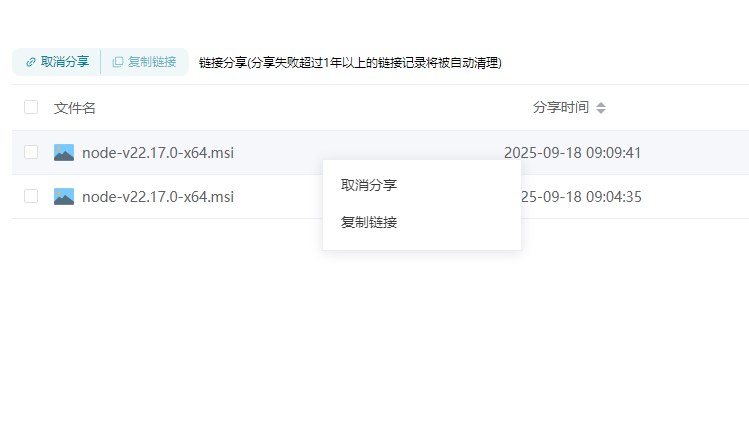
效果图el-table 右键单击某一行的时候 关闭浏览器默认弹框 弹出自己设置的菜单列表
html
        <el-table
          :data="tableData"
          @cell-contextmenu="openMenu"
          style="width: 100%; height: 72vh"
          @selection-change="handleSelectionChange"
          @row-dblclick="rowDblclick"
          @scroll="handleScroll"
          @row-drop="handleDrop"
        >
          <el-table-column type="selection" width="30" />
          <el-table-column
            prop="fullName"
            :label="`已选择${multipleSelection.length}个文件`"
            align="left"
          >
            <template #default="scope">
              <div class="action">
                <img
                  v-if="scope.row.type == 0"
                  src="../../assets/archive/文件.png"
                />
                <img v-else :src="getFileIcon(scope.row.fileType || '0')" />
                <div style="cursor: pointer" @click="toFolder(scope.row)">
                  {{ scope.row.fullName }}
                </div>
              </div>
            </template>
          </el-table-column>
          <el-table-column prop="fileSize" sortable label="大小" align="center">
            <template #default="scope">
              <div v-if="scope.row.fileSize">{{ scope.row.fileSize }}kb</div>
            </template>
          </el-table-column>
          <el-table-column  prop="tagNames"  sortable label="标签" align="center">
            <template #default="scope">
              <el-tag
                type="primary"
                v-for="item in scope.row.tagNames?.split(',')"
                >{{ item }}</el-tag
              >
            </template>
          </el-table-column>
          <el-table-column sortable prop="fileExtension" label="类型" align="center"  />
          <el-table-column prop="creatorUserName" label="创建人" align="center" />
          <el-table-column prop="creatorTime" label="修改时间" align="center" sortable/>
        </el-table>
     <elpopover
      ref="menuRef"
      v-show="menuVisible"
      :menuY="menuY"
      :menuX="menuX"
      :width="200"
      :currentRow="currentRow"
      @updateList="fileSuccess"
      @clickmenu="closeMenu"
      @copyAndMove="copyAndMove"
    ></elpopover>
script
import elpopover from "../../components/elpopover.vue";

const menuVisible = ref(false);
const menuX = ref(0);
const menuY = ref(0);
const menuRef = ref(null);
const currentRow = ref(null);


//鼠标右键点击
const openMenu = (row, column, cell, event) => {
  event.preventDefault(); // 阻止默认右键菜单
  currentRow.value = row; // 保存当前行数据

  // 设置菜单位置
  menuX.value = event.clientX;
  menuY.value = event.clientY;
  menuVisible.value = true;

  // 点击其他地方关闭菜单(通过全局事件监听)
  document.addEventListener("click", closeMenu);
};

// 关闭菜单
const closeMenu = (e) => {
  if (menuRef.value && menuRef.value.$el.contains(e.target)) {
    return; // 点击的是菜单内部,不关闭
  }
  menuVisible.value = false;
  document.removeEventListener("click", closeMenu);
};
弹框的组件
<template>
  <div
    class="custom-context-menu"
    ref="menuRef"
    :style="{ top: `${adjustedY}px`, left: `${menuX}px`, width: `${widthX}px` }"
  >
    <div class="box-item" v-for="item in list" @click="handleClick(item)">
      <div class="link item">
        {{ item.lable }}
      </div>
    </div>
  </div>
</template>
<script setup>
import { ref, watch, onMounted } from "vue";
import { ShareCancle } from "@/api/resources/index.js";
import { ElMessage, ElMessageBox } from "element-plus";
const props = defineProps({
  menuY: {
    type: Number,
    default: 0,
  },
  menuX: {
    type: Number,
    default: 0,
  },
  widthX: {
    type: Number,
    default: 0,
  },
  currentRow: {
    type: Object,
    default: {},
  },
});
const emit = defineEmits(["clickmenu", "updateList"]);
const menuRef = ref(null);
const adjustedY = ref(props.menuY - 170);

watch(
  () => props.menuY,
  (newY) => {
    adjustMenuPosition(newY);
  }
);
const adjustMenuPosition = (y) => {
  if (!menuRef.value) return;

  // 获取菜单高度(需在 DOM 渲染完成后)
  const windowHeight = window.innerHeight;

  // 如果菜单底部超出视窗,则向上展开
  if (y + 350 > windowHeight) {
    adjustedY.value = y - 350;
  } else {
    adjustedY.value = y;
  }
};
onMounted(() => {
  adjustMenuPosition(props.menuY);
});

const list = ref([
  {
    lable: "取消分享",
  },
  {
    lable: "复制链接",
  },
]);

const handleClick = (item) => {
  if (item.lable == "取消分享") {
    shareCancle(props.currentRow);
  } else if (item.lable == "复制链接") {
    copyLinkAndCode();
  }
  emit("clickmenu", item);
};
//取消分享
const shareCancle = (val) => {
  ElMessageBox.confirm(
    "取消分享后,该条分享记录将被删除,好友将无法再访问此分享链接。 您确认要取消分享吗?",
    "提示",
    {
      confirmButtonText: "确定",
      cancelButtonText: "取消",
      type: "warning",
    }
  )
    .then(() => {
      ShareCancle(val.id, { id: val.id }).then((res) => {
        if (res.code == 200) {
          emit("updateList");
          ElMessage({
            type: "success",
            message: "操作成功",
          });
        }
      });
    })
    .catch(() => {});
};
// 复制链接及提取码的方法
const copyLinkAndCode = () => {
  const textToCopy = `${
    "链接:" + import.meta.env.VITE_BASE_API + props.currentRow.shareUrl
  }\n${"提取码:" + props.currentRow.extCode}`;
  navigator.clipboard
    .writeText(textToCopy)
    .then(() => {
      // 复制成功提示
      ElMessage({
        message: "复制成功",
        type: "success",
      });
    })
    .catch((err) => {
      // 复制失败提示
      ElMessage({
        message: "复制失败",
        type: "error",
      });
    });
};
</script>
<style lang="less" scoped>
.custom-context-menu {
  position: fixed;
  background: white;
  border: 1px solid #ebeef5;
  box-shadow: 0 2px 12px 0 rgba(0, 0, 0, 0.1);
  z-index: 2;
  min-width: 200px;
  padding: 8px;
  box-sizing: border-box;
}
.box-item {
  width: 100%;

  .link {
    justify-content: space-between;
  }
  .item {
    display: flex;
    align-items: center;
    cursor: pointer;
    width: 100%;
    height: 32px;
    padding: 8px 10px;
    box-sizing: border-box;
    font-size: 14px;
    color: rgba(56, 56, 56, 1);
    margin-bottom: 5px;
    div {
      display: flex;
      align-items: center;
    }
    .el-icon {
      margin-right: 5px;
    }
  }
  .link:hover {
    background-color: #f2f9ff;
    color: #00849a;
  }
}
.popoverRight {
  width: 100%;
  height: 32px;
  padding: 8px 10px;
  box-sizing: border-box;
  font-size: 14px;
  color: rgba(56, 56, 56, 1);
  margin-bottom: 5px;
  cursor: pointer;
}
.popoverRight:hover {
  background-color: #f2f9ff;
  color: #00849a;
}
.option-item {
  margin-bottom: 20px;
  display: flex;
  align-items: center;
}

.option-label {
  display: block;
  margin-bottom: 10px;
  font-size: 14px;
  color: #606266;
  width: 100px;
  margin-right: 10px;
}

.link-msg {
  .link-success {
    display: flex;
    gap: 10px;
    align-items: center;
    .left {
      width: 36px;
      height: 36px;
    }
    .right {
      display: flex;
      flex-direction: column;
      gap: 5px;
      .success {
        font-size: 14px;
        color: #030b1a;
        font-weight: bold;
      }
      .time {
        color: #495366;
        font-size: 12px;
      }
    }
  }
  .msg-box {
    display: flex;
    flex-direction: column;
    margin-top: 10px;
    gap: 10px;
    .msg-item {
      display: flex;
      gap: 5px;
      .labe {
        width: 70px;
      }
    }
  }
}
</style>

Agent 垂直技术社区,欢迎活跃、内容共建。
更多推荐

 1
1 0
0- 0


 已为社区贡献2条内容

所有评论(0)