JavaScript--操作BOM对象(一)
·
JavaScript–操作BOM对象(一)
文章目录
1.BOM模型
-
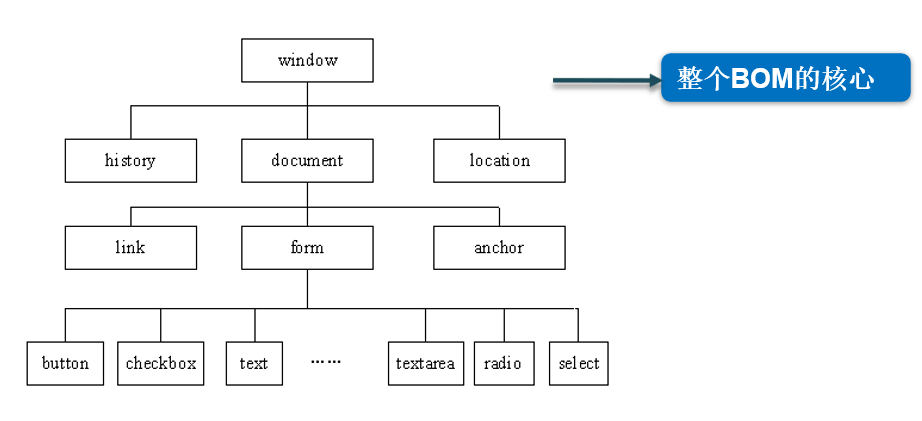
BOM:浏览器对象模型(Browser Object Model)
-
BOM提供了独立于内容的、可以与浏览器窗口进行互动的对象结构
-
-
BOM可实现功能
- 弹出新的浏览器窗口
- 移动、关闭浏览器窗口以及调整窗口的大小
- 页面的前进、后退
2.window对象
2.1window对象的常用属性
-
常用的属性
属性名称 说 明 history 有关客户访问过的URL的信息 location 有关当前 URL 的信息 -
语法
window.属性名="属性值"

window.location="https://www.csdn.net/";
2.2window对象的常用方法
| 方法名称 | 说 明 |
|---|---|
| prompt( ) | 显示可提示用户输入的对话框 |
| alert( ) | 显示带有一个提示信息和一个确定按钮的警示框 |
| confirm( ) | 显示一个带有提示信息、确定和取消按钮的对话框 |
| close( ) | 关闭浏览器窗口 |
| open( ) | 打开一个新的浏览器窗口,加载给定 URL 所指定的文档 |
| setTimeout( ) | 在指定的毫秒数后调用函数或计算表达式 |
| setInterval( ) | 按照指定的周期(以毫秒计)来调用函数或表达式 |
-
confirm()、alert ()、 prompt()区别
- alert():一个参数,仅显示警告对话框的消息,无返回值,不能对 脚本产生任何改变
- prompt():两个参数,输入对话框,用来提示用户输入一些信息 单击“取消”按钮则返回null,单击“确定”按钮则返回用户输入的 值,常用于收集用户关于特定问题而反馈的信息
- confirm():一个参数,确认对话框,显示提示对话框的消息、“确 定”按钮和“取消”按钮,单击“确定”按钮返回true,单击“取 消”按钮返回false,因此与if-else语句搭配使用
-
open()方法
<!DOCTYPE html>
<html lang="en">
<head>
    <meta charset="UTF-8">
    <meta name="viewport" content="width=device-width, initial-scale=1.0">
    <title>Document</title>
</head>
<body>
    <button onclick="javascript:window.open('index2.html')">打开新窗口</button>
</body>
<script>
</script>
</html>
3.history对象
-
常用方法
名称 说明 back() 加载 history 对象列表中的前一个URL forward() 加载 history 对象列表中的下一个URL go() 加载 history 对象列表中的某个具体URL
<!DOCTYPE html>
<html lang="en">
<head>
    <meta charset="UTF-8">
    <meta name="viewport" content="width=device-width, initial-scale=1.0">
    <title>history对象</title>
</head>
<body>
    <span>index2</span>
    <button onclick="backward()">返回上一个页面</button>

</body>
<script>
    function backward(){
       window.history.back();
        //等价于
      // window.history.go(-1);
    }
</script>
</html>
<!DOCTYPE html>
<html lang="en">
<head>
    <meta charset="UTF-8">
    <meta name="viewport" content="width=device-width, initial-scale=1.0">
    <title>Document</title>
</head>
<body>
    <a href="index2.html">点击</a>
    <button onclick="javascript:window.history.forward()">进入下一个页面</button>
    <button onclick="javascript:window.history.go(1)">进入下一个页面</button>
</body>
<script></script>
</html>
4.location对象
-
常用属性
名称 说明 host 设置或返回主机名和当前URL的端口号 hostname 设置或返回当前URL的主机名 href 设置或返回完整的URL -
常用方法
名称 说明 reload() 重新加载当前文档 replace() 用新的文档替换当前文档 <!DOCTYPE html> <html lang="en"> <head> <meta charset="UTF-8"> <meta name="viewport" content="width=device-width, initial-scale=1.0"> <title>location对象</title> </head> <body> <button onclick="location.reload()">刷新</button> </body> <script> alert(window.location.host);//5500 alert(window.location.href);// http://127.0.0.1:5500/JS02/index4.html </script> </html>
5.Document对象
-
常用属性
名称 说 明 referrer 返回载入当前文档的URL URL 返回当前文档的URL <!DOCTYPE html> <html lang="en"> <head> <meta charset="UTF-8"> <meta name="viewport" content="width=device-width, initial-scale=1.0"> <title>Document对象</title> </head> <body> </body> <script> alert(document.URL);//http://127.0.0.1:5500/JS02/index5.html alert(document.referrer); </script> </html> -
Document对象的常用方法
| 名称 | 说 明 |
|---|---|
| getElementById() | 返回对拥有指定id的第一个对象的引用 |
| getElementsByName() | 返回带有指定名称的对象的集合 |
| getElementsByTagName() | 返回带有指定标签名的对象的集合 |
| write() | 向文档写文本、HTML表达式或JavaScript代码 |
<!DOCTYPE html>
<html lang="en">
<head>
    <meta charset="UTF-8">
    <meta name="viewport" content="width=device-width, initial-scale=1.0">
    <title>Document对象</title>
</head>
<body>
    <span  id="fr">凡人修仙传</span>
    <ul>
        <li name="frxxz">韩立</li>
        <li name="frxxz">历飞雨</li>
        <li name="frxxz">墨彩环</li>
        <li>红拂</li>
        <li>张铁</li>
        <li>曲魂</li>
    </ul>
</body>
<script>
       //韩立    历飞雨    墨彩环    红拂    张铁    曲魂
       var list=document.getElementsByTagName("li");
       for(var i=0;i<list.length;i++){
        alert(list[i].innerHTML);
       }
       //韩立    历飞雨    墨彩环
       var list1=document.getElementsByName("frxxz");
       for(var i=0;i<list1.length;i++){
        alert(list1[i].innerHTML);
       }
       alert(document.getElementById("fr").innerHTML);//凡人修仙传


</script>
</html>

Agent 垂直技术社区,欢迎活跃、内容共建。
更多推荐



 21
21 0
0- 0


 已为社区贡献16条内容

所有评论(0)