C++面向对象编程——文件操作
1、程序运行时产生的数据属于临时数据,程序一旦运行结束都会被释放
通过文件可以将数据持久化
2、C++中对文件操作需要包含头文件<fstream>
3、文件类型分为两种:
①文本文件:文件以文本的ASCII码形式存储在计算机中
②二进制文件:文件以文本的二进制形式存储在计算机中,用户一般不能直接读懂它们
4、操作文件的三大类
①ofstream:写操作
②ifstream:读操作
③fstream:读写操作
文本文件
写文件
写文件步骤:
①包含头文件 #include <fstream>
②创建流对象 ofstream ofs;
③打开文件 ofs.open("文件路径",打开方式)
④写数据 ofs<<"写入的数据";
⑤关闭文件 ofs.close();
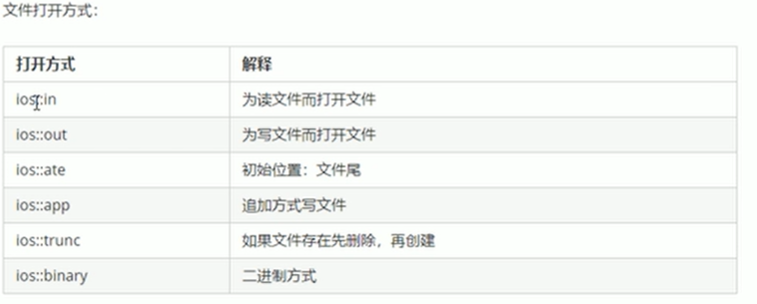
注意:文件打开方式可以配合使用,利用 | 操作符
例如:用二进制方式写文件 ios::binary | ios :: out
//包含头文件
#include <fstream>

void test01(){
    //创建流对象
    ofstream ofs;
    //打开文件
    ofs.open("test.txt",ios::out);
    //写数据
    ofs<<"姓名:张三"  <<endl;
    ofs<<"姓名:张三"  <<endl;
    ofs<<"姓名:张三"  <<endl;
    //关闭文件
    ofs.close();
}
读文件
读文件步骤:
①包含头文件 #include <fstream>
②创建流对象 ifstream ifs;
③打开文件 ifs.open("文件路径",打开方式)
④读数据 四种方式读取
⑤关闭文件 ifs.close();
//包含头文件
#include <fstream>

void test01(){
    //创建流对象
    ifstream ifs;
    //打开文件并判断是否打开成功
    ifs.open("test.txt",ios::in);
    if(!ifs,is_open()){
        cout <<"文件打开失败"
        return;
    }
    //读数据
    //第一种
    char buf[1024] ={0};
    while(ifs>>buf){
        cout <<buf <<endl;
    }

    //第二种
    char buf[1024] ={0};
    while(ifs.getline(buf,sizeof(buf))){
        cout <<buf <<endl;
    }

    //第三种
    string buf;
    while(getline(ifs,buf)){
        cout <<buf <<endl;
    }

    //第四种
    char c;
    while((c=ifs.get())!=EOF){	//EOF:end of file
        cout <<c;
    }
    //关闭文件
    ifs.close();
}
二进制文件
以二进制的方式对文件进行读写操作
打开方式要指定iso::binary
写文件
二进制方式写文件主要利用流对象调用成员函数write
函数原型:ostream& write(const char *buffer, int len);
参数解释:字符指针buffer指向内存中一段存储空间,len是读写的字节数
//包含头文件
#include <fstream>

class Person{
public:
    char m_Name[64];
    int m_Age;
};

void test01(){
    //创建流对象
    ofstream ofs;
    //打开文件
    ofs.open("person.txt",ios::out|ios::binary);
    //写数据
    Person p={"张三",18};
    ofs.write((const char*)&p,sizeof(Person));
    //关闭文件
    ofs.close();
}
读文件
二进制方式读文件主要利用流对象调用成员函数read
函数原型:istream& read(char *buffer,int len);
参数解释:字符指针buffer指向内存中一段存储空间,len是读写的字节数
//包含头文件
#include <fstream>

class Person{
public:
    char m_Name[64];
    int m_Age;
};

void test01(){
    //创建流对象
    ifstream ifs;
    //打开文件并判断是否打开成功
    ifs.open("person.txt",ios::in|ios::binary);
    if(!ifs.is_open()){
        cout <<"文件打开失败" <<endl;
        return;
    }
    //读数据
    Person p={"张三",18};
    ifs.read((char*)&p,sizeof(Person));
    cout<<"姓名:"<<p.m_Name<<"年龄:"<<p.m_Age <<endl;
    //关闭文件
    ifs.close();
}
Agent 垂直技术社区,欢迎活跃、内容共建。
更多推荐

 3
3 0
0- 0


 已为社区贡献23条内容

所有评论(0)