vue3+element3 表单项列表类型拖拽
·
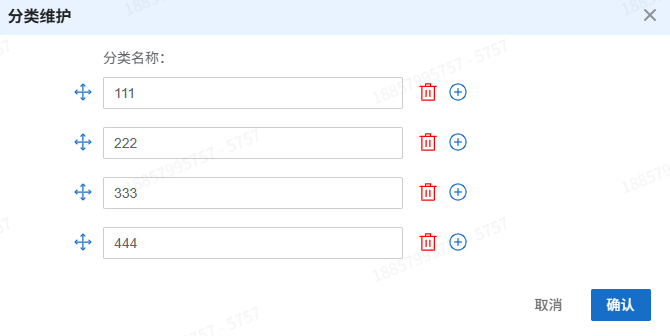
需求:可以拖住任意位置,点加号即在当前项后面追加
1、安装依赖
npm install vue-draggable-next
2、代码示例(CurrencyDialog是我们项目自己封装的el-dialog)
<script lang="ts" setup>
import { ElMessage, ElMessageBox } from 'element-plus'
import { onMounted, reactive, ref } from 'vue'
import { VueDraggableNext as Draggable } from 'vue-draggable-next'
// 表单数据
const form = ref<any>({
  types: [],
})
const rules = reactive({
  name: [{ required: true, message: '请输入', trigger: 'blur' }],
})

// 初始化示例数据
onMounted(() => {
  form.value.types = [
    { id: 1, name: '11' },
    { id: 2, name: '22' },
    { id: 3, name: '33' },
    { id: 3, name: '44' },
  ]
})

// 在指定位置添加项目
const addItemAtIndex = (index: number): void => {
  form.value.types.splice(index + 1, 0, {
    id: 0,
    name: '',
  })
}

// 删除项目
const removeItem = async (index: number): Promise<void> => {
  try {
    await ElMessageBox.confirm('确定要删除这个分类吗?', '提示', {
      confirmButtonText: '确定',
      cancelButtonText: '取消',
      type: 'warning',
    })

    form.value.types.splice(index, 1)
    ElMessage.success('删除成功')
  } catch {
    // 用户取消删除
  }
}

// 验证输入
const validateInput = (item: any, index: number): void => {
  if (form.value.types.filter((i: any) => i.name === item.name).length > 1) {
    ElMessage.error('分类名称不能重复')
    form.value.types[index].name = ''
  }
}

// 提交表单
const submitForm = (): void => {
  console.log(form.value)
}

const emit = defineEmits(['goBack'])
</script>
<template>
  <CurrencyDialog
    :modelValue="true"
    title="分类维护"
    @cancel="emit('goBack', false)"
    @confirm="submitForm"
  >
    <div style="width: 80%; margin: auto">
      <div class="action-form-title">
        <span class="topName">分类名称:</span>
      </div>
      <el-form ref="widgetEnumsRef" :model="form" :rules="rules" class="mt-10">
        <draggable v-model="form.types" handle=".icon-bar">
          <transition-group>
            <div
              class="action-form-row flex"
              v-for="(item, index) in form.types"
              :key="index"
            >
              <span class="icon-bar ml-10 mt-5"
                ><el-icon color="#176ec8" size="20"><Rank /></el-icon
              ></span>
              <el-form-item
                :prop="`types.${index}.name`"
                :rules="rules.name"
                class="ml-10"
              >
                <el-input
                  v-model="item.name"
                  style="width: 300px; margin-right: 5px"
                  placeholder="请输入内容"
                  maxlength="1000"
                  @blur="validateInput(item, index)"
                />
              </el-form-item>
              <span class="icon-delete ml-10 mt-5" @click="removeItem(index)"
                ><el-icon color="red" size="20"><Delete /></el-icon
              ></span>
              <span
                class="icon-delete ml-10 mt-5"
                @click="addItemAtIndex(index)"
                ><el-icon color="#176ec8" size="20"><CirclePlus /></el-icon
              ></span>
            </div>
          </transition-group>
        </draggable>
      </el-form>
    </div>
  </CurrencyDialog>
</template>

<style scoped>
.topName {
  margin-left: 40px;
}
.mt-5 {
  margin-top: 5px;
}
</style>

Agent 垂直技术社区,欢迎活跃、内容共建。
更多推荐


 3
3 0
0- 0


 已为社区贡献1条内容

所有评论(0)