uniapp 微信小程序实现答题功能
·
效果图:
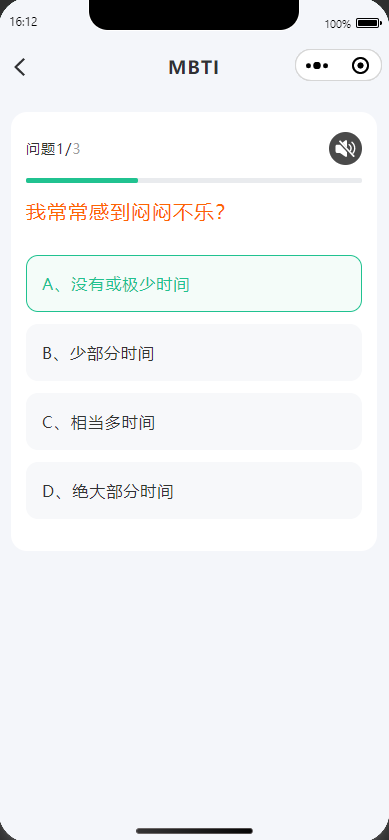
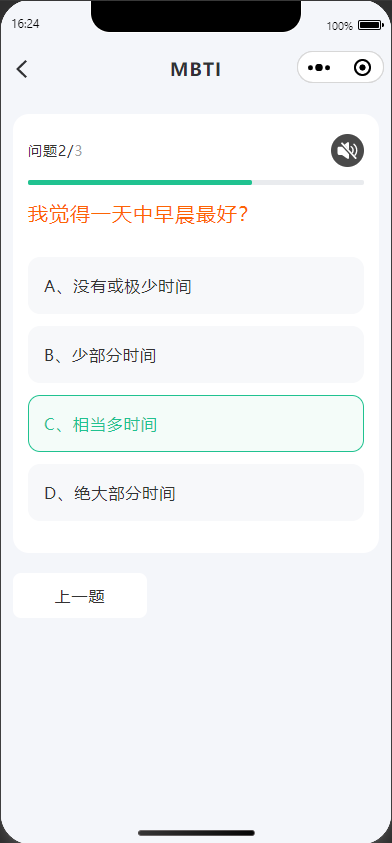
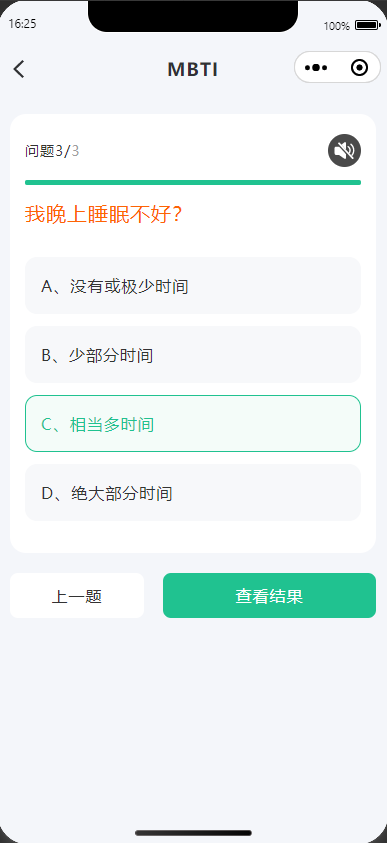
完整代码:
<template>
	<view class="content">
		<headComp title='MBTI' :background='false' @goBack='goBack'></headComp>
		<!-- <web-view src="http://111.9.7.112:50023/#/examination/list"></web-view> -->
		<view class="box">
			<view class="cont-box">
				<view class="flex-align-center flex-justify-between">
					<view class="font-size-14 color-333">问题{{currentIndex + 1}}/<span
							class="color-9E9E9E">{{questions.length}}</span></view>
					<image @click="togglePlay" class="yyIcon-sty" :src="yyIconShow" mode=""></image>
				</view>
				<view class="bar-sty">
					<view class="bar-box" :style="{'width':((currentIndex+1)/questions.length)*100+'%'}"></view>
				</view>

				<!-- 显示当前题目 -->
				<view class="question-sty font-size-20">{{questions[currentIndex].text}}</view>
				<!-- 图片 -->
				<view v-if="isImg" class="img-box">
				</view>
				<!-- 渲染当前题目的选项 -->
				<view class="answer-sty" :class="isImg?'mag-top-40':'mag-top-60'">
					<view class="list-item" v-for="(item,index) in questions[currentIndex].options" :key="index"
						:class="xzClass===index || (showIndex===index)?'xz-sty':'wxz-sty'" @click="selectOption(index)">
						{{item.text}}
					</view>
				</view>
			</view>

			<view class="flex-align-center upper-box">
				<view class="upper-stage color-333 font-size-16" v-if="currentIndex>0" @click="upperStage">上一题</view>
				<view class="result-sty color-fff font-size-16" v-if="(currentIndex+1)==questions.length && (currentIndex+1)==userAnswers.length"
					@click="lookResult">查看结果</view>
			</view>
		</view>
		<!-- 		<view style="margin-top: 100rpx;">
			<button @click="togglePlay">{{ isPlaying ? '暂停' : '播放' }}</button>
		</view> -->
	</view>
</template>
<script>
	import jyIocn from '../static/imgC/jinyin-icon.svg'
	import bfIocn from '../static/imgC/bofang-icon.svg'
	import headComp from '../../../components/head.vue'
	export default {
		components: {
			headComp: headComp,
		},
		data() {
			return {
				yyIconShow: jyIocn,
				jyIocn,
				bfIocn,
				questions: [ // 存储所有题目和选项
					{
						id: 1,
						text: "我常常感到闷闷不乐?",
						options: [{
								text: 'A、没有或极少时间',
								value: 1,
								selected: false
							},
							{
								text: 'B、少部分时间',
								value: 2,
								selected: false
							},
							{
								text: 'C、相当多时间',
								value: 3,
								selected: false
							},
							{
								text: 'D、绝大部分时间',
								value: 4,
								selected: false
							}
						]
					},
					{
						id: 2,
						text: "我觉得一天中早晨最好?",
						options: [{
								text: 'A、没有或极少时间',
								value: 1,
								selected: false
							},
							{
								text: 'B、少部分时间',
								value: 2,
								selected: false
							},
							{
								text: 'C、相当多时间',
								value: 3,
								selected: false
							},
							{
								text: 'D、绝大部分时间',
								value: 4,
								selected: false
							}
						]
					},
					{
						id: 2,
						text: "我晚上睡眠不好?",
						options: [{
								text: 'A、没有或极少时间',
								value: 1,
								selected: false
							},
							{
								text: 'B、少部分时间',
								value: 2,
								selected: false
							},
							{
								text: 'C、相当多时间',
								value: 3,
								selected: false
							},
							{
								text: 'D、绝大部分时间',
								value: 4,
								selected: false
							}
						]
					},
					// ... 其余题目
				],
				currentIndex: 0, // 当前显示的题目索引
				userAnswers: [], // 用于存储用户的答案
				xzClass: '', //历史题目选中的标识
				showIndex: '', //当前点击选中标识
				innerAudioContext: null,
				isPlaying: true, // 是否正在播放
				musicUrl: '/subPackages/subPackC/static/music.mp3', // 替换为你的音频地址
				isImg: false,
			};
		},
		onShow() {
			this.musicPlay()
		},
		onUnload() {
			// 页面卸载时销毁音频实例,释放资源
			if (this.innerAudioContext) {
				this.innerAudioContext.destroy();
			}
		},

		methods: {

			/**
			 * 暂停音乐播放
			 */
			togglePlay() {
				if (this.isPlaying) {
					this.yyIconShow = this.bfIocn
					this.innerAudioContext.pause();
				} else {
					this.yyIconShow = this.jyIocn
					this.innerAudioContext.play();
				}
			},
			onSliderChange(e) {
				// 拖动进度条跳转
				this.innerAudioContext.seek(e.detail.value);
			},
			/**
			 * 音乐播放
			 */
			musicPlay() {
				// 创建音频上下文
				this.innerAudioContext = uni.createInnerAudioContext();
				this.innerAudioContext.src = this.musicUrl;
				// 关键设置:开启循环播放
				this.innerAudioContext.loop = true;
				// 监听音频事件
				this.innerAudioContext.onPlay(() => {
					console.log('开始播放');
					this.isPlaying = true;
				});

				this.innerAudioContext.onPause(() => {
					console.log('暂停播放');
					this.isPlaying = false;
				});

				this.innerAudioContext.onEnded(() => {
					console.log('播放结束');
					this.isPlaying = false;
				});


				this.innerAudioContext.onError((res) => {
					console.error('播放错误:', res);

				});
				this.innerAudioContext.play();
			},
			/**
			 * 查看结果
			 */
			lookResult() {
				if (this.innerAudioContext) {
					this.innerAudioContext.destroy();
				}
				uni.navigateTo({
					url: '/subPackages/subPackC/appraisal/testResult'
				})
			},

			// 用户选择选项时触发
			selectOption(index) {
				//用于当前点击 或更换答案时选中的标识
				this.showIndex = index
				//根据答案length和当前题目索引 判断是否变更答案
				if (this.currentIndex <= this.userAnswers.length - 1) {
					//更换答案
					this.userAnswers.splice(this.currentIndex, 1, index)
					//取消选中样式
					this.xzClass = ''
				} else {
					//判断当前题是否在总题数内 并且 是否是最后一道题
					//是否是新题选答案 或 最后一题
					if ((this.currentIndex + 1) <= this.questions.length && this.userAnswers.length != this.questions
						.length) {
						//追加答案
						this.userAnswers.push(index)
					}
				}

				//判断是否是最后一题
				if ((this.currentIndex + 1) < this.questions.length) {
					//不是则跳转下一题
					setTimeout(() => {
						this.showIndex = ''
						this.currentIndex += 1
						//选中当前题答案
						this.xzClass = this.userAnswers[this.currentIndex]
					}, 300); // 300毫秒后跳转
				} else {
					//最后一题选中答案
					this.xzClass = this.userAnswers[this.currentIndex]
				}
				console.log(this.userAnswers, '答案')
			},
			/**
			 * 上一题
			 */
			upperStage() {
				//清空上一题点击选中的样式
				this.showIndex = ''
				this.currentIndex -= 1
				//已选答案的选中
				this.xzClass = this.userAnswers[this.currentIndex]

			},
			/**
			 * 返回
			 */
			goBack() {
				uni.navigateBack()
			},
		}
	}
</script>
<style lang="scss">
	.content {
		height: 100vh;
		background-color: #F4F6FA;

		.box {
			padding: 0 24rpx;
			height: 85vh;
			overflow-y: scroll;

			.cont-box {
				margin-top: 46rpx;
				background-color: #FFFFFF;
				padding: 40rpx 30rpx;
				border-radius: 32rpx;

				.bar-sty {
					margin-top: 26rpx;
					background-color: #E9EBEE;
					width: 100%;
					height: 10rpx;
					border-radius: 100rpx;

					.bar-box {
						background-color: #20C290;
						height: 10rpx;
						border-radius: 100rpx;
						transition: width 0.3s ease;
					}
				}

				.yyIcon-sty {
					width: 64rpx;
					height: 64rpx;
				}

				.question-sty {
					margin-top: 30rpx;
					color: #FD6404;
				}

				.img-box {
					width: 100%;
					height: 320rpx;
					border-radius: 24rpx;
					background-color: pink;
					margin-top: 60rpx;

				}

				.mag-top-60 {
					margin-top: 60rpx;
				}

				.mag-top-40 {
					margin-top: 40rpx;
				}

				.answer-sty {

					.list-item {
						padding: 34rpx 0 34rpx 30rpx;
						margin-bottom: 24rpx;
						border-radius: 24rpx;
					}

					.xz-sty {
						background: rgba(32, 194, 144, 0.05);
						color: #20C290;
						border: 2rpx solid #20C290;
					}

					.wxz-sty {
						border: 2rpx solid #F7F8FA;
						background-color: #F7F8FA;
						color: #333;
					}
				}
			}
		}

		.upper-box {
			margin-top: 40rpx;
			gap: 38rpx;

			.upper-stage {
				display: inline-block;
				background-color: #FFFFFF;
				width: 258rpx;
				height: 88rpx;
				line-height: 88rpx;
				text-align: center;
				border-radius: 16rpx;
			}

			.result-sty {
				flex: 1;
				text-align: center;
				line-height: 88rpx;
				height: 88rpx;
				display: inline-block;
				background-color: #20C290;
				border-radius: 16rpx;
			}
		}
	}
</style>
注意:
userAnswers字段中存放的是答案 例如:[0,3,2,1] 对应的就是 [ A ,D ,C ,B ] 答案我的取值是取的答案的下标没有取实际的A B C D 答案项

Agent 垂直技术社区,欢迎活跃、内容共建。
更多推荐


 3
3 0
0- 0


 已为社区贡献5条内容

所有评论(0)