百宝箱开放平台 ✖️ 智能体调用 ✖️ Node.js SDK
Node.js SDK
开发者可以通过安装 Node.js SDK 的方式将百宝箱的 OpenAPI 集成到自有系统中,从而在外部系统中发起智能体对话。
前提条件
在调用 SDK 前,请先完成应用的发布。
环境准备
百宝箱 Node.js SDK 适用于 node.js 18 或以上版本,且支持大部分主流浏览器。开发者可以执行下述命令确认 node 版本。
# 查询node版本
node --version

# 返回的版本信息
v18.18.1
安装 SDK
开发者可以执行下述 npm 命令,安装 SDK。
npm install tbox-nodejs-sdk或者访问 npm 官网 Tbox 主页查看最新内容。
调用 SDK
1. 初始化客户端
import { TboxClient } from 'tbox-nodejs-sdk';

const client = new TboxClient({
  httpClientConfig: {
    authorization: 'TBox-your-token-xxx'
  }
});
其中,各请求参数说明如下。
|
参数名 |
必填 |
类型 |
说明 |
示例 |
|
authorization |
是 |
String |
用于验证客户端身份的访问令牌,你可以在百宝箱中获取,获取方式可参见:授权管理。 |
- |
2. 调用对话型应用
2.1. 流式调用
const stream = client.chat({
  appId: "your-app-id",
  query: "今天杭州天气怎么样?",
  userId: "user123"
});

stream.on('data', (data) => {
  console.log('Received data:', data);
});

stream.on('end', () => {
  console.log('Stream ended');
});

stream.on('error', (error) => {
  console.error('Stream error:', error);
});
其中,各请求参数说明如下。
|
参数名 |
必填 |
类型 |
说明 |
示例 |
|
appId |
是 |
String |
智能体唯一标识,需要替换为开发者在发布应用时,发布渠道上方显示的 AppID。 |
- |
|
query |
是 |
String |
对话内容,可自定义输入 |
“今天杭州天气怎么样?” |
|
userId |
是 |
String |
百宝箱用户 ID,由开发者自行定义以及维护的智能体用户 ID,无需在开放平台获取。 |
- |
EventEmitter 对象事件订阅说明如下。
- data:接收到数据返回时触发;
- error:发生错误时触发;
- end:流结束时触发。
2.2. 常规调用
try {
  const response = await client.chatSync({
    appId: "your-app-id",
    query: "今天杭州天气怎么样?",
    userId: "user123"
  }, {
    sseFormat: true
  });
} catch (e) {
  console.error('Error', e)
}
其中,各请求参数说明如下。
|
参数名 |
必填 |
类型 |
说明 |
示例 |
|
appId |
是 |
String |
智能体唯一标识,需要替换为开发者在发布应用时,发布渠道上方显示的 AppID。 |
- |
|
query |
是 |
String |
对话内容,可自定义输入 |
“今天杭州天气怎么样?” |
|
userId |
是 |
String |
百宝箱用户 ID,由开发者自行定义以及维护的智能体用户 ID,无需在开放平台获取。 |
- |
|
sseFormat |
是 |
Boolean |
是否格式化输出。
|
false |
返回参数说明:
- 当 sseFormat 为 false 时,返回原始响应,返回示例可参见:默认标准返回。
- 当 sseFormat 为 true 时,返回格式化后的响应,返回示例可参见:格式化返回。
-
- chunk:解析后的 SSE chunk 数据;
- think:解析后的 SSE think 数据;
- raw:原始返回。
2.3. 返回示例
2.3.1. 默认标准返回(sseFormat = false)
#--------------------------------------------------------
#data: {'entity': {'node_type': 'output', 'execute_id': '2', 'node_name': '结束', 'node_id': 'output_isn9lm'}, 'lane': 'mvz20luv', 'payload': {'extraParams': {}, 'mediaType': 'text', 'name': '回答', 'requestId': '7a03c482-955d-4861-83c5-59024629ed26', 'sessionId': '20250523U1OO28836351'}, 'type': 'header'}
#--------------------------------------------------------
#--------------------------------------------------------
#data: {'lane': 'mvz20luv', 'payload': {'text': '今天'}, 'type': 'chunk'}
#--------------------------------------------------------
#--------------------------------------------------------
#data: {'lane': 'mvz20luv', 'payload': {'text': '杭州'}, 'type': 'chunk'}
#--------------------------------------------------------
#--------------------------------------------------------
#data: {'lane': 'mvz20luv', 'payload': {'text': '的'}, 'type': 'chunk'}
#--------------------------------------------------------
#--------------------------------------------------------
#data: {'lane': 'mvz20luv', 'payload': {'text': '天气就像是江南水墨'}, 'type': 'chunk'}
#--------------------------------------------------------
#--------------------------------------------------------
#data: {'lane': 'mvz20luv', 'payload': {'text': '画,温婉'}, 'type': 'chunk'}
#--------------------------------------------------------
#--------------------------------------------------------
#data: {'lane': 'mvz20luv', 'payload': {'text': '又带着几分朦胧'}, 'type': 'chunk'}
#--------------------------------------------------------
#--------------------------------------------------------
#data: {'lane': 'mvz20luv', 'payload': {'text': '美。如果要'}, 'type': 'chunk'}
#--------------------------------------------------------
#--------------------------------------------------------
#data: {'lane': 'mvz20luv', 'payload': {'text': '具体点说的话,'}, 'type': 'chunk'}
#--------------------------------------------------------
#--------------------------------------------------------
#data: {'lane': 'mvz20luv', 'payload': {'text': '记得带上把小'}, 'type': 'chunk'}
#--------------------------------------------------------
#--------------------------------------------------------
#data: {'lane': 'mvz20luv', 'payload': {'text': '伞哦,可能'}, 'type': 'chunk'}
#--------------------------------------------------------
#--------------------------------------------------------
#data: {'lane': 'mvz20luv', 'payload': {'text': '偶尔会有几滴'}, 'type': 'chunk'}
#--------------------------------------------------------
#--------------------------------------------------------
#data: {'lane': 'mvz20luv', 'payload': {'text': '细雨来添'}, 'type': 'chunk'}
#--------------------------------------------------------
#--------------------------------------------------------
#data: {'lane': 'mvz20luv', 'payload': {'text': '几分诗意呢!'}, 'type': 'chunk'}
#--------------------------------------------------------
2.3.2. 格式化返回(sseFormat = true)
{
  chunk: '今天杭州的天气像是大自然的心情,说变就变。早上还阳光明媚,午后可能就有几朵调皮的云彩带来小雨点,记得带伞哦,别让这份突如其来的惊喜打湿了你的好心情!',
  think: '嗯,用户问的是今天杭州的天气怎么样,要求回答简洁生动。现在杭州的时间是下午2点35分,所以我需要先确定今天的实际天气情况。\n\n今天杭州应该是多云转晴的天气,早上有雾但下午放晴了,温度在26到34度之间。用户强调要生动活泼的回答,那就要避免枯燥的天气预报模式,而是营造画面感。\n\n想到"秋老虎"这个词很贴切,可以突出晴热的特点。用"云雾纱衣"形容早晨的薄雾既诗意又形象。结尾用阳光和西湖组合成"金箔洒满湖面"的意象,既有本地特色又能引发美好联想。\n\n用户没有提供额外背景,但从简洁要求看可能是出行前快速查询,所以温度范围和时间特征(早凉午热)都要包含。最后加个月亮符号增加一点活泼感,平衡实用性和趣味性。\n',
  raw: 'id:1\nevent:message\ndata:{"payload":"{\\"ext_data\\":{},\\"event\\":\\"flow.graph.start\\"}","type":"meta"}\n\nid:2\nevent:message\ndata:{"payload":"{\\"event\\":\\"flow.node.start\\",\\"entity\\":{\\"node_type\\":\\"input\\",\\"execute_id\\":\\"0\\",\\"node_name\\":\\"开始\\",\\"node_id\\":\\"input_hgtoen\\"}}","type":"meta"}\n\nid:3\nevent:message\ndata:{"payload":"{\\"ext_data\\":{\\"start_time\\":1752662013.4744685,\\"input_params\\":{\\"type\\":\\"json\\",\\"value\\":{\\"currentChatByUser\\":\\"今天杭州天气怎么样?\\",\\"currentChatRound\\":\\"1\\",\\"requestId\\":\\"80c106d0-29a2-46f3-8c63-14017f49eb7d\\",\\"conversationId\\":\\"20250716zLGg35257464\\",\\"historyChat\\":[]}},\\"query\\":{\\"type\\":\\"text\\",\\"value\\":\\"今天杭州天气怎么样?\\"},\\"end_time\\":1752662013.4792163},\\"event\\":\\"flow.node.end\\",\\"entity\\":{\\"node_type\\":\\"input\\",\\"execute_id\\":\\"0\\",\\"node_name\\":\\"开始\\",\\"node_id\\":\\"input_hgtoen\\"}}","type":"meta"}\n\nid:4\nevent:message\ndata:{"payload":"{\\"event\\":\\"flow.node.start\\",\\"entity\\":{\\"node_type\\":\\"text-completion\\",\\"execute_id\\":\\"1\\",\\"node_name\\":\\"文本大模型\\",\\"node_id\\":\\"text_completion_u27th0\\"}}","type":"meta"}\n\nid:5\nevent:message\ndata:{"payload":"{\\"event\\":\\"flow.node.start\\",\\"entity\\":{\\"node_type\\":\\"output\\",\\"execute_id\\":\\"2\\",\\"node_name\\":\\"结束\\",\\"node_id\\":\\"output_isn9lm\\"}}","type":"meta"}\n\nid:6\nevent:message\ndata:{"entity":{"node_type":"output","execute_id":"2","node_name":"结束","node_id":"output_isn9lm"},"lane":"output_isn9lm_text_1","payload":"{\\"extraParams\\":{},\\"mediaType\\":\\"text\\",\\"requestId\\":\\"80c106d0-29a2-46f3-8c63-14017f49eb7d\\",\\"sessionId\\":\\"20250716zLGg35257464\\"}","type":"header"}\n\nid:7\nevent:message\ndata:{"lane":"output_isn9lm_text_1","payload":"{\\"text\\":\\"SDK 测试:\\"}","type":"chunk"}\n\nid:8\nevent:message\ndata:{"lane":"output_isn9lm_text_1","payload":"{\\"text\\":\\"今天\\"}","type":"chunk"}\n\nid:9\nevent:message\ndata:{"lane":"output_isn9lm_text_1","payload":"{\\"text\\":\\"杭州\\"}","type":"chunk"}\n\nid:10\nevent:message\ndata:{"lane":"output_isn9lm_text_1","payload":"{\\"text\\":\\"的\\"}","type":"chunk"}\n\nid:11\nevent:message\ndata:{"lane":"output_isn9lm_text_1","payload":"{\\"text\\":\\"天气\\"}","type":"chunk"}\n\nid:12\nevent:message\ndata:{"lane":"output_isn9lm_text_1","payload":"{\\"text\\":\\"像是大自然的心情,\\"}","type":"chunk"}\n\nid:13\nevent:message\ndata:{"lane":"output_isn9lm_text_1","payload":"{\\"text\\":\\"说变就变\\"}","type":"chunk"}\n\nid:14\nevent:message\ndata:{"lane":"output_isn9lm_text_1","payload":"{\\"text\\":\\"。早上还阳光\\"}","type":"chunk"}\n\nid:15\nevent:message\ndata:{"lane":"output_isn9lm_text_1","payload":"{\\"text\\":\\"明媚,午后可能\\"}","type":"chunk"}\n\nid:16\nevent:message\ndata:{"lane":"output_isn9lm_text_1","payload":"{\\"text\\":\\"就有几朵调皮\\"}","type":"chunk"}\n\nid:17\nevent:message\ndata:{"lane":"output_isn9lm_text_1","payload":"{\\"text\\":\\"的云彩带来\\"}","type":"chunk"}\n\nid:18\nevent:message\ndata:{"lane":"output_isn9lm_text_1","payload":"{\\"text\\":\\"小雨点,\\"}","type":"chunk"}\n\nid:19\nevent:message\ndata:{"lane":"output_isn9lm_text_1","payload":"{\\"text\\":\\"记得带伞哦\\"}","type":"chunk"}\n\nid:20\nevent:message\ndata:{"lane":"output_isn9lm_text_1","payload":"{\\"text\\":\\",别让这份\\"}","type":"chunk"}\n\nid:21\nevent:message\ndata:{"lane":"output_isn9lm_text_1","payload":"{\\"text\\":\\"突如其来的惊喜打\\"}","type":"chunk"}\n\nid:22\nevent:message\ndata:{"lane":"output_isn9lm_text_1","payload":"{\\"text\\":\\"湿了你的好\\"}","type":"chunk"}\n\nid:23\nevent:message\ndata:{"lane":"output_isn9lm_text_1","payload":"{\\"text\\":\\"心情!\\"}","type":"chunk"}\n\nid:24\nevent:message\ndata:{"payload":"{\\"ext_data\\":{\\"run_id\\":\\"272d4f97c616434b83848303e4fa9ea3\\",\\"usage\\":{\\"total_tokens\\":75,\\"output_tokens\\":50,\\"input_tokens\\":25}},\\"event\\":\\"flow.node.llm.end\\",\\"entity\\":{\\"node_type\\":\\"text-completion\\",\\"execute_id\\":\\"1\\",\\"group_id\\":0,\\"parent_execute_id\\":\\"1\\",\\"node_name\\":\\"文本大模型\\",\\"node_id\\":\\"text_completion_u27th0\\"}}","type":"meta"}\n\nid:25\nevent:message\ndata:{"payload":"{\\"ext_data\\":{\\"start_time\\":1752662013.4981315,\\"model_name\\":\\"通义千问 • Max\\",\\"output_type\\":\\"text\\",\\"output_result\\":\\"今天杭州的天气像是大自然的心情,说变就变。早上还阳光明媚,午后可能就有几朵调皮的云彩带来小雨点,记得带伞哦,别让这份突如其来的惊喜打湿了你的好心情!\\",\\"complete_time\\":1752662013.562182,\\"input_params\\":{\\"type\\":\\"json\\",\\"value\\":{\\"currentChatByUser\\":\\"今天杭州天气怎么样?\\",\\"currentChatRound\\":\\"1\\",\\"requestId\\":\\"80c106d0-29a2-46f3-8c63-14017f49eb7d\\",\\"conversationId\\":\\"20250716zLGg35257464\\",\\"historyChat\\":[]}},\\"output_result_length\\":74,\\"input_prompt_length\\":0,\\"end_time\\":1752662017.4586399},\\"event\\":\\"flow.node.end\\",\\"entity\\":{\\"node_type\\":\\"text-completion\\",\\"execute_id\\":\\"1\\",\\"node_name\\":\\"文本大模型\\",\\"node_id\\":\\"text_completion_u27th0\\"}}","type":"meta"}\n\nid:26\nevent:message\ndata:{"payload":"{\\"ext_data\\":{\\"start_time\\":1752662013.5814104,\\"output_result_length\\":81,\\"end_time\\":1752662017.4764028},\\"event\\":\\"flow.node.end\\",\\"entity\\":{\\"node_type\\":\\"output\\",\\"execute_id\\":\\"2\\",\\"node_name\\":\\"结束\\",\\"node_id\\":\\"output_isn9lm\\"}}","type":"meta"}\n\nid:27\nevent:message\ndata:{"payload":"{\\"ext_data\\":{\\"start_time\\":1752662013.4624104,\\"end_time\\":1752662017.5004191},\\"event\\":\\"flow.graph.end\\"}","type":"meta"}\n\nid:28\nevent:end\ndata:{"type":"end"}\n\n'
}
3. 调用生成型应用
3.1流式调用
const stream = client.completion({
  appId: "your-app-id",
  inputs: { feqeyrj5: '生成一个故事' },
  userId: 'user123'
})

stream.on('data', (response) => {
  console.log('Received completion data:', response);
})

stream.on('end', () => {
  console.log('Completion stream ended');
});

stream.on('error', (error) => {
  console.error('Error in completion:', error);
});
其中,请求参数说明详见下表。
|
参数名 |
必填 |
类型 |
说明 |
示例 |
|
Authorization |
是 |
String |
用于验证客户端身份的访问令牌,你可以在百宝箱中获取,获取方式可参见:授权管理。 |
|
|
appId |
是 |
String |
应用 ID,需要通过 API 进行集成的应用 ID。 |
202506e******00450562 |
|
userId |
是 |
String |
用户 ID。填入使用您产品的用户 ID。请尽量使用 OAID 或手机号,我们会根据此信息帮助您构建用户画像。 |
- |
|
query |
是 |
String |
当应用类型为对话型应用时,必填。指用户发给智能体的问题内容。 |
你好 |
|
inputs |
是 |
Object |
当应用类型为生成型应用时,必填。指用户发给智能体的内容。 |
{"feqeyrj5":"生成一个故事"} |
|
conversationId |
否 |
String |
会话 ID,用于用户多轮对话时组装上下文信息。 |
多轮对话时,按照SDK中之前返回的 conversationId 内容传入。 |
|
requestId |
否 |
String |
请求 ID,主要用于失败重试时,标识上一次请求。 |
uuid即可 |
|
withMeta |
否 |
Boolean |
是否接收百宝箱返回的meta 信息,默认为 False:不接收。 |
False |
|
clientProperties |
否 |
Object |
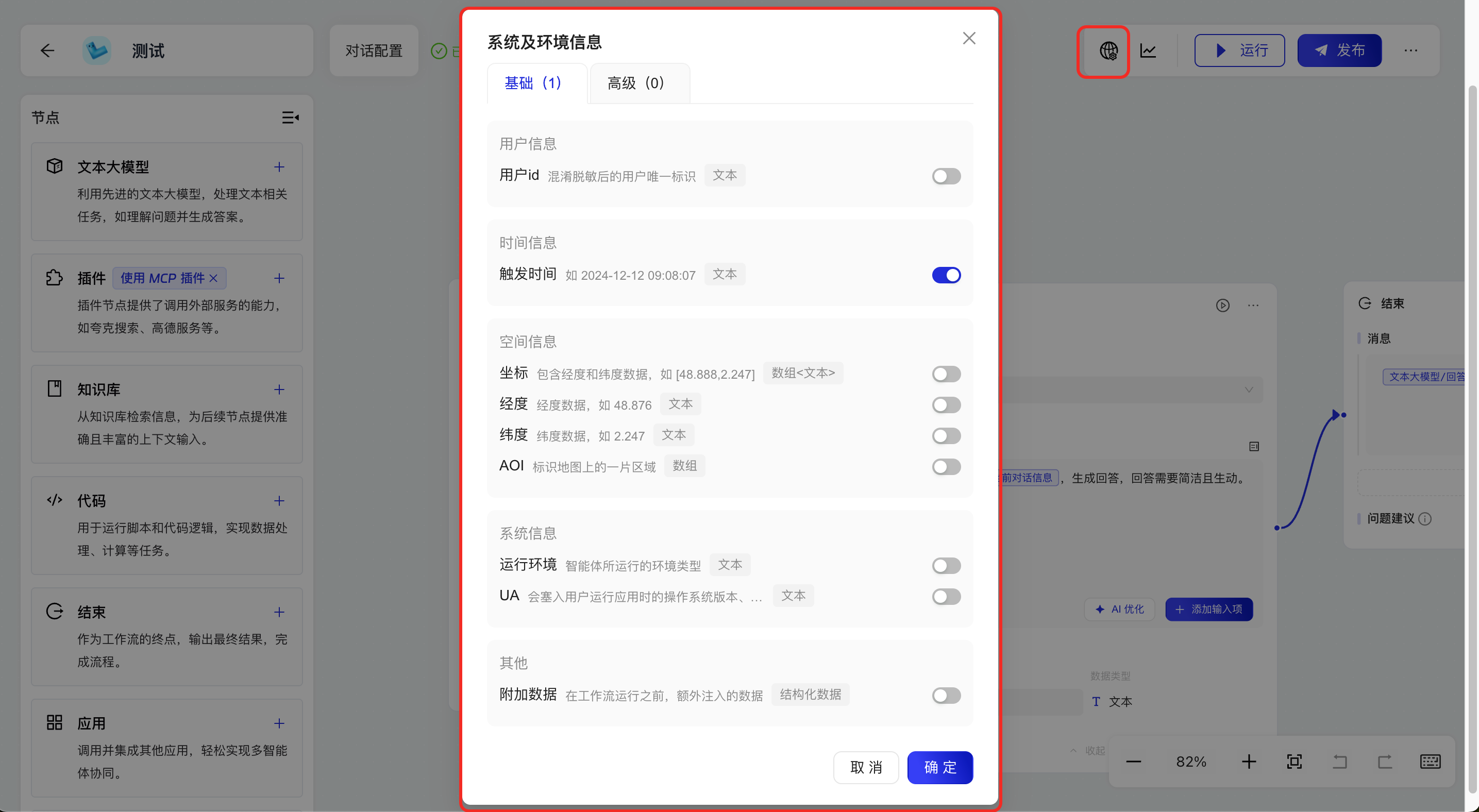
系统及环境变量参数。传入的 key 值请参考示例。 |
如果你在对话型工作流应用中,开启了“系统及环境信息”中的变量开关(示例如下)
|
|
files |
否 |
List<File> |
文件列表,用于在对话中提供多模态(文档、图片、音频及视频)数据。 说明: 使用文件上传能力前,请先为智能体配置具有文件处理能力的大模型或插件。 |
[{'type":“FILE", "fileId":"202502********001001"}] |
3.2. 常规调用
const response = client.completionSync({
  appId: "your-app-id",
  inputs: { feqeyrj5: '生成一个故事' },
  userId: 'user123'
});
console.log(response);
其中,各请求参数说明如下。
|
参数名 |
必填 |
类型 |
说明 |
示例 |
|
Authorization |
是 |
String |
用于验证客户端身份的访问令牌,你可以在百宝箱中获取,获取方式可参见:授权管理。 |
pat_2j4e******THUIVRH1 |
|
appId |
是 |
String |
应用 ID,需要通过 API 进行集成的应用 ID。 |
202506e******00450562 |
|
userId |
是 |
String |
用户 ID。填入使用您产品的用户 ID。请尽量使用 OAID 或手机号,我们会根据此信息帮助您构建用户画像。 |
- |
|
query |
是 |
String |
当应用类型为对话型应用时,必填。指用户发给智能体的问题内容。 |
你好 |
|
inputs |
是 |
Object |
当应用类型为生成型应用时,必填。指用户发给智能体的内容。 |
{"feqeyrj5":"生成一个故事"} |
|
conversationId |
否 |
String |
会话 ID,用于用户多轮对话时组装上下文信息。 |
多轮对话时,按照SDK中之前返回的 conversationId 内容传入。 |
|
requestId |
否 |
String |
请求 ID,主要用于失败重试时,标识上一次请求。 |
uuid即可 |
|
withMeta |
否 |
Boolean |
是否接收百宝箱返回的meta 信息,默认为 False:不接收。 |
False |
|
clientProperties |
否 |
Object |
系统及环境变量参数。传入的 key 值请参考示例。 |
如果你在对话型工作流应用中,开启了“系统及环境信息”中的变量开关(示例如下) |
|
files |
否 |
List<File> |
文件列表,用于在对话中提供多模态(文档、图片、音频及视频)数据。说明:使用文件上传能力前,请先为智能体配置具有文件处理能力的大模型或插件。 |
[{'type":“FILE", "fileId":"202502********001001"}] |
3.3. 返回示例
'id:1\nevent:message\ndata:{"entity":{"node_type":"output","execute_id":"2","node_name":"结束","node_id":"output_isn9lm"},"lane":"pvmv10_y","payload":"{"extraParams":{"tboxData":{},"tboxType":"chatMessage.stream"},"mediaType":"text","name":"回答2","requestId":"579b480f-10ba-4720-a35f-f1cd4acb0d89","sessionId":"202509013Pnh43082939"}","type":"header"}\n\nid:2\nevent:message\ndata:{"lane":"pvmv10_y","payload":"{"text":"西湖"}","type":"chunk"}\n\nid:3\nevent:message\ndata:{"lane":"pvmv10_y","payload":"{"text":"水"}","type":"chunk"}\n\nid:4\nevent:message\ndata:{"lane":"pvmv10_y","payload":"{"text":"畔"}","type":"chunk"}\n\nid:5\nevent:message\ndata:{"lane":"pvmv10_y","payload":"{"text":"柳如"}","type":"chunk"}\n\nid:6\nevent:message\ndata:{"lane":"pvmv10_y","payload":"{"text":"烟,桥影"}","type":"chunk"}\n\nid:7\nevent:message\ndata:{"lane":"pvmv10_y","payload":"{"text":"波光映画"}","type":"chunk"}\n\nid:8\nevent:message\ndata:{"lane":"pvmv10_y","payload":"{"text":"船。\\n雷峰塔下"}","type":"chunk"}\n\nid:9\nevent:message\ndata:{"lane":"pvmv10_y","payload":"{"text":"人声沸,一"}","type":"chunk"}\n\nid:10\nevent:message\ndata:{"lane":"pvmv10_y","payload":"{"text":"曲笙歌醉晚"}","type":"chunk"}\n\nid:11\nevent:message\ndata:{"lane":"pvmv10_y","payload":"{"text":"天。"}","type":"chunk"}\n\nid:12\nevent:end\ndata:{"type":"end"}'4. 文件上传
4.1. 浏览器端调用
const fileInput = document.querySelector('input[type=file]');
fileInput. addEventListener('change', async () => {
const file = fileInput.files[0];
const response = await client.uploadFile(file);
console.log(response);
}) ;
其中,各参数说明如下。
|
参数名 |
必填 |
类型 |
说明 |
示例 |
|
file |
是 |
Blob |
文件对象 |
- |
|
filename |
否 |
String |
文件名称,当文件对象非 file 类型时,需要提供。 |
- |
4.2. Node.js 端调用
import { readFileSync } from 'node:fs';

const file = new Blob([readFileSync('local-file-path')]);
const response = await client.uploadFile(file, 'local-filename');
console.log(response);
其中,各参数说明如下。
|
参数名 |
必填 |
类型 |
说明 |
示例 |
|
file |
是 |
Blob |
文件对象 |
- |
|
filename |
否 |
String |
文件名称,当文件对象非 file 类型时,需要提供。 |
- |
4.3. 返回示例
{"code":"10000","data":"20250901orLH08254074","errorCode":"0","errorMsg":"success","msg":"Success","traceId":"0a4200d317567088002188358e6be4"}5. 知识库管理
5.1. 创建知识库
const response = await client.createDatasets({
  name: 'new dataset name',
  description: 'new dataset description'
});
console.log(response);
5.1.1. 请求参数
|
参数名 |
必填 |
类型 |
说明 |
示例 |
|
name |
是 |
String |
自定义知识库名称,最多支持输入 50 个字符。 说明: 知识库名称需在租户内保持唯一。 |
demo知识库 |
|
description |
是 |
String |
自定义知识库描述,最多支持输入 100 个字符 |
这是一个demo知识库 |
5.1.2. 返回参数
|
参数名 |
类型 |
说明 |
示例 |
|
errorCode |
String |
错误码,为 0 表示成功。 |
0 |
|
errorMsg |
String |
错误信息。 |
success |
|
data |
String |
创建的知识库 ID。 |
202508059********063 |
|
traceId |
String |
本次请求的唯一标识,通常用于发生错误时的排查定位。 |
0b****4d9 |
5.1.3. 返回示例
成功示例
{
    "data": "202508059********063",
    "errorCode": "0",
    "errorMsg": "success",
    "traceId": "0b****4d9"
}
失败示例
{
    "errorCode": "P_1_06_384",
    "errorMsg": "知识库名称已存在",
    "solution": "请更换知识库名称",
    "traceId": "0b446a1717543623264013347e386f"
}
5.2. 查询知识库列表
const response = await client.listDatasets({
  pageNum: 1,
  pageSize: 10
});
console.log(response);
5.2.1. 请求参数
|
参数名 |
必填 |
类型 |
说明 |
示例 |
|
pageNum |
否 |
Integer |
分页页码,默认为 1,从第一页数据开始返回。 |
1 |
|
pageSize |
否 |
Integer |
分页大小,默认为 10,最大为 50。 |
10 |
5.2.2. 返回参数
|
参数名 |
类型 |
说明 |
示例 |
|
errorCode |
String |
错误码,为 0 表示成功。 |
0 |
|
errorMsg |
String |
错误信息。 |
success |
|
data |
PageObject |
知识库列表信息。 |
- |
|
traceId |
String |
本次请求的唯一标识,通常用于发生错误时的排查定位。 |
0b****4d9 |
5.2.2.1. data 定义
|
参数名 |
类型 |
说明 |
|
currentPage |
Integer |
当前页 |
|
datasets |
List<Dataset> |
知识库文件对象列表。 |
|
pageSize |
Integer |
分页大小 |
|
total |
Integer |
列表总数 |
5.2.2.2. datasets 定义
|
参数名 |
类型 |
说明 |
|
datasetId |
String |
知识库 ID |
|
description |
String |
知识库描述 |
|
name |
String |
知识库名称 |
|
storeSize |
Double |
知识库存储大小 |
5.2.3. 返回示例
成功示例
{
    "data": {
        "currentPage": 1,
        "datasets": [
            {
                "datasetId": "202508059lUk00458063",
                "description": "测试2",
                "name": "测试1",
                "storeSize": 0.0
            },
            {
                "datasetId": "20250804tpAo00457894",
                "description": "测试2",
                "name": "测试2",
                "storeSize": 7808.0
            }
        ],
        "pageSize": 20,
        "total": 2
    },
    "errorCode": "0",
    "errorMsg": "success",
    "traceId": "0b446a1717543635033032613e386f"
}
失败示例
{
    "errorCode": "P_1_00_005",
    "errorMsg": "pageSize不能大于50",
    "solution": "请确认参数值是否正确!",
    "traceId": "0be8c63017543648690345786e1a1c"
}
5.3. 创建知识库文档
const response = await client.createDatasetDocument({
  datasetId: 'your-dataset-id',
  fileId: 'your-file-id',
});
console.log(response);
5.3.1. 请求参数
|
参数名 |
必填 |
类型 |
说明 |
示例 |
|
datasetId |
是 |
String |
知识库 ID,指文件上传的目标知识库 ID。 |
2555****sdf |
|
fileId |
是 |
String |
文件 ID,通过文件上传 API 或 SDK 上传文件时返回的文件标识。 |
2156****112 |
5.3.2. 返回参数
|
参数名 |
类型 |
说明 |
示例 |
|
errorCode |
String |
错误码,为 0 表示成功。 |
0 |
|
errorMsg |
String |
错误信息。 |
success |
|
data |
String |
目标知识库 ID。 |
202508059********063 |
|
traceId |
String |
本次请求的唯一标识,通常用于发生错误时的排查定位。 |
0b****4d9 |
5.3.3. 返回示例
成功示例
{
    "data": "20250805****9457696",
    "errorCode": "0",
    "errorMsg": "success",
    "traceId": "0b446a1f17543847325624439e41a7"
}
失败示例
{
    "errorCode": "P_1_06_361",
    "errorMsg": "不存在知识库",
    "solution": "请检查datasetId是否输错",
    "traceId": "1ee603881754385338419138937634"
}
5.4. 查询文档构建进度
const response = await client.queryDocumentProgress({
  documentId: 'your-document-id',
});
console.log(response);
5.4.1. 请求参数
|
参数名 |
必填 |
类型 |
说明 |
示例 |
|
documentId |
是 |
String |
查询目标文件的 ID。 |
2025****5552 |
5.4.2. 返回参数
|
参数名 |
类型 |
说明 |
示例 |
|
errorCode |
String |
错误码,为 0 表示成功。 |
0 |
|
errorMsg |
String |
错误信息。 |
success |
|
data |
DocumentProcess |
查询的文件构建详情。 |
- |
|
traceId |
String |
本次请求的唯一标识,通常用于发生错误时的排查定位。 |
0b****4d9 |
5.4.2.1. data 定义
|
参数名 |
类型 |
说明 |
示例 |
|
status |
String |
文件构建状态,包含:
|
SUCCESS |
|
errorMsg |
String |
文件构建失败原因,仅当 status = FAILED 时返回。 |
文档分段失败:excel文件解析异常,请检查文件内容后重试 |
5.4.3. 返回示例
请求成功且文件构建成功
{
    "data": {
        "status": "SUCCESS"
    },
    "errorCode": "0",
    "errorMsg": "success",
    "traceId": "0be8ed2517543866585838625e231f"
}
请求成功但文件构建失败
{
    "data": {
        "errorMsg": " 文档分段失败:excel文件解析异常,请检查文件内容后重试",
        "status": "FAILED"
    },
    "errorCode": "0",
    "errorMsg": "success",
    "traceId": "0be8ed2317543870606746859e39cb"
}
请求失败
{
    "errorCode": "P_1_06_385",
    "errorMsg": "知识库文档不存在",
    "solution": "请检查documentId是否输错",
    "traceId": "1ee603881754378335441132526365"
}
5.5. 查询知识库文档列表
const response = await client.listDatasetDocuments({
  datasetId: 'your-dataset-id',
  pageNum: 1,
  pageSize: 10
});
5.5.1. 请求参数
|
参数名 |
必填 |
类型 |
说明 |
示例 |
|
datasetId |
是 |
String |
知识库 ID,指文件所在的目标知识库 ID。 |
2555****sdf |
|
pageNum |
否 |
Integer |
分页页码,默认为 1,从第一页数据开始返回。 |
1 |
|
pageSize |
否 |
Integer |
分页大小,默认为 10,最大为 50。 |
10 |
5.5.2. 返回参数
|
参数名 |
类型 |
说明 |
示例 |
|
errorCode |
String |
错误码,为 0 表示成功。 |
0 |
|
errorMsg |
String |
错误信息。 |
success |
|
data |
PageObject |
知识库文件列表。 |
- |
|
traceId |
String |
本次请求的唯一标识,通常用于发生错误时的排查定位。 |
0b****4d9 |
5.5.2.1. data 定义
|
参数名 |
类型 |
说明 |
|
currentPage |
Integer |
当前页 |
|
documents |
List<Document> |
知识库文件对象列表。 |
|
pageSize |
Integer |
分页大小 |
|
total |
Integer |
列表总数 |
5.5.2.2. documents 定义
|
参数名 |
类型 |
说明 |
|
documentId |
String |
文件 ID |
|
name |
String |
文件名 |
|
storeSize |
Double |
知识库存储大小 |
|
wordCount |
Double |
文件大小 |
5.5.3. 返回示例
成功示例
{
    "data": {
        "currentPage": 1,
        "documentsList": [
            {
                "documentId": "20250805edFX7629458673",
                "name": "千岛湖.docx",
                "storeSize": 7808.0,
                "wordCount": 2286
            }
        ],
        "pageSize": 50,
        "total": 1
    },
    "errorCode": "0",
    "errorMsg": "success",
    "traceId": "0b446a1717543881293953712e3875"
}
失败示例
{
    "errorCode": "P_1_00_005",
    "errorMsg": "pageSize不能大于50",
    "solution": "请确认参数值是否正确!",
    "traceId": "0be8c63017543648690345786e1a1c"
}
5.6. 删除知识库文档
const response = await client.deleteDatasetDocument({
  documentId: 'your-document-id',
});
console.log(response);
5.6.1. 请求参数
|
参数名 |
必填 |
类型 |
说明 |
示例 |
|
documentId |
是 |
String |
知识库内指定文件 ID。 |
2025****58063 |
5.6.2. 返回参数
|
参数名 |
类型 |
说明 |
示例 |
|
errorCode |
String |
错误码,为 0 表示成功。 |
0 |
|
errorMsg |
String |
错误信息。 |
success |
|
traceId |
String |
本次请求的唯一标识,通常用于发生错误时的排查定位。 |
0b****4d9 |
5.6.3. 返回示例
成功示例
{
    "errorCode": "0",
    "errorMsg": "success",
    "traceId": "0be8ed2317543652744847731e39a7"
}
返回示例
{
    "errorCode": "P_1_06_385",
    "errorMsg": "知识库文档不存在",
    "solution": "请检查documentId是否输错",
    "traceId": "1ee603881754378335441132526365"
}
5.7. 检索知识库内容
const response = await client.retrieveDataset({
  datasetId: 'your-dataset-id',
  query: 'query something',
  limit: 5,
});
console.log(response);
5.7.1. 请求参数
|
参数名 |
必填 |
类型 |
说明 |
示例 |
|
query |
是 |
String |
查询内容 |
库存商品 |
|
datasetId |
是 |
String |
目标知识库 ID |
2025****58063 |
|
limit |
否 |
Interger |
返回召回内容的条数,默认是 5,上限是 10 |
5 |
5.7.2. 返回参数
|
参数名 |
类型 |
说明 |
示例 |
|
errorCode |
String |
错误码,为 0 表示成功。 |
0 |
|
errorMsg |
String |
错误信息。 |
success |
|
data |
List<RetrieveResult> |
召回对象信息,详细说明可参考:data 定义。 |
- |
|
traceId |
String |
本次请求的唯一标识,通常用于发生错误时的排查定位。 |
0b****4d9 |
5.7.2.1. data 定义
|
参数名 |
类型 |
说明 |
|
content |
String |
召回内容 |
|
originFileName |
String |
原始文件名 |
|
score |
Double |
关联度分 |
5.7.3. 返回示例
成功示例
{
    "data": [
        {
            "content": "{\"商品名称\":\"猫粮\",\"订单号\":\"\",\"快递公司\":\"顺丰\",\"省市区\":\"浙江省杭州市西湖区\",\"订单编号\":\"1.0\",\"收货人姓名\":\"\",\"收货人电话号码\":\"\",\"详细收货地址\":\"shippingAddress\"}",
            "originFileName": "订单信息.xlsx",
            "score": 0.06375612
        }
    ],
    "errorCode": "0",
    "errorMsg": "success",
    "traceId": "0b446a3117543806882455710e5f2c"
}
失败示例
{
    "errorCode": "P_1_00_005",
    "errorMsg": "query不能为空",
    "solution": "请确认参数值是否正确!",
    "traceId": "0be8c63017543810866326652e1a1e"
}
5.8. 删除知识库
const response = await client.deleteDataset({
  datasetId: 'your-dataset-id',
});
console.log(response);
5.8.1. 请求参数
|
参数名 |
必填 |
类型 |
说明 |
示例 |
|
datasetId |
是 |
String |
目标知识库 ID |
2025****58063 |
5.8.2. 返回参数
|
参数名 |
类型 |
说明 |
示例 |
|
errorCode |
String |
错误码,为 0 表示成功。 |
0 |
|
errorMsg |
String |
错误信息。 |
success |
|
traceId |
String |
本次请求的唯一标识,通常用于发生错误时的排查定位。 |
0b****4d9 |
5.8.3. 返回示例
成功示例
{
    "errorCode": "0",
    "errorMsg": "success",
    "traceId": "0be8ed2317543652744847731e39a7"
}
失败示例
{
    "errorCode": "P_1_06_361",
    "errorMsg": "不存在知识库",
    "solution": "请检查datasetId是否输错",
    "traceId": "1ee603881754378335441132526365"
}
6. 插件管理
6.1. 获取官方插件列表
const response = await client.getOfficialPlugins({
  pluginType: 'UTILITY_TOOL',
  pageNum: 1,
  pageSize: 20,
});
console.log(response);
6.1.1. 请求参数
|
参数名 |
必填 |
类型 |
说明 |
示例 |
|
pluginType |
否 |
Enum<String> |
插件类别,不传查询全部插件,枚举值包括:
|
UTILITY_TOOL |
|
pageNum |
否 |
Integer |
分页页码,默认为1,从第一页数据开始返回 |
1 |
|
pageSize |
否 |
Integer |
分页大小,默认为 20,最大为 20 |
20 |
6.1.2. 返回参数
|
参数名 |
类型 |
说明 |
示例 |
|
errorCode |
String |
错误码,为 0 表示成功。 |
0 |
|
errorMsg |
String |
错误信息。 |
success |
|
data |
QueryPluginResult |
插件查询结果对象。 |
- |
|
traceId |
String |
本次请求的唯一标识,通常用于发生错误时的排查定位。 |
0b****4d9 |
6.1.2.1. data 定义
|
参数名 |
类型 |
说明 |
|
plugins |
List<Plugin> |
插件详情 |
|
currentPage |
Interger |
当前页码 |
|
pageSize |
Interger |
分页大小 |
|
total |
Interger |
总数据量 |
6.1.2.2. plugins 定义
|
参数名 |
类型 |
说明 |
|
pluginId |
String |
插件 ID |
|
name |
String |
插件名称 |
|
description |
String |
插件描述 |
|
pluginType |
Enum<String> |
官方插件类别,枚举值包含:
|
|
toolType |
Enum<String> |
插件内工具所属类别,枚举值包含:
|
|
avgExecTime |
Double |
平均执行时间,单位:毫秒 |
|
citationCount |
Integer |
当前插件被智能体引用次数 |
|
successRate |
Double |
智能体调用成功率 |
|
toolCount |
Integer |
插件内部包含的工具数 |
|
tools |
List<Tool> |
工具详情 |
6.1.2.3. tools 定义
|
参数名 |
类型 |
说明 |
|
pluginToolId |
String |
工具 ID |
|
name |
String |
工具名称 |
|
description |
String |
工具描述 |
|
stream |
Boolean |
是否支持流式返回 |
|
avgExecTime |
Double |
平均执行时间,单位:毫秒 |
|
citationCount |
Integer |
当前工具被智能体引用次数 |
|
successRate |
Double |
智能体调用成功率 |
|
inputParams |
List<ParamsSchema> |
当前工具的入参定义 |
|
outputParams |
List<ParamsSchema> |
当前工具的出参定义 |
6.1.2.4. paramsSchema 定义
|
参数名 |
类型 |
说明 |
|
name |
String |
参数名 |
|
description |
String |
参数描述 |
|
required |
Boolean |
是否必传 |
|
in |
Enum<String> |
参数位置,仅 OPENAPI 插件有。枚举值包含:
|
|
schema |
Schema |
参数结构 |
6.1.2.5. schema 定义
|
参数名 |
类型 |
说明 |
|
type |
String |
参数类型,包括:
|
|
enum |
List<Object> |
枚举值,约束参数在一定范围内取值 |
|
default |
Object |
默认值 |
|
properties |
Map<String, Properties>
|
仅 object 类型有,用来表示对象中每一个属性的结构 |
|
required |
List<String> |
仅 object 类型有,参数名集合,表示必传的参数 |
|
items |
Items |
仅 array 类型有,用来定义数组中元素的约束 |
6.1.2.6. properties 定义
说明:当前内容仅针对 Object 类型的参数,用来表示 Object 对象中每一个属性的结构。
|
参数名 |
类型 |
说明 |
|
type |
String |
参数类型,包括:
|
|
enum |
List<Object> |
枚举值,约束参数在一定范围内取值 |
|
default |
Object |
默认值 |
|
properties |
Map<String, Properties>
|
仅 object 类型有,用来表示对象中每一个属性的结构。 |
|
required |
List<String> |
仅 object 类型有,参数名集合,表示必传的参数 |
|
items |
Items |
仅 array 类型有,用来定义数组中元素的约束。 |
6.1.2.7. items 定义
|
参数名 |
类型 |
说明 |
|
type |
String |
参数类型,包括:
|
|
properties |
Map<String, Properties>
|
仅 object 类型有,用来表示对象中每一个属性的结构。 |
|
required |
List<String> |
仅 object 类型有,参数名集合,表示必传的参数 |
6.1.3. 返回示例
成功示例
{
"data": {
"currentPage": 1,
"pageSize": 1,
"plugins": [
{
"avgExecTime": 1609.0,
"citationCount": 13828,
"description": "利用夸克搜索引擎搜索相关内容,可以根据提示词要求来返回链接等信息。如:关于 OpenAI 有什么新闻?",
"name": "夸克搜索",
"pluginId": "20240611204300000001",
"pluginType": "CONTENT_SEARCH",
"successRate": 0.995,
"toolCount": 3,
"toolType": "OPENAPI",
"tools": [
{
"avgExecTime": 1292.0,
"citationCount": 13443,
"description": "利用夸克搜索引擎搜索相关内容,可以根据提示词要求来返回链接等信息。如:关于 OpenAI 有什么新闻?",
"inputParams": [
{
"description": "搜索内容",
"in": "body",
"name": "q",
"required": true,
"schema": {
"type": "string"
}
}
],
"name": "夸克搜索",
"outputParams": [
{
"description": "搜索结果",
"name": "data",
"schema": {
"items": {
"properties": {
"hostName": {
"description": "站点名(可空)",
"type": "string"
},
"publishTime": {
"description": "发布时间",
"type": "string"
},
"extra": {
"description": "其它信息",
"properties": {
"extraUrl": {
"description": "链接",
"type": "string"
},
"domain": {
"description": "来源",
"type": "string"
},
"sort": {
"description": "排序",
"type": "number"
},
"extraTitle": {
"description": "标题",
"type": "string"
}
},
"type": "object"
},
"channel": {
"description": "输出平台",
"type": "string"
},
"articleId": {
"description": "数据ID",
"type": "string"
},
"title": {
"description": "标题",
"type": "string"
},
"url": {
"description": "网页地址",
"type": "string"
},
"desc": {
"description": "描述信息",
"type": "string"
}
},
"type": "object"
},
"type": "array"
}
},
{
"description": "请求结果",
"name": "success",
"schema": {
"type": "boolean"
}
},
{
"description": "响应信息",
"name": "msg",
"schema": {
"type": "string"
}
},
{
"description": "响应状态码",
"name": "code",
"schema": {
"type": "number"
}
}
],
"pluginToolId": "20240611204600000001",
"stream": false,
"successRate": 0.99
},
{
"citationCount": 0,
"description": "利用夸克搜索引擎搜索相关内容,可以根据提示词要求来返回链接等信息。如:关于 OpenAI 有什么新闻?",
"inputParams": [
{
"description": "搜索内容",
"in": "body",
"name": "q",
"required": true,
"schema": {
"type": "string"
}
}
],
"name": "新版夸克搜索",
"outputParams": [
{
"description": "traceId",
"name": "traceId",
"schema": {
"type": "string"
}
},
{
"description": "响应信息",
"name": "msg",
"schema": {
"type": "string"
}
},
{
"description": "响应状态码",
"name": "code",
"schema": {
"type": "number"
}
},
{
"description": "搜索结果",
"name": "data",
"schema": {
"items": {
"properties": {
"hostName": {
"description": "站点名(可空)",
"type": "string"
},
"publishTime": {
"description": "发布时间",
"type": "string"
},
"extra": {
"description": "其它信息",
"properties": {
"extraUrl": {
"description": "链接",
"type": "string"
},
"domain": {
"description": "来源",
"type": "string"
},
"extraTitle": {
"description": "标题",
"type": "string"
},
"sort": {
"description": "排序",
"type": "number"
}
},
"type": "object"
},
"channel": {
"description": "输出平台",
"type": "string"
},
"articleId": {
"description": "数据ID",
"type": "string"
},
"title": {
"description": "标题",
"type": "string"
},
"url": {
"description": "网页地址",
"type": "string"
},
"desc": {
"description": "描述信息",
"type": "string"
}
},
"type": "object"
},
"type": "array"
}
},
{
"description": "请求结果",
"name": "success",
"schema": {
"type": "boolean"
}
}
],
"pluginToolId": "20250526JVW706618482",
"stream": false
},
{
"avgExecTime": 1925.0,
"citationCount": 385,
"description": "利用夸克搜索引擎搜索相关内容,可以根据提示词要求来返回链接等信息,搜索结果中包含文章的正文字段。如:关于 OpenAI 有什么新闻?",
"inputParams": [
{
"description": "搜索内容",
"in": "body",
"name": "q",
"required": true,
"schema": {
"type": "string"
}
}
],
"name": "夸克搜索(含正文)",
"outputParams": [
{
"description": "响应状态码",
"name": "code",
"schema": {
"type": "number"
}
},
{
"description": "搜索结果",
"name": "data",
"schema": {
"items": {
"properties": {
"publishTime": {
"description": "发布时间",
"type": "string"
},
"hostName": {
"description": "站点名(可空)",
"type": "string"
},
"extra": {
"description": "其它信息",
"properties": {
"extraUrl": {
"description": "链接",
"type": "string"
},
"domain": {
"description": "来源",
"type": "string"
},
"extraTitle": {
"description": "标题",
"type": "string"
},
"sort": {
"description": "排序",
"type": "number"
}
},
"type": "object"
},
"channel": {
"description": "输出平台",
"type": "string"
},
"articleId": {
"description": "数据id",
"type": "string"
},
"title": {
"description": "标题",
"type": "string"
},
"url": {
"description": "网页地址",
"type": "string"
},
"content": {
"description": "正文",
"type": "string"
},
"desc": {
"description": "描述信息",
"type": "string"
}
},
"type": "object"
},
"type": "array"
}
},
{
"description": "描述简介",
"name": "success",
"schema": {
"type": "boolean"
}
},
{
"description": "响应信息",
"name": "msg",
"schema": {
"type": "string"
}
}
],
"pluginToolId": "20250528mgnR06685343",
"stream": false,
"successRate": 1.0
}
]
}
],
"total": 17
},
"errorCode": "0",
"errorMsg": "success",
"traceId": "0b44******1814"
}失败示例
{
    "errorCode": "P_1_00_005",
    "errorMsg": "不合法的插件类型",
    "solution": "请检查入参:pluginType是否有效"
}
6.2. 调用插件工具
const response = await client.invokePlugin({
  pluginToolId: 'official-plugin-tool-id',
  params: {
    key: 'value',
  },
});
console.log(response);
6.2.1. 请求参数
|
参数名 |
必填 |
类型 |
说明 |
示例 |
|
pluginToolId |
是 |
String |
工具 ID,由查询官方插件列表接口获取。 |
- |
|
params |
是 |
Map<String, Object>
|
工具调用所需参数,由查询官方插件列表接口获取。 |
- |
6.2.2. 返回参数
|
参数名 |
类型 |
说明 |
示例 |
|
errorCode |
String |
错误码,为 0 表示成功。 |
0 |
|
errorMsg |
String |
错误信息。 |
success |
|
data |
ToolResponse |
插件调用结果详情。 |
- |
|
traceId |
String |
本次请求的唯一标识,通常用于发生错误时的排查定位。 |
0b****4d9 |
6.2.2.1. data 定义
|
参数名 |
类型 |
说明 |
|
success |
Boolean |
是否调用成功 |
|
response |
Object |
工具响应结果,结构请参考查询官方插件列表接口获取的工具输出参数定义。 |
6.2.3. 返回示例
成功示例
{
    "data": {
        "response": {
            "msg": "操作成功",
            "code": 0,
            "data": [
                {
                    "hostName": "",
                    "publishTime": "1755355752",
                    "extra": {
                        "extraUrl": "https://www.jinjia.com.cn/",
                        "domain": "quark",
                        "sort": 0,
                        "extraTitle": "金价网-今日金价查询表"
                    },
                    "channel": "quark",
                    "articleId": "quark_f9bc6e9d934638a361ec0bc85042aef2",
                    "title": "金价网-今日金价查询表",
                    "url": "https://www.jinjia.com.cn/",
                    "desc": "金价网是一个专业的黄金价格查询平台,提供黄金市场行情,包括国际国内黄金、今日金价、上海黄金、银行黄金价格、香港黄金价格行情行情等内容,全力为广大投资者提供黄金的信息服务。"
                },
                {
                    "hostName": "",
                    "publishTime": "1755579111",
                    "extra": {
                        "extraUrl": "https://www.jinrijinjia.cn/",
                        "domain": "quark",
                        "sort": 1,
                        "extraTitle": "今日黄金价格查询_现在金价黄金多少钱一克_国际金价实时行情_黄金金价网"
                    },
                    "channel": "quark",
                    "articleId": "quark_c1643b6a5b01737aa37ff505fcdee306",
                    "title": "今日黄金价格查询_现在金价黄金多少钱一克_国际金价实时行情_黄金金价网",
                    "url": "https://www.jinrijinjia.cn/",
                    "desc": "国内金价 778.61 -9.58 -1.22% 788.30 777.00 788.00 788.19 克/人民币 国内银价 9388.00 -87.00 -0.92% 9498.00 9355.00 9474.00 9475.00 千克/人民币 24小时黄金实时快讯 2025年7月23日黄金价格多少钱一克今日查询"
                },
                {
                    "hostName": "",
                    "publishTime": "1755404286",
                    "extra": {
                        "extraUrl": "http://guojijinjia.com/",
                        "domain": "quark",
                        "sort": 2,
                        "extraTitle": "国际金价_今日金价实时行情最新黄金价格查询"
                    },
                    "channel": "quark",
                    "articleId": "quark_bf6d40e5c901948bc8c67979df037da5",
                    "title": "国际金价_今日金价实时行情最新黄金价格查询",
                    "url": "http://guojijinjia.com/",
                    "desc": "伦敦金价现货走势图纽约黄金期货走势图中国上海黄金走势图今日国际金价行情使用说明提供今天黄金即时价格走势查询,实时报价更..."
                },
                {
                    "hostName": "",
                    "publishTime": "1755273600",
                    "extra": {
                        "extraUrl": "http://www.huangjinjiage.cn/golden/113761.html",
                        "domain": "quark",
                        "sort": 3,
                        "extraTitle": "国内金价实时查询(24小时行情走势图|回收价格|今日价格)金价查询网"
                    },
                    "channel": "quark",
                    "articleId": "quark_20c83ec8f20e02af69f8ca74b3e828d7",
                    "title": "国内金价实时查询(24小时行情走势图|回收价格|今日价格)金价查询网",
                    "url": "http://www.huangjinjiage.cn/golden/113761.html",
                    "desc": "国内金价今日多少钱一克?提供国内金价实时查询、国内金价行情走势图、国内金价回收多少钱一克、国内金价最低多少钱一克等国内金价今天什么价格查询。今日国内金价实时查询黄金品种回收价格销售..."
                },
                {
                    "hostName": "",
                    "publishTime": "1755273600",
                    "extra": {
                        "extraUrl": "http://www.huangjinjiage.cn/jinrijinjia.html",
                        "domain": "quark",
                        "sort": 4,
                        "extraTitle": "今日金价(实时更新)黄金价格今日多少钱一克_金价查询网"
                    },
                    "channel": "quark",
                    "articleId": "quark_0cc918acaf7b8c7ef28607741439a2c1",
                    "title": "今日金价(实时更新)黄金价格今日多少钱一克_金价查询网",
                    "url": "http://www.huangjinjiage.cn/jinrijinjia.html",
                    "desc": "本页面提供今日金价在线查询,包括国际金价、国内金价、今日金价、上海黄金价格、银行黄金价格、金店黄金价格、黄金回收价格等实时行情报价。黄金价格今日实时报价名称卖出价格今日价格最高价格最低价格价格..."
                },
                {
                    "hostName": "",
                    "publishTime": "1755273600",
                    "extra": {
                        "extraUrl": "http://www.huangjinjiage.cn/quote/113124.html",
                        "domain": "quark",
                        "sort": 5,
                        "extraTitle": "金价国际今日价格(走势图|24小时实时|金条价格|回收)金价查询网"
                    },
                    "channel": "quark",
                    "articleId": "quark_cbf5cbd99ca272cf052d5bc5b8bb1541",
                    "title": "金价国际今日价格(走势图|24小时实时|金条价格|回收)金价查询网",
                    "url": "http://www.huangjinjiage.cn/quote/113124.html",
                    "desc": "提供黄金金价国际今日价格在线查询,通过走势图实时了解金价的变化,还提供金条价格和回收价格的最新报价查询,无论你是购买黄金、投资黄金还是回收黄金,在这里都可以查到实时金价行情。金价..."
                }
            ],
            "success": true
        }
    },
    "errorCode": "0",
    "errorMsg": "success",
    "traceId": "0be8*******e477"
}
失败示例
{
    "errorCode": "P_1_03_200",
    "errorMsg": "必传参数缺少参数值",
    "solution": ""
}
Agent 垂直技术社区,欢迎活跃、内容共建。
更多推荐


 16
16 0
0- 0


 已为社区贡献6条内容

所有评论(0)