从零到一搭建:vue3+vite7+antfu+stylelint+githooks,全流程配置,附带源码,集成css变量使用,下载即用
·
文章目录
0 基础环境
0.1 node版本
node 最好>20 因为eslint9的需要 本次项目node为22.14.0
0.2 包管理器
这里采用pnpm
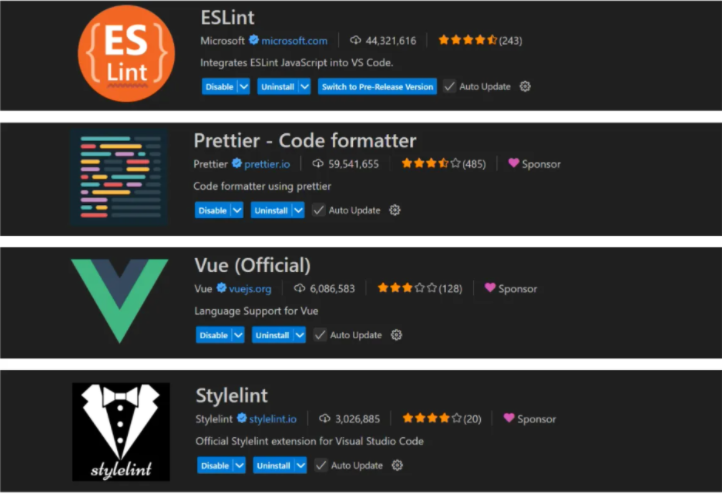
0.3 vscode插件
eslint prettier vue-official stylelint
1 创建项目——vue官网方式
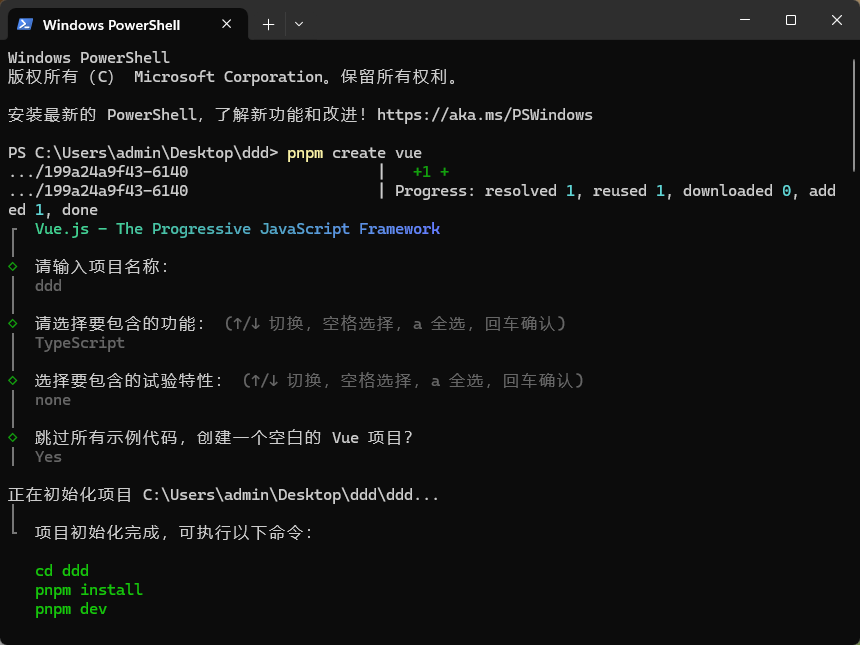
1.1 创建命令
pnpm create vue
1.2 初始化git
git init
git add .
git commit -m 'first'
2 语法检查:antfu组合eslint和prettier
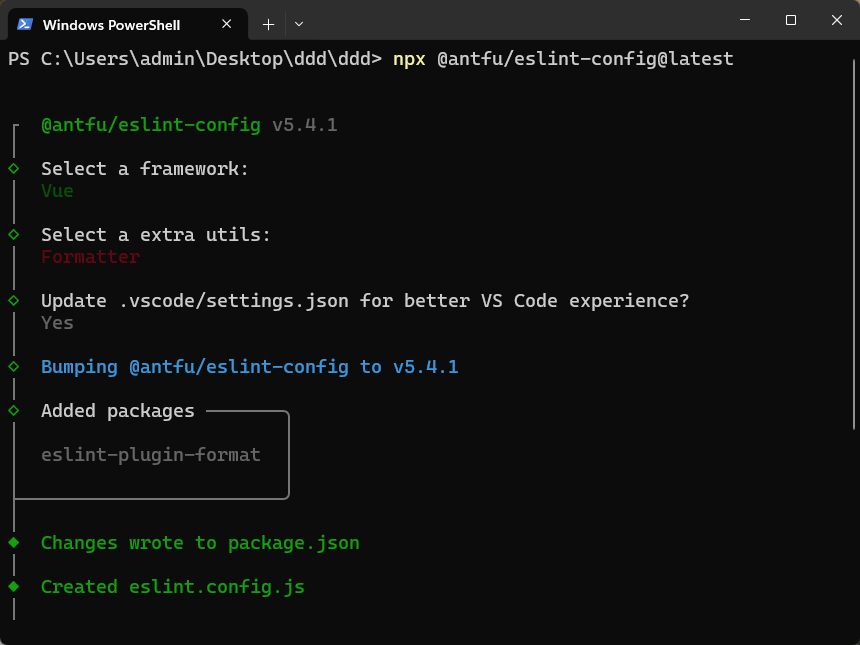
2.1 安装命令
npx @antfu/eslint-config@latest
2.2 安装依赖
pnpm i
2.3 在package.json中添加脚本
"lint": "eslint .",
"lint:fix": "eslint . --fix"
2.4 修改eslint配置文件
import antfu from '@antfu/eslint-config'

export default antfu({
  // 1. 基本配置
  // type: 'lib', // 表示当前项目是一个库(library),而不是应用(app)
  // 2. 代码风格配置(Stylistic)
  stylistic: true, // 或者你可以更加细粒度的设置
  // 3. 格式化工具
  formatters: true, // 使用外部格式化工具(如 Prettier)

  // 4. ts支持
  typescript: true, // 启用 TypeScript 支持

  // 5. vue支持
  // vue: true, // 或者你可以更加细粒度的设置
  vue: {
    overrides: {
      // 强制 Vue 文件的顺序为  <script> -> <template> -> <style>
      'vue/block-order': [
        'error',
        {
          order: ['script', 'template', 'style'],
        },
      ],
    },
  },

  // 6. 规则覆盖(Rules)
  /**
   * 规则 https://www.wenjiangs.com/docs/eslint,vue规则:https://eslint.vuejs.org/rules/
   * 主要有如下的设置规则,可以设置字符串也可以设置数字,两者效果一致
   */
  rules: {
    'eslint-comments/no-unlimited-disable': 'off',
    'ts/no-use-before-define': 'off',
    'style/no-mixed-operators': 'off',
    'no-console': 'warn',
    'ts/no-unused-expressions': 'off',
    'style/max-statements-per-line': 'off',
    'ts/prefer-namespace-keyword': 'off',
    'antfu/top-level-function': 'off',
    'node/prefer-global/process': 'off',
    'ts/consistent-type-definitions': 'off',
    'ts/ban-ts-comment': 'off',
    'vue/singleline-html-element-content-newline': 'off', // vue 标签强制换行
    // 关闭一些耗时的规则
    'import/no-cycle': 'off',
    'import/no-deprecated': 'off',
    'import/no-named-as-default': 'off',
    'prefer-promise-reject-errors': 'off',

  },

  // 7. 忽略文件(Ignores)
  // 9x版本 忽略文件这种配置方式 废弃掉eslintignore
  // 【注意:ignores 是 @antfu/eslint-config 的配置方式,替代了传统的 .eslintignore 文件】
  ignores: [
    '*.sh',
    'node_modules',
    '*.md',
    '*.woff',
    '*.ttf',
    '.vscode',
    '.idea',
    '/public',
    '/docs',
    '.husky',
    '.local',
    '/bin',
    'Dockerfile',
    '/dist',
    '/src/libs',
    'src/mock',
    '*.min.js',
    '/*.json',
  ],
  // 8. 其他配置
  // 关闭对 JSON 和 YAML 的支持
  // jsonc: false, // 关闭 JSON 支持
  // yaml: false, // 关闭 YAML 支持
  // isInEditor: false, // 保存删除未引入的代码
  // unocss: true, // unocss 检测&格式化 暂时注释 等配置了unocss再开放为true
})
3 语法检查:stylelint
3.1 安装命令
pnpm i -D postcss postcss-html stylelint stylelint-config-recess-order stylelint-config-standard
3.2 在package.json中添加脚本
"stylelint": "stylelint  \"**/*.{css,scss,less,vue,html}\"",
"stylelint:fix": "stylelint  \"**/*.{css,scss,less,vue,html}\" --fix"
3.3 修改.vscode/settings.json
  // Auto fix
  "editor.codeActionsOnSave": {
    "source.fixAll.eslint": "explicit",
    "source.organizeImports": "never",
    "source.fixAll.stylelint": "explicit"
  },

  // stylelint配置
  "stylelint.enable": true,
  // 关闭编辑器内置样式检查(避免与stylelint冲突)
  "css.validate": false,
  "less.validate": false,
  "scss.validate": false,
  "stylelint.validate": [
      "css",
      "less",
      "postcss",
      "scss",
      "sass",
      "vue"
  ],
3.4 创建stylelint配置文件
stylelint.config.js
export default {
  // 1. 基础配置,继承两个官方推荐的配置
  // stylelint-config-standard:Stylelint 的标准规则集,涵盖常见的 CSS 规范。
  // stylelint-config-recess-order:强制 CSS 属性按照特定顺序排列(如 position -> display -> margin 等),提高代码可读性。
  extends: ['stylelint-config-standard', 'stylelint-config-recess-order'],

  // 2. 文件解析器
  overrides: [
    {
      files: ['**/*.(html|vue)'],
      customSyntax: 'postcss-html', // 解析 CSS、HTML、Vue(如 Vue 的 <style> 块) 文件
    },
    // 选less可以注释scss
    // {
    //   files: ['*.less', '**/*.less'],
    //   customSyntax: 'postcss-less', // 解析 Less 文件
    // },
    // 选sass可以注释上面的less
    // {
    //   files: ['*.scss', '**/*.scss'],
    //   customSyntax: 'postcss-scss', // 解析 SCSS 文件
    //   rules: {
    //     'scss/percent-placeholder-pattern': null, // 关闭 SCSS 占位符检查
    //     'scss/at-mixin-pattern': null, // 关闭 SCSS Mixin 命名检查
    //   },
    // },
  ],

  // 3. 自定义规则
  rules: {
    // (1) 忽略某些规则: 这些规则被设为 null,表示不检查,通常是为了兼容项目特殊情况。
    'media-feature-range-notation': null, // 允许 `min-width: 768px` 或 `width >= 768px`
    'selector-not-notation': null, // 允许 `:not(.class)` 或 `:not(.class, .other)`
    'import-notation': null,
    'function-no-unknown': null, // 允许未知的 CSS 函数(如自定义函数)
    'selector-class-pattern': null, // 允许任意类名(默认强制 kebab-case)
    'no-empty-source': null, // 允许空样式文件
    'no-descending-specificity': null, // 允许低优先级选择器覆盖高优先级
    'font-family-no-missing-generic-family-keyword': null, // 允许 `font-family: Arial`(不强制加 `sans-serif`)
    'named-grid-areas-no-invalid': null, //  禁用对 CSS Grid 命名区域有效性的检查。

    // (2) 特殊伪类/伪元素处理: 允许 Vue 特有的伪类(如 :global)和伪元素(如 ::v-deep),避免误报。
    'selector-pseudo-class-no-unknown': [
      true,
      {
        ignorePseudoClasses: ['global', 'deep'], // 允许 `:global` 和 `:deep`(Vue Scoped CSS)
      },
    ],
    'selector-pseudo-element-no-unknown': [
      true,
      {
        ignorePseudoElements: ['v-deep', ':deep'], // 允许 `::v-deep` 和 `::deep`(Vue 深度选择器)
      },
    ],

    // (3) 忽略未知的 @ 规则: 允许 TailwindCSS、SCSS/Less 的特殊语法(如 @apply、@mixin)
    'at-rule-no-unknown': [
      true,
      {
        ignoreAtRules: [
          // TailwindCSS
          'tailwind',
          'apply',
          'variants',

          // SCSS/Less 控制语句
          'function',
          'if',
          'each',

          // SCSS Mixins
          'include',
          'mixin',
          'extend',

          'use',
          'responsive',
          'screen',

          'return',
        ],
      },
    ],

    // (4) 其他重要规则
    'unit-no-unknown': [true, { ignoreUnits: ['rpx'] }], // 允许微信小程序的 `rpx` 单位
    'rule-empty-line-before': [// 规则前空行(注释后除外)
      'always',
      {
        ignore: ['after-comment', 'first-nested'],
      },
    ],
    'property-no-vendor-prefix': [ // 允许 `-webkit-` 前缀
      true,
      {
        ignoreProperties: ['background-clip'],
      },
    ],
  },

  // 4. 忽略文件: 不检查 .js、.jsx、.tsx、.ts 文件(Stylelint 只处理样式文件)
  ignoreFiles: ['**/*.js', '**/*.jsx', '**/*.tsx', '**/*.ts'],
}
3.5 创建stylelint忽略文件
.stylelintignore
/dist/*
/public/*

node_modules
.husky
.vscode
.idea
*.sh
*.md

stats.html
4 提交检查:simple-git-hooks
4.1 安装命令
pnpm i simple-git-hooks -D
4.2 在package.json中最后添加如下代码
"simple-git-hooks": {
  "pre-commit": "pnpm lint-staged",
  "commit-msg": "node scripts/verifyCommit.js"
}
4.3 更新git hooks
npx simple-git-hooks
4.4 verifyCommit配置(也可使用commitlint)
scripts/verifyCommit.js
// @ts-check
import { readFileSync } from 'node:fs'
import path from 'node:path'
import chalk from 'chalk'

const msgPath = path.resolve('.git/COMMIT_EDITMSG')
const msg = readFileSync(msgPath, 'utf-8').trim()

const commitRE
  // eslint-disable-next-line regexp/no-unused-capturing-group
  = /^(revert: )?(feat|fix|docs|dx|style|refactor|perf|test|workflow|build|ci|chore|types|wip|release)(\(.+\))?: .{1,50}/

chalk.level = 1
if (!commitRE.test(msg)) {
  console.error(
    `  ${chalk.bgRed.white(' ERROR ')} ${chalk.red(
      'invalid commit message format.',
    )}\n\n${
      chalk.red(
        '  Proper commit message format is required for automated changelog generation. Examples:\n\n',
      )
    }    ${chalk.green('feat(compiler): add \'comments\' option')}\n`
    + `    ${chalk.green(
      'fix(v-model): handle events on blur (close #28)',
    )}\n\n${
      chalk.red('  See .github/commit-convention.md for more details.\n')}`,
  )
  process.exit(1)
}
4.5 安装chalk
pnpm add chalk -D
5 Lint-staged
5.1 安装命令
pnpm i lint-staged -D
5.2 配置文件
lint-staged.config.js
/**  @type {import('lint-staged').Config} */
export default {
  '*.{js,jsx,ts,tsx}': ['eslint --fix'],
  '*.json': ['eslint --fix'],
  '*.{scss,less,styl,html,vue}': ['eslint --fix', 'stylelint --fix --allow-empty-input'],
  '*.md': ['prettier --write'],
}
5.3 在package.json中配置脚本
"staged:fix": "lint-staged"
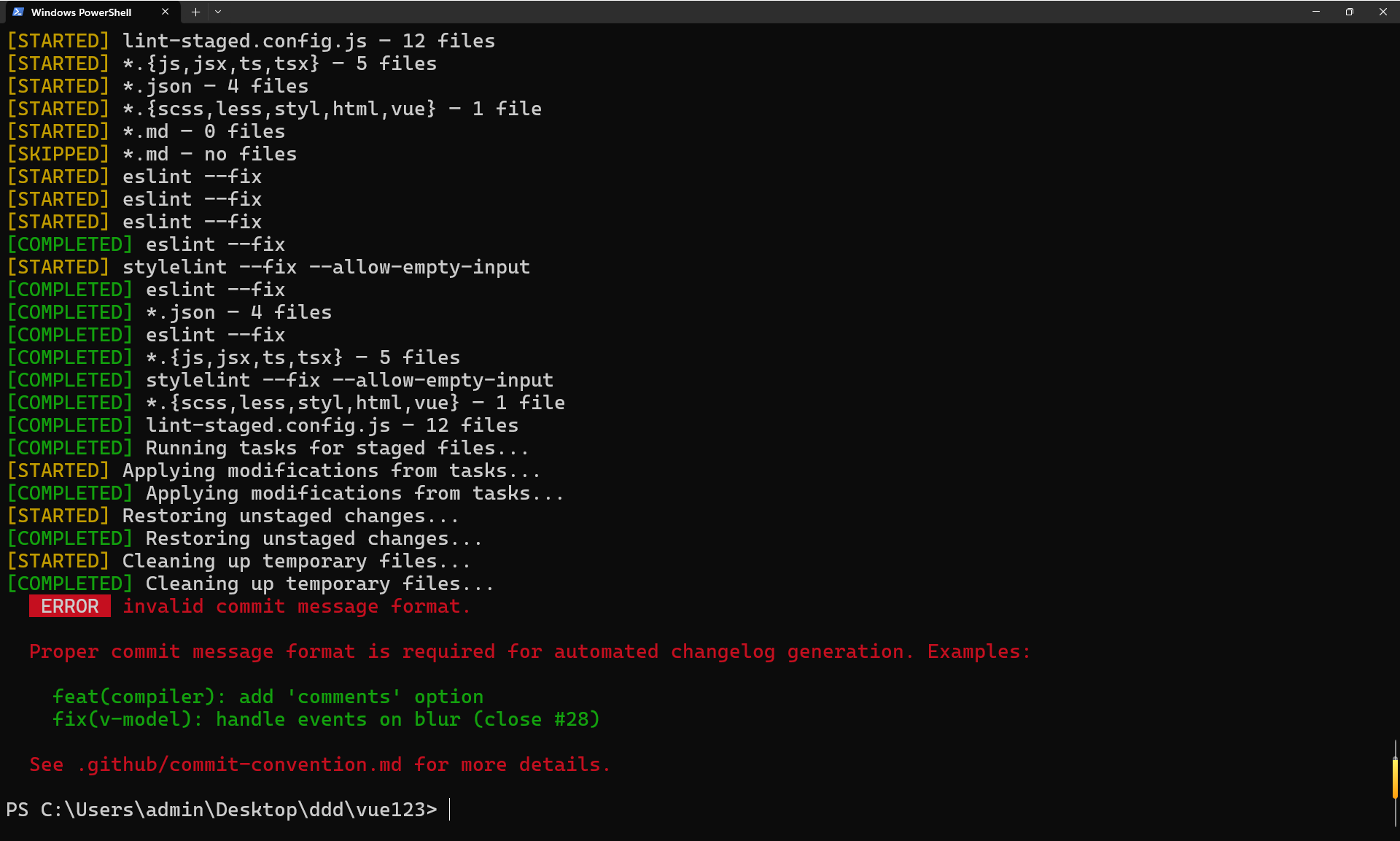
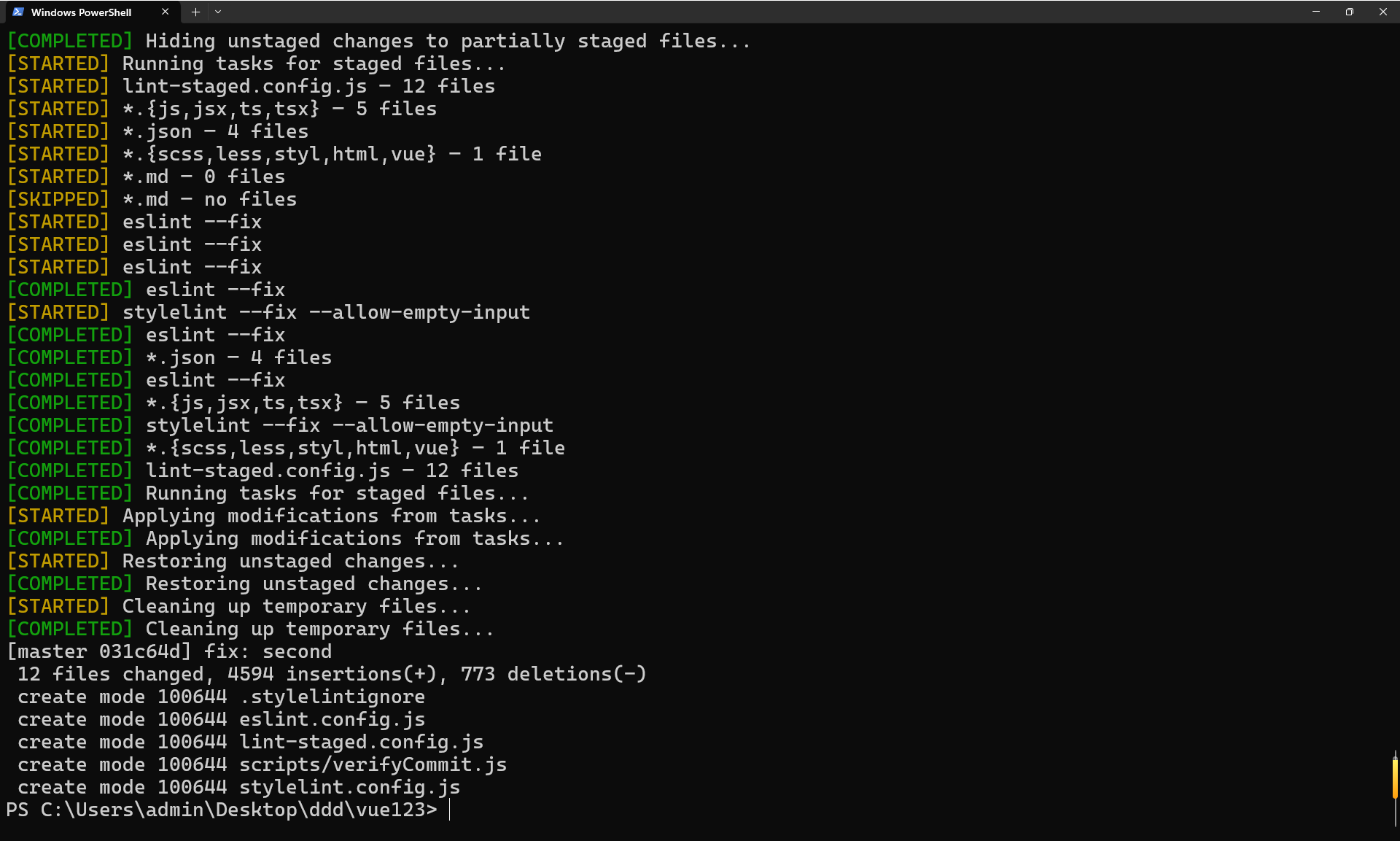
6 完毕,测试lint功能,提交lint功能
6.1 提交格式不对
6.2 提交完成
7 在项目中测试css
7.1 在项目中创建css文件
styles/variables.css
/* Variables */
:root {
  --color1: #45f3ff;
  --color3: #23242a;
  --color2: #1c1c1c;
}
styles/global.css
/* Global CSS */
* {
  box-sizing: border-box;
  padding: 0;
  margin: 0;
}

html,
body {
  height: 100%;
  background-color: purple;
}
styles/index.css
/* 引入 css 文件 */
@import './global.css';
@import './variables.css';
main.ts
import './styles/index.css'
7.2 vue文件中使用
App.vue
<script setup lang="ts">
// 动态修改CSS 变量
document.documentElement.style.setProperty('--color1', '#00f')
</script>

<template>
  <h1>You did it!</h1>
</template>

<style scoped>
h1 {
  color: var(--color1);
}
</style>

Agent 垂直技术社区,欢迎活跃、内容共建。
更多推荐


 16
16 0
0- 0


 已为社区贡献8条内容

所有评论(0)