AIGC(生成式AI)试用 38 -- 辅助测试 Browser-use, Playwright
AI浏览器应用:
Automate browser tasks in plain text. 以纯文本自动执行浏览器任务。
结合LLM,将基于浏览器的任务以Prompt形式输入,并调用Playwright的headless模式完成任务
Python版本:软件依赖关系较强,新版python匹配度低,建议使用 python3.12.X / python3.12.X版本,具体以实际要求为准
- Browser Use
- 官网:https://browser-use.com/ , Browser Use - The AI browser agent
Automate browser tasks in plain text. 以纯文本自动执行浏览器任务。
- Doc:Introduction - Browser Use
- 安装pip install browser-use- 使用
from browser_use import Agent from langchain_openai import ChatOpenAI from dotenv import load_dotenv import asyncio load_dotenv() async def main(): llm = ChatOpenAI(model="llama3.1:8b") # Refer: https://docs.browser-use.com/customize/agent/supported-models # LLM Recommendations: # Best accuracy: O3 # Fastest: llama4 on groq # Balanced: fast + cheap + clever: gemini-2.5-flash or gpt-4.1-mini # Required environment variables: .env # OPENAI_API_KEY= task = "search Browser-use on 百度" # 设置需要在Browser上完成的任务 agent = Agent(task=task, llm=llm) await agent.run() if __name__ == "__main__": asyncio.run(main()) >>> 建立连接 INFO [telemetry] Anonymized telemetry enabled. See https://docs.browser-use.com/development/telemetry for more information. INFO [agent] 🧠 Starting an agent with main_model=llama3.1:8b +tools +vision +memory, planner_model=None, extraction_model=llama3.1:8b ERROR [agent] ❌ LLM ChatOpenAI connection test failed. Check that OPENAI_API_KEY is set correctly in .env and that the LLM API account has sufficient funding. Request timed out. INFO [mem0.vector_stores.faiss] Loaded FAISS index from /tmp/mem0_1536_faiss/mem0.faiss with 0 vectors INFO [mem0.vector_stores.faiss] Loaded FAISS index from C:\Users\rolei\.mem0\migrations_faiss/mem0_migrations.faiss with 8 vectors INFO [mem0.vector_stores.faiss] Inserted 1 vectors into collection mem0_migrations INFO [agent] 🚀 Starting task: search Browser-use on 百度 INFO [agent] 📍 Step 1 ERROR [agent] ❌ Result failed 1/3 times: Connection error. INFO [agent] 📍 Step 1 >>> 访问失败 INFO [service] Using anonymized telemetry, see https://docs.browser-use.com/development/telemetry. INFO [Agent] 🧠 Starting a browser-use version 0.6.1 with model=gpt-4.1-mini INFO [Agent] [34m🚀 Task: search Browser-use on 百度[0m INFO [utils] 📦 Downloading uBlock Origin extension... WARNING [utils] ⚠️ Failed to setup uBlock Origin extension: Failed to download extension: <urlopen error [WinError 10060] 由于连接方在一段时间后没有正确答复或连接的主机没有反应,连接尝试失败。> INFO [utils] 📦 Downloading I still don't care about cookies extension... - PlayWright
- 官网:PlayWright for Python Fast and reliable end-to-end testing for modern web apps | Playwright Python
- Doc:Installation | Playwright Python
- 安装pip install playwright # install playwright playwright install # install browser driver # support browsers (chromium, firefox and webkit) playwright install chromium # only install chrome browser driver playwright install --force chrome- 执行
synchronous(同步)和
同步:发送请求 --> 等待返回 --> 再发送下一个请求,只能按顺序执行,出错后既退出
异步:发送请求 --> 不等待返回 --> 即可再发送下一个请求,可以不按顺序执行,只关注请求的执行
- 样例,synchronous(同步),asynchronous(异步)参考官方Docfrom playwright.sync_api import sync_playwright with sync_playwright() as p: # start playwright, with method(refer with open()) # or using Interactive mode (REPL) # 交互式模式(Read-Eval-Print Loop,简称REPL) # playwright = sync_playwright().start() browser = p.chromium.launch() # Chrome浏览器:chromium, firefox and webkit # default headless=True # headless mode,无头模式,不显示流览器界面,后台运行, page = browser.new_page() page.goto("https://www.baidu.com") # 访问网页 print(page.title()) # 输出网页标题 browser.close() # playwright.stop(), stop playwright if using start() >>> 百度一下,你就知道- API,参考 https://playwright.dev/python/docs/api
- Playwright命令playwright --help Usage: playwright [options] [command] Options: -V, --version output the version number -h, --help display help for command Commands: open [options] [url] open page in browser specified via -b, --browser codegen [options] [url] open page and generate code for user actions install [options] [browser...] ensure browsers necessary for this version of Playwright are installed uninstall [options] Removes browsers used by this installation of Playwright from the system (chromium, firefox, webkit, ffmpeg). This does not include branded channels. install-deps [options] [browser...] install dependencies necessary to run browsers (will ask for sudo permissions) cr [options] [url] open page in Chromium ff [options] [url] open page in Firefox wk [options] [url] open page in WebKit screenshot [options] <url> <filename> capture a page screenshot pdf [options] <url> <filename> save page as pdf run-server [options] show-trace [options] [trace...] show trace viewer help [command] display help for command- 脚本录制,参考 Generating tests | Playwright Python
> playwright codegen https://baidu.com -o test.py  # 启动脚本录制并输出到文件


C:\Python313\Scripts>playwright codegen --help
Usage: playwright codegen [options] [url]

open page and generate code for user actions

Options:
  -o, --output <file name>             saves the generated script to a file
  --target <language>                  language to generate, one of javascript, playwright-test, python, python-async,
                                       python-pytest, csharp, csharp-mstest, csharp-nunit, java, java-junit (default:
                                       "python")
  --test-id-attribute <attributeName>  use the specified attribute to generate data test ID selectors
  -b, --browser <browserType>          browser to use, one of cr, chromium, ff, firefox, wk, webkit (default:
                                       "chromium")
  --block-service-workers              block service workers
  --channel <channel>                  Chromium distribution channel, "chrome", "chrome-beta", "msedge-dev", etc
  --color-scheme <scheme>              emulate preferred color scheme, "light" or "dark"
  --device <deviceName>                emulate device, for example  "iPhone 11"
  --geolocation <coordinates>          specify geolocation coordinates, for example "37.819722,-122.478611"
  --ignore-https-errors                ignore https errors
  --load-storage <filename>            load context storage state from the file, previously saved with --save-storage
  --lang <language>                    specify language / locale, for example "en-GB"
  --proxy-server <proxy>               specify proxy server, for example "http://myproxy:3128" or
                                       "socks5://myproxy:8080"
  --proxy-bypass <bypass>              comma-separated domains to bypass proxy, for example
                                       ".com,chromium.org,.domain.com"
  --save-har <filename>                save HAR file with all network activity at the end
  --save-har-glob <glob pattern>       filter entries in the HAR by matching url against this glob pattern
  --save-storage <filename>            save context storage state at the end, for later use with --load-storage
  --timezone <time zone>               time zone to emulate, for example "Europe/Rome"
  --timeout <timeout>                  timeout for Playwright actions in milliseconds, no timeout by default
  --user-agent <ua string>             specify user agent string
  --user-data-dir <directory>          use the specified user data directory instead of a new context
  --viewport-size <size>               specify browser viewport size in pixels, for example "1280, 720"
  -h, --help                           display help for command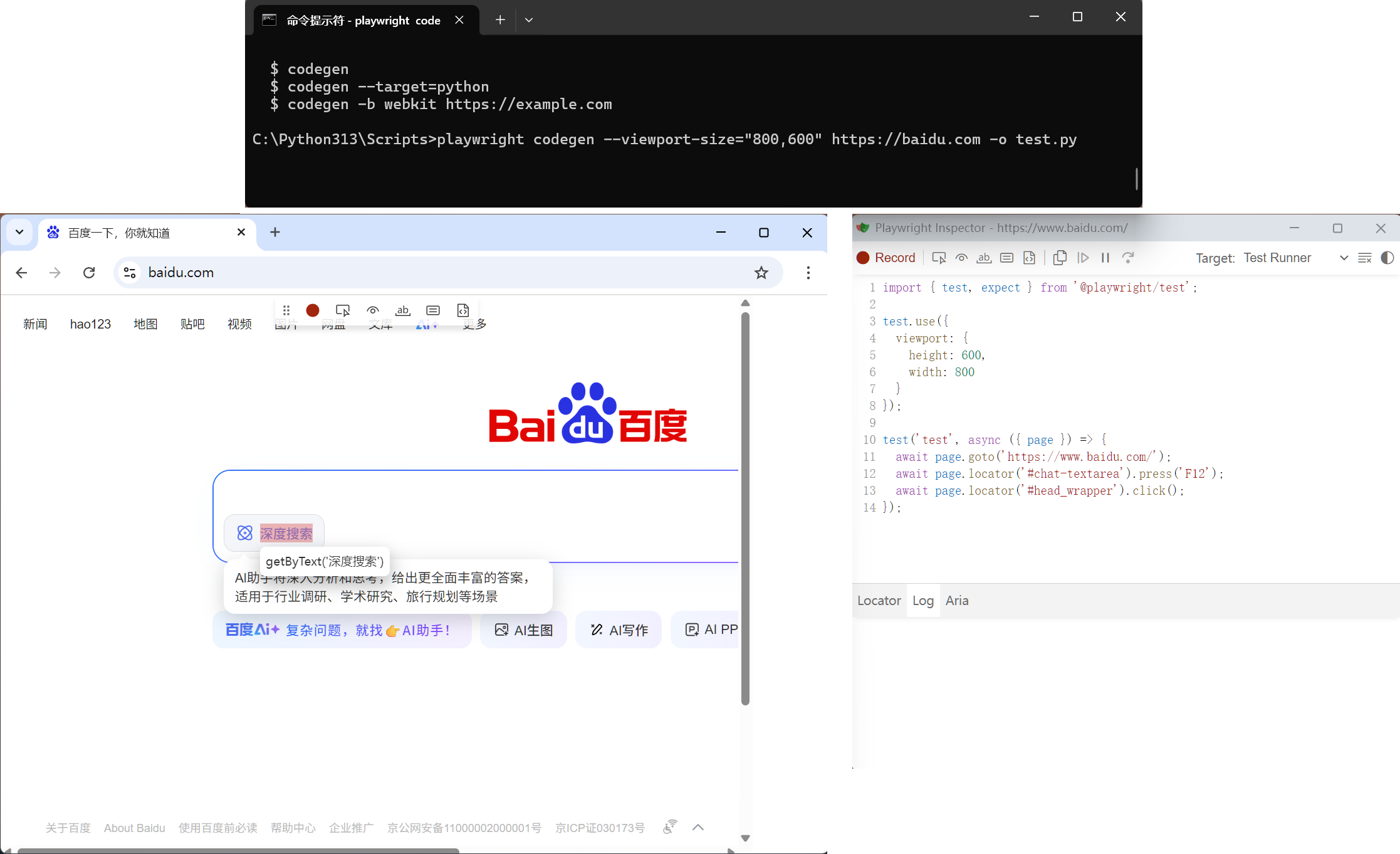
- lib: %Python_path%\Lib\site-packages\playwright\_impl
> _locator.py: selector locator,元素定位方法
* all_text_contents,selector识别不足,可以通过系统输出组件内所有selector,然后筛选
> _frame.py:FrameLocator
- Issue
> 缺少 Google API 密钥,因此 Chrominum 的部分功能将无法使用
快捷方式: %userprofile%\Local\ms-playwright\chromium-1181\chrome-win\chrome.exe --test-type=webdriver
- Browse Use Web-UI
- 安装
> python 3.11 / python 3.12
> https://github.com/browser-use/web-ui.git -- 下载zip文件后解压
> 安装依赖lib -- 注意下载lib与已下载lib版本之间的冲突
- 启动cd %Web-UI% # 进入Web-UI目录 pip install -r requirements.txt # install dependency lib ############## Web-UI folder list # . # .. # .dockerignore # .env # .env.example -- AI environment setting # .github # .gitignore # .vscode # assets # docker-compose.yml # Dockerfile # LICENSE # README.md # requirements.txt -- dependency lib # SECURITY.md # src # supervisord.conf # tests # webui.py -- run Web-UIpython webui.py --ip 127.0.0.1 --port 7788 >>> No module named 'gradio' # pip install gradio >>> No module named 'distutils' # Distutils2 is the packaging library that supersedes Distutils. Distutils, expired after Python 3.12,replace by setuptools # pip install distutils2 >> No module named 'ConfigParser' # pip install ConfigParser

Agent 垂直技术社区,欢迎活跃、内容共建。
更多推荐

 30
30 0
0- 0


 已为社区贡献20条内容

所有评论(0)