JavaScript 基础03
·
第五部分
01-对象的使用
1、对象属性没有顺序
2、属性和值用什么符号隔开?多个属性用什么隔开?
- 属性和值用:隔开
- 多个属性用,隔开
<script>
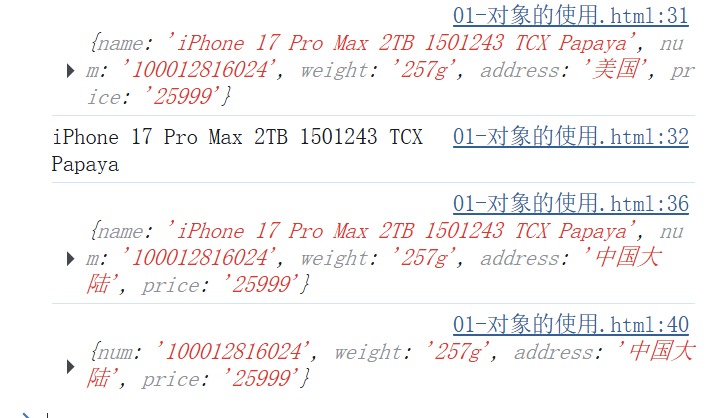
    let goods = {
        name : 'iPhone 17 Pro Max 2TB 1501243 TCX Papaya',
        num : '100012816024',
        weight : '257g',
        address : '美国'
    }
        //添加对象信息
        goods.price = '25999'
        console.log(goods)
        console.log(goods.name)  //打印对象指定信息

        //改
        goods.address = '中国大陆'
        console.log(goods)

        //删
        delete goods.name
        console.log(goods)

</script>
02-对象的方法
<script>
    let person = {
        name : '刘德华',
        sayHi : function () {
            document.write('hi~~~')
        },
        song : function () {
            console.log('恭喜发财')
        }
    }
    person.sayHi()
    person.song()
</script>
03-遍历对象
<script>
    let obj = {
        name : '小美',
        age : 18,
        gender : '女'
    }
    //遍历对象
    for (let k in obj){
        console.log(k) //所打印的值为加引号的属性值 'name' 'age' ;gender
        // k = '属性值'
        console.log(obj[k])
    }
</script>
04-遍历数组对象
<script>
    let students = [
        {name : '张三' , age : 23 , gender : '男' , hometown : '湖南'},
        {name : '李四' , age : 24 , gender : '女' , hometown : '湖北'},
        {name : '王五' , age : 25 , gender : '男' , hometown : '黑龙江'},
        {name : '李六' , age : 26 , gender : '男' , hometown : '新疆'}
    ]
    for (let i = 0; i < students.length; i++) {
        console.log(i)  //下标索引号
        console.log(students[i])  //数组元素

        //想要每个对象中的名字
        console.log(students[i].name);

    }
</script>
05-渲染学生页面表(综合案例)
<!DOCTYPE html>
<html lang="en">
<head>
    <meta charset="UTF-8">
    <meta name="viewport" content="width=device-width, initial-scale=1.0">
    <title>学生信息表</title>
    <style>
        table {
            width: 600px;
            text-align: center;
        }

        table,
        th,
        td {
            border: 1px solid #ccc;
            border-collapse: collapse;
        }

        caption {
            font-size: 18px;
            margin-bottom: 10px;
            font-weight: 700;
        }

        tr {
            height: 40px;
            cursor: pointer;
        }

        table tr:nth-child(1){
            background-color: #ddd;
        }

        table tr:not(:first-child):hover{
            background-color: #eee;
        }
    </style>
</head>
<body>
    <h2>学生信息</h2>
    <p>将数据渲染到页面中...</p>
    <table>
        <caption>学生列表</caption>
        <tr>
            <th>序号</th>
            <th>姓名</th>
            <th>年龄</th>
            <th>性别</th>
            <th>住址</th>
        </tr>
    <!-- script写到这里 -->
    <script>
        //准备数据
        let students = [
            {name : '张三' , age : 23 , gender : '男' , hometown : '湖南'},
            {name : '李四' , age : 24 , gender : '女' , hometown : '湖北'},
            {name : '王五' , age : 25 , gender : '男' , hometown : '黑龙江'},
            {name : '李六' , age : 26 , gender : '男' , hometown : '新疆'}
        ]
        //渲染页面
        for (let i = 0; i < students.length; i++) {
            document.write(`
                <tr>
                    <th>${i + 1}</th>
                    <th>${students[i].name}</th>
                    <th>${students[i].age}</th>
                    <th>${students[i].gender}</th>
                    <th>${students[i].hometown}</th>
                </tr>
            `)
        }
    </script>
    </table>
</body>
</html>
06-数学内置对象Math
<script>
    //属性
    console.log(Math.PI)

    console.log('--------ceil--------')

    //方法  ceil(向上取整)
    console.log(Math.ceil(1.49)) //2
    console.log(Math.ceil(1.51)) //2

    console.log('--------floor--------')


    //方法  floor(向上取整)
    //类似于parseInt() 取整函数 parseInt(1.2)  parseInt('12px')
    console.log(Math.floor(1.49)) //1
    console.log(Math.floor(1.51)) //1

    console.log('--------round--------')

    //四舍五入 round()
    console.log(Math.round(1.49)) //1
    console.log(Math.round(1.5)) //2
    console.log(Math.round(1.51)) //2
    console.log(Math.round(-1.49)) //-1
    console.log(Math.round(-1.5)) //-1
    console.log(Math.round(-1.51)) //-2

    console.log('--------max,min--------')

    //取最大值Math.max()
    console.log(Math.max(1,5,9,3,6))

    //取最小值Math.min()
    console.log(Math.min(1,5,9,3,6))

    console.log('------Math.pow(_,_)------')

    //求某个数的多少次方Math.pow(_,_)
    console.log(Math.pow(4,2)) //16
    console.log(Math.pow(2,3)) //8

    console.log('------Math.sqrt()------')

    //求某数的平方根Math.sqrt()
    console.log(Math.sqrt(16)) //4
    console.log(Math.sqrt(256)) //16

</script>
07-生成任意范围随机数
<script>
    //Math.random()随机数函数,返回一个0~1之间,并且包括0不包括1的随机小数,即[0,1)
    //1、如何生成0~10的随机数呢?
    //Math.floor(Math.random() * (10 + 1))

    //2、如何生成5~10的随机数呢?
    //Math.floor(Math.random() * (5 + 1)) + 5

    //3、如何生成N ~ M之间的随机数呢?
    //Math.floor(Math.random() * (M - N + 1)) + N

    //0 ~ 10之间的整数
    console.log(Math.floor(Math.random() * 11))

    //随机数组中的元素
    let arr = ['red','green','yellow','blue','black']
    let random = Math.floor(Math.random() * arr.length)
    //console.log(random) //0~4
    console.log(arr[random])

    //使用函数,生成N ~ M之间的随机数
    function getRandom(N , M){
        return Math.floor(Math.random() * (M - N + 1)) + N
    }
    console.log(getRandom(4,8))

 </script>
08-随机点名
<script>
    let uName = ['赵云','黄忠','关羽','张飞','马超','刘备','曹操']
    let random = Math.floor(Math.random() * uName.length)
    console.log(random)
    document.write(uName[random])

    //抽取一位人名之后讲其删除,以免重复
    //splice (起始位置(下标),删除几个元素)
    uName.splice(random,1)  //从抽取到的元素开始,往后删除一位
    console.log(uName)

</script>
09-猜数字游戏
<script>
    //1、随机生成一个数字1~10
    function getRandom(N , M){
        return Math.floor(Math.random() * (M - N + 1)) + N
    }
    let random = getRandom(1,10)
    console.log(random)

    //不断循环输入,直至才对结束程序
    while (true) {
        //2、用户输入一个值
        let number = +prompt('请输入您所猜的数字:')
        //3、判断输出
        if(number > random){
            alert('您猜大了')
        }else if(number < random){
            alert('您猜小了')
        }else{
            alert('猜对啦,恭喜你!!!')
            break //退出循环
        }
    }

</script>
10-猜数字游戏限定次数
<script>
    function getRandom(N , M){
        return Math.floor(Math.random() * (M - N + 1)) + N
    }
    let random = getRandom(1,10)
    console.log(random)

    //设定三次机会,三次没猜对直接退出
    let flag = true  //开关变量

    //在明确循环次数后,可使用for循环
    for (let i = 1; i <= 3; i++) {
        let number = +prompt('请输入1~10之间的一个数字:')
        if(number > random){
            alert('您猜大了')
        }else if(number < random){
            alert('您猜小了')
        }else{
            flag = false
            alert('猜对啦,恭喜你!!!')
            break //退出循环
        }
    }

    //判断次数条件写道for的外面去
    if(flag){
        alert('次数已经用完')
    }
</script>
11-随机颜色案例
<script>
    //1、自定义一个随机颜色函数
    function getRandomColor(flag = true) {
        if (flag) {
            //1.1如果是true 则返回#ffffff
            let str = '#'
            let arr = ['0','1','2','3','4','5','6','7','8','9','a','b','c','d','e','f']
            //利用for循环随机抽取6次,累加到str里面,拼接成#ffffff
            for(let i = 1; i <= 6; i++){
                //每次要随机从数组里面抽取一个
                //random是数组的索引号 是随机的
                let random = Math.floor(Math.random() * arr.length)
                //str = str + arr[random]
                str += arr[random]
            }
            return str
        }else{
            //如果是false 则返回rgb(255,255,255)
            let red = Math.floor(Math.random() * 256)
            let green = Math.floor(Math.random() * 256)
            let blue = Math.floor(Math.random() * 256)
            return `RGB(${red},${green},${blue})`
        }

    }
    //2、调用函数getRandomColor()
    console.log(getRandomColor(false))
    console.log(getRandomColor(true))

    //当默认参数设置为true,则在未声明值时自动显示十六进制
    console.log(getRandomColor())

</script>
12-随机颜色div
<!DOCTYPE html>
<html lang="en">
<head>
    <meta charset="UTF-8">
    <meta name="viewport" content="width=device-width, initial-scale=1.0">
    <title>随机颜色盒子</title>
    <style>
        div {
            width: 100px;
            height: 100px;
        }
    </style>
</head>
<body>
    <div></div>
    <script>
        //1、自定义一个随机颜色函数
        function getRandomColor(flag = true) {
            if (flag) {
                //1.1如果是true 则返回#ffffff
                let str = '#'
                let arr = ['0','1','2','3','4','5','6','7','8','9','a','b','c','d','e','f']
                //利用for循环随机抽取6次,累加到str里面,拼接成#ffffff
                for(let i = 1; i <= 6; i++){
                    //每次要随机从数组里面抽取一个
                    //random是数组的索引号 是随机的
                    let random = Math.floor(Math.random() * arr.length)
                    //str = str + arr[random]
                    str += arr[random]
                }
                return str
            }else{
                //如果是false 则返回rgb(255,255,255)
                let red = Math.floor(Math.random() * 256)
                let green = Math.floor(Math.random() * 256)
                let blue = Math.floor(Math.random() * 256)
                return `RGB(${red},${green},${blue})`
            }
        }

        const div = document.querySelector('div')
        div.style.backgroundColor = getRandomColor()
    </script>
</body>
</html>

Agent 垂直技术社区,欢迎活跃、内容共建。
更多推荐


 28
28 0
0- 0


 已为社区贡献2条内容

所有评论(0)