【项目实战 Day11】springboot + vue 苍穹外卖系统(Apache ECharts + 营业额统计优化 + 用户统计 + 订单统计 + 销量统计 完结)
·
目录
一、营业额统计模块
1、需求分析
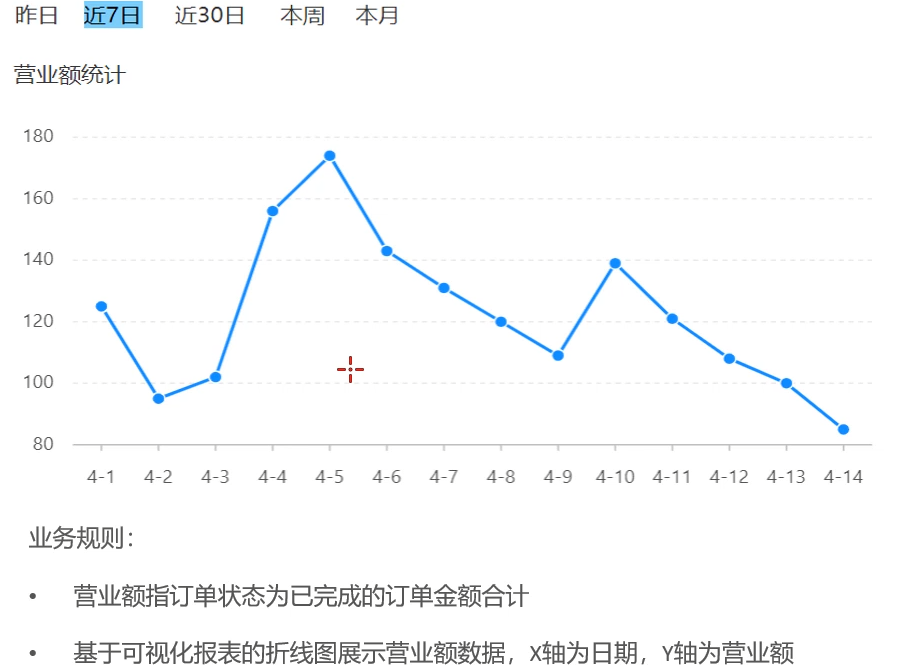
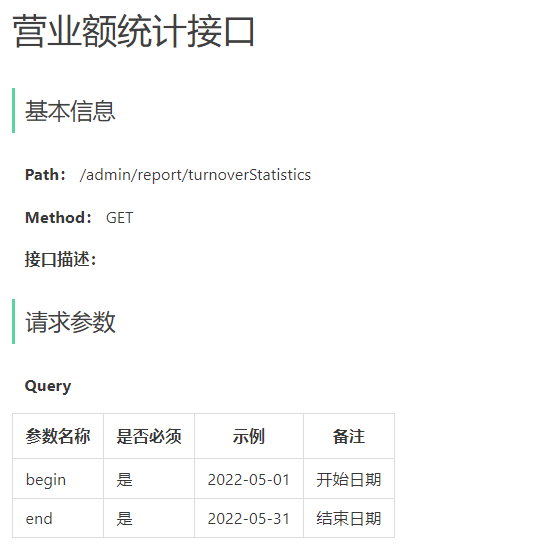
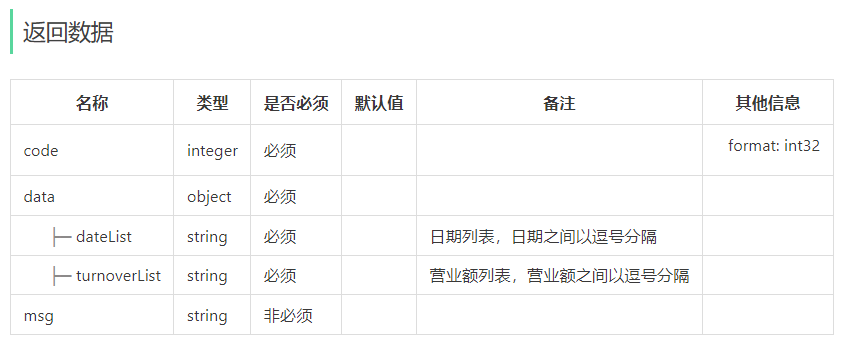
2、代码开发(原版 循环查数据库 写法)
【1】controller层
    /**
     * 营业额统计
     * @param begin
     * @param end
     * @return
     */
    @GetMapping("/turnoverStatistics")
    @ApiOperation("营业额统计")
    public Result<TurnoverReportVO> turnoverStatistics(
            @DateTimeFormat(pattern = "yyyy-MM-dd")LocalDate begin,
            @DateTimeFormat(pattern = "yyyy-MM-dd")LocalDate end){
        return Result.success(reportService.getTurnoverStatistics(begin,end));
    }
【2】service层
    /**
     * 营业额统计
     * @param begin
     * @param end
     * @return
     */
    public TurnoverReportVO getTurnoverStatistics(LocalDate begin, LocalDate end) {

        //当前集合用于存放【从begin到end范围内每一天的日期】
        List<LocalDate> dateList = new ArrayList<>();

        dateList.add(begin);
        while(!begin.equals(end)){
            begin = begin.plusDays(1);
            dateList.add(begin);
        }

        //当前集合用于存放【每天的营业额】
        List<Double> turnoverList = new ArrayList<>();

        //查询date日期对应的营业额【营业额指状态为”已完成“的订单】
        for (LocalDate date : dateList) {
            //把年月日转换为年月日时分秒
            LocalDateTime beginTime = LocalDateTime.of(date, LocalTime.MIN);
            LocalDateTime endTime = LocalDateTime.of(date, LocalTime.MAX);

            Map map = new HashMap<>();
            map.put("begin",beginTime);
            map.put("end",endTime);
            map.put("status", Orders.COMPLETED);

            Double turnover = orderMapper.sumByMap(map);
            //如果查不出营业额,显示为0.0
            turnover = turnover == null? 0.0:turnover;
            turnoverList.add(turnover);
        }

        return TurnoverReportVO.builder()
                .dateList(StringUtils.join(dateList,","))
                .turnoverList(StringUtils.join(turnoverList,","))
                .build();
    }
【3】mapper层
    /**
     * 根据动态条件统计营业额数据
     * @param map
     * @return
     */
    Double sumByMap(Map map);
【4】mybatis文件
<select id="sumByMap" resultType="java.lang.Double"> select sum(amount) from sky_take_out.orders <where> <if test="begin != null">and order_time > #{begin}</if> <if test="end != null">and order_time < #{end}</if> <if test="status != null">and status = #{status}</if> </where> </select>
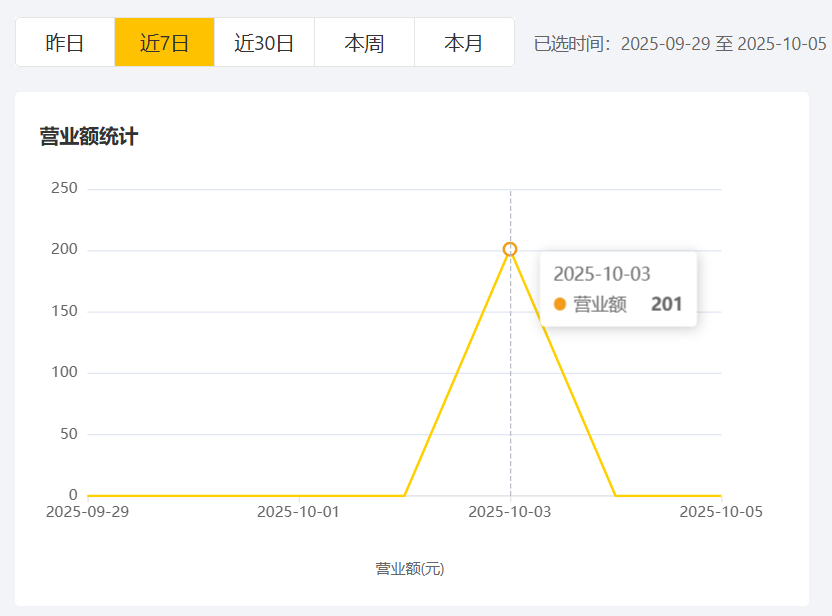
3、代码优化(只查询一次数据库)
【1】创建DTO
@Data
@Builder
@NoArgsConstructor
@AllArgsConstructor
public class DailyTurnoverDTO {
    private LocalDate orderDate;      // 对应数据库的order_date
    private Double dailyTurnover;     // 对应数据库的daily_turnover
}
【2】service层
- 获取日期列表(从begin到end的每一天)
- 从数据库中一次性查询【日期-营业额】对应关系列表(List<DTO>)
- 将数据库查询到的List转换为Map<日期,营业额>,方便后续查询
- 封装营业额列表,注意:如果当日营业额为null,则用0.0补充
- 封装数据(日期列表,营业额列表)
    /**
     * 营业额统计 - 只查询一次数据库版
     * @param begin
     * @param end
     * @return
     */
    public TurnoverReportVO getTurnoverStatistics(LocalDate begin, LocalDate end) {

        //1.获取日期列表 --从bengin到end的每一条
        List<LocalDate> dateList = generateDateList(begin,end);
        //----------------------------------------------------------------------

        //2.从数据库中一次性查询【日期-营业额】对应关系
        //把年月日转换为年月日时分秒
        LocalDateTime beginTime = LocalDateTime.of(begin, LocalTime.MIN);
        LocalDateTime endTime = LocalDateTime.of(end, LocalTime.MAX);

        Map map = new HashMap<>();
        map.put("begin",beginTime);
        map.put("end",endTime);
        map.put("status", Orders.COMPLETED);

        //查询【日期-营业额】这里只查询一次数据库
        List<DailyTurnoverDTO> dailyTurnover = orderMapper.sumByMapToDTO(map);
        //----------------------------------------------------------------------

        //3.将查出来的数据进行类型转换【DTO->Map】,方便后续查询
        Map<LocalDate,Double> dailyTurnoverMap = new HashMap<>();
        for (DailyTurnoverDTO dto : dailyTurnover) {
            dailyTurnoverMap.put(dto.getOrderDate(), dto.getDailyTurnover());
        }
        //----------------------------------------------------------------------

        //4.封装营业额列表,查漏补缺:如果这一天营业额为null,用0.0代替
        List<Double> turnoverList = new ArrayList<>();
        for (LocalDate date : dateList) {
            Double turnover = dailyTurnoverMap.get(date);
            turnoverList.add(turnover == null? 0.0:turnover);
        }
        //----------------------------------------------------------------------

        //5.封装数据
        return TurnoverReportVO.builder()
                .dateList(StringUtils.join(dateList,","))
                .turnoverList(StringUtils.join(turnoverList,","))
                .build();
    }

    /**
     * 生成日期列表
     * @param begin
     * @param end
     * @return
     */
    List<LocalDate> generateDateList(LocalDate begin,LocalDate end){
        //当前集合用于存放【从begin到end范围内每一天的日期】
        List<LocalDate> dateList = new ArrayList<>();

        dateList.add(begin);
        while(!begin.equals(end)){
            begin = begin.plusDays(1);
            dateList.add(begin);
        }
        return dateList;
    }
【3】mapper层
    /**
     * 根据动态条件统计营业额数据
     * @param map
     * @return
     */
    List<DailyTurnoverDTO> sumByMapToDTO(Map map);
【4】mybatis文件
注意命名与DTO属性名要保持一致
select
date(order_time) as orderDate,
sum(amount) as dailyTurnover
from sky_take_out.orders<select id="sumByMapToDTO" resultType="com.sky.dto.DailyTurnoverDTO"> select date(order_time) as orderDate, sum(amount) as dailyTurnover from sky_take_out.orders <where> <if test="begin != null">and order_time >= #{begin}</if> <if test="end != null">and order_time <= #{end}</if> <if test="status != null">and status = #{status}</if> </where> GROUP BY date(order_time) ORDER BY orderDate </select>
二、用户统计模块
1、需求分析
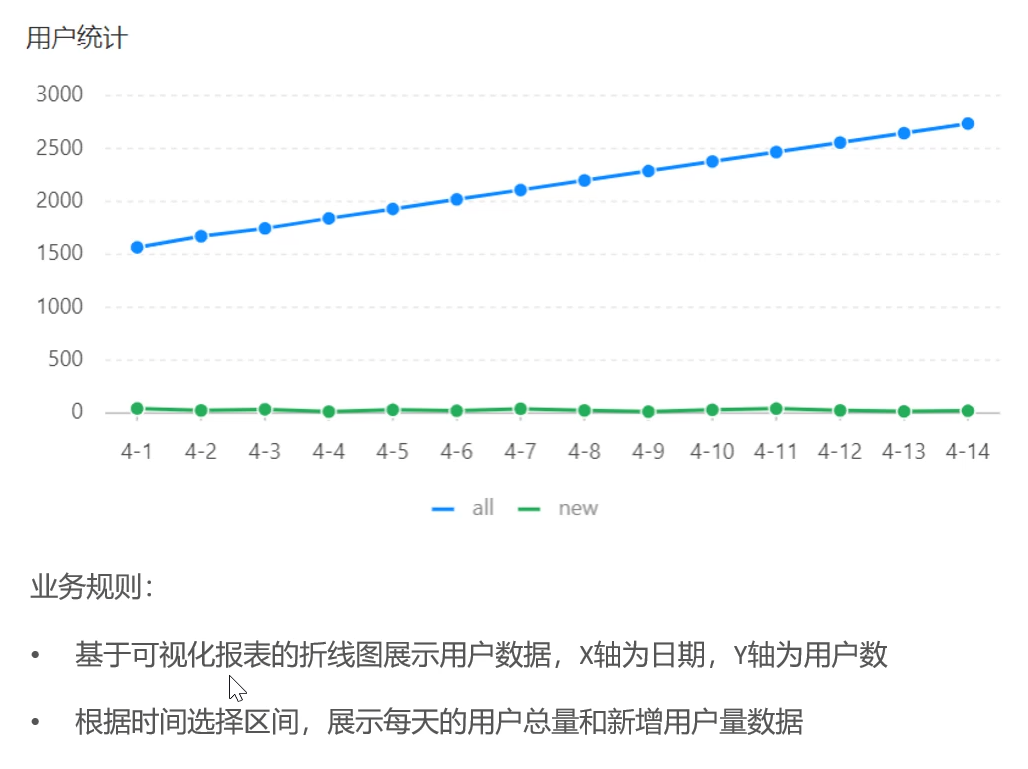
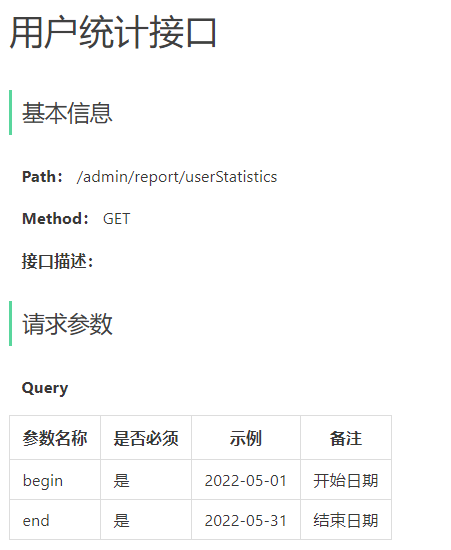
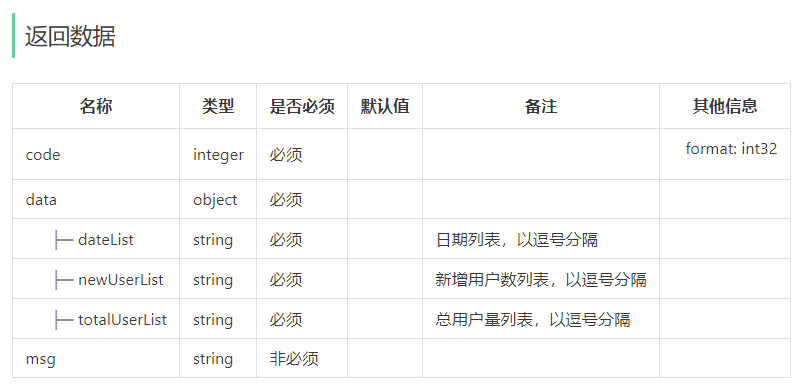
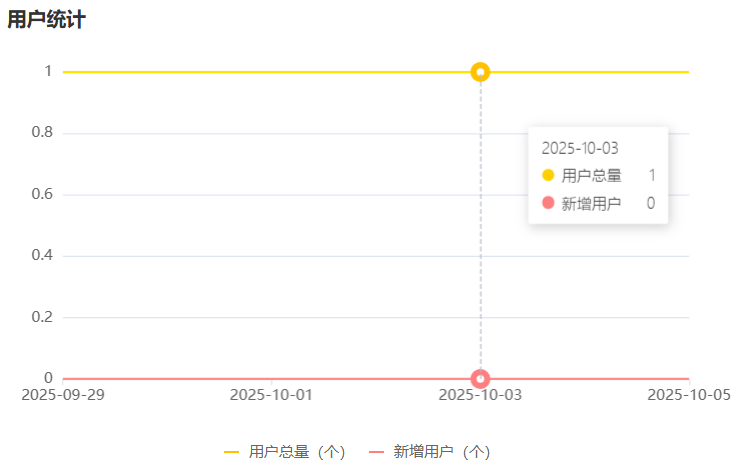
2、代码开发
【1】controller层
    /**
     * 用户统计
     * @param begin
     * @param end
     * @return
     */
    @GetMapping("/userStatistics")
    @ApiOperation("用户统计")
    public Result<UserReportVO> userStatistics(
            @DateTimeFormat(pattern = "yyyy-MM-dd")LocalDate begin,
            @DateTimeFormat(pattern = "yyyy-MM-dd")LocalDate end){
        return Result.success(reportService.getUserStatistics(begin,end));
    }
【2】service层
与营业额统计的业务逻辑类似
- 生成日期列表
- 通过循环每一个日期,查询对应的【用户总数】和【新增用户数】
- 其中用户总数只需要 create_time < end_time 即可
- 而每日新增用户数需要 begin_time < create_time < end_time
- 各自封装进【用户总数列表】和【新增用户数列表】
- 封装数据:(日期列表,用户总数列表、新增用户数列表)
/**
     * 统计指定区间内的用户统计
     * @param begin
     * @param end
     * @return
     */
    @Override
    public UserReportVO getUserStatistics(LocalDate begin, LocalDate end) {
        // 当前集合用于存放从begin到end范围内的每天的日期
        List<LocalDate> dateList = generateDateList(begin,end);

        // 存放新增用户数量 select count(id) from user where create_time > beginTime and create_time < endTime
        List<Integer> newUserList = new ArrayList<>();
        // 存放总用户数量 select count(id) from user where create_time < endTime
        List<Integer> totalUserList = new ArrayList<>();

        for (LocalDate date : dateList) {
            LocalDateTime beginTime = LocalDateTime.of(date, LocalTime.MIN);
            LocalDateTime endTime = LocalDateTime.of(date, LocalTime.MAX);

            Map map = new HashMap<>();
            map.put("end", endTime);
            // 查询总用户数量
            Integer totalUser = userMapper.countByMap(map);
            totalUserList.add(totalUser);

            map.put("begin", beginTime);
            // 查询新用户数量
            Integer newUser = userMapper.countByMap(map);
            newUserList.add(newUser);
        }

        // 封装返回结果
        return UserReportVO
                .builder()
                .dateList(StringUtils.join(dateList,","))
                .newUserList(StringUtils.join(newUserList, ","))
                .totalUserList(StringUtils.join(totalUserList, ","))
                .build();
    }

    /**
     * 生成日期列表
     * @param begin
     * @param end
     * @return
     */
    List<LocalDate> generateDateList(LocalDate begin,LocalDate end){
        //当前集合用于存放【从begin到end范围内每一天的日期】
        List<LocalDate> dateList = new ArrayList<>();

        dateList.add(begin);
        while(!begin.equals(end)){
            begin = begin.plusDays(1);
            dateList.add(begin);
        }
        return dateList;
    }
【3】mapper层
/**
 * 根据动态条件来统计用户数量
 * @param map
 * @return
 */
Integer countByMap(Map map);
【4】mybatis文件
<select id="countByMap" resultType="java.lang.Integer"> select count(id) from user <where> <if test="begin != null">and create_time > #{begin}</if> <if test="end != null">and create_time < #{end}</if> </where> </select>
三、订单统计模块
1、需求分析
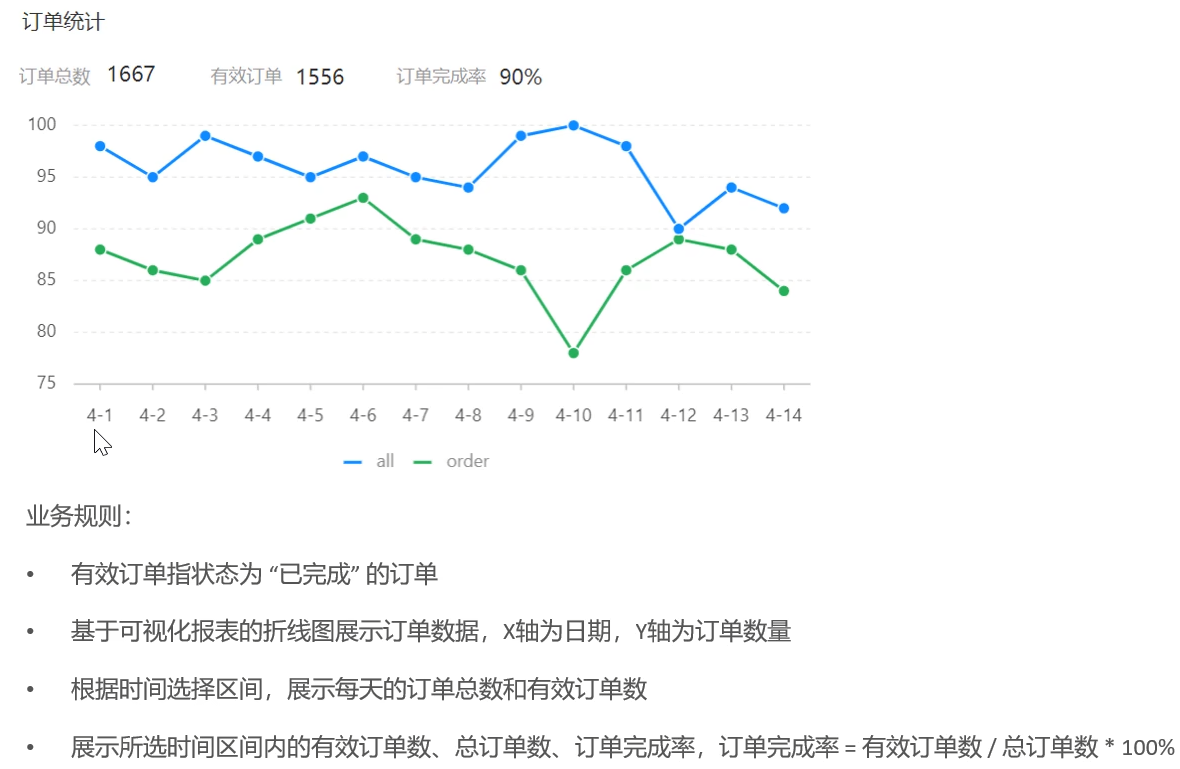
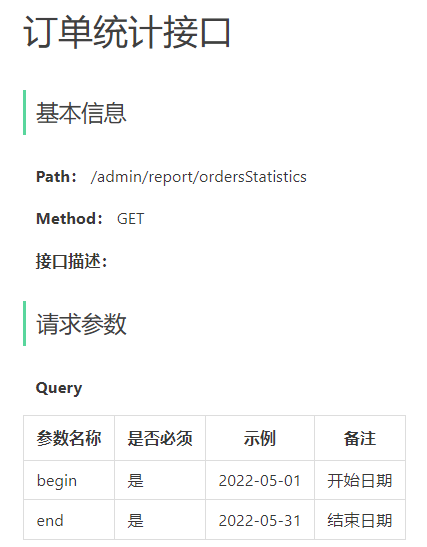
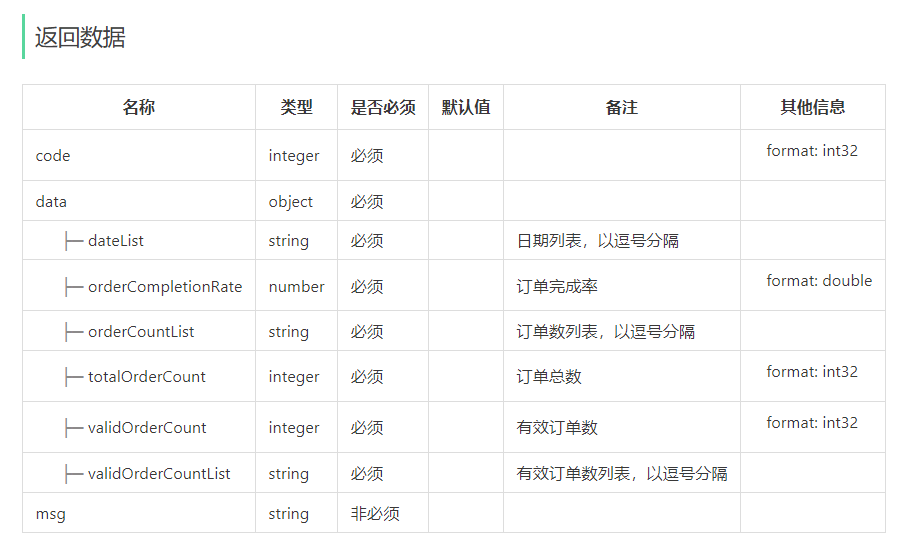
2、代码开发
【1】controller层
    /**
     * 订单统计
     * @param begin
     * @param end
     * @return
     */
    @GetMapping("/ordersStatistics")
    @ApiOperation("订单统计")
    public Result<OrderReportVO> ordersStatistics(
            @DateTimeFormat(pattern = "yyyy-MM-dd")LocalDate begin,
            @DateTimeFormat(pattern = "yyyy-MM-dd")LocalDate end){
        return Result.success(reportService.getOrderStatistics(begin,end));
    }
【2】service层
- 获取日期列表
- 循环日期,条件查询每一天的订单总数和有效订单数,并存入对应【订单总数列表】和【有效订单数列表】
- 将【订单总数列表】和【有效订单数列表】的List数据流化,获得该时间段内的订单总数和有效订单总数
- 计算订单完成率 = 有效订单数 / 订单总数(注意:订单总数不能是0!)
- 封装VO数据返回
    /**
     * 订单统计
     * @param begin
     * @param end
     * @return
     */
    public OrderReportVO getOrderStatistics(LocalDate begin, LocalDate end) {
        List<LocalDate> dateList = generateDateList(begin,end);

        //存放订单总数和有效订单数
        List<Integer> orderCountList = new ArrayList<>();
        List<Integer> validOrderCountList = new ArrayList<>();

        //查询每一天的订单总数和有效订单数
        for (LocalDate date : dateList) {
            LocalDateTime beginTime = LocalDateTime.of(date, LocalTime.MIN);
            LocalDateTime endTime = LocalDateTime.of(date, LocalTime.MAX);

            Integer orderCount = getOrderCount(beginTime,endTime,null);
            Integer validOrderCount = getOrderCount(beginTime,endTime,Orders.COMPLETED);

            orderCountList.add(orderCount);
            validOrderCountList.add(validOrderCount);
        }

        //计算时间区间内的订单总数和订单数
        Integer totalOrderCount = orderCountList.stream().reduce(Integer::sum).get();
        Integer validOrderCount = validOrderCountList.stream().reduce(Integer::sum).get();

        //计算订单完成率
        Double completionRate = 0.0;
        if(totalOrderCount != 0){
            completionRate = validOrderCount.doubleValue() / totalOrderCount;
        }

        return OrderReportVO.builder()
                .dateList(StringUtils.join(dateList,","))
                .orderCountList(StringUtils.join(orderCountList, ","))
                .validOrderCountList(StringUtils.join(validOrderCountList, ","))
                .totalOrderCount(totalOrderCount)
                .validOrderCount(validOrderCount)
                .orderCompletionRate(completionRate)
                .build();
    }


    /**
     * 根据条件统计订单数量
     * @param begin
     * @param end
     * @param status
     * @return
     */
    Integer getOrderCount(LocalDateTime begin,LocalDateTime end,Integer status){
        Map map = new HashMap<>();
        map.put("begin",begin);
        map.put("end",end);
        map.put("status",status);

        return orderMapper.countByMap(map);
    }
【3】mapper层
    /**
     * 根据条件统计订单数量
     * @param map
     * @return
     */
    Integer countByMap(Map map);
【4】mybatis文件
<select id="countByMap" resultType="java.lang.Integer"> select count(id) from sky_take_out.orders <where> <if test="begin != null">and order_time > #{begin}</if> <if test="end != null">and order_time < #{end}</if> <if test="status != null">and status = #{status}</if> </where> </select>
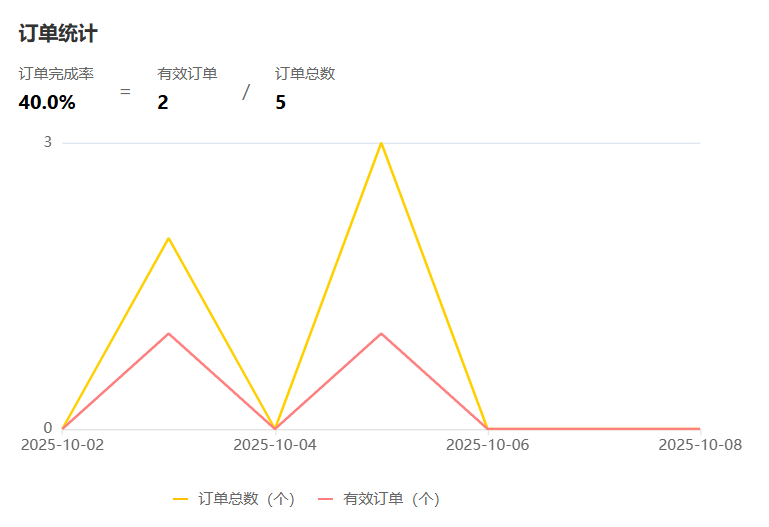
四、销量排名统计模块
1、需求分析
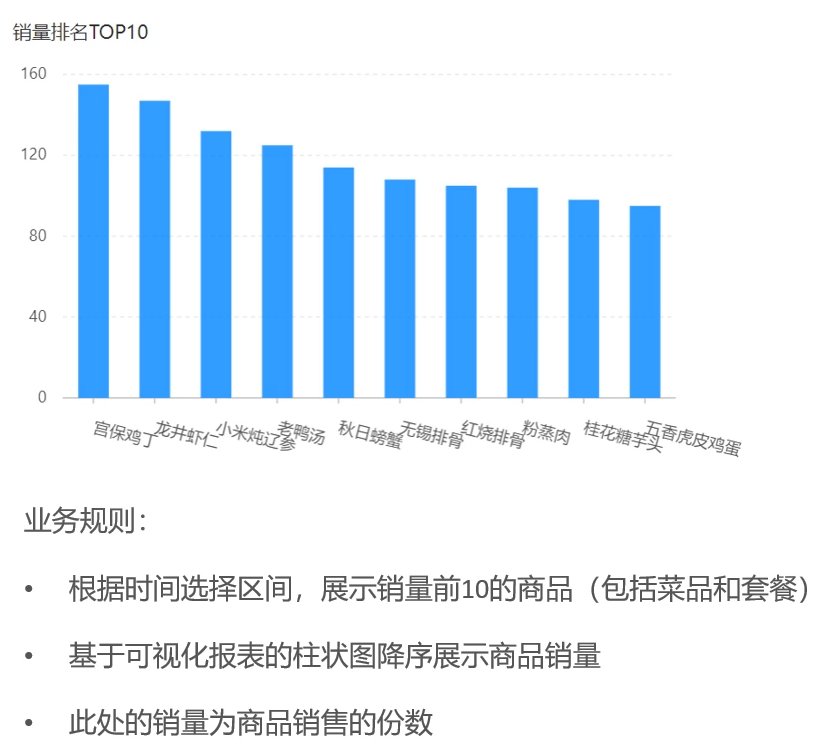
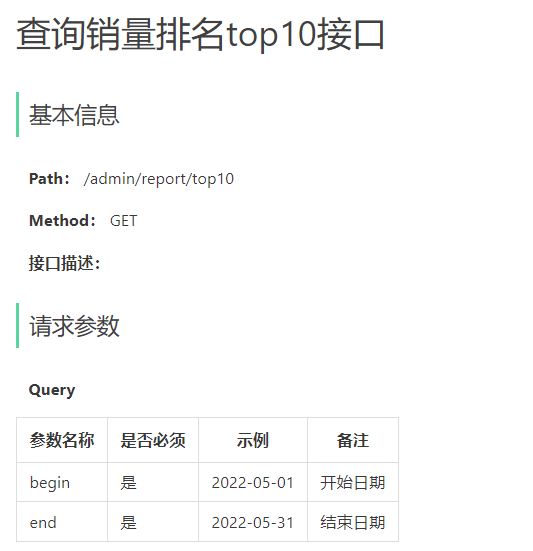
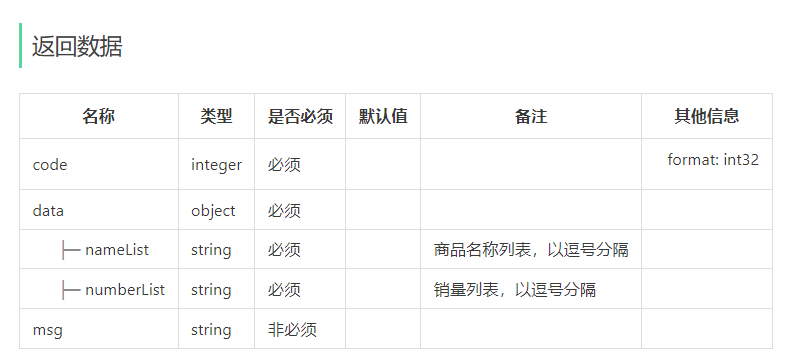
2、代码开发
【1】controller层
    /**
     * 销量统计
     * @param begin
     * @param end
     * @return
     */
    @GetMapping("/top10")
    @ApiOperation("销量统计")
    public Result<SalesTop10ReportVO> salesTop10(
            @DateTimeFormat(pattern = "yyyy-MM-dd")LocalDate begin,
            @DateTimeFormat(pattern = "yyyy-MM-dd")LocalDate end){
        return Result.success(reportService.getSalesTop10(begin,end));
    }
【2】service层
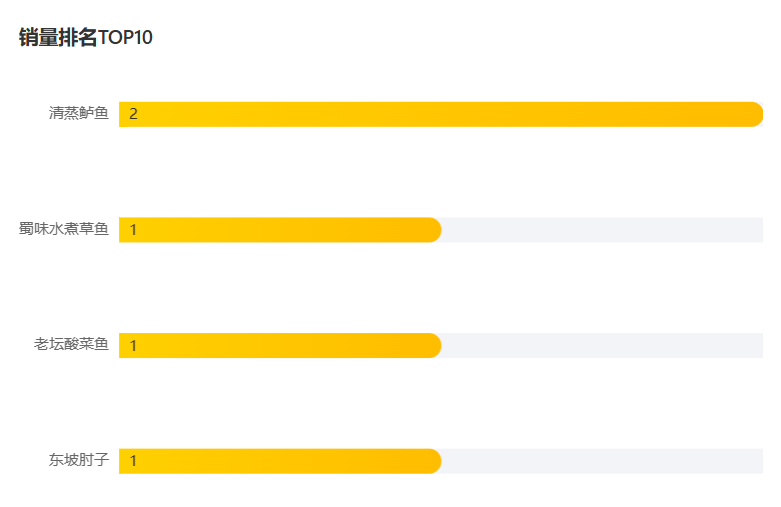
- 统计top10的菜品即关联【菜品表】和【菜品明细表】,附上条件【订单状态为已完成】【起止时间在范围内】,取前10条
- 先转换起止时间(年月日→年月日时分秒)
- 通过mapper层查询符合条件的菜品DTO列表
- 将List转化为数据流,并分别取出【菜名】和【数量】生成列表,再把列表生成字符串nameList和numberList
- 封装VO返回
    /**
     * 销量统计
     * @param begin
     * @param end
     * @return
     */
    public SalesTop10ReportVO getSalesTop10(LocalDate begin, LocalDate end) {
        LocalDateTime beginTime = LocalDateTime.of(begin,LocalTime.MIN);
        LocalDateTime endTime = LocalDateTime.of(end,LocalTime.MAX);

        List<GoodsSalesDTO> salesTop10 = orderMapper.getSalesTop10(beginTime,endTime);

        /**
         * salesTop10.stream() - 将salesTop10列表转换为Stream流
         *
         * .map(GoodsSalesDTO::getName) - 提取每个GoodsSalesDTO对象的name属性
         *
         * 相当于将List<GoodsSalesDTO>转换为List<String>
         *
         * .collect(Collectors.toList()) - 将流收集回List集合
         */
        List<String> names = salesTop10.stream().map(GoodsSalesDTO::getName).collect(Collectors.toList());
        String nameList = StringUtils.join(names,",");

        List<Integer> numbers = salesTop10.stream().map(GoodsSalesDTO::getNumber).collect(Collectors.toList());
        String numberList = StringUtils.join(numbers,",");

        return SalesTop10ReportVO
                .builder()
                .nameList(nameList)
                .numberList(numberList)
                .build();
    }
【3】mapper层
    /**
     * 获取销量前10的菜品及套餐
     * @param begin
     * @param end
     * @return
     */
    List<GoodsSalesDTO> getSalesTop10(LocalDateTime begin, LocalDateTime end);
【4】mybatis文件
<select id="getSalesTop10" resultType="com.sky.dto.GoodsSalesDTO"> select od.name,sum(od.number) as number from sky_take_out.orders o,sky_take_out.order_detail od where od.order_id = o.id and o.status = 5 <if test="begin != null">and o.order_time > #{begin}</if> <if test="end != null">and o.order_time < #{end}</if> group by od.name order by number desc limit 0,10 #取前10条 </select>

Agent 垂直技术社区,欢迎活跃、内容共建。
更多推荐

 11
11 0
0- 0


 已为社区贡献4条内容

所有评论(0)