uniapp tab切换及tab锚点效果(wx小程序及H5端)
·
1. uniapp tab切换及tab锚点效果(wx小程序及H5端)
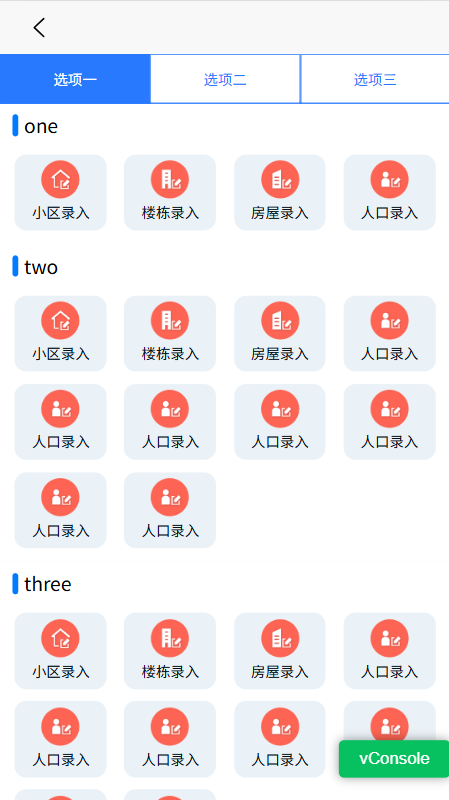
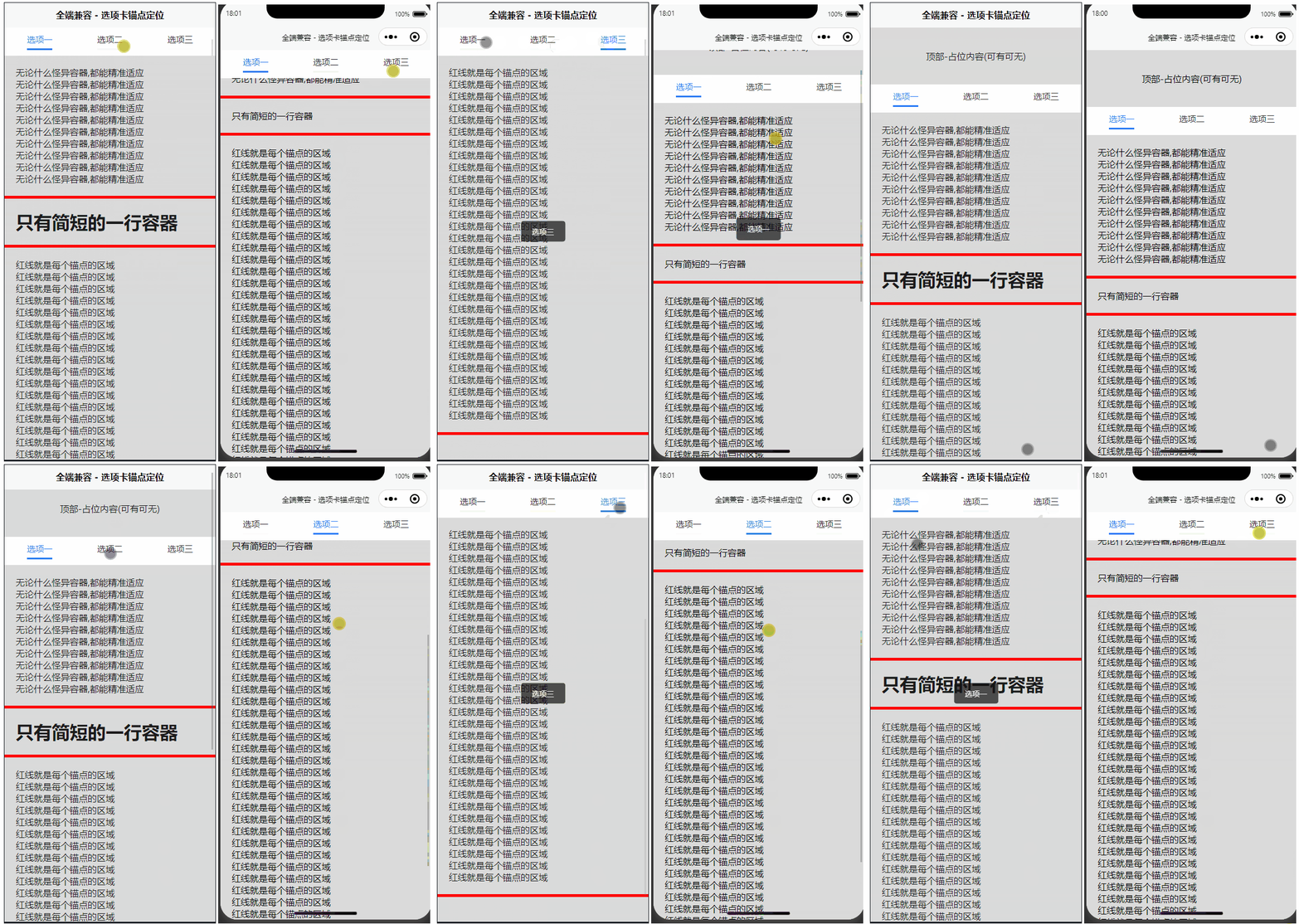
1.1. 示例源码
1.1.1. 在 components 文件夹下,新建 tab-anchor.vue 文件,一键复制如下代码。
<!-- 可根据现有需求,"适当"更改组件源码! -->

<template>
	<view :id="'luBarTabNav'+barId" class="lu-bar-tab-nav">
		<view v-if="!!barFixed" id="luTabFixed" class="lu-bar-tab lu-bar-tab-fixed" :style="{ top: barTopStyles,height:barHeightStyles,display:barShowStyles }">
			<view class="lu-tab-item" v-for="(item,index) in tabList" :key="index"
			:class="[selectedIndex==index? 'lu-active' : '',!!iconShow? 'lu-icon-show' : '']"
			:style="selectedIndex==index?tabActiveStyles:tabStyles"
			@tap="_scrollToTarget(index, item)">
				<view v-if="!!iconShow" class="lu-tab-icon"
					:class="selectedIndex==index?item.selectedIconClass:item.iconClass"
					:style="selectedIndex==index?(!!item.selectedIconImage?'backgroundImage:url('+item.selectedIconImage+')':''):(!!item.iconImage?'backgroundImage:url('+item.iconImage+')':'')">
				</view>
				<view
				:class="selectedIndex==index? 'lu-tab-text lu-tab-text-active' : 'lu-tab-text'">
					{{item.text}}
				</view>
			</view>
		</view>
		<view id="luTabStatic" class="lu-bar-tab lu-bar-tab-static" :style="{height:barHeightStyles}">
			<view class="lu-tab-item" v-for="(item,index) in tabList" :key="index"
			:class="[selectedIndex==index? 'lu-active' : '',!!iconShow? 'lu-icon-show' : '']"
			:style="selectedIndex==index?tabActiveStyles:tabStyles"
			@tap="_scrollToTarget(index, item)">
				<view v-if="!!iconShow" class="lu-tab-icon"
					:class="selectedIndex==index?item.selectedIconClass:item.iconClass"
					:style="selectedIndex==index?(!!item.selectedIconImage?'backgroundImage:url('+item.selectedIconImage+')':''):(!!item.iconImage?'backgroundImage:url('+item.iconImage+')':'')">
				</view>
				<view
				:class="selectedIndex==index? 'lu-tab-text lu-tab-text-active' : 'lu-tab-text'">
					{{item.text}}
				</view>
			</view>
		</view>
		<view class="lu-tab-content"><slot></slot></view>
	</view>
</template>

<script>
	export default {
		props: {
			barFixed:{//选项卡是否启用浮动功能(可选)
				type:Boolean,
				default:true
			},
			iconShow:{//是否启用选项卡图标(可选)
				type:Boolean,
				default:false
			},
			transitionShow:{
				type:Boolean,
				default:false
			},
			barHeight:{
				type:[String,Number],
				default:44
			},
			barTop:{
				type:[String,Number],
				default:0
			},
			barId:{
				type:[String,Number],
				default:0
			},
			tabList: {
				type:Array,
				default:function () {
					return []
				}
			}

		},
		data() {
			return {
				barShow:false,
				selectedIndex:0,
			};
		},
		computed:{
			tabStyles:function () {
				return (!!this.color?'color:'+this.color+';':'')+(!!this.backgroundColor?'backgroundColor:'+this.backgroundColor+';':'');
			},
			tabActiveStyles:function () {
				return (!!this.selectedColor?'color:'+this.selectedColor+';':'')+(!!this.selectedBackgroundColor?'backgroundColor:'+this.selectedBackgroundColor+';':'');
			},
			barTopStyles:function () {
				// #ifndef H5
					return 'calc('+this.barTop+'px);';
				// #endif
				// #ifdef H5
					return 'calc('+this.barTop+'px + var(--window-top));';
				// #endif
			},
			barHeightStyles:function () {
				return this.barHeight?this.barHeight+'px':'44px';
			},
			barShowStyles:function () {
				return !this.barShow?'none':'';
			},
		},
		methods: {
			_barInit:async function (index){
				let navTargetTop = [];
				let duration = 0;
				let viewScrollTop = 0;
				let viewHeight = 0;
				for (let i = 0,len=this.tabList.length; i < len; i++) {
					navTargetTop[i]= await this._queryMultipleNodes(this.tabList[i]["navTarget"]).then(res => {
						let navTarget = res[0],
							viewPort = res[1];
						viewHeight = viewPort.height;
						viewScrollTop = viewPort.scrollTop;
						const scrollTop = parseInt(navTarget.top) + viewPort.scrollTop - this.barTop - this.barHeight;
						return scrollTop;
					});
				}
				if (!!this.transitionShow) {
					duration = 200;
				}
				return {
					navTargetTop:navTargetTop,
					duration:duration,
					viewHeight:viewHeight,
					viewScrollTop:viewScrollTop
				};
			},
			_pageScroll:async function(i){
				const elment = await this._barInit(i);
				let scrollTop = elment["navTargetTop"][i];
				let duration = elment["duration"];
				let viewHeight = elment["viewHeight"];
				let viewScrollTop = elment["viewScrollTop"];
				if (Math.abs(scrollTop-viewScrollTop)>viewHeight) {
					if (scrollTop>viewScrollTop) {
						await uni.pageScrollTo({
							scrollTop:(scrollTop-viewHeight),
							duration:0
						});
					}else{
						await uni.pageScrollTo({
							scrollTop:(scrollTop+viewHeight),
							duration:0
						});
					}
				}
				await uni.pageScrollTo({
					scrollTop:(scrollTop+1),
					duration:duration
				});
				// #ifndef H5
				const view = await this._queryMultipleNodes();
				viewScrollTop = view[0].scrollTop;
				if (scrollTop>viewScrollTop&&duration!==0) {
					uni.pageScrollTo({
						scrollTop:(scrollTop+1),
						duration: 0
					})
				}
				// #endif
			},
			_scrollToTarget:function(i, item) {
				this._pageScroll(i);
				// 通知父组件(把行数据传过去)
				// console.log(item)
				this.$emit('clickTabs', item)
			},
			_queryMultipleNodes:function (e,notThis) {
				return new Promise((resolve, reject) => {
					let view = uni.createSelectorQuery();
					if (!!notThis) {
						view.in(this);
					}
					if (!!e) {
						view.select(e).boundingClientRect();
					}
					view.selectViewport().fields({size: true,scrollOffset: true});
					view.exec(function(res) {
						resolve(res);
					});

				});
			},
			_showBarFixed:function () {
				this._queryMultipleNodes("#luTabStatic",true).then(res => {
					let tabNav = res[0];
					if (tabNav.top<=this.barTop) {
						this.barShow=true;
					}else{
						this.barShow=false;
					}
				});
			},
			_selectedTab:function (y) {
				this._barInit().then((res)=>{
					let itemIndex = 0;
					for (let i = 0,len=res["navTargetTop"].length; i < len; i++) {
						if (y >=res["navTargetTop"][i]) {
							itemIndex = i;
						}
					}
					this.selectedIndex = itemIndex;
				});
				if (!!this.barFixed) {
					this._showBarFixed();
				}
			}
		}
	};
</script>

<style lang="scss" >
	lu-bar-tab-nav{
		position:relative;
		width: 100%;
	}
	.lu-bar-tab-nav{
		position:relative;
		width: 100%;
		.lu-bar-tab{
			width: 100%;
			display: flex;
			flex-flow: row wrap;
			justify-content: space-around;
			align-items:center;
			// 选项卡背景颜色
			background-color: #fff;
			height: 44px;
			.lu-tab-item{
				//默认状态
				position: relative;
				flex: 1 1 auto;
				text-align: center;
				color: #333;
				height: 100%;
				font-size: 15px;
				display: flex;
				flex-flow: column nowrap;
				justify-content: center;
				align-items:center;
				// &::before{
				// 	position: absolute;
				// 	top: calc(50% - 15px);
				// 	left: 0px;
				// 	content: " ";
				// 	width: 1px;
				// 	height: 30px;
				// 	background-color: #eee;
				// }
				&:first-child::before{
					display: none;
				}
				.lu-tab-icon{
					font-size: inherit;
					color: inherit;
				}
				// 选项卡默认样式
				.lu-tab-text{
					font-size: inherit;
					color: inherit;
					// border: 1px solid red;
					padding-bottom: 6px;
					// 加个默认白色,防止高度不统一
					border-bottom: 3px solid #fff;
				}
				// 激活的选项卡-下划线
				.lu-tab-text-active {
					border-bottom: 3px solid #2979ff;
				}
				// 显示图标
				&.lu-icon-show{
					.lu-tab-icon{
						height: 24px;
						width: 24px;
						background-position: center center;
						background-repeat: no-repeat;
						background-size: 100% 100%;
					}
					.lu-tab-text{
						font-size: 12px;
						line-height: 16px;
					}
				}
				// 选中状态
				&.lu-active{
					color: #2979ff;
					// font-weight: bold;
					.lu-tab-icon{
						background-position: center center;
						background-repeat: no-repeat;
						background-size: 100% 100%;
					}
				}
			}

		}
		.lu-bar-tab-fixed{
			position:fixed;
			z-index: 1;
			top:calc(0px + var(--window-top));
		}
		.lu-bar-tab-static{
			position:static;
			z-index: 0;
		}
	}
</style>
1.1.2. 页面引用
<!-- 注意: 底部最好留空或业务内容占位,否则会出现最后一个锚点"激活时(到显示区域)",选项卡无高亮的问题 -->
<!-- 如果想要修改选项卡样式,请到组件中去修改 -->
<!-- 更多配置及用法,详见文章底部组件文档! -->

<template>
	<view>

		<!-- 占位内容 -->
		<view class="seize">
			<text>顶部-占位内容(可有可无)</text>
		</view>
		<!-- END -->

		<Anchor
		:tabList="tabs"
		:barFixed="true"
		:transitionShow="true"
		barHeight="50"
		:barTop="0"
		barId="0"
		@clickTabs="clickTabs"
		ref="barTabNav"
		>
			<!-- id与数据tabs->navTarget对应 -->
			<view id="item1">
				<view class="box">
					<p v-for="item in 10">
						无论什么怪异容器,都能精准适应
					</p>
				</view>
			</view>
			<view id="item2">
				<view class="box">
					<h1>只有简短的一行容器</h1>
				</view>
			</view>
			<view id="item3">
				<view class="box">
					<p v-for="item in 30">
						红线就是每个锚点的区域
					</p>
				</view>
			</view>
		</Anchor>

		<!-- 占位内容 -->
		<view class="seize">
			<text>底部-占位内容(可有可无)</text>
		</view>
		<!-- END -->

	</view>
</template>

<script>

// 注意引用位置
import Anchor from '@/components/anchor.vue'

export default {
	components:{ Anchor },
	data() {
		return {

			// 选项卡
			// 注意: 必须有text/navTarget属性,其他键值不管随便写和用
			tabs: [
				{
					text: "选项一",//名称
					navTarget: "#item1",//锚点
					value: 'one'//比如
				},
				{
					text: "选项二",
					navTarget: "#item2",
					value: 'two'
				},
				{
					text: "选项三",
					navTarget: "#item3",
					value: 'three'
				}
			],

			// 当前选项卡value
			current: 'one'

		}
	},

	/**
	 * 监听滚动
	 * @description 传给子组件处理逻辑
	 * @return void
	 */
	onPageScroll(e) {
	    this.$refs.barTabNav._selectedTab(e.scrollTop);
	},

	methods: {

		/**
		 * 选项卡被点击
		 * @description 你无需关心锚点如何工作,写你的业务即可
		 * @param {Object} row - 行数据
		 * @return void
		 */
		clickTabs(row) {

			// 避免重复点击
			if(this.current == row.value) return false;

			// 操作处理
			console.log(row)
			this.current = row.value
			uni.showToast({
				title: row.text,
				icon: 'none'
			})
		},

	}
}
</script>

<style scoped>

/* 占位内容 */
.seize {
	background: #dadada;
	padding: 40px;
	text-align: center;
}
/* END */


/* 选项卡样式 */
.tabs {
	background: #fff;
	width: 100%;
}
/* END */

.box {
	background: #dadada;
	padding: 20px;
	border-bottom: 5px solid red;
}
</style>
1.1.3. Props
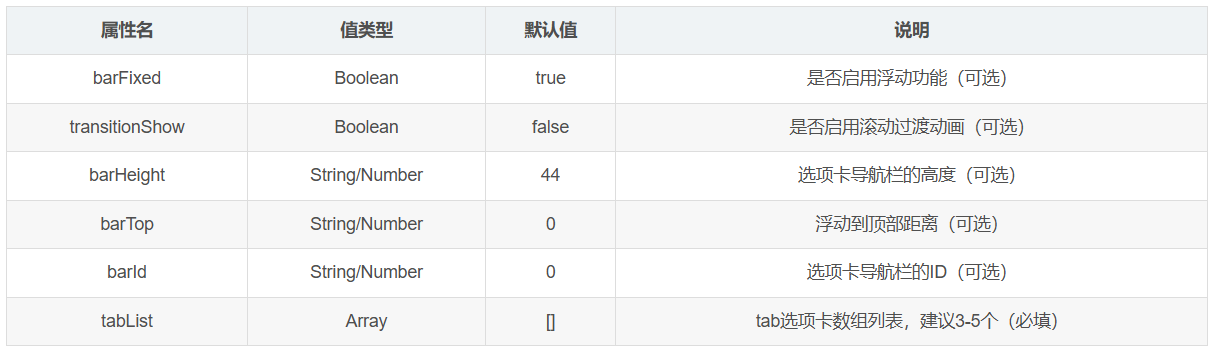
注意:在APP下建议禁用transitionShow,不然会引起点击触发滚动中选项卡导航栏消失的bug。
1.1.4. tabList

除了这两个必填项,其他数据随便往里面追加,点击选项卡时会读出来。
1.2. 其它代码
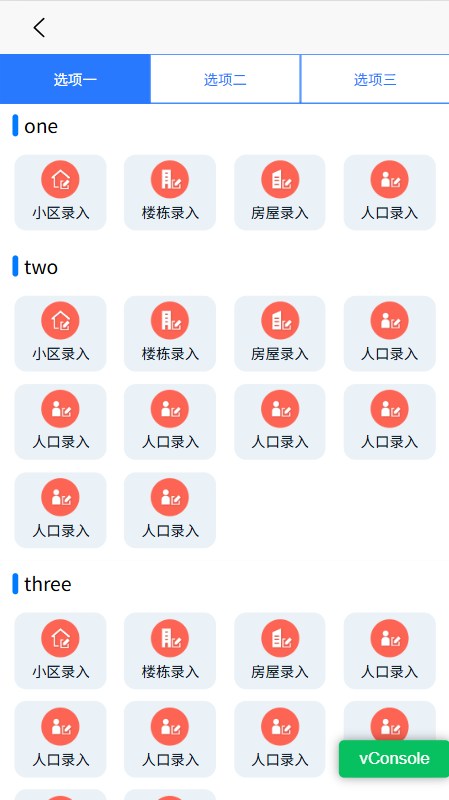
1.2.1. tabAnchor.json
{
  "rows": [
    {
      "text": "选项一",
      "navTarget": "#item1",
      "navId": "item1",
      "title": "one",
      "subRows": [
        {
          "id": 1,
          "img": "../../../static/icon/base-menu/icon-base-community-add.png",
          "title": "小区录入",
          "url": "../eventInfo/eventInfo"
        },
        {
          "id": 2,
          "img": "../../../static/icon/base-menu/icon-base-building-add.png",
          "title": "楼栋录入",
          "url": "../baseInfo/baseInfo"
        },
        {
          "id": 3,
          "img": "../../../static/icon/base-menu/icon_base_house_add.png",
          "title": "房屋录入",
          "url": "../workCheckInfo/workCheckInfo"
        },
        {
          "id": 4,
          "img": "../../../static/icon/base-menu/icon_base_people_add.png",
          "title": "人口录入",
          "url": "../eventInfo/eventInfo"
        }
      ]
    },
    {
      "text": "选项二",
      "navTarget": "#item2",
      "navId": "item2",
      "title": "two",
      "subRows": [
        {
          "id": 1,
          "img": "../../../static/icon/base-menu/icon-base-community-add.png",
          "title": "小区录入",
          "url": "../eventInfo/eventInfo"
        },
        {
          "id": 2,
          "img": "../../../static/icon/base-menu/icon-base-building-add.png",
          "title": "楼栋录入",
          "url": "../baseInfo/baseInfo"
        },
        {
          "id": 3,
          "img": "../../../static/icon/base-menu/icon_base_house_add.png",
          "title": "房屋录入",
          "url": "../workCheckInfo/workCheckInfo"
        },
        {
          "id": 4,
          "img": "../../../static/icon/base-menu/icon_base_people_add.png",
          "title": "人口录入",
          "url": "../eventInfo/eventInfo"
        },
        {
          "id": 4,
          "img": "../../../static/icon/base-menu/icon_base_people_add.png",
          "title": "人口录入",
          "url": "../eventInfo/eventInfo"
        },
        {
          "id": 4,
          "img": "../../../static/icon/base-menu/icon_base_people_add.png",
          "title": "人口录入",
          "url": "../eventInfo/eventInfo"
        },
        {
          "id": 4,
          "img": "../../../static/icon/base-menu/icon_base_people_add.png",
          "title": "人口录入",
          "url": "../eventInfo/eventInfo"
        },
        {
          "id": 4,
          "img": "../../../static/icon/base-menu/icon_base_people_add.png",
          "title": "人口录入",
          "url": "../eventInfo/eventInfo"
        },
        {
          "id": 4,
          "img": "../../../static/icon/base-menu/icon_base_people_add.png",
          "title": "人口录入",
          "url": "../eventInfo/eventInfo"
        },
        {
          "id": 4,
          "img": "../../../static/icon/base-menu/icon_base_people_add.png",
          "title": "人口录入",
          "url": "../eventInfo/eventInfo"
        }
      ]
    },
    {
      "text": "选项三",
      "navTarget": "#item3",
      "navId": "item3",
      "title": "three",
      "subRows": [
        {
          "id": 1,
          "img": "../../../static/icon/base-menu/icon-base-community-add.png",
          "title": "小区录入",
          "url": "../eventInfo/eventInfo"
        },
        {
          "id": 2,
          "img": "../../../static/icon/base-menu/icon-base-building-add.png",
          "title": "楼栋录入",
          "url": "../baseInfo/baseInfo"
        },
        {
          "id": 3,
          "img": "../../../static/icon/base-menu/icon_base_house_add.png",
          "title": "房屋录入",
          "url": "../workCheckInfo/workCheckInfo"
        },
        {
          "id": 4,
          "img": "../../../static/icon/base-menu/icon_base_people_add.png",
          "title": "人口录入",
          "url": "../eventInfo/eventInfo"
        },
        {
          "id": 4,
          "img": "../../../static/icon/base-menu/icon_base_people_add.png",
          "title": "人口录入",
          "url": "../eventInfo/eventInfo"
        },
        {
          "id": 4,
          "img": "../../../static/icon/base-menu/icon_base_people_add.png",
          "title": "人口录入",
          "url": "../eventInfo/eventInfo"
        },
        {
          "id": 4,
          "img": "../../../static/icon/base-menu/icon_base_people_add.png",
          "title": "人口录入",
          "url": "../eventInfo/eventInfo"
        },
        {
          "id": 4,
          "img": "../../../static/icon/base-menu/icon_base_people_add.png",
          "title": "人口录入",
          "url": "../eventInfo/eventInfo"
        },
        {
          "id": 4,
          "img": "../../../static/icon/base-menu/icon_base_people_add.png",
          "title": "人口录入",
          "url": "../eventInfo/eventInfo"
        },
        {
          "id": 4,
          "img": "../../../static/icon/base-menu/icon_base_people_add.png",
          "title": "人口录入",
          "url": "../eventInfo/eventInfo"
        }
      ]
    }
  ]
}
1.2.2. tab-anchor.vue
<template>
  <view :id="'luBarTabNav'+barId">
    <view v-if="!!barFixed"
          id="luTabFixed"
          class="stb-tab-layout stb-tab-fixed"
          :style="{ top: barTopStyles,
                    height:barHeightStyles}">
      <view v-for="(item,index) in tabList"
            :key="index"
            :class="selectedIndex===index
                    ? 'stb-tab-item stb-tab-active'
                    : 'stb-tab-item stb-tab-normal'"
            @tap="scrollToTarget(index, item)">
        {{ item.text }}
      </view>
    </view>
    <view id="luTabStatic"
          class="stb-tab-layout stb-tab-static"
          :style="{height:barHeightStyles}">
      <view class=""
            v-for="(item,index) in tabList" :key="index"
            :class="selectedIndex===index
                    ? 'stb-tab-item stb-tab-active'
                    : 'stb-tab-item stb-tab-normal'"
            @tap="scrollToTarget(index, item)">
        {{ item.text }}
      </view>
    </view>
    <view>
      <slot></slot>
    </view>
  </view>
</template>
<script>
export default {
  props: {
    barFixed: {//选项卡是否启用浮动功能(可选)
      type: Boolean,
      default: true
    },
    /**
     * 是否动画切换
     */
    transitionShow: {
      type: Boolean,
      default: false
    },
    barHeight: {
      type: [String, Number],
      default: 30
    },
    barTop: {
      type: [String, Number],
      default: 0
    },
    barId: {
      type: [String, Number],
      default: 0
    },
    tabList: {
      type: Array,
      default: function () {
        return []
      }
    }
  },
  data() {
    return {
      selectedIndex: 0,
    };
  },
  computed: {
    barTopStyles: function () {
      let barTopStyles = 'calc(' + this.barTop + 'px);'
      // #ifndef H5
      barTopStyles = 'calc(' + this.barTop + 'px);'
      // #endif
      // #ifdef APP
      barTopStyles = 'calc(' + this.barTop + 'px + var(--window-top));';
      // #endif
      return barTopStyles;
    },
    barHeightStyles: function () {
      return this.barHeight ? this.barHeight + 'px' : '30px';
    },
  },
  methods: {
    /**
     * 初始化tab
     */
    barInit: async function (index) {
      let navTargetTop = [];
      let duration = 0;
      let viewScrollTop = 0;
      let viewHeight = 0;
      for (let i = 0, len = this.tabList.length; i < len; i++) {
        navTargetTop[i] = await this.queryMultipleNodes(
            this.tabList[i]["navTarget"]).then(res => {
          let navTarget = res[0],
              viewPort = res[1];
          viewHeight = viewPort.height;
          viewScrollTop = viewPort.scrollTop;
          const scrollTop = parseInt(navTarget.top)
              + viewPort.scrollTop
              - this.barTop - this.barHeight;
          return scrollTop;
        });
      }
      if (!!this.transitionShow) {
        duration = 200;
      }
      return {
        navTargetTop: navTargetTop,
        duration: duration,
        viewHeight: viewHeight,
        viewScrollTop: viewScrollTop
      };
    },
    pageScroll: async function (i) {
      const elment = await this.barInit(i);
      let scrollTop = elment["navTargetTop"][i];
      let duration = elment["duration"];
      let viewHeight = elment["viewHeight"];
      let viewScrollTop = elment["viewScrollTop"];
      if (Math.abs(scrollTop - viewScrollTop) > viewHeight) {
        if (scrollTop > viewScrollTop) {
          await uni.pageScrollTo({
            scrollTop: (scrollTop - viewHeight),
            duration: 0
          });
        } else {
          await uni.pageScrollTo({
            scrollTop: (scrollTop + viewHeight),
            duration: 0
          });
        }
      }
      await uni.pageScrollTo({
        scrollTop: (scrollTop + 1),
        duration: duration
      });
      // #ifndef H5
      const view = await this.queryMultipleNodes();
      viewScrollTop = view[0].scrollTop;
      if (scrollTop > viewScrollTop && duration !== 0) {
        uni.pageScrollTo({
          scrollTop: (scrollTop + 1),
          duration: 0
        })
      }
      // #endif
    },
    scrollToTarget: function (i, item) {
      this.pageScroll(i);
      // 通知父组件(把行数据传过去)
      this.$emit('clickTabs', item)
    },
    queryMultipleNodes: function (e, notThis) {
      return new Promise((resolve, reject) => {
        let view = uni.createSelectorQuery();
        if (!!notThis) {
          view.in(this);
        }
        if (!!e) {
          view.select(e).boundingClientRect();
        }
        view.selectViewport().fields({
          size: true,
          scrollOffset: true
        });
        view.exec(function (res) {
          resolve(res);
        });
      });
    },
    showBarFixed: function () {
      this.queryMultipleNodes("#luTabStatic",
          true).then(res => {
        let tabNav = res[0];
        this.barShow = tabNav.top <= this.barTop;
      });
    },
    selectedTab: function (y) {
      this.barInit().then((res) => {
        let itemIndex = 0;
        for (let i = 0, len = res["navTargetTop"].length;
             i < len; i++) {
          if (y >= res["navTargetTop"][i]) {
            itemIndex = i;
          }
        }
        this.selectedIndex = itemIndex;
      });
      if (!!this.barFixed) {
        this.showBarFixed();
      }
    }
  }
};
</script>
<style lang="scss">
.stb-tab-layout {
  width: 100%;
  display: flex;
  flex-flow: row wrap;
  justify-content: space-around;
  align-items: center;
  background-color: #fff;
  height: 30px;
}

.stb-tab-fixed {
  position: fixed;
  z-index: 1;
  top: calc(0px + var(--window-top));
}

.stb-tab-static {
  position: static;
  z-index: 0;
}

.stb-tab-item {
  position: relative;
  flex: 1;
  height: 100%;
  display: flex;
  flex-flow: column nowrap;
  justify-content: center;
  border: 1px solid #2979ff;
  font-size: 12px;
  align-items: center;
}

.stb-tab-normal {
  color: #2979ff;
}

.stb-tab-active {
  background-color: #2979ff;
  color: white;
}


</style>
1.2.3. tabAnchor.vue
<template>
  <view>
    <tab-anchor ref="barTabNav"
                barId="0"
                barHeight="40"
                :tabList="tabList"
                :barFixed="true"
                :transitionShow="false"
                :barTop="0"
                @clickTabs="clickTabs">
      <!--id与数据tabList->navTarget对应-->
      <view class="anchor-menu-body"
            v-for="(item) in tabList">
        <view :id="item.navId"
              class="anchor-menu-main-layout">
          <view class="anchor-header-layout">
            <view class="anchor-header-left">
              <view class="anchor-header-icon"></view>
              <text class="anchor-header-title">{{ item.title }}</text>
            </view>
            <view></view>
          </view>
          <view class="anchor-menu-layout">
            <view class="anchor-menu-item"
                  v-for="(subItem) in item.subRows"
                  @click="toDetail(subItem)">
              <image class="anchor-menu-item-image" :src="subItem.img"></image>
              <view class="anchor-menu-item-title">{{ subItem.title }}</view>
            </view>
          </view>
        </view>
      </view>
    </tab-anchor>
  </view>
</template>
<script>
// 注意引用位置
import TabAnchor from "/components/tab-anchor.vue";
import tabAnchorJson from '../../../data/tabAnchor.json'

export default {
  components: {TabAnchor},
  data() {
    return {
      // 注意: 必须有text/navTarget属性,其他键值不管随便写和用
      tabList: [],
    }
  },
  onLoad: function () {
    this.tabList = tabAnchorJson.rows
  },

  /**
   * 监听滚动
   * @description 传给子组件处理逻辑
   * @return void
   */
  onPageScroll(e) {
    this.$refs.barTabNav.selectedTab(e.scrollTop);
  },

  methods: {

    /**
     * 选项卡被点击
     * @description 你无需关心锚点如何工作,写你的业务即可
     * @param {Object} row - 行数据
     * @return void
     */
    clickTabs(row) {

    },

  }
}
</script>

<style scoped>

.anchor-menu-body {
  display: flex;
  flex-direction: column;
  background: linear-gradient(180deg, #fff, #fff);
}

.anchor-menu-main-layout {
  display: flex;
  flex-direction: column;
}

.anchor-header-layout {
  display: flex;
  flex-direction: row;
  justify-content: space-between;
  align-items: center;
  margin-top:5px;
}

.anchor-header-left {
  display: flex;
  flex-direction: row;
  align-items: center;
}

.anchor-header-icon {
  width: 5px;
  height: 18px;
  margin: 0 5px 0 10px;
  border-radius: 3px;
  background-color: #007AFF;
}

.anchor-header-title {
  font-size: 16px;
  color: #000000;
}


.anchor-menu-layout {
  display: table;
  flex-wrap: wrap;
  justify-content: space-between;
  align-content: space-between;
  padding: 5px;
}

.anchor-menu-item {
  width: 21%;
  display: flex;
  flex-direction: column;
  align-items: center;
  padding: 5px 0;
  margin: 5px 2%;
  border-radius: 10px;
  float: left;
  background-color: #EBF2F7;
}

.anchor-menu-item-image {
  width: 32px;
  height: 32px;
}

.anchor-menu-item-title {
  width: 100%;
  color: #06121e;
  font-size: 12px;
  text-align: center;
  overflow: hidden;
  display: -webkit-box;
  -webkit-line-clamp: 1;
  -webkit-box-orient: vertical;
}
</style>

Agent 垂直技术社区,欢迎活跃、内容共建。
更多推荐


 9
9 0
0- 0


 已为社区贡献4条内容

所有评论(0)