uniapp app跳转微信小程序方法
·
1. uniapp app跳转微信小程序方法
uni-app开发的APP跳转到微信小程序需要调用H5+的原生界面控件。
1.1. 注意事项
(1)用到了分享功能,在打包原生应用时,需要注意:首先勾选权限配置,manifest.json->App 模块权限配置->Share。然后,manifest.json->App SDK 配置->分享,按照提示填写微信分享的信息(微信开放平台,不是微信公众平台)。
(2)因为涉及到第三方 SDK 的配置,需要打包自定义基座进行测试。真机运行自定义基座包使用说明。
(3)需要在微信开放平台开启APP跳转小程序,并管理相应的小程序。
1.2. 跳转到微信小程序的代码
<template>
	<view class="center">
		<view class="text"  @click="checkWeChat">跳转到小程序</view>
	</view>
</template>
<script>
export default {
	data() {
		return {
			sweixin: null
		}
	},
	onLoad() {
		this.getPlus()
	},
	methods: {
		getPlus() {
			//获取当前显示的webview
			var pages = getCurrentPages()
			var page = pages[pages.length - 1]
			var currentWebview = page.$getAppWebview()
			//调用H5+APP的扩展API
			var shares=null;
			let that = this
			var pusher = plus.share.getServices(function(s){
				shares={};
				for(var i in s){
					var t=s[i];
					shares[t.id]=t;
				}
				that.sweixin=shares['weixin'];
			}, function(e){
				console.log("获取分享服务列表失败:"+e.message);
			});
			//放入当前的webview
			currentWebview.append(pusher);
		},
		checkWeChat() {
			//调用微信小程序
			this.sweixin.launchMiniProgram({
				id:'gh_244-------' //要跳转小程序的原始ID
			})
		}
	}
}
</script>
/**
 * 跳转到微信小程序
 */
const openWxProgram = (wxAppId) => {
    plus.share.getServices(
        res => {
            let sweixin = null;
            for (let i in res) {
                if (res[i].id == 'weixin') {
                    sweixin = res[i];
                }
            }
            //唤醒微信小程序
            if (sweixin) {
                uni.hideLoading()
                sweixin.launchMiniProgram({
                    id: wxAppId, //需要跳转到的小程序的原始id,这是特别要注意的,
                    type: 0,
                    // path:'https://jingyan.baidu.com/article/XXXX.html' //跳转指定小程序的页面
                });
            }
        }
    )
};
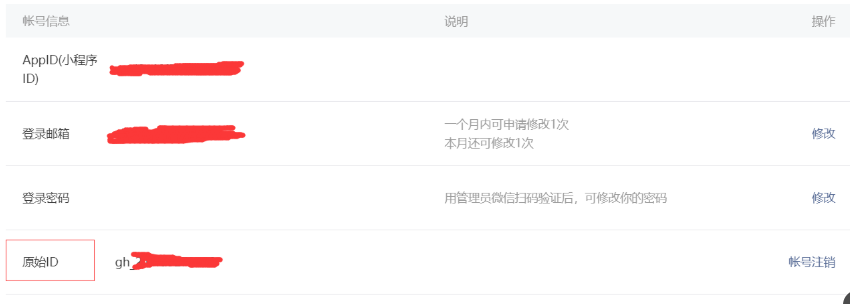
id是目标小程序的原始id,这是特别要注意的,之前填成appid,直接报错:bad_param。
android App拉起微信小程序提示bad_param,主要是因为req.userName的值传错,req.userName的值是小程序的原始ID,而不是appId,小程序之间的跳转是appId。
1.3. 小程序原始ID获取方法
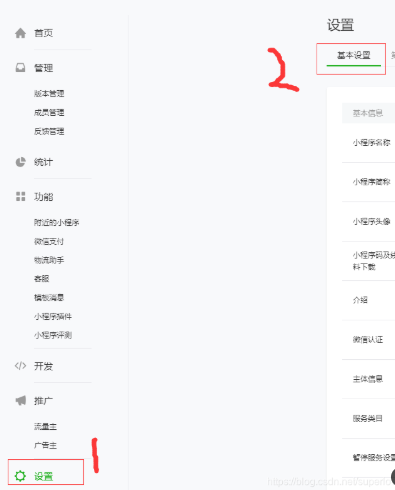
登录微信公众平台,设置->基本设置,最下边为原始ID。

Agent 垂直技术社区,欢迎活跃、内容共建。
更多推荐


 8
8 0
0- 0


 已为社区贡献4条内容

所有评论(0)