Java 图书管理系统期末作业实现
·
下面为你设计一个适合高等院校水平的图书管理系统,采用 Java Swing 实现简单的图形界面,功能包括图书的增删改查和借阅归还等基本操作。
一、项目目录介绍:
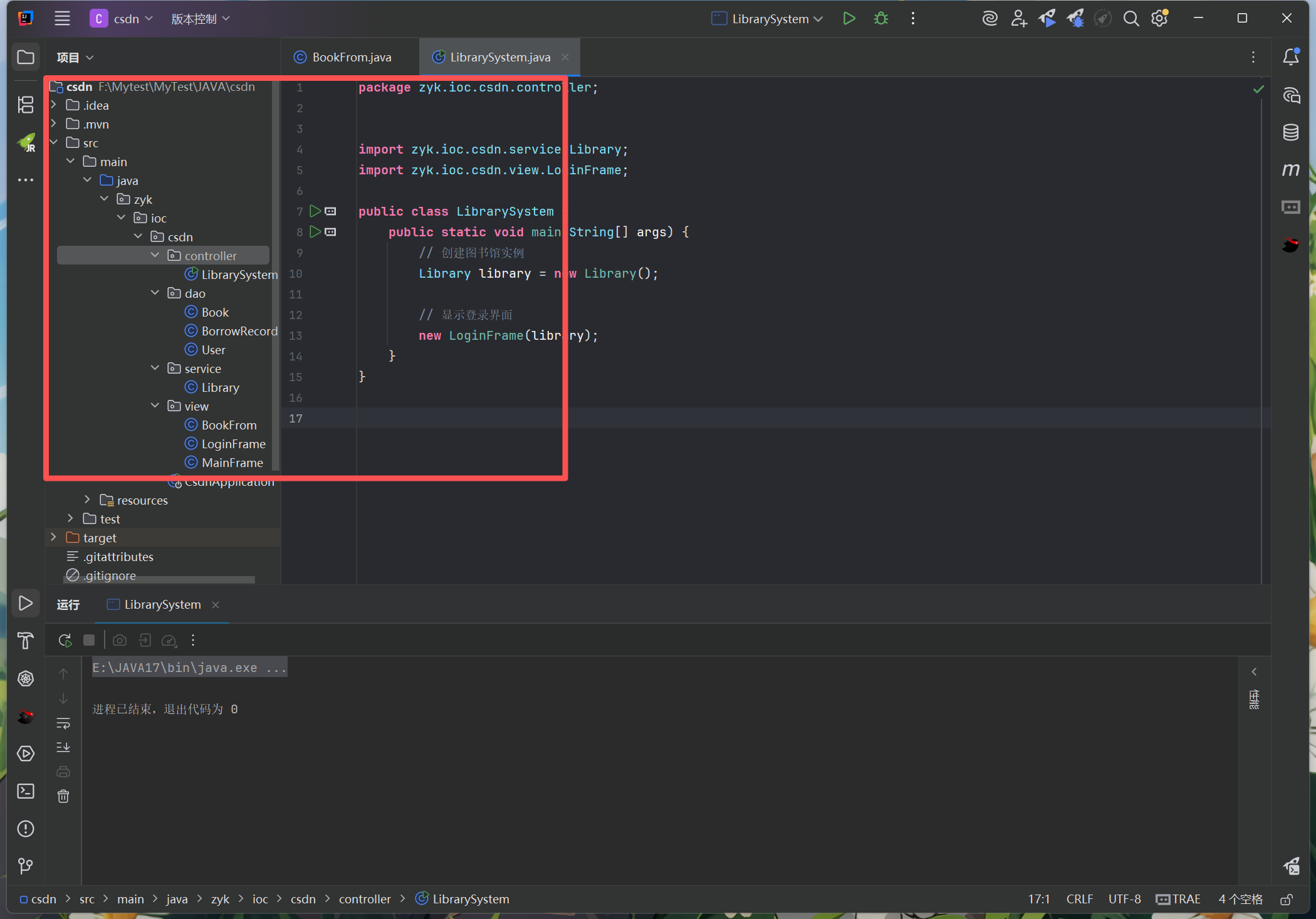
系统功能说明
这个图书管理系统适合学习和期末作业要求,具有以下特点:
-
用户角色区分:包含管理员和普通用户两种角色
- 管理员:可以进行图书的增删改查操作
- 普通用户:可以查询图书、借阅和归还图书
-
核心功能:
- 用户登录 / 退出
- 图书查询(按名称)
- 图书管理(添加、编辑、删除)
- 图书借阅和归还
- 借阅记录查询
-
使用说明:
- 系统初始账号:
- 管理员:用户名 admin,密码 admin
- 普通用户 1:用户名 user1,密码 123
- 普通用户 2:用户名 user2,密码 123
- 运行 LibrarySystem 类的 main 方法启动系统
- 系统初始账号:
作业扩展建议
如果想进一步完善这个系统,可以考虑添加以下功能:
- 增加用户注册功能
- 添加图书分类管理
- 实现数据持久化(使用文件或数据库存储数据)
- 添加借阅期限和超期提醒功能
- 优化界面美观度和交互体验
二、代码如下:
编写实体类
public class Book {
    private String id;         // 图书编号
    private String name;       // 图书名称
    private String author;     // 作者
    private String publisher;  // 出版社
    private int quantity;      // 库存数量
    private boolean isBorrowed;// 是否被借出

    public Book(String id, String name, String author, String publisher, int quantity) {
        this.id = id;
        this.name = name;
        this.author = author;
        this.publisher = publisher;
        this.quantity = quantity;
        this.isBorrowed = false;
    }

    // getter和setter方法
    public String getId() {
        return id;
    }

    public void setId(String id) {
        this.id = id;
    }

    public String getName() {
        return name;
    }

    public void setName(String name) {
        this.name = name;
    }

    public String getAuthor() {
        return author;
    }

    public void setAuthor(String author) {
        this.author = author;
    }

    public String getPublisher() {
        return publisher;
    }

    public void setPublisher(String publisher) {
        this.publisher = publisher;
    }

    public int getQuantity() {
        return quantity;
    }

    public void setQuantity(int quantity) {
        this.quantity = quantity;
    }

    public boolean isBorrowed() {
        return isBorrowed;
    }

    public void setBorrowed(boolean borrowed) {
        isBorrowed = borrowed;
    }

    // 重写toString方法,方便显示
    @Override
    public String toString() {
        return "图书编号: " + id + ", 书名: " + name + ", 作者: " + author +
                ", 出版社: " + publisher + ", 库存: " + quantity +
                ", 状态: " + (isBorrowed ? "已借出" : "可借阅");
    }
}
public class BorrowRecord {
    private String recordId;    // 记录编号
    private String bookId;      // 图书编号
    private String userId;      // 用户编号
    private Date borrowDate;    // 借阅日期
    private Date returnDate;    // 归还日期
    private boolean isReturned; // 是否归还

    public BorrowRecord(String recordId, String bookId, String userId, Date borrowDate) {
        this.recordId = recordId;
        this.bookId = bookId;
        this.userId = userId;
        this.borrowDate = borrowDate;
        this.returnDate = null;
        this.isReturned = false;
    }

    // getter和setter方法
    public String getRecordId() {
        return recordId;
    }

    public void setRecordId(String recordId) {
        this.recordId = recordId;
    }

    public String getBookId() {
        return bookId;
    }

    public void setBookId(String bookId) {
        this.bookId = bookId;
    }

    public String getUserId() {
        return userId;
    }

    public void setUserId(String userId) {
        this.userId = userId;
    }

    public Date getBorrowDate() {
        return borrowDate;
    }

    public void setBorrowDate(Date borrowDate) {
        this.borrowDate = borrowDate;
    }

    public Date getReturnDate() {
        return returnDate;
    }

    public void setReturnDate(Date returnDate) {
        this.returnDate = returnDate;
    }

    public boolean isReturned() {
        return isReturned;
    }

    public void setReturned(boolean returned) {
        isReturned = returned;
    }
}
public class User {
    private String id;       // 用户编号
    private String name;     // 用户名
    private String password; // 密码
    private String role;     // 角色:管理员/普通用户

    public User(String id, String name, String password, String role) {
        this.id = id;
        this.name = name;
        this.password = password;
        this.role = role;
    }

    // getter和setter方法
    public String getId() {
        return id;
    }

    public void setId(String id) {
        this.id = id;
    }

    public String getName() {
        return name;
    }

    public void setName(String name) {
        this.name = name;
    }

    public String getPassword() {
        return password;
    }

    public void setPassword(String password) {
        this.password = password;
    }

    public String getRole() {
        return role;
    }

    public void setRole(String role) {
        this.role = role;
    }
}
二、service类(增删改查核心功能|CRUD)
import zyk.ioc.csdn.dao.Book;
import zyk.ioc.csdn.dao.BorrowRecord;
import zyk.ioc.csdn.dao.User;

import java.util.ArrayList;
import java.util.Date;
import java.util.List;
import java.util.UUID;

public class Library {
    private List<Book> books;               // 图书列表
    private List<User> users;               // 用户列表
    private List<BorrowRecord> borrowRecords; // 借阅记录列表
    private User currentUser;               // 当前登录用户

    public Library() {
        books = new ArrayList<>();
        users = new ArrayList<>();
        borrowRecords = new ArrayList<>();

        // 初始化一些测试数据
        initTestData();
    }

    // 初始化测试数据
    private void initTestData() {
        // 添加测试用户
        users.add(new User("admin", "管理员", "admin", "admin"));
        users.add(new User("user1", "张三", "123", "user"));
        users.add(new User("user2", "李四", "123", "user"));

        // 添加测试图书
        books.add(new Book("1001", "Java编程基础", "张三", "编程出版社", 5));
        books.add(new Book("1002", "数据结构", "李四", "计算机出版社", 3));
        books.add(new Book("1003", "操作系统", "王五", "高等教育出版社", 2));
    }

    // 用户登录
    public boolean login(String userId, String password) {
        for (User user : users) {
            if (user.getId().equals(userId) && user.getPassword().equals(password)) {
                currentUser = user;
                return true;
            }
        }
        return false;
    }

    // 获取当前登录用户
    public User getCurrentUser() {
        return currentUser;
    }

    // 退出登录
    public void logout() {
        currentUser = null;
    }

    // 添加图书
    public boolean addBook(Book book) {
        // 检查是否已存在相同编号的图书
        for (Book b : books) {
            if (b.getId().equals(book.getId())) {
                return false;
            }
        }
        books.add(book);
        return true;
    }

    // 删除图书
    public boolean deleteBook(String bookId) {
        for (int i = 0; i < books.size(); i++) {
            if (books.get(i).getId().equals(bookId)) {
                books.remove(i);
                return true;
            }
        }
        return false;
    }

    // 更新图书信息
    public boolean updateBook(Book updatedBook) {
        for (int i = 0; i < books.size(); i++) {
            if (books.get(i).getId().equals(updatedBook.getId())) {
                books.set(i, updatedBook);
                return true;
            }
        }
        return false;
    }

    // 根据图书编号查询图书
    public Book findBookById(String bookId) {
        for (Book book : books) {
            if (book.getId().equals(bookId)) {
                return book;
            }
        }
        return null;
    }

    // 根据图书名称查询图书
    public List<Book> findBooksByName(String name) {
        List<Book> result = new ArrayList<>();
        for (Book book : books) {
            if (book.getName().contains(name)) {
                result.add(book);
            }
        }
        return result;
    }

    // 获取所有图书
    public List<Book> getAllBooks() {
        return new ArrayList<>(books);
    }

    // 借阅图书
    public boolean borrowBook(String bookId, String userId) {
        Book book = findBookById(bookId);
        if (book == null || book.getQuantity() <= 0) {
            return false;
        }

        // 减少库存
        book.setQuantity(book.getQuantity() - 1);
        book.setBorrowed(true);

        // 创建借阅记录
        String recordId = "BR" + UUID.randomUUID().toString().substring(0, 8);
        BorrowRecord record = new BorrowRecord(recordId, bookId, userId, new Date());
        borrowRecords.add(record);

        return true;
    }

    // 归还图书
    public boolean returnBook(String bookId, String userId) {
        Book book = findBookById(bookId);
        if (book == null) {
            return false;
        }

        // 查找对应的借阅记录
        for (BorrowRecord record : borrowRecords) {
            if (record.getBookId().equals(bookId) && record.getUserId().equals(userId) && !record.isReturned()) {
                // 更新图书信息
                book.setQuantity(book.getQuantity() + 1);
                book.setBorrowed(false);

                // 更新借阅记录
                record.setReturned(true);
                record.setReturnDate(new Date());
                return true;
            }
        }
        return false;
    }

    // 获取用户的借阅记录
    public List<BorrowRecord> getUserBorrowRecords(String userId) {
        List<BorrowRecord> result = new ArrayList<>();
        for (BorrowRecord record : borrowRecords) {
            if (record.getUserId().equals(userId)) {
                result.add(record);
            }
        }
        return result;
    }
}
三、视图,也就是编写的前端页面,此处简易实现
import zyk.ioc.csdn.dao.Book;
import zyk.ioc.csdn.service.Library;

import javax.swing.*;
import java.awt.event.ActionEvent;
import java.awt.event.ActionListener;

public class BookFrom extends JFrame {
    private Library library;
    private MainFrame mainFrame;
    private Book book; // 为null时表示添加新图书,否则表示编辑已有图书

    private JTextField idField;
    private JTextField nameField;
    private JTextField authorField;
    private JTextField publisherField;
    private JTextField quantityField;

    public BookFrom(Library library, MainFrame mainFrame, Book book) {
        this.library = library;
        this.mainFrame = mainFrame;
        this.book = book;

        initUI();
    }

    private void initUI() {
        setTitle(book == null ? "添加图书" : "编辑图书");
        setSize(400, 300);
        setLocationRelativeTo(mainFrame); // 相对于主窗口居中

        // 创建面板
        JPanel panel = new JPanel();
        panel.setLayout(null);
        add(panel);

        // 图书编号
        JLabel idLabel = new JLabel("图书编号:");
        idLabel.setBounds(50, 30, 80, 25);
        panel.add(idLabel);

        idField = new JTextField(20);
        idField.setBounds(140, 30, 200, 25);
        panel.add(idField);

        // 图书名称
        JLabel nameLabel = new JLabel("图书名称:");
        nameLabel.setBounds(50, 70, 80, 25);
        panel.add(nameLabel);

        nameField = new JTextField(20);
        nameField.setBounds(140, 70, 200, 25);
        panel.add(nameField);

        // 作者
        JLabel authorLabel = new JLabel("作者:");
        authorLabel.setBounds(50, 110, 80, 25);
        panel.add(authorLabel);

        authorField = new JTextField(20);
        authorField.setBounds(140, 110, 200, 25);
        panel.add(authorField);

        // 出版社
        JLabel publisherLabel = new JLabel("出版社:");
        publisherLabel.setBounds(50, 150, 80, 25);
        panel.add(publisherLabel);

        publisherField = new JTextField(20);
        publisherField.setBounds(140, 150, 200, 25);
        panel.add(publisherField);

        // 库存数量
        JLabel quantityLabel = new JLabel("库存数量:");
        quantityLabel.setBounds(50, 190, 80, 25);
        panel.add(quantityLabel);

        quantityField = new JTextField(20);
        quantityField.setBounds(140, 190, 200, 25);
        panel.add(quantityField);

        // 如果是编辑模式,填充已有数据
        if (book != null) {
            idField.setText(book.getId());
            idField.setEditable(false); // 编辑时不允许修改图书编号
            nameField.setText(book.getName());
            authorField.setText(book.getAuthor());
            publisherField.setText(book.getPublisher());
            quantityField.setText(String.valueOf(book.getQuantity()));
        }

        // 保存按钮
        JButton saveButton = new JButton("保存");
        saveButton.setBounds(100, 230, 80, 25);
        saveButton.addActionListener(new ActionListener() {
            @Override
            public void actionPerformed(ActionEvent e) {
                saveBook();
            }
        });
        panel.add(saveButton);

        // 取消按钮
        JButton cancelButton = new JButton("取消");
        cancelButton.setBounds(220, 230, 80, 25);
        cancelButton.addActionListener(new ActionListener() {
            @Override
            public void actionPerformed(ActionEvent e) {
                dispose();
            }
        });
        panel.add(cancelButton);

        setVisible(true);
    }

    // 保存图书信息
    private void saveBook() {
        String id = idField.getText().trim();
        String name = nameField.getText().trim();
        String author = authorField.getText().trim();
        String publisher = publisherField.getText().trim();
        String quantityStr = quantityField.getText().trim();

        // 验证输入
        if (id.isEmpty() || name.isEmpty() || author.isEmpty() || publisher.isEmpty() || quantityStr.isEmpty()) {
            JOptionPane.showMessageDialog(this, "请填写所有字段!", "输入错误", JOptionPane.ERROR_MESSAGE);
            return;
        }

        int quantity;
        try {
            quantity = Integer.parseInt(quantityStr);
            if (quantity < 0) {
                throw new NumberFormatException();
            }
        } catch (NumberFormatException e) {
            JOptionPane.showMessageDialog(this, "库存数量必须是正整数!", "输入错误", JOptionPane.ERROR_MESSAGE);
            return;
        }

        // 创建或更新图书
        Book newBook = new Book(id, name, author, publisher, quantity);

        if (book == null) {
            // 添加新图书
            boolean success = library.addBook(newBook);
            if (success) {
                JOptionPane.showMessageDialog(this, "图书添加成功!");
                mainFrame.showAllBooks(); // 刷新主窗口的图书列表
                dispose();
            } else {
                JOptionPane.showMessageDialog(this, "图书编号已存在!", "添加失败", JOptionPane.ERROR_MESSAGE);
            }
        } else {
            // 更新已有图书
            library.updateBook(newBook);
            JOptionPane.showMessageDialog(this, "图书更新成功!");
            mainFrame.showAllBooks(); // 刷新主窗口的图书列表
            dispose();
        }
    }
}
import zyk.ioc.csdn.service.Library;

import javax.swing.*;
import java.awt.*;
import java.awt.event.ActionEvent;
import java.awt.event.ActionListener;

public class LoginFrame extends JFrame {
    private Library library;
    private JTextField userIdField;
    private JPasswordField passwordField;

    public LoginFrame(Library library) {
        this.library = library;
        initUI();
    }

    private void initUI() {
        setTitle("图书管理系统 - 登录");
        setSize(350, 250);
        setDefaultCloseOperation(JFrame.EXIT_ON_CLOSE);
        setLocationRelativeTo(null); // 居中显示

        // 创建面板
        JPanel panel = new JPanel();
        panel.setLayout(null);
        add(panel);

        // 用户名标签和文本框
        JLabel userIdLabel = new JLabel("用户名:");
        userIdLabel.setBounds(50, 50, 80, 25);
        panel.add(userIdLabel);

        userIdField = new JTextField(20);
        userIdField.setBounds(140, 50, 150, 25);
        panel.add(userIdField);

        // 密码标签和密码框
        JLabel passwordLabel = new JLabel("密码:");
        passwordLabel.setBounds(50, 90, 80, 25);
        panel.add(passwordLabel);

        passwordField = new JPasswordField(20);
        passwordField.setBounds(140, 90, 150, 25);
        panel.add(passwordField);

        // 登录按钮
        JButton loginButton = new JButton("登录");
        loginButton.setBounds(80, 140, 80, 25);
        loginButton.addActionListener(new ActionListener() {
            @Override
            public void actionPerformed(ActionEvent e) {
                String userId = userIdField.getText();
                String password = new String(passwordField.getPassword());

                if (library.login(userId, password)) {
                    JOptionPane.showMessageDialog(LoginFrame.this, "登录成功!");
                    // 打开主界面
                    new MainFrame(library);
                    dispose(); // 关闭登录窗口
                } else {
                    JOptionPane.showMessageDialog(LoginFrame.this, "用户名或密码错误!",
                            "登录失败", JOptionPane.ERROR_MESSAGE);
                }
            }
        });
        panel.add(loginButton);

        // 重置按钮
        JButton resetButton = new JButton("重置");
        resetButton.setBounds(180, 140, 80, 25);
        resetButton.addActionListener(new ActionListener() {
            @Override
            public void actionPerformed(ActionEvent e) {
                userIdField.setText("");
                passwordField.setText("");
            }
        });
        panel.add(resetButton);

        setVisible(true);
    }
}
import zyk.ioc.csdn.dao.Book;
import zyk.ioc.csdn.dao.BorrowRecord;
import zyk.ioc.csdn.dao.User;
import zyk.ioc.csdn.service.Library;

import javax.swing.*;
import java.awt.*;
import java.awt.event.ActionEvent;
import java.awt.event.ActionListener;
import java.util.List;

public class MainFrame extends JFrame {
    private Library library;
    private User currentUser;

    // 构造方法
    public MainFrame(Library library) {
        this.library = library;
        this.currentUser = library.getCurrentUser();
        initUI();
    }

    // 初始化界面
    private void initUI() {
        setTitle("图书管理系统 - " + currentUser.getName() + "(" + currentUser.getRole() + ")");
        setSize(800, 600);
        setDefaultCloseOperation(JFrame.EXIT_ON_CLOSE);
        setLocationRelativeTo(null); // 居中显示

        // 创建菜单栏
        JMenuBar menuBar = new JMenuBar();

        // 图书菜单
        JMenu bookMenu = new JMenu("图书管理");

        JMenuItem viewAllBooksItem = new JMenuItem("查看所有图书");
        viewAllBooksItem.addActionListener(new ActionListener() {
            @Override
            public void actionPerformed(ActionEvent e) {
                showAllBooks();
            }
        });
        bookMenu.add(viewAllBooksItem);

        JMenuItem searchBookItem = new JMenuItem("查找图书");
        searchBookItem.addActionListener(new ActionListener() {
            @Override
            public void actionPerformed(ActionEvent e) {
                searchBook();
            }
        });
        bookMenu.add(searchBookItem);

        // 只有管理员可以添加、编辑和删除图书
        if ("admin".equals(currentUser.getRole())) {
            JMenuItem addBookItem = new JMenuItem("添加图书");
            addBookItem.addActionListener(new ActionListener() {
                @Override
                public void actionPerformed(ActionEvent e) {
                    new BookFrom(library, MainFrame.this, null);
                }
            });
            bookMenu.add(addBookItem);

            JMenuItem editBookItem = new JMenuItem("编辑图书");
            editBookItem.addActionListener(new ActionListener() {
                @Override
                public void actionPerformed(ActionEvent e) {
                    editBook();
                }
            });
            bookMenu.add(editBookItem);

            JMenuItem deleteBookItem = new JMenuItem("删除图书");
            deleteBookItem.addActionListener(new ActionListener() {
                @Override
                public void actionPerformed(ActionEvent e) {
                    deleteBook();
                }
            });
            bookMenu.add(deleteBookItem);
        }

        menuBar.add(bookMenu);

        // 借阅菜单
        JMenu borrowMenu = new JMenu("借阅管理");

        JMenuItem borrowBookItem = new JMenuItem("借阅图书");
        borrowBookItem.addActionListener(new ActionListener() {
            @Override
            public void actionPerformed(ActionEvent e) {
                borrowBook();
            }
        });
        borrowMenu.add(borrowBookItem);

        JMenuItem returnBookItem = new JMenuItem("归还图书");
        returnBookItem.addActionListener(new ActionListener() {
            @Override
            public void actionPerformed(ActionEvent e) {
                returnBook();
            }
        });
        borrowMenu.add(returnBookItem);

        JMenuItem myBorrowsItem = new JMenuItem("我的借阅记录");
        myBorrowsItem.addActionListener(new ActionListener() {
            @Override
            public void actionPerformed(ActionEvent e) {
                showMyBorrows();
            }
        });
        borrowMenu.add(myBorrowsItem);

        menuBar.add(borrowMenu);

        // 系统菜单
        JMenu systemMenu = new JMenu("系统");

        JMenuItem logoutItem = new JMenuItem("退出登录");
        logoutItem.addActionListener(new ActionListener() {
            @Override
            public void actionPerformed(ActionEvent e) {
                library.logout();
                new LoginFrame(library);
                dispose();
            }
        });
        systemMenu.add(logoutItem);

        JMenuItem exitItem = new JMenuItem("退出系统");
        exitItem.addActionListener(new ActionListener() {
            @Override
            public void actionPerformed(ActionEvent e) {
                System.exit(0);
            }
        });
        systemMenu.add(exitItem);

        menuBar.add(systemMenu);

        setJMenuBar(menuBar);

        // 初始显示所有图书
        showAllBooks();

        setVisible(true);
    }

    // 显示所有图书
    protected void showAllBooks() {
        List<Book> books = library.getAllBooks();
        showBooksInTable(books);
    }

    // 查找图书
    private void searchBook() {
        String bookName = JOptionPane.showInputDialog(this, "请输入图书名称:");
        if (bookName != null && !bookName.trim().isEmpty()) {
            List<Book> books = library.findBooksByName(bookName);
            showBooksInTable(books);
        }
    }

    // 编辑图书
    private void editBook() {
        String bookId = JOptionPane.showInputDialog(this, "请输入要编辑的图书编号:");
        if (bookId != null && !bookId.trim().isEmpty()) {
            Book book = library.findBookById(bookId);
            if (book != null) {
                new BookFrom(library, this, book);
            } else {
                JOptionPane.showMessageDialog(this, "找不到编号为 " + bookId + " 的图书!");
            }
        }
    }

    // 删除图书
    private void deleteBook() {
        String bookId = JOptionPane.showInputDialog(this, "请输入要删除的图书编号:");
        if (bookId != null && !bookId.trim().isEmpty()) {
            int confirm = JOptionPane.showConfirmDialog(this, "确定要删除编号为 " + bookId + " 的图书吗?");
            if (confirm == JOptionPane.YES_OPTION) {
                boolean success = library.deleteBook(bookId);
                if (success) {
                    JOptionPane.showMessageDialog(this, "图书删除成功!");
                    showAllBooks(); // 刷新图书列表
                } else {
                    JOptionPane.showMessageDialog(this, "删除失败,找不到编号为 " + bookId + " 的图书!");
                }
            }
        }
    }

    // 借阅图书
    private void borrowBook() {
        String bookId = JOptionPane.showInputDialog(this, "请输入要借阅的图书编号:");
        if (bookId != null && !bookId.trim().isEmpty()) {
            Book book = library.findBookById(bookId);
            if (book == null) {
                JOptionPane.showMessageDialog(this, "找不到编号为 " + bookId + " 的图书!");
                return;
            }

            if (book.getQuantity() <= 0) {
                JOptionPane.showMessageDialog(this, "图书《" + book.getName() + "》已无库存!");
                return;
            }

            boolean success = library.borrowBook(bookId, currentUser.getId());
            if (success) {
                JOptionPane.showMessageDialog(this, "图书《" + book.getName() + "》借阅成功!");
                showAllBooks(); // 刷新图书列表
            } else {
                JOptionPane.showMessageDialog(this, "借阅失败,请重试!");
            }
        }
    }

    // 归还图书
    private void returnBook() {
        String bookId = JOptionPane.showInputDialog(this, "请输入要归还的图书编号:");
        if (bookId != null && !bookId.trim().isEmpty()) {
            boolean success = library.returnBook(bookId, currentUser.getId());
            if (success) {
                JOptionPane.showMessageDialog(this, "图书归还成功!");
                showAllBooks(); // 刷新图书列表
            } else {
                JOptionPane.showMessageDialog(this, "归还失败,未找到对应的借阅记录!");
            }
        }
    }

    // 显示我的借阅记录
    private void showMyBorrows() {
        List<BorrowRecord> records = library.getUserBorrowRecords(currentUser.getId());

        if (records.isEmpty()) {
            JOptionPane.showMessageDialog(this, "您没有借阅任何图书!");
            return;
        }

        String[] columnNames = {"记录编号", "图书编号", "借阅日期", "归还日期", "状态"};
        Object[][] data = new Object[records.size()][5];

        for (int i = 0; i < records.size(); i++) {
            BorrowRecord record = records.get(i);
            data[i][0] = record.getRecordId();
            data[i][1] = record.getBookId();
            data[i][2] = record.getBorrowDate().toLocaleString();
            data[i][3] = record.getReturnDate() != null ? record.getReturnDate().toLocaleString() : "未归还";
            data[i][4] = record.isReturned() ? "已归还" : "未归还";
        }

        JTable table = new JTable(data, columnNames);
        JScrollPane scrollPane = new JScrollPane(table);
        JOptionPane.showMessageDialog(this, scrollPane, "我的借阅记录", JOptionPane.PLAIN_MESSAGE);
    }

    // 在表格中显示图书列表
    private void showBooksInTable(List<Book> books) {
        // 清除当前面板内容
        getContentPane().removeAll();

        if (books.isEmpty()) {
            JLabel label = new JLabel("没有找到图书记录!");
            label.setHorizontalAlignment(SwingConstants.CENTER);
            getContentPane().add(label, BorderLayout.CENTER);
        } else {
            // 表格列名
            String[] columnNames = {"图书编号", "书名", "作者", "出版社", "库存数量", "状态"};

            // 表格数据
            Object[][] data = new Object[books.size()][6];
            for (int i = 0; i < books.size(); i++) {
                Book book = books.get(i);
                data[i][0] = book.getId();
                data[i][1] = book.getName();
                data[i][2] = book.getAuthor();
                data[i][3] = book.getPublisher();
                data[i][4] = book.getQuantity();
                data[i][5] = book.isBorrowed() ? "已借出" : "可借阅";
            }

            // 创建表格
            JTable table = new JTable(data, columnNames);
            table.setAutoResizeMode(JTable.AUTO_RESIZE_ALL_COLUMNS);

            // 添加滚动面板
            JScrollPane scrollPane = new JScrollPane(table);
            getContentPane().add(scrollPane, BorderLayout.CENTER);
        }

        // 刷新界面
        revalidate();
        repaint();
    }
}
三、编写控制器,也就是项目启动的文件
import zyk.ioc.csdn.service.Library;
import zyk.ioc.csdn.view.LoginFrame;

public class LibrarySystem {
    public static void main(String[] args) {
        // 创建图书馆实例
        Library library = new Library();

        // 显示登录界面
        new LoginFrame(library);
    }
}
-
运行项目:
- 找到
LibrarySystem.java文件,右键点击 ->Run As -> Java Application - 系统会自动启动,首先显示登录界面
- 找到
项目成果示例:
登录页面:
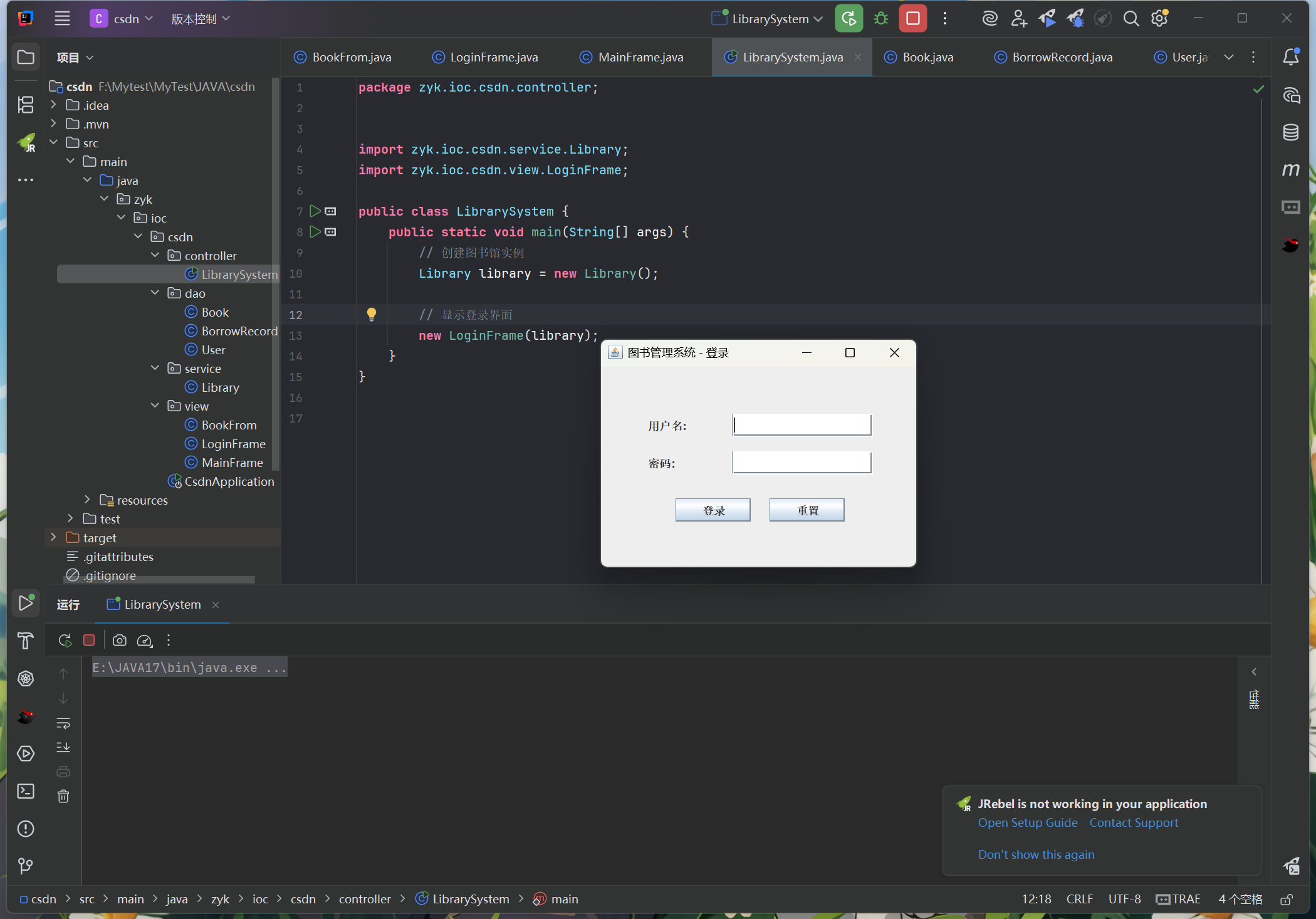
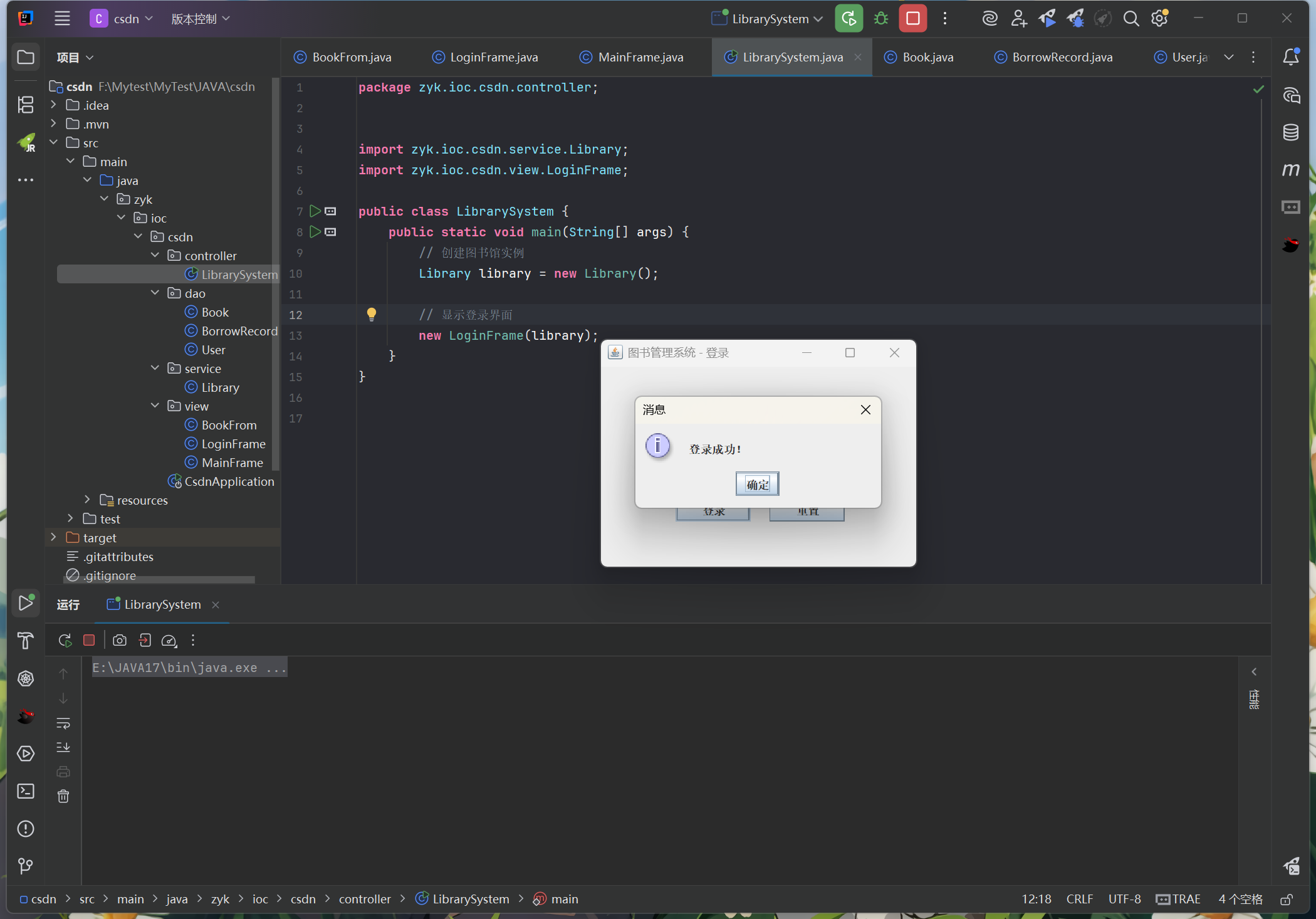
会进入到列表选项:
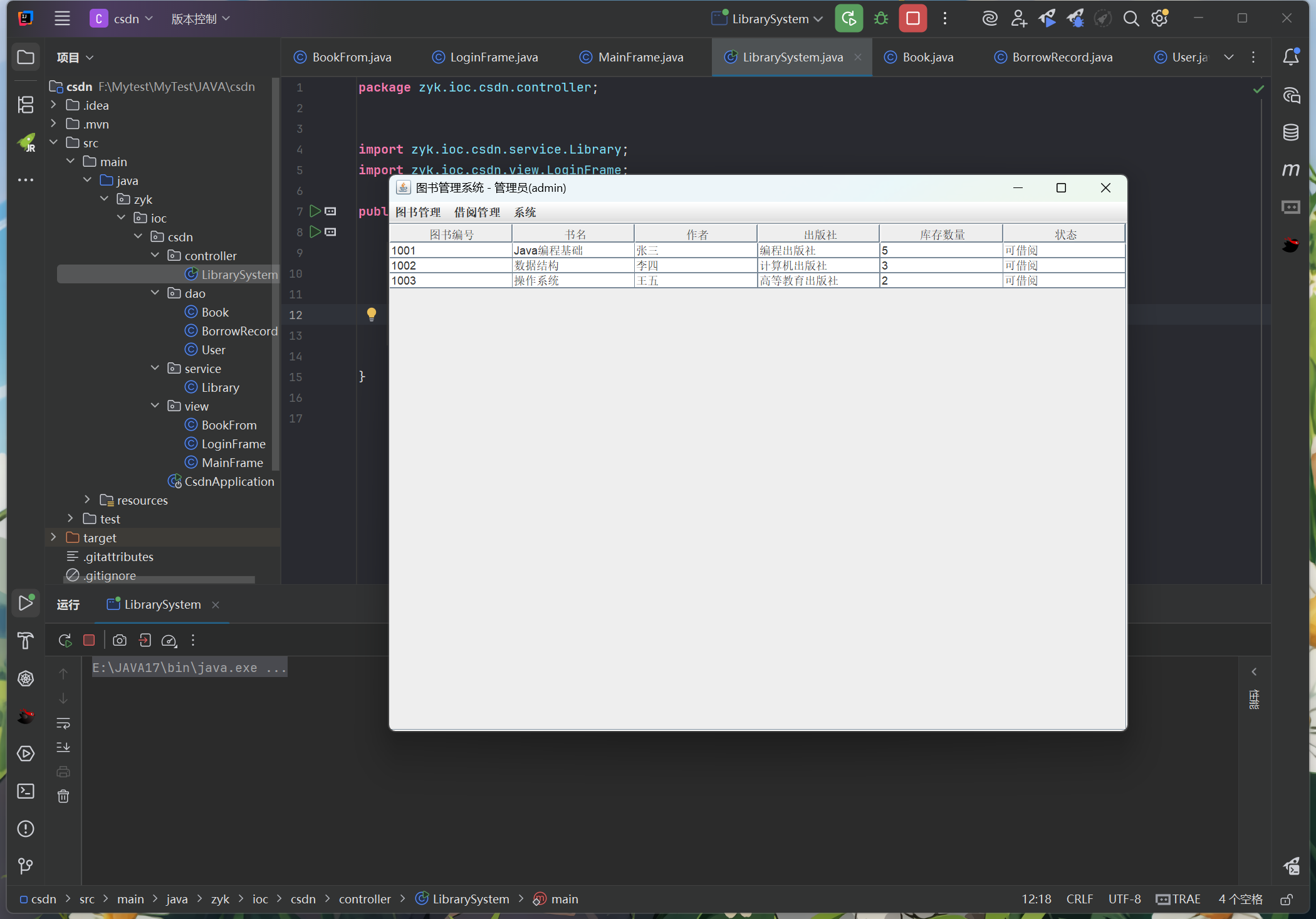
对于一些基础差的同学,这里送上登录的账号和密码
账号:admin
密码:123
感兴趣的小伙伴们,可以扫码关注一下哦!


Agent 垂直技术社区,欢迎活跃、内容共建。
更多推荐

 19
19 0
0- 0


 已为社区贡献1条内容

所有评论(0)