Python,R 运行结束时提醒我一下!
·
灵感来源
来自竹席的评论: https://www.zhihu.com/question/63358064/answer/208687105,代码源于Kimi,已实测。
应用原理
Threshold监测:当内存占用率小于某数值时,置顶一项弹窗。
应用场景
Windows + Python(base) 环境,内存占用率高、占用时间长、稳定时可以使用。
使用方法
首先启动R程序;
当内存占用率高于15% (memory_monitoring.py默认阈值) 后;
运行memory_monitoring.py。
运行命令
python .\memory_monitoring.py
或者
python .\memory_monitoring.py 20 # 内存占用小于20%时置顶弹窗。
# 加载python包
pip install psutil
import psutil
import tkinter as tk
from tkinter import messagebox
import threading
import time
import sys
class MemoryMonitor:
def __init__(self, threshold=15):
self.threshold = threshold
self.monitoring = False
self.root = None
def get_memory_usage(self):
"""获取当前内存使用率"""
memory = psutil.virtual_memory()
return memory.percent
def show_alert(self):
"""显示置顶提示框"""
self.root = tk.Tk()
self.root.title("内存监测提醒")
# 设置窗口为置顶
self.root.attributes('-topmost', True)
# 设置窗口大小和位置
self.root.geometry("300x150+500+300")
# 创建标签
label = tk.Label(
self.root,
text=f"⚠️ 程序运行完毕!\n\n当前内存使用率:{self.get_memory_usage():.1f}%",
font=("微软雅黑", 12),
fg="blue"
)
label.pack(pady=30)
# 创建关闭按钮
button = tk.Button(
self.root,
text="确定",
command=self.close_alert,
font=("微软雅黑", 10)
)
button.pack(pady=10)
# 播放提示音(可选)
self.root.bell()
self.root.mainloop()
def close_alert(self):
"""关闭提示框"""
if self.root:
self.root.quit()
self.root.destroy()
def monitor_memory(self):
"""监测内存使用率"""
print("开始监测内存使用率...")
self.monitoring = True
while self.monitoring:
try:
memory_percent = self.get_memory_usage()
print(f"当前内存使用率: {memory_percent:.1f}%")
# 检查内存使用率是否低于阈值
if memory_percent < self.threshold:
print(f"内存使用率低于 {self.threshold}%,显示提示框!")
self.show_alert()
break
# 每5秒检查一次
time.sleep(5)
except KeyboardInterrupt:
print("\n停止监测")
self.stop_monitoring()
break
except Exception as e:
print(f"监测过程中出现错误: {e}")
time.sleep(5)
def stop_monitoring(self):
"""停止监测"""
self.monitoring = False
def run(self):
"""运行监测程序"""
# 检查内存是否已经在阈值以下
current_usage = self.get_memory_usage()
print(f"当前内存使用率: {current_usage:.1f}%")
if current_usage < self.threshold:
print(f"当前内存使用率已低于 {self.threshold}%,立即显示提示框!")
self.show_alert()
else:
# 开始监测
self.monitor_memory()
def main():
"""主函数:支持命令行传入阈值"""
# 从命令行读取阈值,默认 15
if len(sys.argv) > 1 and sys.argv[1].isdigit():
threshold = int(sys.argv[1])
else:
threshold = 15
print("=" * 50)
print("内存使用率监测程序")
print("=" * 50)
print(f"监测阈值: {threshold}%")
print("按 Ctrl+C 可以停止监测")
print("=" * 50)
monitor = MemoryMonitor(threshold=threshold)
try:
monitor.run()
except KeyboardInterrupt:
print("\n程序被用户中断")
monitor.stop_monitoring()
sys.exit(0)
if __name__ == "__main__":
main()运行效果
打印值随着内存占用变化而刷新:
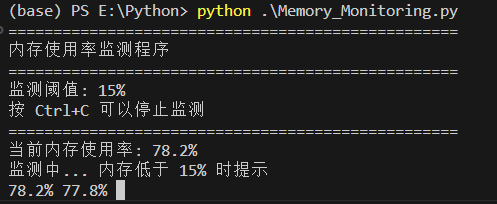
与实际使用情况对比:

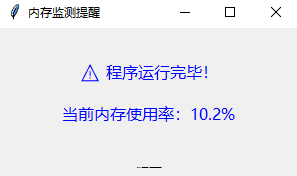
提示效果为置顶弹窗

Agent 垂直技术社区,欢迎活跃、内容共建。
更多推荐


 11
11 0
0- 0


 已为社区贡献1条内容

所有评论(0)