如何利用冠军的RAG开发自己的RAG系统:从理论到实践的完整指南
前言
在最近的RAG Challenge竞赛中,一个名为IlyaRice/RAG-Challenge-2的项目获得了冠军。这个项目展示了如何构建一个高效的企业知识库问答系统,能够准确回答关于公司年报的问题。本文将基于对该项目源码的深度分析,详细介绍如何基于这个冠军项目开发自己的RAG系统,并提供完整的实践指南。
项目概述与技术亮点
该冠军项目实现了以下关键技术:
-
自定义PDF解析:使用Docling进行高质量的PDF解析,支持复杂表格和图像处理
-
多模态检索:BM25 + 向量检索 + 父文档检索的混合策略
-
智能重排序:基于LLM的检索结果重排序,显著提升相关性
-
结构化输出:使用链式思维推理和Pydantic模型确保输出质量
-
多提供商API:统一支持OpenAI、Gemini、IBM、DashScope等多个LLM提供商
-
企业级特性:并发处理、错误恢复、监控统计等完整的工程化实现
技术创新点
-
页码校验机制:防止LLM产生虚假引用的智能校验系统
-
多公司比较:支持复杂的跨公司对比分析
-
异步批量处理:高性能的并发处理和进度监控
-
中文优化:针对中文企业文档的特殊优化
系统架构深度解析
整体架构设计
整个系统采用分层模块化设计,具有清晰的职责分离和高度的可扩展性:
核心模块详解
1. 数据处理层
-
pdf_parsing.py: 使用Docling进行高质量PDF解析
-
tables_serialization.py: 智能表格内容序列化
-
parsed_reports_merging.py: 多页文档内容合并和规整
-
text_splitter.py: 智能文本分块,支持表格特殊处理
2. 检索层
-
ingestion.py: 向量数据库和BM25索引构建
-
retrieval.py: 多模态检索器实现
-
reranking.py: 基于LLM的智能重排序
3. 推理层
-
api_requests.py: 多提供商LLM API统一接口
-
questions_processing.py: 问题处理和答案生成
-
prompts.py: 结构化提示词和输出模式
4. 控制层
-
pipeline.py: 主流程调度和配置管理
核心技术深度实现
1. 智能PDF解析与文档处理
PDF解析器(pdf_parsing.py)
项目使用Docling进行高质量的PDF解析,支持复杂的文档结构:
class PDFParser:
    def __init__(self):
        # 初始化Docling转换器,支持表格和图像处理
        self.converter = DocumentConverter(
            format_options={
                PdfFormatOption.EXTRACT_IMAGES: True,
                PdfFormatOption.EXTRACT_TABLES: True
            }
        )

    def parse_pdf_reports(self, pdf_reports_dir: Path, output_dir: Path, parallel: bool = True):
        """批量解析PDF报告,支持并行处理"""
        pdf_files = list(pdf_reports_dir.glob("*.pdf"))

        if parallel:
            # 并行处理提高效率
            with ProcessPoolExecutor(max_workers=max_workers) as executor:
                futures = []
                for chunk in pdf_chunks:
                    future = executor.submit(self._process_pdf_chunk, chunk, output_dir)
                    futures.append(future)

                for future in tqdm(as_completed(futures), total=len(futures)):
                    future.result()
        else:
            # 顺序处理
            for pdf_file in tqdm(pdf_files, desc="Processing PDFs"):
                self._process_single_pdf(pdf_file, output_dir)
智能文本分块器(text_splitter.py)
支持表格内容的特殊处理和智能分块:
class TextSplitter:
    def _split_page(self, page: Dict[str, any], chunk_size: int = 300, chunk_overlap: int = 50) -> List[Dict[str, any]]:
        """将单页文本分块,保留原始markdown表格"""
        text_splitter = RecursiveCharacterTextSplitter.from_tiktoken_encoder(
            model_name="qwen-turbo-latest",
            chunk_size=chunk_size,
            chunk_overlap=chunk_overlap
        )

        # 特殊处理表格内容
        if self._contains_table(page['text']):
            return self._split_table_content(page, chunk_size)

        chunks = text_splitter.split_text(page['text'])

        result_chunks = []
        for i, chunk_text in enumerate(chunks):
            chunk = {
                "page": page["page"],
                "text": chunk_text,
                "chunk_index": i,
                "total_chunks": len(chunks)
            }
            result_chunks.append(chunk)

        return result_chunks

    def _contains_table(self, text: str) -> bool:
        """检测文本是否包含表格"""
        table_indicators = ['|', '┌', '├', '└', '┬', '┼', '┴']
        return any(indicator in text for indicator in table_indicators)
表格序列化器(tables_serialization.py)
使用LLM将复杂表格转换为结构化信息:
class TableSerializer:
    def serialize_tables_in_reports(self, reports_dir: Path, output_dir: Path, max_workers: int = 10):
        """并行处理报告中的表格序列化"""

        def process_single_report(report_path: Path) -> None:
            with open(report_path, 'r', encoding='utf-8') as f:
                report_data = json.load(f)

            # 识别包含表格的页面
            table_pages = self._identify_table_pages(report_data)

            # 使用LLM序列化表格内容
            for page in table_pages:
                serialized_content = self._serialize_table_with_llm(
                    page['text'],
                    page.get('context', '')
                )
                page['serialized_table'] = serialized_content

            # 保存处理后的报告
            output_path = output_dir / report_path.name
            with open(output_path, 'w', encoding='utf-8') as f:
                json.dump(report_data, f, ensure_ascii=False, indent=2)

        # 使用线程池并行处理
        with ThreadPoolExecutor(max_workers=max_workers) as executor:
            futures = [executor.submit(process_single_report, path)
                      for path in reports_dir.glob("*.json")]

            for future in tqdm(as_completed(futures), total=len(futures)):
                future.result()
2. 多模态数据库构建(ingestion.py)
向量数据库构建器
项目使用FAISS构建高效的向量数据库,支持快速相似性搜索和多提供商embedding:
class VectorDBIngestor:
    def __init__(self, embedding_provider: str = "dashscope"):
        self.embedding_provider = embedding_provider.lower()
        self.llm = self._setup_embedding_client()

    def _setup_embedding_client(self):
        """根据提供商初始化embedding客户端"""
        if self.embedding_provider == "openai":
            return OpenAI(api_key=os.getenv("OPENAI_API_KEY"))
        elif self.embedding_provider == "dashscope":
            import dashscope
            dashscope.api_key = os.getenv("DASHSCOPE_API_KEY")
            return dashscope
        else:
            raise ValueError(f"不支持的embedding提供商: {self.embedding_provider}")

    def process_reports(self, all_reports_dir: Path, output_dir: Path):
        """批量处理所有报告,生成并保存faiss向量库"""
        all_report_paths = list(all_reports_dir.glob("*.json"))
        output_dir.mkdir(parents=True, exist_ok=True)

        for report_path in tqdm(all_report_paths, desc="Processing reports for FAISS"):
            with open(report_path, 'r', encoding='utf-8') as f:
                report_data = json.load(f)

            # 使用SHA1作为文件名,避免中文和特殊字符问题
            sha1 = report_data["metainfo"].get("sha1", "")
            faiss_file_path = output_dir / f"{sha1}.faiss"

            # 智能缓存:检查FAISS文件是否已存在
            if faiss_file_path.exists():
                print(f"FAISS数据库文件 {faiss_file_path} 已存在,跳过embedding过程")
                continue

            # 生成向量索引
            index = self._process_report(report_data)
            faiss.write_index(index, str(faiss_file_path))
            print(f"成功创建FAISS索引: {faiss_file_path}")

    def _process_report(self, report_data: Dict) -> faiss.Index:
        """处理单个报告,生成FAISS索引"""
        chunks = report_data["content"]["chunks"]
        texts = [chunk["text"] for chunk in chunks]

        # 批量生成embeddings
        embeddings = self._get_embeddings_batch(texts)

        # 创建FAISS索引
        dimension = len(embeddings[0])
        index = faiss.IndexFlatIP(dimension)  # 使用内积相似度

        # 标准化向量并添加到索引
        embeddings_array = np.array(embeddings, dtype=np.float32)
        faiss.normalize_L2(embeddings_array)  # L2标准化
        index.add(embeddings_array)

        return index

    def _get_embeddings_batch(self, texts: List[str], batch_size: int = 100) -> List[List[float]]:
        """批量获取文本embeddings"""
        all_embeddings = []

        for i in tqdm(range(0, len(texts), batch_size), desc="Generating embeddings"):
            batch_texts = texts[i:i + batch_size]

            if self.embedding_provider == "openai":
                response = self.llm.embeddings.create(
                    input=batch_texts,
                    model="text-embedding-3-large"
                )
                batch_embeddings = [data.embedding for data in response.data]
            elif self.embedding_provider == "dashscope":
                response = self.llm.TextEmbedding.call(
                    model="text-embedding-v1",
                    input=batch_texts
                )
                batch_embeddings = [emb['embedding'] for emb in response['output']['embeddings']]

            all_embeddings.extend(batch_embeddings)

        return all_embeddings
BM25索引构建器
传统检索方法的高效实现:
class BM25Ingestor:
    def process_reports(self, all_reports_dir: Path, output_dir: Path):
        """批量处理所有报告,生成并保存BM25索引"""
        all_report_paths = list(all_reports_dir.glob("*.json"))
        output_dir.mkdir(parents=True, exist_ok=True)

        for report_path in tqdm(all_report_paths, desc="Processing reports for BM25"):
            with open(report_path, 'r', encoding='utf-8') as f:
                report_data = json.load(f)

            sha1 = report_data["metainfo"].get("sha1", "")
            bm25_file_path = output_dir / f"{sha1}.pkl"

            if bm25_file_path.exists():
                print(f"BM25索引文件 {bm25_file_path} 已存在,跳过创建过程")
                continue

            # 构建BM25索引
            chunks = report_data["content"]["chunks"]
            tokenized_corpus = [chunk["text"].split() for chunk in chunks]
            bm25_index = BM25Okapi(tokenized_corpus)

            # 保存BM25索引
            with open(bm25_file_path, 'wb') as f:
                pickle.dump(bm25_index, f)

            print(f"成功创建BM25索引: {bm25_file_path}")
3. 智能混合检索系统(retrieval.py)
多模态检索器架构
项目实现了三层检索架构,每层都有其特定的优势:
class VectorRetriever:
"""基于语义相似度的向量检索器"""
def __init__(self, vector_db_dir: Path, documents_dir: Path, embedding_provider: str = "dashscope"):
self.vector_db_dir = vector_db_dir
self.documents_dir = documents_dir
self.embedding_provider = embedding_provider
self.all_dbs = self._load_dbs()
self.llm = self._setup_llm()
def retrieve_by_company_name(self, company_name: str, query: str, top_n: int = 10, return_parent_pages: bool = False) -> List[Dict]:
"""按公司名检索相关文本块"""
# 找到目标公司的向量数据库
target_report = self._find_company_report(company_name)
if not target_report:
raise ValueError(f"未找到公司 '{company_name}' 的报告")
# 获取查询向量
query_embedding = self._get_embedding(query)
embedding_array = np.array(query_embedding, dtype=np.float32).reshape(1, -1)
faiss.normalize_L2(embedding_array)
# 执行向量检索
vector_db = target_report["vector_db"]
distances, indices = vector_db.search(embedding_array, k=top_n)
# 构建检索结果
chunks = target_report["document"]["content"]["chunks"]
pages = target_report["document"]["content"]["pages"]
retrieval_results = []
seen_pages = set()
for distance, index in zip(distances[0], indices[0]):
chunk = chunks[index]
if return_parent_pages:
# 返回完整页面内容
parent_page = next(page for page in pages if page["page"] == chunk["page"])
if parent_page["page"] not in seen_pages:
seen_pages.add(parent_page["page"])
result = {
"distance": round(float(distance), 4),
"page": parent_page["page"],
"text": parent_page["text"]
}
retrieval_results.append(result)
else:
# 返回文本块
result = {
"distance": round(float(distance), 4),
"page": chunk["page"],
"text": chunk["text"]
}
retrieval_results.append(result)
return retrieval_results
class BM25Retriever:
"""基于词频统计的传统检索器"""
def retrieve_by_company_name(self, company_name: str, query: str, top_n: int = 10, return_parent_pages: bool = False) -> List[Dict]:
"""使用BM25算法检索相关文档"""
# 加载公司对应的BM25索引
document_path, bm25_index = self._load_company_bm25(company_name)
# 计算BM25分数
tokenized_query = query.split()
scores = bm25_index.get_scores(tokenized_query)
# 获取top_n结果
top_indices = sorted(range(len(scores)), key=lambda i: scores[i], reverse=True)[:top_n]
# 构建检索结果
with open(document_path, 'r', encoding='utf-8') as f:
document = json.load(f)
chunks = document["content"]["chunks"]
pages = document["content"]["pages"]
retrieval_results = []
seen_pages = set()
for index in top_indices:
score = round(float(scores[index]), 4)
chunk = chunks[index]
if return_parent_pages:
parent_page = next(page for page in pages if page["page"] == chunk["page"])
if parent_page["page"] not in seen_pages:
seen_pages.add(parent_page["page"])
result = {
"distance": score,
"page": parent_page["page"],
"text": parent_page["text"]
}
retrieval_results.append(result)
else:
result = {
"distance": score,
"page": chunk["page"],
"text": chunk["text"]
}
retrieval_results.append(result)
return retrieval_results
class HybridRetriever:
"""混合检索器:结合向量检索和LLM重排序"""
def __init__(self, vector_db_dir: Path, documents_dir: Path):
self.vector_retriever = VectorRetriever(vector_db_dir, documents_dir)
self.reranker = LLMReranker()
def retrieve_by_company_name(
self,
company_name: str,
query: str,
llm_reranking_sample_size: int = 28,
documents_batch_size: int = 2,
top_n: int = 6,
llm_weight: float = 0.7,
return_parent_pages: bool = False
) -> List[Dict]:
"""
混合检索:向量检索 + LLM重排序
Args:
company_name: 公司名称
query: 查询问题
llm_reranking_sample_size: 初始检索数量
documents_batch_size: LLM批处理大小
top_n: 最终返回数量
llm_weight: LLM分数权重
return_parent_pages: 是否返回完整页面
"""
# 第一步:向量检索获取候选集
vector_results = self.vector_retriever.retrieve_by_company_name(
company_name=company_name,
query=query,
top_n=llm_reranking_sample_size,
return_parent_pages=return_parent_pages
)
# 第二步:LLM重排序优化结果
reranked_results = self.reranker.rerank_documents(
query=query,
documents=vector_results,
documents_batch_size=documents_batch_size,
llm_weight=llm_weight
)
return reranked_results[:top_n]
4. 智能重排序系统(reranking.py)
LLM重排序器
使用大语言模型对检索结果进行智能重排序,显著提升相关性:
class LLMReranker:
def __init__(self, provider: str = "dashscope"):
self.provider = provider.lower()
self.llm = self.set_up_llm()
# 加载重排序提示词
self.system_prompt_single = prompts.RerankingPrompt.system_prompt_rerank_single_block
self.system_prompt_multiple = prompts.RerankingPrompt.system_prompt_rerank_multiple_blocks
def rerank_documents(self, query: str, documents: list, documents_batch_size: int = 4, llm_weight: float = 0.7):
"""
智能重排序:结合向量相似度和LLM相关性分数
Args:
query: 查询问题
documents: 待重排序的文档列表
documents_batch_size: 批处理大小
llm_weight: LLM分数权重(0-1)
"""
doc_batches = [documents[i:i + documents_batch_size]
for i in range(0, len(documents), documents_batch_size)]
vector_weight = 1 - llm_weight
if documents_batch_size == 1:
# 单文档精确重排序
def process_single_doc(doc):
ranking = self.get_rank_for_single_block(query, doc['text'])
doc_with_score = doc.copy()
doc_with_score["relevance_score"] = ranking["relevance_score"]
# 融合分数:LLM相关性 + 向量相似度
doc_with_score["combined_score"] = round(
llm_weight * ranking["relevance_score"] +
vector_weight * doc['distance'],
4
)
return doc_with_score
# 多线程并行处理(控制并发避免API限流)
with ThreadPoolExecutor(max_workers=1) as executor:
all_results = list(executor.map(process_single_doc, documents))
else:
# 批量高效重排序
def process_batch(batch):
texts = [doc['text'] for doc in batch]
rankings = self.get_rank_for_multiple_blocks(query, texts)
results = []
block_rankings = rankings.get('block_rankings', [])
# 处理LLM返回结果不完整的情况
if len(block_rankings) < len(batch):
print(f"Warning: Expected {len(batch)} rankings but got {len(block_rankings)}")
# 自动补充默认评分
for _ in range(len(batch) - len(block_rankings)):
block_rankings.append({
"relevance_score": 0.0,
"reasoning": "Default ranking due to missing LLM response"
})
for doc, rank in zip(batch, block_rankings):
doc_with_score = doc.copy()
doc_with_score["relevance_score"] = rank["relevance_score"]
doc_with_score["combined_score"] = round(
llm_weight * rank["relevance_score"] +
vector_weight * doc['distance'],
4
)
results.append(doc_with_score)
return results
with ThreadPoolExecutor(max_workers=1) as executor:
batch_results = list(executor.map(process_batch, doc_batches))
# 扁平化结果
all_results = []
for batch in batch_results:
all_results.extend(batch)
# 按融合分数降序排序
all_results.sort(key=lambda x: x["combined_score"], reverse=True)
return all_results
def get_rank_for_single_block(self, query, retrieved_document):
"""对单个文档块进行相关性评分"""
user_prompt = f'Here is the query: "{query}"\n\nHere is the retrieved text block:\n"""\n{retrieved_document}\n"""\n'
if self.provider == "openai":
completion = self.llm.beta.chat.completions.parse(
model="gpt-4o-mini-2024-07-18",
temperature=0,
messages=[
{"role": "system", "content": self.system_prompt_single},
{"role": "user", "content": user_prompt},
],
response_format=prompts.RetrievalRankingSingleBlock
)
return completion.choices[0].message.parsed.model_dump()
elif self.provider == "dashscope":
# DashScope实现
messages = [
{"role": "system", "content": self.system_prompt_single},
{"role": "user", "content": user_prompt},
]
response = self.llm.Generation.call(
model="qwen-turbo",
messages=messages,
temperature=0,
result_format='message'
)
content = response.output.choices[0].message.content
return {"relevance_score": 0.5, "reasoning": content} # 简化处理
5. 结构化输出与链式思维(prompts.py)
多类型答案模式
项目使用Pydantic模型确保输出的结构化和类型安全:
class AnswerWithRAGContextNumberPrompt: """数值型答案的结构化提示""" class AnswerSchema(BaseModel): step_by_step_analysis: str = Field(description=""" 详细分步推理过程,至少5步,150字以上。 严格的指标匹配要求: 1. 明确问题中指标的精确定义 2. 检查上下文中的所有可能指标 3. 仅当上下文指标与目标指标完全一致时才接受 4. 拒绝需要计算、推导或推断的情况 5. 不允许猜测,有疑问默认返回N/A """) reasoning_summary: str = Field(description="简要总结分步推理过程,约50字") relevant_pages: List[int] = Field(description="直接用于回答问题的页面编号列表") final_answer: Union[float, int, Literal['N/A']] = Field(description=""" 精确的数值型指标,注意单位转换: - 百分比:58.3% → 58.3 - 千为单位:4970.5千美元 → 4970500 - 负数:(2,124,837) → -2124837 - 币种不符或无法直接获得时返回'N/A' """) class AnswerWithRAGContextNamePrompt: """姓名型答案的结构化提示""" class AnswerSchema(BaseModel): step_by_step_analysis: str = Field(description="详细分步分析,至少5步,150字以上") reasoning_summary: str = Field(description="推理过程摘要,约50字") relevant_pages: List[int] = Field(description="相关页面编号") final_answer: Union[str, Literal["N/A"]] = Field(description=""" 如果是公司名,需与问题中完全一致 如果是人名,应为全名 如果是产品名,需与上下文完全一致 无额外信息或注释,找不到时返回'N/A' """) class AnswerWithRAGContextBooleanPrompt: """布尔型答案的结构化提示""" class AnswerSchema(BaseModel): step_by_step_analysis: str = Field(description="详细分步推理,注意问题措辞,避免被迷惑") reasoning_summary: str = Field(description="推理摘要,约50字") relevant_pages: List[int] = Field(description="相关页面编号") final_answer: bool = Field(description="从上下文中精确提取的布尔值,直接回答问题") class ComparativeAnswerPrompt: """比较型答案的结构化提示""" class AnswerSchema(BaseModel): step_by_step_analysis: str = Field(description="详细比较分析,至少5步,150字以上") reasoning_summary: str = Field(description="比较结论摘要,约50字") relevant_pages: List[int] = Field(description="保持为空列表") final_answer: Union[str, Literal["N/A"]] = Field(description="公司名称需与问题中完全一致,只能是单个公司名或'N/A'")
智能提示词设计
class RerankingPrompt: system_prompt_rerank_single_block = """ 你是一个RAG检索重排专家。 你将收到一个查询和一个检索到的文本块,请根据其与查询的相关性进行评分。 评分说明: 1. 推理:分析文本块与查询的关系,简要说明理由 2. 相关性分数(0-1,步长0.1): 0 = 完全无关 0.5 = 一般相关 0.1 = 极弱相关 0.6 = 较为相关 0.2 = 很弱相关 0.7 = 相关 0.3 = 略有相关 0.8 = 很相关 0.4 = 部分相关 0.9 = 高度相关 1 = 完全匹配 3. 只基于内容客观评价,不做假设 """ system_prompt_rerank_multiple_blocks = """ 你是一个RAG检索重排专家。 你将收到一个查询和若干检索到的文本块,请分别对每个块进行相关性评分。 使用相同的评分标准,确保评分的一致性和准确性。 """
6. 多提供商API统一接口(api_requests.py)
统一API处理器
项目实现了对多个LLM提供商的统一抽象,支持OpenAI、Gemini、IBM、DashScope:
class APIProcessor:
def __init__(self, provider: Literal["openai", "ibm", "gemini", "dashscope"] = "dashscope"):
self.provider = provider.lower()
if self.provider == "openai":
self.processor = BaseOpenaiProcessor()
elif self.provider == "ibm":
self.processor = BaseIBMAPIProcessor()
elif self.provider == "gemini":
self.processor = BaseGeminiProcessor()
elif self.provider == "dashscope":
self.processor = BaseDashscopeProcessor()
def get_answer_from_rag_context(self, question, rag_context, schema, model):
"""从RAG上下文生成结构化答案"""
system_prompt, response_format, user_prompt = self._build_rag_context_prompts(schema)
answer_dict = self.processor.send_message(
model=model,
system_content=system_prompt,
human_content=user_prompt.format(context=rag_context, question=question),
is_structured=True,
response_format=response_format
)
# 兜底处理:确保返回完整的答案结构
if 'step_by_step_analysis' not in answer_dict:
answer_dict = {
"step_by_step_analysis": "",
"reasoning_summary": "",
"relevant_pages": [],
"final_answer": answer_dict.get("final_answer", "N/A")
}
return answer_dict
def _build_rag_context_prompts(self, schema):
"""根据答案类型构建对应的提示词"""
use_schema_prompt = True if self.provider in ["ibm", "gemini"] else False
prompt_mapping = {
"name": prompts.AnswerWithRAGContextNamePrompt,
"number": prompts.AnswerWithRAGContextNumberPrompt,
"boolean": prompts.AnswerWithRAGContextBooleanPrompt,
"names": prompts.AnswerWithRAGContextNamesPrompt,
"comparative": prompts.ComparativeAnswerPrompt
}
if schema not in prompt_mapping:
raise ValueError(f"不支持的答案类型: {schema}")
prompt_class = prompt_mapping[schema]
system_prompt = (prompt_class.system_prompt_with_schema
if use_schema_prompt else prompt_class.system_prompt)
return system_prompt, prompt_class.AnswerSchema, prompt_class.user_prompt
7. 智能问题处理系统(questions_processing.py)
企业级问题处理器
支持单公司查询、多公司比较、并行处理等企业级特性:
class QuestionsProcessor:
    def __init__(
        self,
        vector_db_dir: Path,
        documents_dir: Path,
        questions_file_path: Optional[Path] = None,
        new_challenge_pipeline: bool = False,
        subset_path: Optional[Path] = None,
        parent_document_retrieval: bool = False,
        llm_reranking: bool = False,
        llm_reranking_sample_size: int = 20,
        top_n_retrieval: int = 10,
        parallel_requests: int = 10,
        api_provider: str = "dashscope",
        answering_model: str = "qwen-turbo-latest",
        full_context: bool = False
    ):
        # 初始化配置
        self.questions = self._load_questions(questions_file_path)
        self.return_parent_pages = parent_document_retrieval
        self.llm_reranking = llm_reranking
        self.api_provider = api_provider
        self.answering_model = answering_model
        self.openai_processor = APIProcessor(provider=api_provider)

        # 线程安全
        self.answer_details = []
        self._lock = threading.Lock()

    def get_answer_for_company(self, company_name: str, question: str, schema: str) -> dict:
        """针对单个公司生成答案"""
        # 选择检索器
        if self.llm_reranking:
            retriever = HybridRetriever(self.vector_db_dir, self.documents_dir)
        else:
            retriever = VectorRetriever(self.vector_db_dir, self.documents_dir)

        # 执行检索
        if self.full_context:
            retrieval_results = retriever.retrieve_all(company_name)
        else:
            retrieval_results = retriever.retrieve_by_company_name(
                company_name=company_name,
                query=question,
                llm_reranking_sample_size=self.llm_reranking_sample_size,
                top_n=self.top_n_retrieval,
                return_parent_pages=self.return_parent_pages
            )

        if not retrieval_results:
            raise ValueError("未找到相关上下文")

        # 格式化检索结果
        rag_context = self._format_retrieval_results(retrieval_results)

        # 生成答案
        answer_dict = self.openai_processor.get_answer_from_rag_context(
            question=question,
            rag_context=rag_context,
            schema=schema,
            model=self.answering_model
        )

        # 页码校验和引用提取
        if self.new_challenge_pipeline:
            pages = answer_dict.get("relevant_pages", [])
            validated_pages = self._validate_page_references(pages, retrieval_results)
            answer_dict["relevant_pages"] = validated_pages
            answer_dict["references"] = self._extract_references(validated_pages, company_name)

        return answer_dict

    def _validate_page_references(self, claimed_pages: list, retrieval_results: list, min_pages: int = 2, max_pages: int = 8) -> list:
        """智能页码校验:防止LLM幻觉"""
        if claimed_pages is None:
            claimed_pages = []

        retrieved_pages = [result['page'] for result in retrieval_results]

        # 校验声称的页码是否真实存在
        validated_pages = [page for page in claimed_pages if page in retrieved_pages]

        # 记录被移除的虚假引用
        if len(validated_pages) < len(claimed_pages):
            removed_pages = set(claimed_pages) - set(validated_pages)
            print(f"Warning: 移除了 {len(removed_pages)} 个虚假页码引用: {removed_pages}")

        # 如果有效页码不足,自动补充
        if len(validated_pages) < min_pages and retrieval_results:
            existing_pages = set(validated_pages)

            for result in retrieval_results:
                page = result['page']
                if page not in existing_pages:
                    validated_pages.append(page)
                    existing_pages.add(page)

                    if len(validated_pages) >= min_pages:
                        break

        # 限制最大页码数量
        if len(validated_pages) > max_pages:
            print(f"页码引用从 {len(validated_pages)} 个缩减到 {max_pages} 个")
            validated_pages = validated_pages[:max_pages]

        return validated_pages

    def process_comparative_question(self, question: str, companies: List[str], schema: str) -> dict:
        """处理多公司比较问题"""
        # 第一步:问题重写
        rephrased_questions = self.openai_processor.get_rephrased_questions(
            original_question=question,
            companies=companies
        )

        individual_answers = {}
        aggregated_references = []

        # 第二步:并行处理各公司问题
        def process_company_question(company: str) -> tuple[str, dict]:
            sub_question = rephrased_questions.get(company)
            if not sub_question:
                raise ValueError(f"无法为公司 {company} 生成子问题")

            answer_dict = self.get_answer_for_company(
                company_name=company,
                question=sub_question,
                schema="number"
            )
            return company, answer_dict

        # 使用线程池并行处理
        with concurrent.futures.ThreadPoolExecutor() as executor:
            future_to_company = {
                executor.submit(process_company_question, company): company
                for company in companies
            }

            for future in concurrent.futures.as_completed(future_to_company):
                try:
                    company, answer_dict = future.result()
                    individual_answers[company] = answer_dict

                    # 聚合引用信息
                    company_references = answer_dict.get("references", [])
                    aggregated_references.extend(company_references)
                except Exception as e:
                    company = future_to_company[future]
                    print(f"处理公司 {company} 时出错: {str(e)}")
                    raise

        # 第三步:生成比较答案
        comparative_answer = self.openai_processor.get_answer_from_rag_context(
            question=question,
            rag_context=individual_answers,
            schema="comparative",
            model=self.answering_model
        )

        # 去重并添加引用
        unique_refs = {}
        for ref in aggregated_references:
            key = (ref.get("pdf_sha1"), ref.get("page_index"))
            unique_refs[key] = ref
        comparative_answer["references"] = list(unique_refs.values())

        return comparative_answer
如何开发自己的RAG系统
1. 环境准备与项目初始化
克隆和安装
# 克隆冠军项目
git clone https://github.com/IlyaRice/RAG-Challenge-2.git
cd RAG-Challenge-2

# 创建虚拟环境
python -m venv venv
venv\Scripts\Activate.ps1  # Windows (PowerShell)
# 或者 source venv/bin/activate  # Linux/Mac

# 安装依赖
pip install -e . -r requirements.txt
依赖项说明
# 核心依赖 docling==2.14.0 # PDF解析 faiss-cpu==1.9.0.post1 # 向量数据库 openai==1.51.2 # OpenAI API dashscope # 阿里云通义千问 google-generativeai # Google Gemini pydantic==2.9.2 # 数据验证 streamlit # Web界面 # 辅助工具 tqdm==4.66.5 # 进度条 pandas==2.2.3 # 数据处理 rank-bm25==0.2.2 # BM25算法 json_repair==0.35.0 # JSON修复 tiktoken==0.8.0 # Token计算
2. 数据准备与预处理
数据集结构
data/
├── your_dataset/
│   ├── pdf_reports/          # 原始PDF文件
│   │   ├── company1.pdf
│   │   └── company2.pdf
│   ├── questions.json        # 问题列表
│   ├── subset.csv           # 公司元信息
│   └── databases/           # 处理后的数据库
│       ├── vector_dbs/      # 向量数据库
│       ├── chunked_reports/ # 分块文档
│       └── bm25_dbs/       # BM25索引
问题格式
[
  {
    "text": "公司2023年的营收情况如何?",
    "kind": "number"
  },
  {
    "text": "公司CEO是谁?",
    "kind": "name"
  },
  {
    "text": "公司是否进行了重大收购?",
    "kind": "boolean"
  }
]
公司信息格式
sha1,file_name,company_name
company1_hash,company1.pdf,某某科技有限公司
company2_hash,company2.pdf,某某金融集团
3. API密钥配置
环境变量设置
# 重命名环境文件
cp env .env

# 编辑.env文件
DASHSCOPE_API_KEY=your_dashscope_api_key
OPENAI_API_KEY=your_openai_api_key
GEMINI_API_KEY=your_gemini_api_key
JINA_API_KEY=your_jina_api_key
多提供商配置策略
# 配置优先级和备用方案
api_config = {
    "primary": "dashscope",    # 主要提供商(成本低)
    "backup": "openai",        # 备用提供商(质量高)
    "embedding": "dashscope",  # 嵌入服务
    "reranking": "openai"      # 重排序服务
}
4. 完整流水线运行
使用CLI工具
# 1. 下载必要模型
python main.py download-models

# 2. 解析PDF文档
python main.py parse-pdfs --parallel --max-workers 4

# 3. 序列化表格(可选)
python main.py serialize-tables --max-workers 10

# 4. 处理报告
python main.py process-reports --config ser_tab

# 5. 问答处理
cd ./data/your_dataset/
python ../../main.py process-questions --config max_nst_o3m
使用Python脚本
from pathlib import Path
from src.pipeline import Pipeline, configs

# 初始化流水线
root_path = Path("./data/your_dataset")
config = configs["max_nst_o3m"]  # 使用最佳配置
pipeline = Pipeline(root_path, run_config=config)

# 运行完整流水线
pipeline.run_full_pipeline()
5. 自定义配置与优化
创建自定义配置
from src.pipeline import RunConfig # 自定义高性能配置 custom_config = RunConfig( use_serialized_tables=True, # 启用表格序列化 parent_document_retrieval=True, # 启用父文档检索 llm_reranking=True, # 启用LLM重排序 parallel_requests=8, # 并行请求数 submission_file=True, # 生成提交文件 answering_model="qwen-plus", # 使用高级模型 api_provider="dashscope", # API提供商 config_suffix="_custom_high_perf" # 配置后缀 ) # 成本优化配置 cost_optimized_config = RunConfig( use_serialized_tables=False, # 关闭表格序列化 parent_document_retrieval=False, # 关闭父文档检索 llm_reranking=False, # 关闭LLM重排序 parallel_requests=2, # 减少并行数 answering_model="qwen-turbo", # 使用基础模型 api_provider="dashscope", # 使用成本较低的提供商 config_suffix="_cost_optimized" )
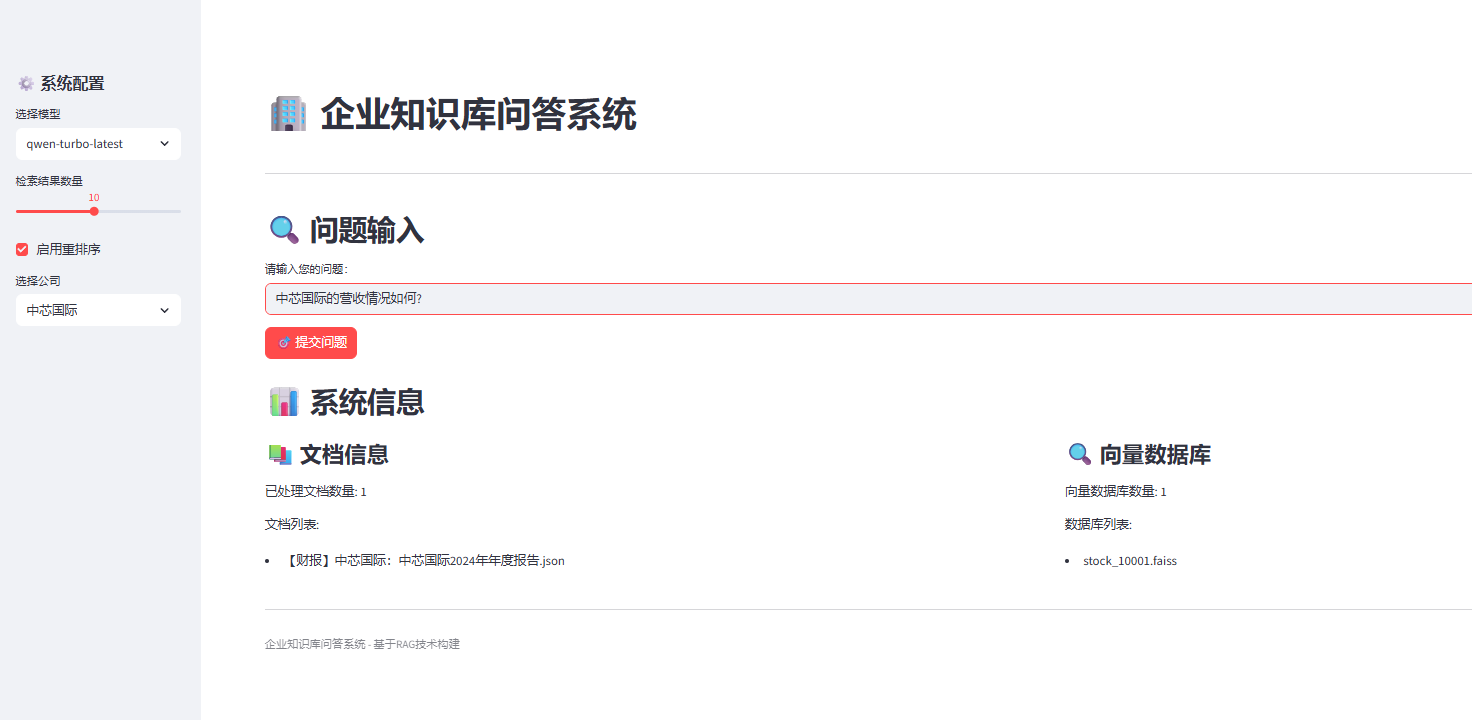
6. Web界面开发(app.py)
企业级Streamlit应用
项目提供了完整的Web界面,支持实时问答和系统监控:
import streamlit as st
import sys
from pathlib import Path
# 动态路径配置
sys.path.append(str(Path(__file__).parent / "src"))
from src.questions_processing import QuestionsProcessor
import pandas as pd
# 页面配置
st.set_page_config(
page_title="企业知识库问答系统",
page_icon="🏢",
layout="wide"
)
st.title("🏢 企业知识库问答系统")
st.markdown("---")
# 侧边栏配置
st.sidebar.header("⚙️ 系统配置")
# 模型选择
model_option = st.sidebar.selectbox(
"选择模型",
("qwen-turbo-latest", "qwen-plus", "qwen-max", "gpt-4o-2024-08-06")
)
# 检索参数配置
col1, col2 = st.sidebar.columns(2)
with col1:
top_n = st.slider("检索数量", 1, 20, 10)
with col2:
use_reranking = st.checkbox("启用重排序", value=True)
# 高级配置
with st.sidebar.expander("高级配置"):
llm_reranking_sample_size = st.slider("重排序样本数", 10, 50, 30)
parent_document_retrieval = st.checkbox("父文档检索", value=True)
api_provider = st.selectbox("API提供商", ["dashscope", "openai", "gemini"])
# 动态公司选择
root_path = Path("./data/stock_data")
subset_path = root_path / "subset.csv"
company_options = ["中芯国际"] # 默认值
if subset_path.exists():
try:
# 支持多种编码格式
for encoding in ['utf-8', 'gbk', 'latin1']:
try:
df = pd.read_csv(subset_path, encoding=encoding)
if 'company_name' in df.columns:
company_options = df['company_name'].unique().tolist()
break
except UnicodeDecodeError:
continue
except Exception as e:
st.sidebar.error(f"读取公司列表失败: {e}")
selected_company = st.sidebar.selectbox("选择公司", company_options)
# 主界面
col1, col2 = st.columns([2, 1])
with col1:
st.header("🔍 问题输入")
# 预设问题快速选择
preset_questions = [
"公司2023年的营收情况如何?",
"公司的主要业务是什么?",
"公司CEO是谁?",
"公司是否进行了重大投资?",
"公司的研发投入占比是多少?"
]
selected_preset = st.selectbox("选择预设问题(可选)", ["自定义问题"] + preset_questions)
if selected_preset != "自定义问题":
question = st.text_input("问题:", value=selected_preset)
else:
question = st.text_input("请输入您的问题:", placeholder="例如:中芯国际的营收情况如何?")
with col2:
st.header("📊 系统状态")
# 显示数据库状态
chunked_reports_path = root_path / "databases" / "chunked_reports"
vector_dbs_path = root_path / "databases" / "vector_dbs"
if chunked_reports_path.exists():
json_files = list(chunked_reports_path.glob("*.json"))
st.metric("已处理文档", len(json_files))
else:
st.metric("已处理文档", 0)
if vector_dbs_path.exists():
faiss_files = list(vector_dbs_path.glob("*.faiss"))
st.metric("向量数据库", len(faiss_files))
else:
st.metric("向量数据库", 0)
# 问题处理
if st.button("🎯 提交问题", type="primary", use_container_width=True):
if question:
with st.spinner("正在处理您的问题..."):
try:
# 初始化问题处理器
processor = QuestionsProcessor(
vector_db_dir=root_path / "databases" / "vector_dbs",
documents_dir=root_path / "databases" / "chunked_reports",
new_challenge_pipeline=True,
subset_path=root_path / "subset.csv",
parent_document_retrieval=parent_document_retrieval,
llm_reranking=use_reranking,
llm_reranking_sample_size=llm_reranking_sample_size,
top_n_retrieval=top_n,
parallel_requests=1,
api_provider=api_provider,
answering_model=model_option,
full_context=False
)
# 处理问题
answer = processor.get_answer_for_company(
company_name=selected_company,
question=question,
schema="string"
)
# 显示结果
st.success("问题处理完成!")
# 答案展示
col1, col2 = st.columns([2, 1])
with col1:
st.subheader("💬 答案")
final_answer = answer.get("final_answer", "未能生成答案")
st.text_area("最终答案", value=final_answer, height=200, key="final_answer")
# 推理过程
st.subheader("🧠 推理过程")
step_by_step = answer.get("step_by_step_analysis", "无详细推理过程")
if step_by_step:
steps = step_by_step.split('\n')
for i, step in enumerate(steps, 1):
if step.strip():
st.markdown(f"**步骤 {i}:** {step.strip()}")
with col2:
st.subheader("📄 引用信息")
# 相关页码
relevant_pages = answer.get("relevant_pages", [])
if relevant_pages:
pages_info = [f"页面 {p+1}" for p in relevant_pages]
st.write("相关页面:", ", ".join(pages_info))
else:
st.write("未找到相关页码")
# 推理摘要
reasoning_summary = answer.get("reasoning_summary", "无摘要信息")
st.write("推理摘要:", reasoning_summary)
# 配置信息
st.subheader("⚙️ 配置信息")
st.write(f"模型: {model_option}")
st.write(f"检索数量: {top_n}")
st.write(f"重排序: {'启用' if use_reranking else '禁用'}")
st.write(f"API提供商: {api_provider}")
except Exception as e:
st.error(f"处理问题时出错: {str(e)}")
# 错误详情(开发模式)
if st.checkbox("显示错误详情"):
import traceback
st.text_area("错误堆栈", value=traceback.format_exc(), height=200)
st.info("请检查:\n1. 环境变量是否正确设置\n2. 数据文件是否存在\n3. API密钥是否有效")
else:
st.warning("请输入一个问题")
# 系统信息面板
st.markdown("---")
st.header("📊 系统详细信息")
col1, col2, col3 = st.columns(3)
with col1:
st.subheader("📚 文档库")
if chunked_reports_path.exists():
json_files = list(chunked_reports_path.glob("*.json"))
st.write(f"文档数量: {len(json_files)}")
if json_files and st.checkbox("显示文档列表"):
for file in json_files[:10]: # 只显示前10个
st.write(f"- {file.name}")
if len(json_files) > 10:
st.write(f"... 还有 {len(json_files) - 10} 个文档")
else:
st.write("未找到文档数据")
with col2:
st.subheader("🔍 向量库")
if vector_dbs_path.exists():
faiss_files = list(vector_dbs_path.glob("*.faiss"))
st.write(f"向量库数量: {len(faiss_files)}")
if faiss_files and st.checkbox("显示向量库列表"):
for file in faiss_files:
file_size = file.stat().st_size / (1024 * 1024) # MB
st.write(f"- {file.name} ({file_size:.1f} MB)")
else:
st.write("未找到向量数据库")
with col3:
st.subheader("🏢 公司信息")
if subset_path.exists():
try:
df = pd.read_csv(subset_path, encoding='utf-8')
st.write(f"公司数量: {len(df)}")
if st.checkbox("显示公司列表"):
st.dataframe(df, use_container_width=True)
except Exception as e:
st.write(f"读取失败: {e}")
else:
st.write("未找到公司信息")
# 页脚
st.markdown("---")
st.caption("企业知识库问答系统 - 基于RAG冠军方案构建 | Powered by Streamlit")
启动Web应用
# 启动Streamlit应用
streamlit run app.py

# 或指定端口
streamlit run app.py --server.port 8501
性能优化与最佳实践
1. 计算资源优化
避免重复计算
class SmartVectorDBIngestor(VectorDBIngestor):
    def process_reports_with_cache(self, all_reports_dir: Path, output_dir: Path):
        """智能缓存:避免重复embedding计算"""
        cache_file = output_dir / "embedding_cache.json"

        # 加载缓存
        cache = {}
        if cache_file.exists():
            with open(cache_file, 'r') as f:
                cache = json.load(f)

        for report_path in tqdm(all_reports_dir.glob("*.json")):
            with open(report_path, 'r', encoding='utf-8') as f:
                report_data = json.load(f)

            sha1 = report_data["metainfo"]["sha1"]
            faiss_file_path = output_dir / f"{sha1}.faiss"

            # 检查文件和缓存
            if faiss_file_path.exists() and sha1 in cache:
                print(f"跳过已处理的文档: {sha1}")
                continue

            # 处理文档
            index = self._process_report(report_data)
            faiss.write_index(index, str(faiss_file_path))

            # 更新缓存
            cache[sha1] = {
                "processed_time": datetime.now().isoformat(),
                "file_path": str(faiss_file_path)
            }

            # 保存缓存
            with open(cache_file, 'w') as f:
                json.dump(cache, f, indent=2)
并行处理优化
class ParallelPDFProcessor:
    def __init__(self, max_workers: int = 4):
        self.max_workers = max_workers

    def process_pdfs_parallel(self, pdf_dir: Path, output_dir: Path):
        """并行PDF处理,充分利用多核CPU"""
        pdf_files = list(pdf_dir.glob("*.pdf"))

        # 按文件大小分组,平衡负载
        pdf_files.sort(key=lambda x: x.stat().st_size, reverse=True)

        with ProcessPoolExecutor(max_workers=self.max_workers) as executor:
            # 提交任务
            futures = []
            for pdf_file in pdf_files:
                future = executor.submit(self._process_single_pdf, pdf_file, output_dir)
                futures.append((future, pdf_file.name))

            # 收集结果
            for future, filename in tqdm(futures, desc="Processing PDFs"):
                try:
                    result = future.result(timeout=300)  # 5分钟超时
                    print(f"成功处理: {filename}")
                except TimeoutError:
                    print(f"处理超时: {filename}")
                except Exception as e:
                    print(f"处理失败 {filename}: {e}")
2. 内存管理优化
流式处理大文档
class StreamingTextProcessor:
    def __init__(self, chunk_size: int = 1000):
        self.chunk_size = chunk_size

    def process_large_document(self, document_path: Path):
        """流式处理大文档,避免内存溢出"""
        with open(document_path, 'r', encoding='utf-8') as f:
            document = json.load(f)

        chunks = document["content"]["chunks"]

        # 分批处理chunks
        for i in range(0, len(chunks), self.chunk_size):
            batch = chunks[i:i + self.chunk_size]

            # 处理当前批次
            embeddings = self._process_chunk_batch(batch)

            # 立即保存,释放内存
            self._save_batch_embeddings(embeddings, i)

            # 强制垃圾回收
            import gc
            gc.collect()
智能缓存策略
from functools import lru_cache
import hashlib

class CachedEmbeddingGenerator:
    def __init__(self, cache_size: int = 10000):
        self.cache_size = cache_size

    @lru_cache(maxsize=10000)
    def get_embedding_cached(self, text_hash: str, text: str):
        """缓存embedding结果,避免重复计算"""
        return self._generate_embedding(text)

    def get_embedding(self, text: str):
        """生成文本hash用于缓存"""
        text_hash = hashlib.md5(text.encode()).hexdigest()
        return self.get_embedding_cached(text_hash, text)

    def clear_cache(self):
        """清理缓存"""
        self.get_embedding_cached.cache_clear()
3. 错误处理与容错机制
健壮的数据库加载
class RobustVectorRetriever(VectorRetriever):
    def _load_dbs_with_retry(self, max_retries: int = 3):
        """带重试机制的数据库加载"""
        all_dbs = []
        failed_files = []

        all_documents_paths = list(self.documents_dir.glob('*.json'))
        vector_db_files = {db_path.stem: db_path for db_path in self.vector_db_dir.glob('*.faiss')}

        for document_path in tqdm(all_documents_paths, desc="Loading databases"):
            stem = document_path.stem

            # 检查对应的向量库是否存在
            if stem not in vector_db_files:
                print(f"Warning: 未找到 {document_path.name} 对应的向量库")
                continue

            # 重试机制加载文档
            document = None
            for attempt in range(max_retries):
                try:
                    with open(document_path, 'r', encoding='utf-8') as f:
                        document = json.load(f)
                    break
                except Exception as e:
                    if attempt == max_retries - 1:
                        print(f"Error: 加载文档失败 {document_path.name}: {e}")
                        failed_files.append(document_path.name)
                        continue
                    time.sleep(1)  # 等待1秒后重试

            if document is None:
                continue

            # 验证文档结构
            if not self._validate_document_structure(document):
                print(f"Warning: 文档结构无效 {document_path.name}")
                continue

            # 重试机制加载向量库
            vector_db = None
            for attempt in range(max_retries):
                try:
                    vector_db = faiss.read_index(str(vector_db_files[stem]))
                    break
                except Exception as e:
                    if attempt == max_retries - 1:
                        print(f"Error: 加载向量库失败 {document_path.name}: {e}")
                        failed_files.append(f"{stem}.faiss")
                        continue
                    time.sleep(1)

            if vector_db is None:
                continue

            # 成功加载
            report = {
                "name": stem,
                "vector_db": vector_db,
                "document": document
            }
            all_dbs.append(report)

        if failed_files:
            print(f"Warning: 以下文件加载失败: {failed_files}")

        print(f"成功加载 {len(all_dbs)} 个数据库")
        return all_dbs

    def _validate_document_structure(self, document: dict) -> bool:
        """验证文档结构完整性"""
        required_keys = ["metainfo", "content"]
        if not all(key in document for key in required_keys):
            return False

        content = document["content"]
        if not isinstance(content, dict):
            return False

        required_content_keys = ["chunks", "pages"]
        if not all(key in content for key in required_content_keys):
            return False

        return True
智能API重试机制
from tenacity import retry, stop_after_attempt, wait_exponential, retry_if_exception_type

class RobustAPIProcessor(APIProcessor):
    @retry(
        stop=stop_after_attempt(3),
        wait=wait_exponential(multiplier=1, min=4, max=10),
        retry=retry_if_exception_type((requests.RequestException, openai.APIError))
    )
    def send_message_with_retry(self, **kwargs):
        """带智能重试的API调用"""
        try:
            return super().send_message(**kwargs)
        except Exception as e:
            # 记录错误
            print(f"API调用失败: {e}")

            # 特殊处理限流错误
            if "rate_limit" in str(e).lower():
                print("遇到限流,等待60秒...")
                time.sleep(60)

            raise

    def send_message_with_fallback(self, **kwargs):
        """带备用提供商的API调用"""
        primary_provider = self.provider

        try:
            return self.send_message_with_retry(**kwargs)
        except Exception as e:
            print(f"主要提供商 {primary_provider} 失败: {e}")

            # 尝试备用提供商
            fallback_providers = ["dashscope", "openai", "gemini"]
            fallback_providers.remove(primary_provider)

            for provider in fallback_providers:
                try:
                    print(f"尝试备用提供商: {provider}")
                    self.provider = provider
                    self.processor = self._create_processor(provider)
                    return self.send_message_with_retry(**kwargs)
                except Exception as fallback_error:
                    print(f"备用提供商 {provider} 也失败: {fallback_error}")
                    continue

            # 所有提供商都失败
            raise Exception("所有API提供商都不可用")
4. 监控与调试
性能监控
import time
from functools import wraps

class PerformanceMonitor:
    def __init__(self):
        self.metrics = {}

    def monitor_function(self, func_name: str = None):
        """函数性能监控装饰器"""
        def decorator(func):
            @wraps(func)
            def wrapper(*args, **kwargs):
                name = func_name or func.__name__
                start_time = time.time()

                try:
                    result = func(*args, **kwargs)
                    success = True
                except Exception as e:
                    success = False
                    raise
                finally:
                    end_time = time.time()
                    duration = end_time - start_time

                    if name not in self.metrics:
                        self.metrics[name] = []

                    self.metrics[name].append({
                        'duration': duration,
                        'success': success,
                        'timestamp': time.time()
                    })

                return result
            return wrapper
        return decorator

    def get_stats(self, func_name: str = None):
        """获取性能统计"""
        if func_name:
            calls = self.metrics.get(func_name, [])
        else:
            calls = []
            for func_calls in self.metrics.values():
                calls.extend(func_calls)

        if not calls:
            return {}

        successful_calls = [c for c in calls if c['success']]

        return {
            'total_calls': len(calls),
            'successful_calls': len(successful_calls),
            'success_rate': len(successful_calls) / len(calls),
            'avg_duration': sum(c['duration'] for c in successful_calls) / len(successful_calls) if successful_calls else 0,
            'max_duration': max(c['duration'] for c in calls),
            'min_duration': min(c['duration'] for c in calls)
        }

# 使用示例
monitor = PerformanceMonitor()

@monitor.monitor_function("embedding_generation")
def generate_embeddings(texts):
    # embedding生成逻辑
    pass

@monitor.monitor_function("vector_search")
def search_vectors(query_vector, top_k):
    # 向量搜索逻辑
    pass
详细日志系统
import logging
from datetime import datetime

class RAGLogger:
    def __init__(self, log_level=logging.INFO):
        self.logger = logging.getLogger("RAG_System")
        self.logger.setLevel(log_level)

        # 创建文件处理器
        file_handler = logging.FileHandler(
            f"rag_system_{datetime.now().strftime('%Y%m%d')}.log",
            encoding='utf-8'
        )

        # 创建控制台处理器
        console_handler = logging.StreamHandler()

        # 设置格式
        formatter = logging.Formatter(
            '%(asctime)s - %(name)s - %(levelname)s - %(funcName)s:%(lineno)d - %(message)s'
        )

        file_handler.setFormatter(formatter)
        console_handler.setFormatter(formatter)

        self.logger.addHandler(file_handler)
        self.logger.addHandler(console_handler)

    def log_retrieval(self, query: str, company: str, results_count: int, duration: float):
        """记录检索操作"""
        self.logger.info(f"检索完成 - 查询: {query[:50]}..., 公司: {company}, "
                        f"结果数: {results_count}, 耗时: {duration:.2f}s")

    def log_answer_generation(self, question: str, answer: str, model: str, duration: float):
        """记录答案生成"""
        self.logger.info(f"答案生成完成 - 问题: {question[:50]}..., "
                        f"模型: {model}, 耗时: {duration:.2f}s")
        self.logger.debug(f"完整答案: {answer}")

    def log_error(self, operation: str, error: Exception, context: dict = None):
        """记录错误"""
        self.logger.error(f"操作失败 - {operation}: {str(error)}")
        if context:
            self.logger.error(f"上下文: {context}")

        import traceback
        self.logger.debug(f"错误堆栈: {traceback.format_exc()}")
5. 部署与生产环境
Docker容器化部署
# Dockerfile
FROM python:3.11-slim

WORKDIR /app

# 安装系统依赖
RUN apt-get update && apt-get install -y \
    gcc \
    g++ \
    && rm -rf /var/lib/apt/lists/*

# 复制依赖文件
COPY requirements.txt .
RUN pip install --no-cache-dir -r requirements.txt

# 复制应用代码
COPY . .

# 设置环境变量
ENV PYTHONPATH=/app
ENV STREAMLIT_SERVER_PORT=8501

# 暴露端口
EXPOSE 8501

# 启动命令
CMD ["streamlit", "run", "app.py", "--server.address", "0.0.0.0"]
# docker-compose.yml
version: '3.8'
services:
rag-system:
build: .
ports:
- "8501:8501"
environment:
- DASHSCOPE_API_KEY=${DASHSCOPE_API_KEY}
- OPENAI_API_KEY=${OPENAI_API_KEY}
volumes:
- ./data:/app/data
- ./logs:/app/logs
restart: unless-stopped
redis:
image: redis:alpine
ports:
- "6379:6379"
restart: unless-stopped
生产环境配置
# config/production.py
class ProductionConfig:
    # API配置
    API_RATE_LIMIT = 100  # 每分钟请求数
    API_TIMEOUT = 30      # 超时时间(秒)
    MAX_RETRIES = 3       # 最大重试次数

    # 缓存配置
    REDIS_URL = "redis://localhost:6379"
    CACHE_TTL = 3600      # 缓存过期时间(秒)

    # 并发配置
    MAX_WORKERS = 4       # 最大工作进程数
    BATCH_SIZE = 10       # 批处理大小

    # 日志配置
    LOG_LEVEL = "INFO"
    LOG_FILE = "/app/logs/rag_system.log"

    # 安全配置
    ALLOWED_HOSTS = ["localhost", "your-domain.com"]
    API_KEY_REQUIRED = True
监控和告警
# monitoring/health_check.py
import requests
import time
from datetime import datetime
class HealthChecker:
def __init__(self, config):
self.config = config
self.metrics = {
'api_response_time': [],
'error_count': 0,
'success_count': 0
}
def check_api_health(self):
"""检查API健康状态"""
try:
start_time = time.time()
# 测试API调用
response = self._test_api_call()
end_time = time.time()
response_time = end_time - start_time
self.metrics['api_response_time'].append(response_time)
self.metrics['success_count'] += 1
return {
'status': 'healthy',
'response_time': response_time,
'timestamp': datetime.now().isoformat()
}
except Exception as e:
self.metrics['error_count'] += 1
return {
'status': 'unhealthy',
'error': str(e),
'timestamp': datetime.now().isoformat()
}
def get_metrics(self):
"""获取系统指标"""
if self.metrics['api_response_time']:
avg_response_time = sum(self.metrics['api_response_time']) / len(self.metrics['api_response_time'])
else:
avg_response_time = 0
total_requests = self.metrics['success_count'] + self.metrics['error_count']
success_rate = self.metrics['success_count'] / total_requests if total_requests > 0 else 0
return {
'avg_response_time': avg_response_time,
'success_rate': success_rate,
'total_requests': total_requests,
'error_count': self.metrics['error_count']
}
实际应用案例
案例1:金融研究机构
某金融研究机构使用该系统处理上市公司年报:
# 金融研究配置 financial_config = RunConfig( use_serialized_tables=True, # 启用表格处理(财务数据重要) parent_document_retrieval=True, # 启用父文档检索 llm_reranking=True, # 启用重排序提高准确性 parallel_requests=8, # 高并发处理 answering_model="qwen-plus", # 使用高级模型 api_provider="dashscope", # 成本控制 config_suffix="_financial" ) # 专门的财务问题处理 class FinancialQuestionsProcessor(QuestionsProcessor): def __init__(self, *args, **kwargs): super().__init__(*args, **kwargs) self.financial_indicators = [ "营收", "净利润", "总资产", "净资产", "现金流", "毛利率", "净利率", "ROE", "ROA", "负债率" ] def process_financial_question(self, question: str, company: str): """处理财务相关问题""" # 检测问题类型 question_type = self._detect_financial_type(question) # 使用专门的提示词 if question_type == "ratio": schema = "number" elif question_type == "comparison": schema = "comparative" else: schema = "string" return self.get_answer_for_company(company, question, schema)
案例2:法律合规部门
法律部门使用系统查询合规相关信息:
# 法律合规配置
legal_config = RunConfig(
use_serialized_tables=False, # 法律文档较少表格
parent_document_retrieval=True, # 需要完整上下文
llm_reranking=True, # 准确性优先
parallel_requests=2, # 保守的并发设置
answering_model="gpt-4o-2024-08-06", # 最高质量模型
api_provider="openai", # 质量优先
config_suffix="_legal"
)
class LegalComplianceProcessor(QuestionsProcessor):
def __init__(self, *args, **kwargs):
super().__init__(*args, **kwargs)
self.legal_keywords = [
"合规", "违规", "处罚", "诉讼", "风险",
"监管", "审计", "内控", "治理"
]
def process_compliance_question(self, question: str, company: str):
"""处理合规相关问题"""
# 增加法律相关的上下文提示
enhanced_question = f"从合规角度分析:{question}"
return self.get_answer_for_company(company, enhanced_question, "boolean")
总结与展望
核心技术总结
通过深入分析冠军RAG项目的实现,我们掌握了构建企业级知识库问答系统的核心技术:
1. 数据处理层面
-
智能PDF解析:使用Docling等专业工具确保文档解析质量
-
表格序列化:通过LLM将复杂表格转换为结构化信息
-
文本分块优化:支持表格内容的特殊处理和智能分块
2. 检索技术层面
-
多模态检索:BM25 + 向量检索 + 父文档检索的混合策略
-
智能重排序:基于LLM的检索结果重排序,显著提升相关性
-
页码校验:防止LLM产生虚假引用的创新机制
3. 推理生成层面
-
结构化输出:使用Pydantic模型确保输出格式和类型安全
-
链式思维:详细的分步推理过程,提高答案可解释性
-
多类型支持:支持数值、文本、布尔、列表等多种答案类型
4. 工程化层面
-
多提供商API:统一抽象,支持OpenAI、Gemini、DashScope等
-
并发处理:智能的多线程和批量处理机制
-
错误恢复:完善的重试、兜底和容错机制
-
性能监控:详细的日志记录和性能统计
技术创新点
-
页码校验机制:创新性地解决了LLM幻觉问题
-
混合重排序:向量相似度与LLM相关性的智能融合
-
多公司比较:问题分解 + 并行处理 + 结果聚合的完整方案
-
中文优化:针对中文企业文档的特殊优化和本土化改进
应用价值
该系统特别适合以下场景:
1. 企业内部知识管理
-
员工快速查找企业政策、流程、规定
-
新员工培训和知识传承
-
跨部门信息共享和协作
2. 金融投资研究
-
上市公司年报分析和财务指标查询
-
行业对比分析和投资决策支持
-
监管合规检查和风险评估
3. 法律合规管理
-
法规政策查询和合规检查
-
合同条款分析和风险识别
-
诉讼案例研究和法律咨询
4. 客户服务支持
-
产品信息查询和技术支持
-
常见问题自动回答
-
客户投诉处理和解决方案推荐
发展趋势与展望
1. 技术发展方向
-
多模态融合:文本、图像、表格的统一处理
-
实时更新:支持文档的增量更新和实时索引
-
个性化推荐:基于用户行为的智能推荐系统
-
知识图谱:结合知识图谱的深度推理能力
2. 工程化改进
-
微服务架构:模块化部署和独立扩展
-
云原生支持:容器化部署和自动扩缩容
-
边缘计算:本地部署和隐私保护
-
低代码平台:可视化配置和快速部署
3. 应用场景扩展
-
多语言支持:跨语言文档处理和查询
-
行业定制:针对特定行业的深度优化
-
移动端适配:移动设备的轻量化部署
-
语音交互:语音问答和多模态交互
最佳实践建议
1. 项目规划
-
明确业务需求和应用场景
-
评估数据质量和处理复杂度
-
选择合适的技术栈和API提供商
-
制定详细的实施计划和里程碑
2. 技术选型
-
根据成本预算选择API提供商
-
根据数据规模选择检索策略
-
根据准确性要求选择重排序方案
-
根据并发需求选择部署架构
3. 质量保证
-
建立完善的测试数据集
-
实施多轮迭代优化
-
建立用户反馈机制
-
持续监控和改进系统性能
4. 运维管理
-
建立完善的监控告警体系
-
制定应急响应和故障恢复预案
-
定期备份和数据安全保护
-
持续的性能优化和成本控制
通过学习和应用这个冠军RAG项目的技术和经验,我们可以构建出高质量、高性能的企业知识库问答系统,为企业的数字化转型和智能化升级提供强有力的技术支撑。
参考资源
本文基于对RAG-Challenge-2冠军项目的深度源码分析,提供了从理论到实践的完整指南。希望能够帮助读者构建出适合自己业务场景的高质量RAG系统。

Agent 垂直技术社区,欢迎活跃、内容共建。
更多推荐


 14
14 0
0- 0


 已为社区贡献7条内容

所有评论(0)