vue3 内部资产标签-浏览器打印
·
实现方案:
# html2canvas:网页转高清图片,jspdf 生成pdf(带分页)
# 然后浏览器直接打开pdf,这样可直接调用相应分辨率的打印机
# 注:1)尺寸需根据打印机做调整 1mm ≈ 3.78px
# 2)也可改一下调用 pdf.save('文件名.pdf') 把文件下载下来

# vue3 安装依赖
pnpm install html2canvas
pnpm install jspdf
效果如下
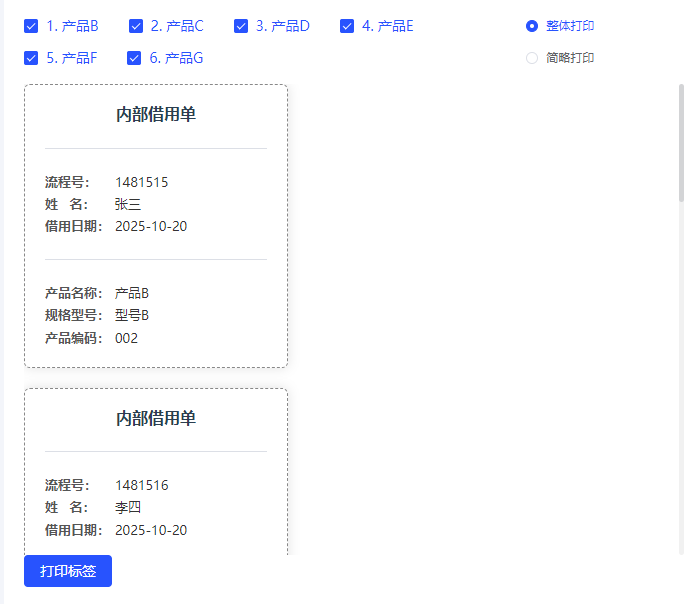
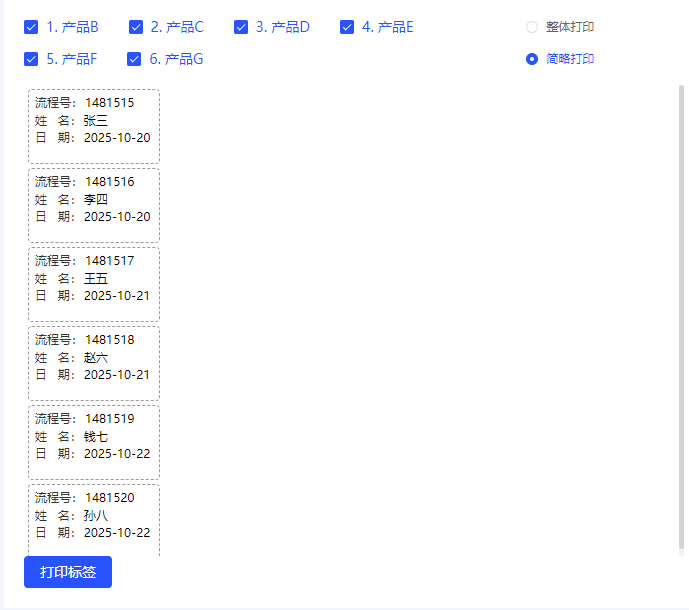
组件效果代码
也可把浏览器新页签打开,改为下载pdf
pdf.save(‘文件名.pdf’)
<template>
<div style="width: 700px;background: white;padding: 20px 20px">
<!-- 打印控制区 -->
<div class="print-control" style="display: flex; justify-content: space-between; margin-bottom: 10px;">
<!-- 多选行(改为复选框) -->
<div class="checkbox-group" style="display: flex; flex-wrap: wrap; gap: 8px; width: 80%;">
<el-checkbox-group v-model="selectedRows">
<el-checkbox
v-for="(item, index) in borrowList"
:key="item.flowNo"
:label="index"
:disabled="borrowList.length === 0"
>
{{ index + 1 }}. {{ item.productName }}
</el-checkbox>
</el-checkbox-group>
</div>
<!-- 打印模式单选 -->
<el-radio-group v-model="printMode" size="small">
<el-radio label="full">整体打印</el-radio>
<el-radio label="simple">简略打印</el-radio>
</el-radio-group>
</div>
<div class="scrollbar" id="printContainer" style="height: 50vh">
<!-- 整体打印 -->
<template v-if="printMode === 'full'">
<el-card
v-for="(item, index) in borrowList"
:key="item.flowNo"
class="page-card full-card"
shadow="always"
v-show="selectedRows.includes(index)"
>
<h2 class="title">内部借用单</h2>
<el-divider></el-divider>
<div class="info">
<p><strong>流程号:</strong><span>{{ item.flowNo }}</span></p>
<p><strong>姓 名:</strong><span>{{ item.name }}</span></p>
<p><strong>借用日期:</strong><span>{{ item.date }}</span></p>
</div>
<el-divider></el-divider>
<div class="product">
<p><strong>产品名称:</strong><span>{{ item.productName }}</span></p>
<p><strong>规格型号:</strong><span>{{ item.spec }}</span></p>
<p><strong>产品编码:</strong><span>{{ item.code }}</span></p>
<p v-if="item.productNo"><strong>产品番号:</strong><span>{{ item.productNo }}</span></p>
</div>
</el-card>
</template>
<!-- 简略打印 -->
<template v-else>
<div
v-for="(item, index) in borrowList"
:key="item.flowNo"
class="simple-card"
v-show="selectedRows.includes(index)"
>
<div class="simple-line"><strong>流程号:</strong>{{ item.flowNo }}</div>
<div class="simple-line"><strong>姓 名:</strong>{{ item.name }}</div>
<div class="simple-line date-line"><strong>日 期:</strong>{{ item.date }}</div>
</div>
</template>
</div>
<el-button type="primary" @click="generatePDF">打印标签</el-button>
</div>
</template>
<script setup>
import {onMounted, ref} from 'vue'
import {jsPDF} from 'jspdf'
import html2canvas from 'html2canvas'
const borrowList = ref([])
const printMode = ref('full') // 'full' or 'simple'
const selectedRows = ref([])
const generatePDF = async () => {
const selector = printMode.value === 'simple' ? '.simple-card' : '.page-card'
const pages = Array.from(document.querySelectorAll(selector)).filter((_, i) =>
selectedRows.value.includes(i)
)
if (pages.length === 0) {
ElMessage.warning('请选择要打印的行')
return
}
// PDF 尺寸(mm)
const pdfWidth = printMode.value === 'simple' ? 35 : 70
const pdfHeight = printMode.value === 'simple' ? 20 : 70
// 根据宽高判断方向
const orientation = pdfWidth > pdfHeight ? 'landscape' : 'portrait'
// 创建 PDF
const pdf = new jsPDF({
unit: 'mm',
format: [pdfWidth, pdfHeight],
orientation
})
for (let i = 0; i < pages.length; i++) {
const page = pages[i]
// 高分辨率渲染
const canvas = await html2canvas(page, {
scale: 3, // 原来 3,适当降低 2,加快生成
dpi: 300, // 原来 300,适当降低 150,视觉差不多
letterRendering: true,
useCORS: true
})
const imgData = canvas.toDataURL('image/jpeg', 0.9) // JPEG压缩到90%
if (i > 0) {
pdf.addPage([pdfWidth, pdfHeight])
}
pdf.addImage(imgData, 'JPEG', 0, 0, pdfWidth, pdfHeight)
}
// 浏览器新页签打开
const pdfBlob = pdf.output('blob')
const pdfUrl = URL.createObjectURL(pdfBlob)
const printWindow = window.open(pdfUrl, "_blank");
printWindow?.focus(); // 尝试切换焦点
# 下载
# pdf.save(printMode.value === 'simple' ? '简略借用单.pdf' : '内部借用单.pdf')
}
onMounted(()=>{
borrowList.value = [
{ flowNo: '1481515', name: '张三', date: '2025-10-20', productName: '产品B', spec: '型号B', code: '002' },
{ flowNo: '1481516', name: '李四', date: '2025-10-20', productName: '产品C', spec: '型号C', code: '003', productNo: 'PN-003' },
{ flowNo: '1481517', name: '王五', date: '2025-10-21', productName: '产品D', spec: '型号D', code: '004' },
{ flowNo: '1481518', name: '赵六', date: '2025-10-21', productName: '产品E', spec: '型号E', code: '005', productNo: 'PN-005' },
{ flowNo: '1481519', name: '钱七', date: '2025-10-22', productName: '产品F', spec: '型号F', code: '006', productNo: 'PN-006' },
{ flowNo: '1481520', name: '孙八', date: '2025-10-22', productName: '产品G', spec: '型号G', code: '007' }
]
selectedRows.value = borrowList.value.map((_, idx) => idx)
})
</script>
<style>
/* --- 整体打印(更深更清晰) --- */
.page-card {
width: 264px;
margin-bottom: 20px;
box-sizing: border-box;
/* 全局统一黑体,提高可读性 */
font-family: "SimHei", "Microsoft YaHei", sans-serif !important;
color: #000 !important;
background-color: #fff;
border: 2px solid #000 !important; /* 深边框 */
border-radius: 6px;
}
/* 标题更深、更清晰 */
.page-card h2.title {
text-align: center;
margin: 0 0 10px 0;
font-size: 16px;
font-weight: 900;
color: #000 !important;
}
/* 提高分隔线可见性(关键) */
.el-divider {
border-top: 2px solid #000 !important; /* 原本是浅灰,现在非常清晰 */
margin: 8px 0 !important;
}
/* 内容区域布局 */
.page-card .info,
.page-card .product {
display: flex;
flex-direction: column;
gap: 4px;
}
/* 行文本更深 */
.page-card p {
margin: 0;
font-size: 14px; /* 字大一点打印更清晰 */
font-weight: 600; /* 整体加粗 */
line-height: 1.4;
display: flex;
align-items: flex-start;
color: #000 !important;
}
/* 左侧字段名(更清晰) */
.page-card p strong {
width: 78px; /* 原70 建议略大一点,避免挤压右侧内容 */
font-weight: 800 !important; /* 极致加粗 */
color: #000 !important;
flex-shrink: 0;
}
/* 右侧内容更黑且字重增强(关键) */
.page-card p span {
flex: 1;
font-weight: 700 !important; /* 加粗右侧内容,让可读性更高 */
color: #000 !important;
word-break: break-all;
}
/* --- 简略打印 --- */
.simple-card {
width: 132px;
height: 75px;
padding: 4px 4px;
margin: 4px;
box-sizing: border-box;
border: 1px solid #222 !important;
font-family: "SimHei", "Microsoft YaHei", sans-serif !important;
font-size: 12px;
line-height: 1.35;
background-color: #fff;
color: #000 !important;
display: flex;
flex-direction: column;
justify-content: flex-start;
overflow: visible;
}
.simple-line {
margin: 2px 0;
color: #000 !important;
font-weight: 700 !important; /* 整行更清晰 */
}
.simple-line strong {
font-weight: 900 !important; /* 字段名更粗 */
color: #000 !important;
margin-right: 2px;
display: inline-block;
}
</style>

Agent 垂直技术社区,欢迎活跃、内容共建。
更多推荐



 3
3 0
0- 0


 已为社区贡献3条内容

所有评论(0)