ant-design-vue Notification 通知提醒框 内容换行
·
业务需求中,有这样一个反馈信息,需要根据;进行换行并通过Notification组件展示
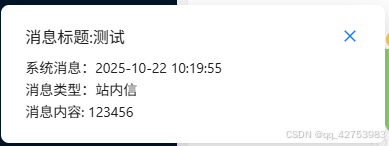
常规的Notification使用并不会自动换行,可以使用ES6的`符号+换行符`,并且css设置 whiteSpace: 'pre-wrap'属性,用来识别换行符\n,就可以实现换行效果。
具体代码如下:
import { notification } from 'ant-design-vue';

// 首先我下面循环是因为我这有很多条未读消息 所以需要循环弹出每条
newMessageList.forEach((msg) => {
  const content = `消息内容: ${msg.content}`;
  const type = `消息类型:${getMessageTypeText(msg.messageType)}`;
  const time = `系统消息:${msg.createTime}`;
  notification.open({
    message: `消息标题:${msg.title}`,
    description: time + `\n` + type + `\n` + content,//通知提醒内容,必选
    // 弹出位置,可选 top topLeft topRight bottom bottomLeft bottomRight
    placement: 'bottomLeft',
    // 默认 4.5 秒后自动关闭,配置为 null 则不自动关闭  设置为0  则取消自动关闭通知弹框
    duration: 10,
    style: {
      whiteSpace: 'pre-wrap',
    },
    dangerouslyUseHTMLString: true,
    icon: null, //自定义图标
  });
 });
效果图如下:

Agent 垂直技术社区,欢迎活跃、内容共建。
更多推荐


 4
4 0
0- 0


 已为社区贡献1条内容

所有评论(0)